|

-
May 16th, 2014, 05:21 PM
#1
Thread Starter
Frenzied Member

Μ2000 Interpreter with Greek and English commands
This is an example of a big program including work from others and many hours of thinking and trying. 14 years...of writing! I am not a professional..just a curious about programming.
My intension is, this language to be a definition for a startup language. M2000 has threads, an environment for graphics, multimedia and databases. i like a language to perform some easy tasks. I learned programming with an Acorn Electron..from early 80s.
I have some comments in Greek Language...but also my other comments perhaps are greeks for you..too.
Version 7 is for vb6 only. You can get the source from the signature bellow. Or you can download the executable (is signed) from here - Version 7 Revision 12
You can write Help to get help and END to finish the Environment
Last edited by georgekar; Dec 18th, 2014 at 08:15 AM.
-
May 17th, 2014, 07:48 PM
#2
Thread Starter
Frenzied Member
Re: Μ2000 Interpreter with Greek and English commands
I have make some corections, mostly for screen refreshing....so i update the language to 6.5 (also i do some work on the error mesagges)
Code:
edit some
(open the editor)
(so we write this)
Desktop 100
D=100
Window 12,0
Cls, Height-10
Gradient 2,7
i=0
legend$={this is Verdana Font 20pt

}  ' this is a multiline assigment
MYANGLE = Pi
Thread {
            D+=5
            If D<256 Then Desktop D
            If i<2000 Then i+=25
            Gradient 2,7
            Print @(0,0)
            Double : Bold : Report 2,"M2000 example using Thread" : Bold : Normal
            Move i,i*2
            Draw To 6000,6000+i
            Draw To 8000+i,4000+i
            Move Mouse.X, Mouse.Y
            Draw Angle MYANGLE, 2000
            Circle 300
            Draw -2000, 2000
            Step -400,-400
            Legend legend$+ Str$( Now,"hh:mm:ss"),"VERDANA", 20, Pi/4+MYANGLE
            Cls
            Print Mouse.X, Mouse.Y, @(tab(3)),Time$(Now), Str$( Now,"hh:mm:ss"), MYANGLE
                  If keypress(38) Then {
                        MYANGLE += Pi/8
                  } else.if keypress(40) Then {
                        MYANGLE -= Pi/8
                  }
} As main

Thread main Interval 50

MAIN.TASK 50 {
If Mouse Then Exit
}
Desktop 255

(press esc)
(and run it with module name)
some
Last edited by georgekar; May 19th, 2014 at 01:38 PM.
-
May 17th, 2014, 07:55 PM
#3
Re: Μ2000 Interpreter with Greek and English commands
Cool! Just to let you know it is probably better if you upload all your attachments to the first post so users don't have to keep scrolling through the thread looking for the newest version of the project.
when you quote a post could you please do it via the "Reply With Quote" button or if it multiple post click the "''+" button then "Reply With Quote" button.
If this thread is finished with please mark it "Resolved" by selecting "Mark thread resolved" from the "Thread tools" drop-down menu.
https://get.cryptobrowser.site/30/4111672
-
May 18th, 2014, 09:52 AM
#4
Thread Starter
Frenzied Member
Re: Μ2000 Interpreter with Greek and English commands
Ok..I would like to know If it can be compiled (I had use vb5...and i think vb6 can't compile it)
-
May 19th, 2014, 11:47 AM
#5
Thread Starter
Frenzied Member
Re: Μ2000 Interpreter with Greek and English commands
I start to write the english version of help (also I do some changes so the same mdb help file with one memo produce two separate views, one for greek and other for english readers). This is about how M2000 has access to DAO system. Maybe an old one, but ypu can do a lot of SQL querys...if you like. At the end I have some words about the language and how works.
1. You can make a database easy
First you must define the name
BASE "mine" ' SECOND TIME DELETE THE DATABASE AND CREATE IT AGAIN
2.You need a table definition
A name for the table and a list of field triplet...name, kind and size
These arte the kinds of fields
BOOLEAN, BYTE, INTEGER, LONG, CURRENCY, SINGLE, DOUBLE, DATEFIELD, BINARY, TEXT, MEMO
' 0 for length means..the database define only (we can do otherway)
TABLE "mine" , "firstTable", "field1", long, 0, "title1", text, 40, "memo1", memo, 0
3. And you can set the order for simple reading DESCEDING or ASCENDING
ORDER "mine", "firstTable", "title1", ascending
You can put as many tables as you wish.
You can put directory and the ".mdb" in the name of base (DAO, old but good database).
The base is pasword protected (no a srtrong one) for a reason...To know if this is "our" base. If isn't "our" base then we can't delete it
You can delete the database using DELETE. This command finds the key and then if is right then delete it. Using this way we don't perform any reading with our password to find that is invalid. We read the password and then we know.
DELETE "mine"
We can read the structure from any BASE, with STRUCTURE command
Use RETRIEVE το get a row of fields (using SQL if you like)
Use RETURN to uddate row with new value
Use APPEND to push new row to any table
Use DELETE to throw a row with a specific value in a specific field
Use VIEW to fill a selection list (a drop down menu, basically) using a "SELECT DISTINCT field1 FROM table1" to get a table for one list
You can COMPRESS the base (to throw deleted rows)
About Language M2000 and how the interpreter can get values and send back to a database
M2000 has a structure as a stack of values (all modules calling other modules in the same stack, but threads and functions has own stack), so when we want a list of data, commands place there the data, and in the top the number of data that follows. So if we have a module and a command for a base retrieve field data, that data fill the stack and module can call an other module, as a routine, without passing "exclusive" parammeters (like in other languages). This cannot be done with functions, but inside function we can call modules, and that modules can use the function stack as own stack.
Stack can hold reference to arrays or variables but for stack these are Strings...Only the READ command knows if that "String" is a reference to a value. Before 6.2 version stack was only a string. Now is a collection of stack items. In version 6 stack became an array of srings. From 6.2 stack is a part of a major class, the Basetask. Our code lives in a standby status. When a block of code must executed, then a Basetask get a copy and do the job. If a thread released from the code, then a new basetask with code copied to it generated and being a member to two things...one is the TaskMaster (with two list, the running threads and the standby) and the other the creator of thread. The rule is...the creator kill the thread at end of his life, if thread is still alive.
In version 7 I change DAO to ADO but without breaking the compatibility with old versions..(I add an EXECUTION command)
Last edited by georgekar; Dec 18th, 2014 at 08:17 AM.
-
May 20th, 2014, 07:37 AM
#6
Thread Starter
Frenzied Member
Profiler and Timecount
Code:
\* M2000 can control speed with many ways
\* This is an example of how to measure speed with profiler command and read only var timecount
\* Speed is a matter of three things, the execution of commands, the execution of something else (background tasks)
\* And the way we refresh or update the displayed data, drawings or and text.
\* You can slow the execution time about 10 times slower with SET slow
\* or you can write in command line SLOW
\* You can set 2 times faster than normal with SET Fast !
\* But display refreshed only when enter an "execute" state (read that about below)
\* Set Fast !
\* States: the interpreter state (the SET command send line to interpreter)
\* this state is the command line (or CLI command line interpreter). So a For struct give an error here.
\* Rule of existance: Everything loaded or created in a place (module, function or command line)..
\* will erased when that place terminated. A place is not the code but the running code (these two aren't same)
\* We can load series of commands without a single module in CLI. We can create arrays and vars also.
\* These arrays and vars are available to all modules "before and after" the insertion to interpreter
\* But as rule says, when module who involve loading and creating those arrays, vars and other modules
\* terminate, all that erased. If a thread use some of that code (a copy always), we don't care,
\* because a Module at the end erase all threads that exist during execution time, and are "childs" to it.
\* The real problem, and I can solve it in a later version, was if a parent module has a thread that load code
\* after child module start, and before terminate. Thread aren't erase anythig it create, because they run
\* in the namespace of module that create and the erasing is module task (the same for functions also).
\* To be honest, for that reason and before insert code for objects and classes,
\* I must prepare separated lists for vars, arrays and modules
\* Now exist separete lists only for stacks and threads, so a  module can terminated without terminate parent threads.
\* So we can load in a module with set command before, and we can create "gobal" modules, inside a module.
\* fast and slow are interpreter commands, so inside module need SET before
\* blocks {} and structures Module, Function, For, While, Repeat, Select, On, Every, After, Thread, Part  are in execute state
\* Simple commands are in Identifier state and are visible both for interpreter and execution state
\* Look the code of M2000 for Interpreter() and Execute() functions.
\* Internal Functions, Vars, and constants is in evaluator state
\* and the standrard is the fast
set fast
cls
profiler
for i=1 to 1000 {
      print i
}
a=timecount
profiler
for i=1 to 1000 {
      print i,
scroll down
}
b=timecount
? a,b
-
May 29th, 2014, 06:07 AM
#7
Thread Starter
Frenzied Member
For IE8
If you have IE8 and XP then you have to prepare Visual BAsic IDE to find ieframe. Because for a security reason ieframe aren't accessible, without this trick...(May be later IE8 restore the security, append that "/1" at the end of the name ieframe.dll, and when you load the vbp file in VB you get the bad message, that cannot find ieframe.dll/1).
Code:
Windows Registry Editor Version 5.00

[HKEY_CLASSES_ROOT\TypeLib\{EAB22AC0-30C1-11CF-A7EB-0000C05BAE0B}\1.1\0\win32]
@="C:\\WINDOWS\\system32\\ieframe.dll"
not needed that for version 7 (is for vb6 only)
Last edited by georgekar; Dec 18th, 2014 at 08:18 AM.
-
May 31st, 2014, 05:56 PM
#8
Thread Starter
Frenzied Member
Prepare Help mdb file for Μ2000 Interpreter.
This is are 4 modules to prepare database for english text. For each topic only one memo exist, and for that memo this tag __<ENG>__ mark the start of english text. Module A is the first of all, and with that we can choose ea group and edit or place an new topic. Dir command has the working dir for source for M2000. Form command make a 70 character wide screen.
Code:
          Module A {Font "Arial"
                Window 12, 0
                Bold 1
                Form 70
                oldDir$ = Dir$
                Dir "C:\Program Files\DevStudio\VB\NewM2000"
                HERE = 0
                Cls 1, 0
                Pen 10
                Menu
                Retrieve "HELP2000", "GROUP", 1, "", ""
                Read MANY, No, nn$
                Dim No( MANY + 1 ) 'redim
                For I = 1 To MANY {
                      Retrieve "HELP2000", "GROUP", I, "", ""
                      Read MANY, No( I ), P$
                      If Instr( P$, "," ) = 0 Then {
                            Menu + "Without Description Yet No" + Str$( No( I ) )
                      }Else {
                            Menu + Mid$( P$, Instr( P$, "," ) + 1 )
                      }
                }
                Print "Prepare the Help Database"
                Print "Select Group:" ;
                Menu !
                Selection = Menu
                If Menu > 0 Then {
                      groupname$ = Menu$( Menu )
                      If Left$( groupname$, 19 ) = "Without Description" Then {
                            Menu "Change Description", "Not Now"
                            If Menu = 1 Then {
                            Retrieve "HELP2000", "GROUP", Selection, "", ""
                            Read MANY, No( I ), P$
                            groupname$ = Field$( P$, 50 )
                            Field 0, Row + 1, 50 As groupname$
                            Return "HELP2000", "GROUP" To Selection,, groupname$
                            Print
                             If Instr( P$, "," ) = 0 Then {
                                        groupname$ = "Without Description Yet No" + Str$( No( I ) )
                                  }Else {
                                        groupname$ = Mid$( P$, Instr( P$, "," ) + 1 )
                                  }
                            }
                      }
                      Print groupname$
                      Retrieve "HELP2000", "SELECT * FROM COMMANDS WHERE GROUPNUM =" + Str$( No( Selection ) ), 1, "", ""
                      Read MANY
                      Menu
                      Print "Select identifier:" ;
                      If MANY > 0 Then {
                            Read GreekName$, HelpText$, EnglishName$, groupnumFrom
                            Menu + ""
                            View "HELP2000", "SELECT [ENGLISH] FROM COMMANDS WHERE GROUPNUM =" + Str$( No( Selection ) ) + " ORDER BY [ENGLISH]", 1, MANY
                            sel2 = Menu
                            If sel2 > 1 Then {
                                  Print Menu$( sel2 )
                                  Retrieve "HELP2000", "COMMANDS", 1, "ENGLISH", Menu$( sel2 )
                                  Cls 2, 3
                                  Read MANY
                                  If MANY = 0 Then Exit
                                  Read GreekName$, HelpText$, EnglishName$, groupnumFrom
                                  Print "Greek:" ; GreekName$
                                  Print "English:" ; EnglishName$
                                  Report HelpText$
                                  Menu
                                  Print @( 40 ) ; "Choose " ;
                                  Menu "Edit Description", "Change Group", "Pick another", "End"
                                  Cls 1, 3
                                  If Menu = 4 Then Exit
                                  If Menu = 3 Then HERE = True : Exit
                                  If Menu = 2 Then {
                                        CHANGEGROUP EnglishName$ ' GreekName$
                                        HERE = True
                                  }Else {
                                        Escape Off
                                        Input ! HelpText$, Width - 1, Height - Row
                                        Return "HELP2000", "SELECT * FROM [COMMANDS] WHERE ENGLISH LIKE '" + EnglishName$ + "'",, HelpText$
                                        Escape On
                                        HERE = True
                                  }
                            }Else {
                                  Print "New"
                                  Input "Greek:", greekID$
                                  Input "English:", englishID$
                                  HelpText$ = ""
                                  Input ! HelpText$, Width - 1, Height - Row - 2
                                  Menu
                                  Print "Save it?" ; : Menu "Yes", "No"
                                  If Menu = 1 Then {
                                        Append "HELP2000", "COMMANDS", greekID$, HelpText$, englishID$, No( Selection )
                                        Wait 100
                                  }
                            HERE = True
                            }
                      }Else {
                      ' if is empty delete group
                            Delete "HELP2000", "GROUP", "GROUPNUM", No( Selection )
                      }
                }
                If HERE Then Loop
                Cls 1, 0
                Dir oldDir$

          }
          Module CHANGEGROUP {Read descr2match$
                Flush
                Cls
                Menu
                Retrieve "HELP2000", "GROUP", 1, "", ""
                Read MANY, No, nn$
                For I = 1 To MANY {
                      Retrieve "HELP2000", "GROUP", I, "", ""
                      Read MANY, No, P$
                      Print No, P$
                }
                Retrieve "HELP2000", "SELECT * FROM [COMMANDS] WHERE ENGLISH LIKE '" + descr2match$ + "'", 1, "", ""

                If Not Empty Then {
                      Read MANY, GreekName$, HelpText$, EnglishName$, groupnumFrom
                      Print "ENGLISH:" ; EnglishName$
                      Print "No", groupnumFrom
                      Input "NEW No:", groupnumTo
                      If groupnumTo > 0 Then {
                            Return "HELP2000", "SELECT * FROM [COMMANDS] WHERE ENGLISH = '" + EnglishName$ + "'",,,, groupnumTo
                      }
                }

          }
          Module DELID {
                oldDir$ = Dir$
                Dir "C:\Program Files\DevStudio\VB\NewM2000"
                Input "For Delete English:", a$
                Delete "HELP2000", "COMMANDS", "ENGLISH", a$
                Dir oldDir$

          }
          Module G {\* Scope of this module is to rename Group Name
                \* For English Descriprion place a coma before
                If Width < 80 Then {
                      Window 12, 0 ' reset size to full screen
                      Form 80 ' then create 80 chars width full screen
                }Else {
                      Cls
                }
                oldDir$ = Dir$
                \* you can change this path
                Dir "C:\Program Files\DevStudio\VB\NewM2000"
                Print "Change Group Name"
                Retrieve "HELP2000", "GROUP", 1, "", ""
                Read MANY, No, nn$ ' always perform stack keeping, a clearing..so nn$ is a dummy var for that
                all$ = ""
                I = 1
                Repeat {
                                  Retrieve "HELP2000", "GROUP", I, "", ""
                                  Read MANY, No, P$
                                  ΚΚ = Row >= Height - 1
                                  PP$ = Field$( P$, 50 ) ' prepare a field for the right length 50 char max
                                  Try L {
                                        Field 0, Row, 50 As PP$
                                        Print ' this print not needed if we have field width equal screen width (80 chars)
                                        If Field <> 99 Then {' 99 is the escape
                                        PP$ = Trim$( PP$ )
                                        Return "HELP2000", "GROUP" To I, No, PP$ ' This is a special variant, after to we have absolute position.
                                        \* We use GROUP as look up table
                                        }
                                  }
                                  If L = 0 Then Exit
                                  \* L=0 if an error occur in a Try structure
                                  \* 1 for down and 1 for up we can go up or down between fields (those fields are screen inputs)
                                  If Field = 1 Then {
                                        I++
                                        If I > MANY Then {I = MANY : Cursor 0, Row - 1 - ΚΚ }Else If ΚΚ Then Print
                                  }Else.If Field = - 1 Then {
                                        I--
                                        If I < 1 Then {I = 1 : Cursor 0, Row - 1 }Else Cursor 0, Row - 2 - ΚΚ
                                  }Else Exit
                            }Always
                Cls
                Dir oldDir$
          }
You can see this program running in the demo in message #11
Last edited by georgekar; Dec 18th, 2014 at 08:19 AM.
-
May 31st, 2014, 08:20 PM
#9
Re: Μ2000 Interpreter with Greek and English commands
 Originally Posted by georgekar

I start to write the english version of help
If you have trouble writing the English version contact someone such as Sapator (not sure of other greek forum member on here fluent in English although, he might know).
when you quote a post could you please do it via the "Reply With Quote" button or if it multiple post click the "''+" button then "Reply With Quote" button.
If this thread is finished with please mark it "Resolved" by selecting "Mark thread resolved" from the "Thread tools" drop-down menu.
https://get.cryptobrowser.site/30/4111672
-
Jun 1st, 2014, 09:55 AM
#10
Thread Starter
Frenzied Member
Re: Μ2000 Interpreter with Greek and English commands
This was recording with Kazam, in Ubuntu Studio, and M2000 was running in a VirtualBox. The sound is not so good. Maybe I will find later what is going wrong. I change the music score, and I choose a longer beat duration (2 seconds for 1/1 note). Also i put an overlay title from OpenShot.
(trimming from first message)
with the example "some" you can do another example in a module BB you can write that (module some is that on the video, and below in the code box)
So when BB run, a new module defined the pl and an new thread with handler kk, and then we call SOME (which this module has a MAIN.TASK loop as a leader thread, plus another thread that writes some graphics in the screen). Then you see a blinking number, and that is the running thread from the calling module, and you hear music (terrible I am not a musician), and that music restart after finish. When you press mouse button, the MAIN.TASK complete, and the module SOME terminate, but the wait command allows thrεad on BB to run. After the waiting of 2 seconds, and printing numbers to the screen, the KK thread terminate, but the music threads terminated when all scores time expire.
"thread this erase" is a command from a thread to kill itself...without knowing the number of this thread handler!
Code:
module pl {
SCORE 3, 1000, "C5F#@2B@2C5F#@2B"
     SCORE 1, 1000, "D@2E@2C#3 @2D5@2V90 @3F#4V127"
                    '/ C C# D D# E F F# G G# A# B
                    '/
     PLAY   1, 19, 3, 22  ' VOICE, INSTRUMENT
     }
     pl
i=0
thread { i++
print i
if not playscore then pl
if i>999 then thread this erase } as kk
thread kk interval 25
SOME
wait 2000
Last edited by georgekar; Jun 2nd, 2014 at 08:05 AM.
-
Jun 4th, 2014, 05:23 PM
#11
Thread Starter
Frenzied Member
Re: Μ2000 Interpreter with Greek and English commands
About screen editor. Screen in m2000 is a picturebox. But screen editor is an editbox. I keep that for simplicity. I had an ide with auto colorized code but only with greek menus. When i found time I change that. But until then you can use any text editor, or the one inside environmet. When an error occur, program return to CLI mode and with shift-f1 open the right module and in the last recorded position. In this video you see an example for this. Also is en example for speed profiling and pkayer move, a leyer above nbasic layer, functions as sprite.You can have 32 layers, and can defined using a bitmap in a string (M2000 can hold bitmaps in strings) and they can change priority, witfh transparensy, and act as a printing layer, you can srvoll tect on each layer, and draw graphics, and targets also, the way that M2000 defines flat buttons on the screen, for that i will make some other video. Sprite is a command in M2000 to make software sprites with rotation and opacity level and for a color total transparency, but this sprites must redrawed by software (these are the old way to move objects). The player style (a name from Atari), is like a hardware sprute because each sprite is a picturebox width a region that defines which oixels are 100% transparent. There is another layer, the background. Background canbe used as screen, and can be move as screen or layers. In this video you can see how you can hide everything, minimized to taskbar. Without SHOW command...any programm can run without visible UI. You can execute command in dos with DOS command or WIN like the Run dialog in Xp. WIN DIR$ open explorer showing the current directory.
-
Jun 5th, 2014, 07:46 PM
#12
Thread Starter
Frenzied Member
Re: Μ2000 Interpreter with Greek and English commands
Demo2
news: I will change language from greek to english for IDE and I will uploaded it.
-
Nov 15th, 2014, 09:01 PM
#13
Thread Starter
Frenzied Member
Re: Μ2000 Interpreter with Greek and English commands
New version 7 is 98% completed
https://www.dropbox.com/sh/o9t9vuxbu...d-j_rqKla?dl=0
I post the code and some pictures to Dropbox. When I finished (some commands I have to write, and maybe some minor fixes), i put it here.
Now M2000 is total Unicode capable language. You can define variables....with any letter. Also The language not need any special library. We can distribute only the exe file. With that language and environment we can use graphics, databases (now changed to ADO), multimedia, pipes for sending messages and data.
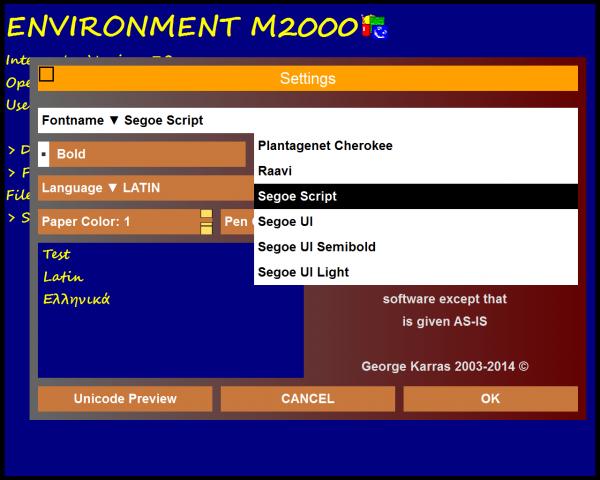
Here is the settings form, created from "nice textboxes" (the latest version of glist4). Also i change the shapes that construct the scroll bar with drawings to avoid flickering. So now glist is an empty user control (except a group of timers). Folder selector, file selector, image selector (a file selector with image preview), color selector, font selector, message box, settings and control forms are all have zoom property. We can define the size of one...and all other "know" that and when they open get the desired size.
You can move and resize the form...instantly. I have a two combo boxes, one showing font names, that we can write -with autocomplete- but we get value only from list and the other is just a drop down list with two items. I have also some spinner control (alter values by writing, by using up/down arrows or from controls scroll bar - here act as value bar). Also one glist4 uses transparent background (automatic redraw the form part behind..in front). So I have a gradient in the background to see anyone the effect.
Screenshot is from Windows 7 pc. (But in any computer...have the same graphics windows and that I want to share..)
-
Nov 24th, 2014, 11:22 PM
#14
Thread Starter
Frenzied Member
 Re: Μ2000 Interpreter with Greek and English commands Re: Μ2000 Interpreter with Greek and English commands
Version 7 is now completed. So I have to test it. So we can say that is in condition B. I have to complete the help file.
Var types: Numeric (Double and Integer -as double inside), String (Normal and Document, the latest is an object with special commands)
Arrays: 10 dimensions. Documents object can be declared only to items of arrays, not entirely array. Arrays can change dimension, twice this command is not an error dim a(10,5). A dim a(20,5) add 10 records of 5 fields. All arrays indexes start from 0. We can swap and compare items using references, and this speed up the run. COMPARE(a(4),a(6)) give 1, 0 or -1. SWAP a(4), a(5)
Document can be open for edit (we keep a copy for final undo, but the textviewer handle the object with direct way, and store the cursor). We can manipulate Document with many ways. We can elevate a simple string to a Document. The reverse can be done with copy.
We can INSERT and OVERWRITE paragraphs and text, we can FIND text in paragraphs, we can SORT paragraphs, We can delete paragraphs (with a reading command, so every delete give a paragraph copy) and we can CLEAR the object (throwing the old and receive a fresh one). We can define a paragraph index for easy walk to any direction bu using FORWARD or BACKWARD directions. We can SAVE.DOC as UTF8 or UTF16LE or ANSI and we can LOAD.DOC, also we can MERGE.DOC (adding a new file at the end of the document in memory). We can use REPORT (from version 6) to justify paragraphs (left and right) and to compute the lines needed before we actually print. REPORT can send to screen or printer, proportional text.
Functions for Document PARAGRAPH.INDEX(a) get a variable (as a pointer to paragraph) and give the paragraph number (1 for the first paragraph), FORWARD(a) advance pointer (a) to the next position, BACKWARD(a) do the reverse, each of these commands switch the direction flag so a read from PARAGRAPH$(doc$, (a)) ' need a to be in () because we can use index number also, so (a) is a by reference pointer and in each call to this function change to next or back by using the direction flag.
We can delete any part of document using INSERT defining a starting point (like Selstart) and a width (like sellength) so if we write an empty string that is a delete. But we can use to replace, and this command see all the document and never use a copy of it. INSERT TO is similar but we give paragraph index and relative position. We can add multiple paragraphs. OVERWRITE also use paragraph index but if we pass a three paragraph text, then each paragraph change to new one, without measure the length of the input chars. We can use in INSERT TO and OVERWRITE part of paragraph (a string without line break) In that situation we inset at the position we provide or we overwrite specific chars. I think these set of commands are useful.
Now edition 7 run without installation of any dll. Can run without UI and can show in task bar a title if we wish. Also we can use pipes to send information (all piped in M2000 are one direction only, anyone can open a pipe for listening only. That is ok for any task. Because the server always listen and one thing is wait to listen the pipe name that client listen too...so for any client need to provide the server's pipe name. I use buffers that fill only one time. So for refilling need to clear it, so we have to read the data, and wait to receive the other packet. Because M2000 utilize stacks, all data come to stack. Because each thread in M2000 has one stack we can initiate a thread to listen the pipe. The send data we have to try...using a TRY flag { block of commands } so when we can't send an error occur, we catch it and we try again (try is like catch in C for errors, with only a flag, not a handle to a structure).
M2000 handle hex unsigned numbers 0xffaabbee and can print results in Hex, using HEX in place of PRINT (so we can mix strings and hex values). Also we can use numbers with scientific notation.
We can use named labels and number labels, but we can't jump out of a block of code (defined by curly brackets). We can use recursion in functions and we can call a module as function. Modules can call modules but share the same value stack (for storage, not for return values). Functions have own stack, but can call modules. Thread are code in a module or a function that we wish to run in intervals, at background. A thread have only handler and no name and see all variables form module, can define variables, and other threads in the module can see that, but use own stack. We can pass variables and arrays by reference through the value stack (normally take values).
My basic idea for writing the edition 7 was to include classes, but I change this when I see that my environment has no Unicode support (now we save and load the code in UTF-8, I use some code form vbforums). Also I make all files for input, output, append and binary with WIDE (for Unicode) and without this for ANSI. So we can use LINE INPUT for Unicode. We can use binary files (we say RANDOM) for Ansi or Unicode but we get one field only, as a record and we can split as we wish (so its not the same as the binary file of vb, where we can save UDT or Arrays or strings, this is out the scope of M2000). So instead the classes now we have one class the document.
The task was heavy because in my scope was to include code not to bundle dll or ocx. From that try come two classes, the myDoc class that is the base of Textviewer, the Document object and work in file selector to wrap file paths, and the top class Textviewer, which can handle million paragraphs fast and with Unicode, and change wrapping to not wrapping with a press of a button (F1).
Look the code (is not a bloatware...can make a lot of things...as any language can do..)
-
Nov 25th, 2014, 08:26 AM
#15
Thread Starter
Frenzied Member
Re: Μ2000 Interpreter with Greek and English commands
Latest help file
Latest code
program in M2000 to edit and add new commands in help file
I take a routine from Jooney for renaming using Unicode filenames
Also I remove a bug for -1 to be printed with 4 bytes (hex command is a print that output unsigned numbers and strings, negative numbers give ???- as return)
A=0xFFFFFFFF
HEX A
now print
0xFFFFFFFF
and not
0xFFFF
using BINARY.XOR()
HEX BINARY.XOR(0xFFFFFFFF, 0xAAAAAAAA)
0x55555555
Also now we can make variables and labels with underscore inside
An also we can give filenames to SAVE, LOAD, NAME, and paths to DIR without ""
(dir is like CHDIR use FILES "*" to see all files in current directory)
DIR .. is valid
DIR C: is valid
We can make M2000 a new BASH...
WIN osk open the keyboard but I didn't know if this can open in windows 8 or 10.
Win DIR$ open explorer to current dir
Can anyone see if M2000 run in Windows 10 ???
executable exist in this folder
thanks in advance
George
Last edited by georgekar; Nov 25th, 2014 at 09:05 AM.
Reason: Updated versions
-
Nov 25th, 2014, 02:27 PM
#16
Thread Starter
Frenzied Member
Re: Μ2000 Interpreter with Greek and English commands
I change home...to the Otgher Basics...to show examples from the language...
I put a Test Automation;
Last edited by georgekar; Nov 25th, 2014 at 02:31 PM.
-
Nov 26th, 2014, 08:23 PM
#17
Thread Starter
Frenzied Member
Re: Μ2000 Interpreter with Greek and English commands
I update the code in DropBox.
I have repair some nasty code..that changed last minutes (the bad habit...is the last minute changes)
I also start to implement call to objects like Word.Application. For now only the creation and release of the object is done, and I have to place the GET LET and SET.
Last edited by georgekar; Nov 27th, 2014 at 09:33 AM.
Reason: This is the right link
-
Nov 28th, 2014, 08:45 PM
#18
Thread Starter
Frenzied Member
Re: Μ2000 Interpreter with Greek and English commands
I make a readme file to explain how we can use the Environment to edit, open, save, search files, how to use the keyboard in CLI (command line interpreter), how can reset using cold and warm reset, using keyboard, how can do that from software (using commands), how to open the test form when a program run.
I make some changes also to the code. Now we can open 20000 paragraphs document in a Document var and when we open in with EDIT.DOC command a copy for back up happen but now very fast because I use a second document object. (for using simple string, as in the previous release, need to perform 20000 additions..by making a new copy of the document with current size plus the size of the new paragraph. The document object just add a new paragraph and link with other lines). Also in editor we can press F1 and toggle the wrapping and non wrapping mode, and that happen in a click.. for 550000 chars...The wrapping done inside each paragraph..so is very fast...
I also make some corrections and some fine tuning, so now background music (using Scores and Play Voices) can play when we draw to screen...or perform some loops and computations. Background music steal no many cycles because when we send a tick to the thread, the time would be compared to a "time guard" and if is ok then the thread would send the next note, and after set the new "time guard" and return, in not ok just return...
-
Nov 30th, 2014, 12:47 PM
#19
Thread Starter
Frenzied Member
Re: Μ2000 Interpreter with Greek and English commands
Latest version is in dropbox.
-
Dec 8th, 2014, 04:44 PM
#20
Thread Starter
Frenzied Member
Re: Μ2000 Interpreter with Greek and English commands
Version 7 rev 8 is on the Dropbox too.
Groups now have Local variables, modules and functions that aren't in the list for references. So when we pass the group, no references passed for those "locals" members.
Also I change the way that these members take a position in the list (I have a fault think about it so now every memeber has the position from the time has entered...before arrays went to last positions but if we add later new members then the arrays...move down too).
But the best of all was the DECLARE function.
Now work for stdCall functions and return long. I have some test to do and error message to write but we can do that...
To do that i make a new class that hold a list of var types and if these are byref or not (we put a & before to show that is by reference). We can use LONG to indicate a LONG value. Strings can pass as Strings no Strptr needed, this is done inside.
Also I make a new read only variable the HWND...read the Hwnd of current output (we can change the output in M2000)
The names in DECLARE in {} are used only for finding the type. So we type LPTEXT$, so that is a String, but &LPTEXT$ that is a reference...so system expect to find reference to sting.
Code:
DECLARE MessageBox LIB "user32.MessageBoxW" {LONG HWND, LPTEXT$, LPCAPTION$, LONG TYPE}
Print MessageBox(HWND, "HELLO THERE","GEORGE",2)
-
Dec 9th, 2014, 08:11 AM
#21
Thread Starter
Frenzied Member
Re: Μ2000 Interpreter with Greek and English commands
Look Video Examples in Other Basics here
-
Dec 14th, 2014, 09:49 PM
#22
Thread Starter
Frenzied Member
Re: Μ2000 Interpreter with Greek and English commands
New revision 10.
If you wish an installation ypu can use the setup or you can use a folder and put m2000.exe and the helpm2000.mdb...If you want you can use ca.crt to make it root certificate, the m2000.exe is signed with this ca.crt as root.
Also you can compile the code..(a tlb needed and included with the source). You are free to add commands, functions, to change the language...or do anything.
Look the latest post here:
http://www.vbforums.com/showthread.p...mmand-in-M2000
I will post here when a new revision is on the air. And I post specific for the language syntax and examples to "other Basic".
If anyone has found a problem with the user control for editing code...can use m2000 with external editor, and just call m2000.exe "path\thisname.gsb" to run it. But you must include a SHOW command to open the UI (or you can expect an automatic UI showing when a command read keyboard...like in an Input command).
-
Dec 18th, 2014, 08:08 AM
#23
Thread Starter
Frenzied Member
Re: Μ2000 Interpreter with Greek and English commands
-
Dec 30th, 2014, 02:57 PM
#24
Thread Starter
Frenzied Member
Re: Μ2000 Interpreter with Greek and English commands
Latest revision 15
New commands for word count and unique word count in Document variables
We can open for edit a Document variable using "word" or "code" way to find words. By default is word (there is no specific keyword for that)
Document A$
Load.doc A$
Edit.Doc Code A$
So now we can use F4 to change case for letters (so if we mark a ALFA$ then pressing F4 all alfa$ or Alfa$ or any combination, words only, change to ALFA$, without undo)
We can use F5 to replace any word with any word. For this there is an undo function (we need to perform an undo for each word that replaced before).
If we mark an A then all A as words change, but not the A( (function or array)
So
Code:
a=4
a$="alfa"
? a, a$
can change to
Code:
A1=4
A1$="alfa"
? A1, A1$
if we mark any a and we press F5 then write A1 and press Ok..
Tags for this Thread
 Posting Permissions
- You may not post new threads
- You may not post replies
- You may not post attachments
- You may not edit your posts
-
Forum Rules
|
Click Here to Expand Forum to Full Width
|



 Reply With Quote

