|

-
Mar 11th, 2014, 07:46 PM
#1
Thread Starter
Frenzied Member

 [RESOLVED] Can I create an executable without compiling project? [RESOLVED] Can I create an executable without compiling project?
I don't have the reference files on my machine but they are on the client machine. So how do I create the executable without one of the reference files?
Thanking you in advance,
-
Mar 11th, 2014, 07:54 PM
#2
Re: Can I create an executable without compiling project?
What you seem to be calling "reference files" are files that cotain COM type information, possibly as well as object code (though the object code might be in a separate file).
Since these are used by the compiler much like source code in order to perform early binding then they are required unless you have written everything in your program to use late binding.
However even with late binding, licensed controls may require design-time licenses that provide a way to embed run time license information in your compiled program.
-
Mar 19th, 2014, 04:12 PM
#3
Thread Starter
Frenzied Member
Re: Can I create an executable without compiling project?
For some reason one of the reference files has become corrupt. Basically, there is no location referenced when I select the file (See att NoLocation.jpg). 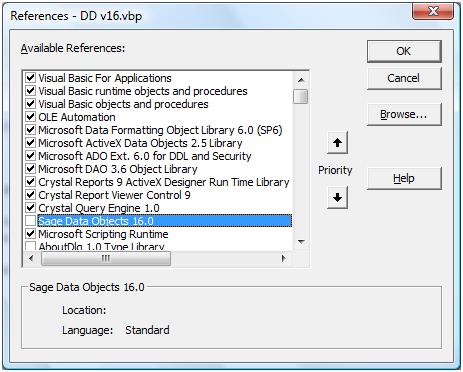
The file is located on my machine (See att SelectFile.jpg)
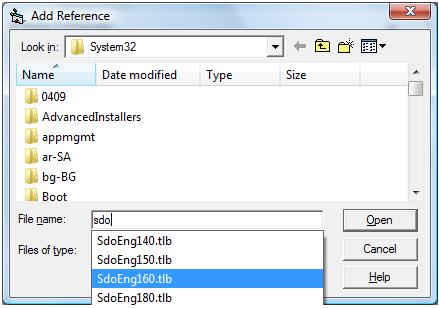
but VB is not picking it up correctly.
Any ideas?
Last edited by mel_flynn; Mar 19th, 2014 at 04:21 PM.
Reason: Add image files
Mel
-
Mar 19th, 2014, 04:48 PM
#4
Re: Can I create an executable without compiling project?
A type library (TLB file) normally "points to" some actual DLL containing the code. If this DLL (or OCX, etc.) has been lost then you can't set a reference to that library.
Odds are either somebody has been tinkering around and deleted or moved the DLL or else screwed up something in the registry. This is frequent when uninstalling applications packaged with hazardous tools like Inno (a.k.a. "No-No") Setup.
The only "fix" I can imagine is to reinstall the software if this is what has happened. I doubt it has anything to do with VB6 itself.
-
Mar 19th, 2014, 04:58 PM
#5
Thread Starter
Frenzied Member
Re: Can I create an executable without compiling project?
No messing around with DLLs or the registry. This happened on my machine. I have uninstalled and reinstalled the associated software but no luck. When I uninstalled the software, the reference 'Sage Data Objects 16.0' was still showing up in the list even though the sdoEng160.tbl was removed. I reckon the problem is in the registry but can't figure out which key it is, so I can remove it completely. Any idea where I can reset this link?
-
Mar 20th, 2014, 07:06 AM
#6
Re: Can I create an executable without compiling project?
 Originally Posted by mel_flynn

When I uninstalled the software, the reference 'Sage Data Objects 16.0' was still showing up in the list even though the sdoEng160.tbl was removed. I reckon the problem is in the registry but can't figure out which key it is, so I can remove it completely. Any idea where I can reset this link?
The type library remained registered. Try looking up regtlib.exe. Its supposed to be able to unregister type libraries. I can't remember if RegSvr32 can work on pure type libraries(Type libraries don't export DllRegisterServer/DllUnregisterServer) but if it can, you will be able to unregister the type library using that.
-
Mar 20th, 2014, 04:18 PM
#7
Re: Can I create an executable without compiling project?
Originally Posted by Niya
The type library remained registered. Try looking up regtlib.exe. Its supposed to be able to unregister type libraries. I can't remember if RegSvr32 can work on pure type libraries(Type libraries don't export DllRegisterServer/DllUnregisterServer) but if it can, you will be able to unregister the type library using that.
regtlib.exe can register/unregister "plain TypeLibs" - regsvr32 cannot.
Olaf
-
Mar 20th, 2014, 05:05 PM
#8
Thread Starter
Frenzied Member
Re: Can I create an executable without compiling project?
I unregistered (resgvr32 -u) the associated .dll before uninstalling the associated software and removing the .tlb and .dll files. I have tried regtlib.exe on both the .tlb and .dll file but still isn't linking correctly.
Any other ideas?
-
Mar 20th, 2014, 05:57 PM
#9
Re: Can I create an executable without compiling project?
Did you run those programs from an elevated console in Admin-Mode?
Another approach is, to put the correct tlb-info (its GUID-Identifier) into the VBP-File "by hand"
(with a plainText-Editor)
Olaf
-
Mar 25th, 2014, 04:36 PM
#10
Thread Starter
Frenzied Member
Re: Can I create an executable without compiling project?
Yes ran as Admin
Also I have edited the .vbp in notepad to the correct location for the .tlb file. But it's still showing as no location in the reference list.
-
Mar 25th, 2014, 05:01 PM
#11
Thread Starter
Frenzied Member
Re: Can I create an executable without compiling project?
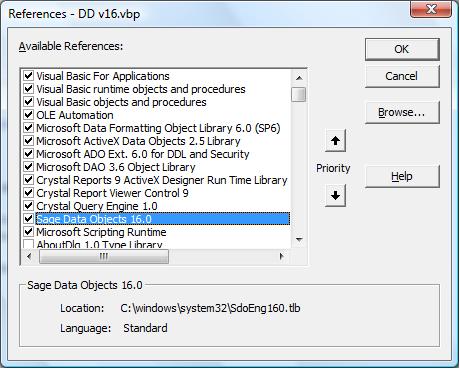
I sorted my problem. I found the registry key using the .vbp file (thanks Olaf). Then I searched the registry. The data field for this key wasn't set. I manually modified it, giving it the path of the .tlb file.
Thanks for you help.
-
Mar 25th, 2014, 05:17 PM
#12
Re: [RESOLVED] Can I create an executable without compiling project?
Just googled a bit - and it seems that there's licensing involved with those libs -
(as well as .NET-interop-stuff etc.)
Though maybe it helps when you try to (re)register the license-keys properly?
http://community.sellerdeck.com/showthread.php?t=53219
If that doesn't help, then you will have to ask their tech-support - or try to
(find and) contact other users who use those libs.
Olaf
-
Mar 25th, 2014, 06:52 PM
#13
Re: Can I create an executable without compiling project?
Originally Posted by mel_flynn
I sorted my problem. I found the registry key using the .vbp file (thanks Olaf). Then I searched the registry. The data field for this key wasn't set. I manually modified it, giving it the path of the .tlb file.
Glad you found the reason - though normally that's the job of regtlib, to register things properly...
As for what could have gone wrong in this regard - just googled a bit - and found that
apparently a new (OleAut32)-API needs to be called since Vista SP1...
http://msdn.microsoft.com/en-us/libr...=vs.85%29.aspx
Perhaps it works better next time, when you use your own "tuned tool" for the job:
Just a plain Module-Based StdExe without any Forms - then make e.g. two Executables
from it RegTlb.exe and UnRegTlb.exe and just drop the *.tlb Files there (I have such
things on my Desktop also for RegSvr32 although as *.lnk-Files with Admin-Rights).
Code:
Option Explicit

'http://msdn.microsoft.com/en-us/library/windows/desktop/cc713570%28v=vs.85%29.aspx
Private Declare Sub OaEnablePerUserTLibRegistration Lib "oleaut32" ()

Sub Main()
Dim FileName As String
    FileName = Command$
    If Len(FileName) = 0 Then MsgBox "We need a dropped File here": Exit Sub

  On Error Resume Next
    OaEnablePerUserTLibRegistration 'new (and required) since Vista-SP1
  On Error GoTo ErrMsg

  CreateObject("TLI.TLIApplication").TypeLibInfoFromFile(FileName).Register
'  CreateObject("TLI.TLIApplication").TypeLibInfoFromFile(FileName).UnRegister

ErrMsg: If Err Then MsgBox Err.Description
End Sub
The above works LateBound against tlbinf32.dll and should do on any system which runs a VB6-IDE
(also on those >=Vista SP1).
Olaf
 Posting Permissions
- You may not post new threads
- You may not post replies
- You may not post attachments
- You may not edit your posts
-
Forum Rules
|
Click Here to Expand Forum to Full Width
|



 Reply With Quote

