|

-
Mar 7th, 2014, 12:13 AM
#1
Thread Starter
Junior Member

Making a Standalone of my Project which has a MS Access database
Finally I made my own system in visual basic 2013, which has a database (MS Access).
Already published it and when I installed it to a computer of my friend it has an error when I try to login. The login form will access the ms database to it can continue and the other information in that ms access database will be access also for later use.
So when I click the login button I got this error:
The 'Microsoft.ACE.OLEDB.12.0' provider is not registered on the local machine.
How can I fix this and include on my exe file. Or any thoughts about this one?
-
Mar 7th, 2014, 12:48 AM
#2
Re: Making a Standalone of my Project which has a MS Access database
Did you use 64bit machine as your development machine? And on that computer you are deploying, is it 32 or 64 bit? Try compiling your project as x86 and see if it makes any changes when deployed.
-
Mar 7th, 2014, 03:30 AM
#3
Re: Making a Standalone of my Project which has a MS Access database
The Jet OLE DB provider has been installed by default with Windows for some time and is what is usually used to connect to MDB databases, which is what most people know as the old Access format. If you're using an MDB file then you should use the Jet OLE DB provider for the greatest compatibility.
With Access 2007, Microsoft introduced the new ACCDB format. That format is not supported by Jet and so requires the ACE OLE DB provider, which is not installed as part of Windows. It will be installed with Office 2007 or later or it is also available as a separate free download.
Office 2007 was only released as a 32-bit application so the original ACE provider was only available in 32-bit form. Since Office 2010, there has also been a 64-bit version available too. Almost everyone who installs Office will install the 32-bit version though, because that's what Microsoft recommend and the installer does by default, so you will almost always find ACE in the 32-bit version. You can't have both installed on the same machine at the same time. That means that, in order to use the ACE OLE DB provider, you must set the Target Platform in your project properties to x86 or else set it to Any CPU and check the Prefer 32-bit box. That way, your app will run in 32-bit mode even on a 64-bit OS and be able to make use of the 32-bit ACE provider.
As I said, ACE is not installed with Windows so, if your user doesn't have Office installed, they will also need to download the ACE provider from Microsoft.
-
Mar 7th, 2014, 04:41 PM
#4
Thread Starter
Junior Member
Re: Making a Standalone of my Project which has a MS Access database
 Originally Posted by dee-u

Did you use 64bit machine as your development machine? And on that computer you are deploying, is it 32 or 64 bit? Try compiling your project as x86 and see if it makes any changes when deployed.
How can I achieve this?
-
Mar 7th, 2014, 09:47 PM
#5
Re: Making a Standalone of my Project which has a MS Access database
Originally Posted by wpnimitz
How can I achieve this?
Um, like I told you 12 hours ago:
That means that, in order to use the ACE OLE DB provider, you must set the Target Platform in your project properties to x86 or else set it to Any CPU and check the Prefer 32-bit box.
-
Mar 8th, 2014, 07:16 PM
#6
Thread Starter
Junior Member
Re: Making a Standalone of my Project which has a MS Access database
hello,
I have created a x86 release of my program... However I found another error. This time, its the location of the ms access file which goes to the the another folder after installation which when I tried to login. Which gave me this error 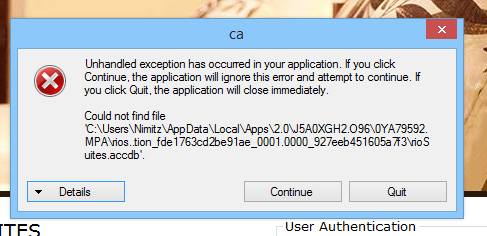
Since it was the error, I visited the directory and I couldn't also find the ms access file their.
How can I add it to my installation?
-
Mar 8th, 2014, 11:33 PM
#7
Re: Making a Standalone of my Project which has a MS Access database
Is the database file part of your project? If so, what are the values of its Build Action and Copy To Output Directory properties?
-
Mar 9th, 2014, 02:45 AM
#8
Thread Starter
Junior Member
Re: Making a Standalone of my Project which has a MS Access database
I don't know if its part of my project. Since I added it to the bin folder. then I am dead to the rest of your comment
-
Mar 9th, 2014, 02:47 AM
#9
Re: Making a Standalone of my Project which has a MS Access database
Either you added it to the project or you didn't. Is it listed in the Solution Explorer?
-
Mar 9th, 2014, 03:22 AM
#10
Thread Starter
Junior Member
Re: Making a Standalone of my Project which has a MS Access database
Nope, I don't know how to do that. This is going to be my first program. And I only add it via the add connection and browse my access file.
-
Mar 9th, 2014, 04:22 AM
#11
Re: Making a Standalone of my Project which has a MS Access database
You should have been prompted to add the file to your project at that point, which you should have done. Follow the first link in my signature below to learn how to manage local data files. Use the Other Versions link at the top to select the version for VS 2013.
-
Mar 9th, 2014, 02:25 PM
#12
Thread Starter
Junior Member
Re: Making a Standalone of my Project which has a MS Access database
Thanks, now I understand it well.
The thing that I do was add the manual connecting string instead of the file that will be copied to my project.
Thanks jmcilhinney
-
Mar 9th, 2014, 02:54 PM
#13
Thread Starter
Junior Member
Re: Making a Standalone of my Project which has a MS Access database
Hello JM,
I have added it the way from the tutorial, however when I published it and run the setup, I can still see this error
System.Data.OleDb.OleDbException (0x80004005): Could not find file 'C:\Users\Nimitz\AppData\Local\Apps\2.0\Data\CMKE1XH1.0W2\V22Z7JD8.0CX\naia..tion_6a1da08d2a1921ff_0 001.0000_33d9fe34a080142f\Data\naiagardennew.accdb'.
I asign its property to always copy but it, doesnt copy it after I hit the published button.
Here's the iamge
https://www.dropbox.com/s/bg5s579mge5v3gh/Untitled.png
Last edited by wpnimitz; Mar 9th, 2014 at 02:58 PM.
-
Mar 9th, 2014, 09:33 PM
#14
Re: Making a Standalone of my Project which has a MS Access database
So, as I asked earlier, what is the Build Action property of your database file?
-
Mar 10th, 2014, 04:57 PM
#15
Thread Starter
Junior Member
Re: Making a Standalone of my Project which has a MS Access database
-
Mar 10th, 2014, 06:01 PM
#16
Re: Making a Standalone of my Project which has a MS Access database
Originally Posted by wpnimitz
Its compile....
That's your problem then. A data file doesn't get compiled into the EXE so its Build Action should not be Compile. Change the Build Action to Content and then open the Publish page of the project properties and open the Application Files dialogue. You should see the data file now included in the list. If it's not, include it and make sure that its in the Data group.
-
Mar 10th, 2014, 06:41 PM
#17
Thread Starter
Junior Member
Re: Making a Standalone of my Project which has a MS Access database
Originally Posted by jmcilhinney
That's your problem then. A data file doesn't get compiled into the EXE so its Build Action should not be Compile. Change the Build Action to Content and then open the Publish page of the project properties and open the Application Files dialogue. You should see the data file now included in the list. If it's not, include it and make sure that its in the Data group.
Hello Jm, I really appreacite all of your efforts coming in to take part and solve my problem.
Also, I have change everything to what you have said.
Change my build action property from content to compile
SEE this: https://www.dropbox.com/s/ktmqhpiwt7...2007.36.24.png
I also read this article: http://stackoverflow.com/questions/1...perties-and-wh
Also on the Application file dialog, it was included: SEE image: https://www.dropbox.com/s/5bna4c1xib...2007.14.40.png
Now, I have published my program and I am still getting the same error that the database can't be found.
From here I don't really know what to do, but for the meantime I am looking for possible ways to achieve other solution for my problem.
If you still have some possible ways to solve this I am willing to take that step just to solve this as well as another learning curve to myself.
-
Mar 10th, 2014, 07:31 PM
#18
Re: Making a Standalone of my Project which has a MS Access database
I'm not sure why it hasn't happened automatically but, in the Publish Status column for your ACCDB file in the Application Files dialogue, it should be Data File rather than Include. Data files get placed in a different folder to included files. "|DataDirectory|" used in a connection string resolves to the location of data files, so it's not finding your database because it's not being copied to the data files' folder.
-
Mar 10th, 2014, 07:41 PM
#19
Thread Starter
Junior Member
Re: Making a Standalone of my Project which has a MS Access database
Thanks, now solved  in my machine installation. Later I will try this to another computer in my machine installation. Later I will try this to another computer
-
Mar 10th, 2014, 07:45 PM
#20
Thread Starter
Junior Member
Re: Making a Standalone of my Project which has a MS Access database
one quick question, should I stick to .net 4.5 on my project properties prerequisites? Or should I change it to .net 3.5?
-
Mar 10th, 2014, 07:56 PM
#21
Re: Making a Standalone of my Project which has a MS Access database
Originally Posted by wpnimitz
one quick question, should I stick to .net 4.5 on my project properties prerequisites? Or should I change it to .net 3.5?
That depends on what you want to achieve. You're likely to find more machines with 3.5 already installed but you can always install 4.5. That said, I'm not sure that Windows XP is supported by .NET 4.0 or later. If you don't use any .NET 4.5 features then you can drop back to 4.0 or earlier for the increased compatibility. Mind you, I think that Windows 7 and above install .NET 4.0 by default but not 3.5.
-
Mar 10th, 2014, 08:27 PM
#22
Thread Starter
Junior Member
Re: Making a Standalone of my Project which has a MS Access database
Well, I am assuming that when this program have its final exe then when installed on another computer then it will require a .net 4.5 framework and I also assuming that most windows version especially win 7 (which is the most use version of users) has a default .net framework of 3.5 if I am not mistaken. Then if I didn't change my prerequisites to 3.5 it means that they need to download or the during the installation it will asked to download 4.5 instead, but sometimes it will take too long to download this one especially when users don't have fast internet connection.
And maybe my final question, would it hurt my program if I drop its prerequisite to 3.5 since I have the following list of prerequisites, https://www.dropbox.com/s/1gjgfl3plp...rerequites.png
Sorry for this trouble, but I am a fast learner though
Thanks JM and God Bless
-
Mar 11th, 2014, 05:09 PM
#23
Re: Making a Standalone of my Project which has a MS Access database
.NET 4.0 is the last officially supported .NET Framework on Windows XP. I would imagine most people would have 4.0 if they have at least 7 or Vista by now. I would target 4.0 Client Profile, IIRC, even if you need to include it as a prerequisite, .NET 4.0 Client Profile is something like 30MB as a software package.
Keep in mind, if you are distributing this to a business, you will need appropriate permissions to install the frameworks. If this is something that will get in the way, then re-target to the framework they current have deployed.
You can distribute it with your project, this means they can install it locally without requiring to download:
http://stackoverflow.com/questions/1...-setup-project
http://support.microsoft.com/kb/324733
Tags for this Thread
 Posting Permissions
- You may not post new threads
- You may not post replies
- You may not post attachments
- You may not edit your posts
-
Forum Rules
|
Click Here to Expand Forum to Full Width
|



 Reply With Quote

 ™
™
