|

-
May 23rd, 2013, 10:50 PM
#41
Re: Visual Basic 1 code?
What I have for lines 710 to 890
Code:
Private Sub cmdDraw_Click()
Dim I As Single
Dim J As Single
Dim X1 As Single
Dim X2 As Single
Dim Y1 As Single
Dim Y2 As Single
Dim lngC As Long
Dim C As Long
pic.ScaleMode = 3
pic.Width = 12000
pic.Height = 4700
For I = 0 To 100
    lngC = RGB(255 * Rnd, 255 * Rnd, 255 * Rnd)
    pic.Line (320, 90)-(310, 99), lngC
    pic.Line (310, 99)-(300, 100), lngC
    pic.Line (300, 100)-(310, 101), lngC
    pic.Line (310, 101)-(320, 110), lngC
    pic.Line (320, 110)-(322, 101), lngC
    pic.Line (322, 101)-(340, 100), lngC
    pic.Line (340, 100)-(322, 99), lngC
    pic.Line (322, 99)-(320, 90), lngC
Next I
For I = 101 To 309
    J = I / 3.3
    pic.Line (319 - I, 99 - J)-(320 + I, 100 + J), , B
Next I
For I = 0 To 100
    lngC = RGB(255 * Rnd, 255 * Rnd, 255 * Rnd)
    pic.Line (320, 90)-(310, 99), lngC
    pic.Line (310, 99)-(300, 100), lngC
    pic.Line (300, 100)-(310, 101), lngC
    pic.Line (310, 101)-(320, 110), lngC
    pic.Line (320, 110)-(322, 101), lngC
    pic.Line (322, 101)-(340, 100), lngC
    pic.Line (340, 100)-(322, 99), lngC
    pic.Line (322, 99)-(320, 90), lngC
Next I
'
' All variables defined as Single except 'C' which is Long
'
For J = 1 To 100
    I = 3.2 * J
    'C = Rnd * 16 + 1
    C = RGB(CLng(255 * Rnd), CLng(255 * Rnd), CLng(255 * Rnd))
    X1 = (320 - I) + Rnd * I
    X2 = Rnd * I + 319
    Y1 = (100 - J) + Rnd * J
    Y2 = Rnd * J + 99
    pic.PSet (X1, Y1), C
    pic.PSet (X2, Y2), C
    pic.PSet (X1, Y2), C
    pic.PSet (X2, Y1), C
Next J
End Sub

Private Sub Form_Load()
Randomize
End Sub
I suspect there should be some sort of 'delay' or 'refresh' as I suspect the inner 'box' should flash or something. The outer 'I' loops look redundant unless the processor this was running on was 'really' slow (which by today's standards it probably was)
-
May 23rd, 2013, 11:06 PM
#42
Re: Visual Basic 1 code?
Didn't someone post a picture of all the code?
when you quote a post could you please do it via the "Reply With Quote" button or if it multiple post click the "''+" button then "Reply With Quote" button.
If this thread is finished with please mark it "Resolved" by selecting "Mark thread resolved" from the "Thread tools" drop-down menu.
https://get.cryptobrowser.site/30/4111672
-
May 24th, 2013, 03:37 AM
#43
Thread Starter
Junior Member

Re: Visual Basic 1 code?
Yes, but I as-well as the one posting the picture removed it so that other people in the contest wouldn't find it. But we won't mind PM'ing it to anyone who asks.
I don't know any of visual basic, and my "quest" is to find the original code as it is shown.
-
May 24th, 2013, 04:47 AM
#44
Re: Visual Basic 1 code?
If you'd like to PM me the code I'd be grateful (my eyes are nearly 62 years old so it's a struggle looking at the Video!)
-
May 24th, 2013, 03:30 PM
#45
Thread Starter
Junior Member
Re: Visual Basic 1 code?
I'v been looking a bit at QBasic and "fixing" my code a bit. The only thing I'm not sure is that the video has "nummering" on each line. But I haven't really seen that that is used in qBasic? Also can you use the ":"-"command" in Qbasic to act as a next line?
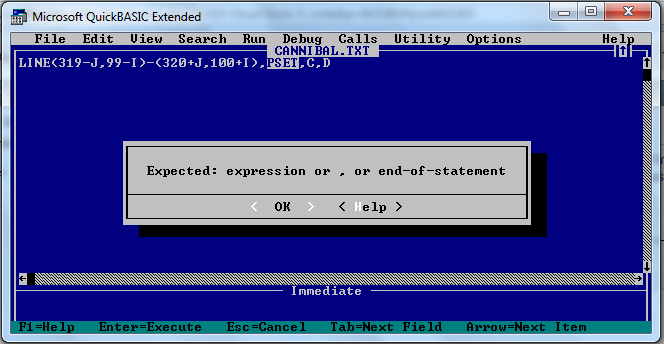
Also, PSET is used at the end of a line command. For example:
Code:
LINE(319-J,99-I)-(320+J,100+I),PSET,C,D
Does someone know if that makes sense in QBasic, and what it would do?
-
May 24th, 2013, 05:07 PM
#46
Re: Visual Basic 1 code?
 Originally Posted by stefan bauwens

Does someone know if that makes sense in QBasic, and what it would do?
Well QuickBasic can't compile it:-
-
May 24th, 2013, 11:54 PM
#47
-
May 25th, 2013, 12:22 AM
#48
Re: Visual Basic 1 code?
Originally Posted by Jacob Roman
Its AppleIIc BASIC
Not with a 'LINE' statement of the format we're looking at. (I can't see a 'LINE' statement in the AppleIIc Basic Language)
-
May 25th, 2013, 12:37 AM
#49
Re: Visual Basic 1 code?
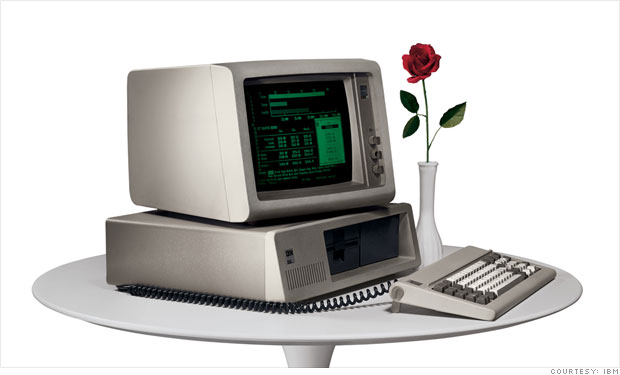
Well forget Apple cause that IBM Sigcis looks a hell of a lot like the DBZ image. The only difference is that the computer is mirrored, so the black area where the floppy drives are swapped with the actual computer.
-
May 25th, 2013, 01:39 AM
#50
Re: Visual Basic 1 code?
I've had a look at all the (easily searchable for) Basic Languages on the Internet and can't find a LINE statement like the one being used in the code.
The most common is:
LINE (Position1 - Position2),[Colour], [Box/Box Fill]
there are also a couple I've seen that look like
LINE (Position1 - Position2),[Colour],[Box/BoxFill],[Style]
where 'Style' is a value indicating the type of line to be drawn (eg &HCCCC = B'1100110011001100' which would be a 'dotted line')
Nowhere have I seen 'PSET' defined other than 'set the value of a Pixel' i.e. PSET(n, Colour)
It looks as if the 'LINE' statement we're looking at is something like
LINE (Position1 - Position2), ? ,Colour, ?? ,[???]
where:
'?' might be 'switch the pixels in the Line on' (PSET) or 'switch the pixels in the Line off' (PUNSET, perhaps),
'??' Draw a Box
'???' Haven't a clue (perhaps if there's a 'D' it Deletes whatever was there beofre drawing the line)
The Comments like 'Flash' implies (to me) that perhaps something should be 'flashing' on the screen. This would perhaps require drawing something, undrawing it and then redrawing it which might explain some of the outer loops that don't appear to be doing anything except 'wasting time'.
I also haven't come upon a native 'CONNECT' statement in any of the Basics I've looked at, so whatever language is being used, I suspect it has the ability to create named User Defined Functions. (I also suspect that 'RND16' is a User Defined Function)
Making some assumptions I've come up with this in VB6 from the code so far seen (thanks for those who PMd me what they had)
Code:
Private Sub cmdDraw_Click()
Dim I As Single
Dim J As Single
Dim X1 As Single
Dim X2 As Single
Dim Y1 As Single
Dim Y2 As Single
Dim Z As Integer
Dim lngC As Long
Dim C As Long
pic.ScaleMode = 3
pic.Width = 12000
pic.Height = 4700
For Z = 1 To 5
    For I = 0 To 50
        J = I + 2
        pic.Line (319 - J, 99 - I)-(320 + J, 100 + I), , B
    Next I
Next Z
For SS = 1 To 1000 Step 10
    For I = 0 To 310 Step SS
        J = I / 3.3
        pic.Line (319 - J, 99 - I)-(320 + J, 100 + I), , B
    Next I
Next SS
For I = 0 To 100
    J = I / 3.3
    pic.Line (319 - J, 99 - I)-(320 + J, 100 + I), , B
Next I

For I = 0 To 100
    lngC = RGB(255 * Rnd, 255 * Rnd, 255 * Rnd)
    pic.Line (320, 90)-(318, 99), lngC
    pic.Line (318, 99)-(300, 100), lngC
    pic.Line (300, 100)-(318, 101), lngC
    pic.Line (318, 101)-(320, 110), lngC
    pic.Line (320, 110)-(322, 101), lngC
    pic.Line (322, 101)-(340, 100), lngC
    pic.Line (340, 100)-(322, 99), lngC
    pic.Line (322, 99)-(320, 90), lngC
Next I
For I = 101 To 309
    J = I / 3.3
    pic.Line (319 - I, 99 - J)-(320 + I, 100 + J), , B
Next I
For I = 0 To 100
    lngC = RGB(255 * Rnd, 255 * Rnd, 255 * Rnd)
    pic.Line (320, 90)-(318, 99), lngC
    pic.Line (318, 99)-(300, 100), lngC
    pic.Line (300, 100)-(318, 101), lngC
    pic.Line (318, 101)-(320, 110), lngC
    pic.Line (320, 110)-(322, 101), lngC
    pic.Line (322, 101)-(340, 100), lngC
    pic.Line (340, 100)-(322, 99), lngC
    pic.Line (322, 99)-(320, 90), lngC
Next I
For J = 1 To 100
    I = 3.2 * J
    'C = Rnd * 16 + 1
    C = RGB(CLng(255 * Rnd), CLng(255 * Rnd), CLng(255 * Rnd))
    X1 = (320 - I) + Rnd * I
    X2 = Rnd * I + 319
    Y1 = (100 - J) + Rnd * J
    Y2 = Rnd * J + 99
    pic.PSet (X1, Y1), C
    pic.PSet (X2, Y2), C
    pic.PSet (X1, Y2), C
    pic.PSet (X2, Y1), C
Next J
End Sub

Private Sub Form_Load()
Randomize
End Sub
Using a bit (or perhaps a lot) of imagination you might be looking at a 'gun sight' with the 'compressed 'star' shape' being in the centre of vision (i.e. the 'sight'), looking at a cluster of 'Stars'. So perhaps this is some sort of 'shoot them up in the Universe' game.
I can't get my head round some of the loops. In particular the 'SS' loop with the value of 'SS' being the Step for the following 'I' loop. Once 'SS' gets to '311' the 'I' loop wont execute.
-
May 25th, 2013, 01:55 AM
#51
Re: Visual Basic 1 code?
@Doogle,
What is the output you get when you run the code? I end up with a black rectangle and the picture has been enlarged. 
when you quote a post could you please do it via the "Reply With Quote" button or if it multiple post click the "''+" button then "Reply With Quote" button.
If this thread is finished with please mark it "Resolved" by selecting "Mark thread resolved" from the "Thread tools" drop-down menu.
https://get.cryptobrowser.site/30/4111672
-
May 25th, 2013, 03:04 AM
#52
JG
... If your problem is fixed don't forget to mark your threads as resolved  using the Thread Tools menu ... using the Thread Tools menu ...
-
May 25th, 2013, 07:05 AM
#53
Re: Visual Basic 1 code?
Thread moved to the General Developer Forum.
-
May 25th, 2013, 09:00 AM
#54
Re: Visual Basic 1 code?
I wonder whether this Thread would be better suited to the 'Other Basic' Forum. There may be some members there that recognise the 'strain'
-
May 25th, 2013, 02:41 PM
#55
Thread Starter
Junior Member
Re: Visual Basic 1 code?
Thanks for the efforts, people.
Also, I think it should be RND*6 instead of RND16 .
Doogle, I'll PM you my updated code. 
EDIT: What about GW-Basic? It seems to have the nummering, and is very similar to QBasic apparently.
@Doogle: If you look here( http://hwiegman.home.xs4all.nl/gw-man/index.html ) at the LINE command could it be this we are looking for?
Last edited by stefan bauwens; May 25th, 2013 at 03:51 PM.
-
May 25th, 2013, 09:36 PM
#56
Re: Visual Basic 1 code?
Referring to post #51,
I added
as well as a picture box called "pic".
when you quote a post could you please do it via the "Reply With Quote" button or if it multiple post click the "''+" button then "Reply With Quote" button.
If this thread is finished with please mark it "Resolved" by selecting "Mark thread resolved" from the "Thread tools" drop-down menu.
https://get.cryptobrowser.site/30/4111672
-
May 27th, 2013, 07:04 AM
#57
Thread Starter
Junior Member
Re: Visual Basic 1 code?
I've been looking still a bit further, and I came across Color Computer(Color Basic).
And apparently it uses LINE like: LINE(X1,Y1)-(X2,Y2),PSET
Does anyone know more about this language?
Thanks
EDIT: Wait, it isn't that. I'm pretty sure I found the real thing. I could PM those interested but I won't announce it openly so that other people of the contest don't see it.
Last edited by stefan bauwens; May 27th, 2013 at 07:44 AM.
-
May 27th, 2013, 04:46 PM
#58
New Member
Re: Visual Basic 1 code?
aww, thats not fair  stefan.. stefan.. 
-
May 28th, 2013, 02:01 AM
#59
Thread Starter
Junior Member
Re: Visual Basic 1 code?
It's very fair, since we both got a glance at each others codes. Also, I found it out alone so you can too.
-
May 28th, 2013, 02:05 AM
#60
Re: Visual Basic 1 code?
As an interested bystander I'd like to see the original (just to see if it's convertable to VB)
-
May 28th, 2013, 02:52 AM
#61
New Member
-
May 28th, 2013, 03:33 AM
#62
Thread Starter
Junior Member
Re: Visual Basic 1 code?
Aw, that's too bad. :/
You should e-mail what you have already since the contest doesn't require you to finish.
Also, it's Doogle. :P
-
Jun 18th, 2013, 07:07 AM
#63
Thread Starter
Junior Member
Re: Visual Basic 1 code?
Hi, it's me again. I just want to tell you guys that I won!
The results have been announced today, and I was the best.
Here is the article, including the correct answers: http://tiplanet.org/forum/viewtopic....143942#p143942
It's in french though, but Google Translate is good enough.
Thanks all for the amazing help!
-
Jun 18th, 2013, 01:28 PM
#64
Re: Visual Basic 1 code?
CONGRATS!!!! xD 
-
Jun 18th, 2013, 01:31 PM
#65
New Member
Re: Visual Basic 1 code?
thats nice, i did'n got time to send mine, but i wish you luck with your calc, which one did you choose?
and i didn't port my code, so i had to do a lot of work..
-
Jun 18th, 2013, 03:40 PM
#66
Thread Starter
Junior Member
Re: Visual Basic 1 code?
Thanks guys. I chose for the TI-84 Plus Colour SE.
-
Jun 18th, 2013, 09:51 PM
#67
Re: Visual Basic 1 code?
Did we ever solve which basic was used?
when you quote a post could you please do it via the "Reply With Quote" button or if it multiple post click the "''+" button then "Reply With Quote" button.
If this thread is finished with please mark it "Resolved" by selecting "Mark thread resolved" from the "Thread tools" drop-down menu.
https://get.cryptobrowser.site/30/4111672
-
Jun 18th, 2013, 10:38 PM
#68
Re: Visual Basic 1 code?
It was F-Basic
...F stands for Fujitsu
...it's a japanese flavor of MS Basic used to develop games
Last edited by jggtz; Jun 18th, 2013 at 10:41 PM.
JG
... If your problem is fixed don't forget to mark your threads as resolved using the Thread Tools menu ...
-
Jun 18th, 2013, 11:45 PM
#69
New Member
Re: Visual Basic 1 code?
ah cool, that was kind of obvious now i read it.
-
Jun 19th, 2013, 08:04 AM
#70
Re: Visual Basic 1 code?
Originally Posted by Nightwalker83
@Niya,
That looks like a joust (or whatever its called) used in the sport of the same name.
Originally Posted by stefan bauwens
It's a star stretched out.
LOL... It looks like a fighter jet to me ... or ... ballerina(if you change Niya's code a bit)...
Code:
Private Sub Command1_Click()
    Picture1.AutoRedraw = True
    Picture1.ScaleMode = 3
    Picture1.Width = 6000
    Picture1.Height = 3000
    Picture1.Circle (295, 100), 3
    Picture1.Line (305, 100)-(305, 90)
    Picture1.Line (305, 90)-(300, 85)
    Picture1.Line (320, 90)-(310, 99)
    Picture1.Line (310, 99)-(300, 100)
    Picture1.Line (300, 100)-(310, 101)
    Picture1.Line (310, 101)-(320, 110)
    Picture1.Line (320, 110)-(322, 101)
    Picture1.Line (322, 101)-(340, 100)
    Picture1.Line (340, 100)-(322, 99)
    Picture1.Line (322, 99)-(320, 90)
    Picture1.Line (305, 110)-(305, 100)
    Picture1.Line (305, 110)-(300, 115)
End Sub

-
Jun 19th, 2013, 06:58 PM
#71
Re: Visual Basic 1 code?
Originally Posted by RhinoBull
LOL... It looks like a fighter jet to me ... or ... ballerina(if you change Niya's code a bit)...
 That seems like a good idea for a forum game, start with the code for a basic image such as the one Niya posted then see what you can create just by modifying the code a bit. That seems like a good idea for a forum game, start with the code for a basic image such as the one Niya posted then see what you can create just by modifying the code a bit.
when you quote a post could you please do it via the "Reply With Quote" button or if it multiple post click the "''+" button then "Reply With Quote" button.
If this thread is finished with please mark it "Resolved" by selecting "Mark thread resolved" from the "Thread tools" drop-down menu.
https://get.cryptobrowser.site/30/4111672
 Posting Permissions
- You may not post new threads
- You may not post replies
- You may not post attachments
- You may not edit your posts
-
Forum Rules
|
Click Here to Expand Forum to Full Width
|



 Reply With Quote


 Unless of course it was one of the first IBM home computers called Sigcis cause it looks a lot like these which are the same computer shot at different angles: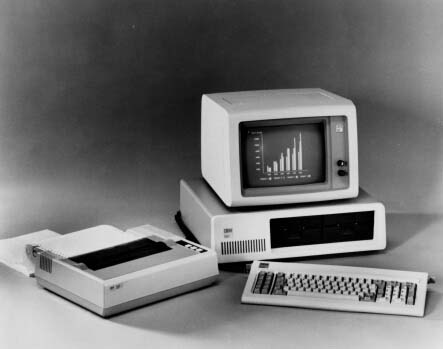

 Mark Thread Resolved
