|

-
May 10th, 2013, 08:05 AM
#1
Thread Starter
Addicted Member

SaveAs Macro Enabled Workbook Excel 2010
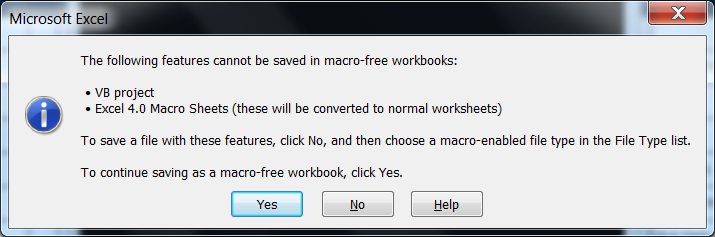
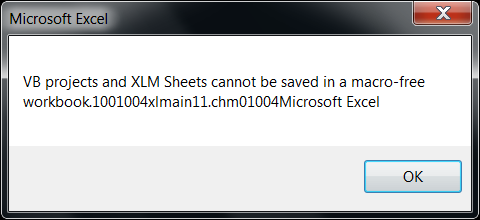
We've been using the same macro for years on the older Office versions. Now we have Office 2010 and the macro still works except for saving the workbooks. I've attached screen shots of the errors. Here is a quick breakdown of what the macro does:
1. Opens a template file (which already has macros inside it).
2. Opens some other excel files and manuiplates and transfers the data to the template file.
3. Saves the template file as a new workbook with a unique name.
The problem with the new Office 2010 is that I cannot figure out how to write the code to save as a macro enabled file?? Here is the code snipit where I am trying to save the file and where I get the errors. The error comes after the "MasterWb.SaveAs...." line.
Any help would be greatly appreciated!!
Code:
Workbooks.Open(Filename:="H:\Maintenance\Schedule Template\Rochelle Weekly Schedule Individual Master.xltm").RunAutoMacros Which:=xlAutoOpen
DO ALL THE DATA MANIPULATION STUFF
fileSavePath = DiscWB.Path & "\"
fileSaveName = "Contract " & Format(Now + 3, "mm-dd-yyyy") & ".xlsm"
MasterWb.SaveAs Filename:=fileSavePath & fileSaveName
-
May 10th, 2013, 09:43 AM
#2
Re: SaveAs Macro Enabled Workbook Excel 2010
Try this
Code:
MasterWb.SaveAs Filename:=fileSavePath & fileSaveName, Fileformat:=xlOpenXMLWorkbookMacroEnabled
or
Code:
MasterWb.SaveAs Filename:=fileSavePath & fileSaveName, Fileformat:=52
A good exercise for the Heart is to bend down and help another up...
Please Mark your Thread " Resolved", if the query is solved
MyGear: Resolved", if the query is solved
MyGear:
★ CPU ★ Ryzen 5 5800X
★ GPU ★ NVIDIA GeForce RTX 3080 TI Founder Edition
★ RAM ★ G. Skill Trident Z RGB 32GB 3600MHz
★ MB ★ ASUS TUF GAMING X570 (WI-FI) ATX Gaming
★ Storage ★ SSD SB-ROCKET-1TB + SEAGATE 2TB Barracuda IHD
★ Cooling ★ NOCTUA NH-D15 CHROMAX BLACK 140mm + 10 of Noctua NF-F12 PWM
★ PSU ★ ANTEC HCG-1000-EXTREME 1000 Watt 80 Plus Gold Fully Modular PSU
★ Case ★ LIAN LI PC-O11 DYNAMIC XL ROG (BLACK) (G99.O11DXL-X)
★ Monitor ★ LG Ultragear 27" 240Hz Gaming Monitor
★ Keyboard ★ TVS Electronics Gold Keyboard
★ Mouse ★ Logitech G502 Hero
-
May 10th, 2013, 12:24 PM
#3
Thread Starter
Addicted Member
Re: SaveAs Macro Enabled Workbook Excel 2010
 Originally Posted by koolsid

Try this
Code:
MasterWb.SaveAs Filename:=fileSavePath & fileSaveName, Fileformat:=xlOpenXMLWorkbookMacroEnabled
or
Code:
MasterWb.SaveAs Filename:=fileSavePath & fileSaveName, Fileformat:=52
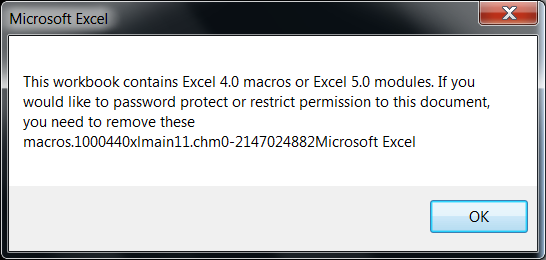
Okay, these seemed to do the trick but now I get this error. Any ideas on how to fix?
-
May 10th, 2013, 01:34 PM
#4
Re: SaveAs Macro Enabled Workbook Excel 2010
Are you trying to protect the workbook using a password?
A good exercise for the Heart is to bend down and help another up...
Please Mark your Thread "Resolved", if the query is solved
MyGear:
★ CPU ★ Ryzen 5 5800X
★ GPU ★ NVIDIA GeForce RTX 3080 TI Founder Edition
★ RAM ★ G. Skill Trident Z RGB 32GB 3600MHz
★ MB ★ ASUS TUF GAMING X570 (WI-FI) ATX Gaming
★ Storage ★ SSD SB-ROCKET-1TB + SEAGATE 2TB Barracuda IHD
★ Cooling ★ NOCTUA NH-D15 CHROMAX BLACK 140mm + 10 of Noctua NF-F12 PWM
★ PSU ★ ANTEC HCG-1000-EXTREME 1000 Watt 80 Plus Gold Fully Modular PSU
★ Case ★ LIAN LI PC-O11 DYNAMIC XL ROG (BLACK) (G99.O11DXL-X)
★ Monitor ★ LG Ultragear 27" 240Hz Gaming Monitor
★ Keyboard ★ TVS Electronics Gold Keyboard
★ Mouse ★ Logitech G502 Hero
-
May 10th, 2013, 02:10 PM
#5
Thread Starter
Addicted Member
Re: SaveAs Macro Enabled Workbook Excel 2010
Originally Posted by koolsid
Are you trying to protect the workbook using a password?
Yes, I am trying to protect using a password.
-
May 10th, 2013, 02:11 PM
#6
Re: SaveAs Macro Enabled Workbook Excel 2010
Can you share the code that you are using?
A good exercise for the Heart is to bend down and help another up...
Please Mark your Thread "Resolved", if the query is solved
MyGear:
★ CPU ★ Ryzen 5 5800X
★ GPU ★ NVIDIA GeForce RTX 3080 TI Founder Edition
★ RAM ★ G. Skill Trident Z RGB 32GB 3600MHz
★ MB ★ ASUS TUF GAMING X570 (WI-FI) ATX Gaming
★ Storage ★ SSD SB-ROCKET-1TB + SEAGATE 2TB Barracuda IHD
★ Cooling ★ NOCTUA NH-D15 CHROMAX BLACK 140mm + 10 of Noctua NF-F12 PWM
★ PSU ★ ANTEC HCG-1000-EXTREME 1000 Watt 80 Plus Gold Fully Modular PSU
★ Case ★ LIAN LI PC-O11 DYNAMIC XL ROG (BLACK) (G99.O11DXL-X)
★ Monitor ★ LG Ultragear 27" 240Hz Gaming Monitor
★ Keyboard ★ TVS Electronics Gold Keyboard
★ Mouse ★ Logitech G502 Hero
-
May 10th, 2013, 02:18 PM
#7
Thread Starter
Addicted Member
Re: SaveAs Macro Enabled Workbook Excel 2010
Do you want the entire macro code, or just the relevant parts?
-
May 10th, 2013, 02:21 PM
#8
Re: SaveAs Macro Enabled Workbook Excel 2010
Just the part where you are protecting. I believe that you are protecting the workbook with the option "Protect Structures and Windows" set to true. Just protect the workbook without using "Protect Structures and Windows" and you will be just fine...
A good exercise for the Heart is to bend down and help another up...
Please Mark your Thread "Resolved", if the query is solved
MyGear:
★ CPU ★ Ryzen 5 5800X
★ GPU ★ NVIDIA GeForce RTX 3080 TI Founder Edition
★ RAM ★ G. Skill Trident Z RGB 32GB 3600MHz
★ MB ★ ASUS TUF GAMING X570 (WI-FI) ATX Gaming
★ Storage ★ SSD SB-ROCKET-1TB + SEAGATE 2TB Barracuda IHD
★ Cooling ★ NOCTUA NH-D15 CHROMAX BLACK 140mm + 10 of Noctua NF-F12 PWM
★ PSU ★ ANTEC HCG-1000-EXTREME 1000 Watt 80 Plus Gold Fully Modular PSU
★ Case ★ LIAN LI PC-O11 DYNAMIC XL ROG (BLACK) (G99.O11DXL-X)
★ Monitor ★ LG Ultragear 27" 240Hz Gaming Monitor
★ Keyboard ★ TVS Electronics Gold Keyboard
★ Mouse ★ Logitech G502 Hero
-
May 10th, 2013, 02:57 PM
#9
Thread Starter
Addicted Member
Re: SaveAs Macro Enabled Workbook Excel 2010
Originally Posted by koolsid
Just the part where you are protecting. I believe that you are protecting the workbook with the option "Protect Structures and Windows" set to true. Just protect the workbook without using "Protect Structures and Windows" and you will be just fine...
Unfortunately there are areas of the book that they need to be able to modify but many other areas that need to be protected. Here is the code.
Code:
WsWeekly.Protect ("HorMel2009"), DrawingObjects:=True, Contents:=True, Scenarios:=True, AllowFormattingColumns:=True, AllowFormattingRows:=True
MasterWb.UpdateLinks = xlUpdateLinksAlways
MasterWb.WritePassword = "book"
MasterWb.SaveAs Filename:=fileSavePath & fileSaveName, FileFormat:=xlOpenXMLWorkbookMacroEnabled
Set TrayWb = Workbooks(fileSaveName)
-
May 10th, 2013, 03:08 PM
#10
Re: SaveAs Macro Enabled Workbook Excel 2010
Try this for me...
Code:
fileSaveName = "Contract " & Format(Now + 3, "mm-dd-yyyy") & ".xls"
MasterWb.SaveAs Filename:=fileSavePath & fileSaveName, FileFormat:=xlExcel8
A good exercise for the Heart is to bend down and help another up...
Please Mark your Thread "Resolved", if the query is solved
MyGear:
★ CPU ★ Ryzen 5 5800X
★ GPU ★ NVIDIA GeForce RTX 3080 TI Founder Edition
★ RAM ★ G. Skill Trident Z RGB 32GB 3600MHz
★ MB ★ ASUS TUF GAMING X570 (WI-FI) ATX Gaming
★ Storage ★ SSD SB-ROCKET-1TB + SEAGATE 2TB Barracuda IHD
★ Cooling ★ NOCTUA NH-D15 CHROMAX BLACK 140mm + 10 of Noctua NF-F12 PWM
★ PSU ★ ANTEC HCG-1000-EXTREME 1000 Watt 80 Plus Gold Fully Modular PSU
★ Case ★ LIAN LI PC-O11 DYNAMIC XL ROG (BLACK) (G99.O11DXL-X)
★ Monitor ★ LG Ultragear 27" 240Hz Gaming Monitor
★ Keyboard ★ TVS Electronics Gold Keyboard
★ Mouse ★ Logitech G502 Hero
-
May 10th, 2013, 03:48 PM
#11
Thread Starter
Addicted Member
Re: SaveAs Macro Enabled Workbook Excel 2010
Originally Posted by koolsid
Try this for me...
Code:
fileSaveName = "Contract " & Format(Now + 3, "mm-dd-yyyy") & ".xls"
MasterWb.SaveAs Filename:=fileSavePath & fileSaveName, FileFormat:=xlExcel8
This didn't work. It allowed me to save the file but with a notification about updating the cells when the book is reopened. Here is what is interesting. When I open the template the first time (in the code) it works just fine. After I save that file (with the code we are talking about) and I open the template again (looping in the code); is when I get the error about the macros in the workbook???
-
May 10th, 2013, 03:55 PM
#12
Thread Starter
Addicted Member
Re: SaveAs Macro Enabled Workbook Excel 2010
It doesn't happen the first time the template is opened, just on the second one.
Code:
Workbooks.Open(Filename:="H:\Maintenance\Schedule Template\Rochelle Weekly Schedule Individual Master.xltm").RunAutoMacros Which:=xlAutoOpen

DO SOME MACRO STUFF

MasterWb.SaveAs Filename:=fileSavePath & fileSaveName, FileFormat:=xlExcel8
    Set CONWB = Workbooks(fileSaveName)

Workbooks.Open(Filename:="H:\Maintenance\Schedule Template\Rochelle Weekly Schedule Individual Master.xltm").RunAutoMacros Which:=xlAutoOpen

DO SOME MACRO STUFF

MasterWb.SaveAs Filename:=fileSavePath & fileSaveName, FileFormat:=xlExcel8
    Set ENGWB = Workbooks(fileSaveName)
-
May 10th, 2013, 03:59 PM
#13
Re: SaveAs Macro Enabled Workbook Excel 2010
I think I will have to see your complete code. Let me have a look at it from a fresh pair of eyes when I wake up in the morning. It is 2:30AM here and I was about to go to bed.
If you can show the complete code and also if possible can you zip the template and upload it? I will play with it in the morning.
A good exercise for the Heart is to bend down and help another up...
Please Mark your Thread "Resolved", if the query is solved
MyGear:
★ CPU ★ Ryzen 5 5800X
★ GPU ★ NVIDIA GeForce RTX 3080 TI Founder Edition
★ RAM ★ G. Skill Trident Z RGB 32GB 3600MHz
★ MB ★ ASUS TUF GAMING X570 (WI-FI) ATX Gaming
★ Storage ★ SSD SB-ROCKET-1TB + SEAGATE 2TB Barracuda IHD
★ Cooling ★ NOCTUA NH-D15 CHROMAX BLACK 140mm + 10 of Noctua NF-F12 PWM
★ PSU ★ ANTEC HCG-1000-EXTREME 1000 Watt 80 Plus Gold Fully Modular PSU
★ Case ★ LIAN LI PC-O11 DYNAMIC XL ROG (BLACK) (G99.O11DXL-X)
★ Monitor ★ LG Ultragear 27" 240Hz Gaming Monitor
★ Keyboard ★ TVS Electronics Gold Keyboard
★ Mouse ★ Logitech G502 Hero
 Posting Permissions
- You may not post new threads
- You may not post replies
- You may not post attachments
- You may not edit your posts
-
Forum Rules
|
Click Here to Expand Forum to Full Width
|



 Reply With Quote
