|

-
Mar 5th, 2013, 02:47 PM
#1
Thread Starter
New Member

Moving to top of TreeView after ExpandAll()
Greetings:
I am trying to move to the top of my TreeView control after expanding all. This means that I should see the highlighted node (0) after the ExpandAll is done. But nothing I have tried does this.
Bellow is my code:
Private Sub btnExpandAll_Click(sender As Object, e As EventArgs) Handles btnExpandAll.Click
trvMasterFormat.Focus()
trvMasterFormat.ExpandAll()
trvMasterFormat.SelectedNode = trvMasterFormat.Nodes(0)
trvMasterFormat.Refresh()
End Sub
Any help in this regard woulkd be greatly appreciated.
Thanks!
-
Mar 5th, 2013, 03:03 PM
#2
Re: Moving to top of TreeView after ExpandAll()
Try this:
Code:
Private Sub btnExpandAll_Click(sender As Object, e As EventArgs) Handles btnExpandAll.Click
     trvMasterFormat.ExpandAll()
     trvMasterFormat.SelectedNode = trvMasterFormat.Nodes(0)
     trvMasterFormat.Select()
End Sub
Let us have faith that right makes might, and in that faith, let us, to the end, dare to do our duty as we understand it.
- Abraham Lincoln -
-
Mar 5th, 2013, 03:42 PM
#3
Thread Starter
New Member
Re: Moving to top of TreeView after ExpandAll()
stanav thanks but end results is the tree view control is still showing the last node and not the first
-
Mar 5th, 2013, 04:10 PM
#4
Re: Moving to top of TreeView after ExpandAll()
 Originally Posted by lhasha

stanav thanks but end results is the tree view control is still showing the last node and not the first
I don't quite understand what you mean exactly... The code works fine for me. Can you post a screen shot to show what you mean? And by the way, what, if any, treeview events are you handling?
Let us have faith that right makes might, and in that faith, let us, to the end, dare to do our duty as we understand it.
- Abraham Lincoln -
-
Mar 5th, 2013, 04:54 PM
#5
Thread Starter
New Member
Re: Moving to top of TreeView after ExpandAll()
While I know that setting focus is not the correct term when referring to nodes, that is exactly what I am seeking. After expanding all, the TreeView is showing the very end of the list as shown below:
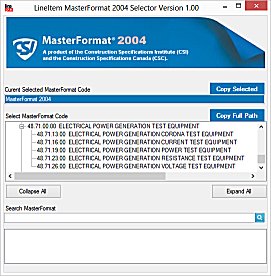
But when scrolling up, the first node is selected as shown below:

What I want is to have visual focus after the expand all as shown in the second image.
-
Mar 5th, 2013, 04:59 PM
#6
Re: Moving to top of TreeView after ExpandAll()
Code:
TreeView.TopNode.EnsureVisible
Something like that anyway.
-
Mar 5th, 2013, 05:34 PM
#7
Thread Starter
New Member
Re: Moving to top of TreeView after ExpandAll()
Grimfort: Thanks but same results 
-
Mar 5th, 2013, 05:35 PM
#8
Thread Starter
New Member
Re: Moving to top of TreeView after ExpandAll()
This seems like one of 'THOSE' issues that will drive me crazy YIKES!
-
Mar 5th, 2013, 05:42 PM
#9
Thread Starter
New Member
Re: Moving to top of TreeView after ExpandAll()
Originally Posted by stanav
I don't quite understand what you mean exactly... The code works fine for me. Can you post a screen shot to show what you mean? And by the way, what, if any, treeview events are you handling?
No treeview events being handled
-
Mar 5th, 2013, 06:00 PM
#10
Thread Starter
New Member
Re: Moving to top of TreeView after ExpandAll()
Originally Posted by stanav
I don't quite understand what you mean exactly... The code works fine for me. Can you post a screen shot to show what you mean? And by the way, what, if any, treeview events are you handling?
No treeview events being handled
-
Mar 5th, 2013, 07:03 PM
#11
Re: Moving to top of TreeView after ExpandAll()
The following code must work
vb Code:
Private Sub Button1_Click(sender As Object, e As EventArgs) Handles Button1.Click
        TreeView1.ExpandAll()
        TreeView1.Nodes(0).EnsureVisible()
        TreeView1.SelectedNode = TreeView1.Nodes(0)
        TreeView1.Focus()
    End Sub
If it isn't work inside your project, try it with new project.
-
Mar 5th, 2013, 07:09 PM
#12
Thread Starter
New Member
Re: Moving to top of TreeView after ExpandAll()
Originally Posted by 4x2y
The following code must work
vb Code:
Private Sub Button1_Click(sender As Object, e As EventArgs) Handles Button1.Click TreeView1.ExpandAll() TreeView1.Nodes(0).EnsureVisible() TreeView1.SelectedNode = TreeView1.Nodes(0) TreeView1.Focus() End Sub
If it isn't work inside your project, try it with new project.
4x2y! BINGO! Thanks and thanks to all others who contributed!
-
Mar 5th, 2013, 07:27 PM
#13
Re: Moving to top of TreeView after ExpandAll()
TreeView1.Nodes(0).EnsureVisible()
Is no different from
TreeView.TopNode.EnsureVisible
So I have to assume it is the Focus you are interested in seeing, that is the blue highlight, in which case check out this property, which may help in future.
-
Mar 5th, 2013, 07:53 PM
#14
Re: Moving to top of TreeView after ExpandAll()
TreeView1.Nodes(0).EnsureVisible()
Is no different from
TreeView.TopNode.EnsureVisible
They are totally different, TreeView1.Nodes(0) points to the first node while TreeView.TopNode points to the first visible node, to know the difference use
vb Code:
Debug.Print("TopNode is " & TreeView1.TopNode.Text) Debug.Print("Nodes(0) is " & TreeView1.Nodes(0).Text)
The TopNode property is changing each time you scroll the tree.
Last edited by 4x2y; Mar 5th, 2013 at 07:57 PM.
 Posting Permissions
- You may not post new threads
- You may not post replies
- You may not post attachments
- You may not edit your posts
-
Forum Rules
|
Click Here to Expand Forum to Full Width
|



 Reply With Quote


