|

-
Feb 8th, 2012, 10:42 AM
#1
Thread Starter
New Member

how to represent data in a tabular format?
i can retrieve the data from the DB and put it in a vector and then , vector in a JTable, to display data in a tabular format in java,
all i wanted to know is there any similar way in vb dotnet?
-
Feb 8th, 2012, 10:47 AM
#2
Re: how to represent data in a tabular format?
I think what you're looking for is a datagridview. If you added a datasource to your project, simply drag it to your form. Otherwise, there is a datagridview in your toolbar(Toolbar -> Data -> DataGridView); and from there use a SQL select stament to populate it.
A little fyi, if you take the first route, there is an sql statement. It's just generated when you add the datasource to your project and the command that populates the dgv is in your form_load event and it's tableadapter.fill().
If I misunderstood you, please let me know.
-
Feb 8th, 2012, 11:39 AM
#3
Re: how to represent data in a tabular format?
 Originally Posted by navedjobs

i can retrieve the data from the DB and put it in a vector and then , vector in a JTable, to display data in a tabular format in java,
all i wanted to know is there any similar way in vb dotnet?
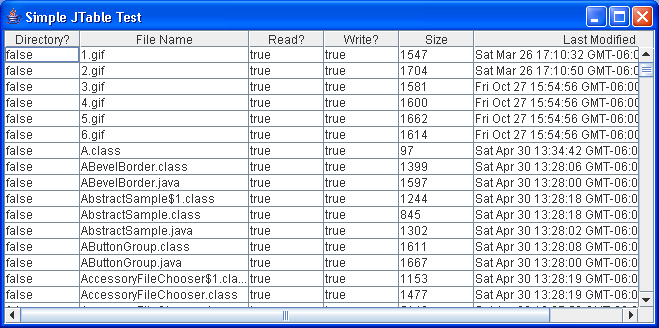
A suggestion, do not assume those reading this question have a clue to what a JTable is in Java, some may while other may not. Best to provide a simple image showing what you are after or a link explaining a JTable.
-
Feb 8th, 2012, 01:39 PM
#4
Thread Starter
New Member
Re: how to represent data in a tabular format?
Originally Posted by dday9
I think what you're looking for is a datagridview. If you added a datasource to your project, simply drag it to your form. Otherwise, there is a datagridview in your toolbar(Toolbar -> Data -> DataGridView); and from there use a SQL select stament to populate it.
A little fyi, if you take the first route, there is an sql statement. It's just generated when you add the datasource to your project and the command that populates the dgv is in your form_load event and it's tableadapter.fill().
If I misunderstood you, please let me know.
you are almost near, i want solution through programmatically and not through drag and drop, yes datagridview is all i need
but how do i fill all the values into it ?
-
Feb 8th, 2012, 01:57 PM
#5
Re: how to represent data in a tabular format?
If you want to take route number 2, you need to add the DataGridView to your form and add a select statement to populate the datagridview. This can be done in a few ways, the most common is in your Form_Load event or in a button_click event. The way to explain your select statement is like such:
Code:
Select * From myDataTable
The select * is saying that you want to select all records
The from mydatatable is the Table Name you want to select it from.
Try this out:
Code:
'Set up our connection
        Dim connetionString As String = "Provider=Microsoft.Jet.OLEDB.4.0;Data Source=C:\Documents and Settings\PC #6\My Documents\db2.mdb;"
        Dim connection As OleDbConnection
        connection = New OleDbConnection(connetionString)
        Try
            'Open it up
            connection.Open()
            'SQL Select Command
            'To filter, add a Where Clause
            Dim sql As String = "Select * From customers"
            'Set up a DataAdapter
            Dim adapter As New OleDbDataAdapter(sql, connection)
            'And a Table
            Dim dt As New DataTable("customers")
            'Now fill the adapter with the datatable
            adapter.Fill(dt)
            'Populate the DGV
            DataGridView1.DataSource = dt
            'Please close it when you're done.
            connection.Close()
        Catch ex As Exception
            'If by any chance you get a message box with an error
            'It's generally because you mispelt your conString or Datatable
            MsgBox(ex.ToString)
        End Try
Last edited by dday9; Feb 8th, 2012 at 02:25 PM.
 Posting Permissions
- You may not post new threads
- You may not post replies
- You may not post attachments
- You may not edit your posts
-
Forum Rules
|
Click Here to Expand Forum to Full Width
|



 Reply With Quote


