Re: [RESOLVED] Convert VB6 Code to VB2010. Code from "The most amazing VB6 Code ever"
EntityX ... I think it would be cool if you added a randomize button to your adjustment form that fills in the fields with random values in the appropriate range for each parameter. A lot of Photoshop plugins have this feature to randomize the effect that it's designed to produce...
Re: [RESOLVED] Convert VB6 Code to VB2010. Code from "The most amazing VB6 Code ever"
I've ventured into adjusting some variables that will sometimes cause arithmetic overflows. I was putting the Lerp function inside of a Try but after the error message comes up the screen keeps flashing and I have to use task manager to close. I tried putting Application.Exit after the MessageBox.Show like this
Code:
   Private Function Lerp(ByVal c1 As Integer, ByVal c2 As Integer, ByVal k As Single) As Integer
        Try ' Try being used because many adjustments combinations are possible and some may cause arithmetic overflow or other types of problems
            Return CInt((c1 And 255) * (k * LerpkMultiplier1) + (c2 And 255) * (1.0F - k)) Or (CInt((c1 And &HFF00) * k + (c2 And &HFF00) * (1.0F - k)) And &HFF00) Or (CInt((c1 And &HFF0000) * k * LerpkMultiplier2 + (c2 And &HFF0000) * (1.0F - k)) And &HFF0000)
        Catch ex As Exception
            MessageBox.Show("Lerp Function problem. " & ex.Message)
            Application.Exit()
            Lerp = 1 ' this is here so the function always returns a value otherwise you get a squiggly line under End Function
        End Try
    End Function
but it still doesn't close and I have to use task manager. I could just skip adjusting those problem variables or limit the adjusting range which is a simpler solution but there might arise some combination of settings that causes a problem so I'd like to know how to close the application if it catches an exception. I'm up to adjusting 15 variables now. You'll notice LerpMultiplier1 and 2 in the Lerp function above. I'm limiting those to 1.5 maximum.
Last edited by EntityX; Aug 5th, 2011 at 05:39 PM.
Make as many mistakes as you can as quickly as you can. We want to make sure that we make a great enough number of mistakes in a given amount of time so that we can be successful.
"Persistence is the magic of success." Paramahansa Yogananda
Re: [RESOLVED] Convert VB6 Code to VB2010. Code from "The most amazing VB6 Code ever"
I just posted in the Code Bank. I'll probably update the zip file with improvements. I already noticed something I missed. It's just that you can only enter integer values in the WaterRipple textbox. You mostly would only want to use integer values so I might just change WaterRipple from Single to Integer. Not seeing the arithmetic overflow problem because I limited the range of the problem variables but would still like to figure out how to get the application to close when an exception is thrown.
Make as many mistakes as you can as quickly as you can. We want to make sure that we make a great enough number of mistakes in a given amount of time so that we can be successful.
"Persistence is the magic of success." Paramahansa Yogananda
Re: [RESOLVED] Convert VB6 Code to VB2010. Code from "The most amazing VB6 Code ever"
Originally Posted by EntityX
I've ventured into adjusting some variables that will sometimes cause arithmetic overflows.
...
You'll notice LerpMultiplier1 and 2 in the Lerp function above. I'm limiting those to 1.5 maximum.
Yeah... take those two out. You're breaking the meaning of the function. The function interpolates between two colours. If you want to produce weird effects, pass in weird colours. Don't make this function do weird stuff.
Without those two multipliers, the Lerp function will not error.
Re: [RESOLVED] Convert VB6 Code to VB2010. Code from "The most amazing VB6 Code ever"
Yeah... take those two out.
...Don't make this function do weird stuff.
No, I don't feel like it.
It's working ok now. I limited the values for LerpkMultiplier1 to 3 so they can't go above 1.5. You can get some cool results in my opinion by using those so I'm going to leave them in. If you use my code bank entry you can always just leave them at the default value if that's what you prefer. Some people like weird stuff.
Make as many mistakes as you can as quickly as you can. We want to make sure that we make a great enough number of mistakes in a given amount of time so that we can be successful.
"Persistence is the magic of success." Paramahansa Yogananda
Re: [RESOLVED] Convert VB6 Code to VB2010. Code from "The most amazing VB6 Code ever"
If you want the same picture every time then don't use any adjustments at all. Forget about my adjustments form and just use the basic code. No one has to pay any attention to what I did. Create your own unique application if you like. Like I said before just leave LerpkMultiplier1 to 3 at 1 and it's just like those adjustments aren't there. But using them you can do some stuff that you wouldn't otherwise be able to do. All I'm doing is expanding the possibilities of what you can do with the picture. I'm not aware of any Lerp function police that are going to sue me or arrest me. Yes I'm doing something that wasn't originally intended with the program. So if you don't like that then don't use my code. The program just creates a bunch of picture elements on a screen. I'm expanding the possibilities for creating a greater variety of different pictures that's all.
In the below picture I used LerpkMultiplier1 at 1.05 to get the yellow sun. You can do that another way most likely but using that adjustment worked pretty good. So what's so evil about that?
Make as many mistakes as you can as quickly as you can. We want to make sure that we make a great enough number of mistakes in a given amount of time so that we can be successful.
"Persistence is the magic of success." Paramahansa Yogananda
Re: [RESOLVED] Convert VB6 Code to VB2010. Code from "The most amazing VB6 Code ever"
Originally Posted by EntityX
So what's so evil about that?
The source of this program came from a topic entitled "The most amazing VB6 Code ever". I strongly disagree with that assessment.
Yes, the program is pretty amazing, but the code is an impenetrable mess of calculations that does not clearly communicate its intent and is incredibly difficult to comprehend for anyone looking to maintain or extend it.
There are a few places that are simple enough to be understood by themselves. One of those was the Lerp function. The function returned the colour that was partway between two supplied colours (the distance along the line between the two colours being controlled by the k parameter). You've now destroyed that small oasis of clarity not just by making the semantics unclear, but by making the semantics wrong. The 3 multiplier variables are not scoped to the function itself so apply to every linear interpolation. And what does it mean for a LerpkMultiplier1 value of 1.05? It means that (for every linear interpolation performed, remember) that once you have taken the weighted average of the two colours, you will then turn around and add another .05 of the red component of the first colour to the final result.
If you can't see that there's a conceptual problem with that, that would be bad enough. However, you're posting it to the Codebank, thereby promoting it as some kind of good programming practice. That's what's so evil: spreading the idea that sloppy hacking that seems to get what you want is a good way of programming. You've not stopped to consider the fact that you're getting overflow exceptions might imply you've broken some of the fundamental assumptions on which this code hinges? No, you've got a yellow sun and that's what you wanted.
You want a yellow sun? Find the code that determines the base colour of the sun.Don't break the interpolation function to make every colour come out more yellow.
(originally m_sunPosition.X and m_sunPosition.Y were sX and sY - making that realisation and updating my variable names allowed this piece of code to become clearer)
So what is this doing? s is initially 50 divided by the distance in pixels between the current x,y being considered (it is considering every pixel in the sky in a loop) and the position of the sun. Therefore, s is inversely proportional to the distance from the centre of the sun. We then clamp the value of s to not be higher than 1. Since the value of s is 1 at 50 pixels, uyou can see that whilst we are less than 50 pixels from the centre of the sun, s will be 1, and if we are further than 50 pixels from the centre of the sun, the value of s decreases asymptotically.
s is then used as the k argument to a call to Lerp that interpolates between 0xFFFFFF (white colour) and c1. This result is written back to c1. So what it is actually doing is saying that inside 50 pixels from the centre of the sun, we have white. Outside 50 pixels from the centre we fade from white back to the base c1 colour. Adjusting the 0xFFFFFF is probably a good starting point for figuring out how to get a different coloured sun, as that appears to be the base colour.
However, we then interpolate between that colour and the colour c2 by some factor k. c2 (like c1) is a vertical gradient across the sky, and the k comes from the BN method which is a tiled 2 dimensional "smooth" random plane. The index it uses into that set of values is opaque to me at this point, I haven't looked too closely at that part, but the figures by which it is multiplying the base values seem somewhat arbitrary at first glance - this could just be a stretching thing to make sure it doesn't line up with other accesses to the values and give an obvious tiled look to the resulting image.
I would recommend that you take the time to try and understand what the code is doing in the small. Work through and determine for yourself what the variables represent. That is a very good skill to practice. Then muck about with the code once you understand the structure.
I'm slowly chipping away at the code and making it more clear and expressive. Each change is small and you might argue doesn't really get you anything, but they add up to a big improvement in the code as a whole)
Re: [RESOLVED] Convert VB6 Code to VB2010. Code from "The most amazing VB6 Code ever"
Okay, so to test my theory that that 0xFFFFFF was the sun base colour, I adjusted the value to match the yellow from your program screenshot, and sure enough I got a yellow sun to match yours. But because I'd done it by adjusting the base colour rather than fritzing the interpolation function, I also got a yellow glow around the sun. If you note in your screenshot, you get a white glow around the sun.
Re: [RESOLVED] Convert VB6 Code to VB2010. Code from "The most amazing VB6 Code ever"
ok I'll remove the post in CodeBank. You can put one up if you like or Jenner can.
Last edited by EntityX; Aug 9th, 2011 at 01:24 AM.
Make as many mistakes as you can as quickly as you can. We want to make sure that we make a great enough number of mistakes in a given amount of time so that we can be successful.
"Persistence is the magic of success." Paramahansa Yogananda
Re: [RESOLVED] Convert VB6 Code to VB2010. Code from "The most amazing VB6 Code ever"
And to demonstrate that reasoning about the code in its current state is fraught with peril, I in fact got the below completely wrong.
Originally Posted by Evil_Giraffe
And what does it mean for a LerpkMultiplier1 value of 1.05? It means that (for every linear interpolation performed, remember) that once you have taken the weighted average of the two colours, you will then turn around and add another .05 of the red component of the first colour to the final result.
Note that we have to explain why the sun comes out yellow, but the glow does not? First off, let's note that in fact the 0xFF mask pulls out the BLUE component of the colour, not the red. I discovered this when trying to create the yellow effect - I originally put in a value of 0x1AEDFA (having got R=0xFA, G=0xED, B=0x1A from a screen capture of your posted image). This turned out to be a very blue sun, not yellow. Putting the value of 0xFAED1A was necessary to match your colour.
Now, next nnotice that inside the sun, we call Lerp with a k value of 1 (see earlier reasoning about the Sky() method). We can ignore any effect from c2 inside Lerp (since that will be multiplied by 0).
Since c1 is white (0xFFFFFF) in your version, we work out the blue component by multiplying 0xFF by 1 * LerpkMultiplier1 = 0xFF * 1.05 = 255 * 1.05 = 267.75. We'll chop off the .75 when we convert back to an int, so let's ignore that. What is 267 in Hex? 0x10B. Assuming other LerpkMultipliers of 1, we get 0x10B + 0xFF00 + 0xFF0000 as our final calculation. That is a hex value of 0x100000B. I can only assume that you've added an And clause to the blue component with a bitmask ox 0xFF, in which case you get 0xFFFF0B. And that's why it's yellow, you've completely killed off the blue component of your sun's colour.
Now, as s decreases (outside of 50 pixels from the sun's centre) pretty quickly it will reach s = 0.95 (within 2 pixels according to my calculations). AT this point, the blue component calculation comes out below 0x100, and you're back with the blue component being fully present, and you switch back to a white-ish colour (I say white-ish - the blue component is given slightly more weight than the red and green so it will be a blue tinged glow rather than plain white.)
Re: [RESOLVED] Convert VB6 Code to VB2010. Code from "The most amazing VB6 Code ever"
Originally Posted by EntityX
ok I'll remove the post in CodeBank. You can put one up if you like or Jenner can.
Two points
1) The process of working through the code and understanding it and then refactoring the code is the main takeaway from this, for me. Not the finished piece of code itself.
2) My version doesn't work. I've got some integer arithmetic going on somewhere that shouldn't be happening. I can tell this by taking advantage of a property of the Random class. Starting with the same seed generates the same sequence every time. Since I have done a straight port, the same sequence of random numbers means the same numbers go into the calculations each time (if I had reordered too much this would no longer hold) so I can compare the results of the VB version with my C# version by making the following changes:
Re: [RESOLVED] Convert VB6 Code to VB2010. Code from "The most amazing VB6 Code ever"
I stopped messing with this code a while ago now. I'd love to refactor it and fully document it out, but I don't have the time.
I totally agree with Evil Giraffe though, the core functions like Lerp() should be left as they are, because when type in "Lerp" into Google, I get as the first hit, the Wikipedia on Linear Interpolation and it tells me what the function must look like; they're standard functions.
I'm actually surprised nobody made the Sky(), Water(), etc take a Type Color as an argument, or send a Type Point argument to Sky() for the sun's position. It seems like a logical step forward.
The biggest problem with this code in my opinion is the sloppy-as-hell use of numerical types. Shifting between integers and floats all over the place without concern for numerical integrity or understanding is a recipe for confusion. Maybe not the mot amazing code ever, but a nice example of mathematically generated scenes.
Re: [RESOLVED] Convert VB6 Code to VB2010. Code from "The most amazing VB6 Code ever"
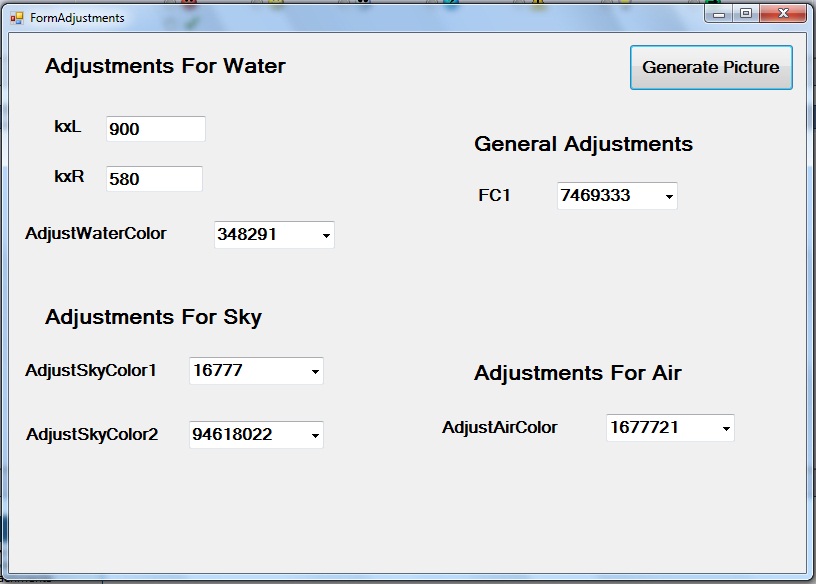
I went ahead and had the thread in CodeBank removed. Earlier I had 2 versions in this post but I just deleted the one that has the LerpkMultiplier1 to 3 in it so now there's just the version that doesn't have those. I noticed that even though you can get some different results using those 3 variables I added to the Lerp function the results aren't that great or else the results can be gotten using other adjustments. The version here has an adjustments form that looks like what you see in this screenshot. If you wanted to add or remove some variables for adjustment you could use this if you want.
When the program starts it has the default values in the textboxes. Click Generate Picture to get a picture. No need to hit the space bar. If you close the picture form using the close box the adjustments form will reopen and you can try some other adjustments. Esc key will close the program from either form as it did before.
Last edited by EntityX; Aug 9th, 2011 at 05:51 PM.
Make as many mistakes as you can as quickly as you can. We want to make sure that we make a great enough number of mistakes in a given amount of time so that we can be successful.
"Persistence is the magic of success." Paramahansa Yogananda
Re: [RESOLVED] Convert VB6 Code to VB2010. Code from "The most amazing VB6 Code ever"
The 383 and 384 values (yDivisor, k1L, k1R) that you've made configurable probably shouldn't be made configurable, as they are linked to the horizon height at half the height of the image. There are some assumptions made in the code that prevent certain computations generating a value outside of a certain range (for example, arguments passed to k in Lerp should be between 0 and 1 inclusive - there are some computations that could go out of whack if you allow the divisor to change).
I don't mean to keep banging on about this, but it would behoove you to understand how these values are being used and any constraints on them before altering them willy-nilly.
Re: [RESOLVED] Convert VB6 Code to VB2010. Code from "The most amazing VB6 Code ever"
I suspected you might say something like that which is why I said, "If you wanted to add or remove some variables for adjustment you could use this if you want." The reason those added variables are there is because I was simply experimenting with adding variables. Sure for some values that you enter you might get an undesirable result but you might also be able to create something that is interesting that you wouldn't otherwise be able to create. If you take out everything that would ever possibly create an undesirable result then your range of possibilities goes down. You can modify my code though however you like and create your own version that suits you.
If you were going to take some more things out I would say what you just mentioned, yDivisor, k1L, and k1R, would be first on the list. I would leave kxL and kxR in even if there's a good reason to take them out because you can get some interesting results by using them. Using yDivisor doesn't do that much.
Last edited by EntityX; Aug 12th, 2011 at 04:38 PM.
Make as many mistakes as you can as quickly as you can. We want to make sure that we make a great enough number of mistakes in a given amount of time so that we can be successful.
"Persistence is the magic of success." Paramahansa Yogananda




 Reply With Quote
 Make as many mistakes as you can as quickly as you can. We want to make sure that we make a great enough number of mistakes in a given amount of time so that we can be successful.


 Originally Posted by EntityX


 the people who helped you and mark your forum RESOLVED when you're done!
