|

-
Mar 9th, 2010, 09:01 AM
#81
New Member

Re: vb web browser tutorial
Hi,
I am trying to use the WebControl in VB6 as an activeX which I put in a cab file and then display in a html page.
Only problem is that I am not able to get to the URL of the current page :
locationURL does not work and documentCompleted does not run as I describe in http://www.vbforums.com/showthread.p...54#post3748554
Can somebody help me with this.
Thanks !
-
Mar 14th, 2010, 09:02 AM
#82
Member

Re: vb web browser tutorial
 Originally Posted by joebobfrank

Code:
Private Sub WebBrowser1_TitleChange(ByVal Text As String)
    Form1.Caption = WebBrowser1.LocationName
End Sub
Show page title in the forms caption.
can i have it for vb.net !! 2008
-
Mar 14th, 2010, 09:53 AM
#83
Re: vb web browser tutorial
-
Mar 18th, 2010, 04:15 PM
#84
New Member
Re: vb web browser tutorial
Hi Gary,
Thanks for the reply !
The problem here is I am using vb 6 and I am running an activeX in IE. When I use the activeX I created in a vb 6 desktop client all works well. But in the browser it does not.
I do not think the link you send me does answer this or did I miss something?
-
Mar 19th, 2010, 03:37 AM
#85
Re: vb web browser tutorial
Ronny,
I was replying to the question from smith carlos regarding a .Net version, which is shown in the link that I posted.
Sorry, I have no idea about your question, I don't do VB 6 
Gary
-
Mar 23rd, 2010, 12:06 PM
#86
New Member
Re: vb web browser tutorial
Dear Sir,
Today only i visited this forum and found it very useful.
I know programming in VB6, and currently facing a problem.
The problem is that i want to open the link on my webbrowser control in in a new window.
If i am using the right click > open in new window then i am able to catch it via..
Code:
Private Sub wb_NewWindow2(index As Integer, ppDisp As Object, Cancel As Boolean)
  ........
  .........
  frmMain.wb(new_index).RegisterAsBrowser = True
  Set ppDisp = frmMain.wb(new_index).Object
End Sub
But what i want is even if somebody click the left mouse button on a link, i shall be able to open it in a new window (with session maintained).
Second thing is that i want to scroll the loaded page programatically (pagedown/pageup).
Is it possible to do the above two actions?
-
Mar 30th, 2010, 01:51 PM
#87
Member

Re: vb web browser tutorial
I can only give you a solution for your first question. Just use the following code:
Code:
Option Explicit
Enum BrowserNavConstants
    navOpenInNewWindow = 1
    navNoHistory = 2
    navNoReadFromCache = 4
    navNoWriteToCache = 8
    navAllowAutosearch = 16
    navBrowserBar = 32
    navHyperlink = 64
    navEnforceRestricted = 128
    navNewWindowsManaged = 256
    navUntrustedForDownload = 512
    navTrustedForActiveX = 1024
    navOpenInNewTab = 2048
    navOpenInBackgroundTab = 4096
    navKeepWordWheelText = 8192
    navVirtualTab = 16384
    navBlockRedirectsXDomain = 32768
    navOpenNewForegroundTab = 65536
End Enum
so you can now navigate to a site (e.g. google.com) by using:
WebBrowser1.navigate "www.google.com", 1
I can't give you an answer for your second question.
-
Apr 8th, 2010, 10:54 PM
#88
New Member
 Re: vb web browser tutorial Re: vb web browser tutorial
Does anybody know where I can find either an opera browser control, a google chrome control, a good non-glitchy firefox control, or just adding security to the standard IE control? i have a firefox control already but it is probably the worst thing i have ever had to deal with so i think i need a different thing. oh and also a bookmarks thing. that would be great.
-
Apr 11th, 2010, 02:56 AM
#89
New Member
Re: vb web browser tutorial
Originally Posted by zeidhaddadin
* Show webpage's source code:
VB Code:
Private Sub Form_Load()
Text1.Text = Form1.browser.Document.documentElement.innerHTML
End Sub
Hi!
I would like to ask for a little help with this feature. It works great, but doesnt do everything what i really need. I want monitor every page's source code. But this code monitors only the page, what you typed in Combo1. After i click on the loaded page navigate to an other --> the source -Form1.browser.Document.documentElement.innerHTML- doesnt change. If i type other adress, it creates a new innerHTML. Hope, i could wrote my problem well..
So my question is: how can i monitor every page's source code
Thank you in advance
-
Apr 14th, 2010, 11:24 PM
#90
New Member
Re: vb web browser tutorial
is there a code to load a saved page? if someone could post it, that'd be great.
-
Apr 15th, 2010, 12:59 AM
#91
Re: vb web browser tutorial
You should ask your questions in the main forum. I think you will get better responces there.
Anything I post is an example only and is not intended to be the only solution, the total solution nor the final solution to your request nor do I claim that it is. If you find it useful then it is entirely up to you to make whatever changes necessary you feel are adequate for your purposes.
-
Jul 24th, 2010, 10:12 PM
#92
Member
Re: vb web browser tutorial
Thnks you your oppertunity this is my first question reply you code gose here
Code:
If KeyAscii = vbKeyReturn Then
  Command1_Click
End If
-
Aug 27th, 2010, 08:34 PM
#93
Member
Re: vb web browser tutorial - Search function
i'm sorry but will it be applied for the case of other search engines.How?
-
Aug 28th, 2010, 06:40 AM
#94
New Member
Re: vb web browser tutorial
MSWindowsUser, I don't really need the attachment as mine came with it and i run 6.0 However, Nelton, I have made a Web Browser, Not with the timer or notes, but it does have searchbox..I have another with a history box. though i dont no why, but to add stuff to it, you need to highlight it all blue, and press backspace (erase key) for it to add... If anyone can give me code so it automaticly adds, then thanks!
-
Aug 29th, 2010, 09:47 AM
#95
Member
Re: vb web browser tutorial
Thanks all the friends of vbforums
-
Oct 5th, 2010, 02:05 PM
#96
New Member
Re: vb web browser tutorial
Hi All... i've nearly finished building a web browser using visual studio 2005, but i'm just having trouble displaying the url of the current page displayed in the web browser control!
i.e
urltxtbox1.text = WebBrowser1. ?????
Can anyone please help me....
Thanking you in advance...
-
Oct 5th, 2010, 03:00 PM
#97
Member

Re: vb web browser tutorial
Originally Posted by chukka32
Hi All... i've nearly finished building a web browser using visual studio 2005, but i'm just having trouble displaying the url of the current page displayed in the web browser control!
i.e
urltxtbox1.text = WebBrowser1. ?????
Can anyone please help me....
Thanking you in advance...
Hello. Are you talking about when displaying the title of the site e.g. www.google.com - Google (title bar)? or the StatusBar e.g. Loading www.google.com/ladidadid Done?
-
Oct 5th, 2010, 03:24 PM
#98
New Member
Re: vb web browser tutorial
Hi MSWindowsUser,
What I'm trying to do is to keep the current page URL displayed in a separate textbox, so that when I browse back and fro with the navigate buttons then the textbox changes with the webbrowser control if that makes any sense?! I basically need the code to read the URL for the current page that is displayed in the web browser?!?!
Thanks for your prompt response!!
-
Oct 6th, 2010, 02:44 AM
#99
Re: vb web browser tutorial
Originally Posted by chukka32
Hi All... i've nearly finished building a web browser using visual studio 2005, but i'm just having trouble displaying the url of the current page displayed in the web browser control!
i.e
urltxtbox1.text = WebBrowser1. ?????
Can anyone please help me....
Thanking you in advance...
Hey,
If you are creating a Web Browser in Visual Studio 2005, why are you posting/asking questions about it in the VB6 forum?!?
Take a look at the links in my signature, they will be of more help to you if you are using .Net.
Gary
-
Jan 28th, 2011, 12:17 PM
#100
New Member
Re: vb web browser tutorial
this agood tutorial and it's agood work
but, in my project i need to using search engine such as google or yahoo to search about any subject and then i need to store only html and pdf documents to hard disk , can any one known me how do that programatically, please answer me?
-
Jul 25th, 2011, 07:01 AM
#101
Fanatic Member

Re: vb web browser tutorial
Hello, how to you loop through all elements (input, select textarea etc) of a form and fill them?
-
Jul 25th, 2011, 01:31 PM
#102
Re: vb web browser tutorial
Anything I post is an example only and is not intended to be the only solution, the total solution nor the final solution to your request nor do I claim that it is. If you find it useful then it is entirely up to you to make whatever changes necessary you feel are adequate for your purposes.
-
Aug 7th, 2011, 07:25 AM
#103
New Member
Re: vb web browser tutorial
Hi, I'm new here. I know how to make a web browser in VB 2010 but I don't know how to let it access IP address like 192.168.1.1 or else. Please help me...
-
Aug 8th, 2011, 12:43 AM
#104
Re: vb web browser tutorial
Originally Posted by silveraero
Hi, I'm new here. I know how to make a web browser in VB 2010 but I don't know how to let it access IP address like 192.168.1.1 or else. Please help me...
Hello silveraero,
Welcome to the forums!
Can you please provide more information about what you are trying to achieve? Are you saying that you want to restrict access to a site based on the client IP address, or are you saying that you want your web browser to be able to access a website that is hosted on 192.168.1.1. If it is the latter, then it should simply be a case of navigating to http://192.168.1.1.
Gary
-
Aug 8th, 2011, 09:52 AM
#105
Re: vb web browser tutorial
Originally Posted by silveraero
Hi, I'm new here. I know how to make a web browser in VB 2010 but I don't know how to let it access IP address like 192.168.1.1 or else. Please help me...
See post #91
Anything I post is an example only and is not intended to be the only solution, the total solution nor the final solution to your request nor do I claim that it is. If you find it useful then it is entirely up to you to make whatever changes necessary you feel are adequate for your purposes.
-
Aug 11th, 2011, 04:17 AM
#106
New Member
Re: vb web browser tutorial
Sorry, it's double post. Thank you very much. Solved it.
I'm design a web base application. Here is the description: I have an Android phone and I installed a wifi transfer application. I build this application as an file transfer center, you know, like PC suite or sync ... (my country is not using English as main language so sorry for my bad English).
What I want to as is how can I list the phone that using the wifi transfer application so I just need to choose in the list to transfer?
And, when I resize the form, the right align control will not realign to the border and stay still. Here is my solution for this:
[qupte]Private Sub Main_SizeChanged(ByVal sender As Object, ByVal e As System.EventArgs) Handles Me.SizeChanged
cbPort.Top = 15
cbIP.Top = 15
cmdBack.Top = 10
cmdForward.Top = 10
cmdHome.Top = 10
cmdStop.Top = 10
cmdGo.Top = 10
cmdStop.Left = Me.Width - cmdStop.Width - 40
cmdGo.Left = Me.Width - (cmdStop.Width) * 2 - 45
cbPort.Left = Me.Width - (cmdStop.Width) * 2 - 50 - cbPort.Width
cbIP.Width = Me.Width - (cmdBack.Width) * 5 - cbPort.Width - 90
End Sub
[/quote]
I just think about the controls size and scale. Does anyone have better solution?
-
Jan 6th, 2014, 10:34 AM
#107
New Member
Re: vb web browser tutorial
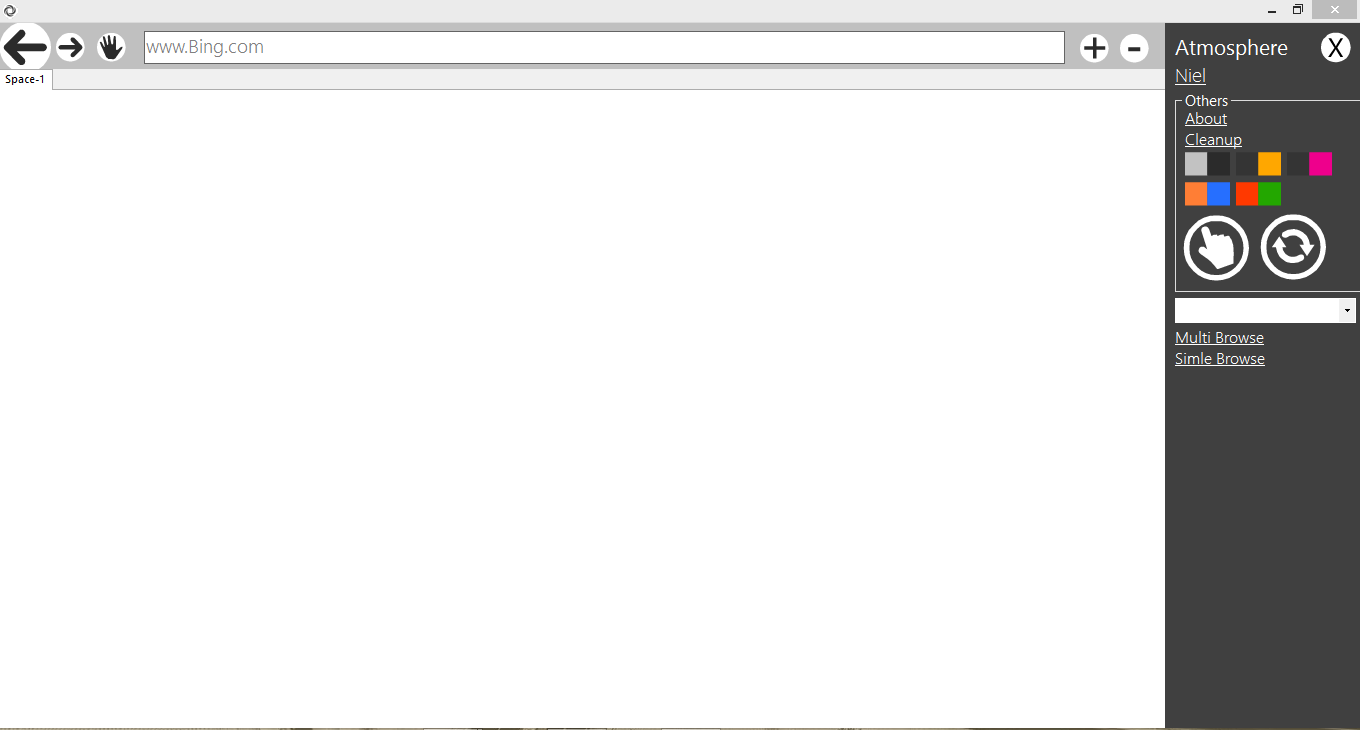
this is the browser I created you can download the sample if you want
here - < link removed by moderator >
Last edited by si_the_geek; Jan 6th, 2014 at 10:57 AM.
Reason: removed link to executable
-
Jan 6th, 2014, 11:01 AM
#108
Re: vb web browser tutorial
Originally Posted by virmil15
this is the browser I created you can download the sample if you want
Welcome to VBForums 
I have removed your link to protect our members, because we have no way of knowing what an executable file actually does - which could include something malicious, such as if there is a virus on your computer.
Feel free to post the code in an attachment (without executable files). You can do that by putting the files into a zip file, and when posting click on the "Go advanced", then "Manage attachments"
 Posting Permissions
- You may not post new threads
- You may not post replies
- You may not post attachments
- You may not edit your posts
-
Forum Rules
|
Click Here to Expand Forum to Full Width
|



 Reply With Quote


