|

-
Mar 13th, 2023, 01:42 PM
#1
 VB6 - Unicode Captions for all intrinsic controls (yes, LABEL too!) - no OCX required VB6 - Unicode Captions for all intrinsic controls (yes, LABEL too!) - no OCX required
When developing international applications there is often a need to display user interface elements in foreign languages. I've put together a small "cCapW" class that can handle Unicode captions for all intrinsic controls (Form, CommandButton, CheckBox, OptionButton, Frame and Label). The class only has one property which is also marked as "Default" to keep the syntax as short as possible. It is also "Predeclared" so it can be used "as is" without declaring new instances:
Code:
' For example instead of using:
cmdButton.Caption = "Some ANSI Text"
' Now we can use:
cCapW(cmdButton) = "????? ???¢??? ????"
Here's a screenshot of the demo program showing Unicode captions in action (clicking on each element will randomly change its caption from a selection of strings loaded from a file):
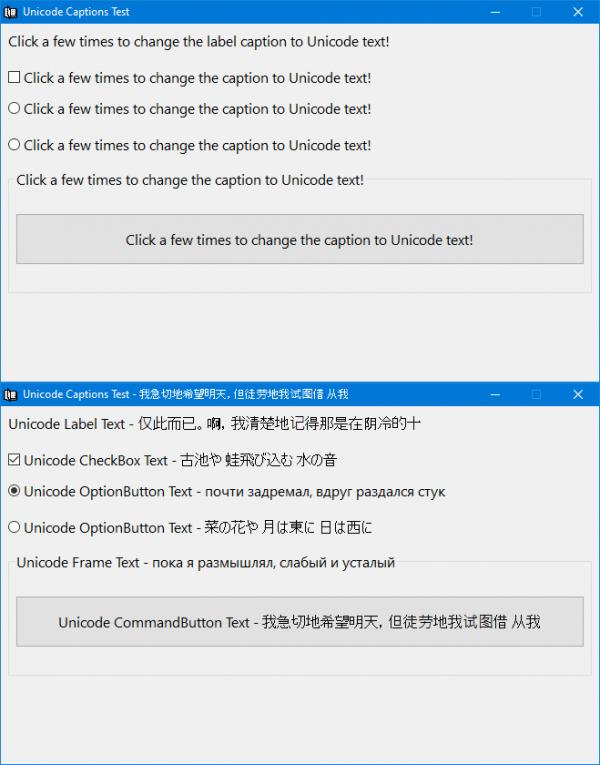
While for most controls the solution can be as easy as subclassing their hWnd and handling WM_GETTEXT and WM_SETTEXT messages, the Label control proved to be a little tricky as it doesn't have a hWnd at all. It turns out the Label is using the "TextOutA" GDI function to draw text directly on the device context of its container window (which is usually a form). In this case the solution was to change the ANSI version of the "TextOutA" GDI function and point it to our own custom "HookedTextOut" function that ends up calling the Unicode-capable "DrawTextW" function to format and draw the actual text.
The "Caption" property of a label is only capable of holding ANSI text so all Unicode captions are first encoded to Base64 and then decoded on the fly by our "HookedTextOut" function when they need to be rendered on the screen. Another problem that needed addressing was that the form is being repainted multiple times (when moved around, when covered by other windows, when minimized and restored, etc). On every such repainting event the form is using "TextOutA" to write all Label captions at once so we needed to identify which caption was already encoded to Base64 and which was not because a form can contain both ANSI and Unicode labels at the same time depending on user needs.
Finally, the "TextOutA" function is not capable of formatted output on its own (for example it cannot draw multiple lines of text at once). Internally, the Label control has additional code that can format the caption text and call "TextOutA" multiple times in order to draw multi-line captions or captions that wrap around at the edge. The latest version of this project addresses this problem and can now draw multi-line Unicode captions with proper alignment (Left, Right or Center). The obvious limitation of this approach is that it won't work with the "AutoSize" property of a Label control.
cCapW.cls
Code:
Option Explicit

Implements ISubclass

Private Const sTextOutA As String = "TextOutA", GDI32_DLL As String = "gdi32", WM_SETTEXT As Long = &HC, WM_GETTEXT As Long = &HD, WM_GETTEXTLENGTH As Long = &HE

Private Declare Function DefWindowProcW Lib "user32" (ByVal hWnd As Long, ByVal wMsg As Long, ByVal wParam As Long, ByVal lParam As Long) As Long
Private Declare Function ReadProcessMemory Lib "kernel32" (ByVal hProcess As Long, lpBaseAddress As Any, lpBuffer As Any, ByVal nSize As Long, lpNumberOfBytesWritten As Long) As Long
Private Declare Function WriteProcessMemory Lib "kernel32" (ByVal hProcess As Long, lpBaseAddress As Any, lpBuffer As Any, ByVal nSize As Long, lpNumberOfBytesWritten As Long) As Long
Private Declare Function GetModuleHandleW Lib "kernel32" (ByVal lpModuleName As Long) As Long
Private Declare Function GetProcAddress Lib "kernel32" (ByVal hModule As Long, ByVal lpProcName As String) As Long

Private lOriginalProcAddress As Long, byteOriginalAddress(0 To 5) As Byte

Public Property Get CaptionW(objControl As Object) As String
Dim lTextLen As Long, baCaption() As Byte
    With objControl
        If TypeOf objControl Is Label Then ' Labels are a special case since they don't have a hWnd
            If lOriginalProcAddress = 0 Then HookTextOut ' Hook the "TextOutA" function if it hasn't been done already
            CaptionW = .Caption
            If AscB(CaptionW) = 11 Then ' A "VerticalTab (ASCII 11)" character is used to mark this label caption as Base64 encoded
                If Base64Decode(Mid$(CaptionW, InStr(2, CaptionW, vbVerticalTab) + 1), baCaption) Then CaptionW = baCaption ' Retrieve the Base64 encoded caption following the "VerticalTab" character
            End If
        Else ' Everything else can easily handle Unicode via a simple WM_GETTEXT message
            lTextLen = DefWindowProcW(.hWnd, WM_GETTEXTLENGTH, 0&, 0&)  ' Get the caption length
            CaptionW = String$(lTextLen, vbNullChar) ' Allocate memory for the caption
            DefWindowProcW .hWnd, WM_GETTEXT, lTextLen + 1, StrPtr(CaptionW) ' Get the caption text
        End If
    End With
End Property

Public Property Let CaptionW(objControl As Object, sCaption As String)
Dim lTextLen As Long, sBase64Caption As String
    With objControl
        If TypeOf objControl Is Label Then ' Labels are a special case since they don't have a hWnd
            If lOriginalProcAddress = 0 Then HookTextOut ' Hook the "TextOutA" function if it hasn't been done already
            If Base64Encode(sCaption, sBase64Caption) Then .Caption = vbVerticalTab & ObjPtr(objControl) & vbVerticalTab & sBase64Caption Else .Caption = sCaption ' A "VerticalTab (ASCII 11)" character is used to mark this label caption as Base64 encoded
        Else ' Everything else can easily handle Unicode via a simple WM_SETTEXT message
            SubclassWnd .hWnd, Me ' Subclass this hWnd if it hasn't already been subclassed.
            DefWindowProcW .hWnd, WM_SETTEXT, 0&, StrPtr(sCaption) ' Set the new caption
        End If
        .Refresh ' Force the control to be redrawn to show the new caption immediately
    End With
End Property

Private Sub HookTextOut()
Dim bytePatch(0 To 5) As Byte
    If lOriginalProcAddress = 0 Then
        lOriginalProcAddress = GetProcAddress(GetModuleHandleW(StrPtr(GDI32_DLL)), sTextOutA) ' Get the entry point address of the ANSI TextOutA function from gdi32.dll
        If ReadProcessMemory(-1, ByVal lOriginalProcAddress, byteOriginalAddress(0), 6, ByVal 0&) Then ' Save it to be restored on exit
            Debug.Print "Saved original TextOutA address"
        End If
        bytePatch(0) = &H68 ' push
        PutMem4 bytePatch(1), AddressOf HookedTextOut ' Get the address of our replacement HookedTextOut function
        bytePatch(5) = &HC3 ' ret
        If WriteProcessMemory(-1, ByVal lOriginalProcAddress, bytePatch(0), 6, ByVal 0&) Then ' Apply patch, all calls to TextOutA will execute our HookedTextOut function now
            Debug.Print "Hooked TextOutA address"
        End If
    End If
End Sub

Private Sub Class_Terminate()
    If lOriginalProcAddress Then
        If WriteProcessMemory(-1, ByVal lOriginalProcAddress, byteOriginalAddress(0), 6, ByVal 0&) Then ' Restore the address of the original TextOutA function (only useful in IDE)
            Debug.Print "Restored original TextOutA address"
        End If
    End If
End Sub

Private Function ISubclass_WndProc(ByVal hWnd As Long, ByVal uMsg As Long, ByVal wParam As Long, ByVal lParam As Long, ByVal dwRefData As Long) As Long
Dim bDiscardMessage As Boolean
    Select Case uMsg
        Case WM_GETTEXT ' Force this message to be processed by the Unicode version of the window procedure (DefWindowProcW) and then discard it
            ISubclass_WndProc = DefWindowProcW(hWnd, uMsg, wParam, lParam): bDiscardMessage = True
    End Select
    If Not bDiscardMessage Then ISubclass_WndProc = DefSubclassProc(hWnd, uMsg, wParam, lParam)
End Function
The "HookedTextOut" function takes care of rendering Unicode captions for the correct labels:
mdlCapW.bas
Code:
Option Explicit

Private Type RECT
    Left As Long
    Top As Long
    Right As Long
    Bottom As Long
End Type

Private Const WM_NCDESTROY As Long = &H82, CRYPT_STRING_BASE64 As Long = 1, CRYPT_STRING_NOCRLF As Long = &H40000000, DT_CALCRECT As Long = &H400, DT_LEFT As Long = 0, DT_CENTER As Long = 1, _
              DT_RIGHT As Long = 2, DT_WORDBREAK As Long = &H10, DT_NOCLIP As Long = &H100, DT_EDITCONTROL As Long = &H2000

Private Declare Function SetWindowSubclass Lib "comctl32" Alias "#410" (ByVal hWnd As Long, ByVal pfnSubclass As Long, ByVal uIdSubclass As Long, ByVal dwRefData As Long) As Long
Private Declare Function GetWindowSubclass Lib "comctl32" Alias "#411" (ByVal hWnd As Long, ByVal pfnSubclass As Long, ByVal uIdSubclass As Long, pdwRefData As Long) As Long
Private Declare Function RemoveWindowSubclass Lib "comctl32" Alias "#412" (ByVal hWnd As Long, ByVal pfnSubclass As Long, ByVal uIdSubclass As Long) As Long
Public Declare Function DefSubclassProc Lib "comctl32" Alias "#413" (ByVal hWnd As Long, ByVal uMsg As Long, ByVal wParam As Long, ByVal lParam As Long) As Long
Private Declare Function CryptBinaryToStringW Lib "crypt32" (ByVal pbBinary As Long, ByVal cbBinary As Long, ByVal dwFlags As Long, ByVal pszString As Long, pcchString As Long) As Long
Private Declare Function CryptStringToBinaryW Lib "crypt32" (ByVal pszString As Long, ByVal cchString As Long, ByVal dwFlags As Long, ByVal pbBinary As Long, pcbBinary As Long, pdwSkip As Long, pdwFlags As Long) As Long
Private Declare Function lstrlenA Lib "kernel32" (ByVal lpString As Long) As Long
Public Declare Sub GetMem1 Lib "msvbvm60" (Ptr As Any, RetVal As Byte)
Public Declare Sub PutMem4 Lib "msvbvm60" (Ptr As Any, ByVal NewVal As Long)
Private Declare Function vbaObjSet Lib "msvbvm60" Alias "__vbaObjSet" (ByVal dstObject As Long, ByVal srcObject As Long) As Long
Private Declare Function SysAllocStringByteLen Lib "oleaut32" (ByVal pSZ As Long, ByVal Length As Long) As Long
Private Declare Function DrawTextA Lib "user32" (ByVal hDC As Long, ByVal lpStr As Long, ByVal nCount As Long, ByVal lpRect As Long, ByVal wFormat As Long) As Long
Private Declare Function DrawTextW Lib "user32" (ByVal hDC As Long, ByVal lpStr As Long, ByVal nCount As Long, ByVal lpRect As Long, ByVal wFormat As Long) As Long
Private Declare Function GetProp Lib "user32" Alias "GetPropA" (ByVal hWnd As Long, ByVal lpString As String) As Long
Private Declare Function RemoveProp Lib "user32" Alias "RemovePropA" (ByVal hWnd As Long, ByVal lpString As String) As Long
Private Declare Function SetProp Lib "user32" Alias "SetPropA" (ByVal hWnd As Long, ByVal lpString As String, ByVal hData As Long) As Long

Private Function GetContainerScaleMode(objContainer As Object) As ScaleModeConstants
On Error GoTo ScaleModeTwips
    GetContainerScaleMode = objContainer.ScaleMode: Exit Function
ScaleModeTwips:
    GetContainerScaleMode = vbTwips: Err.Clear
End Function

Private Function PtrToStr(lpString As Long) As String
Dim lLen As Long
    lLen = lstrlenA(lpString): If lLen Then PutMem4 PtrToStr, SysAllocStringByteLen(lpString, lLen)
End Function

Public Function HookedTextOut(ByVal hDC As Long, ByVal X As Long, ByVal Y As Long, ByVal lpString As Long, ByVal nCount As Long) As Long
Dim baCaption() As Byte, byteVTab As Byte, sCaption As String, lTextLen As Long, rcLabel As RECT, objLabel As Label, LabelScaleMode As ScaleModeConstants, lLabelAlignment As Long
    If nCount > 0 Then
        GetMem1 ByVal lpString, byteVTab
        If byteVTab = 11 Then ' A "VerticalTab (ASCII 11)" character is used to mark this Label caption as Base64 encoded
            vbaObjSet VarPtr(objLabel), Val(PtrToStr(lpString + 1)) ' Get a weak reference to this Label object whose pointer address was previously saved in its caption
            With objLabel
                sCaption = Mid$(.Caption, InStr(2, .Caption, vbVerticalTab) + 1) ' Retrieve the actual Base64 encoded caption following the VerticalTab delimiter
                LabelScaleMode = GetContainerScaleMode(.Container) ' We need to know the ScaleMode of this Label borrowed from its Container object
                rcLabel.Left = .Parent.ScaleX(.Left, LabelScaleMode, vbPixels) + .BorderStyle ' Calculate the size of the drawing rectangle (in pixels) for this Label
                rcLabel.Top = .Parent.ScaleY(.Top, LabelScaleMode, vbPixels) + .BorderStyle
                rcLabel.Right = rcLabel.Left + .Parent.ScaleX(.Width, LabelScaleMode, vbPixels) - .BorderStyle * 2
                rcLabel.Bottom = rcLabel.Top + .Parent.ScaleY(.Height, LabelScaleMode, vbPixels) - .BorderStyle * 2
                Select Case .Alignment ' Get the alignment of the Label
                    Case vbLeftJustify: lLabelAlignment = DT_LEFT
                    Case vbCenter: lLabelAlignment = DT_CENTER
                    Case vbRightJustify: lLabelAlignment = DT_RIGHT
                End Select
            End With
            PutMem4 objLabel, 0& ' Destroy the weak reference previously acquired
            lTextLen = Base64Decode(sCaption, baCaption) ' Decode the actual caption from Base64
            If lTextLen Then HookedTextOut = DrawTextW(hDC, VarPtr(baCaption(0)), lTextLen \ 2, VarPtr(rcLabel), DT_EDITCONTROL Or DT_WORDBREAK Or lLabelAlignment) ' Draw the Label's caption in the previously calculated rectangle
        Else ' This Caption hasn't been encoded to Base64 yet so just render it in ANSI form
            rcLabel.Left = X: rcLabel.Top = Y ' Initialize the upper-left corner of the drawing rectangle
            HookedTextOut = DrawTextA(hDC, lpString, nCount, VarPtr(rcLabel), DT_NOCLIP) ' Draw the actual caption
        End If
    End If
End Function

Public Function Base64Decode(sInputData As String, baOutputData() As Byte) As Long
Dim lDataLen As Long, lOutLen As Long
    lDataLen = Len(sInputData)
    If lDataLen Then
        If CryptStringToBinaryW(StrPtr(sInputData), lDataLen, CRYPT_STRING_BASE64, 0&, lOutLen, 0&, 0&) Then
            ReDim baOutputData(0 To lOutLen - 1)
            If CryptStringToBinaryW(StrPtr(sInputData), lDataLen, CRYPT_STRING_BASE64, VarPtr(baOutputData(0)), lOutLen, 0&, 0&) Then Base64Decode = lOutLen
        End If
    End If
End Function

Public Function Base64Encode(sInputData As String, sOutputData As String) As Long
Dim lDataLen As Long, lOutLen As Long
    lDataLen = Len(sInputData)
    If lDataLen Then
        If CryptBinaryToStringW(StrPtr(sInputData), lDataLen * 2, CRYPT_STRING_BASE64 Or CRYPT_STRING_NOCRLF, 0&, lOutLen) Then
            sOutputData = String$(lOutLen - 1, vbNullChar)
            If CryptBinaryToStringW(StrPtr(sInputData), lDataLen * 2, CRYPT_STRING_BASE64 Or CRYPT_STRING_NOCRLF, StrPtr(sOutputData), lOutLen) Then Base64Encode = lOutLen
        End If
    End If
End Function

Public Sub SubclassWnd(hWnd As Long, Subclass As ISubclass, Optional dwRefData As Long)
Dim uIdSubclass As Long
    uIdSubclass = ObjPtr(Subclass)
    If Not IsWndSubclassed(hWnd, uIdSubclass) Then
        SetProp hWnd, hWnd, uIdSubclass: SetWindowSubclass hWnd, AddressOf WndProc, uIdSubclass, dwRefData
    End If
End Sub

Private Sub UnSubclassWnd(hWnd As Long, Optional Subclass As ISubclass)
Dim uIdSubclass As Long
    If Subclass Is Nothing Then uIdSubclass = GetProp(hWnd, hWnd) Else uIdSubclass = ObjPtr(Subclass)
    If IsWndSubclassed(hWnd, uIdSubclass) Then
        RemoveProp hWnd, hWnd: RemoveWindowSubclass hWnd, AddressOf WndProc, uIdSubclass
    End If
End Sub

Private Function IsWndSubclassed(hWnd As Long, uIdSubclass As Long, Optional dwRefData As Long) As Boolean
    IsWndSubclassed = GetWindowSubclass(hWnd, AddressOf WndProc, uIdSubclass, dwRefData)
End Function

Private Function WndProc(ByVal hWnd As Long, ByVal uMsg As Long, ByVal wParam As Long, ByVal lParam As Long, ByVal Subclass As ISubclass, ByVal dwRefData As Long) As Long
Dim i As Long
    Select Case uMsg
        Case WM_NCDESTROY
            UnSubclassWnd hWnd, Subclass
            WndProc = DefSubclassProc(hWnd, uMsg, wParam, lParam)
        Case Else
            WndProc = Subclass.WndProc(hWnd, uMsg, wParam, lParam, dwRefData)
    End Select
End Function
That's all there is to it. Here's a small demo program showing the Unicode captions in action (clicking on each element will randomly change its caption from a selection of strings loaded from a file):
UnicodeCaptions.zip (Updated)
Last edited by VanGoghGaming; Feb 19th, 2026 at 08:35 AM.
Reason: Bug fix
 Posting Permissions
- You may not post new threads
- You may not post replies
- You may not post attachments
- You may not edit your posts
-
Forum Rules
|
Click Here to Expand Forum to Full Width
|



 Reply With Quote