|

-
Dec 25th, 2010, 04:34 PM
#1
Recover data from corrupted NTFS boot drive marked as RAW
Due to a recent power failure, my system became unbootable. Fortunately my OS (windows 7) was installed on a different drive than my boot drive & I also had some unformatted space on my harddisk. So after trying a few things to boot it all of which failed, I installed a fresh instance of windows 7 in the unformatted partition, and made it the bootable drive. Then I added my old working OS to the Boot Menu and my old OS is accessible again. I was desperately needing this because I didn't wanted to install everything afresh.
My drive letters have changed in the new installed OS. The old bootable drive which was C: is now D: and is showing the filesystem as RAW. The drive contents are inaccessible. When I try to open that drive, I get either of these two messages:
"D: is not accessible. The file or directory is corrupted and unreadable."
or,
"The parameter is incorrect."
Running CHKDSK from command prompt still detects it correctly as NTFS file system, though it can't finish checking the whole drive.

This is an overview of how my system looks at present:
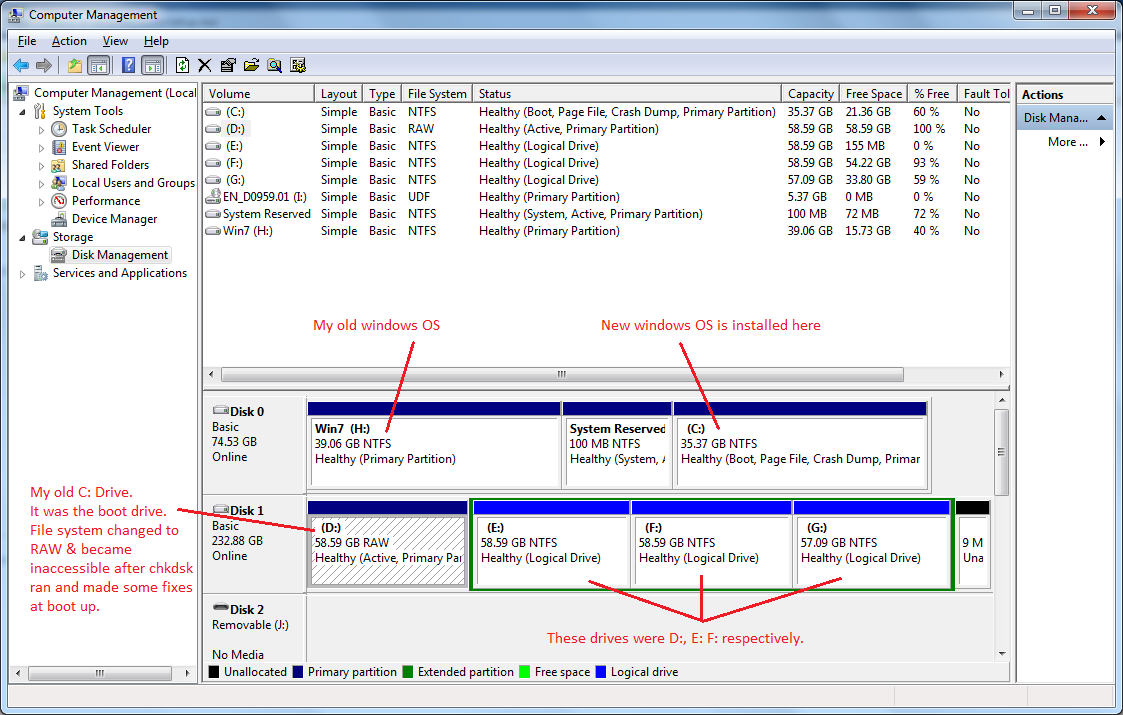
So now I have two problems left:
1. Recovering the C: drive (now D: drive). I know that the drive contents are intact and safe; only my MBR is corrupted.
So it would be good if I can find any free tool that can fix the MBR if possible, or recover the entire drive contents otherwise.
I have tried quite a few tools, but they don't list the D: drive in the list of drives they find. A few of them that show the corrupted drive in their list are not able to work in it, one error or the other and they give up.
2. The file access to all drives has become utterly slow. To backup a mere 3.5 GB of data from E: drive, took more than 24 hours and still didn't complete. So I gave up. Though I can see the files in the drive and use them properly. But I can't backup the files to any external drive.
 Posting Permissions
- You may not post new threads
- You may not post replies
- You may not post attachments
- You may not edit your posts
-
Forum Rules
|
Click Here to Expand Forum to Full Width
|



 icon on the left of the post.


 Reply With Quote