Since the PictureBox control can't be used with transparent images/icons, I've been relying on resource files to store the files as custom resources. Is there a practical way of storing these image files in a UserControl such that no additional file is required? Just need the data stored, not displayed, all the images are handled now by just starting with a byte array of the contents from a resource file. If size matters, only one of the images I need to store exceeds 65535 bytes, and I could reduce that if needed, several exceed 24 and 32kb so I'd like to not need to work around that but could if it really mattered.
With 26 images I think any way of putting them in actual code as constants would run over VB limits on data, unless I'm missing something or misinterpreting the limits, so probably need something different.
The Tag property comes to mind, which VB docs says "Limited only by available memory", but I don't think VB accepts binary data. You could use one of these Binary-to-text encoding methods. Using ZIP or PNG reduces the size, but you could also use Zlib before to compress/decompress byte arrays on the fly, without saving to files. However, the user needs to include a standard DLL in the project.
The Tag property comes to mind, which VB docs says "Limited only by available memory", but I don't think VB accepts binary data. You could use one of these Binary-to-text encoding methods. Using ZIP or PNG reduces the size, but you could also use Zlib before to compress/decompress byte arrays on the fly, without saving to files. However, the user needs to include a standard DLL in the project.
This looks extremely promising... it was tough getting the string into the tag, but it worked on my first test icon using Base64, will try to scale it up.
If I've got an icon encoded as a Base64 string, is there any way the process can be going wrong resulting in being able to load an icon, but the wrong size icon?
Probably going to have to dump to re-constituted bytes but it's weird something's getting corrupted but not just resulting in an error or invalid image.
Edit: This probably isn't going to work (storing Base64 in .Tag)... compiled exe crashes several times before then running correctly; VB IDE crashes after entering the data but then works as well. Any ideas what might cause this when no change is being made between crashing and working?
Last edited by fafalone; Apr 10th, 2020 at 09:39 PM.
Here's another idea, untested. I don't have VB on this box, so bear with me.
Technically, you can include any binary data you want as a 32bpp bitmap. So, using a little creativity...
This is a bit of a hack.
1. Personally, going this route, I don't think I combine all your binary data into 1 bitmap. Use an image control per binary "file"
-- entire image file is the bitmap's data, not just the image pixel info
2. You will need to add some overhead to know the actual size of the embedded image file because your 32bpp bitmap data will be DWord aligned, equal to or larger than the file
-- could be a simple as a 4 byte value as the first "pixel" in the bitmap.
3. At runtime, you'll need to get the pixel data (which is really your file) via APIs like GetDibits.
If interested, play with a test project to get your logic down. That project should dynamically build a valid bitmap that simply embeds a selected file and can display the bitmap (pixel gibberish) to ensure your bitmap is valid. Then of course, create the routines needed to extract the embedded file. Of course you'll have a ctx file when all said and done. As for the bitmap dimensions? If the file size is < 1gb, might as well make it a bitmap 1 x (file size + overhead) divided by 4 and rounded up to DWord
Edited: I think I actually have code a home that does something like this. I wrote it as a test when I was playing with steganography. But I'm at work and won't be at my pc for another 12 hours
Last edited by LaVolpe; Apr 10th, 2020 at 10:07 PM.
Insomnia is just a byproduct of, "It can't be done"
Private mBA() As Byte

Public Property Let BA(nBA As Variant)
    mBA = nBA
End Property

Public Property Get BA() As Variant
    BA = mBA
End Property

Private Sub UserControl_InitProperties()
    mBA = vbNullString
End Sub

Private Sub UserControl_ReadProperties(PropBag As PropertyBag)
    mBA = PropBag.ReadProperty("BA", vbNullString)
    Debug.Print UBound(mBA)
End Sub

Private Sub UserControl_WriteProperties(PropBag As PropertyBag)
    PropBag.WriteProperty "BA", mBA, vbNullString
End Sub
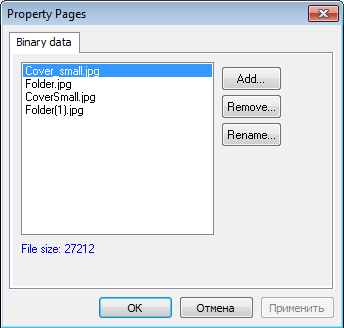
You could use an UserControl and save any binary data to a property. To control the content you could use a PropertyPage.
I've attached the project you can store any binary files to UC and then load it:
The other approach is you could store data inside EXE. So it can be better in several cases because those data isn't mapped into virtual memory and don't consume memory and you can always update it. If you're interesting i can give you special class to work with those data too.
If interested, play with a test project to get your logic down. That project should dynamically build a valid bitmap that simply embeds a selected file and can display the bitmap (pixel gibberish) to ensure your bitmap is valid. Then of course, create the routines needed to extract the embedded file. Of course you'll have a ctx file when all said and done. As for the bitmap dimensions? If the file size is < 1gb, might as well make it a bitmap 1 x (file size + overhead) divided by 4 and rounded up to DWord
Maybe this code will help you:
Code:
Option Explicit

Private Type GUID
    Data1           As Long
    data2           As Integer
    Data3           As Integer
    Data4(7)        As Byte
End Type
Private Type PicBmp
    size            As Long
    Type            As Long
    hbmp            As Long
    hpal            As Long
    Reserved        As Long
End Type
Private Type RGBQUAD
    rgbBlue         As Byte
    rgbGreen        As Byte
    rgbRed          As Byte
    rgbReserved     As Byte
End Type
Private Type BITMAPINFOHEADER
    biSize          As Long
    biWidth         As Long
    biHeight        As Long
    biPlanes        As Integer
    biBitCount      As Integer
    biCompression   As Long
    biSizeImage     As Long
    biXPelsPerMeter As Long
    biYPelsPerMeter As Long
    biClrUsed       As Long
    biClrImportant  As Long
End Type
Private Type BITMAPINFO
    bmiHeader       As BITMAPINFOHEADER
    bmiColors       As RGBQUAD
End Type

Private Declare Function SetDIBits Lib "gdi32" ( _
                         ByVal hDC As Long, _
                         ByVal hBitmap As Long, _
                         ByVal nStartScan As Long, _
                         ByVal nNumScans As Long, _
                         ByRef lpBits As Any, _
                         ByRef lpBI As BITMAPINFO, _
                         ByVal wUsage As Long) As Long
Private Declare Function GetDIBits Lib "gdi32" ( _
                         ByVal aHDC As Long, _
                         ByVal hBitmap As Long, _
                         ByVal nStartScan As Long, _
                         ByVal nNumScans As Long, _
                         ByRef lpBits As Any, _
                         ByRef lpBI As BITMAPINFO, _
                         ByVal wUsage As Long) As Long
Private Declare Function CopyMemory Lib "kernel32" _
                         Alias "RtlMoveMemory" ( _
                         ByRef Destination As Any, _
                         ByRef Source As Any, _
                         ByVal Length As Long) As Long
Private Declare Function CreateDIBSection Lib "gdi32" ( _
                         ByVal hDC As Long, _
                         ByRef pBitmapInfo As BITMAPINFO, _
                         ByVal un As Long, _
                         ByRef lplpVoid As Long, _
                         ByVal handle As Long, _
                         ByVal dw As Long) As Long
Private Declare Function OleCreatePictureIndirect Lib "olepro32.dll" ( _
                         ByRef PicDesc As PicBmp, _
                         ByRef RefIID As GUID, _
                         ByVal fPictureOwnsHandle As Long, _
                         ByRef IPic As IPicture) As Long
Private Declare Function IIDFromString Lib "ole32.dll" ( _
                         ByVal lpsz As Long, _
                         ByRef lpiid As GUID) As Long

Private Sub BMP2Array(bmp As IPicture, data() As Byte)
    Dim bi  As BITMAPINFO
    Dim l   As Long

    bi.bmiHeader.biSize = Len(bi.bmiHeader)
    GetDIBits Me.hDC, bmp.handle, 0, 0, ByVal 0, bi, 0

    ReDim data(bi.bmiHeader.biWidth * Abs(bi.bmiHeader.biHeight) * 3 - 1)
    bi.bmiHeader.biBitCount = 24
    bi.bmiHeader.biCompression = 0
    bi.bmiHeader.biSizeImage = 0

    GetDIBits Me.hDC, bmp.handle, 0, Abs(bi.bmiHeader.biHeight), data(0), bi, 0

    CopyMemory l, data(0), 4
    CopyMemory data(0), data(4), l

    ReDim Preserve data(l - 1)

End Sub

Private Function Array2BMP(data() As Byte) As IPicture
    Dim sWidth      As Long
    Dim sHeight     As Long
    Dim pixels      As Long
    Dim bi          As BITMAPINFO
    Dim hbmp        As Long
    Dim lpPtr       As Long

    pixels = -Int(-(UBound(data) + 5) / 3)
    sWidth = -Int(Int(-Sqr(pixels)) / 4) * 4
    sHeight = -Int(-pixels / sWidth)

    With bi.bmiHeader
        .biSize = Len(bi.bmiHeader)
        .biBitCount = 24
        .biHeight = sHeight
        .biPlanes = 1
        .biWidth = sWidth
    End With

    hbmp = CreateDIBSection(Me.hDC, bi, 0, lpPtr, 0, 0)
    CopyMemory ByVal lpPtr, UBound(data) + 1, 4
    CopyMemory ByVal lpPtr + 4, data(0), UBound(data) + 1

    Dim IID_IPictureDisp    As GUID
    Dim pic                 As PicBmp

    IIDFromString StrPtr("{7BF80981-BF32-101A-8BBB-00AA00300CAB}"), IID_IPictureDisp

    With pic
       .size = Len(pic)
       .Type = vbPicTypeBitmap
       .hbmp = hbmp
    End With

    OleCreatePictureIndirect pic, IID_IPictureDisp, True, Array2BMP

End Function

Private Sub Form_Click()
    Dim fnum    As Integer
    Dim data()  As Byte
    Dim data2() As Byte
    Dim lIndex  As Long

    fnum = FreeFile
    Open "C:\Temp\videoplayback.mp4" For Binary As fnum
    ReDim data(LOF(fnum) - 1)
    Get fnum, , data()
    Close fnum

    Set Picture1.Picture = Array2BMP(data)
    ' Correct?
    BMP2Array Picture1.Picture, data2()

    Debug.Assert UBound(data) = UBound(data2)

    For lIndex = 0 To UBound(data)
        Debug.Assert data(lIndex) = data2(lIndex)
    Next

End Sub
Private mBA() As Byte

Public Property Let BA(nBA As Variant)
    mBA = nBA
End Property

Public Property Get BA() As Variant
    BA = mBA
End Property

Private Sub UserControl_InitProperties()
    mBA = vbNullString
End Sub

Private Sub UserControl_ReadProperties(PropBag As PropertyBag)
    mBA = PropBag.ReadProperty("BA", vbNullString)
    Debug.Print UBound(mBA)
End Sub

Private Sub UserControl_WriteProperties(PropBag As PropertyBag)
    PropBag.WriteProperty "BA", mBA, vbNullString
End Sub
This doesn't run up against one of the limits for the data size of variables? Would really be a mess.
You can only load 65536 lines of code per module, and you can only have 1024 bytes per line. Even Zip-compressed, the image set I need is 197kb, so I'd need 197,000*2 lines to define them as strings.
The_trick's solution would be great if it were an exe I was distributing, but it's just the control... so I'd need a UserControl on a UserControl...
But I may have found a solution... List items. You can enter it seems like 32k List items into the IDE, so my images would need to be split between at most 2 lists, then just need to combine all the items back into one string. Works with no crashing so far but I've only tried a single icon. That 64kb limit from chars*2 might have been the issue with tags; issues with exceeding that.
Last edited by fafalone; Apr 11th, 2020 at 01:44 AM.
You can only load 65536 lines of code, and you can only have 1024 bytes per line. Even Zip-compressed, the image set I need is 197kb, so I'd need 197,000 lines to define them as strings.
The_trick's solution would be great if it were an exe I was distributing, but it's just the control... so I'd need a UserControl on a UserControl...
But I may have found a solution... List items. You can enter it seems like 32kb of List items into the IDE, so my images would need to be split between at most 2 lists, then just need to combine all the items back into one string. Works with no crashing so far but I've only tried a single icon.
Those limits has nothing to do with it.
I've stored files in this way (I don't remember the size but at least something like 300KB), I think there is no limit.
The limit must be 4GB, that is the limit for file size in win32.
Edit: you can test.
Olaf also told you that there is no limit:
Originally Posted by Schmidt
No, have used something like this myself at some time.
Last edited by Eduardo-; Apr 11th, 2020 at 01:52 AM.
You can only load 65536 lines of code per module, and you can only have 1024 bytes per line.
Not sure, how that shall come into play...
Eduardo was talking about "all your resources in a single ByteArray-Variable" (showing, how to interact with the PropBag for that).
How you've organized your resources inside this ByteArray (compressed or not) - "is your thing".
Maybe, what you're missing is the "initial spark" (to get valid initial content into your ByteArray)...
Code:
Private Sub UserControl_ReadProperties(PropBag As PropertyBag)
    mBA = PropBag.ReadProperty("BA", vbNullString)
    If UBound(mBA) < 0 Then 'it wasn't yet in the PropBag
      mBA = ReadInitialContentFromAnyFileOnYOurDevMachine
    End If
End Sub
Ah, yes, the idea is to be able to load the file into the UserControl. I can make a sample to load the file from a property page if you want, it is to load the binary file from disk and to send it to the UserControl.
If you instead want to "code" the content, that's another story. But why would you want to do that?
BTW, the sample project posted by The trick also loads files from a property page, but it is a bit more complex because it is able to handle many files.
Or if it is something that you need to do only once, do what Olaf suggested of loading the file from a path from disk the first time.
Last edited by Eduardo-; Apr 11th, 2020 at 02:35 AM.
You want to store the file into an UserControl that you want to make available to other developers in source code or compiled into an OCX (I'm guessing) and the image must be there, if that's the case, then perhaps you need to store it into another UserControl that is contained into this main UserControl. In this way, when the main UserControl is saved, the file will be saved into the *.ctx file.
Edit: re-reading your post #17 I see that you don't want to do that. I guess that you want to distribute an UserControl with no dependency.
Well, then convert the binary file to text, Base64 possibly, and check if the tag property can store it.
If not, you can put it in code, the limits should not be a problem, you can split the text into several variables in array, fill each variable in a different procedure, and join all before reconverting to byte array.
Last edited by Eduardo-; Apr 11th, 2020 at 03:47 AM.
Or if it is something that you need to do only once, do what Olaf suggested of loading the file from a path from disk the first time.
Since resources might change, one can influence the loading-behaviour of that internal bytearray (no need for a PropPage),
to behave differently when the project is run in the IDE (where it e.g. could *always* initialize "from FileSystem").
I have some stuff I handle similar (putting a local WebRoot-Folder into a compressed "WebArchive-File" in each IDE-Run)
I usually do that with:
Code:
If App.Logmode Then 'we run compiled
   LoadWebArchiveFromInternalResources 'in your case PB.ReadProperty
Else
   MakeNewWebArchiveFromFolder ... 'in your case ReadBytesFromFileSystem
End If
This costs not much time when it runs in IDE-mode, and I can be sure that whatever I change in my WebRoot-Folder -
will be updated in the next IDE-Run - and later be included in the final App as a resource.
Olaf
Last edited by Schmidt; Apr 11th, 2020 at 02:58 AM.
I made a sample using Base64 encoding and a 65Kb picture could be stored in a single procedure.
Attached is an UserControl that has a sample image already loaded (in code), but you can uncomment the procedures needed to convert the image into code.
Personally, I'd tend to go with the bitmap wrapper idea (~44 bytes extra per embedded file) vs string data. Likely overall smaller footprint, faster/easier processing. The only hurdle is creating the bitmap & that's done outside of your project. Once the bitmap data was accessed, the image control picture can simply be set to nothing. Image controls are windowless, listboxes are not. I guess what I'm saying, if you are trying to make this easier for the potential user/coder, why make it more bloated than needed?
Insomnia is just a byproduct of, "It can't be done"
@The_trick and LaVolpe, this method seems to be working good, worked without any crashing on a test image, going to scale it up now. Created a separate app to make the bitmaps, saved them with SavePicture, and loaded them into the UC normally.
Update: Works perfectly with the full image set loaded. Thanks guys. Also appreciate the other ideas, definitely useful in other circumstances.
Last edited by fafalone; Apr 14th, 2020 at 03:34 AM.
Even Zip-compressed, the image set I need is 197kb, so I'd need 197,000*2 lines to define them as strings.
197*2 lines of code, not thousands :-))
PNG images are already zipped so here is a strategy I've been using successfully before. Place all your icons in a single image, convert it to PNG and embed it in the user-control as a base64 encoded string. This is what I did for a button control of mine for instance and it worked.
E.g., here is the image with the "icons" placed in a grid as a 32-bit transparent PNG (file size of 14KB):
The added bonus is that the button remained a single file user-control as there is no companion .ctx file to distribute as it has no binary properties set.
cheers,
</wqw>
Last edited by wqweto; Apr 14th, 2020 at 03:28 AM.
Neat. Will definitely keep that in mind for the future... just a couple questions though,
-I need multi-size icons for code dealing with the ICO file format and APIs expecting HICON handles to it; I take it there's no easy way to reassemble into an icon file (why I asked about binary data rather than straight images)? Would be a massive undertaking to re-write for exclusively regular images.
-Can you briefly summarize how the mapping works? All hand entered coords or automatic?
I like the idea of no ctx file either. I'm pretty sure it's just my images stored in there now.
Last edited by fafalone; Apr 14th, 2020 at 03:51 AM.
> I need multi-size icons for code dealing with the ICO file format and APIs expecting HICON handles to it
What do you use for the multi-size ICO files now? Do you need hIcons to pass to some Windows common controls? If your project does not deal w/ GDI, GDI+, WIA or WIC currently at all, then PNG loading will be tough w/o any of these.
> -Can you briefly summarize how the mapping works? All hand entered coords or automatic?
Mostly yes but surely there is a method to it -- first 15 icons are 32x32 so offsets are calculated, next 7 icons are 64x64 so more calculation needed, etc.
I'm using them to select the best size for the current DPI. It's not that I couldn't rewrite all the icon-handling to image handling besides a couple narrow points involving Windows controls and transparency, it's just since 90% of the graphics my control deals with are incoming icons from the system image list, I also used icons for the built-in stuff. I do deal with GDI+ though. (This is for my shell browser control. I've started with the basics of WIC when I made a small demo, so not entirely unfamiliar, but not used in this project).
Last edited by fafalone; Apr 14th, 2020 at 07:10 AM.
> it's just since 90% of the graphics my control deals with are incoming icons from the system image list, I also used icons for the built-in stuff.
This should probably remain as is (although the rest of the world is working with PNG icons exclusively).
You could shim a PNG to hIcon extractor somewhere so to get it working without modifications -- take a look at this pvLoadPicture function for ideas. It can convert a GDI+ hBitmap from GdipCloneBitmapAreaI for instance (or an IWICBitmapFrameDecode reference btw) to a GDI hIcon w/ 32-bit alpha transparency (a PNG in disguise) *and* wrap the latter in a standard VB6 StdPicture.
BTW there is the possibility to store binary data to a ctl file instead ctx (and other X files) but there are some restrictions. You could make a converter and use a bin file inside an Usercontrol. See the attached example.
You could play with it just for fun if you're interesting.
You could use an UserControl and save any binary data to a property. To control the content you could use a PropertyPage.
I've attached the project you can store any binary files to UC and then load it:
The other approach is you could store data inside EXE. So it can be better in several cases because those data isn't mapped into virtual memory and don't consume memory and you can always update it. If you're interesting i can give you special class to work with those data too.
I'm interested! I want you to give me a special class towork with those data too.



 [RESOLVED] Store binary data in UserControl?

 Reply With Quote
 Originally Posted by qvb6