|

-
Oct 28th, 2009, 03:48 PM
#1
Thread Starter
Lively Member

 [RESOLVED] Code Not Executing (button) [RESOLVED] Code Not Executing (button)
I'm just getting into ASP.NET, so please excuse my ignorance.
I've added a button to my page and have added code to the _Click event, but the code doesn't execute when clicked. I've put a break on each line but it runs right through when clicked. It's clearly not a problem with the code in this button since it doesn't execute it, but i'll toss it in here anyways just for fun.
vb Code:
Protected Sub cmdSubmit_Click(ByVal sender As Object, ByVal e As System.EventArgs)
        Context.Items.Add("custnum", txtSQL.Text)

        Server.Transfer("custnum.aspx", True)
    End Sub
I'm assuming it's something very simple. Any ideas? Yes, the button name is correct, btw.
-
Oct 28th, 2009, 03:55 PM
#2
Fanatic Member
Re: Code Not Executing (button)
Try
Code:
Protected Sub cmdSubmit_Click(ByVal sender As Object, ByVal e As System.EventArgs) Handles cmdSubmit.Click
-
Oct 28th, 2009, 03:57 PM
#3
Thread Starter
Lively Member
Re: Code Not Executing (button)
 Originally Posted by rjv_rnjn

Try
Code:
Protected Sub cmdSubmit_Click(ByVal sender As Object, ByVal e As System.EventArgs) Handles cmdSubmit.Click
no good 
-
Oct 28th, 2009, 04:01 PM
#4
Thread Starter
Lively Member
Re: Code Not Executing (button)
Originally Posted by Eclyps19
no good
I added an additional button directly after my textbox and copied the code into there, which seems to work just fine. Here's a clip.
vb Code:
<p align="left"> Please type the Customer Number: <asp:TextBox ID="txtSQL" runat="server" Width="660px" ontextchanged="txtSQL_TextChanged"></asp:TextBox> 'Works! <asp:Button ID="Button1" runat="server" onclick="Button1_Click" Text="Button" /> </p> <p align="left"> 'Doesn't work! <asp:Button ID="cmdSubmit" runat="server" onclick="cmdSubmit_Click" Text="Submit SQL" /> </p>
still can't figure out why one works and the other doesn't...
-
Oct 28th, 2009, 04:09 PM
#5
Fanatic Member
Re: Code Not Executing (button)
Is there any difference on the event handler signature of two buttons?
-
Oct 28th, 2009, 04:12 PM
#6
Thread Starter
Lively Member
Re: Code Not Executing (button)
Originally Posted by rjv_rnjn
Is there any difference on the event handler signature of two buttons?
nothing other than the name
vb Code:
Protected Sub cmdSubmit_Click(ByVal sender As Object, ByVal e As System.EventArgs) Protected Sub Button1_Click(ByVal sender As Object, ByVal e As System.EventArgs)
-
Oct 28th, 2009, 04:13 PM
#7
Re: Code Not Executing (button)
Hey,
Basically, events, like the Button Click event, need to be hooked up to their associated Event Handlers. In VB.net, this linkage happens with the use of the Handles Clause which rjv_rnjn pointed you at. Quite why this didn't work for you, I am at a loss to say, but one way to check would be the following:
1) In Design View, select your button
2) Bring up the Properties window, and then click the yello lightning bolt
3) Select the Event that you are interested in, in your case the click event, and then hit the drop down list beside (you may or may not already have a event handler specified.
4) Select the event handler that you want to associate with this event.
Here is a screen shot:
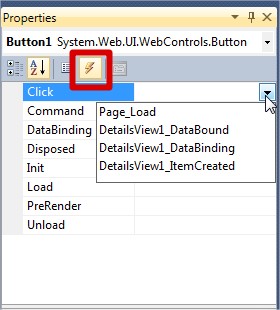
Hope that helps!!
Gary
-
Oct 28th, 2009, 04:24 PM
#8
Thread Starter
Lively Member
Re: Code Not Executing (button)
Originally Posted by gep13
Hey,
Basically, events, like the Button Click event, need to be hooked up to their associated Event Handlers. In VB.net, this linkage happens with the use of the Handles Clause which rjv_rnjn pointed you at. Quite why this didn't work for you, I am at a loss to say, but one way to check would be the following:
1) In Design View, select your button
2) Bring up the Properties window, and then click the yello lightning bolt
3) Select the Event that you are interested in, in your case the click event, and then hit the drop down list beside (you may or may not already have a event handler specified.
4) Select the event handler that you want to associate with this event.
Here is a screen shot:
Hope that helps!!
Gary
that helped. Appreciate it!
-
Oct 29th, 2009, 02:42 AM
#9
Re: [RESOLVED] Code Not Executing (button)
Hey,
Good stuff, glad to hear you got it working!
Gary
 Posting Permissions
- You may not post new threads
- You may not post replies
- You may not post attachments
- You may not edit your posts
-
Forum Rules
|
Click Here to Expand Forum to Full Width
|



 Reply With Quote

