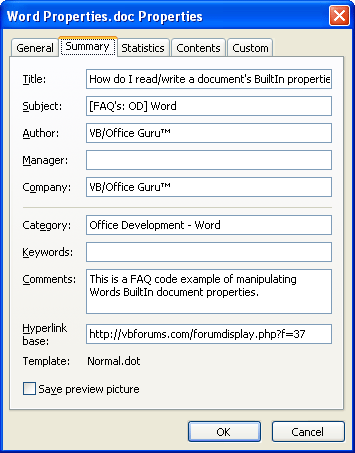
The Properties dialog items can be viewed from the menu - "File > Properties > Summary tab" as displayed in Fig. 1 below.
These are the constanst for the available builtin document properties. If you are doing late binding then you can find the constant values in Word Object Browser.
- wdPropertyAppName
- wdPropertyAuthor
- wdPropertyBytes
- wdPropertyCategory
- wdPropertyCharacters
- wdPropertyCharsWSpaces
- wdPropertyComments
- wdPropertyCompany
- wdPropertyFormat
- wdPropertyHiddenSlides
- wdPropertyHyperlinkBase
- wdPropertyKeywords
- wdPropertyLastAuthor
- wdPropertyLines
- wdPropertyManager
- wdPropertyMMClips
- wdPropertyNotes
- wdPropertyPages
- wdPropertyParas
- wdPropertyRevision
- wdPropertySecurity
- wdPropertySlides
- wdPropertySubject
- wdPropertyTemplate
- wdPropertyTimeCreated
- wdPropertyTimeLastPrinted
- wdPropertyTimeLastSaved
- wdPropertyTitle
- wdPropertyVBATotalEdit
- wdPropertyWords
Word 2003 VBA Code Example:
VB Code:
'READ PROPERTIES
Option Explicit
 Private Sub cmdReadProps_Click()
     Dim iLines As Integer
    iLines = ActiveDocument.BuiltInDocumentProperties(wdPropertyLines)
    MsgBox "There are " & iLines & " lines in the current document.", vbOkOnly + vbInformation
     Dim lWords As Long
    lWords = ActiveDocument.BuiltInDocumentProperties(wdPropertyWords)
    MsgBox "There are " & lWords & " words in the current document.", vbOkOnly
     Dim sWhen As String
    sWhen = ActiveDocument.BuiltInDocumentproperties(wdPropertyTimeLastSaved)
    MsgBox "The last time the current document was saved was " & sWhen, vbOkOnly
     Dim sPrinted As String
    sPrinted = ActiveDocument.BuiltInDocumentProperties(wdPropertyTimeLastPrinted)
    MsgBox "The last time the current document was printed was " & sPrinted, vbOkOnly
 End Sub
VB Code:
'WRITE PROPERTIES
Option Explicit
 Private Sub cmdWriteProps_Click()
     ActiveDocument.BuiltInDocumentProperties(wdPropertyTitle) = "How do I read/write a document's BuiltIn properties?"

    ActiveDocument.BuiltInDocumentProperties(wdPropertySubject) = "[FAQ's: OD] Word"

    ActiveDocument.BuiltInDocumentProperties(wdPropertyCompany) = "VB/Office Guru™"

    ActiveDocument.BuiltInDocumentProperties(wdPropertyCategory) = "Office Development - Word"

    ActiveDocument.BuiltInDocumentProperties(wdPropertyComments) = "This is a FAQ code example of manipulating Words BuiltIn document properties."

    ActiveDocument.BuiltInDocumentProperties(wdPropertyHyperlinkBase) = "http://vbforums.com/forumdisplay.php?f=37"
 End Sub
Fig. 1



 Reply With Quote