Private Sub Form_Load()
    WebBrowser1.Navigate "c:/page2.html"

End Sub
 Private Sub WebBrowser1_DocumentComplete(ByVal pDisp As Object, URL As Variant)
    If (pDisp Is WebBrowser1.Application) Then
        GetInfo WebBrowser1.Document
    End If
End Sub
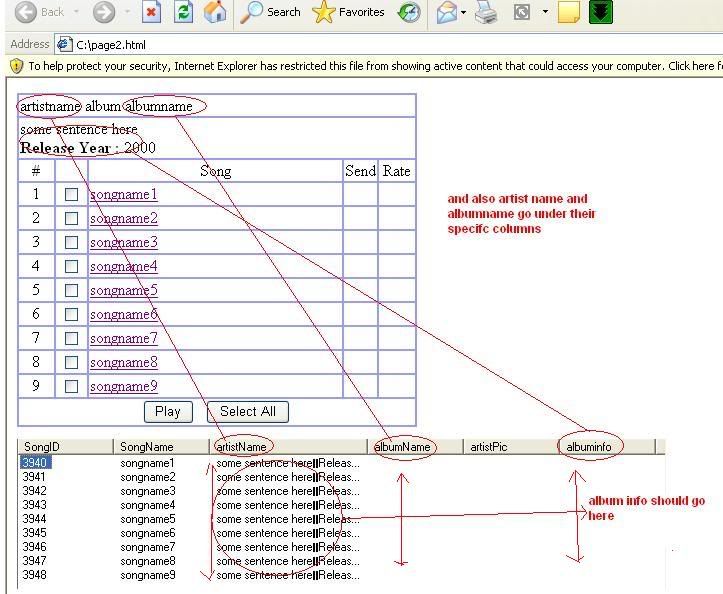
  Private Sub GetInfo(HTML As HTMLDocument)
    Dim HTMLA As HTMLAnchorElement
    Dim HTMLT As HTMLTable
    Dim HTMLR As HTMLTableRow
    Dim HTMLC As HTMLTableCell
    Dim HTMLI As HTMLInputElement
    Dim pTYPE As Integer
    Dim TMP() As String
    Dim tArtist As String
    Dim LI As ListItem
    For Each HTMLT In HTML.getElementsByTagName("table")
        For Each HTMLR In HTMLT.rows
            For Each HTMLC In HTMLR.cells
                If HTMLC.colSpan = 5 Then
                    tArtist = HTMLC.innerText
                    pTYPE = 1
                End If
                If pTYPE = 1 Then
                    For Each HTMLI In HTMLC.getElementsByTagName("input")
                        If HTMLI.Type = "checkbox" Then
                            Set LI = ListView1.ListItems.Add(, "ID:" & HTMLI.Value, HTMLI.Value)
                        End If
                    Next
                    For Each HTMLA In HTMLC.getElementsByTagName("a")
                        If InStr(HTMLA.onclick, LI.Text) Then
                            LI.ListSubItems.Add , , HTMLA.innerText
                            LI.ListSubItems.Add , , tArtist
                            Exit For
                        End If
                    Next
                Else
                    For Each HTMLA In HTMLC.getElementsByTagName("a")
                        If InStr(HTMLA.href, "WriteLyrics.asp?SongID=") Then
                            TMP = Split(HTMLA.href, "=")
                            If Not LIExists(Replace(TMP(1), "&Singer", "")) Then
                                Set LI = ListView1.ListItems.Add(, "ID:" & Replace(TMP(1), "&Singer", ""), Replace(TMP(1), "&Singer", ""))
                                LI.ListSubItems.Add , , TMP(4)
                                LI.ListSubItems.Add , , Replace(TMP(2), "&Album", "")
                                LI.ListSubItems.Add , , Replace(TMP(3), "&Song", "")
                            End If
                        End If
                    Next
                End If
            Next
        Next
    Next


End Sub
Private Function LIExists(sKEY As String) As Boolean
    On Error GoTo ItsNotThere
    Dim LI2 As ListItem
    Set LI2 = ListView1.ListItems("ID:" & sKEY)
    LIExists = True

    Exit Function
ItsNotThere:
End Function




 Reply With Quote