|

-
Apr 27th, 2006, 02:07 AM
#1
[FAQ's: OD] How do I color alternating rows on my report (Greenbar effect)?
Greenbar:
A style of fanfolded continuous-feed paper with alternating green and white bars on it, especially used in old-style line printers. This slang almost certainly dates way back to mainframe days.
Greenbar formatting on a report is very easy to do with only a few lines of VBA code. It makes reading reports and printouts much easier.
Once you have created your report you will want to make sure all the controls in the Details section have a Transparent background applied via the Properties window. After that is done all that is left to do is add the code that formats the Background property of the Details section in an alternating fashion with a light green color or any other color you wish.
To view the Class module code (CodeBehind) of your opened report:

Preview or the completed report with Greenbar effect:
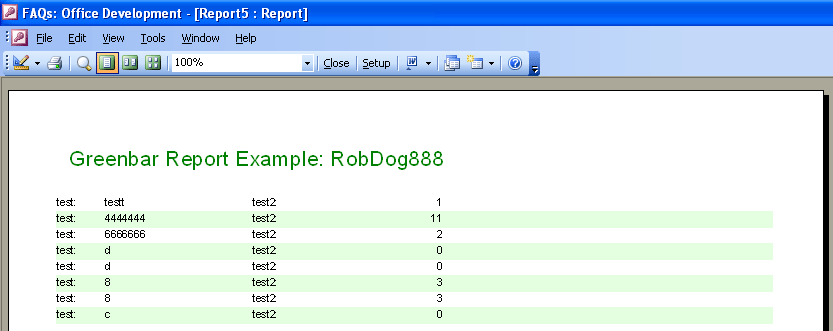
Access 2003 VBA Code Example:
VB Code:
Option Explicit
Option Compare [color=navy]Database[/color]
 Private miCount As Integer
 Private Sub Detail_Format(Cancel As Integer, FormatCount As Integer)
    'Determine if we are on an even or odd record.
    If miCount Mod 2 = 1 Then
        'White
        Detail.BackColor = vbWhite
    Else
        'Light Green
        Detail.BackColor = RGB(228, 255, 223)
    End If
    miCount = miCount + 1
End Sub
 Private Sub Report_Open(Cancel As Integer)
    miCount = 1
End Sub
Last edited by RobDog888; May 24th, 2006 at 09:39 PM.
VB/Office Guru™ (AKA: Gangsta Yoda™  ®) ®)
I dont answer coding questions via PM. Please post a thread in the appropriate forum. 
Microsoft MVP 2006-2011
Office Development FAQ (C#, VB.NET, VB 6, VBA)
Senior Jedi Software Engineer MCP (VB 6 & .NET), BSEE, CET
If a post has helped you then Please Rate it! 
• Reps & Rating Posts • VS.NET on Vista • Multiple .NET Framework Versions • Office Primary Interop Assemblies • VB/Office Guru™ Word SpellChecker™.NET • VB/Office Guru™ Word SpellChecker™ VB6 • VB.NET Attributes Ex. • Outlook Global Address List • API Viewer utility • .NET API Viewer Utility •
System: Intel i7 6850K, Geforce GTX1060, Samsung M.2 1 TB & SATA 500 GB, 32 GBs DDR4 3300 Quad Channel RAM, 2 Viewsonic 24" LCDs, Windows 10, Office 2016, VS 2019, VB6 SP6
 Posting Permissions
- You may not post new threads
- You may not post replies
- You may not post attachments
- You may not edit your posts
-
Forum Rules
|
Click Here to Expand Forum to Full Width
|



 Reply With Quote