|

-
Apr 22nd, 2026, 08:34 AM
#1
 Forum not working in Chrome and IOS Chrome Forum not working in Chrome and IOS Chrome
Is this a known issue? I have to use Edge on my workstation and Safari on IOS. Any other news about the forum? Seems to be dwindling participants these days? Could it be related to inaccessibility in some browsers?
- Coding Examples:
- Features:
- Online Games:
- Compiled Games:
-
Apr 22nd, 2026, 09:32 AM
#2
Re: Forum not working in Chrome and IOS Chrome
I use Chrome without issue on the my desktop and from time to time on my Android.
That isn't very much to go on... Are you getting any error messages
-
Apr 22nd, 2026, 12:46 PM
#3
Re: Forum not working in Chrome and IOS Chrome
Here’s a screenshot of the error message. I’ll try to copy the text in case it’s unreadable…
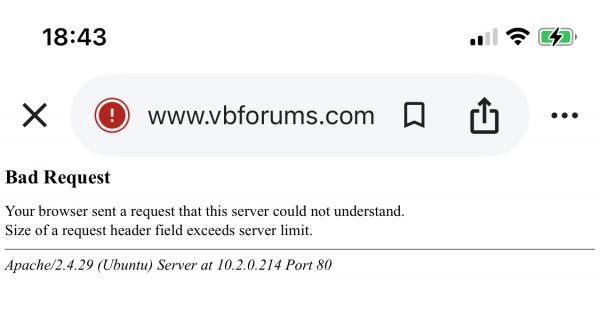
Bad Request
Your browser sent a request that this server could not understand.
Size of a request header field exceeds server limit.
Apache/2.4.29 (Ubuntu) Server at 10.2.0.214 Port 80
- Coding Examples:
- Features:
- Online Games:
- Compiled Games:
-
Apr 23rd, 2026, 01:42 AM
#4
Re: Forum not working in Chrome and IOS Chrome
Same Error Reported Here:
https://www.vbforums.com/showthread....34-Bad-Request
Try the suggestion about changing the DNS.
-
Apr 23rd, 2026, 09:02 AM
#5
Re: Forum not working in Chrome and IOS Chrome
I used to get this error too, from time to time. Not just with VBForums, but also big-name sites like Microsoft.
During my last job, I even had their managed service provider look at it (we were basically a Microsoft shop exclusively working in a .NET environment and so not being able to access Microsoft was a pretty big deal) and they tracked it down to a transient networking issue that they couldn't really resolve. I found this odd because sometimes it wouldn't work on one browser, but it would work on another; then again, I do not work in IT nor do I pretend to know anything about networking.
9 times out of 10, flushing the DNS or changing it to/from 1.1.1.1 or 8.8.8.8 or allowing the default ISP DNS resolved the issue.
Since I've switched ISPs (away from AT&T), I haven't had the issue anymore. I can't say definitely that the ISP was the issue because the reason I switched was that I moved to the house next door, so it could have been the equipment I was using for all I know.
Either way, I know it's a pain in the rear.
-
Apr 23rd, 2026, 12:29 PM
#6
Re: Forum not working in Chrome and IOS Chrome
To flush the DNS cache on Windows, open Command Prompt as administrator, type ipconfig /flushdns, and press Enter. This resolves connectivity issues and forces your device to update outdated website information.
-
Apr 23rd, 2026, 06:33 PM
#7
Re: Forum not working in Chrome and IOS Chrome
Flushing the DNS cache didn’t work for me…
- Coding Examples:
- Features:
- Online Games:
- Compiled Games:
-
Apr 24th, 2026, 01:18 AM
#8
Re: Forum not working in Chrome and IOS Chrome
Did changing the DNS make any difference? (See dday9's post)
-
Apr 24th, 2026, 07:32 AM
#9
Re: Forum not working in Chrome and IOS Chrome
I don't think changing DNS would made a difference in this case - you're hitting the VBForums.com server but there's a problem with your browser's request. "Your browser sent a request that this server could not understand. Size of a request header field exceeds server limit." means the problem is with your browser's request - one or more of the HTTP Header fields is too long for the server to process.
Maybe a bad cookie? I'd try clearing cookies first (or visit the site in Incognito Mode to see if that makes a difference first if you don't want to clear your cookies). If you're familiar with Chrome's devtools, I'd pull them up and inspect the request - are there any unusually long header fields?
 Posting Permissions
- You may not post new threads
- You may not post replies
- You may not post attachments
- You may not edit your posts
-
Forum Rules
|
Click Here to Expand Forum to Full Width
|



 Reply With Quote

