|

-
Jan 27th, 2026, 03:12 PM
#1
[VB6] - RGB to RYB and RGB to HSL conversion
RGB to RYB and RGB to HSL conversion
INTRODUCTION
I've been looking for a way to convert the color space from RGB (additive) to RYB [Red, Yellow, Blue] (subtractive) for a while.
This is because if we want to mix Yellow with Blue, using RGB we get Gray, while, in reality, if we use brushes on a canvas, we get a Green color.
Yellow RGB = (1,1,0) Blue RGB (0,0,1)
Mixed = (0.5, 0.5, 0.5) = Gray.
The internet is full of resources ranging from using equations to trilinear interpolations of the 8 vertices of cubes corresponding to the RGB and RYB color spaces.
However, none of these methods really satisfied me, and the conversions were not one-to-one. That is, converting any RGB color to RYB and then converting it back from RYB to RGB did not yield the original color.
METHOD
One day, as soon as I woke up, this occurred to me:
Looking at the RGB and RYB color spaces from an HSL (Hue, Saturation, Lightness) perspective, you can see that the RGB yellow hue (R+G) corresponds to the RYB yellow hue (Y).
So, primarily, color space conversion must somehow rely on hue conversion, so I thought of using HSL as an intermediate color space.
- The hue is transformed nonlinearly to approximate RYB perception (since pigment mixing behaves differently than light).
- Saturation is preserved and
- Brightness is inverted, as RGB(1,1,1) white will correspond to RYB(0,0,0) white, meaning no pigment on the (white) canvas. And vice versa, RGB(0,0,0) black will correspond to RYB(1,1,1) black, meaning maximum concentration of all pigments. (This isn't entirely true, but it's a simplification.)
In my case, starting with Red on the Hue wheel, I have
Red 0 degrees
Green 120 degrees
Blue 240 degrees
Suppose we want to draw the RYB color space hue wheel.
I notice that the RYB hue from blue to red (counterclockwise) is practically unchanged (equal to RGB), while it's in the slice from red to blue (counterclockwise) that things change significantly compared to RGB.
So I only consider the range from 0 to 240 degrees, or 4/6 of the entire circle.
Code:
If H < 0.6666667! Then ' < 4/6
So I "normalize" the hue angle like this:
| Angle | Circle Slice | Normalized |
| 000 | 0/6 | 0.00 |
| 060 | 1/6 | 0.25 |
| 120 | 2/6 | 0.50 |
| 180 | 3/6 | 0.75 |
| 240 | 4/6 | 1.00 |
Normalized:
Code:
H = H * 1.5! 'H = H / 0.6666667!
When drawing the RYB color space hue wheel, I start with Red and blend the hue until I reach Yellow (which in this case will be at 120 degrees).
I note that this 120-degree endpoint (RYB) corresponds to the RGB Yellow between R and G, or 60 degrees.
That is, the Yellow RGB hue (60 degrees -> 0.25) is translated into the Yellow RYB hue (120 degrees -> 0.5).
Continuing in this way, I now want to draw RYB hues in the range from Yellow to Green (only 60 degrees).
I note that this Green (RYB) 180-degree endpoint corresponds to the RGB Green, or 120 degrees.
That is, the Green RGB hue (120 degrees -> 0.5) corresponds to Green (yellow + blue) in the RYB hue, which is located at (180 degrees -> 0.75).
What I just explained is the crucial aspect of the conversion. It's best to focus and understand this step before reading further.
RGB and RYB wheels
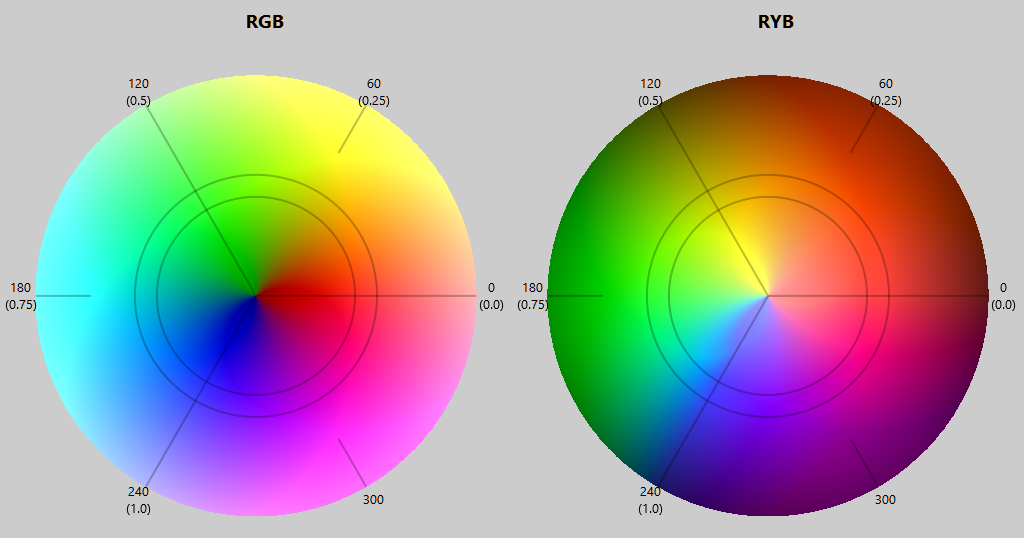
In any case, at this point I needed a function that would map (transform) the 0-240 degree Hue range normalized to the 0-1 range as follows:
Code:
f(0.00) = 0.00		RGB (red)	  0  =	RYB (red)      0
f(0.25) = 0.50		RGB (Yellow)  60  = RYB (Yellow) 120
f(0.50) = 0.75		RGB (Green)  120  = RYB (Green)  180
f(1.00) = 1.00		RGB (Blue)   240  = RYB (Blue)   240
I tried several times to get close, but finally asked some AI, which found (not without initial difficulty) the exact formula.
Also with the help of AI, I found the inverse formula that allows me to transform the inverse hue (for RYB to RGB conversion).
Code:
Private Function ForwardHUEtransform(X!) As Single
    ForwardHUEtransform = 1.206639 * (1 - Exp(-1.764618 * (X ^ 0.860773)))
End Function
Private Function InverseHUEtransform(X!) As Single
    ' InverseHUEtransform = (-Log(1 - (X / 1.206639)) / 1.764618) ^ (1 / 0.860773)
    ' (avoid Division)
    InverseHUEtransform = (-Log(1 - (X * 0.828748)) * 0.566694) ^ (1.161746)
End Function
Graph of these transforms HERE
UPDATE 1: New Hue trasfromation Curve
(Update1) New graph Here
THE MAIN FUNCTIONS:
Code:
Public Sub RGB2ryb(R As Single, G As Single, B As Single)
    '     R--|--G--|--B--|--R
    '     0  1  2  3  4  5  6
    '     0    0.5    1
    Dim H!, s!, L!
    RGB2HSLmy R, G, B, H, s, L
    If H < 0.6666667! Then              '4/6             '< Blue  (Range R=0 Y=.1666 G=0.33333)
        H = H * 1.5!                    '6/4
        H = ForwardHUEtransform(H)
        H = H * 0.6666667!              '4/6
    End If
    L = 1 - L
    HSL2RGBmy H, s, L, R, G, B
End Sub

Public Sub ryb2RGB(R As Single, y As Single, B As Single)
    '     R--|--G--|--B--|--R
    '     0  1  2  3  4  5  6
    '     0    0.5    1
    Dim H!, s!, L!
    RGB2HSLmy R, y, B, H, s, L
    If H < 0.6666667! Then              '4/6
        H = H * 1.5!                    '6/4              ' / 0.6666667
        H = InverseHUEtransform(H)
        H = H * 0.6666667!              '4/6
    End If
    L = 1 - L
    HSL2RGBmy H, s, L, R, y, B
End Sub
Another interesting aspect:
RGB to HSL Conversion
My algorithm implements the RGB?HSL conversion using a geometric vector approach rather than the traditional min/max method.
RGB to HSL Conversion
Fundamental concept: We're treating the RGB channels as vectors pointing in the 0°, 120°, and 240° directions in 2D space.
The math:
Create three vectors positioned at 0°, 120°, and 240° around a circle (forming an equilateral triangle).
V1 = (1, 0) represents red at 0°
V2 = (-0.5, 0.866...) represents green at 120°
V3 = (-0.5, -0.866...) represents blue at 240°
What happens:
1. Each RGB component is multiplied by its corresponding vector of length 1.
This results in three vectors pointing in the directions mentioned above (which are fixed) and with lengths equal to the RGB values.
2. The three vectors are added to create a resulting 2D vector.
Saturation is the amplitude of this resulting vector (Euclidean distance).
3. Brightness is simply the average of R, G, and B.
4. Hue is the angle of the resulting vector (using atan2), which is normalized to the range [0, 1].
All in all, this is very simple.
The reverse operation is a little more complicated.
HSL to RGB Conversion
This reverses the process:
1. Convert hue back to an angle. Create a vector with that angle and a magnitude equal to saturation.
(This corresponds to the sum of the three vectors obtained in the previous process.)
2. Depending on the "slice" in which this vector falls, we decompose it into the two directions that form that slice, which can be:
Red (0°) - Green (120°)
Green (120°) - Blue (240°)
Blue (240°) - Red (360°=0°)
This decomposition tells us how long the three vectors placed at 120° along the hue circle should be.
These lengths represent the RGB components.
3. This is not enough.
The current Brightness is calculated, which is given by the current RGB average.
Finally, to all 3 lengths (Current RGB Values) an amount corresponding to the difference between the desired and current Brightness must be added.
You can visualize it here https://htmlpreview.github.io/?https...alization.html
How RGB colors mix using RYB
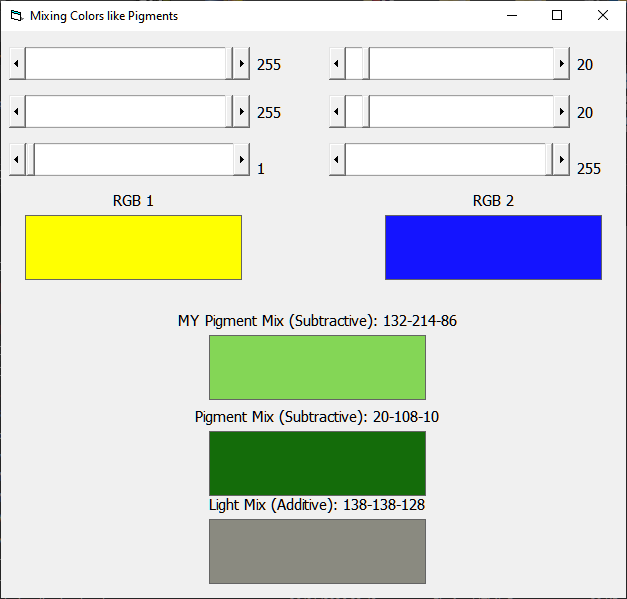
Requires RC6.Dll, but not essential, only used to create HSL wheels image. https://www.vbrichclient.com/#/en/About/
Github DOWNLOAD
Other considerations and developments:
This project was completed very quickly, using my less-than-stellar mathematical skills.
Regarding the HSL conversion:
One consideration, for example, could be made regarding the HSL Brightness:
Not all RGB components have the same brightness; for example, Blue is much darker than Green.
In fact, these weights are usually applied to the RGB components to calculate the Brightness:
L = 0.299 * R + 0.587 * G + 0.114 * B.
Well, I tried to take this into account when calculating L, but I couldn't obtain the equivalent HSL2RGB inverse transformation, so the problem is postponed for now.
Regarding the RYB conversion:
One thing I didn't worry about was where the Cyan color ended up
while applying the HUE transformation.
As we said: (ForwardHUEtransform)
Yellow goes from 60 to 120 degrees.
Green goes from 120 to 180 degrees.
And so does Cyan from 180 to 216 degrees. And perhaps it's "squashed" too much.
(I don't know the consequences of this.)
All in all, however, I'm quite satisfied, as the HSL and especially the RYB transformations work both ways; that is, by transforming forward and then backward, I obtain the initial values.
However, I don't rule out further developments/improvements in the future.
2026 - Roberto Mior (miorsoft - reexre)
Last edited by reexre; Feb 7th, 2026 at 06:31 AM.
-
Jan 28th, 2026, 10:41 AM
#2
Re: [VB6] - RGB to RYB and RGB to HSL conversion
Personally, I've never seen RYB (subtractive) used in any computer or printer context. Since I've learned about computers (MANY decades ago), I've always thought of the RYB approach as just something used in child's play and crayons.
Now, in a very related vein, printers are basically 'subtractive', and they use a CMYK approch (or, in a perfect world, just CMY), which is much more purely a 'subtractive' approach, basically layers of ink on paper.
Last edited by Elroy; Jan 28th, 2026 at 10:44 AM.
Any software I post in these forums written by me is provided "AS IS" without warranty of any kind, expressed or implied, and permission is hereby granted, free of charge and without restriction, to any person obtaining a copy. To all, peace and happiness.
-
Jan 28th, 2026, 01:44 PM
#3
Re: [VB6] - RGB to RYB and RGB to HSL conversion
> basically layers of ink on paper
The light passes through the ink, reflects off the paper and passes second time through the ink and in the process Magenta and Yellow are subtracted so only Cyan remains i.e. Cyan ink is transparent and block all other colors.
Black in CMYK is technically not needed but obviously initally the printing press was black and white so it makes sense to have a separate specialized ink for the (black) text and this is how we ended up with having CMYK model for images with K used to implement shadows i.e. K = min(C, M, Y) and C' = C - K, M' = M - K, Y' = Y - K off the top of my head (probably should consult LLMs for exact calculations).
cheers,
</wqw>
-
Jan 29th, 2026, 06:22 AM
#4
Re: [VB6] - RGB to RYB and RGB to HSL conversion
One thing I'm thinking of improving is the hue transformation curve.
https://www.desmos.com/calculator/fq7fcn9hx3
To avoid sharp distortions, it should be "smoother" at the points X = 0 (0 degrees) and X = 1 (240 degrees). That is, at these points, its derivative should be equal to 1. (45 degrees in graph curve)
The constant key is that it must pass through the points.
(0.0)
(0.25,0.5)
(0.5,0.75)
(1.1)
and I might even consider considering a curve for the entire 0-360 range instead of just 0-240.
-
Jan 29th, 2026, 11:00 AM
#5
Re: [VB6] - RGB to RYB and RGB to HSL conversion
 Originally Posted by wqweto

Black in CMYK is technically not needed but obviously initally the printing press was black and white so it makes sense to have a separate specialized ink for the (black) text and this is how we ended up with having CMYK model for images with K used to implement shadows
I always thought black was added basically because we don't live in a "perfect world", and it's quite difficult to mix Cyan, Magenta, & Yellow inks to get them to go all the way to black. So, to fix that problem, black ink was added. I'm quite sure there are algorithms somewhere to specify the CMYK mixtures to get nice "near black" colors. I also understand this may be somewhat printer and ink specific, where printers actually make final adjustments to the CMYK values before actually spraying ink onto paper. But, for the most part, we never have to worry about things at that level.
In fact, it's a bit confusing to me why it's not just CMY, and then let the printers' firmware figure out how to add in the black (and make whatever printer idiosyncratic adjustments are necessary).
Any software I post in these forums written by me is provided "AS IS" without warranty of any kind, expressed or implied, and permission is hereby granted, free of charge and without restriction, to any person obtaining a copy. To all, peace and happiness.
-
Jan 29th, 2026, 11:11 AM
#6
Re: [VB6] - RGB to RYB and RGB to HSL conversion
WOW, I guess I'm not enough of an artist. We actually have CMYK (rather than just CMY) in our image specifications because a moderate gray you'd make with CMY has qualitative differences than a gray you'd make with a light coat of black. Apparently there are sheen and other qualitative differences that some designers rely on and play with. And apparently, there are even times when designers do their work while aiming at a specific printer, because they're familiar with its printing idiosyncracies. I've certainly never gotten into any image designing at that level of detail.
And yes, just talking about it in terms of a moderate gray is vastly simplifying the issue, as apparently the issue of how much black to use exists for any "grayed" color, i.e., color separation approach.
This really starts getting into why CMYK is vastly preferred over RGB by designers, as their end product often involves laying ink down on paper.
Last edited by Elroy; Jan 29th, 2026 at 11:19 AM.
Any software I post in these forums written by me is provided "AS IS" without warranty of any kind, expressed or implied, and permission is hereby granted, free of charge and without restriction, to any person obtaining a copy. To all, peace and happiness.
-
Feb 1st, 2026, 11:59 AM
#7
Re: [VB6] - RGB to RYB and RGB to HSL conversion
At the moment, I'm thinking this Hue transform curve is the best.
You can see that the forward transform not only assigns the exact points at x = 0.25 and x = 0.5 as expected,
but at x = 0.125 it passes through y = 0.25 (Orange)
and at x = 0.75 it passes through y = 0.875 (Cyan).
Further developments to follow.

Attachment 195688
Seems that Image Attachment do not works...
I'll update in some days
Last edited by reexre; Feb 1st, 2026 at 12:39 PM.
-
Feb 5th, 2026, 11:48 AM
#8
Re: [VB6] - RGB to RYB and RGB to HSL conversion
Hue Transformation Curve Update
After several attempts, I managed to create the Hue transformation curve I wanted.
As mentioned previously, it now has appropriate derivatives (slopes) at the required points.
To avoid sharp distortions, it should be smoother at the points X = 0 (0 degrees) and X = 1 (240 degrees). That is, at these points, its derivative should be equal to 1. (45 degrees in graph curve)
The key constant is that it must pass through the points.
(0 , 0)
(0.25, 0.5)
(0.5, 0.75)
(1 , 1)
Furthermore,
at x = 0.125 it passes through y = 0.25 (Orange)
and at x = 0.75 it passes through y = 0.875 (Cyan).
Look at the color wheels to better see the correspondence.
In the wheel, we can see the RGB Yellow at 0.25 being brought to 0.5 in the RYB wheel (this point has a derivative (slope) of 1).
Similarly, the RGB Green at 0.5 being brought to 0.75 in the RYB wheel has a derivative (slope) of 1.
To simplify, and to avoid more complex curves, to define the Hue transformation curves, I simply used four arcs and a line.
The Inverse curve was created using the reverse process.
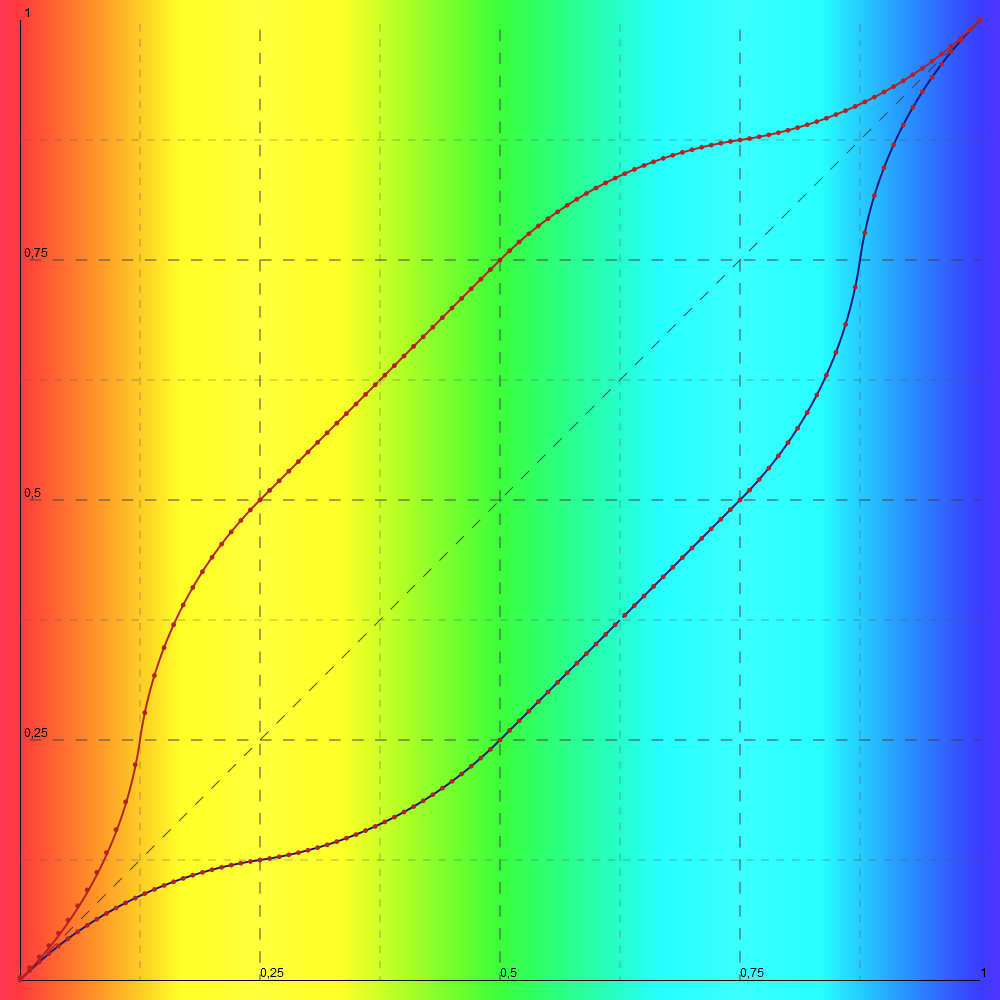
The forward transform is therefore divided into 5 zones:
1) First arc, 0 < X < 0.125
2) Second arc, 0.125 < X < 0.25
3) Line, 0.25 < X < 0.5
4) Third arc, 0.5 < X < 0.75
5) Fourth arc, 0.75 < X < 1.00
The inverse transform is divided into these zones:
1) First arc, 0 < X < 0.25
2) Second arc, 0.25 < X < 0.5
3) Line, 0.5 < X < 0.75
4) Third arc, 0.75 < X < 0.875
5) Fourth arc, 0.875 < X < 1.00
CODE:
Code:
Public Function ForwardHUEtransform(ByVal X!) As Single
    ' 1st Version
    '  X ^ 0.5
    ' 2nd Version
    'ForwardHUEtransform = (2.72 - Exp(1 - 2.5 * X)) * 0.4
    'ForwardHUEtransform = ForwardHUEtransform * 0.5 + X ^ 0.5 * 0.5

    ' 3rd Version
    '    ForwardHUEtransform = 1.206639 * (1 - Exp(-1.764618 * (X ^ 0.860773)))

    ' 4th Version (Arcs and Line)
    If X <= 0.125 Then
        X = X - (-0.3125)
        ForwardHUEtransform = -Sqr(0.1953125 - X * X) + 0.3125
    ElseIf X <= 0.25 Then
        X = X - (0.5625)
        ForwardHUEtransform = Sqr(0.1953125 - X * X) + 0.1875
    ElseIf X <= 0.5 Then
        ForwardHUEtransform = X + 0.25
    ElseIf X < 0.75 Then
        X = X - (0.8125)
        ForwardHUEtransform = Sqr(0.1953125 - X * X) + 0.4375
    Else
        X = X - (0.6875)
        ForwardHUEtransform = -Sqr(0.1953125 - X * X) + 1.3125
    End If

End Function
Public Function InverseHUEtransform(ByVal X!) As Single
    ' 1st Version
    '  X * X
    ' 2nd Version
    'InverseHUEtransform = -(Log(-2.5 * X + 2.72) - 1) * 0.4
    'InverseHUEtransform = InverseHUEtransform * 0.5 + X * X * 0.5
    ' 3rd Version
    '    InverseHUEtransform = (-Log(1 - (X / 1.206639)) / 1.764618) ^ (1 / 0.860773)

    ' 3rd Verdion (avoid Division)
    '    InverseHUEtransform = (-Log(1 - (X * 0.828748)) * 0.566694) ^ (1.161746)

     ' 4th Version (Arcs and Line)
    If X <= 0.25 Then
        X = X - (0.3125)
        InverseHUEtransform = Sqr(0.1953125 - X * X) + (-0.3125)
    ElseIf X < 0.5 Then
        X = X - (0.1875)
        InverseHUEtransform = -Sqr(0.1953125 - X * X) + 0.5625
    ElseIf X <= 0.75 Then
        InverseHUEtransform = X - 0.25
    ElseIf X < 0.875 Then
        X = X - (0.4375)
        InverseHUEtransform = -Sqr(0.1953125 - X * X) + 0.8125
    Else
        X = X - (1.3125)
        InverseHUEtransform = Sqr(0.1953125 - X * X) + 0.6875
    End If

End Function
See graph on Desmos
Last edited by reexre; Feb 18th, 2026 at 01:26 PM.
-
Feb 5th, 2026, 11:49 AM
#9
Re: [VB6] - RGB to RYB and RGB to HSL conversion
L problem in HSL transforms.
I noticed that when I assigned L a value equal to the average of the 3 channels (RGB), I ran into the problem that when transforming RGB to RYB and vice versa, I didn't get exactly the same initial RGB values.
Recent tests have led me to adopt the standard RGB->HSL conversion formula for assigning the L value.
It's not very pretty and doesn't match the perceived brightness, but it works well in the forward-backward transformation.
Code:
L = ( max(R,G,B) + min(R,G,B)) * 0.5
However, I don't consider this aspect concluded.
Last edited by reexre; Feb 5th, 2026 at 11:59 AM.
-
Feb 5th, 2026, 01:40 PM
#10
Re: [VB6] - RGB to RYB and RGB to HSL conversion
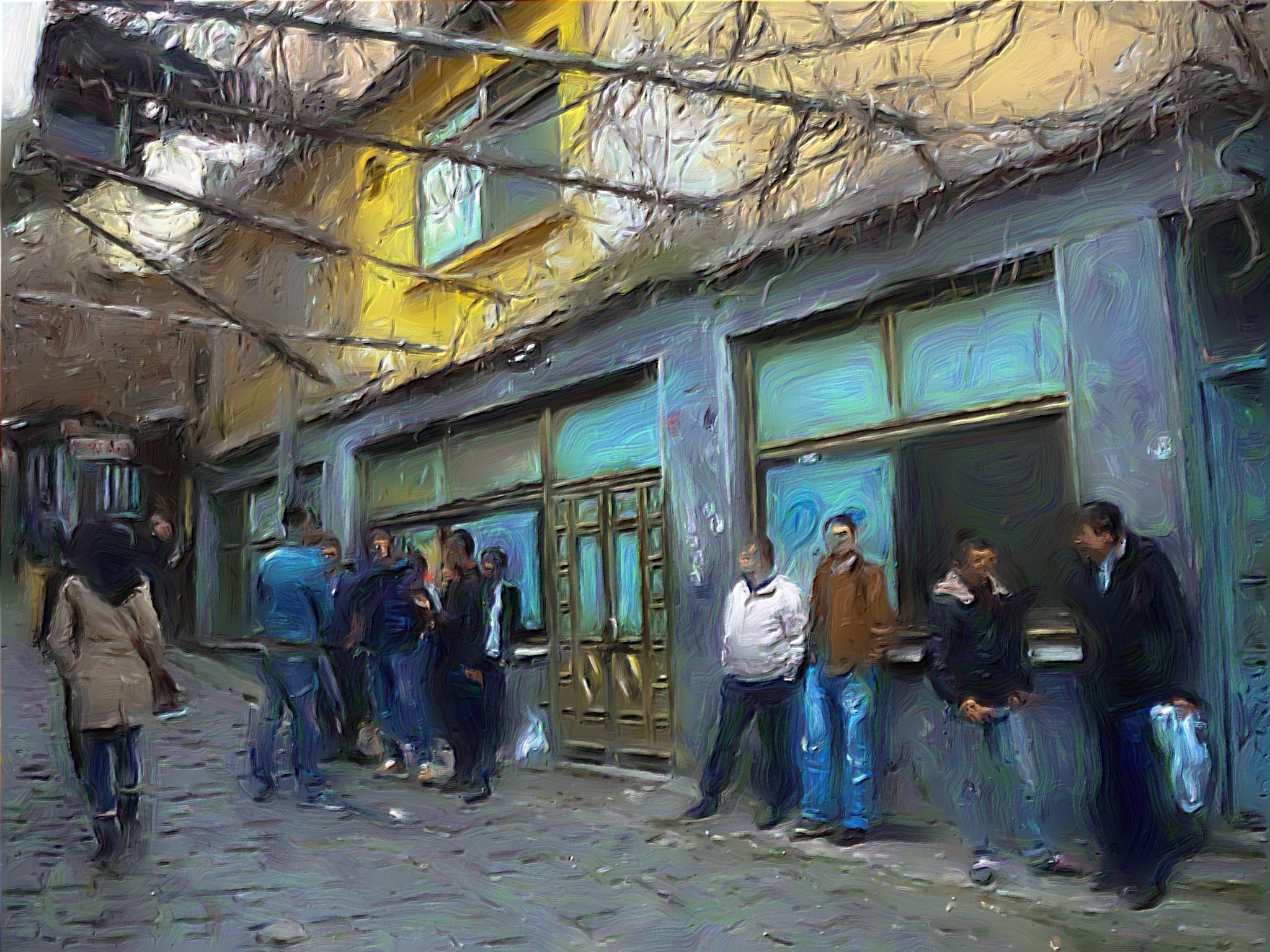
My interest in the RYB color space is mainly due to my attempt to transform Photo into a painterly style.
This is what my PhotoModularFX program can do using the xPainter3 node.
PS: Here, I mainly meant to test image/file sharing via OneDrive.
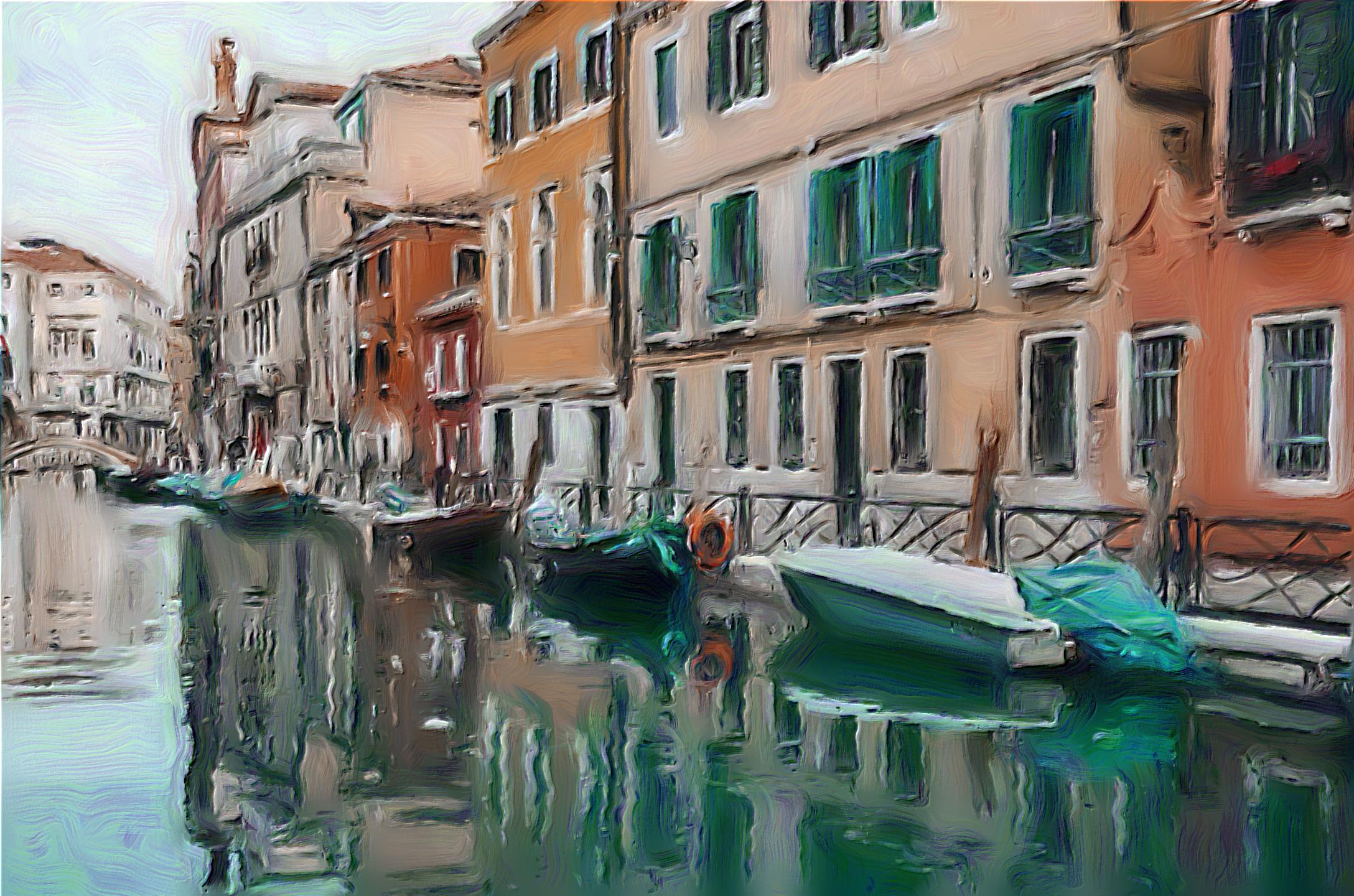
Shared Folder
Last edited by reexre; Feb 5th, 2026 at 04:08 PM.
 Posting Permissions
- You may not post new threads
- You may not post replies
- You may not post attachments
- You may not edit your posts
-
Forum Rules
|
Click Here to Expand Forum to Full Width
|



 Reply With Quote
