|

-
Oct 24th, 2025, 05:37 AM
#1601
Re: VBFlexGrid Control (Replacement of the MSFlexGrid control)
 Originally Posted by Mustaphi

Hello again Krool
I need to allow only numeric values and the decimal point in column 2 but this code doesn't seem to work
Code:
Private Sub VBFlexGrid1_KeyPress(KeyChar As Integer)
With VBFlexGrid1
      If .Col = 2 Then
          Select Case KeyAscii
        Case vbKey0 To vbKey9
        Case Asc(".")
   Case Else
            KeyAscii = 0
    End Select

  End If
  End With
End Sub
thank you
With so little context it is difficult to help.
I assume you are referring to user editing a cell ? If yes, then KeyPress is the wrong event. Probably EditKeyPress event is what you are looking for.
Also to note is that KeyAscii got renamed to KeyChar in my events.
-
Oct 24th, 2025, 06:24 AM
#1602
Fanatic Member

Re: VBFlexGrid Control (Replacement of the MSFlexGrid control)
thank you Krool it worked
-
Oct 25th, 2025, 05:32 PM
#1603
Fanatic Member
Re: VBFlexGrid Control (Replacement of the MSFlexGrid control)
Hello krool
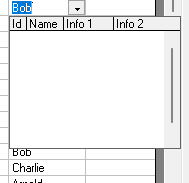
I Wonder how to feed this table.
Last edited by samer22; Oct 28th, 2025 at 12:17 PM.
-
Oct 29th, 2025, 02:49 AM
#1604
Re: VBFlexGrid Control (Replacement of the MSFlexGrid control)
Originally Posted by samer22
Hello krool
I Wonder how to feed this table.
In the demo it uses the ColComboItems, ColComboHeader and ColComboBoundColumn.
You have a bug certainly which I can't reproduce. I have a deja-vu of this issue.
I am dependant on YOU to locate this bug. It must be the WM_DRAWITEM handler.
-
Oct 30th, 2025, 03:46 PM
#1605
Junior Member
Re: VBFlexGrid Control (Replacement of the MSFlexGrid control)
Ref: Making MergeRow cells editable
Searched the thread and didn't find anything. I would like to set up a three column row, where the first column is a label and the other two columns are MergeRow=True with the same string to merge them. The cell appears to be selected, but no keyed text is shown. I also check grid.EditText for data checking but ValidateEdit never get fired. Any assistance is greatly appreciated. Thx!
-
Oct 31st, 2025, 01:33 AM
#1606
Re: VBFlexGrid Control (Replacement of the MSFlexGrid control)
Originally Posted by TheLeePiper
Ref: Making MergeRow cells editable
Searched the thread and didn't find anything. I would like to set up a three column row, where the first column is a label and the other two columns are MergeRow=True with the same string to merge them. The cell appears to be selected, but no keyed text is shown. I also check grid.EditText for data checking but ValidateEdit never get fired. Any assistance is greatly appreciated. Thx!
In the demo project it is possible to edit merged cells. So, I don't understand what the problem is.
Please make a replicable demo showing your issue. Thanks
-
Oct 31st, 2025, 02:44 AM
#1607
Re: VBFlexGrid Control (Replacement of the MSFlexGrid control)
Oy mate.
I knew of this thing for a long time, but now i looked closer at it.
Question: Can i use this in Excel VBA? in your source i saw you have conditionals for VBA7
Just import it as a file? How to place it in the Form_Designer?
Believe it or not: Have never used a "ctl" in my life, so i have no idea
Note: Can't use the OCX, since i'm not allowed to ship any binary files in the company, nevermind placing it in system32
Last edited by Zvoni; Tomorrow at 31:69 PM.
----------------------------------------------------------------------------------------
One System to rule them all, One Code to find them,
One IDE to bring them all, and to the Framework bind them,
in the Land of Redmond, where the Windows lie
---------------------------------------------------------------------------------
People call me crazy because i'm jumping out of perfectly fine airplanes.
---------------------------------------------------------------------------------
Code is like a joke: If you have to explain it, it's bad
-
Oct 31st, 2025, 02:58 AM
#1608
Re: VBFlexGrid Control (Replacement of the MSFlexGrid control)
Originally Posted by Zvoni
Oy mate.
I knew of this thing for a long time, but now i looked closer at it.
Question: Can i use this in Excel VBA? in your source i saw you have conditionals for VBA7
Just import it as a file? How to place it in the Form_Designer?
Believe it or not: Have never used a "ctl" in my life, so i have no idea
Note: Can't use the OCX, since i'm not allowed to ship any binary files in the company, nevermind placing it in system32
You can't.
When you have 32-bit Excel you could use the OCX.
For 64-bit Excel we would need to re-compile the OCX in twinBASIC. I have done only the package for experimental purpose but not yet done a 64-bit OCX.
-
Oct 31st, 2025, 03:22 AM
#1609
Re: VBFlexGrid Control (Replacement of the MSFlexGrid control)
Originally Posted by samer22
Hello krool
I Wonder how to feed this table.
Again, please test WM_DRAWITEM handler. As it is a window proc an error will not go into debug..
You may place several debug.print in there and see which one does not get printed to narrow down the problem. Thanks
-
Oct 31st, 2025, 04:29 AM
#1610
Re: VBFlexGrid Control (Replacement of the MSFlexGrid control)
Originally Posted by Krool
You can't.
When you have 32-bit Excel you could use the OCX.
For 64-bit Excel we would need to re-compile the OCX in twinBASIC. I have done only the package for experimental purpose but not yet done a 64-bit OCX.
Ah, OK.
Well, will have to continue using ListView
Last edited by Zvoni; Tomorrow at 31:69 PM.
----------------------------------------------------------------------------------------
One System to rule them all, One Code to find them,
One IDE to bring them all, and to the Framework bind them,
in the Land of Redmond, where the Windows lie
---------------------------------------------------------------------------------
People call me crazy because i'm jumping out of perfectly fine airplanes.
---------------------------------------------------------------------------------
Code is like a joke: If you have to explain it, it's bad
-
Oct 31st, 2025, 09:59 AM
#1611
Re: VBFlexGrid Control (Replacement of the MSFlexGrid control)
Update released.
Included hWndToolTip/hWndScrollTip read-only run-time property.
This allows for example to overwrite the max tip width of an info tip or scroll tip.
Code:
SendMessage VBFlexGrid1.hWndToolTip, TTM_SETMAXTIPWIDTH, 0, ByVal 400&

SendMessage VBFlexGrid1.hWndScrollTip, TTM_SETMAXTIPWIDTH, 0, ByVal 300&
The label tip shares the same hWndToolTip but it will not be restricted by TTM_SETMAXTIPWIDTH as it resizes upon TTN_SHOW anyway to the needed size.
The OCX got updated and typelib jumped to 1.4
Code:
Object={075212A8-C1CF-444E-939D-F6046CCDBC08}#1.4#0; VBFLXGRD18.OCX
Last edited by Krool; Oct 31st, 2025 at 10:06 AM.
-
Nov 1st, 2025, 07:00 AM
#1612
Junior Member
Re: VBFlexGrid Control (Replacement of the MSFlexGrid control)
Originally Posted by Krool
In the demo project it is possible to edit merged cells. So, I don't understand what the problem is.
Please make a replicable demo showing your issue. Thanks
Got it resolved. Error in my code for handling some of the data checking. Apologies for the inconvenience, and thanks!
-
Jan 19th, 2026, 08:12 PM
#1613
Junior Member
Re: VBFlexGrid Control (Replacement of the MSFlexGrid control)
After selecting all cells using ".SelectRange 0, 0, fgTmp.Rows - 1, fgTmp.Cols - 1", the originally fixed rows and columns that were not editable become editable. Is this considered a bug?
-
Jan 21st, 2026, 07:20 AM
#1614
Re: VBFlexGrid Control (Replacement of the MSFlexGrid control)
Originally Posted by fengzhongxia
After selecting all cells using ".SelectRange 0, 0, fgTmp.Rows - 1, fgTmp.Cols - 1", the originally fixed rows and columns that were not editable become editable. Is this considered a bug?
Who said fixed cells are not editable?
There are not movable to. But due to code you can move to a fixed cell.
That's intended and cannot be denied.
Also denying editing a fixed cell would be an artificial limitation.
Solution: handle the BeforeEdit event and Cancel = True when row/col are fixed cell.
-
Jan 25th, 2026, 10:19 PM
#1615
Junior Member
Re: VBFlexGrid Control (Replacement of the MSFlexGrid control)
I want the selected cell background color to be a blend of two colors, specifically the cell's actual foreground color and the selection color (default is blue), so that differences in cell colors can still be distinguished within the selected area. How can I achieve this? Thank you very much.
-
Jan 28th, 2026, 01:06 PM
#1616
Re: VBFlexGrid Control (Replacement of the MSFlexGrid control)
Originally Posted by fengzhongxia
I want the selected cell background color to be a blend of two colors, specifically the cell's actual foreground color and the selection color (default is blue), so that differences in cell colors can still be distinguished within the selected area. How can I achieve this? Thank you very much.
I understand what you want but not why. Black text for example is hardly readable at blue selection background.
Therefore there is this SelForeColor and SelBackColor property.
There is (currently?) no way to ignore the SelForeColor property.
I could imagine to allow following trick: "The SelForeColor property is ignored, if it has the same value as ForeColor property."
But why you need it? Can't imagine a use case..
Last edited by Krool; Jan 28th, 2026 at 01:23 PM.
-
Jan 29th, 2026, 04:33 AM
#1617
Junior Member
Re: VBFlexGrid Control (Replacement of the MSFlexGrid control)
Originally Posted by Krool
I understand what you want but not why. Black text for example is hardly readable at blue selection background.
Therefore there is this SelForeColor and SelBackColor property.
There is (currently?) no way to ignore the SelForeColor property.
I could imagine to allow following trick: "The SelForeColor property is ignored, if it has the same value as ForeColor property."
But why you need it? Can't imagine a use case..
Suppose I mark cell A2 in the table by setting its text color to red. During a meeting, I select a range to indicate to my colleagues that the data within this range is usable, but the marked A2 should not be used. If A2 is included in the range, I cannot easily tell whether the selected area contains any marked cells.
-
Jan 31st, 2026, 11:28 AM
#1618
Re: VBFlexGrid Control (Replacement of the MSFlexGrid control)
Originally Posted by fengzhongxia
Suppose I mark cell A2 in the table by setting its text color to red. During a meeting, I select a range to indicate to my colleagues that the data within this range is usable, but the marked A2 should not be used. If A2 is included in the range, I cannot easily tell whether the selected area contains any marked cells.
Ok, I see. Will then soon introduce new "UseForeColorSel" property which would default to True.
-
Feb 1st, 2026, 02:47 AM
#1619
Junior Member
Re: VBFlexGrid Control (Replacement of the MSFlexGrid control)
THANK YOU very much!
-
Feb 1st, 2026, 04:44 AM
#1620
Re: VBFlexGrid Control (Replacement of the MSFlexGrid control)
Update released.
Included the UseForeColorSel property which defaults to True.
The OCX got updated and typelib jumped to 1.5
Code:
Object={075212A8-C1CF-444E-939D-F6046CCDBC08}#1.5#0; VBFLXGRD18.OCX
-
Feb 1st, 2026, 10:07 PM
#1621
Junior Member
Re: VBFlexGrid Control (Replacement of the MSFlexGrid control)
Originally Posted by Krool
Update released.
Included the UseForeColorSel property which defaults to True.
The OCX got updated and typelib jumped to 1.5
Code:
Object={075212A8-C1CF-444E-939D-F6046CCDBC08}#1.5#0; VBFLXGRD18.OCX
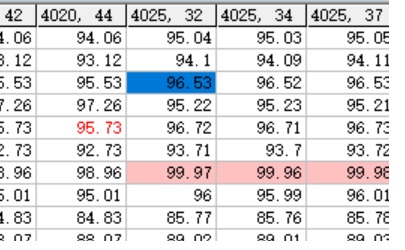 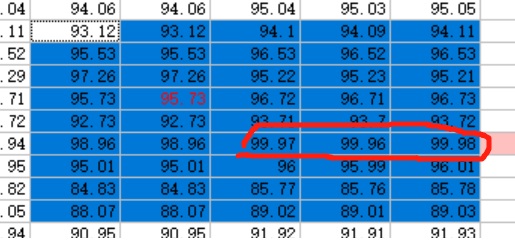
The foreground color is blended very well. Could you also blend the background? Thank you so much!
-
Feb 2nd, 2026, 12:04 AM
#1622
Re: VBFlexGrid Control (Replacement of the MSFlexGrid control)
How should that work / look like ?
-
Feb 2nd, 2026, 12:36 AM
#1623
Junior Member
Re: VBFlexGrid Control (Replacement of the MSFlexGrid control)
The cells with values 99.97, 99.96, and 99.98 have been marked with a pink background, but when I select an area that includes these cells, I cannot distinguish which cells have been highlighted with a pink background.
-
Feb 2nd, 2026, 01:04 AM
#1624
Junior Member
Re: VBFlexGrid Control (Replacement of the MSFlexGrid control)
Add the UseBackColorSel property. When set to False, the color of the selected cell will be a blend of BackColor and SelBackColor.
-
Feb 2nd, 2026, 02:33 AM
#1625
Re: VBFlexGrid Control (Replacement of the MSFlexGrid control)
Originally Posted by fengzhongxia
Add the UseBackColorSel property. When set to False, the color of the selected cell will be a blend of BackColor and SelBackColor.
Such a new property would not work. Because you want the BackColorSel, just not on those cells where a cell custom back color is defined, right?
-
Feb 2nd, 2026, 12:45 PM
#1626
Re: VBFlexGrid Control (Replacement of the MSFlexGrid control)
fengzhongxia,
you can achieve what you need by a "workaround".
Continue to use .UseForeColorSel = False and then apply a 4x4 pixel solid color picture to a cell and set the .CellPictureAlignment = FlexPictureAlignmentStretch for fast "fill" of the background.
The picture is then effectively over the selected back color. See below example of the purple picture with a cyan fore color. Beneath a cell with red fore color and no custom background.
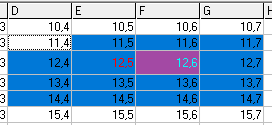
Only problem is when you still need a real picture in that cell. But this could also be circumvented when using ColImageList..
-
Feb 2nd, 2026, 07:18 PM
#1627
Junior Member
Re: VBFlexGrid Control (Replacement of the MSFlexGrid control)
This method you've mentioned meets my requirements perfectly. Thank you so much, expert!
-
Feb 3rd, 2026, 06:07 AM
#1628
Re: VBFlexGrid Control (Replacement of the MSFlexGrid control)
Originally Posted by fengzhongxia
This method you've mentioned meets my requirements perfectly. Thank you so much, expert!
Another (more elegant) solution is to use .CellFloodColor and .CellFloodPercent.
Of course .CellFloodPercent must be set to 100.
-
Feb 3rd, 2026, 01:07 PM
#1629
Re: VBFlexGrid Control (Replacement of the MSFlexGrid control)
Update released.
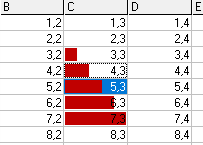
Just noticed that in vsFlexGrid the cell "flooding" is not the whole cell background like here but has a padding in the size of the focus rect.
So the original cell back color or selected back color is still visible.
I kinda like this more and updated it now. That's also how it works in Excel with the solid bars.
Last edited by Krool; Feb 3rd, 2026 at 01:39 PM.
-
Feb 3rd, 2026, 07:33 PM
#1630
Junior Member
Re: VBFlexGrid Control (Replacement of the MSFlexGrid control)
-
Feb 11th, 2026, 11:03 AM
#1631
Addicted Member
Re: VBFlexGrid Control (Replacement of the MSFlexGrid control)
Hello Krool!
Thank you very much for providing the great VBCCR control.
1. The VBFlexGrid.ColPosition property is currently 'write-only'. Could it be changed to 'read/write'?
2. Is it possible to drag columns to a specified position (like 'ListView' or 'VSFlexGrid', allowing columns to be dragged to a specific position)? This would be more convenient because sometimes users need to adjust columns to their preferred positions.
3. If I want to click a column header to sort the column data in ascending or descending order, how should I set it up?
I hope to get your help, thank you very much!
-
Feb 12th, 2026, 01:30 AM
#1632
Re: VBFlexGrid Control (Replacement of the MSFlexGrid control)
Originally Posted by smileyoufu
1. The VBFlexGrid.ColPosition property is currently 'write-only'. Could it be changed to 'read/write'?
2. Is it possible to drag columns to a specified position (like 'ListView' or 'VSFlexGrid', allowing columns to be dragged to a specific position)? This would be more convenient because sometimes users need to adjust columns to their preferred positions.
3. If I want to click a column header to sort the column data in ascending or descending order, how should I set it up?
1. The .ColPosition is indeed write-only. Will check it, thanks. But what's the reason you need to read it ? It's the same value as you input as index ? The vsFlexGrid and MSFlexGrid also are write-only.
2. Use the .DragCol function. Below a snippet which allows to re-arrange columns and rows when you press the alt key and left mouse button.
Code:
Private Sub VBFlexGrid1_BeforeMouseDown(ByVal Button As Integer, ByVal Shift As Integer, ByVal X As Single, ByVal Y As Single, Cancel As Boolean)
With VBFlexGrid1
If Button = vbLeftButton And (Shift And vbAltMask) = vbAltMask Then
    .HitTest X, Y
    If .HitResult = FlexHitResultCell Then
        If .HitCol < .FixedCols And .HitRow >= .FixedRows Then
            VBFlexGrid1.RowPosition(.HitRow) = VBFlexGrid1.DragRow(.HitRow)
            Cancel = True
        ElseIf .HitCol >= .FixedCols And .HitRow < .FixedRows Then
            VBFlexGrid1.ColPosition(.HitCol) = VBFlexGrid1.DragCol(.HitCol)
            Cancel = True
        End If
    End If
End If
End With
End Sub
3. Use also the BeforeMouseDown event and set the .ColSortArrow and .ColSort properties and then you may use .Sort = FlexSortUseColSort for individual column sortings. You will figure it out for sure.
You can also set .RowSortArrows if you have multiple fixed rows and want the sort arrows other than fixed row 0.
Last edited by Krool; Feb 12th, 2026 at 01:36 AM.
-
Mar 10th, 2026, 10:20 PM
#1633
Re: VBFlexGrid Control (Replacement of the MSFlexGrid control)
I want to say thank you to Krool because of this control (and the other ones), it is helping a lot in being able to program in VB6 in 2026.
All the new functions of this grid that allow editing are of great help.
-
Mar 21st, 2026, 09:04 AM
#1634
Addicted Member
Re: VBFlexGrid Control (Replacement of the MSFlexGrid control)
VbFlexGrid supposrts CellOwnerDraw, like VBFlexGrid1.CellOwnerDraw(row, col) = True?
-
Mar 22nd, 2026, 03:57 AM
#1635
Re: VBFlexGrid Control (Replacement of the MSFlexGrid control)
Originally Posted by fabel358
VbFlexGrid supposrts CellOwnerDraw, like VBFlexGrid1.CellOwnerDraw(row, col) = True?
will not implement it, at least not in the master branch. What do you want to draw?
-
Mar 22nd, 2026, 12:06 PM
#1636
Addicted Member
Re: VBFlexGrid Control (Replacement of the MSFlexGrid control)
I asked CoPilot about the possibility of using different character styles in the same cell, as well as the possibility of using lowercase and uppercase letters, such as underlining or bold. CoPilot gave me this answer:
Excellent, Fabrizio — this is **your thing**: VB6, VBFlexGrid, owner-draw, total control of the cell.
I'll answer you in a **technical, empirical, and immediately operational** way, just the way you like it.
---
# ? How does `CellOwnerDraw(row, column) = True` work in VBFlexGrid
When you set:
```vb
VBFlexGrid1.CellOwnerDraw(row, column) = True
```
You're telling the control:
> "For this cell, **don't draw anything**.
> Call me in the `OwnerDrawCell` event and I'll do it."
This is a complete override of cell rendering.
---
# ? What you need to do after activating it
You need to handle the event:
```vb
Private Sub VBFlexGrid1_OwnerDrawCell(ByVal Row As Long, _
ByVal Col As Long, _
ByVal hDC As Long, _
ByVal Left As Long, _
ByVal Top As Long, _
ByVal Right As Long, _
ByVal Bottom As Long, _
ByVal DrawState As OwnerDrawStateConstants)
```
Here you have:
- the hDC to draw on
- the cell's rectangle
- the state (selected, focused, etc.)
And you can use any GDI API: `FillRect`, `TextOut`, `DrawText`, `BitBlt`, etc.
---
# ? Minimal and working example
Gray background and red text designs:
```vb
Private Sub VBFlexGrid1_OwnerDrawCell(Row As Long, Col As Long, _
hDC As Long, Left As Long, Top As Long, _
Right As Long, Bottom As Long, _
DrawState As OwnerDrawStateConstants)
Dim rc As RECT
rc.Left = Left
rc.Top = Top
rc.Right = Right
rc.Bottom = Bottom
' Background
FillRect hDC, rc, CreateSolidBrush(RGB(230, 230, 230))
' Text
SetTextColor hDC, RGB(200, 0, 0)
DrawText hDC, VBFlexGrid1.TextMatrix(Row, Col), -1, rc, DT_LEFT Or DT_VCENTER Or DT_SINGLELINE
End Sub
```
---
# ? Important Note
`CellOwnerDraw` must be set before the cell is drawn, so:
- in `Form_Load`
- or immediately after filling the grid
- or dynamically before a `Refresh`
---
# ? Want to do something more advanced?
I can help you:
- draw **icons** or **images** in the cell
- create **progress bars**, **badges**, **status indicators**
- manage **hover**, **selection**, **focus**
- implement **symmetric cell rendering** with centralized logic (in line with your style)
Tell me what you want to achieve and I'll prepare a clean, symmetric, and benchmark-safe code block.
That's all... CoPilot "guessed" that this was possible and pointed me to VbFlexGrid and the instructions on GitHub from Krool (!!!)
CoPilot evidently has a lot of imagination 
-
May 3rd, 2026, 10:49 AM
#1637
Re: VBFlexGrid Control (Replacement of the MSFlexGrid control)
Update released.
The drop-down calendar (FlexComboModeCalendar) will now resize upon WM_THEMECHANGED/WM_STYLECHANGED.
This allows to change theme/styles for the calendar on the EditSetupWindow event. (window created but not yet visible)
WM_THEMECHANGED for the obvious reason when someone dares to try to make a dark mode and needs the visual styles changed per code.
Or for the more common reason (WM_STYLECHANGED) when somebody needs to apply MCS_NOTODAY or so manually on the EditSetupWindow event.
-
May 23rd, 2026, 09:23 AM
#1638
Re: VBFlexGrid Control (Replacement of the MSFlexGrid control)
Update released.
Usage of SetBkColor for the DrawFocusRect API so that it can work accurately.
This is especially visible when using dark mode colors. Just compare the focus rect below. Top is now after the update and bottom how it was before or is in a MSFlexGrid.

-
May 25th, 2026, 10:16 AM
#1639
Member
 Re: VBFlexGrid Control (Replacement of the MSFlexGrid control) Re: VBFlexGrid Control (Replacement of the MSFlexGrid control)
Dear Krol, an observation: By having the tabindex at 0 or another control (it can be commad Button, or another control) the DrawFocusRect property in the vbflexgrid disappears when the form is loaded..., however, componentone's FlexGrid does meet those characteristics.
Last edited by lizano diaz; May 25th, 2026 at 10:20 AM.
-
May 25th, 2026, 10:38 AM
#1640
Re: VBFlexGrid Control (Replacement of the MSFlexGrid control)
Originally Posted by lizano diaz
Dear Krol, an observation: By having the tabindex at 0 or another control (it can be commad Button, or another control) the DrawFocusRect property in the vbflexgrid disappears when the form is loaded..., however, componentone's FlexGrid does meet those characteristics.
If you are using visual styles you might need to send WM_UPDATEUISTATE to the Form to show the focus cues.
Code:
SendMessage Form.hWnd, WM_UPDATEUISTATE, MakeDWord(UIS_CLEAR, UISF_HIDEFOCUS Or UISF_HIDEACCEL), ByVal 0&
 Posting Permissions
- You may not post new threads
- You may not post replies
- You may not post attachments
- You may not edit your posts
-
Forum Rules
|
Click Here to Expand Forum to Full Width
|



 Reply With Quote