|

-
Oct 13th, 2025, 08:43 AM
#41
Fanatic Member

Re: twinBasic "installer"
Sorry for the delay in responding - only seeing this today.
I think option #1 is the one I've seen most often. As to which is BEST or industry-standard, I don't know.
I did not test your last EXE as Windows Defender was flagging it as a virus and didn't allow me to download it. I can work around it but just haven't done so yet. But thought you should know that something is different in your latest version. The previous version had no download issues while the current one does.
-
Oct 13th, 2025, 09:00 AM
#42
Fanatic Member
Re: twinBasic "installer"
I got the latest version (beta 2) downloaded and have several issues. Note that this is on a different computer than all the other tests I've done so these may have been here even in an earlier version. The earlier tests were on a Desktop while these tests are on a laptop:
1. The folder path selector buttons don't work. Clicking on them does nothing.
2. Neither the Revert or View Log History buttons do anything. I see a spinner/busy cursor but nothing appears. It appears like maybe secondary Forms/Windows are not appearing on screen? I tried deleting the SETTINGS file but that didn't help.
3. Log shows that an error happened but it provides no details. It says only "Error:" in red but nothing else
4. If the ZIP file already exists, the log contains a message "The zip exists in the download folder, redownload it?" But there's no way I can see to select a YES or a NO.
5. DPI issues seem better - at least the grid/list icons and text
6. Grid/list control column header captions have an issue with higher DPI. They bleed over each other.
Last edited by AAraya; Oct 13th, 2025 at 09:23 AM.
-
Oct 14th, 2025, 09:16 AM
#43
Thread Starter
Fanatic Member
Re: twinBasic "installer"
hmmm, thank you for testing it.
EDIT: of course, it works here LMAO. What is the date of the EXE? Is it 10/4?
screen recording
https://1drv.ms/v/c/7b44a6c9bbfcba41..._i1Uw?e=7Z2pMh
Last edited by jdelano; Oct 14th, 2025 at 10:12 AM.
-
Oct 15th, 2025, 01:40 PM
#44
Fanatic Member
Re: twinBasic "installer"
Mine is Beta 2 dated 10/1. Can I have a link to the latest version? The last link you posted doesn't seem to work any longer.
-
Oct 17th, 2025, 03:29 AM
#45
Thread Starter
Fanatic Member
Re: twinBasic "installer"
-
Oct 17th, 2025, 08:59 AM
#46
Fanatic Member
Re: twinBasic "installer"
Thanks. Same problems that I reported previously.
I'm testing this one a different laptop at 250 DPI. If you need to create a diagnostic EXE which outputs debug info to a log, I'd be happy to run that for you.
-
Oct 17th, 2025, 10:14 AM
#47
Thread Starter
Fanatic Member
Re: twinBasic "installer"
Oh okay, I'll do some testing at that DPI level.
-
Oct 17th, 2025, 10:29 AM
#48
Fanatic Member
Re: twinBasic "installer"
If it helps you, let me have your twin project file and I can debug it for you, if you'd like.
-
Oct 18th, 2025, 05:24 AM
#49
Thread Starter
Fanatic Member
Re: twinBasic "installer"
Here you go https://1drv.ms/u/c/7b44a6c9bbfcba41...iNhw?e=aqu2dM; recommend a couple asprin before trying to read this stuff.
-
Oct 18th, 2025, 08:02 AM
#50
Fanatic Member
Re: twinBasic "installer"
Haha, no worries - I understand and have lots of code like that too.
Immediately I notice a few of these issues don't happen when I run it from the IDE so there's a clue there (the folder selection buttons work and their images appear on the buttons in the IDE but not in the EXE).
I have little time to devote to this right now but will certainly look at it as time allows as this is a very helpful tool for me as well.
Art
-
Oct 18th, 2025, 08:10 AM
#51
Fanatic Member
Re: twinBasic "installer"
EDIT
OK, found the issue with the two folder selection buttons. Their icons have to be in the same folder path as the EXE otherwise the images don't appear on the buttons and the buttons don't work (the custom button setup code probably silently aborts when the image is not found at the specified path).
Might consider adding some error handling to that button setup code to display or log an error if the button setup fails. Or maybe a Resume Next so that the entire routine is not aborted when setting one property of the button fails.
Last edited by AAraya; Oct 18th, 2025 at 11:07 AM.
-
Oct 18th, 2025, 08:59 AM
#52
Fanatic Member
Re: twinBasic "installer"
For button image DPI issues you can use the DPI Scale factor to modify the button's graphical properties:
I created a helper function GetDPIScale() and placed it in a modDPI module which I've also added below. You should be able to use this same helper in similar fashion in the other places where you're drawing images.
Code:
Public Sub ConfigureCustomButton(theButton As ucCustomButton, buttonCaption As String, bkColor As OLE_COLOR, frColor As OLE_COLOR, _
    pngImagePath As String, iconSize As Integer, startEnabled As Boolean, boldFont As Boolean, _
    Optional borderColor As OLE_COLOR = 0, Optional borderWidth As Integer = 0)

    'WriteToDebugLogFile "       ConfigureCustomButton identifier " & IIf(buttonCaption = "", pngImagePath, buttonCaption)

    Dim dpiScale As Double = GetDPIScale()

    With theButton
        .Caption = buttonCaption
        .BackColor = bkColor
        .ForeColor = frColor
        If borderWidth > 0 Then
            .BorderColor = borderColor
            .BorderWidth = borderWidth
        End If
        .FontSize = 11
        .BorderRadius = 3 * dpiScale
        .FontBold = boldFont
        .PngIconPath = pngImagePath
        .IconSize = iconSize * dpiScale
        .IconSpacing = 8 * dpiScale
        .Enabled = startEnabled
    End With

End Sub
Code:
Attribute VB_Name = "modDPI"

' Standard Module: modDPI
Option Explicit

' --- API Declarations and Constants ---

' System Metric Index for Horizontal DPI
Private Const LOGPIXELSX As Long = 88
' Standard DPI baseline (100% scaling)
Private Const BASE_DPI As Long = 96

' twinBASIC uses VBA7 compatibility syntax for 64-bit compilation,
' requiring PtrSafe and LongPtr for handles and pointers [4-7].

#If VBA7 Then
    ' Retrieves a handle to a device context (hDC) for the entire screen (hWnd=0)
    Private Declare PtrSafe Function GetDC Lib "user32" (ByVal hWnd As LongPtr) As LongPtr

    ' Releases the device context handle
    Private Declare PtrSafe Function ReleaseDC Lib "user32" (ByVal hWnd As LongPtr, ByVal hDC As LongPtr) As Long

    ' Retrieves device-specific information from the specified device context
    Private Declare PtrSafe Function GetDeviceCaps Lib "gdi32" (ByVal hDC As LongPtr, ByVal nIndex As Long) As Long
#Else
    ' Fallback declarations (standard VB6/VBA syntax for 32-bit)
    Private Declare Function GetDC Lib "user32" (ByVal hWnd As Long) As Long
    Private Declare Function ReleaseDC Lib "user32" (ByVal hWnd As Long, ByVal hDC As Long) As Long
    Private Declare Function GetDeviceCaps Lib "gdi32" (ByVal hDC As Long, ByVal nIndex As Long) As Long
#End If


' --- Public Method ---

Public Function GetDPIScale() As Double
    ' Returns the system DPI scaling factor (e.g., 1.5 for 150% scaling)

    #If VBA7 Then
        Dim hDC As LongPtr
    #Else
        Dim hDC As Long
    #End If
    Dim CurrentDPI As Long
    Dim ScaleFactor As Double

    ' 1. Get the Device Context (DC) for the desktop window (hWnd=0)
    hDC = GetDC(0)

    If hDC <> 0 Then
        ' 2. Retrieve the current DPI value (e.g., 144 DPI for 150% scaling)
        CurrentDPI = GetDeviceCaps(hDC, LOGPIXELSX)

        ' 3. Release the Device Context (essential cleanup)
        Call ReleaseDC(0, hDC)

        ' 4. Calculate the fractional scale factor using floating-point division
        If CurrentDPI > 0 Then
            ScaleFactor = CDbl(CurrentDPI) / BASE_DPI
            GetDPIScale = ScaleFactor
        Else
            GetDPIScale = 1.0 ' Default to 1.0 (100%) if DPI failed to retrieve
        End If
    Else
        ' Failed to get DC
        GetDPIScale = 1.0
    End If

End Function
Last edited by AAraya; Oct 18th, 2025 at 11:09 AM.
-
Oct 18th, 2025, 09:07 AM
#53
Fanatic Member
Re: twinBasic "installer"
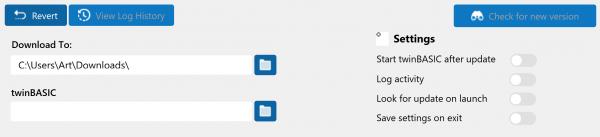
Here's the button images shown at 250 DPI after these changes.
-
Oct 18th, 2025, 09:10 AM
#54
Fanatic Member
Re: twinBasic "installer"
That might be all I can get to today but hopefully there's enough in here to get you started down the path to resolving the other DPI issues.
-
Oct 18th, 2025, 10:57 AM
#55
Thread Starter
Fanatic Member
Re: twinBasic "installer"
Awesome, thank you.
EDIT: the images are meant to be included as a resource in the end, just haven't done that yet.
-
Oct 18th, 2025, 11:05 AM
#56
Fanatic Member
Re: twinBasic "installer"
Including the images as a resource is a great way to go! It'll help prevent these issues.
-
Oct 18th, 2025, 12:17 PM
#57
Fanatic Member
Re: twinBasic "installer"
You've got several Image controls on the main form which aren't handling DPI properly. The fix is super easy. Image controls have a PictureDPIScaling property which you have to set to True and this automatically resolves the issue for you - no code required.
-
Oct 18th, 2025, 01:31 PM
#58
Fanatic Member
Re: twinBasic "installer"
The activity log's issue is that the row height is currently a fixed value. You're correctly calculating the font size in CalculateDPIValues() but you need to also calculate a variable sized row height in there and use that in all places in the code where you're using the ROW_HEIGHT constant.
-
Oct 19th, 2025, 05:05 AM
#59
Thread Starter
Fanatic Member
Re: twinBasic "installer"
Indeed, much appreciated.
-
Oct 19th, 2025, 08:21 AM
#60
Thread Starter
Fanatic Member
Re: twinBasic "installer"
Added new code and exe to the github (I'll be moving the files around on this soon so the new version isn't in a sub folder) for:
Adding DPI code to Activity Log and Change Log
updated columns width calculation, type badge drawing, type text location in the badge, row height, and inner row wrapping.
Add code given by ArtAraya, again thank you, to handle the custom buttons, as well as what needed to be changed for the images (used for placing icons) to be correct.
Modified selecting a twinBASIC location code as it lacked adding a (edit): backslash causing the check for the existence of tB in the folder to break.
Added the verification that the download button can be enabled once both the folders are valid.
I'll look at changing the treeview on the select folder location to be DPI aware (if possible, if not that'll be swapped out) I tested this at 125% and 150% let me know if you see something off. THANK YOU again.
Last edited by jdelano; Oct 19th, 2025 at 08:28 AM.
-
Oct 20th, 2025, 09:23 AM
#61
Fanatic Member
Re: twinBasic "installer"
Sounds like a productive weekend! I'd love to give it a spin.
Forgive me but I looked at the Github project but can't figure out the organization. There's a couple of EXE files but they're not the current one. How do I get the current EXE or how do I load this project into twinBasic as there's no twin basic project file?
-
Oct 20th, 2025, 06:18 PM
#62
Thread Starter
Fanatic Member
Re: twinBasic "installer"
That was one item I worked on earlier, reorganized the repo, the old tHelper is in a sub folder and the latest version is in the root and sub folders. The latest EXE is in the Build folder.
-
Oct 20th, 2025, 06:38 PM
#63
Fanatic Member
Re: twinBasic "installer"
Where is the Beta 2 EXE?
The EXEs in the Build folders are for the old version and for beta 1. Please provide a path and name to the correct EXE. I've downloaded the latest source.
Last edited by AAraya; Oct 20th, 2025 at 06:47 PM.
-
Oct 21st, 2025, 07:31 AM
#64
Thread Starter
Fanatic Member
Re: twinBasic "installer"
The EXE (tBHelper_win32.exe) that was there is the current beta. I deleted the beta 1 file and renamed the other file to include beta2. Sorry for the confusion.
-
Oct 21st, 2025, 09:52 AM
#65
Fanatic Member
Re: twinBasic "installer"
Thanks - the renamed EXE made things easier.
The new build's main window looks good at 250 DPI. I'll need a new version of tB to be released before I can confirm the Change Log portion of the window but everything else is scaling properly.
Other issues:
View Log History window has several areas that need DPI scaling applied
The down arrow on all dropdown controls (on all secondary windows) needs DPI scaling
Custom message boxes need DPI scaling for icons and text
It's getting there. It seems to be MUCH better - good job. I look forward to a new tB build so I can confirm that all's good with the main window.
-
Oct 23rd, 2025, 04:58 AM
#66
Thread Starter
Fanatic Member
Re: twinBasic "installer"
Awesome, gotchya, thanks again for help testing.
-
Oct 23rd, 2025, 10:00 AM
#67
Fanatic Member
Re: twinBasic "installer"
The main window is the one I use 99.9% of the time so I'm not personally impacted by the issues on the secondary windows.
The message box issue is kind of a big one since the message text is almost unreadably small on my 250 DPI system.
-
Oct 24th, 2025, 04:07 AM
#68
Thread Starter
Fanatic Member
Re: twinBasic "installer"
Yeah, I worked on the message box yesterday. Just uploaded the files to github https://github.com/jdelano0310/tbHelper
-
Oct 24th, 2025, 02:40 PM
#69
Fanatic Member
Re: twinBasic "installer"
It's coming along great! Activity Log window looks much better now, message boxes are looking much better too.
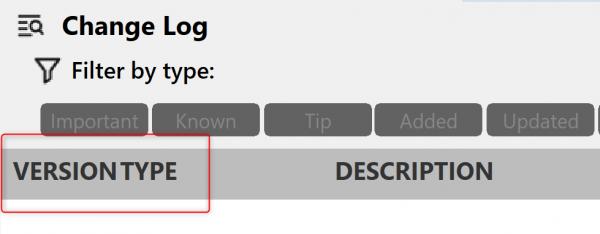
Only items I see now are:
1. Dropdown control arrows images are too small at 250 DPI
2. Main window Change Log column headers - some space is needed between the first two column headers
-
Oct 25th, 2025, 05:54 AM
#70
Thread Starter
Fanatic Member
Re: twinBasic "installer"
Good deal, thank you.
I'll dive into those
EDIT: check out the new EXE for beta 2 that has been updated to display the dropdown button / arrow in a DPI aware fashion.
Last edited by jdelano; Oct 26th, 2025 at 04:50 AM.
-
Mar 4th, 2026, 05:18 AM
#71
Thread Starter
Fanatic Member
Re: twinBasic "installer"
I have been remiss in updating this thread, though there may only be me and one other person using this. Release Candidate 2 is available that embeds the images in the EXE removing the need for physical files in with the EXE.
https://github.com/jdelano0310/tbHelper
There are a couple more tweaks to come
EDIT: just a quick video of using it to update to the latest twinBASIC available. https://imgur.com/a/H7t2I6n
Last edited by jdelano; Mar 19th, 2026 at 04:22 AM.
Tags for this Thread
 Posting Permissions
- You may not post new threads
- You may not post replies
- You may not post attachments
- You may not edit your posts
-
Forum Rules
|
Click Here to Expand Forum to Full Width
|



 Reply With Quote