|

-
May 3rd, 2025, 12:18 PM
#1
Find/Replace panel
BETA 752 adds the initial implementation of a FIND/REPLACE panel. It can be used floating, or docked as any ordinary panel.

-
May 3rd, 2025, 01:57 PM
#2
Re: Find/Replace panel
VERY good. Makes TB driveable on a daily basis for a VB6-er.
https://github.com/yereverluvinunclebert
Skillset: VMS,DOS,Windows Sysadmin from 1985, fault-tolerance, VaxCluster, Alpha,Sparc. DCL,QB,VBDOS- VB6,.NET, PHP,NODE.JS, Graphic Design, Project Manager, CMS, Quad Electronics. classic cars & m'bikes. Artist in water & oils. Historian.
By the power invested in me, all the threads I start are battle free zones - no arguing about the benefits of VB6 over .NET here please. Happiness must reign.
-
May 5th, 2025, 09:32 AM
#3
Fanatic Member

Re: Find/Replace panel
This is good but now there's no way to find within a Project as that option is disabled on this new Find/Replace dialog. You should leave the current Find in Project implementation until that functionality is supported in this new dialog since you've taken away something that was useful and working properly without giving us another way of doing it.
Last edited by AAraya; May 5th, 2025 at 10:26 AM.
-
May 5th, 2025, 10:35 AM
#4
Re: Find/Replace panel
Don't worry - you wont be waiting long. For now, just use the "Global Search" addin on the toolbar, which does support searching the full project, or revert to an older version of tB if it's annoying you.
-
May 5th, 2025, 10:43 AM
#5
Re: Find/Replace panel
Aarya this is a work in progress and you will note that changes are being made every day, watch out for the change description and you will see which new functionality is being added daily. The search box is receiving attention at the moment and you will see more changes in this respect, I have no doubt.
https://github.com/yereverluvinunclebert
Skillset: VMS,DOS,Windows Sysadmin from 1985, fault-tolerance, VaxCluster, Alpha,Sparc. DCL,QB,VBDOS- VB6,.NET, PHP,NODE.JS, Graphic Design, Project Manager, CMS, Quad Electronics. classic cars & m'bikes. Artist in water & oils. Historian.
By the power invested in me, all the threads I start are battle free zones - no arguing about the benefits of VB6 over .NET here please. Happiness must reign.
-
May 5th, 2025, 10:43 AM
#6
Fanatic Member
Re: Find/Replace panel
Never saw the Global Search toolbar option! Thanks for pointing that out to this blind old man. Haha - we get so used to doing things a certain way we miss things when working with new tools or interfaces.
-
May 5th, 2025, 11:57 AM
#7
Re: Find/Replace panel
I know a lot of people prefer the VB6 style one but I hope the existing Global Search addin and current Monaco find/replace (b/c multiline support-- even full VS doesn't have that and it's great) aren't removed even when the new one is finished.
I love how the Global Search addin displays all the results and their location in a single table rather than blindly jumping around with Find Next.
-
May 5th, 2025, 12:13 PM
#8
Re: Find/Replace panel
I envisage having a "Find All" button that is basically the same as the old Find In Project option, producing the results list in a virtual document as before.
@fafalone, if I add multi-line support to the Find/Replace panel, do you think that the Monaco inplace find/replace widget is really still needed? I'm trying to reduce and make find/replace more concise. We've currently got or had 4 different ways of doing find/replace so far (new Find/Replace panel, old Find In Project option, Monaco widget and Global Search addin).
-
May 5th, 2025, 02:07 PM
#9
Re: Find/Replace panel
The good thing about a pop-up panel/form is that it can expand to hold new/better functionality as and when needed, there is plenty of space to expand.
However, I do realise that some may be used to the newer approach and if possible it is nice to cater for all needs.
For some guidance and a decent example, I'd say have a look at RJTextEd, a very decent advanced text/programmer's editor and see how the developer there accomplishes same requirement. That Editor offers the same functionality as a pop up or lodged in a location on the editor corners/edges. Best of both worlds as it were.
When that functionality was being developed, I was one of the contributors that assisted Rickard in getting the same requirement implemented to everyone's satisfaction. Similar discussions were had.
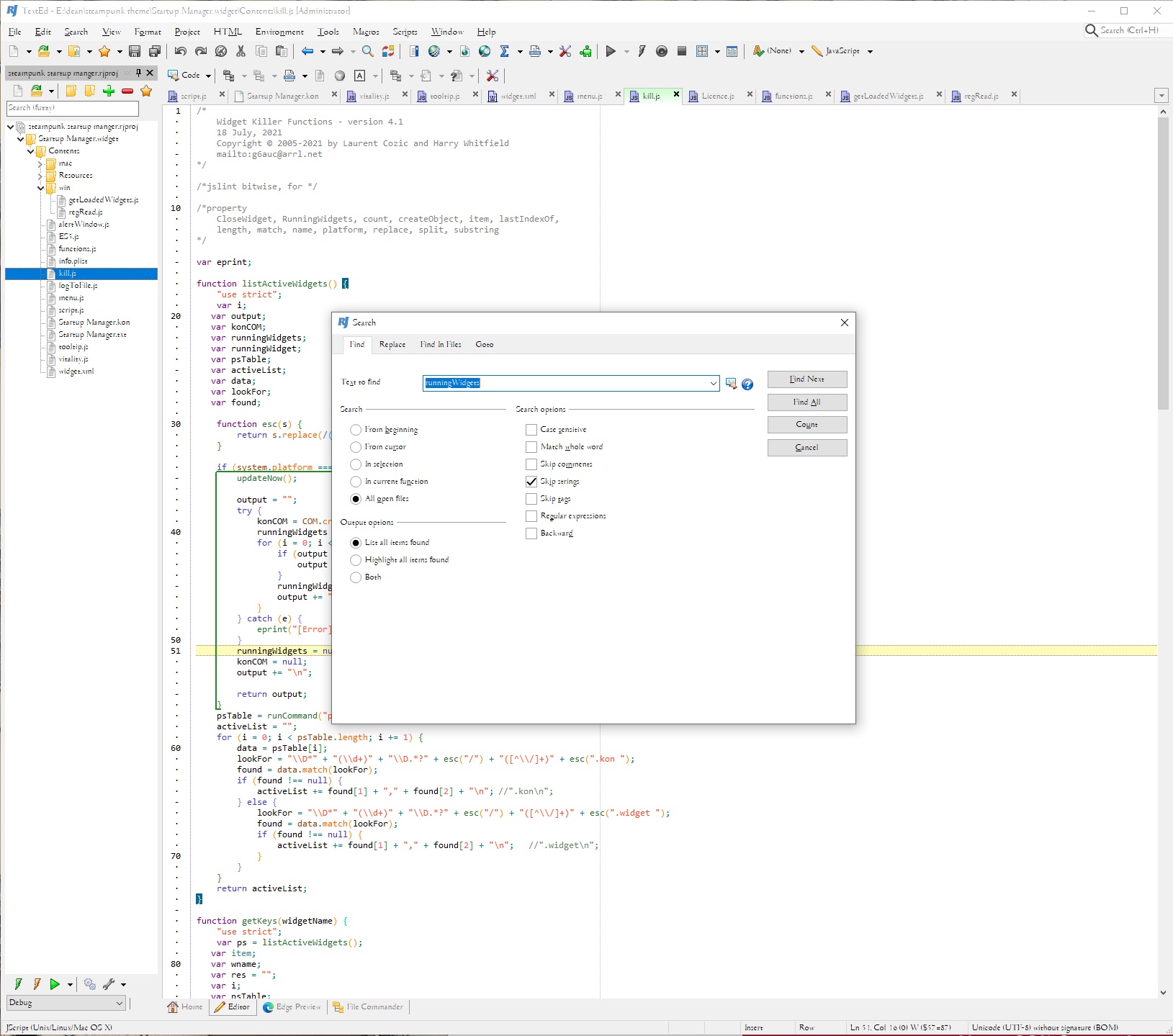
Fig 01 non-modal popup panel (same could be made modal) Following the VB6 layout where possible.
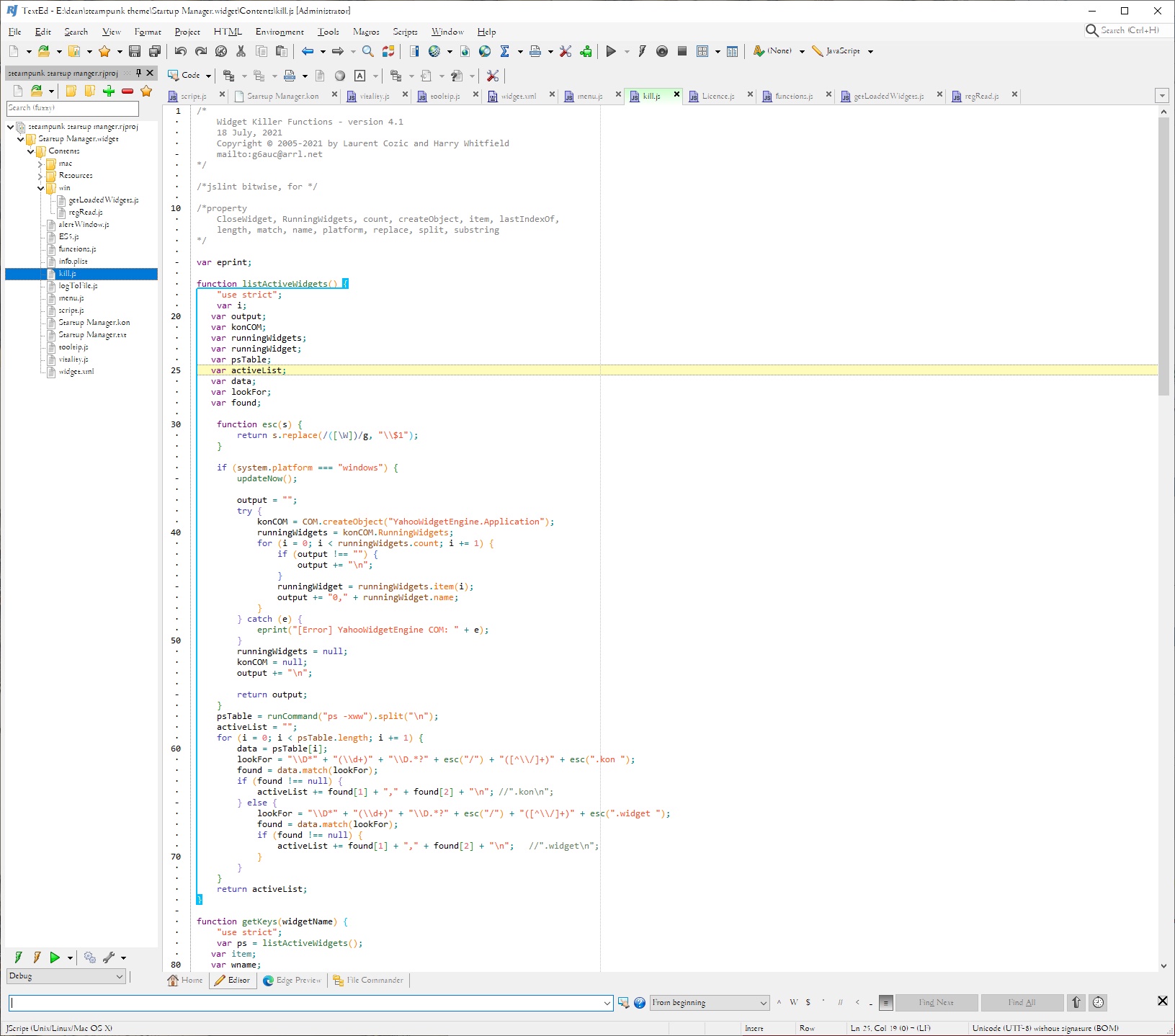
Fig 02 search panel at bottom of panel
I am unsure that the bottom is the best place for a in-panel search as it often ends up off screen when the main window is large and placed in a handy location with a bit of it off-screen. Top for me is better.
Last edited by yereverluvinuncleber; May 5th, 2025 at 02:21 PM.
https://github.com/yereverluvinunclebert
Skillset: VMS,DOS,Windows Sysadmin from 1985, fault-tolerance, VaxCluster, Alpha,Sparc. DCL,QB,VBDOS- VB6,.NET, PHP,NODE.JS, Graphic Design, Project Manager, CMS, Quad Electronics. classic cars & m'bikes. Artist in water & oils. Historian.
By the power invested in me, all the threads I start are battle free zones - no arguing about the benefits of VB6 over .NET here please. Happiness must reign.
-
May 5th, 2025, 02:56 PM
#10
Re: Find/Replace panel
 Originally Posted by WaynePhillipsEA

I envisage having a "Find All" button that is basically the same as the old Find In Project option, producing the results list in a virtual document as before.
@fafalone, if I add multi-line support to the Find/Replace panel, do you think that the Monaco inplace find/replace widget is really still needed? I'm trying to reduce and make find/replace more concise. We've currently got or had 4 different ways of doing find/replace so far (new Find/Replace panel, old Find In Project option, Monaco widget and Global Search addin).
While it's mostly about the functionality, I think there's something to be said for retaining the Monaco widget as a 'Quick find/Quick replace'. Something small to quickly deal with minor jobs; it doesn't need more options or to also move into other documents, just left as is. If the new dialog showed a full results table like Global Search, absolutely it makes sense to remove that and the old "Find in project", since those are both bigger jobs where you want the full featured power tool and there's no feature difference. Certainly the new dialog should support multiline too, but I'd suggest leaving the Monaco widget in any case. Then the user can configure e.g. which one is opened with Ctrl+F with the normal shortcut tool; probably the full dialog as default.
Last edited by fafalone; May 5th, 2025 at 03:05 PM.
-
May 5th, 2025, 03:09 PM
#11
Re: Find/Replace panel
The option to "Find All" and the result listing the contents in a "found panel" are shown here as an example:
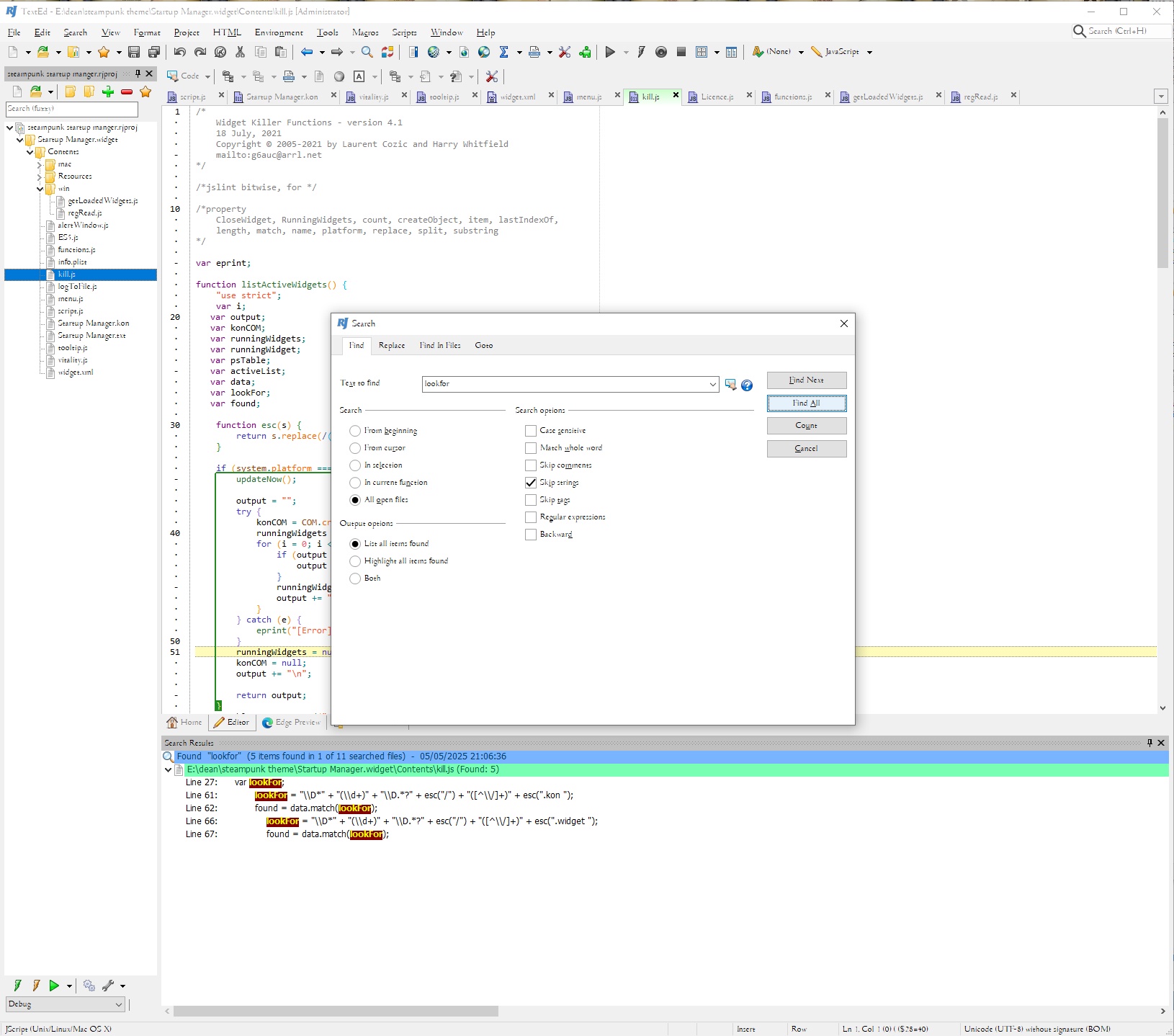
https://github.com/yereverluvinunclebert
Skillset: VMS,DOS,Windows Sysadmin from 1985, fault-tolerance, VaxCluster, Alpha,Sparc. DCL,QB,VBDOS- VB6,.NET, PHP,NODE.JS, Graphic Design, Project Manager, CMS, Quad Electronics. classic cars & m'bikes. Artist in water & oils. Historian.
By the power invested in me, all the threads I start are battle free zones - no arguing about the benefits of VB6 over .NET here please. Happiness must reign.
Tags for this Thread
 Posting Permissions
- You may not post new threads
- You may not post replies
- You may not post attachments
- You may not edit your posts
-
Forum Rules
|
Click Here to Expand Forum to Full Width
|



 Reply With Quote

