|

-
Dec 27th, 2024, 11:46 PM
#81
Registered User

Re: [VB6/VBA] QR Code generator library
Hi Wqweto,
I've sent few messages but seems lost somewhere...
Anyway, I downloaded the Module QRgenerator and i have few issues as folows:
1- I'm unable to save the generated code into [ Image1.Picture ] as JPG or PNG, the saved file is unreadable except if you open it with Paintbrush
2- I'm unable to save the Image1.Picture to a Sheet Cell
can you help with this issue? I appreciate your support
Ehab
-
Feb 22nd, 2025, 04:14 AM
#82
New Member
Re: [VB6/VBA] QR Code generator library
A very useful package that almost exactly fits my needs. It looks well written.
A minor suggestion: At the github page, please indicate that the code requires the Windows libraries (I initially tried to use this on a Mac). Also note whatever restrictions there are (Visual Studio, perhaps) on the test case example (The .frm file fails to load in my Win10 system, with an error about the class used.)
Tl R; I don't know how to create (and access) objects at run time that have the Image property that will take the QR image. R; I don't know how to create (and access) objects at run time that have the Image property that will take the QR image.
Even though I couldn't load the test form, I was able to read its code. So I was able to get this to work with UserForms or with ActiveX forms (but not with non-ActiveX Content Control forms) which I create manually. But, as I'm not proficient at VBA, I've run into a problem that may be trivial for others with experience. Maybe others here can suggest solutions.
I want to create about 200 QR codes from a dynamic source, to be stored in a Word document, for printing. I do not have access to install software on this device (no Visual Studio, etc). With the QR Code generator, I was hoping to programmatically create the QR images in a Word document. I can set the Image field for UserForms and ActiveX pictures, but I've not figured out how to create and access objects with the .Image field that I create at run time. (As far as I am concerned, I don't require a form but just the ability to put the QR code into the file.)
If I can't get past this, I may resort to creating multiple documents from a template file containing ActiveX forms.
FYI, I was able to scale a QR code generated by Nayuki's generator, with a full 4.296 alphanumeric characters (encoding 2864 bytes), to 1.25" (3.175 cm) square, print, scan, and read the QR code from the scan perfectly. That suggests that I can pack about 68kB of binary data per letter-sized page. (I've not done this using this VBA QR code generator yet, but I feel comfortable expecting it will work.)
-
Feb 22nd, 2025, 06:48 AM
#83
Re: [VB6/VBA] QR Code generator library
> A minor suggestion: At the github page, please indicate that the code requires the Windows libraries (I initially tried to use this on a Mac). Also note whatever restrictions there are (Visual Studio, perhaps) on the test case example (The .frm file fails to load in my Win10 system, with an error about the class used.)
Just added a scary README for all the VBA users. . .
> Maybe others here can suggest solutions.
You can create 200 image files (.wmf vectors) which you can then drag&drop in MS Word or you can automate MS Word and copy/paste each vector image w/ QR Code on separate page.
cheers,
</wqw>
-
Aug 17th, 2025, 03:08 PM
#84
New Member
Re: [VB6/VBA] QR Code generator library
Good job , Thankssssssssssssssssss
-
Nov 6th, 2025, 01:54 AM
#85
New Member
Re: [VB6/VBA] QR Code generator library
Hello, is there a way to generate QR codes and paste them directly into Excel worksheet cells?
-
Nov 6th, 2025, 05:46 AM
#86
Re: [VB6/VBA] QR Code generator library
@ycz22: Ask ChatGPT or your preferred LLM.
-
Nov 15th, 2025, 10:43 PM
#87
New Member
Re: [VB6/VBA] QR Code generator library
Find a solution:
Code:
Public Function QRCcodeToWorksheet(pict As stdole.StdPicture, topLeftCell As Range)
   Dim oleObj As OLEObject, shapeObj As Shape
   '????????????????
   For Each shapeObj In Sheets(topLeftCell.Parent.Name).Shapes
       If shapeObj.Name = "QRCcode" Then
          shapeObj.Delete
          Exit For
       End If
   Next
   '?? OLEObjects ???? StdPicture ???????????
   Set oleObj = Sheets(topLeftCell.Parent.Name).OLEObjects.Add(ClassType:="Forms.Image.1", Link:=False, DisplayAsIcon:=False, Left:=topLeftCell.Left, Top:=topLeftCell.Top, Width:=pict.Width \ 2540, Height:=pict.Height \ 2540)
   With oleObj
        .Object.Picture = pict
        .Object.BorderStyle = 0
        .Object.AutoSize = True
        .CopyPicture
        .Delete
   End With
   '?????????????
   Sheets(topLeftCell.Parent.Name).Paste Destination:=topLeftCell
   Set shapeObj = Sheets(topLeftCell.Parent.Name).Shapes(Sheets(topLeftCell.Parent.Name).Shapes.count)
   With shapeObj
        .Name = "QRCcode"
        .Top = topLeftCell.Top
        .Left = topLeftCell.Left
        .LockAspectRatio = msoTrue
   End With
End Function
Last edited by Shaggy Hiker; Nov 15th, 2025 at 11:15 PM.
Reason: Added CODE tags.
-
Nov 16th, 2025, 12:32 PM
#88
Re: [VB6/VBA] QR Code generator library
That's some code I wouldn't inflict on anyone!
Every time adding a dummy Forms.Image.1 OLE object only to copy/paste an StdPicture into the destination cell seems like beyond overkill.
cheers,
</wqw>
-
Dec 21st, 2025, 10:17 PM
#89
New Member
Re: [VB6/VBA] QR Code generator library
Code:
Option Explicit

'==================================================================
' ?????API ??
'==================================================================
Private Declare PtrSafe Function GetDC Lib "user32" (ByVal hwnd As LongPtr) As LongPtr
Private Declare PtrSafe Function ReleaseDC Lib "user32" (ByVal hwnd As LongPtr, ByVal hDC As LongPtr) As Long
Private Declare PtrSafe Function CreateCompatibleDC Lib "gdi32" (ByVal hDC As LongPtr) As LongPtr
Private Declare PtrSafe Function CreateCompatibleBitmap Lib "gdi32" (ByVal hDC As LongPtr, ByVal nWidth As Long, ByVal nHeight As Long) As LongPtr
Private Declare PtrSafe Function SelectObject Lib "gdi32" (ByVal hDC As LongPtr, ByVal hObject As LongPtr) As LongPtr
Private Declare PtrSafe Function DeleteObject Lib "gdi32" (ByVal hObject As LongPtr) As Long
Private Declare PtrSafe Function DeleteDC Lib "gdi32" (ByVal hDC As LongPtr) As Long
Private Declare PtrSafe Function PlayEnhMetaFile Lib "gdi32" (ByVal hDC As LongPtr, ByVal hEMF As LongPtr, lpRect As RECT) As Long
Private Declare PtrSafe Function PatBlt Lib "gdi32" (ByVal hDC As LongPtr, ByVal x As Long, ByVal y As Long, ByVal nWidth As Long, ByVal nHeight As Long, ByVal dwRop As Long) As Long

Private Declare PtrSafe Function OpenClipboard Lib "user32" (ByVal hwnd As LongPtr) As Long
Private Declare PtrSafe Function EmptyClipboard Lib "user32" () As Long
Private Declare PtrSafe Function SetClipboardData Lib "user32" (ByVal wFormat As Long, ByVal hMem As LongPtr) As LongPtr
Private Declare PtrSafe Function CloseClipboard Lib "user32" () As Long
Private Declare PtrSafe Function CopyImage Lib "user32" (ByVal handle As LongPtr, ByVal un1 As Long, ByVal n1 As Long, ByVal n2 As Long, ByVal un2 As Long) As LongPtr
Private Declare PtrSafe Function OleCreatePictureIndirect Lib "olepro32.dll" (ByRef picDesc As GUID_UOID, ByRef RefIID As GUID, ByVal fPictureOwnsHandle As Long, ByRef IPic As stdole.IPicture) As Long
Private Declare PtrSafe Function GetDeviceCaps Lib "gdi32" (ByVal hDC As LongPtr, ByVal nIndex As Long) As Long

'==================================================================
' ??????????
'==================================================================
Private Type RECT
    Left As Long
    Top As Long
    Right As Long
    Bottom As Long
End Type

Private Type GUID_UOID
    cbSizeOfStruct As Long
    picType As Long
    hPic As LongPtr
    hPal As LongPtr
End Type

Private Type GUID
    Data1 As Long
    Data2 As Integer
    Data3 As Integer
    Data4(0 To 7) As Byte
End Type

'==================================================================
' ?????????
'==================================================================
Private Const LOGPIXELSX = 88
Private Const LOGPIXELSY = 90
Private Const CF_BITMAP = 2
Private Const IMAGE_BITMAP = 0
Private Const LR_COPYRETURNORG = &H4
Private Const WHITENESS = &HFF0064
Private Const TWIPS_PER_INCH As Long = 2540

'==================================================================
' ?????????
'==================================================================
Public Function ConvertToBitmap(srcPicture As stdole.StdPicture, Optional CopyToClipboard As Boolean = False) As stdole.StdPicture
    Dim hResultBitmap As LongPtr
    Dim picDesc As GUID_UOID
    Dim tGuid As GUID
    Dim tRect As RECT
    Dim hdcScreen As LongPtr, hdcMem As LongPtr
    Dim lngWidth As Long, lngHeight As Long
    Dim dpiX As Long, dpiY As Long
    Dim hSrcHandle As LongPtr

    ' --- ??? ---
    On Error Resume Next
    Set ConvertToBitmap = Nothing
    If srcPicture Is Nothing Then Exit Function

    hSrcHandle = srcPicture.handle
    If hSrcHandle = 0 Then Exit Function

    ' --- ????: ???????? ---
    If srcPicture.Type = 1 Then ' ?????
        ' ??????
        hResultBitmap = CopyImage(hSrcHandle, IMAGE_BITMAP, 0, 0, LR_COPYRETURNORG)
    Else ' ??? (EMF/WMF) - ?????

        hdcScreen = GetDC(0)
        If hdcScreen = 0 Then Exit Function

        ' ?? DPI (???????)
        dpiX = GetDeviceCaps(hdcScreen, LOGPIXELSX)
        dpiY = GetDeviceCaps(hdcScreen, LOGPIXELSY)

        ' --- ????????????? ---
        lngWidth = (srcPicture.width * dpiX) / TWIPS_PER_INCH
        lngHeight = (srcPicture.height * dpiY) / TWIPS_PER_INCH

        ' ??????
        lngWidth = IIf(lngWidth < 50, 100, lngWidth)
        lngHeight = IIf(lngHeight < 50, 100, lngHeight)

        tRect.Right = lngWidth
        tRect.Bottom = lngHeight

        ' --- ?????? ---
        hdcMem = CreateCompatibleDC(hdcScreen)
        If hdcMem = 0 Then GoTo Cleanup

        hResultBitmap = CreateCompatibleBitmap(hdcScreen, lngWidth, lngHeight)
        If hResultBitmap = 0 Then GoTo Cleanup

        Dim hOld As LongPtr
        hOld = SelectObject(hdcMem, hResultBitmap)

        ' --- ???? ---
        PatBlt hdcMem, 0, 0, lngWidth, lngHeight, WHITENESS

        ' --- ????? ---
        PlayEnhMetaFile hdcMem, hSrcHandle, tRect

        ' --- ???? ---
        SelectObject hdcMem, hOld
    End If

    ' --- ???? (????) ---
    ' ??? hdcMem ????????
Cleanup:
    If hdcMem <> 0 Then
        DeleteDC hdcMem
    End If
    If hdcScreen <> 0 Then
        ReleaseDC 0, hdcScreen
    End If

    ' --- ??????? ---
    If hResultBitmap = 0 Then Exit Function

    ' --- ??? StdPicture ---
    With picDesc
        .cbSizeOfStruct = LenB(picDesc)
        .picType = 1
        .hPic = hResultBitmap
        .hPal = 0
    End With

    ' --- ???????? GUID ---
    ' ???????? IPicture GUID
    With tGuid
        .Data1 = &H7BF80980
        .Data2 = &HBF32
        .Data3 = &H101A
        .Data4(0) = &H8B
        .Data4(1) = &HBB
        .Data4(2) = 0
        .Data4(3) = &HAA
        .Data4(4) = 0
        .Data4(5) = &H30
        .Data4(6) = &HC
        .Data4(7) = &HAB
    End With

    ' --- ???? ---
    If OleCreatePictureIndirect(picDesc, tGuid, True, ConvertToBitmap) = 0 Then
        ' --- ????? ---
        If CopyToClipboard Then
            Dim hClip As LongPtr
            hClip = CopyImage(ConvertToBitmap.handle, IMAGE_BITMAP, 0, 0, LR_COPYRETURNORG)
            If hClip <> 0 Then
                CloseClipboard
                If OpenClipboard(0) Then
                    EmptyClipboard
                    SetClipboardData CF_BITMAP, hClip
                    CloseClipboard
                End If
            End If
        End If
    End If
End Function
This method copies it to the clipboard and directly pastes it onto the worksheet
Last edited by dday9; Dec 23rd, 2025 at 09:14 AM.
-
Jan 12th, 2026, 12:40 PM
#90
Lively Member

Re: [VB6/VBA] QR Code generator library
For Excel users who prefer not to use APIs in their spreadsheets, it's possible to export the QR code as a vector image and then import it. A great option is the EPS format whitch is in plain text easy to write and widely supported by softwares including older versions of Excel.
Place QRBarcode in Qr main module and remove all Apis and theirs dependies, Now need to find a VBA version of the UTF-8 conversion function which shouldn't be hard to find, and everything will work fine.
Code:
Public Sub QRBarcode(ByVal Target As Range, TextOrByteArray As Variant, _
                     Optional ByVal ModuleSize As Long = 120, _
            Optional ByVal Ecl As QRCodegenEcc = QRCodegenEcc_MEDIUM)
    Dim baQrCode()  As Byte
    Dim picName As String
    picName = "QrEpsImage" & Target.Address(0, 0)
    On Error Resume Next
      Target.Worksheet.Shapes(picName).Delete
    On Error GoTo 0
    If IsEmpty(TextOrByteArray) Then Exit Sub
    If QRCodegenEncode(TextOrByteArray, baQrCode, Ecl, VERSION_MIN, VERSION_MAX, QRCodegenMask_5, True) Then
        Dim QrSize As Long
        Dim lX As Long
        Dim lY As Long
        Dim rc As Long, TxtOut() As String, Pz As Long
        On Error GoTo nEnd

        QrSize = QRCodegenGetSize(baQrCode)
        ReDim TxtOut(0 To UBound(baQrCode) + 30)
        rc = ModuleSize / (QrSize + 2)
        TxtOut(0) = "%!PS-Adobe-3.0 EPSF-3.0"
        TxtOut(1) = "%%BoundingBox: 0 0 " & ModuleSize & " " & ModuleSize
        TxtOut(2) = "/dt " & rc & " def"
        TxtOut(3) = "/rc {moveto dt 0 rlineto 0 dt rlineto dt neg 0 rlineto closepath fill 0 setgray} bind def"
        Pz = 4
        For lY = 0 To QrSize - 1
          For lX = 0 To QrSize - 1
           ' If baQrCode(lY * QrSize + lX + 1) <> 0 Then
             If QRCodegenGetModule(baQrCode, lX, lY) Then
                TxtOut(Pz) = (lX + 1) * rc & " " & (lY + 1) * rc & " rc"
                Pz = Pz + 1
             End If
          Next
        Next
        TxtOut(Pz) = "%%EOF"
        ReDim Preserve TxtOut(0 To Pz)

        Dim Pic As Object, f As Integer, EpsFile As String
        EpsFile = Environ("Tmp") & "\Qr.eps"
         f = FreeFile
         Open EpsFile For Output As #f
         Print #f, Join(TxtOut, Chr(10))
         Close #f
        Set Pic = Target.Worksheet.Shapes.AddPicture(EpsFile, False, True, 0, 0, 0, 0)
        Pic.LockAspectRatio = True
        Pic.Name = picName
        With Target
            Pic.Width = Application.Min(.Width, .Height)
            Pic.Top = .Top
            Pic.Left = .Left
        End With
nEnd:  If Err Then
          MsgBox Err.Description, vbExclamation
          End
       End If
     End If
End Sub
Last edited by anycoder; Jan 18th, 2026 at 01:37 PM.
-
Jan 12th, 2026, 12:43 PM
#91
Lively Member
Re: [VB6/VBA] QR Code generator library
usage:
Code:
QRBarcode Range("A1"), "hello !"
Generated file:
Code:
%!PS-Adobe-3.0 EPSF-3.0
%%BoundingBox: 0 0 120 120
/dt 5 def
/rc {moveto dt 0 rlineto 0 dt rlineto dt neg 0 rlineto closepath fill 0 setgray} bind def
5 5 rc
10 5 rc
15 5 rc
20 5 rc
25 5 rc
30 5 rc
35 5 rc
45 5 rc
55 5 rc
60 5 rc
65 5 rc
75 5 rc
80 5 rc
85 5 rc
90 5 rc
95 5 rc
100 5 rc
105 5 rc
5 10 rc
35 10 rc
50 10 rc
75 10 rc
105 10 rc
5 15 rc
15 15 rc
20 15 rc
25 15 rc
35 15 rc
45 15 rc
50 15 rc
60 15 rc
65 15 rc
75 15 rc
85 15 rc
90 15 rc
95 15 rc
105 15 rc
5 20 rc
15 20 rc
20 20 rc
25 20 rc
35 20 rc
50 20 rc
55 20 rc
60 20 rc
65 20 rc
75 20 rc
85 20 rc
90 20 rc
95 20 rc
105 20 rc
5 25 rc
15 25 rc
20 25 rc
25 25 rc
35 25 rc
45 25 rc
50 25 rc
55 25 rc
65 25 rc
75 25 rc
85 25 rc
90 25 rc
95 25 rc
105 25 rc
5 30 rc
35 30 rc
50 30 rc
60 30 rc
65 30 rc
75 30 rc
105 30 rc
5 35 rc
10 35 rc
15 35 rc
20 35 rc
25 35 rc
30 35 rc
35 35 rc
45 35 rc
55 35 rc
65 35 rc
75 35 rc
80 35 rc
85 35 rc
90 35 rc
95 35 rc
100 35 rc
105 35 rc
45 40 rc
50 40 rc
65 40 rc
30 45 rc
35 45 rc
50 45 rc
65 45 rc
75 45 rc
85 45 rc
95 45 rc
105 45 rc
5 50 rc
15 50 rc
20 50 rc
30 50 rc
45 50 rc
65 50 rc
85 50 rc
90 50 rc
95 50 rc
5 55 rc
10 55 rc
25 55 rc
35 55 rc
45 55 rc
65 55 rc
75 55 rc
80 55 rc
90 55 rc
95 55 rc
100 55 rc
15 60 rc
20 60 rc
40 60 rc
50 60 rc
75 60 rc
80 60 rc
90 60 rc
95 60 rc
5 65 rc
10 65 rc
15 65 rc
35 65 rc
45 65 rc
50 65 rc
60 65 rc
70 65 rc
75 65 rc
80 65 rc
85 65 rc
90 65 rc
100 65 rc
45 70 rc
50 70 rc
75 70 rc
85 70 rc
90 70 rc
105 70 rc
5 75 rc
10 75 rc
15 75 rc
20 75 rc
25 75 rc
30 75 rc
35 75 rc
65 75 rc
80 75 rc
95 75 rc
100 75 rc
5 80 rc
35 80 rc
45 80 rc
55 80 rc
60 80 rc
65 80 rc
70 80 rc
85 80 rc
90 80 rc
95 80 rc
100 80 rc
5 85 rc
15 85 rc
20 85 rc
25 85 rc
35 85 rc
55 85 rc
65 85 rc
70 85 rc
75 85 rc
80 85 rc
100 85 rc
5 90 rc
15 90 rc
20 90 rc
25 90 rc
35 90 rc
50 90 rc
55 90 rc
60 90 rc
85 90 rc
90 90 rc
5 95 rc
15 95 rc
20 95 rc
25 95 rc
35 95 rc
60 95 rc
80 95 rc
85 95 rc
90 95 rc
95 95 rc
100 95 rc
105 95 rc
5 100 rc
35 100 rc
60 100 rc
65 100 rc
80 100 rc
85 100 rc
90 100 rc
95 100 rc
5 105 rc
10 105 rc
15 105 rc
20 105 rc
25 105 rc
30 105 rc
35 105 rc
50 105 rc
55 105 rc
65 105 rc
70 105 rc
75 105 rc
85 105 rc
100 105 rc
%%EOF
Last edited by anycoder; Jan 12th, 2026 at 12:58 PM.
-
Jan 13th, 2026, 04:56 AM
#92
Re: [VB6/VBA] QR Code generator library
Keep in mind that this EPS export outputs squares and not contiguous poligons like the original WMF does. There might appear gaps between the squares depending on the EPS on-screen renderer used.
cheers,
</wqw>
-
Jan 18th, 2026, 01:22 PM
#93
Lively Member
Re: [VB6/VBA] QR Code generator library
Hi,
[..]
New version:
Code:
Public Sub QRBarcode(ByVal Target As Range, TextOrByteArray As Variant, _
             Optional ByVal ForeColor As Long = vbBlack, _
             Optional ByVal QrWidth As Single = 100, _
             Optional ByVal QuickSmooth As Boolean = True)
    Dim baQrCode()  As Byte
    Dim picName As String
    picName = "QrEpsImage" & Target.Address(0, 0)
    On Error Resume Next
      Target.Worksheet.Shapes(picName).Delete
    On Error GoTo 0
    If IsEmpty(TextOrByteArray) Then Exit Sub
    On Error GoTo nEnd
    Dim Pic As Object, f As Integer, EpsFile As String
    EpsFile = Environ("Tmp") & "\Qr.eps"
    If Not QRCodegenEpsFile(TextOrByteArray, EpsFile, ForeColor, QrWidth, QuickSmooth, Mask:=QRCodegenMask_5) Then
       Exit Sub
    End If
    Set Pic = Target.Worksheet.Shapes.AddPicture(EpsFile, False, True, 0, 0, 0, 0)
    Pic.LockAspectRatio = True
    Pic.Name = picName
    With Target
        Pic.Width = Application.Min(.Width, .Height)
        Pic.Top = .Top
        Pic.Left = .Left
    End With
nEnd:
    If Err Then
       MsgBox Err.Description, vbExclamation
       Application.EnableEvents = True
       Application.ScreenUpdating = True
       End
    End If
End Sub

Private Function QRCodegenEpsFile(TextOrByteArray As Variant, _
            ByVal Filename As String, _
            Optional ByVal ForeColor As OLE_COLOR = vbBlack, _
            Optional ByVal QrWidth As Single = 100, _
            Optional ByVal QuickSmooth As Boolean = False, _
            Optional ByVal Ecl As QRCodegenEcc = QRCodegenEcc_LOW, _
            Optional ByVal MinVersion As Long = VERSION_MIN, _
            Optional ByVal MaxVersion As Long = VERSION_MAX, _
            Optional ByVal Mask As QRCodegenMask = QRCodegenMask_AUTO, _
            Optional ByVal BoostEcl As Boolean = True) As Boolean
    Dim baQrCode()      As Byte
    Dim uVectors()      As RECT
    Dim uPoints()       As POINTAPI
    Dim aSizes()        As Long
    Dim lQrSize         As Long
    Dim lIdx            As Long
    Dim ModuleSize      As Long
    Const PointsToTwips = 20#

    If Not QRCodegenEncode(TextOrByteArray, baQrCode, Ecl, MinVersion, MaxVersion, Mask, BoostEcl) Then
       Exit Function
    End If

    lQrSize = QRCodegenGetSize(baQrCode)

    ModuleSize = (QrWidth * PointsToTwips / (lQrSize + 1))

    pvConstructVectors baQrCode, True, uVectors
    pvConstructPolygons uVectors, ModuleSize, uPoints, aSizes

    Dim Polys As Long, TxtOut() As String, Pz As Long
    ReDim TxtOut(0 To (UBound(uPoints) * 3 + 30))

    TxtOut(0) = "%!PS-Adobe-3.0 EPSF-3.0"
    TxtOut(1) = "%%BoundingBox: 0 0 " & QrWidth & " " & QrWidth
    TxtOut(2) = "/m {moveto} bind def"
    TxtOut(3) = "/l {lineto} bind def"
    TxtOut(4) = LTrim(Left(Str$(1 / PointsToTwips), 4) & _
                 Left(Str$(1 / PointsToTwips), 4)) & " scale"
    TxtOut(5) = CStr(ModuleSize \ 2) & " " & CStr(ModuleSize \ 2 + (lQrSize) * ModuleSize) & " translate"

    Pz = 6
    Dim Curr As POINTAPI, Nxt As POINTAPI, i As Long
    Dim Dx As Double, Dy As Double, PtDist As Double, ref As Double
    ref = ModuleSize / 5
    For Polys = 0 To UBound(aSizes)
       If QuickSmooth Then
         For i = lIdx To (lIdx + aSizes(Polys) - 2)
            Curr = uPoints(i)
            Nxt = uPoints(i + 1)
            Dx = Nxt.X - Curr.X
            Dy = Nxt.Y - Curr.Y
            If Abs(Dx) > Abs(Dy) Then
               PtDist = ref * Sgn(Dx)
               Curr.X = Curr.X + PtDist
               Nxt.X = Nxt.X - PtDist
            Else
               PtDist = ref * Sgn(Dy)
               Curr.Y = Curr.Y + PtDist
               Nxt.Y = Nxt.Y - PtDist
            End If

            If i = lIdx Then
               TxtOut(Pz) = Curr.X & " " & -Curr.Y & " m"
            Else
               TxtOut(Pz) = Curr.X & " " & -Curr.Y & " l"
            End If
            TxtOut(Pz + 1) = Nxt.X & " " & -Nxt.Y & " l"
            Pz = Pz + 2
         Next
       Else
          For i = lIdx To (lIdx + aSizes(Polys) - 1)
            Curr = uPoints(i)
            If i = lIdx Then
               TxtOut(Pz) = Curr.X & " " & -Curr.Y & " m"
            Else
               TxtOut(Pz) = Curr.X & " " & -Curr.Y & " l"
            End If
            Pz = Pz + 1
         Next
      End If
      lIdx = lIdx + aSizes(Polys)
    Next
    If ForeColor < 0 Then ForeColor = 0
    TxtOut(Pz) = LTrim(Left(Str$((ForeColor And &HFF) / &HFF&), 4)) & _
                 Left(Str$((ForeColor And &HFF00&) / &HFF00&), 4) & _
                 Left(Str$((ForeColor And &HFF0000) / &HFF0000), 4) & " setrgbcolor"

    TxtOut(Pz + 1) = "eofill"
    Pz = Pz + 2
    TxtOut(Pz) = "%%EOF"
    ReDim Preserve TxtOut(0 To Pz)
    Dim f As Integer
    f = FreeFile
    Open Filename For Output As #f
    Print #f, Join(TxtOut, Chr(10))
    Close #f
    QRCodegenEpsFile = True
End Function
Usage:
Code:
QRBarcode Range("A1"), "hello !", QuickSmooth:=True
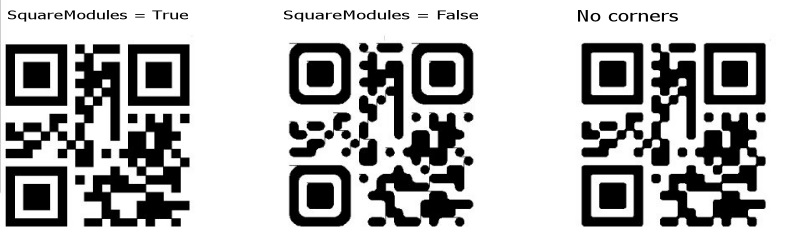
In the new version polygons are generated as expected, but there is small a problem with the rounded modules, it seems that eps doesn't properly support empty polygons and collinear segments they still visible making artifacts on small QRs.
I switched to simple smoothing by clipping the corners instead, which gives an acceptable result , i tried bezier curves but Excel may load polygons in separate layers which affect applaying the odd-even winding rule.
Last edited by anycoder; Jan 19th, 2026 at 02:07 AM.
-
Jan 18th, 2026, 01:58 PM
#94
Lively Member
Re: [VB6/VBA] QR Code generator library
Last edited by anycoder; Jan 19th, 2026 at 02:05 AM.
-
Jan 18th, 2026, 03:10 PM
#95
Re: [VB6/VBA] QR Code generator library
I see you are all down the rabbit hole now :-))
JFYI there is Bezier curves branch at https://github.com/wqweto/VbQRCodege.../bezier-curves which outputs to WMF currently.
Last edited by wqweto; Jan 19th, 2026 at 06:20 AM.
 Posting Permissions
- You may not post new threads
- You may not post replies
- You may not post attachments
- You may not edit your posts
-
Forum Rules
|
Click Here to Expand Forum to Full Width
|



 Reply With Quote
