|

-
Dec 30th, 2024, 09:04 AM
#1
Thread Starter
PowerPoster

twinbasic bug report,vb7 replace vb6,Creative ideas and suggestions
1,It is best to place the new form and module files at the top, and fold other system folders into one directory due to limited screen space.
2. Add a ranking of attribute usage rates (recommended+different usage frequency for each person). The most troublesome thing when developing with VB.net, C #, and VB6 is that attributes have to be pulled up and down for half a day every time.
You can add a search function, press F3 to search, or rank by letter
3. The form should display the title
4. Does TWINBASIC have any special functions for reading and writing registry and INI?
5?Does TWINBASIC not have the function to export VB6 projects? It should add a simple export function, such as forms and code
6. There is no code hint when clicking on the function name with the mouse. It takes 3 seconds to display the function parameter hint box when hovering over it. It would be best if the parameter names could be displayed and highlighted in black when clicking on each parameter
7. Code hinting: Pressing Enter does not trigger automatic completion. This is quite inconvenient
It is best to add the option of pressing enter or the space bar to automatically input the attribute name of the first or selected item. Use the up and down arrow keys to select multiple prompt items, and then press the right arrow key to automatically select and complete the input
8. Double-click the form to frequently add redundant code
Private Sub Form1_Load()
End Sub
There is already code: Private Sub Form_Load()
End Sub
9. Many errors occur without any indication of where they are, such as missing parentheses, which lead to compilation failure, But it doesn't show which line of code the error occurred on
10. Shared variable at the form level: private sarr() as string,
During a process, when redim sarr(10), the data quantity may remain unchanged. However, when displaying the result using msgbox(join(sarr(), vbcrlf)), the data can still be seen. However, when reading and copying, the data is not present. I have spent 3 hours trying to find the reason, but to no avail.
11. The Asc(unicode character) in Chinese is different from the result in VB6, which becomes ASCW. Is there any way to solve this problem?
12. If the button is set with a background color, it is best to automatically switch to mode: vbButtonGraphical
13. Some system functions can be added: write text file (ansi format), write Unicode file, append file, append file Utf8 format
14. Forms created or imported VB6 modules in the project cannot be deleted, renamed, or operated on

Last edited by xiaoyao; Dec 30th, 2024 at 09:32 PM.
-
Dec 30th, 2024, 10:42 AM
#2
Re: twinbasic bug report
VB6 can't export VB3 files either. Makes little sense when it's not forwards compatible.
6. 3 seconds? My machine is hardly a speed demon and it only takes 1 even with WinDevLib.
7. It uses Tab like VB6... you can adjust it in the keyboard settings.
8. Cannot reproduce in Beta 630; it would add an invalid one then another in 628 but it seems to be fixed now.
9. Please post reproducible samples.
10. You may need to restart the compiler between runs (with the button next to the win32/win64 combobox) to clear old data.
11. Different than en-us VB6 or cn-cn VB6? Post a specific example please. If en-us VB6 behaves different from other versions, tB will match en-us for now.
-
Dec 30th, 2024, 12:07 PM
#3
Re: twinbasic bug report
 Originally Posted by xiaoyao

Does TWINBASIC not have the function to export VB6 projects? It should add a simple export function, such as forms and code
Originally Posted by fafalone
VB6 can't export VB3 files either. Makes little sense when it's not forwards compatible.
Everyting is saved as a text file, no? So there isn't really a need to "export" is there?
-tg
-
Dec 30th, 2024, 12:58 PM
#4
Re: twinbasic bug report
Forms/UCs are stored in a different format; .tbform, .tbcontrol contain plain text but different format than .frm/.ctl, plus binary data fields VB would put in .frx/.ctx (different encoding too). .twin files are plain text but use different, incompatible syntax (wrapping with Module...End Module or with tB attributes in most cases, and lacking hidden VB6 attributes required for valid classes), and are Unicode which VB6 might choke on. Further, VB doesn't split layout from code, tB does (but doesn't split binary data, where VB does).
.bas and .cls files would be ok to load back into VB6, provided you didn't add incompatible syntax yourself. These are imported or created and kept as-is in a VB6 compatible format retained on export. But that's it; Forms, UCs, property pages are a one-way conversion to tB-only formats with no support for using the old ones like bas/cls. And no vbp can be generated.
This is all of course when you export individual project files; . twinproj is entirely binary data you shouldn't try to modify the plain text in since there's encoded size data, like the plain text strings you find in an exe.
Last edited by fafalone; Dec 30th, 2024 at 03:33 PM.
-
Dec 30th, 2024, 06:35 PM
#5
Thread Starter
PowerPoster
Re: twinbasic bug report
twinbasicThe project is converted to a VB6 project. We don't need 100% conversion, we just need most of the conversion, and it doesn't matter if it's wrong.
For example, programs written by VB6 can directly restore 100% of the form through decompilation or many other software.
The position and size of forms and controls, which is just a basic expression, should not be difficult.
The source code can also be automatically copied directly to the form or module. So in essence, this is not difficult. It depends on whether the author wants to do it or not.
Sometimes it's just for verification. Some errors may disappear automatically in VB6.
You also need to recreate the form by twinbasic well, copy the code of each module, which is very troublesome.
In addition, a module sharing function can be added. It is a direct reference to the VB6 module.This module can be used together between vb6 and twinbasic
Is called a module file sharing library. The file is automatically detected for changes each time it is compiled. If there is any change, it will be imported automatically. This is like a link to a source code file in the development of vb.net,c#.
So that the two programming languages can use a common code base.
So sometimes it's better to ensure that the two file formats are compatible.For example, a shared form, or a general control userconrtol OCX, can also be directly referenced in Vp6 after being modified in the Spring Cup class, and the two binaries are the same.
If you modify a form or add several buttons in Chunbei Assassin, open the reference directly in the CPU, and it can also see the added buttons.
The main problem is that the code editor is not very easy to use. It is better to automatically convert the full angle to the half angle. Such as the space symbol. Double quote comma."",]
But vb.net because what he uses is winform, WPF form technology, the control type of Cpu and attribute are different also, so want to convert to VB6 old version is very difficult impossible.
Last edited by xiaoyao; Jan 15th, 2025 at 07:16 PM.
-
Dec 30th, 2024, 06:37 PM
#6
Thread Starter
PowerPoster
Re: twinbasic bug report
The ASC(char) function of twinbasic is wrong
Code:
Dim a As Long, asc1 As Long, W As Long, Str As String
Str = "?"
Str = ChrW(24120)
asc1 = Asc(Str)
W = AscW(Str)
ansiCode = Asc(StrConv(Str, vbUnicode))
Debug.Print "vb6 str=" & Str & ",asc=" & asc1 & ",AscW=" & W
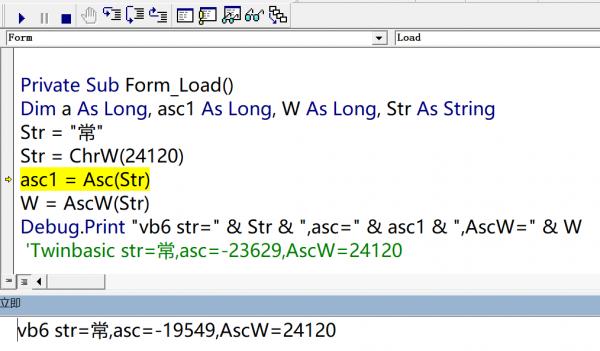
Last edited by xiaoyao; Dec 30th, 2024 at 08:14 PM.
-
Dec 30th, 2024, 08:04 PM
#7
Thread Starter
PowerPoster
Re: twinbasic bug report
some new idea
It is best to place the new form and module files at the top, and fold all other system files in one directory due to limited screen space.
2. Add a ranking of attribute usage rates (recommended+different usage frequency for each person). The most troublesome thing when developing with VB.net, C #, and VB6 is that attributes have to be pulled up and down for half a day every time.
You can add a search function, press F3 to search, or rank by letter
3. The form should display the title
4. Does TWINBASIC have any special functions for reading and writing registry and INI?
12. If the button is set with a background color, it is best to automatically switch to mode: vbButtonGraphical
13. Some system functions can be added: write text file (ansi format), write Unicode file, append file, append file Utf8 format
14. Forms created or imported VB6 modules in the project cannot be deleted, renamed, or operated on
It is best to add the option of pressing enter or the space bar to automatically input the attribute name of the first or selected item. Use the up and down arrow keys to select multiple prompt items, and then press the right arrow key to automatically select and complete the input
Last edited by xiaoyao; Dec 30th, 2024 at 09:32 PM.
-
Dec 31st, 2024, 12:07 AM
#8
Re: twinbasic bug report
Originally Posted by xiaoyao
The ASC(char) function of twinbasic is wrong
Code:
Dim a As Long, asc1 As Long, W As Long, Str As String
Str = "?"
Str = ChrW(24120)
asc1 = Asc(Str)
W = AscW(Str)
ansiCode = Asc(StrConv(Str, vbUnicode))
Debug.Print "vb6 str=" & Str & ",asc=" & asc1 & ",AscW=" & W
I get no difference other than tB can render the Unicode char and VB6 can't:

So if your Chinese VB6 version is behaving different than the US version, the latter is currently how twinBASIC will behave for now. In the future localization may be supported.
-
Dec 31st, 2024, 01:14 AM
#9
Thread Starter
PowerPoster
Re: twinbasic bug report,vb7 replace vb6,Creative ideas and suggestions
ASC=63?that's can't support unicode str,it's "?"
so need like utf8 to unicode(by gbk gb2312)
-
Jan 8th, 2025, 10:26 PM
#10
Thread Starter
PowerPoster
Re: twinbasic bug report,vb7 replace vb6,Creative ideas and suggestions
Twinbasic code prompts lack module name prompt function.
Enter the project name in VB6. *, All modules will be automatically listed, and the form can be manually selected.
But I usually like to use Chinese names because the taskbar uses this display to distinguish between multiple open VB6 projects. Suggest adding MY function to replace the function name, with intelligent prompts for more convenient selection
-
Jan 9th, 2025, 09:11 AM
#11
Re: twinbasic bug report,vb7 replace vb6,Creative ideas and suggestions
Btw your request 13 is already supported. The Open statement for file io supports additional syntax to specify encoding.
https://github.com/twinbasic/documen...ns-for-file-io
Code:
Open "C:\MyFile.txt" For Input Encoding utf-8 As #1
No idea where you got 14... All of those things can be done. If you've made changes you have to save before editing the filesystem with rename etc.
Also, use all the Chinese names you want. Unicode is supported everywhere. You can even name your functions and variables any Unicode code point. This is how extreme it can go:

Yes, that's really working code in tB lol
Chinese is no problem after that.
Last edited by fafalone; Jan 9th, 2025 at 09:22 AM.
-
Jan 10th, 2025, 12:10 PM
#12
Thread Starter
PowerPoster
Re: twinbasic bug report,vb7 replace vb6,Creative ideas and suggestions
Originally Posted by fafalone
Btw your request 13 is already supported. The Open statement for file io supports additional syntax to specify encoding.
Code:
Open "C:\MyFile.txt" For Input Encoding utf-8 As #1
Yes, that's really working code in tB lol
Chinese is no problem after that.
for add str at end of file,with unicode,ansi,utf8
These basic file operations should still be supported.
-
Jan 14th, 2025, 01:06 AM
#13
Re: twinbasic bug report,vb7 replace vb6,Creative ideas and suggestions
They are. All the native file i/o works with the Encoding parameter, e.g. Open strFile_Path For Append Encoding utf_16 As #1. And of course without it which behaves as VB6 does.
Also I believe these are just forwarded to APIs so you can use strings for other code pages that don't have constants but Windows would recognize; like Open strFile_Path For Append Encoding "windows-950" As #1
-
Jan 14th, 2025, 07:52 AM
#14
Fanatic Member

Re: twinbasic bug report,vb7 replace vb6,Creative ideas and suggestions
By the way, I agree that you need to add the space bar to the selection from the suggestion list, as it is done in VB6. I'm very used to choosing the items using the spacebar from the drop-down prompt in the code editor, and the Enter key is inconvenient.
For example, when I start writing in the code "Form1.Ca" appears in a list where, at the very top, I select the "Caption" item from the hint in VB6, I quickly type the code using the space bar and select the "Caption" item, but unfortunately this is not possible in Twin Basic.
-
Jan 14th, 2025, 08:03 AM
#15
Fanatic Member
Re: twinbasic bug report,vb7 replace vb6,Creative ideas and suggestions
And by the way, I completely agree that it's inconvenient that Twin Basic doesn't show, as in VB6, which line of code the error occurs in. This is inconvenient for debugging.
For some reason, in case of errors, it always highlights only the function header, and not the line needed inside the function.
-
Jan 14th, 2025, 08:30 AM
#16
Re: twinbasic bug report,vb7 replace vb6,Creative ideas and suggestions
Feel free to raise an issue in github or second your opinion on an existing issue already raised there, I am sure that Wayne will respond favourably, in time.
https://github.com/yereverluvinunclebert
Skillset: VMS,DOS,Windows Sysadmin from 1985, fault-tolerance, VaxCluster, Alpha,Sparc. DCL,QB,VBDOS- VB6,.NET, PHP,NODE.JS, Graphic Design, Project Manager, CMS, Quad Electronics. classic cars & m'bikes. Artist in water & oils. Historian.
By the power invested in me, all the threads I start are battle free zones - no arguing about the benefits of VB6 over .NET here please. Happiness must reign.
-
Jan 14th, 2025, 05:04 PM
#17
Re: twinbasic bug report,vb7 replace vb6,Creative ideas and suggestions
There's 3 different modes for Intellisense in the IDE settings window... Have you tried the classic mode that's supposed to be closer to VB6?
-
Jan 14th, 2025, 05:06 PM
#18
Re: twinbasic bug report,vb7 replace vb6,Creative ideas and suggestions
Originally Posted by HackerVlad
And by the way, I completely agree that it's inconvenient that Twin Basic doesn't show, as in VB6, which line of code the error occurs in. This is inconvenient for debugging.
For some reason, in case of errors, it always highlights only the function header, and not the line needed inside the function.
This very much depends on the error... The vast majority it gives the line number and when it doesn't it's usually an error in tB-generated code.
-
Jan 15th, 2025, 06:53 PM
#19
Thread Starter
PowerPoster
Re: twinbasic bug report,vb7 replace vb6,Creative ideas and suggestions
It is recommended to complete some functions as a priority:
1. The project is saved as multiple files. Reciting poems every day often leads to various errors and crashes, resulting in the loss of code.
2. Add a running mode of single file code.Just like freebasic, run a main. Bas file directly.
Submain, or both, don't even need this function.
In this way, you can simplify the whole IDE and hide all the other functions.
The whole interface is as simple as notepad for windows.
We can quickly write code to implement the functions of the scripting language.
For example, the twins cript. Exe/filebak. Bas or vbs is used for daily file backup.
If the IDE plug-in function development is convenient enough.
Here's what I want to do: 1/Hide all the menus.2/Add Menu Open Script. Or a separate code module file.
3. Only one code editor is displayed. 4, F5 Run. 5/Generates a desktop shortcut(The computer automatically runs the code and displays the results from the console.). 6.Compile to exe7. Make a sketch directory on the left, which can display all the script codes written.
8. Add the command line compilation function.There are many VB6 projects that can be compiled and run 100% in twinbasic.
If I write an addin plugin in VB6. Add a function to compile it into a 64-bit exe in the menu.
Execute Command twinbasic. Exe /Compile /prj "d;\project1.vbp" /x64 "test_64.exe"
Last edited by xiaoyao; Jan 15th, 2025 at 06:56 PM.
-
Jan 15th, 2025, 07:07 PM
#20
Thread Starter
PowerPoster
Re: twinbasic bug report,vb7 replace vb6,Creative ideas and suggestions
The Microsoft said in 2020 that it would no longer develop VB. Net as a programming language.
But Microsoft ignored the most popular development language in the world. Python, node. JS such scripting tools.
The power shell, at best, is an upgraded version of the command-line tool.
The VB. Net code dynamically compiles and runs the script code on the f # platform.Executing PowerShell commands with VBS, VB6
We need a more convenient and faster script development tool.
In fact, the simplest thing is to use the VBA SDK to run the VBS, VB6 code,
Do you know what tools Microsoft employees use to develop scripts?
Maybe they want to get rid of the influence of Bill Gates as much as possible and delete all the VB languages for him.
-
Jan 16th, 2025, 02:52 AM
#21
Re: twinbasic bug report,vb7 replace vb6,Creative ideas and suggestions
Bill Gates stopped leading the company in 2008.
In June 2008, Gates transitioned into a part-time role at Microsoft and full-time work at the Bill & Melinda Gates Foundation, the private charitable foundation he and his then-wife Melinda had established in 2000.
He stepped down as chairman of the Microsoft board in February 2014 and assumed the role of technology adviser to support newly appointed CEO Satya Nadella.
In March 2020, Gates left his board positions at Microsoft and Berkshire Hathaway to focus on his philanthropic efforts on climate change, global health and development, and education.
-
Jan 16th, 2025, 03:40 PM
#22
Thread Starter
PowerPoster
Re: twinbasic bug report,vb7 replace vb6,Creative ideas and suggestions
And twinbasic 99% compatible VB6, almost the same mode of operation. Lua and.net can call each other, and it is easy for VBS and VB6 to call.net objects, but the developers of Microsoft want to reject the VB language from the bottom of their hearts, because Microsoft refused to cross the platform at the beginning and lost 80% of its users, and now node. JS, Python, and Lua can all run across platforms. Call the net class library directly.Moon , as a Lua language interpreter based on C , with 99% compatibility with Lua 5.2, has successfully implemented a smooth and efficient Lua scripting environment on.NET, Mono, Xamarin and Unity3D platforms. Although it does not support the weak table function, Moon # still provides great convenience for developers through powerful functional support and wide platform adaptability.
In essence, VBS, JavaScript, they are like Android phones and Apple phones, in fact, there is no difference.If there is a company as powerful as Microsoft and Google to support. Symbian can also be as powerful as Android.Of course, the simplest way is not to develop their own, anyway, it is free, the use of ready-made can be.
-
Jan 16th, 2025, 04:01 PM
#23
Thread Starter
PowerPoster
Re: twinbasic bug report,vb7 replace vb6,Creative ideas and suggestions
Cross platform VBS, the simplest way is to directly use V8 JS engine, the old version of a DLL volume is about 5mb.
B4a uses VB to develop Android app, and finally the VB code is compiled into apk by Java.
A compiler that generates another programming language is now more accurately called a transpiler. Because of the simplicity of the language design, the Lua language implements a recursive descent parser with only one traversal, and its compilation time is very fast. Because of their different programming preferences, many people have the idea of developing translators that translate other programming languages into Lua to expand the development capabilities of the Lua language. In addition to Moon script, there are various implementations of Lua that have been translated from Javascript, Type script, Lisp, C, Python, Go, and C , among others. There are also various ideas for adding static type checking to the Lua language.
-
Jan 18th, 2025, 07:54 AM
#24
Re: twinbasic bug report,vb7 replace vb6,Creative ideas and suggestions
Originally Posted by HackerVlad
And by the way, I completely agree that it's inconvenient that Twin Basic doesn't show, as in VB6, which line of code the error occurs in. This is inconvenient for debugging.
For some reason, in case of errors, it always highlights only the function header, and not the line needed inside the function.
Please provide an example that demonstrates this problem. Without reporting such problems properly with examples, they won't get fixed.
-
Jan 18th, 2025, 08:47 AM
#25
Fanatic Member
Re: twinbasic bug report,vb7 replace vb6,Creative ideas and suggestions
Maybe it was just syntax errors or undefined functions. Hmm. Okay
Then the question is: why doesn't it identify error number 53 in this example?
Code:
Class Form1

    Sub New()
    End Sub

    Private Sub Form_Load()
        Dim str As String

        str = "123gfh45654654654654tg8954yht8954uyht89uh54j.notfound_file"

        Kill "C:\" & str
    End Sub

End Class
It highlights the line correctly. This is the line where the Kill function is contained. But the error number does not determine how the file was not found 53. Instead, it writes an unidentified error.
-
Jan 18th, 2025, 08:58 AM
#26
Re: twinbasic bug report,vb7 replace vb6,Creative ideas and suggestions
Originally Posted by HackerVlad
Maybe it was just syntax errors or undefined functions. Hmm. Okay
Then the question is: why doesn't it identify error number 53 in this example?
Code:
Class Form1

    Sub New()
    End Sub

    Private Sub Form_Load()
        Dim str As String

        str = "123gfh45654654654654tg8954yht8954uyht89uh54j.notfound_file"

        Kill "C:\" & str
    End Sub

End Class
It highlights the line correctly. This is the line where the Kill function is contained. But the error number does not determine how the file was not found 53. Instead, it writes an unidentified error.
There are currently many, many cases where tB will just throw "generic errors" rather than the specific expected errors. This is a known issue, and will be concentrated on within the next few months as we review the final implementations of all internal functions.
-
Jan 18th, 2025, 06:44 PM
#27
Fanatic Member
Re: twinbasic bug report,vb7 replace vb6,Creative ideas and suggestions
Originally Posted by HackerVlad
By the way, I agree that you need to add the space bar to the selection from the suggestion list, as it is done in VB6. I'm very used to choosing the items using the spacebar from the drop-down prompt in the code editor, and the Enter key is inconvenient.
For example, when I start writing in the code "Form1.Ca" appears in a list where, at the very top, I select the "Caption" item from the hint in VB6, I quickly type the code using the space bar and select the "Caption" item, but unfortunately this is not possible in Twin Basic.
https://github.com/twinbasic/twinbasic/issues/2004
By the way, another person also noticed and fully described this problem, this is exactly what I was talking about! Thanks for fixing it.
-
Jan 18th, 2025, 06:45 PM
#28
Fanatic Member
Re: twinbasic bug report,vb7 replace vb6,Creative ideas and suggestions
It's a pity that the incorrect loading of the form icon has not yet been fixed...
-
Jan 19th, 2025, 01:20 AM
#29
Re: twinbasic bug report,vb7 replace vb6,Creative ideas and suggestions
Originally Posted by HackerVlad
It's a pity that the incorrect loading of the form icon has not yet been fixed...
Sorry, it is considered low priority compared to other bugs.
-
Jan 19th, 2025, 02:46 AM
#30
Fanatic Member
Re: twinbasic bug report,vb7 replace vb6,Creative ideas and suggestions
Anyway, I like the fact that you work pretty fast actually! You probably have a lot of people in your team. Thank you for your work.
-
Jan 22nd, 2025, 08:44 PM
#31
Thread Starter
PowerPoster
Re: twinbasic bug report,vb7 replace vb6,Creative ideas and suggestions
Originally Posted by WaynePhillipsEA
Sorry, it is considered low priority compared to other bugs.
I am working on a VB6 custom control.
Usercontrol, several controls are placed on the form.Unless it becomes transparent, he can accept the mouse movement event in the design without polypropylene.
If we resize the space, it generates a resize event.
But when we move the control, there is no event, which is terrible.
Add more events for custom controls to facilitate development. Of course, I don't think he needs safe subclassing in twinbasic in theory.
-
Jan 23rd, 2025, 03:51 AM
#32
Fanatic Member
Re: twinbasic bug report,vb7 replace vb6,Creative ideas and suggestions
Have the user controls already started working? I thought they would only start working in version 1.
 Posting Permissions
- You may not post new threads
- You may not post replies
- You may not post attachments
- You may not edit your posts
-
Forum Rules
|
Click Here to Expand Forum to Full Width
|



 Reply With Quote


