|

-
Sep 19th, 2024, 06:05 AM
#1
Thread Starter
Addicted Member

 [RESOLVED] How can we APPROPRIATELY Size-Fit image into Picturebox ? [RESOLVED] How can we APPROPRIATELY Size-Fit image into Picturebox ?
Hello
Any ideas how can we APPROPRIATELY Size-Fit image into Picturebox ?
Inorder to achieve above, Firstly I started exploring MS-Paint and was Zooming with MS-Paint's Zoom Track Bar at very bottom right corner of MS-Paint.
and was impressed by its Zoom Out (Enlarge) and Zoom In (Shrinking) although with fixed % View points for Zooming. 100% being at centre (Normal View of Image), 12.50% being at
extreme left (Smallest View) and 700% (Largest Point view).
On basis of above exploration, i thought of incorporating the similar concept of Image's size which is bigger than picturebox size.
with 12.50% Full image was seen, with 25% had to scroll up and Down a bit with 50% and above had to scroll left to Right, vice versa, Up and Down
My image Size is 3511 W with 4375 Height and PictureBox1 Size is 700 W 700H so in given scenario
how can I approximately fit with slightly enlarged zoom for readble fonts etc
Incorporated the below Function code from Simple-Proper-Image-Scaling
Code:
Public Class workingWithIamges
Private imgpath As String = "C:\Images\Img1.JPG"


    Private Sub FormLayout()

        Me.Location = New Point(0, 0) '
        Me.Size = New Size(800, 800)

        PictureBox1.Location = New Point(65, 5) '(100,5) '(86, 5)
        PictureBox1.Visible = True '
        PictureBox1.Size = New Size(700, 700)
        'PictureBox1.SizeMode = PictureBoxSizeMode.CenterImage

        'Call Option1()
        'Call Option2()
        Call Option3()

    End Sub
Private Sub Option3()
        PictureBox1.Image = ScaleImage(Image.FromFile(imgPath), PictureBox1.Height, PictureBox1.Width)
End Sub

Public Function ScaleImage(ByVal OldImage As Image, ByVal TargetHeight As Integer,_
                           ByVal TargetWidth As Integer) As System.Drawing.Image

        Dim NewHeight As Integer = TargetHeight
        Dim NewWidth As Integer = NewHeight / OldImage.Height * OldImage.Width

        If NewWidth > TargetWidth Then
            NewWidth = TargetWidth
            NewHeight = NewWidth / OldImage.Width * OldImage.Height
        End If

        Return New Bitmap(OldImage, NewWidth, NewHeight)

End Function
When executed the above img in picturebox. Found bit Squarish dent because of Sqaure PictureBox
Any better option that it automatically takes the ratio like 12.5%, 25% etc. and as per the image size that it fits appropriately and represents accordingly.
Thanks
nkvb
-
Sep 20th, 2024, 01:08 AM
#2
Re: How can we APPROPRIATELY Size-Fit image into Picturebox ?
You mean keeping aspect ratio?
Code:
Dim img As New Bitmap([image path])
‘ 12.5%
img =new Bitmap(img, img.Width * 0.125, img.Height * 0.125)
- Coding Examples:
- Features:
- Online Games:
- Compiled Games:
-
Sep 20th, 2024, 09:27 PM
#3
Thread Starter
Addicted Member
Re: How can we APPROPRIATELY Size-Fit image into Picturebox ?
.Paul Sir,
Indeed very Simple just incorporate the Aspect Ratio values 0.125 , 0.25, 0.5 & 1
You mean to say just incorporate the above mentioned values rather than the values
derieved from ScaleImage Function and not use the function.
After seeing your reply yesterday and implementing the same without ScaleImage Function. I further explored
I thought of Zooming appropriately but unfortunately below routines did not Execute At all
TrackBar ie zoomSlider is not able to scroll
Code:
 'https://www.dotnetcurry.com/ShowArticle.aspx?ID=196
Private Sub FormLayout()

......
.....
        ZoomSlider.Location = New Point(805, 56)
        ZoomSlider.Minimum = 1
        ZoomSlider.Maximum = 10
        ZoomSlider.SmallChange = 1
        ZoomSlider.LargeChange = 1
        ZoomSlider.UseWaitCursor = False
        Me.DoubleBuffered = True

 End Sub

Private Sub zoomSlider_Scroll(ByVal sender As Object, ByVal e As EventArgs)

        If ZoomSlider.Value > 0 Then
            PictureBox1.Image = Nothing
            PictureBox1.Image = PictureBoxZoom(imgPath, New Size(ZoomSlider.Value, ZoomSlider.Value))
        End If

    End Sub

Public Function PictureBoxZoom(ByVal img As Image, ByVal size As Size) As Image

        Dim bm As Bitmap = New Bitmap(img, Convert.ToInt32(img.Width * size.Width), Convert.ToInt32(img.Height * size.Height))
        Dim grap As Graphics = Graphics.FromImage(bm)
        grap.InterpolationMode = InterpolationMode.HighQualityBicubic
        Return bm

    End Function
nkvb
Last edited by nkvb; Sep 20th, 2024 at 09:30 PM.
-
Sep 20th, 2024, 09:50 PM
#4
Re: How can we APPROPRIATELY Size-Fit image into Picturebox ?
The values you’re using in ZoomSlider are 1 to 10.
If you want percentages, you need to use values from 0 to 1 with an appropriate change value. I don’t know if that’s possible with a slider control.
- Coding Examples:
- Features:
- Online Games:
- Compiled Games:
-
Sep 20th, 2024, 11:18 PM
#5
Re: How can we APPROPRIATELY Size-Fit image into Picturebox ?
The red highlighted lines won't do anything. The blue highlighted code is wrong. Use two Decimal arguments instead of a Size argument
Code:
Public Function PictureBoxZoom(ByVal img As Image, ByVal size As Size) As Image

    Dim bm As Bitmap = New Bitmap(img, Convert.ToInt32(img.Width * size.Width), Convert.ToInt32(img.Height * size.Height))
    Dim grap As Graphics = Graphics.FromImage(bm)
    grap.InterpolationMode = InterpolationMode.HighQualityBicubic
    Return bm

End Function
- Coding Examples:
- Features:
- Online Games:
- Compiled Games:
-
Sep 21st, 2024, 05:44 AM
#6
Re: How can we APPROPRIATELY Size-Fit image into Picturebox ?
Also, zoomSlider_Scroll doesn’t have a handles clause…
Did you add zoomSlider at design time or did you add it in code? If design time, Try…
Code:
Private Sub zoomSlider_Scroll(ByVal sender As Object, ByVal e As EventArgs) Handles zoomSlider.Scroll
If you added it in code, you’d use AddHandler immediately after the code used to add the control…
Code:
AddHandler zoomSlider.Scroll, AddressOf zoomSlider_Scroll
- Coding Examples:
- Features:
- Online Games:
- Compiled Games:
-
Sep 23rd, 2024, 08:23 AM
#7
Thread Starter
Addicted Member
Re: How can we APPROPRIATELY Size-Fit image into Picturebox ?
.Paul Sir,
I am completely in learning phase in vb.net
Let me be frank. I just copied the code from 'https://www.dotnetcurry.com/ShowArticle.aspx?ID=196
and tried to implement. I did not know the consequences for AddHandler and Handles Clause
Untill you higlighted and explained. Thank you very much.
If you want percentages, you need to use values from 0 to 1 with an appropriate change value.
I don’t know if that’s possible with a slider control
At present I am not incorporating for percentages. Will have to work on it, if something comes up and result not achieved then will post new thread.
....Use two Decimal arguments instead of a Size argument
Is the below what you meant for your above comment because I did not understand ...Use of Two decimal arguments
ZOOMING PART
Code:
Public Function PictureBoxZoom(ByVal img As Image, zWidth As Integer, zHeight As Integer) As Image
       Dim bm As Bitmap = New Bitmap(img, Convert.ToInt32(img.Width * zWidth), Convert.ToInt32(img.Height * zHeight))
       Return bm
End Function

Private Sub zoomSlider_Scroll(sender As Object, e As EventArgs) Handles zoomSlider.Scroll
        If zoomSlider.Value > 0 Then
            PictureBox1.Image = Nothing
            PictureBox1.Image = PictureBoxZoom(imgOriginal, zoomSlider.Value, zoomSlider.Value)
        End If
End Sub
Zooming has worked perfectly with above changes.
Last but not the least.
FYI 've succeeded in moving the image with below coding but with small issues observed
1.Two Images are seen
2. If I zoom the Orignal Image Zooms
3. If I try to move the Zoomed image. Original Image again appears with its original Size, in front of the Zoomed Image, and Orgnl.Img moves and Zoomed image is not moved
4. I would like to move the image within the border of PictureBox. The Image goes outside the border/Frame of Picturebox
5. I will appreciate the corrections, if one could help to correct it
Moving Image
Code:
   Private _img As Image
   Private _imgRect As Rectangle
   Private picture As Image = Nothing
   Private picture_offsetX As Integer = 0, picture_offsetY As Integer = 0
   Private _xPos As Integer = 0
   Private _yPos As Integer = 0
   Private _dragging As Boolean = False
   Private imgpath As String = "C:\Images\Img1.JPG"

Private Sub PictureBox1_MouseDown(sender As Object, e As MouseEventArgs) Handles PictureBox1.MouseDown
        Cursor = Cursors.Cross
        If e.Button <> MouseButtons.Left Then Return
        _dragging = True
        _xPos = e.X
        _yPos = e.Y
End Sub

Private Sub PictureBox1_MouseMove(sender As Object, e As MouseEventArgs) Handles PictureBox1.MouseMove

        Dim _img As Bitmap = New Bitmap(imgOriginal)
        If Not _dragging OrElse _img Is Nothing Then Return
        If e.Button = MouseButtons.Left Then
            picture_offsetX = picture_offsetX - (_xPos - e.X)
            picture_offsetY = picture_offsetY - (_yPos - e.Y)
            _xPos = e.X
            _yPos = e.Y
            _imgRect = New Rectangle(picture_offsetX, picture_offsetY, _img.Width, _img.Height)
            PictureBox1.Invalidate()
        End If
End Sub

Private Sub PictureBox1_Paint(sender As Object, e As PaintEventArgs) Handles PictureBox1.Paint

        If _img IsNot Nothing Then
            e.Graphics.DrawImage(_img, picture_offsetX, picture_offsetY)
        End If

End Sub
nkvb
Last edited by nkvb; Sep 24th, 2024 at 12:12 AM.
-
Sep 23rd, 2024, 08:38 AM
#8
Re: How can we APPROPRIATELY Size-Fit image into Picturebox ?
zWidth As Integer, zHeight As Integer
Be aware that Integers are whole numbers and Decimals are decimal.
The other issue is because the zoomed image is loaded IN your picturebox. Your dragging code draws ON the picturebox. You keep saying you understand the difference, but you clearly don’t…
- Coding Examples:
- Features:
- Online Games:
- Compiled Games:
-
Sep 23rd, 2024, 09:08 AM
#9
Re: How can we APPROPRIATELY Size-Fit image into Picturebox ?
- Coding Examples:
- Features:
- Online Games:
- Compiled Games:
-
Sep 23rd, 2024, 10:56 PM
#10
Thread Starter
Addicted Member
Re: How can we APPROPRIATELY Size-Fit image into Picturebox ?
.Paul Sir,
Your dragging code draws ON the picturebox. You keep saying you understand the difference, but you clearly don’t…
You are right Sir. I thought I was dragging the image in the Picturebox but after your comment. I realized that it is rectangle with image which is being dragged inside the picturebox.
Few days back I had gone through the link and also downloaded the zip.
I was not successful in opening the file.
nkvb
Last edited by nkvb; Sep 23rd, 2024 at 11:00 PM.
-
Sep 24th, 2024, 12:11 AM
#11
Thread Starter
Addicted Member
Re: How can we APPROPRIATELY Size-Fit image into Picturebox ?
Have re-worked on dragging part
Code:
Private _img As Image
   'Private _imgRect As Rectangle
   Private picture As Image = Nothing
   Private picture_offsetX As Integer = 0, picture_offsetY As Integer = 0
   Private _xPos As Integer = 0
   Private _yPos As Integer = 0
   Private _dragging As Boolean = False
   Private imgpath As String = "C:\Images\Img1.JPG"

Private Sub PictureBox1_MouseDown(sender As Object, e As MouseEventArgs) Handles PictureBox1.MouseDown
        Cursor = Cursors.Cross
        If e.Button <> MouseButtons.Left Then Return
        _dragging = True
        _xPos = e.X
        _yPos = e.Y

End Sub

Private Sub PictureBox1_MouseMove(sender As Object, e As MouseEventArgs) Handles PictureBox1.MouseMove
        Dim b As Bitmap = DirectCast(PictureBox1.Image, Bitmap)
        Dim new_b As New Bitmap(PictureBox1.Width, PictureBox1.Height)
        Dim g As Graphics = Graphics.FromImage(new_b)

        If Not _dragging OrElse _img Is Nothing Then Return
        If e.Button = MouseButtons.Left Then
            picture_offsetX = picture_offsetX - (_xPos - e.X)
            picture_offsetY = picture_offsetY - (_yPos - e.Y)
            _xPos = e.X
            _yPos = e.Y
            PictureBox1.Invalidate()
        End If

End Sub

Private Sub PictureBox1_Paint(sender As Object, e As PaintEventArgs) Handles PictureBox1.Paint
        If _img IsNot Nothing Then
            e.Graphics.DrawImage(_img, picture_offsetX, picture_offsetY)
        End If

End Sub
Hope this is correct. Only thing want to drag within the borders of Picturebox
nkvb
-
Sep 24th, 2024, 03:55 AM
#12
Re: How can we APPROPRIATELY Size-Fit image into Picturebox ?
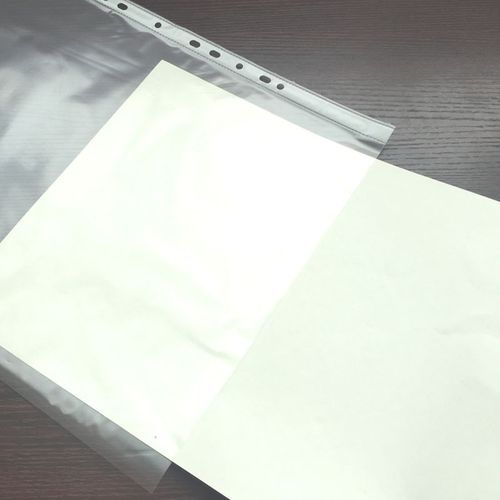
A PictureBox is analogous to a clear plastic folder. You can put an image in the folder, which is part of what you’re doing. Using PictureBox_Paint, you’re drawing on the front of the folder, so now you have two images. The image IN the folder is still there, but now you have an image drawn ON the folder which is partially obscuring the image IN the folder…
- Coding Examples:
- Features:
- Online Games:
- Compiled Games:
-
Sep 24th, 2024, 04:30 AM
#13
Re: How can we APPROPRIATELY Size-Fit image into Picturebox ?
Beyond that, the link I gave you for Boops Boops ZoomPictureBox is the perfect answer to your question. I’m unsubscribing from this thread.
- Coding Examples:
- Features:
- Online Games:
- Compiled Games:
-
Sep 24th, 2024, 10:52 AM
#14
Thread Starter
Addicted Member
Re: How can we APPROPRIATELY Size-Fit image into Picturebox ?
.Paul Sir
Beyond that, the link I gave you for Boops Boops ZoomPictureBox is the perfect answer to your question. I’m unsubscribing from this thread
From the above referred link. I've again downloaded the Zip files from #1 and following file
ZoomPictureBox_Jan2022.vb from #91
Sir give me some time Let me study the whole project.
nkvb
-
Sep 25th, 2024, 04:02 AM
#15
Thread Starter
Addicted Member
Re: How can we APPROPRIATELY Size-Fit image into Picturebox ?
Indeed Remarkable Work !
Already the project was opened did see the Two forms BBImageComposer and TestForm
This is the first time I and never came across something like this. If one could guide me which are the relative classes/modules which needs to be incorporated with above mentioned class "workingWithIamges" as mentioned in #1.
But only BBImageComposer was being executed and not TestForm
Secondly How can I incorporate ZoomPictureBox tool in Public Class workingWithIamges as mentioned #1 coding.
I also get errors Tried to upload the image But Failed. What is the min size of image to be uploaded
your guidance shall be appreciated
nkvb
-
Sep 25th, 2024, 09:12 PM
#16
Thread Starter
Addicted Member
Re: How can we APPROPRIATELY Size-Fit image into Picturebox ?
As the errors have been generated. Should I continue in this thread or continue in
vbforums-Thread 654846
Let me know
-
Sep 30th, 2024, 12:55 AM
#17
Thread Starter
Addicted Member
Re: How can we APPROPRIATELY Size-Fit image into Picturebox ?
All FYI
I've posted Error query in post #93 of vbforums-Thread654846
Thanks
nkvb
-
Sep 30th, 2024, 03:15 AM
#18
Re: How can we APPROPRIATELY Size-Fit image into Picturebox ?
Best to start a new thread if you still have problems. I'm not sure if Boops Boops is still active, so you might not get any help there. As for your current question, you've resolved the original problem you had with this thread, and you're now asking a different question...
- Coding Examples:
- Features:
- Online Games:
- Compiled Games:
-
Sep 30th, 2024, 06:04 AM
#19
Thread Starter
Addicted Member
Re: [RESOLVED] How can we APPROPRIATELY Size-Fit image into Picturebox ?
.Paul Sir,
You are right Sir, for me to start the new thread. Hope this thread gets locked.
Thanks
nkvb
 Posting Permissions
- You may not post new threads
- You may not post replies
- You may not post attachments
- You may not edit your posts
-
Forum Rules
|
Click Here to Expand Forum to Full Width
|



 Reply With Quote
