|

-
Aug 30th, 2024, 12:04 PM
#1
Thread Starter
Fanatic Member

 How do I bring up the events of a Form / control in TwinBasic? How do I bring up the events of a Form / control in TwinBasic?
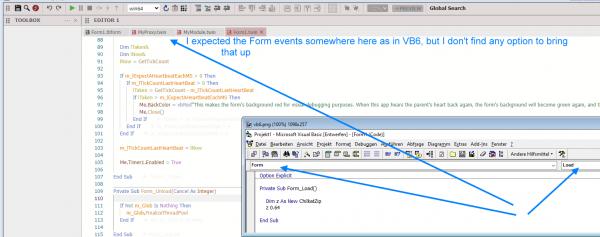
Perhaps I just messed too much with the options:
How do I show the combos with the form / control and their events on top of TwinBasic?
I have attached a screenshot of what it looks like for me.
Thank you!
-
Aug 30th, 2024, 11:16 PM
#2
Re: How do I bring up the events of a Form / control in TwinBasic?
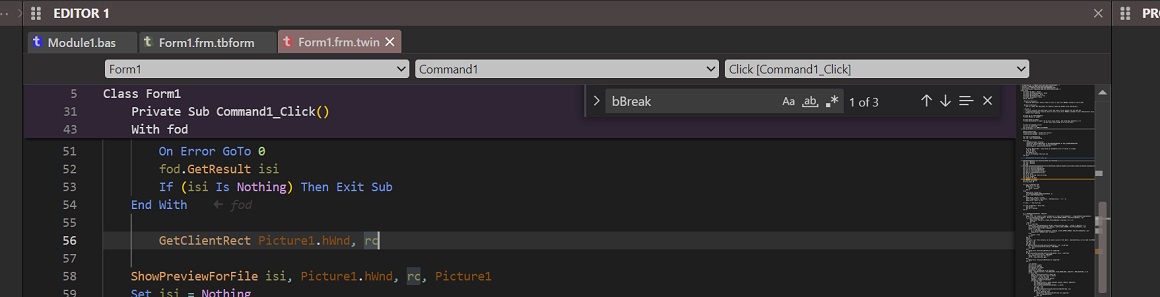
Have you altered the FormDesignerId GUID tB automatically created?
Or deleted then tried to create without it?
Only reason I can think of for why it wouldn't show.
-
Aug 31st, 2024, 02:20 AM
#3
Re: How do I bring up the events of a Form / control in TwinBasic?
 Originally Posted by tmighty2

Perhaps I just messed too much with the options:
How do I show the combos with the form / control and their events on top of TwinBasic?
I have attached a screenshot of what it looks like for me.
Thank you!
Check that you haven't altered the IDE setting:
Tools menu > IDE Options > Show Code Editor Combo Selectors
( defaults to 'above' )
-
Sep 3rd, 2024, 05:57 PM
#4
Thread Starter
Fanatic Member
Re: How do I bring up the events of a Form / control in TwinBasic?
@WaynePhillipsEA Yes, thank you. It was set to "none". I did that myself to see what it does. I did not notice the effect, so I didn't change it back.
Tags for this Thread
 Posting Permissions
- You may not post new threads
- You may not post replies
- You may not post attachments
- You may not edit your posts
-
Forum Rules
|
Click Here to Expand Forum to Full Width
|



 Reply With Quote
