


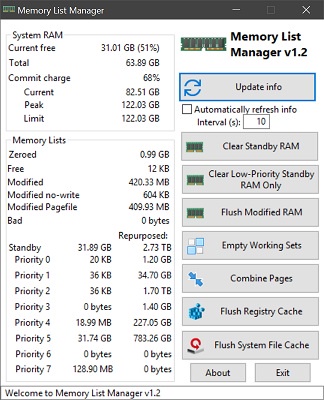
Since the code requires so little change I still think tB projects are of interest here, so quick plug for my new project Memory List Manager. It's a lightweight utility to clear standby and modified memory without loading a full-blown system resources utility. Windows 10 memory management isn't all that great; standby and modified memory will grow to consume all memory, and contrary to Microsoft's claims, this slows down the system (especially opening stuff), and can even cause out of memory errors and system destabilization.
There's also a command line option to run the commands without GUI, and a jump list.
Code is actually pretty simple; just like
(Notice the only difference from perfect VB6 compatibility is I prefer tB's "Return <value>" syntax instead of FunctionName = <value>.Code:Public Function ClearStandby(Optional bLowPriority As Boolean = False) As NTSTATUS Dim nCmd As SYSTEM_MEMORY_LIST_COMMAND If bLowPriority Then nCmd = MemoryPurgeLowPriorityStandbyList Else nCmd = MemoryPurgeStandbyList End If Dim status As NTSTATUS SetCursor LoadCursor(0, ByVal IDC_WAIT) status = NtSetSystemInformation(SystemMemoryListInformation, nCmd, LenB(nCmd)) SetCursor LoadCursor(0, ByVal IDC_ARROW) Return status End Function
More info at the GitHub repo.


 Reply With Quote