|

-
Jun 12th, 2024, 10:23 AM
#1
Thread Starter
PowerPoster


Is RND biased?
The application is flawless. Because, you know... I don't make mistakes.
OK, I do.
But in this case I can find none.
So the application is basically a random number generator.
And to "win" the game takes about 33 years (ish).
I'm good with that part.
The problem is that every time I run it, the negatives out-pace the positives by a lot.
Even though negatives have the exact same probability as the positives.
I don't get it.
I mean I'd chalk it up to random chance if it wasn't like every single time.
Then again, how do you test something in the short-term that takes 33 YEARS to come to fruition????
Last edited by cafeenman; Jun 14th, 2024 at 09:53 AM.
-
Jun 12th, 2024, 10:28 AM
#2
Thread Starter
PowerPoster
Re: I can't figure it out.
For example:
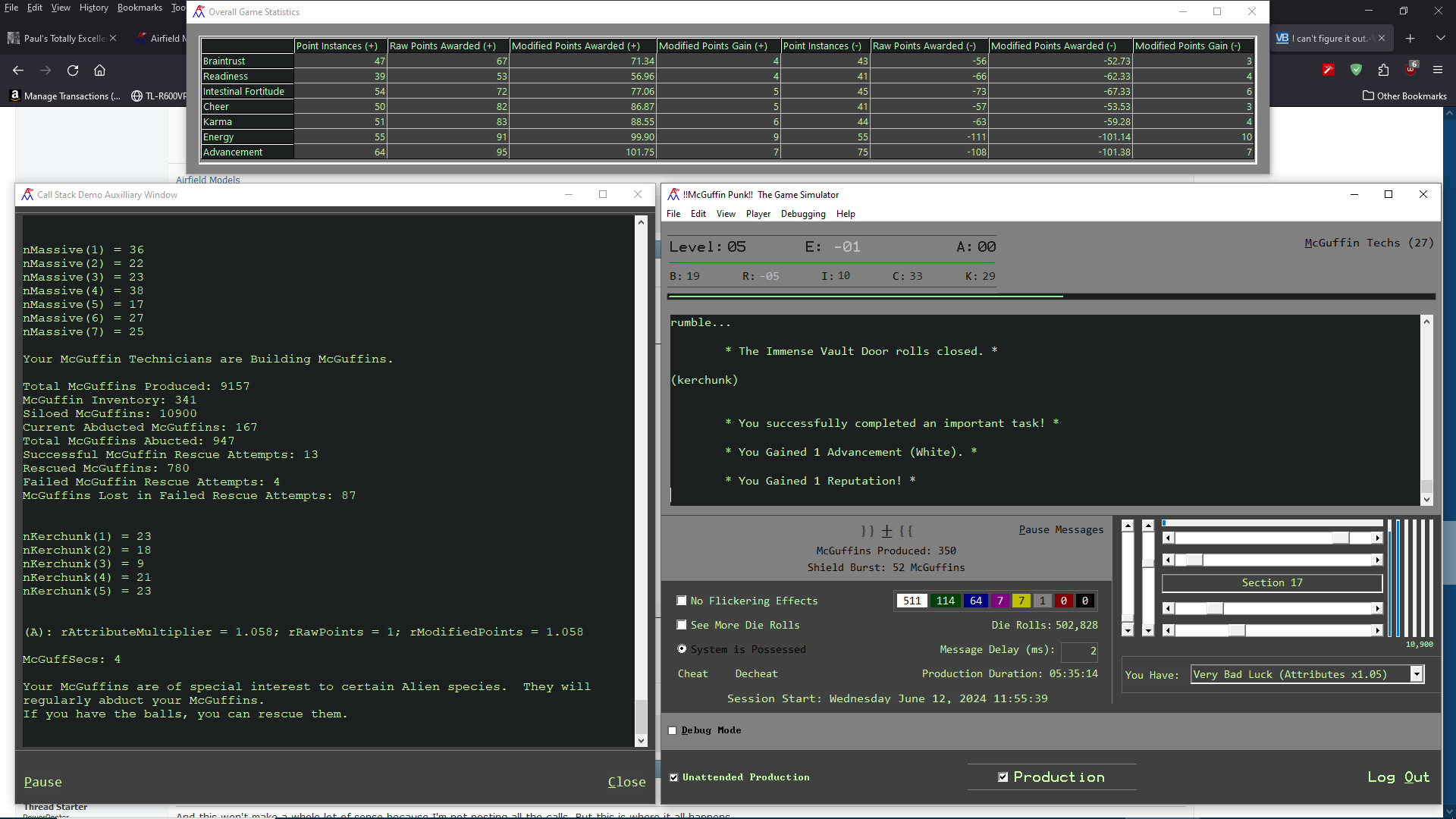
So why does my stuff get taken *way* more often (over the short term)?
Every time I end up in negative numbers no matter what.
Code:
Sub Choose
dim nRnd as long

nRnd =rolldie(2) ' Returns 1 or 2.

select case nrnd

case 1

takestuffawayfromme

case 2

givemestuff

end select

end sub

Sub GiveMeStuff

Stuff=Stuff+1

end sub
sub TakeMyStuff

stuff=stuff-1

end sub

Public Function RollDie(ParamArray Die()) As Long
Dim nTotal As Long

' Returns Sum of all Die Rolled.

nTotal = 0

For n = LBound(Die) To UBound(Die)

  rDieRollCount = rDieRollCount + 1

  nValue = Int(Rnd * Die(n)) + 1

  nTotal = nTotal + nValue

Next n

RollDie = nTotal

End Function
Last edited by cafeenman; Jun 12th, 2024 at 10:39 AM.
-
Jun 12th, 2024, 02:01 PM
#3
Re: I can't figure it out.
My usual boring signature: Nothing
 
-
Jun 12th, 2024, 02:06 PM
#4
Re: I can't figure it out.
All that it means is that the random number generator has a bias. Personally, I've never trusted a random number generator for a range that small. I don't have any particular reason to feel that way, but I do. For that reason, if I want a 50/50 split, I generate a random number up to 100 (depending on the details of the generator). You may also want a better random number generator. In .NET, at least, there is the normal random number generator, but there is also a library with a cryptographically secure random number generator. Presumably, it is "more random", and if that one is "more random", then the normal one is "less random", and less random is not random.
My usual boring signature: Nothing
-
Jun 12th, 2024, 02:25 PM
#5
Re: I can't figure it out.
Something I tend to do if I need to pick between two numbers is to use the current time's millisecond. If it is even use one number and if it is odd then use another.
Take a look at this example:
Code:
Imports System
Public Module Module1

    Public Sub Main()
        Dim game = New Container()
        Do
            Instructions()
            game.RollDie()
            Console.WriteLine("Amount: {0}", game)
        Loop
    End Sub

    Private Sub Instructions()
        Console.WriteLine("Press {enter} to roll the die.")
        Console.ReadLine()
        Console.WriteLine()
    End Sub

End Module

Public Class Container
    Private _amount As Integer

    Public Sub New()
        _amount = 0
    End Sub

    Public Sub New(initialAmount As Integer)
        _amount = initialAmount
    End Sub

    Public Overrides Function ToString() As String
        Return _amount.ToString()
    End Function

    Public Sub RollDie()
        Dim currentTimeMillisecond = DateTimeOffset.UtcNow.Millisecond
        Dim remainder = currentTimeMillisecond Mod 2
        _amount += If(remainder.Equals(0), 1, -1)
    End Sub

End Class
Now the only bias is time, i.e. when the user hits the enter key.
-
Jun 12th, 2024, 02:38 PM
#6
Re: I can't figure it out.
The obvious answer is that nowhere in this code is the random number generator initialized, so this code will always produce the exact same series of random 1's and 2's each and every time it is ran. Assuming that you are running it for the same number of iterations each time, the end result will always be the same. That is why the result is "always negative". It could just as easily have been "always positive", but the point is it will always be "always the same".
The solution is to simply add a "Randomize" statement in Form_Load (assuming this is VB6 code), and then you will see varying results.
Also, as written that code won't work at all, since at one point you seem to be calling a Sub of "takestuffawayfromme", but the actual name of the Sub is "TakeMyStuff".
Last edited by OptionBase1; Jun 12th, 2024 at 02:41 PM.
-
Jun 12th, 2024, 03:14 PM
#7
Thread Starter
PowerPoster
Re: I can't figure it out.
The random number generator is "initialized" mulitiple times in the code. At program start-up and then again "randomly" during the program run.
E.g. sometimes during a timer event - Randomize Timer.
It's initialized properly.
-
Jun 12th, 2024, 03:16 PM
#8
Thread Starter
PowerPoster
Re: I can't figure it out.
Also too, the "code" above is air-code. The actual code is written properly. There are multiple places that give points and multiple places that take points. Every instance has an equal probability of any other instance.
E.g. if there are two places that give points under a certain circumstance then there are two places that can take points away with the same probability of the ones that give points.
-
Jun 12th, 2024, 03:17 PM
#9
Thread Starter
PowerPoster
Re: I can't figure it out.
 Originally Posted by Shaggy Hiker

Taxes.
I knew it!
-
Jun 12th, 2024, 03:39 PM
#10
Re: I can't figure it out.
Originally Posted by cafeenman
Also too, the "code" above is air-code. The actual code is written properly. There are multiple places that give points and multiple places that take points. Every instance has an equal probability of any other instance.
E.g. if there are two places that give points under a certain circumstance then there are two places that can take points away with the same probability of the ones that give points.
Well, if you want feedback on code, then post the actual code. You might be confident that the actual code is written properly, but that doesn't mean it is.
-
Jun 12th, 2024, 03:49 PM
#11
Thread Starter
PowerPoster
Re: I can't figure it out.
OK, it's simple.
The code is thousands of lines and nobody here is going to go through it all and figure it out.
Again, if you can get a point you have the exact same chance to lose a point. And the points are random too. They are color-tiered.
White=1
Green=2
Blue=3
...
Diamond=24
Every time you get or lose points it rolls for how many as well as rolling for a Whiff and rolling for a critical.
They all go to the same sub whether it's plus or minus points. That sub doesn't care. The only thing it does is put a minus in front of points if it's negative but it does all the exact same rolls as anything else.
Honestly, I think I'm just being impatient. I think it just needs to run for at least 10% of it's total run-time to even out. That would be 3.3 years in this case. (really).
Also too, I'm not really asking for an answer to my specific code. I'm certain it's not the code. If you can't find an error in the below then you won't find an error in my code because it's the same thing but moreso.
Code:
Sub ChooseRandomEvent
dim nRnd as long

Randomize Timer

Select Case RollDie(44)

Case 1

TakePoints Brains

Case 2

TakePoints Brawn

......

Case 43

GivePoints Brawn

Case 44

GivePoints Brains

End Select
-
Jun 12th, 2024, 03:56 PM
#12
Thread Starter
PowerPoster
Re: I can't figure it out.
These are the declarations for the color tiers (that have no bearing on the randomness)
Code:
Public Const COLOR_TIER_MODIFIER_DIE_SIDES As Long = 5000

Public Enum COLOR_TIER_ID

  idx_ColorTierID_White = 1
  idx_ColorTierID_Green = 2
  idx_ColorTierID_Blue = 3
  idx_ColorTierID_Purple = 4
  idx_ColorTierID_Gold = 5
  idx_ColorTierID_Platinum = 6
  idx_ColorTierID_Ruby = 7
  idx_ColorTierID_Diamond = 8

End Enum

Public Const MIN_COLOR_TIER_ID As Long = idx_ColorTierID_White
Public Const MAX_COLOR_TIER_ID As Long = idx_ColorTierID_Diamond

Private Const rWhiteChance As Double = 1
Private Const rGreenChance As Double = 0.25
Private Const rBlueChance As Double = 0.1
Private Const rPurpleChance As Double = 0.025
Private Const rGoldChance As Double = 0.01
Private Const rPlatinumChance As Double = 0.001
Private Const rRubyChance As Double = 0.00025
Private Const rDiamondChance As Double = 1 / COLOR_TIER_MODIFIER_DIE_SIDES
-
Jun 12th, 2024, 04:01 PM
#13
Thread Starter
PowerPoster
Re: I can't figure it out.
And this won't make a whole lot of sense because I'm not posting all the calls. But this is where it all happens.
Even though the sub allows for explicitly assigning a color-tier, I never actually do that in the app. Every time points are given or taken it rolls for a random color tier.
Code:
Public Sub AddAttributePoints(ByRef AttributeID As PLAYER_ATTRIBUTES, ByRef BuffOrDebuff As BUFF_OR_DAMAGE, Optional ByRef ColorTierID As COLOR_TIER_ID = MIN_COLOR_TIER_ID - 1)
Dim m_CallStacker As New cCallStacker
Dim rAttributeMultiplier As Double
Dim rActualPointsAdded As Double
Dim rAttributeValuePreChange As Double
Dim nAttributeValuePreChange As Long
Dim rModifiedPoints As Double
Dim rRawPoints As Double

m_CallStacker.Add NAME & ".AddAttributePoints(Public Sub)"

If Not ValidAttributeID(AttributeID) Then Exit Sub          ' First weed out invalid anything.
If ReachedCap(AttributeID, BuffOrDebuff) Then Exit Sub      '
If ColorTierID > MAX_COLOR_TIER_ID Then Exit Sub            '


If Whiffed(BuffOrDebuff) Then Exit Sub


rAttributeValuePreChange = rCurrentAttributePoints(AttributeID) ' Save the current value of the Attribute for comparison later.
nAttributeValuePreChange = PlayerAttributePoints(AttributeID)


If ColorTierID < MIN_COLOR_TIER_ID Then ColorTierID = RollForColorTierID ' This will happen if the caller doesn't pass a ColorTierID.

rRawPoints = PointsByColorTierID(ColorTierID) ' Get the actual points to award.


If BuffOrDebuff = idx_Buff Then

  PositiveColorTierInstances(ColorTierID) = PositiveColorTierInstances(ColorTierID) + 1
  PositiveColorTierInstancesPerAttribute(AttributeID, ColorTierID) = PositiveColorTierInstancesPerAttribute(AttributeID, ColorTierID) + 1

Else

  NegativeColorTierInstances(ColorTierID) = NegativeColorTierInstances(ColorTierID) + 1
  NegativeColorTierInstancesPerAttribute(AttributeID, ColorTierID) = NegativeColorTierInstancesPerAttribute(AttributeID, ColorTierID) + 1

End If


If Critical(BuffOrDebuff) Then ' Roll for Critical.

  rRawPoints = rRawPoints * CRITICAL_MODIFIER

  If BuffOrDebuff = idx_Buff Then

    PositiveCriticalInstancePerAttribute(AttributeID, ColorTierID) = PositiveCriticalInstancePerAttribute(AttributeID, ColorTierID) + 1

  Else

    NegativeCriticalInstancePerAttribute(AttributeID, ColorTierID) = NegativeCriticalInstancePerAttribute(AttributeID, ColorTierID) + 1

  End If

  RaiseCriticalEvent AttributeID, BuffOrDebuff, ColorTierID

Else

  If BuffOrDebuff = idx_Buff Then

    RaiseEvent FoundTreasure(ColorTierID)

  Else

    RaiseEvent FellInTrap(ColorTierID)

  End If

End If


rAttributeMultiplier = TotalMultiplier(AttributeID) ' Get Multipliers.

'If rAttributeMultiplier <> 1 Then Stop

If BuffOrDebuff = idx_Damage Then

  rRawPoints = -rRawPoints

  rAttributeMultiplier = 1 / rAttributeMultiplier ' Use inverse Multiplier for Damage.  For Player Luck of 1+ this reduces damage.  Player Luck < 1 increase damage.

End If


rModifiedPoints = rRawPoints * rAttributeMultiplier ' Apply Multipliers.

If (rModifiedPoints + rCurrentAttributePoints(AttributeID) >= rAttributePointCap(AttributeID)) Then

  rCurrentAttributePoints(AttributeID) = rAttributePointCap(AttributeID)

ElseIf (rModifiedPoints + rCurrentAttributePoints(AttributeID) <= -rAttributePointCap(AttributeID)) Then

  rCurrentAttributePoints(AttributeID) = -rAttributePointCap(AttributeID)

Else

  rCurrentAttributePoints(AttributeID) = rCurrentAttributePoints(AttributeID) + rModifiedPoints

End If

AddPlayerMessage vbCrLf & "(" & AttributeAbbreviation(AttributeID) & "): rAttributeMultiplier = " & Format$(rAttributeMultiplier, "0.000") & "; rRawPoints = " & rRawPoints & "; rModifiedPoints = " & Format$(rModifiedPoints, "0.000") & vbCrLf, 0, True

rActualPointsAdded = rCurrentAttributePoints(AttributeID) - rAttributeValuePreChange

UpdateAttributeTotals AttributeID, CLng(rRawPoints), rActualPointsAdded

If PlayerAttributePoints(AttributeID) - nAttributeValuePreChange <> 0 Then

  RaiseEvent AttributeChange(AttributeID, PlayerAttributePoints(AttributeID) - nAttributeValuePreChange, ColorTierID)

End If

If AttributeID = idx_Player_Attribute_Advancements Then CheckLevelUp

If BuffOrDebuff = idx_Buff Then

  AddReputation 1

Else

  AddReputation -1

End If

End Sub
-
Jun 12th, 2024, 04:10 PM
#14
Thread Starter
PowerPoster
Re: I can't figure it out.
Modifiers.
Also too, if you're paying attention you can see that in one place I'm specifying the Energy multiplier and then when it gets implemented I'm ignoring that and doing something completely different.
That's just because I'm still playing with numbers to get the balance right but it doesn't affect the randomness of anything.
Code:
Public Property Get AttributeMultiplier(ByRef AttributeID As PLAYER_ATTRIBUTES) As Double
Dim m_CallStacker As New cCallStacker

m_CallStacker.Add NAME & ".AttributeMultiplier(Public Property Get); AttributeID = " & AttributeID

AttributeMultiplier = 1

If ModifiersDisabled Then Exit Property

If AttributeID = idx_Player_Attribute_Energy Then

  AttributeMultiplier = 1 + (rCurrentAttributePoints(AttributeID) / rAttributePointCap(AttributeID) * (MAX_ATTRIBUTE_MULTIPLIER / 7))

Else

  AttributeMultiplier = 1 + (rCurrentAttributePoints(AttributeID) / rAttributePointCap(AttributeID) * MAX_ATTRIBUTE_MULTIPLIER)

End If

End Property

Public Function TotalMultiplier(ByRef AttributeID As PLAYER_ATTRIBUTES) As Double
Dim m_CallStacker As New cCallStacker
Dim rAttributeMultiplier As Double
Dim rBaseModifier As Double

m_CallStacker.Add NAME & ".TotalMultiplier(Public Function)"


TotalMultiplier = 1

If ModifiersDisabled Then Exit Function


rBaseModifier = PlayerSkillModifier * BonusModifier * AttributeMultiplier(idx_Player_Attribute_Energy)


Select Case AttributeID


  Case idx_Player_Attribute_Energy

    rAttributeMultiplier = 1 + (0.2 * (PartyMemberCount / nMaxPartyMembers))


  Case idx_Player_Attribute_Advancements

    rAttributeMultiplier = AttributeMultiplier(idx_Player_Attribute_Braintrust)


  Case idx_Player_Attribute_Braintrust

    rAttributeMultiplier = AttributeMultiplier(idx_Player_Attribute_Readiness)


  Case idx_Player_Attribute_Readiness

    rAttributeMultiplier = AttributeMultiplier(idx_Player_Attribute_IntestinalFortitude)


  Case idx_Player_Attribute_IntestinalFortitude

    rAttributeMultiplier = AttributeMultiplier(idx_Player_Attribute_Cheer) * BabyBonus


  Case idx_Player_Attribute_Cheer, idx_Accumulated_Game_Stat_McGuffinsProduced

    rAttributeMultiplier = AttributeMultiplier(idx_Player_Attribute_Karma)


  Case idx_Player_Attribute_Karma

    rAttributeMultiplier = AttributeMultiplier(idx_Player_Attribute_Advancements)


  Case idx_ShieldBurstID

    rAttributeMultiplier = AttributeMultiplier(idx_Player_Attribute_Readiness)


  Case Else

    rAttributeMultiplier = 1


End Select

If rAttributeMultiplier = 0 Then Stop

TotalMultiplier = rBaseModifier * rAttributeMultiplier

End Function
-
Jun 12th, 2024, 04:19 PM
#15
Thread Starter
PowerPoster
Re: I can't figure it out.
Again, no bearing on the randomness but this is how the points are calculated:
Code:
Public Function PointsByColorTierID(ByRef ColorTierID As COLOR_TIER_ID) As Long
Dim m_CallStacker As New cCallStacker

m_CallStacker.Add NAME & ".PointsByColorTierID(Public Function)"

' 2 ^ (ColorTierID / 1.75) Returns:
'
' idx_White = 1
' idx_green = 2
' idx_blue = 3
' idx_purple = 5
' idx_gold = 7
' idx_platinum = 11
' idx_ruby = 16
' idx_diamond = 24

PointsByColorTierID = 2 ^ (ColorTierID / 1.75)

End Function
-
Jun 12th, 2024, 04:27 PM
#16
Re: I can't figure it out.
Originally Posted by cafeenman
OK, it's simple.
The code is thousands of lines and nobody here is going to go through it all and figure it out.
Again, if you can get a point you have the exact same chance to lose a point. And the points are random too. They are color-tiered.
White=1
Green=2
Blue=3
...
Diamond=24
Every time you get or lose points it rolls for how many as well as rolling for a Whiff and rolling for a critical.
They all go to the same sub whether it's plus or minus points. That sub doesn't care. The only thing it does is put a minus in front of points if it's negative but it does all the exact same rolls as anything else.
Honestly, I think I'm just being impatient. I think it just needs to run for at least 10% of it's total run-time to even out. That would be 3.3 years in this case. (really).
Also too, I'm not really asking for an answer to my specific code. I'm certain it's not the code. If you can't find an error in the below then you won't find an error in my code because it's the same thing but moreso.
Code:
Sub ChooseRandomEvent
dim nRnd as long

Randomize Timer

Select Case RollDie(44)

Case 1

TakePoints Brains

Case 2

TakePoints Brawn

......

Case 43

GivePoints Brawn

Case 44

GivePoints Brains

End Select
You should call Randomize only once in your application and not reinitialize it with every call
-
Jun 12th, 2024, 04:40 PM
#17
Thread Starter
PowerPoster
Re: I can't figure it out.
-
Jun 12th, 2024, 04:42 PM
#18
Re: I can't figure it out.
What do the screenshots add to your question?
-
Jun 12th, 2024, 05:09 PM
#19
Thread Starter
PowerPoster
Re: I can't figure it out.
Forgot to quote what I was replying to here:
"You should call Randomize only once in your application and not reinitialize it with every call "
-------------------------------------
Thank you. I wasn't sure about that. I can change that but the app was doing the same thing before I added more randomize calls which is why I added them.
For example, I have a Die-Roll thing in there. It's how many times to roll for a Yahtzee, Large Straight, Small Straight, Full house, etc.
What was happening was I had the randomize statement at the top of the RollDie sub and it was giving me yahtzees way more often than it should have. I mean like 10% when it should be something like 0.08%.
I think what was happening is that it was getting called faster than the timer so that rolls had a high chance of being the same because the RNG was the same if that makes any sense.
So I took it out. Then this morning I put it back but at the bottom instead of the top which is basically the same thing if my hunch is right so that needs to go no matter what.
Again, I'm not a patient person. I think it's me that's the problem and not the app or the RNG.
But I will take out the extra randomize statements.
Last edited by cafeenman; Jun 12th, 2024 at 05:16 PM.
-
Jun 12th, 2024, 05:11 PM
#20
Thread Starter
PowerPoster
Re: I can't figure it out.
Originally Posted by Arnoutdv
What do the screenshots add to your question?
Look at the numbers. Very Bad Luck = 1.05 modifier so the numbers should be going up.
The way it works is that if you get negative numbers it's 1/modifier so bad numbers are less bad. Positive numbers are more good.
So all else being equal the numbers should creep up no matter what.
That's why.
-
Jun 12th, 2024, 05:39 PM
#21
Re: I can't figure it out.
The issue with Randomize is that it seeds the generator with a new seed. That starts the generated sequence over. If you re-seed with the same seed, then you get the same sequence each time. So, what's the seed for Randomize? Generally, it's the system time. The risk with having more than one Randomize in your code is that you can't be sure that two won't be called within the resolution of the system time, in which case the two would produce the exact same sequence. Having only one call to Randomize solves that.
Random is not perfect. You may be asking too much of it.
My usual boring signature: Nothing
-
Jun 12th, 2024, 05:47 PM
#22
Thread Starter
PowerPoster
Re: I can't figure it out.
I mean it's what I've got. I tried rolling my own one time and it was a dismal failure.
And if you look at the numbers in the screen shot, then over five hours it's pretty even for the most part.
What's actually happening is that the negatives tend to get colors (other than white) while the positives tend to get only white. So while the instances are the same, the numbers are not. The negative numbers tend to be bigger.
Even if this code isn't right then it's the same for both positive and negatives so it should even out.
This is that code:
Code:
Public Function RollForColorTierID() As COLOR_TIER_ID
Dim m_CallStacker As New cCallStacker
Dim nRnd As Long
Dim n As Long

m_CallStacker.Add NAME & ".RollForColorTierID(Public Function)"

nRnd = RollDie(COLOR_TIER_MODIFIER_DIE_SIDES) ' Determine base amount of points.

For n = MAX_COLOR_TIER_ID To MIN_COLOR_TIER_ID Step -1

  If nRnd >= (1 - ColorTierChance(n)) * COLOR_TIER_MODIFIER_DIE_SIDES Then

    RollForColorTierID = n

    Exit Function

  End If

Next n

RollForColorTierID = MIN_COLOR_TIER_ID

End Function


Public Property Get ColorTierChance(ByRef ColorTierID As COLOR_TIER_ID) As Double
Dim m_CallStacker As New cCallStacker

m_CallStacker.Add NAME & ".ColorTierChance(Public Property Get)"

Select Case ColorTierID

  Case idx_ColorTierID_Diamond

    ColorTierChance = rDiamondChance

  Case idx_ColorTierID_Ruby

    ColorTierChance = rRubyChance

  Case idx_ColorTierID_Platinum

    ColorTierChance = rPlatinumChance

  Case idx_ColorTierID_Gold

    ColorTierChance = rGoldChance

  Case idx_ColorTierID_Purple

    ColorTierChance = rPurpleChance

  Case idx_ColorTierID_Blue

    ColorTierChance = rBlueChance

  Case idx_ColorTierID_Green

    ColorTierChance = rGreenChance

  Case idx_ColorTierID_White

    ColorTierChance = rWhiteChance

End Select

End Property
-
Jun 12th, 2024, 05:54 PM
#23
Thread Starter
PowerPoster
Re: I can't figure it out.
By the way, I kind of forgot to mention that this isn't really a game. It's going to be one when it grows up (maybe). Right now it's just a self-playing scoring-engine. It takes no user input at all. There are built-in ways to game the game but when I'm testing I don't do that because I want to see what it does. It's basically a timer that sets off random events.
-
Jun 12th, 2024, 06:02 PM
#24
Thread Starter
PowerPoster
Re: I can't figure it out.
Also too, the run in the screenshot is still going. I'll post another screenshot after some time passes so you can see what's going on.
And I think a 1.05 multiplier might be too much. This run started with 0 stats for everything. But I can start with other numbers. The Rule Set allows a total of 40% per attribute total points that can be distributed and up to 80% in any given attribute.
When I do that it hits a point where it starts to snowball in the positive direction which I expect due to the positive multipliers.
The choices for multipliers right now are 1.05, 1.025, 0 (no multipliers at all), 0.975 and 0.95 (you're gonna lose no matter what except you aren't because winning doesn't depend on attributes at all - they're just misdirection).
To win you just need to fill the siloes with 111,111,000 McGuffins. That's how I came up with the 33 years number. I let it run for a week and did the math (McGuffins per Hour). It was a whole lot of hours.
-
Jun 12th, 2024, 06:26 PM
#25
Re: I can't figure it out.
Originally Posted by cafeenman
OK, it's simple.
The code is thousands of lines and nobody here is going to go through it all and figure it out.
Again, if you can get a point you have the exact same chance to lose a point. And the points are random too. They are color-tiered.
White=1
Green=2
Blue=3
...
Diamond=24
Every time you get or lose points it rolls for how many as well as rolling for a Whiff and rolling for a critical.
They all go to the same sub whether it's plus or minus points. That sub doesn't care. The only thing it does is put a minus in front of points if it's negative but it does all the exact same rolls as anything else.
Honestly, I think I'm just being impatient. I think it just needs to run for at least 10% of it's total run-time to even out. That would be 3.3 years in this case. (really).
Also too, I'm not really asking for an answer to my specific code. I'm certain it's not the code. If you can't find an error in the below then you won't find an error in my code because it's the same thing but moreso.
Code:
Sub ChooseRandomEvent
dim nRnd as long

Randomize Timer

Select Case RollDie(44)

Case 1

TakePoints Brains

Case 2

TakePoints Brawn

......

Case 43

GivePoints Brawn

Case 44

GivePoints Brains

End Select
It has nothing to do with allowing for x% of your total iterations to run. If the code is as you describe, and if the result is always negative, the absolutely logical conclusion is that your code is faulty. Period.
Maybe you should refine your thousands of lines of code down to just the simple logic you reference above of "generate a random number and add and subtract based on the outcome with equal likelihood of either" and see if the problem persists, and then start adding your other code back until you find the inevitable error(s) in your code.
-
Jun 12th, 2024, 06:42 PM
#26
Thread Starter
PowerPoster
Re: I can't figure it out.
OK, here you go. You tell me:
Every single Random## has an exact equal and opposite. Every single time in every part of the code if points can be awarded then there is an equal counterpart. Every. Single. Time. I've been extremely careful about that.
The first ones and last ones directly reference a specific attribute.
Thus Random01 takes points from Advancement.
The last Random gives points to Advancement.
When I ran out of attributes, the rest of the subs in the middle don't do anything at all with points (mostly). If they do give points then it's a coin-flip in that sub.
And I already did what you said. I had written the whole thing willy-nilly with not regard for evenness because I didn't think I was even going to do this. Once I decided to go in the direction I'm going in now I took all of that out so that no points were given or taken anywhere.
It was then that I created the sub below and ensured it was absolutely even. Even the wait times for each counterpart sub are the same so that one can't get hit more often than another.
Code:
Private Sub Branch(Optional ByRef RandomID As Long = 0)
Dim m_CallStacker As New cCallStacker
Dim m_Hourglass As New cHourglass
Dim nRnd As Long
Static fBranching As Boolean
Static nCount As Long

' Chooses a Random Event.

m_CallStacker.Add NAME & ".Branch(Private Sub)"

If chkBeginProduction.Value = vbUnchecked Then StopAllTimers

If fBranching Or fStoryTelling Or Not Possessed Then Exit Sub

fBranching = True

m_Hourglass

Randomize Timer

nCount = nCount + 1

If (nCount = 1) Or (nCount Mod 100 = 0) Then

  AddPlayerMessage vbCrLf & "Selecting a Random Event.  Each Event has one d" & NUM_RANDOM_CHOICES & " (" & Format(100 * (1 / NUM_RANDOM_CHOICES), "#0.00") & "%) Probability of Occurring.  Random Events can Trigger More Random Events.", 2000

  nCount = 1

End If

If (RandomID > 0) And (RandomID <= NUM_RANDOM_CHOICES) Then

  nRnd = RandomID

Else

  nRnd = RollDie(NUM_RANDOM_CHOICES)

  RandomBranchCount(nRnd) = RandomBranchCount(nRnd) + 1

End If

Select Case nRnd


  Case 1

    Random01

  Case 2

    Random02

  Case 3

    Random03

  Case 4

    Random04

  Case 5

    Random05

  Case 6

    Random06

  Case 7

    Random07

  Case 8

    Random08

  Case 9

    Random09

  Case 10

    Random10

  Case 11

    Random11

  Case 12

    Random12

  Case 13

    Random13

  Case 14

    Random14

  Case 15

    Random15

  Case 16

    Random16

  Case 17

    Random17

  Case 18

    Random18

  Case 19

    Random19

  Case 20

    Random20

  Case 21

    Random21

  Case 22

    Random22

  Case 23

    Random23

  Case 24

    Random24

  Case 25

    Random25

  Case 26

    Random26

  Case 27

    Random27

  Case 29

    Random29

  Case 30

    Random30

  Case 31

    Random31

  Case 32

    Random32

  Case 33

    Random33

  Case 34

    Random34

  Case 35

    Random35

  Case 36

    Random36

  Case 37

    Random37

  Case 38

    Random38

  Case 39

    Random39

  Case 40

    Random40

  Case 41

    Random41

  Case 42

    Random42

  Case NUM_RANDOM_CHOICES - 1

        RandomMaxRandomChoicesMinus1

  Case NUM_RANDOM_CHOICES

    RandomMaxRandomChoices

End Select

fBranching = False

End Sub

Private Function Random01() As Long
Dim m_CallStacker As New cCallStacker
Static nTickcount As Long

m_CallStacker.Add NAME & ".Random01(Private Function)"

If EventElapsedSeconds(nTickcount) < 60 Then Exit Function

AddPlayerMessage AddAsterisks("You failed to complete a critically important task!"), 1000

mw_Player.AddAttributePoints idx_Player_Attribute_Advancements, idx_Damage

nTickcount = GetTickCount

End Function

.....

Private Sub RandomMaxRandomChoices()
Dim m_CallStacker As New cCallStacker
Static nTickcount As Long

m_CallStacker.Add NAME & ".RandomMaxRandomChoices(Private Sub)"

If EventElapsedSeconds(nTickcount) < 60 Then Exit Sub

AddPlayerMessage AddAsterisks("You successfully completed an important task!"), 1000

mw_Player.AddAttributePoints idx_Player_Attribute_Advancements, idx_Buff

nTickcount = GetTickCount

End Sub
-
Jun 12th, 2024, 07:17 PM
#27
Re: I can't figure it out.
There's not nearly enough context there to try to concretely suggest where your code might be unbalanced.
One thing you might explain is what this is doing:
Code:
If (RandomID > 0) And (RandomID <= NUM_RANDOM_CHOICES) Then

  nRnd = RandomID

Else

  nRnd = RollDie(NUM_RANDOM_CHOICES)

  RandomBranchCount(nRnd) = RandomBranchCount(nRnd) + 1

End If
At first glance you seem to be saying "Sometimes roll an n sided die for a random result, but sometimes don't". And it might be the case that the "sometimes don't" logic is the source of your problems.
-
Jun 12th, 2024, 07:25 PM
#28
Thread Starter
PowerPoster
Re: I can't figure it out.
It allows me to go straight to one of the subs by selecting it from a combobox that won't be present in the app. So if I change something or add something then I don't have to wait for it to randomly happen.
That's not part of the problem because if I do that then I'm not testing the app for balance. I'm just checking that a sub is working properly. It can't call itself so it doesn't affect anything.
I don't know how much more context you need. That sub is the only place that calls anything that adds or subtracts points. And all the subs it calls that add or subtract points work exactly as the two example I've shown with the exception of the coin-flip subs which I can also post but there's not a lot of ways they can be wrong. I can post an example of that if it helps but it won't.
-
Jun 12th, 2024, 07:29 PM
#29
Thread Starter
PowerPoster
Re: I can't figure it out.
To clarify above post. Yes, I can unbalance the app on purpose by calling specific subs that give or take points. But when if I do that then I don't care about the points because I know I took it out of balance and the results are invalid.
In the current run I haven't touched that. It's just doing it's own thing.
-
Jun 12th, 2024, 09:44 PM
#30
Thread Starter
PowerPoster
Re: I can't figure it out.
Now that I think of it, there is one particular instance I'm not sure about. I think it's right but something about it feels off.
It works like this.
You have a coin flip to do a thing.
If you choose not to do it you lose a point.
If you choose to do it you gain a point.
Even so far, right?
But...
If you choose not to do it you're done.
If you choose to do it then there's another coin flip if you're successful or not.
If you succeed you get a point.
If you fail you lose a point.
Seems like it's still even.
So you have a 50/50 shot of doing the thing.
and if you choose to do it you have a 50/50 shot of being successful.
Thus if you choose to do it you get a point and then have a 50% shot of getting another point.
-
Jun 12th, 2024, 09:46 PM
#31
Thread Starter
PowerPoster
Re: I can't figure it out.
Code for above:
Code:
Private Sub McGuffinRescue()
Dim m_CallStacker As New cCallStacker
Static nRescueChoice(1 To 2) As Long
Static nMcGuffinRescue(1 To 2) As Long
Static f As Boolean
Static nTickcount As Long
Dim Prompt As String
Dim s(1) As String
Dim nMax As Long
Dim nLostMcGuffOps As Long

m_CallStacker.Add NAME & ".McGuffinRescue(Private Sub)"

If f Or (EventElapsedSeconds(nTickcount) < 180) Then Exit Sub

nMax = IIf(McGuffin.Count - MIN_MCGUFFINS_TO_ALLOW_TRANSFER > CurrentAbductedMcGuffins, CurrentAbductedMcGuffins, McGuffin.Count - MIN_MCGUFFINS_TO_ALLOW_TRANSFER)

nMax = RollDie(nMax)

If nMax < 4 Then Exit Sub

f = True

With mw_Player

  nLostMcGuffOps = nMax * (1 / .AttributeMultiplier(idx_Player_Attribute_IntestinalFortitude)) * (1 / .PlayerSkillModifier)

  Prompt = AddAsterisks("For the love of God, Commandant " & .PlayerName & ", You Must Make a Decision!")

End With

s(0) = "Launch McGuffOps Mission to Rescue " & nMax & " Abducted McGuffins.  No Price is Too High to Pay!" & vbCrLf & vbTab & "(Risk the loss of " & nLostMcGuffOps & " McGuffins to save " & nMax & " McGuffins." & vbCrLf
s(1) = "Don't be a Fool, Man! You'll Get them All Killed!  Call Them Back!  Call Them All Back!!"

MakeChoice Prompt, s

Select Case RollDie(d2)

  Case 1

    nRescueChoice(1) = nRescueChoice(1) + 1

    AddPlayerMessage vbCrLf & vbTab & ">> 2) Don't be a Fool, Man! You'll Get them All Killed!  Call Them Back!  Call Them All Back!!", 1000
    AddPlayerMessage vbCrLf & vbTab & "You command your McGuffOps Team to stand down leaving the abducted McGuffins in the hands of the enemy.", 1000

    mw_Player.AddAttributePoints idx_Player_Attribute_IntestinalFortitude, idx_Damage

    ShowChoiceCount "nRescueChoice", nRescueChoice

    f = False

    nTickcount = GetTickCount

    Exit Sub

  Case 2

    nRescueChoice(2) = nRescueChoice(2) + 1

    AddPlayerMessage vbCrLf & vbTab & ">> 1) Launch McGuffOps Mission to rescue " & nMax & " abducted McGuffins.  No price is too much to pay for our people!", 1000

    mw_Player.AddAttributePoints idx_Player_Attribute_IntestinalFortitude, idx_Buff

End Select

ShowChoiceCount "nRescueChoice", nRescueChoice

AddPlayerMessage vbCrLf & vbTab & "You assign the McGuffOp Commander the task of selecting " & nLostMcGuffOps & " McGuffOperatives for this high-risk mission.", 1000

Select Case RollDie(d2)

  Case 1

    nMcGuffinRescue(1) = nMcGuffinRescue(1) + 1

    AddPlayerMessage vbCrLf & vbTab & "Your Rescue Mission Failed!  You Lost " & nLostMcGuffOps & " McGuffOperatives, you idiot!", 2000

    McGuffin.Add -CDbl(nLostMcGuffOps)

    TotalMcGuffinsAbducted = TotalMcGuffinsAbducted + nLostMcGuffOps
    CurrentAbductedMcGuffins = CurrentAbductedMcGuffins + nLostMcGuffOps

    FailedMcGuffinRescues = FailedMcGuffinRescues + 1

    McGuffinsLostInRescueAttempts = McGuffinsLostInRescueAttempts + nLostMcGuffOps

    mw_Player.AddAttributePoints idx_Player_Attribute_Cheer, idx_Damage

  Case 2

    nMcGuffinRescue(2) = nMcGuffinRescue(2) + 1

    AddPlayerMessage vbCrLf & vbTab & "Your McGuffOps Team rescued " & nMax & " abducted McGuffins.", 2000

    McGuffin.Add CDbl(nMax)

    RescuedMcGuffins = RescuedMcGuffins + nMax

    CurrentAbductedMcGuffins = CurrentAbductedMcGuffins - nMax

    SuccessfulMcGuffinRescues = SuccessfulMcGuffinRescues + 1

    mw_Player.AddAttributePoints idx_Player_Attribute_Cheer, idx_Buff

End Select

ShowChoiceCount "nMcGuffinRescue", nMcGuffinRescue

ShowMcGuffinStats

nTickcount = GetTickCount

f = False

End Sub
-
Jun 13th, 2024, 03:02 AM
#32
Re: I can't figure it out.
Originally Posted by Shaggy Hiker
The issue with Randomize is that it seeds the generator with a new seed. That starts the generated sequence over. If you re-seed with the same seed, then you get the same sequence each time. So, what's the seed for Randomize? Generally, it's the system time. The risk with having more than one Randomize in your code is that you can't be sure that two won't be called within the resolution of the system time, in which case the two would produce the exact same sequence. Having only one call to Randomize solves that.
Random is not perfect. You may be asking too much of it.
Calling it again and again, even with a different seed, is just not correct.
You only need to initialize the randomizer once in your application.
-
Jun 14th, 2024, 02:15 AM
#33
Thread Starter
PowerPoster
Re: I can't figure it out.
It doesn't matter. I read the vb documentation - I actually bought it in a box that came with three thick books that I've read multiple times. This app isn't a standard app doing standard things in a standard order. Everything about it is random so if it re-seeds it's still doing it at random times and it's not going to regenerate the exact same numbers for the exact same things no matter what.
In cases like this you can reseed as often as you want. Just because everyone tells you that there is a "proper" way to do a thing doesn't mean you have to jump on that bandwagon and parrot that thing over and over again.
-
Jun 14th, 2024, 02:18 AM
#34
Thread Starter
PowerPoster
Re: I can't figure it out.
Also too, I showed you all the code that matters. I keep being told my code must be wrong and even though I've shown the code multiple times, all I'm getting is vague platitudes about how I must be wrong but nobody - not a single person can show me any place my code is wrong.
I've posted it all. So maybe actually stop asking me for more and look at what I've posted and show me where I'm wrong. Hint: It's NOT how I initialize the rng.
-
Jun 14th, 2024, 02:20 AM
#35
Thread Starter
PowerPoster
Re: I can't figure it out.
Originally Posted by dday9
Something I tend to do if I need to pick between two numbers is to use the current time's millisecond. If it is even use one number and if it is odd then use another.
Take a look at this example:
Code:
Imports System
Public Module Module1

    Public Sub Main()
        Dim game = New Container()
        Do
            Instructions()
            game.RollDie()
            Console.WriteLine("Amount: {0}", game)
        Loop
    End Sub

    Private Sub Instructions()
        Console.WriteLine("Press {enter} to roll the die.")
        Console.ReadLine()
        Console.WriteLine()
    End Sub

End Module

Public Class Container
    Private _amount As Integer

    Public Sub New()
        _amount = 0
    End Sub

    Public Sub New(initialAmount As Integer)
        _amount = initialAmount
    End Sub

    Public Overrides Function ToString() As String
        Return _amount.ToString()
    End Function

    Public Sub RollDie()
        Dim currentTimeMillisecond = DateTimeOffset.UtcNow.Millisecond
        Dim remainder = currentTimeMillisecond Mod 2
        _amount += If(remainder.Equals(0), 1, -1)
    End Sub

End Class
Now the only bias is time, i.e. when the user hits the enter key.
That's awesome for yes/no, true/false, on/off.
What's your solution when there's more than two answers?
-
Jun 14th, 2024, 07:08 AM
#36
Re: I can't figure it out.
Originally Posted by cafeenman
It doesn't matter. I read the vb documentation - I actually bought it in a box that came with three thick books that I've read multiple times. This app isn't a standard app doing standard things in a standard order. Everything about it is random so if it re-seeds it's still doing it at random times and it's not going to regenerate the exact same numbers for the exact same things no matter what.
In cases like this you can reseed as often as you want. Just because everyone tells you that there is a "proper" way to do a thing doesn't mean you have to jump on that bandwagon and parrot that thing over and over again.
No, that’s not true.
You complained about a not normal distribution of values. So try my advice
-
Jun 14th, 2024, 07:27 AM
#37
Re: I can't figure it out.
Originally Posted by cafeenman
Also too, I showed you all the code that matters. I keep being told my code must be wrong and even though I've shown the code multiple times, all I'm getting is vague platitudes about how I must be wrong but nobody - not a single person can show me any place my code is wrong.
I've posted it all. So maybe actually stop asking me for more and look at what I've posted and show me where I'm wrong. Hint: It's NOT how I initialize the rng.
No, you haven't shown all the code that matters. Not even close. Post _ALL_ the code and maybe we can find it.
And you are 100% correct that it isn't how you initialize the RNG. Somewhere you have unbalanced outcomes.
Either that or you have done a poor job of explaining your situation.
My understanding is you have some sort of starting numeric value. You are then generating random outcomes where you can either increment or decrement that value. Your explanation seems to indicate that the EV of these outcomes is 0, that is, there is an equal chance of having +x applied as there is -x, for all potential values of x. And yet, in every trial run of this simulation, your numeric value becomes negative.
Is that correct?
Last edited by OptionBase1; Jun 14th, 2024 at 07:41 AM.
-
Jun 14th, 2024, 09:24 AM
#38
Re: I can't figure it out.
Originally Posted by cafeenman
In cases like this you can reseed as often as you want. Just because everyone tells you that there is a "proper" way to do a thing doesn't mean you have to jump on that bandwagon and parrot that thing over and over again.
Yes, you CAN, but no you should NOT. There is nothing that will prevent you from re-seeding, but what I wrote earlier still stands: Every call to Randomize has a seed, which is normally based off the system time. If you can be CERTAIN that you won't be calling Randomize twice with the same seed, then it does no harm to call it multiple times. However, it also does you no good. You don't end up with a "more random" number by calling Randomize a second time. Also, the second number in one sequence is not more random than the first numbers from two different sequences. So, you CAN call Randomize multiple times, but it does you no good and is quite likely to do you significant harm. Therefore, just don't do it.
One thing to note is that .NET got rid of Randomize, so this whole question largely goes away, though there's something like it because you can create multiple Random objects, each of which is a different random number generator with it's own seed.
My usual boring signature: Nothing
-
Jun 14th, 2024, 09:45 AM
#39
Re: I can't figure it out.
Please use better titles to your posts.
https://github.com/yereverluvinunclebert
Skillset: VMS,DOS,Windows Sysadmin from 1985, fault-tolerance, VaxCluster, Alpha,Sparc. DCL,QB,VBDOS- VB6,.NET, PHP,NODE.JS, Graphic Design, Project Manager, CMS, Quad Electronics. classic cars & m'bikes. Artist in water & oils. Historian.
By the power invested in me, all the threads I start are battle free zones - no arguing about the benefits of VB6 over .NET here please. Happiness must reign.
-
Jun 14th, 2024, 09:47 AM
#40
Thread Starter
PowerPoster
Re: I can't figure it out.
Originally Posted by OptionBase1
No, you haven't shown all the code that matters. Not even close. Post _ALL_ the code and maybe we can find it.
Yes, I have.
I have shown what gets called. I've show how the scoring works. There are two things I haven't shown which is the Branch sub being called so I'll throw that in here.
It won't help anything because it's not doing anything but being a timer that calls Branch without specifying what to do.
And I didn't show all the duplicate subs that do the exact same thing as what I did post because it's redundant.
Unfortunately, I had to kill the run I showed the screenshot of because I paused it so many times to make changes that I was afraid my PC would randomly reboot (doesn't happen a lot but happening at all wouldn't make me happy) and I wanted to save my changes.
Again, I think the problem is I'm impatient. If I let it run a week it will probably be almost 100% even.
So the problem is me, not the code. But to determine anything I have to let it run long enough to have valid results.
In any case I showed all the code that matters. Here's some more.
Posses starts the timer and Exorcise turns it off. If you look at the screenshot there's a radio button (just one) where the user can turn it on but can't turn it off. But the user doesn't need to do anything because it will turn itself on.
Interval on the timer is 1000 ms so it calls Branch every five seconds. Branch has a flag that if it's already doing something it skips out when called.
Code:
Private Sub tmrGame_Timer()
Dim m_CallStacker As New cCallStacker
Static nCounter As Long

m_CallStacker.Add NAME & ".tmrGame_Timer(Private Sub)"

UpdateGameTime

nCounter = nCounter + 1

If nCounter = 5 Then

  Branch

  nCounter = 0

End If

Select Case RollDie(120)

  Case Is <= 20

    Possess ' Ensure that Possessed doesn't stay turned off if it's randomly turned off.

  Case 120

    Exorcise

End Select

End Sub
 Posting Permissions
- You may not post new threads
- You may not post replies
- You may not post attachments
- You may not edit your posts
-
Forum Rules
|
Click Here to Expand Forum to Full Width
|



 Reply With Quote