Results 1 to 22 of 22

Thread: [RESOLVED] Windows Media Player (wmp.dll) on Windows 11

  1. #1

    Thread Starter
    Addicted Member beic's Avatar
    Join Date
    Jun 2012
    Posts
    176

    Resolved [RESOLVED] Windows Media Player (wmp.dll) on Windows 11

    Hi there,

    I'm trying to run my compiled "Audio Player" application on Windows 11 64-bit, but without success.

    Getting this message:
    Code:
    Run-time error 339:
    
    Component wmp.dll or one of its dependencies not correctly registered: a file missing or invalid
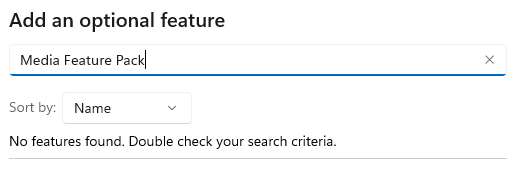
    I tried various suggestions found on the internet, registering the wmp.dll component (as Admin):
    Code:
    regsvr32 vbscript.dll
    
    regsvr32 jscript.dll
    
    regsvr32 wmp.dll
    But the last registration failed with message:
    Code:
    The module wmp.dll failed to load.
    
    Make sure the binary is stored at the specified path or debug it to check for problems with the binary or dependent .DLL
    
    The specified module could not be found.
    After I did a file search for wmp.dll in Windows 11 and found these paths:
    Code:
    C:\Windows\WinSxS\amd64_microsoft-windows-mediaplayer-core_31bf3856ad364e35_10.0.22621.1_none_6cff8ed342d7e9d4\wmp.dll
    
    C:\Windows\WinSxS\wow64_microsoft-windows-mediaplayer-core_31bf3856ad364e35_10.0.22621.1_none_775439257738abcf\wmp.dll
    
    C:\Windows\WinSxS\amd64_microsoft-windows-mediaplayer-core_31bf3856ad364e35_10.0.22621.1194_none_eb7896aaca908578\r\wmp.dll
    
    C:\Windows\WinSxS\amd64_microsoft-windows-mediaplayer-core_31bf3856ad364e35_10.0.22621.1194_none_eb7896aaca908578\wmp.dll
    
    C:\Windows\WinSxS\amd64_microsoft-windows-mediaplayer-core_31bf3856ad364e35_10.0.22621.1194_none_eb7896aaca908578\f\wmp.dll
    Did anyone had a same/similar issue any solution for it? (It's working fine on Windows 7, 8, 10)

    Thanks!

  2. #2
    The Idiot
    Join Date
    Dec 2014
    Posts
    3,001

    Re: Windows Media Player (wmp.dll) on Windows 11

    not sure why u can't use it. it should be in the system. maybe it was not installed? check your windows installation.

    but u should update your project and use something else, such as ActiveMovie (quartz) that is solid and can play audio without much issues.

  3. #3

    Thread Starter
    Addicted Member beic's Avatar
    Join Date
    Jun 2012
    Posts
    176

    Re: Windows Media Player (wmp.dll) on Windows 11

    Quote Originally Posted by baka View Post
    not sure why u can't use it. it should be in the system. maybe it was not installed? check your windows installation.
    Yes, I tough so, but I sent the exe file to my friend too, he has also Windows 11 and has the same issue.

    Quote Originally Posted by baka View Post
    but u should update your project and use something else, such as ActiveMovie (quartz) that is solid and can play audio without much issues.
    I don't know if the ActiveMovie (quartz) supports direct stream Urls like Windows Medial Player (wmp), and I would need to rewrite the whole project.

    p.s. I'm still developing apps on Windows 7 64-bit

    Thanks

  4. #4
    The Idiot
    Join Date
    Dec 2014
    Posts
    3,001

    Re: Windows Media Player (wmp.dll) on Windows 11

    yes. activemovie can handle streaming. now, Im not using it anymore so Im not 100% sure. but I think u can do a search there should be examples.

    nowadays I use fmodex for my needs as it handle all windows well. it can stream as well and can play .ogg format (that I use)

    I tried directsound8 but it act differently between windows 7 and 10, works best in windows 7 (I get issues that some users can't make the engine start, so no sound)
    and media foundation that is the reverse, act well in windows 10+ but not in windows 7 (I get issues with sounds not playing fully)

    activemovie is very good, but I can not play from bytearray. can only play from url or file.

  5. #5
    Hyperactive Member -Franky-'s Avatar
    Join Date
    Dec 2022
    Location
    Bremen Germany
    Posts
    476

    Re: Windows Media Player (wmp.dll) on Windows 11

    Quote Originally Posted by beic View Post
    I'm trying to run my compiled "Audio Player" application on Windows 11 64-bit, but without success.
    I haven't checked this explicitly, but I believe that the Windows Media Player under Win11 is a new development and is based on UWP or WinRT. Therefore, the old WMP references/OCX that worked until Win10 will no longer work. From Win11 onwards you can either rely directly on the MediaFoundation, on the XAML MediaPlayerElement via WinRT via the "XAML Islands" or, if that still works, on ActiveMovie.

  6. #6

    Thread Starter
    Addicted Member beic's Avatar
    Join Date
    Jun 2012
    Posts
    176

    Re: Windows Media Player (wmp.dll) on Windows 11

    Quote Originally Posted by baka View Post
    yes. activemovie can handle streaming. now, Im not using it anymore so Im not 100% sure. but I think u can do a search there should be examples.

    activemovie is very good, but I can not play from bytearray. can only play from url or file.
    I will try to write a simplest Test/Demo app with ActiveMovie (quartz.dll) control to see the behavior on Windows 11 (if it even works).

    I'm only using it for playing direct Urls (streaming), no file, bytearray, etc... playing on my side.

    Quote Originally Posted by baka View Post
    nowadays I use fmodex for my needs as it handle all windows well. it can stream as well and can play .ogg format (that I use)
    Looks interesting, if you have a Sample/Demo on your PC for Url streaming and maybe a simplest spectrum wave visualization, would be nice.

    I found something here, if we are talking about same thing:

    https://www.vbforums.com/showthread....-with-examples

    Quote Originally Posted by baka View Post
    I tried directsound8 but it act differently between windows 7 and 10, works best in windows 7 (I get issues that some users can't make the engine start, so no sound)
    and media foundation that is the reverse, act well in windows 10+ but not in windows 7 (I get issues with sounds not playing fully)
    Yes, a tried also with dx7vb.dll and dx8vb.dll, but it's not for my needs.

    Quote Originally Posted by -Franky- View Post
    I haven't checked this explicitly, but I believe that the Windows Media Player under Win11 is a new development and is based on UWP or WinRT. Therefore, the old WMP references/OCX that worked until Win10 will no longer work. From Win11 onwards you can either rely directly on the MediaFoundation, on the XAML MediaPlayerElement via WinRT via the "XAML Islands" or, if that still works, on ActiveMovie.
    That would be my worst case scenario at this point, let's hear from others too, so, that we could be 100% sure mentioned above.

    But in that case I don't see the point of the included files found on Windows 11:
    Code:
    C:\Windows\WinSxS\amd64_microsoft-windows-mediaplayer-core_31bf3856ad364e35_10.0.22621.1_none_6cff8ed342d7e9d4\wmp.dll
    
    C:\Windows\WinSxS\wow64_microsoft-windows-mediaplayer-core_31bf3856ad364e35_10.0.22621.1_none_775439257738abcf\wmp.dll
    
    C:\Windows\WinSxS\amd64_microsoft-windows-mediaplayer-core_31bf3856ad364e35_10.0.22621.1194_none_eb7896aaca908578\r\wmp.dll
    
    C:\Windows\WinSxS\amd64_microsoft-windows-mediaplayer-core_31bf3856ad364e35_10.0.22621.1194_none_eb7896aaca908578\wmp.dll
    
    C:\Windows\WinSxS\amd64_microsoft-windows-mediaplayer-core_31bf3856ad364e35_10.0.22621.1194_none_eb7896aaca908578\f\wmp.dll
    Could you please do a file search too, if you are using Windows 11 for "wmp.dll" on your system?

    Thanks

  7. #7
    Hyperactive Member -Franky-'s Avatar
    Join Date
    Dec 2022
    Location
    Bremen Germany
    Posts
    476

    Re: Windows Media Player (wmp.dll) on Windows 11

    I only installed Win11 in one VM and therefore can't look for the WMP.DLL at the moment. But when I look at the path to the DLL, I notice this: microsoft-windows-mediaplayer-core and that leads us here: https://learn.microsoft.com/en-us/uw...ew=winrt-22621 So this WMP.DLL is a UWP/WinRT DLL. If you only want to play audio, you can also use the WinRT class MediaPlayer from Win10: https://learn.microsoft.com/en-us/uw...ew=winrt-22621

  8. #8

    Thread Starter
    Addicted Member beic's Avatar
    Join Date
    Jun 2012
    Posts
    176

    Re: Windows Media Player (wmp.dll) on Windows 11

    Quote Originally Posted by -Franky- View Post
    I only installed Win11 in one VM and therefore can't look for the WMP.DLL at the moment. But when I look at the path to the DLL, I notice this: microsoft-windows-mediaplayer-core and that leads us here: https://learn.microsoft.com/en-us/uw...ew=winrt-22621 So this WMP.DLL is a UWP/WinRT DLL. If you only want to play audio, you can also use the WinRT class MediaPlayer from Win10: https://learn.microsoft.com/en-us/uw...ew=winrt-22621
    I'm using Windows 7, as I mentioned above and I don't think I could use it in VB6.

  9. #9
    Hyperactive Member -Franky-'s Avatar
    Join Date
    Dec 2022
    Location
    Bremen Germany
    Posts
    476

    Re: Windows Media Player (wmp.dll) on Windows 11

    I created a new project under Win10, created a WMP control on the form and compiled the project. Then I copied the exe into the Win11 VM and ran it. There are no error messages under Win11 and the WMP control is visible on the form. Win11 contains 2 Windows Media Players for me. Firstly, the “Media Playback”, which should be the UWP/WinRT app, and the “Windows Media Player Lagacy”, which is the old WMP. The WMP Control may work for me under Win11.
    Attached Images Attached Images  

  10. #10

    Thread Starter
    Addicted Member beic's Avatar
    Join Date
    Jun 2012
    Posts
    176

    Re: Windows Media Player (wmp.dll) on Windows 11

    Quote Originally Posted by -Franky- View Post
    I created a new project under Win10, created a WMP control on the form and compiled the project. Then I copied the exe into the Win11 VM and ran it. There are no error messages under Win11 and the WMP control is visible on the form. Win11 contains 2 Windows Media Players for me. Firstly, the “Media Playback”, which should be the UWP/WinRT app, and the “Windows Media Player Lagacy”, which is the old WMP. The WMP Control may work for me under Win11.
    I see something on the screenshot Franky, but unfortunately I don't get it, how did you create those controls?

    Could you please show me the demo/example?

    Is it backward compatible with Windows 7?

    Thank you!

  11. #11
    Hyperactive Member -Franky-'s Avatar
    Join Date
    Dec 2022
    Location
    Bremen Germany
    Posts
    476

    Re: Windows Media Player (wmp.dll) on Windows 11

    What you can see in the screenshot are the existing media players in Win11 if I just enter “medi” in the search box.


    In this screenshot you can see the VB6 project under Win10 on the left and the compiled and started project under Win11 on the right.
    Attached Images Attached Images  

  12. #12

    Thread Starter
    Addicted Member beic's Avatar
    Join Date
    Jun 2012
    Posts
    176

    Re: Windows Media Player (wmp.dll) on Windows 11

    Quote Originally Posted by -Franky- View Post
    What you can see in the screenshot are the existing media players in Win11 if I just enter “medi” in the search box.


    In this screenshot you can see the VB6 project under Win10 on the left and the compiled and started project under Win11 on the right.
    I have the same "Windows Media Player Control" included/compiled on Windows 7 64-bit, I don't understand why is it not working under Windows 11?, on Windows 10 it's working as intended.

  13. #13
    Hyperactive Member -Franky-'s Avatar
    Join Date
    Dec 2022
    Location
    Bremen Germany
    Posts
    476

    Re: Windows Media Player (wmp.dll) on Windows 11

    It works for me. Are you missing the “Windows Media Player Legacy” in Win11? Rather unlikely, but do you perhaps have a Win11N version? The N version lacks all media features. But you can install it later. https://support.microsoft.com/en-us/...0-612c9bea9c01
    Last edited by -Franky-; Mar 9th, 2024 at 09:30 AM.

  14. #14

    Thread Starter
    Addicted Member beic's Avatar
    Join Date
    Jun 2012
    Posts
    176

    Re: Windows Media Player (wmp.dll) on Windows 11

    Quote Originally Posted by -Franky- View Post
    It works for me. Are you missing the “Windows Media Player Legacy” in Win11? Rather unlikely, but do you perhaps have a Win11N version? The N version lacks all media features. But you can install it later. https://support.microsoft.com/en-us/...0-612c9bea9c01
    No, I don't think so, I'm always installing Pro versions, but I will check it right away.

    Could you please post here from your Project file the Object reference line to wmp.dll ?

  15. #15
    Hyperactive Member -Franky-'s Avatar
    Join Date
    Dec 2022
    Location
    Bremen Germany
    Posts
    476

    Re: Windows Media Player (wmp.dll) on Windows 11

    FYI: There is also the Win11 Pro as N version.

    Quote Originally Posted by beic View Post
    Could you please post here from your Project file the Object reference line to wmp.dll ?
    Type=Exe
    Form=Form1.frm
    Reference=*\G{00020430-0000-0000-C000-000000000046}#2.0#0#..\..\..\..\Windows\SysWOW64\stdole2.tlb#OLE Automation
    Object={6BF52A50-394A-11D3-B153-00C04F79FAA6}#1.0#0; wmp.dll
    IconForm="Form1"
    Startup="Form1"
    ExeName32="Project1.exe"
    Command32=""
    Name="Project1"
    HelpContextID="0"
    CompatibleMode="0"
    MajorVer=1
    MinorVer=0
    RevisionVer=0
    AutoIncrementVer=0
    ServerSupportFiles=0
    VersionCompanyName="..."
    CompilationType=0
    OptimizationType=0
    FavorPentiumPro(tm)=0
    CodeViewDebugInfo=0
    NoAliasing=0
    BoundsCheck=0
    OverflowCheck=0
    FlPointCheck=0
    FDIVCheck=0
    UnroundedFP=0
    StartMode=0
    Unattended=0
    Retained=0
    ThreadPerObject=0
    MaxNumberOfThreads=1

  16. #16

    Thread Starter
    Addicted Member beic's Avatar
    Join Date
    Jun 2012
    Posts
    176

    Re: Windows Media Player (wmp.dll) on Windows 11

    So, we have the exact same Object referenced to "wmp.dll":

    Code:
    Object={6BF52A50-394A-11D3-B153-00C04F79FAA6}#1.0#0; wmp.dll
    Maybe I know what is the issue, let me check that out,...

    p.s. No media players are installed by Windows 11 as Default.

    There was no new "Media Player" installed nor the Legacy one.

    You must install it manually from Settings > Search > Optional Features > by typing "Windows Media Player Legacy (App)"

    But let me get back with that a little bit later with the results...

  17. #17

    Thread Starter
    Addicted Member beic's Avatar
    Join Date
    Jun 2012
    Posts
    176

    Re: Windows Media Player (wmp.dll) on Windows 11

    Unfortunately I'm unable to install it!


  18. #18
    Hyperactive Member -Franky-'s Avatar
    Join Date
    Dec 2022
    Location
    Bremen Germany
    Posts
    476

    Re: Windows Media Player (wmp.dll) on Windows 11

    First check whether you have an N version of Win11. If yes, then install the Media Feature Pack for Windows 10/11 N. I had the link to it in post #13.

  19. #19

    Thread Starter
    Addicted Member beic's Avatar
    Join Date
    Jun 2012
    Posts
    176

    Re: Windows Media Player (wmp.dll) on Windows 11

    Quote Originally Posted by -Franky- View Post
    First check whether you have an N version of Win11. If yes, then install the Media Feature Pack for Windows 10/11 N. I had the link to it in post #13.

  20. #20
    Hyperactive Member -Franky-'s Avatar
    Join Date
    Dec 2022
    Location
    Bremen Germany
    Posts
    476

    Re: Windows Media Player (wmp.dll) on Windows 11

    I'm slowly running out of ideas. Is your Win11 up to date?

  21. #21

    Thread Starter
    Addicted Member beic's Avatar
    Join Date
    Jun 2012
    Posts
    176

    Re: Windows Media Player (wmp.dll) on Windows 11

    Quote Originally Posted by -Franky- View Post
    I'm slowly running out of ideas. Is your Win11 up to date?
    It's up to date, but I was running Tiny version ("Media Feature" was removed from it permanently), so, it's worst than N version.

    I installed a normal version of Windows 11 and everything was working immediately without setting up anything or installing some "Optional Features".

    Also I wish to thank you for your help and guidance, because I would still struggling with this issue and madness. <3

  22. #22
    New Member
    Join Date
    Oct 2025
    Posts
    1

    Re: [RESOLVED] Windows Media Player (wmp.dll) on Windows 11

    Hello.. I've actually faced a very similar problem myself when trying to run an older application (which worked fine on Windows 7) on Windows 10. It looks like Windows 11 might be treating your application the same way.

    The core of the issue often isn't the file being missing, but a permissions problem preventing the program from accessing or registering the necessary component.

    Here is the solution that worked for me, which you can suggest to the user:

    Security Permissions Solution
    Try modifying the security permissions for your compiled application's executable file:

    Locate the main executable file of your "Audio Player" application (e.g., Audio Player.exe).

    Right-click on the executable and select Properties.

    Go to the Security tab.

    In the "Group or user names" box, look for ALL APPLICATION PACKAGES (or similar entries like "Users," "Authenticated Users," etc.).

    For each relevant group (especially ALL APPLICATION PACKAGES), click the Edit button.

    In the permissions list, check the box for Full control under the "Allow" column.

    Click Apply and then OK on all windows.

    After applying these permissions, try running your "Audio Player" application again. For me, this simple change allowed the application to run normally, as it gave the necessary permissions to access and utilize components like wmp.dll.

    Let me know if this helps resolve the Run-time error 339!

Tags for this Thread

Posting Permissions

  • You may not post new threads
  • You may not post replies
  • You may not post attachments
  • You may not edit your posts
  •  


Click Here to Expand Forum to Full Width