|

-
Feb 16th, 2024, 05:38 PM
#1
Thread Starter
PowerPoster


how convert VB6 to VB2010 code?
how convert VB6 to VB2010 code?
Code:
Private Const BI_RGB = 0
Private Const CBM_INIT = &H4
Private Const DIB_RGB_COLORS = 0

Private Type BITMAP '14 bytes
    bmType As Long
    bmWidth As Long
    bmHeight As Long
    bmWidthBytes As Long
    bmPlanes As Integer
    bmBitsPixel As Integer
    bmBits As Long
End Type

Private Type BITMAPINFOHEADER
    biSize As Long
    biWidth As Long
    biHeight As Long
    biPlanes As Integer
    biBitCount As Integer
    biCompression As Long
    biSizeImage As Long
    biXPelsPerMeter As Long
    biYPelsPerMeter As Long
    biClrUsed As Long
    biClrImportant As Long
End Type

Private Type BGRAQUAD
    B As Byte
    g As Byte
    R As Byte
    A As Byte
End Type

Private Type RGBQUAD
    B As Byte
    g As Byte
    R As Byte
    A As Byte
End Type

Private Type BITMAPINFO
    bmiHeader As BITMAPINFOHEADER
    bmiColors(0 To 255) As RGBQUAD
End Type
my problem is: how can i convert the 'bmiColors(0 To 255) As RGBQUAD' to VB2010 code?
VB2010 don't have 'type' so must be 'structure'.... and the variables must be with 'dim' or 'public'.
-
Feb 16th, 2024, 05:59 PM
#2
Re: how convert VB6 to VB2010 code?
Code:
Private Const BI_RGB As Integer = 0
Private Const CBM_INIT As Integer = &H4
Private Const DIB_RGB_COLORS As Integer = 0

Private Structure BITMAP '14 bytes
    bmType As Integer
    bmWidth As Integer
    bmHeight As Integer
    bmWidthBytes As Integer
    bmPlanes As Short
    bmBitsPixel As Short
    bmBits As Integer
End Structure

Private Structure BITMAPINFOHEADER
    biSize As Integer
    biWidth As Integer
    biHeight As Integer
    biPlanes As Short
    biBitCount As Short
    biCompression As Integer
    biSizeImage As Integer
    biXPelsPerMeter As Integer
    biYPelsPerMeter As Integer
    biClrUsed As Integer
    biClrImportant As Integer
End Structure

Private Structure BGRAQUAD
    B As Byte
    g As Byte
    R As Byte
    A As Byte
End Structure

Private Structure RGBQUAD
    B As Byte
    g As Byte
    R As Byte
    A As Byte
End Structure

Private Structure BITMAPINFO
    bmiHeader As BITMAPINFOHEADER
    bmiColors(255) As RGBQUAD
End Structure
- Coding Examples:
- Features:
- Online Games:
- Compiled Games:
-
Feb 16th, 2024, 06:01 PM
#3
Re: how convert VB6 to VB2010 code?
Basically, where in vb6 you used Long is now Integer, Integer is now Short, Type is now Structure, Byte remains Byte
- Coding Examples:
- Features:
- Online Games:
- Compiled Games:
-
Feb 16th, 2024, 06:04 PM
#4
Re: how convert VB6 to VB2010 code?
In VB.Net?
Short=Int16
Integer=Int32
Long=Int64
- Coding Examples:
- Features:
- Online Games:
- Compiled Games:
-
Feb 16th, 2024, 06:13 PM
#5
Thread Starter
PowerPoster
Re: how convert VB6 to VB2010 code?
first error:
Code:
Private Structure BITMAP '14 bytes
    bmType As Integer
    bmWidth As Integer
    bmHeight As Integer
    bmWidthBytes As Integer
    bmPlanes As Short
    bmBitsPixel As Short
    bmBits As Integer
    End Structure
message: "Error 1 Declaration expected" i must use 'dim' or 'public' on variables..
second errors:
Code:
Private Structure BITMAPINFO
        Dim bmiHeader As BITMAPINFOHEADER
        Dim bmiColors(255) As RGBQUAD
    End Structure
message: "Error 27 Arrays declared as structure members cannot be declared with an initial size."
but it's an structure... so how can i fix it?
ok... for now, i didn't learned about VB2010 arrays... but i'm trying convert the code
-
Feb 17th, 2024, 03:19 AM
#6
Re: how convert VB6 to VB2010 code?
-
Feb 17th, 2024, 02:57 PM
#7
Thread Starter
PowerPoster
Re: how convert VB6 to VB2010 code?
and how declare with arrays variables with elements number?
-
Feb 17th, 2024, 08:10 PM
#8
Re: how convert VB6 to VB2010 code?
This works:-
Code:
    Private Const BI_RGB As Integer = 0
    Private Const CBM_INIT As Integer = &H4
    Private Const DIB_RGB_COLORS As Integer = 0

    Private Structure BITMAP '14 bytes
        Public bmType As Integer
        Public bmWidth As Integer
        Public bmHeight As Integer
        Public bmWidthBytes As Integer
        Public bmPlanes As Short
        Public bmBitsPixel As Short
        Public bmBits As Integer
    End Structure

    Private Structure BITMAPINFOHEADER
        Public biSize As Integer
        Public biWidth As Integer
        Public biHeight As Integer
        Public biPlanes As Short
        Public biBitCount As Short
        Public biCompression As Integer
        Public biSizeImage As Integer
        Public biXPelsPerMeter As Integer
        Public biYPelsPerMeter As Integer
        Public biClrUsed As Integer
        Public biClrImportant As Integer
    End Structure

    Private Structure BGRAQUAD
        Public B As Byte
        Public G As Byte
        Public R As Byte
        Public A As Byte
    End Structure

    Private Structure RGBQUAD
        Public B As Byte
        Public G As Byte
        Public R As Byte
        Public A As Byte
    End Structure

    Private Structure BITMAPINFO
        Public bmiHeader As BITMAPINFOHEADER

        ' Marshal the array as an inline array of 256 elements
        <MarshalAs(UnmanagedType.ByValArray, SizeConst:=256)>
        Public bmiColors() As RGBQUAD

        Public Sub Initialize()
            ReDim bmiColors(255)
        End Sub
    End Structure
Something very important to note here is that unlike VB6, there is no notion of a fixed sized array field type for structures in .Net so every time you create one of these structures you must initialize the embedded array field. As you can see I provided an Initialize sub for just that.
The MarshalAs attribute you see there is only for when you pass this structure to an unmanaged function like a Windows API function. This tells .Net to embed the array's contents inside the structure like an unmanaged C-based API would expect but this only happens when you call an external API function. It does not happen with normal function calls within .Net itself.
-
Feb 18th, 2024, 06:07 AM
#9
Thread Starter
PowerPoster
Re: how convert VB6 to VB2010 code?
correct me: the 'structure' is like 'class'?
(i'm asking, because we can use 'Initialize' function and we can add functions)
from VB6:
Code:
Private Type SAFEARRAY2D
    cDims As Integer
    fFeatures As Integer
    cbElements As Long
    cLocks As Long
    pvData As Long
    Bounds(0 To 1) As SAFEARRAYBOUND
End Type
to VB2010:
Code:
Private Structure SAFEARRAY2D
        Public cDims As Integer
        Public fFeatures As Integer
        Public cbElements As Long
        Public cLocks As Long
        Public pvData As Long

        <MarshalAs(UnmanagedType.ByValArray, SizeConst:=2)>
        Public Bounds() As SAFEARRAYBOUND

        Public Sub Initialize()
            ReDim Bounds(2)
        End Sub
    End Structure
is these correct?
Last edited by joaquim; Feb 18th, 2024 at 06:19 AM.
-
Feb 18th, 2024, 06:51 AM
#10
Thread Starter
PowerPoster
Re: how convert VB6 to VB2010 code?
how convert these VB6 code to VB2010 code:
Code:
'VB6 have the VarPtr() function
Private Declare Function VarPtrArray Lib "msvbvm60.dll" Alias "VarPtr" (Ptr() As Any) As Long
Private Declare Sub CopyMemory Lib "kernel32" Alias "RtlMoveMemory" ( _
    lpvDest As Any, lpvSource As Any, ByVal cbCopy As Long)
'..........
With tSA
        .fFeatures = FADF_FIXEDSIZE Or FADF_AUTO
        .cbElements = 4
        .cDims = 1
        .Bounds(0).lLbound = 0
        .Bounds(0).cElements = bmiInfo.bmiHeader.biHeight * bmiInfo.bmiHeader.biWidth
        .pvData = PointerPixelData
    End With
     'Erase bDib
    ' Make the bDib() array point to the memory addresses:
    CopyMemory ByVal VarPtrArray(bDib()), VarPtr(tSA), 4
    CopyMemory ByVal VarPtrArray(bDibBGRA()), VarPtr(tSA), 4
have i have on VB2010:
Code:
<DllImport("kernel32.dll", EntryPoint:="RtlMoveMemory")>
    Private Shared Sub CopyMemory(ByVal Destination As IntPtr, ByRef Source As IntPtr, ByVal Length As Integer)
    End Sub

    Public Declare Function VarPtrArray Lib "msvbvm60.dll" Alias "VarPtr" (Array() As Object) As Long
    Public Declare Function VarPtr Lib "msvbvm60.dll" Alias "VarPtr" (ByRef x As Object) As Long
'...........
Private tSA As SAFEARRAY2D
    Private bDib() As Long
    Private bDibBGRA() As BGRAQUAD
 With tSA
            .Initialize()
            .fFeatures = FADF_FIXEDSIZE Or FADF_AUTO
            .cbElements = 4
            .cDims = 1
            .Bounds(0).lLbound = 0
            .Bounds(0).cElements = bmiInfo.bmiHeader.biHeight * bmiInfo.bmiHeader.biWidth
            .pvData = PointerPixelData
        End With
        'Erase bDib
        ' Make the bDib() array point to the memory addresses:
'the IA was wrong on help me :(
        Dim objArrayDib As Object() = Array.ConvertAll(bDib, Function(element) DirectCast(element, Object)) 'error
        Dim objArrayDibBGRA As Object() = Array.ConvertAll(bDibBGRA, Function(element) DirectCast(element, Object))
        CopyMemory(VarPtrArray(objArrayDib), VarPtr(tSA), 4)
        CopyMemory(VarPtrArray(objArrayDibBGRA), VarPtr(tSA), 4)
error: "A first chance exception of type 'System.ArgumentNullException' occurred in mscorlib.dll"
heres the NewImage():
Code:
Public HDC As IntPtr
    Public HBitmap As IntPtr = IntPtr.Zero
    Dim oldBitmap As IntPtr = IntPtr.Zero
    Dim PointerPixelData As IntPtr = IntPtr.Zero

    Dim pbmi As IntPtr
    Public g As Graphics
    Public Width As Integer
    Public Height As Integer
    Dim bmpInfoHeader As New BITMAPINFOHEADER
    Private bmiInfo As BITMAPINFO
    Private tSA As SAFEARRAY2D
    Private bDib() As Long
    Private bDibBGRA() As BGRAQUAD

    'Procedimento para criar um DIB e acessar os pixels usando um ponteiro do tipo Color
    Public Sub NewImage(ByVal ImageWidth As Integer, ByVal ImageHeight As Integer)

        With bmiInfo.bmiHeader
            .biSize = Marshal.SizeOf(GetType(BITMAPINFOHEADER))
            .biWidth = Width
            .biHeight = -Height ' is negative for start on top left pixel image
            .biPlanes = 1
            .biBitCount = 32
            .biCompression = BI_RGB
            .biSizeImage = Width * Height 'AlignScan(bmiInfo.bmiHeader.biWidth, bmiInfo.bmiHeader.biBitCount) * bmiInfo.bmiHeader.biHeight
        End With
        Width = ImageWidth
        Height = ImageHeight

        HDC = CreateCompatibleDC(IntPtr.Zero)
        pbmi = Marshal.AllocHGlobal(Marshal.SizeOf(bmpInfoHeader))
        Marshal.StructureToPtr(bmpInfoHeader, pbmi, False)

        HBitmap = CreateDIBSection(HDC, pbmi, DIB_RGB_COLORS, PointerPixelData, IntPtr.Zero, 0)

        oldBitmap = SelectObject(HDC, HBitmap)

        With tSA
            .Initialize()
            .fFeatures = FADF_FIXEDSIZE Or FADF_AUTO
            .cbElements = 4
            .cDims = 1
            .Bounds(0).lLbound = 0
            .Bounds(0).cElements = bmiInfo.bmiHeader.biHeight * bmiInfo.bmiHeader.biWidth
            .pvData = PointerPixelData
        End With
        'Erase bDib
        ' Make the bDib() array point to the memory addresses:
        Dim objArrayDib As Object() = Array.ConvertAll(bDib, Function(element) DirectCast(element, Object))
        Dim objArrayDibBGRA As Object() = Array.ConvertAll(bDibBGRA, Function(element) DirectCast(element, Object))
        CopyMemory(VarPtrArray(objArrayDib), VarPtr(tSA), 4)
        CopyMemory(VarPtrArray(objArrayDibBGRA), VarPtr(tSA), 4)

        g = Graphics.FromHdc(HDC)
        g.Clear(Color.FromArgb(255, 255, 255, 255))
        g.DrawLine(New Pen(Brushes.Red, 2), New Point(0, 50), New Point(20, 50))

    End Sub
-
Feb 18th, 2024, 06:55 AM
#11
Re: how convert VB6 to VB2010 code?
 Originally Posted by joaquim

correct me: the 'structure' is like 'class'?
(i'm asking, because we can use 'Initialize' function and we can add functions)
from VB6:
Code:
Private Type SAFEARRAY2D
    cDims As Integer
    fFeatures As Integer
    cbElements As Long
    cLocks As Long
    pvData As Long
    Bounds(0 To 1) As SAFEARRAYBOUND
End Type
to VB2010:
Code:
Private Structure SAFEARRAY2D
        Public cDims As Integer
        Public fFeatures As Integer
        Public cbElements As Long
        Public cLocks As Long
        Public pvData As Long

        <MarshalAs(UnmanagedType.ByValArray, SizeConst:=2)>
        Public Bounds() As SAFEARRAYBOUND

        Public Sub Initialize()
            ReDim Bounds(2)
        End Sub
    End Structure
is these correct?
Sort of. You can definitely add method, properties, events, etc. Rather than an Initialise method you would use a constructor to initialise the structure members.
The main differences between classes and structures are :
Structures can't inherit while classes can.
Structures are typically "pass by value" while classes are "pass by reference".
There are a few more subtle things but those are the main two in my opinion.
Last edited by PlausiblyDamp; Feb 18th, 2024 at 07:11 AM.
-
Feb 18th, 2024, 07:12 AM
#12
Thread Starter
PowerPoster
Re: how convert VB6 to VB2010 code?
thanks for all.. in time, we will fix the code 
-
Feb 18th, 2024, 07:13 AM
#13
Re: how convert VB6 to VB2010 code?
Originally Posted by joaquim
how convert these VB6 code to VB2010 code:
Code:
'VB6 have the VarPtr() function
Private Declare Function VarPtrArray Lib "msvbvm60.dll" Alias "VarPtr" (Ptr() As Any) As Long
Private Declare Sub CopyMemory Lib "kernel32" Alias "RtlMoveMemory" ( _
    lpvDest As Any, lpvSource As Any, ByVal cbCopy As Long)
'..........
With tSA
        .fFeatures = FADF_FIXEDSIZE Or FADF_AUTO
        .cbElements = 4
        .cDims = 1
        .Bounds(0).lLbound = 0
        .Bounds(0).cElements = bmiInfo.bmiHeader.biHeight * bmiInfo.bmiHeader.biWidth
        .pvData = PointerPixelData
    End With
     'Erase bDib
    ' Make the bDib() array point to the memory addresses:
    CopyMemory ByVal VarPtrArray(bDib()), VarPtr(tSA), 4
    CopyMemory ByVal VarPtrArray(bDibBGRA()), VarPtr(tSA), 4
have i have on VB2010:
Code:
<DllImport("kernel32.dll", EntryPoint:="RtlMoveMemory")>
    Private Shared Sub CopyMemory(ByVal Destination As IntPtr, ByRef Source As IntPtr, ByVal Length As Integer)
    End Sub

    Public Declare Function VarPtrArray Lib "msvbvm60.dll" Alias "VarPtr" (Array() As Object) As Long
    Public Declare Function VarPtr Lib "msvbvm60.dll" Alias "VarPtr" (ByRef x As Object) As Long
'...........
Private tSA As SAFEARRAY2D
    Private bDib() As Long
    Private bDibBGRA() As BGRAQUAD
 With tSA
            .Initialize()
            .fFeatures = FADF_FIXEDSIZE Or FADF_AUTO
            .cbElements = 4
            .cDims = 1
            .Bounds(0).lLbound = 0
            .Bounds(0).cElements = bmiInfo.bmiHeader.biHeight * bmiInfo.bmiHeader.biWidth
            .pvData = PointerPixelData
        End With
        'Erase bDib
        ' Make the bDib() array point to the memory addresses:
'the IA was wrong on help me :(
        Dim objArrayDib As Object() = Array.ConvertAll(bDib, Function(element) DirectCast(element, Object)) 'error
        Dim objArrayDibBGRA As Object() = Array.ConvertAll(bDibBGRA, Function(element) DirectCast(element, Object))
        CopyMemory(VarPtrArray(objArrayDib), VarPtr(tSA), 4)
        CopyMemory(VarPtrArray(objArrayDibBGRA), VarPtr(tSA), 4)
error: "A first chance exception of type 'System.ArgumentNullException' occurred in mscorlib.dll"
heres the NewImage():
Code:
Public HDC As IntPtr
    Public HBitmap As IntPtr = IntPtr.Zero
    Dim oldBitmap As IntPtr = IntPtr.Zero
    Dim PointerPixelData As IntPtr = IntPtr.Zero

    Dim pbmi As IntPtr
    Public g As Graphics
    Public Width As Integer
    Public Height As Integer
    Dim bmpInfoHeader As New BITMAPINFOHEADER
    Private bmiInfo As BITMAPINFO
    Private tSA As SAFEARRAY2D
    Private bDib() As Long
    Private bDibBGRA() As BGRAQUAD

    'Procedimento para criar um DIB e acessar os pixels usando um ponteiro do tipo Color
    Public Sub NewImage(ByVal ImageWidth As Integer, ByVal ImageHeight As Integer)

        With bmiInfo.bmiHeader
            .biSize = Marshal.SizeOf(GetType(BITMAPINFOHEADER))
            .biWidth = Width
            .biHeight = -Height ' is negative for start on top left pixel image
            .biPlanes = 1
            .biBitCount = 32
            .biCompression = BI_RGB
            .biSizeImage = Width * Height 'AlignScan(bmiInfo.bmiHeader.biWidth, bmiInfo.bmiHeader.biBitCount) * bmiInfo.bmiHeader.biHeight
        End With
        Width = ImageWidth
        Height = ImageHeight

        HDC = CreateCompatibleDC(IntPtr.Zero)
        pbmi = Marshal.AllocHGlobal(Marshal.SizeOf(bmpInfoHeader))
        Marshal.StructureToPtr(bmpInfoHeader, pbmi, False)

        HBitmap = CreateDIBSection(HDC, pbmi, DIB_RGB_COLORS, PointerPixelData, IntPtr.Zero, 0)

        oldBitmap = SelectObject(HDC, HBitmap)

        With tSA
            .Initialize()
            .fFeatures = FADF_FIXEDSIZE Or FADF_AUTO
            .cbElements = 4
            .cDims = 1
            .Bounds(0).lLbound = 0
            .Bounds(0).cElements = bmiInfo.bmiHeader.biHeight * bmiInfo.bmiHeader.biWidth
            .pvData = PointerPixelData
        End With
        'Erase bDib
        ' Make the bDib() array point to the memory addresses:
        Dim objArrayDib As Object() = Array.ConvertAll(bDib, Function(element) DirectCast(element, Object))
        Dim objArrayDibBGRA As Object() = Array.ConvertAll(bDibBGRA, Function(element) DirectCast(element, Object))
        CopyMemory(VarPtrArray(objArrayDib), VarPtr(tSA), 4)
        CopyMemory(VarPtrArray(objArrayDibBGRA), VarPtr(tSA), 4)

        g = Graphics.FromHdc(HDC)
        g.Clear(Color.FromArgb(255, 255, 255, 255))
        g.DrawLine(New Pen(Brushes.Red, 2), New Point(0, 50), New Point(20, 50))

    End Sub
My simple answer to this would be to not even try converting VB6 code of that type to .Net - a lot of that is very specific to how things worked in VB6 and probably isn't relevant in VB.Net.
It might be better to explain what that code is trying to achieve and see if anyone can help, or offer advice, with writing a native VB.Net version.
-
Feb 18th, 2024, 07:27 AM
#14
Thread Starter
PowerPoster
Re: how convert VB6 to VB2010 code?
ok... creating DIB's:
Code:
Public Sub NewImage(ByVal ImageWidth As Integer, ByVal ImageHeight As Integer)


        bmpInfoHeader.biSize = CUInt(Marshal.SizeOf(bmpInfoHeader))
        bmpInfoHeader.biWidth = ImageWidth
        bmpInfoHeader.biHeight = ImageHeight
        bmpInfoHeader.biPlanes = 1
        bmpInfoHeader.biBitCount = 32
        bmpInfoHeader.biCompression = BI_RGB
        Width = ImageWidth
        Height = ImageHeight

        hdc = CreateCompatibleDC(IntPtr.Zero)
        pbmi = Marshal.AllocHGlobal(Marshal.SizeOf(bmpInfoHeader))
        Marshal.StructureToPtr(bmpInfoHeader, pbmi, False)

        If hdc = IntPtr.Zero Then Debug.Print("error")
        hBitmap = CreateDIBSection(hdc, pbmi, DIB_RGB_COLORS, lpvBits, IntPtr.Zero, 0)

        oldBitmap = SelectObject(hdc, hBitmap)

        g = Graphics.FromHdc(hdc)
        g.Clear(Color.FromArgb(255, 255, 255, 255))
        g.DrawLine(New Pen(Brushes.Red, 2), New Point(0, 50), New Point(20, 50))
to be honest these code is working normaly.. the line is drawed too...
now i'm trying getting the array pixels and changing directly on memory:
Code:
With tSA
            .Initialize()
            .fFeatures = FADF_FIXEDSIZE Or FADF_AUTO
            .cbElements = 4
            .cDims = 1
            .Bounds(0).lLbound = 0 'erro
            .Bounds(0).cElements = bmpInfoHeader.biHeight * bmpInfoHeader.biWidth
            .pvData = pbmi
        End With

        'CopyMemory(VarPtrArray(bDib), VarPtr(tSA), 4)
        'CopyMemory(VarPtrArray(bDibBGRA), VarPtr(tSA), 4)
        Marshal.Copy(tSA, bDib, 0, 4)
        Marshal.Copy(tSA, bDibBGRA, 0, 4)
i even tryied use 'Marshal.Copy()' but i get several errors 
-
Feb 18th, 2024, 07:48 AM
#15
Re: how convert VB6 to VB2010 code?
Originally Posted by joaquim
ok... creating DIB's:
Code:
Public Sub NewImage(ByVal ImageWidth As Integer, ByVal ImageHeight As Integer)


        bmpInfoHeader.biSize = CUInt(Marshal.SizeOf(bmpInfoHeader))
        bmpInfoHeader.biWidth = ImageWidth
        bmpInfoHeader.biHeight = ImageHeight
        bmpInfoHeader.biPlanes = 1
        bmpInfoHeader.biBitCount = 32
        bmpInfoHeader.biCompression = BI_RGB
        Width = ImageWidth
        Height = ImageHeight

        hdc = CreateCompatibleDC(IntPtr.Zero)
        pbmi = Marshal.AllocHGlobal(Marshal.SizeOf(bmpInfoHeader))
        Marshal.StructureToPtr(bmpInfoHeader, pbmi, False)

        If hdc = IntPtr.Zero Then Debug.Print("error")
        hBitmap = CreateDIBSection(hdc, pbmi, DIB_RGB_COLORS, lpvBits, IntPtr.Zero, 0)

        oldBitmap = SelectObject(hdc, hBitmap)

        g = Graphics.FromHdc(hdc)
        g.Clear(Color.FromArgb(255, 255, 255, 255))
        g.DrawLine(New Pen(Brushes.Red, 2), New Point(0, 50), New Point(20, 50))
to be honest these code is working normaly.. the line is drawed too...
now i'm trying getting the array pixels and changing directly on memory:
Code:
With tSA
            .Initialize()
            .fFeatures = FADF_FIXEDSIZE Or FADF_AUTO
            .cbElements = 4
            .cDims = 1
            .Bounds(0).lLbound = 0 'erro
            .Bounds(0).cElements = bmpInfoHeader.biHeight * bmpInfoHeader.biWidth
            .pvData = pbmi
        End With

        'CopyMemory(VarPtrArray(bDib), VarPtr(tSA), 4)
        'CopyMemory(VarPtrArray(bDibBGRA), VarPtr(tSA), 4)
        Marshal.Copy(tSA, bDib, 0, 4)
        Marshal.Copy(tSA, bDibBGRA, 0, 4)
i even tryied use 'Marshal.Copy()' but i get several errors
If you are trying to create a bitmap and then draw on it you can get a graphics object with something like
Code:
Dim bmp As New Bitmap(100, 100, PixelFormat.Format32bppRgb)

Dim g = Graphics.FromImage(bmp)
and avoid all the interop stuff.
What is the end result of what you want your code to do? Is I t just create and draw on a bitmap, or something more?
Last edited by PlausiblyDamp; Feb 18th, 2024 at 08:03 AM.
-
Feb 18th, 2024, 08:00 AM
#16
Thread Starter
PowerPoster
Re: how convert VB6 to VB2010 code?
Originally Posted by PlausiblyDamp
If you are trying to create a bitmap and then draw on it you can get a graphics object with something like
Code:
Dim bmp As New Bitmap(100, 100, PixelFormat.Format32bppRgb)

Dim g = Graphics.FromImage(bmp)
and avoid all the interop stuff.
What is the end result of what you want your code to do? IS it just create and dra2w on a bitmap, or something more?
that i know.. but the DIB's are much more faster than Bitmap.SetPixel().. right?
(that's why these big conversion)
even with lockbits() and unlockBits() right?
-
Feb 18th, 2024, 09:09 AM
#17
Re: how convert VB6 to VB2010 code?
Originally Posted by joaquim
that i know.. but the DIB's are much more faster than Bitmap.SetPixel().. right?
(that's why these big conversion)
even with lockbits() and unlockBits() right?
Have you tried and timed the Get/Set pixel approach? Do you need to manipulate individual pixels or would the various other Graphics methods be enough?
If you really do need to manipulate the image directly then it is probably still better to create it the way I suggested and then use LockBits to get at the raw binary data and manipulate that. https://learn.microsoft.com/en-us/do...MSDN#overloads has an example of how to do that kind of thing.
-
Feb 18th, 2024, 10:24 AM
#18
Thread Starter
PowerPoster
Re: how convert VB6 to VB2010 code?
"Have you tried and timed the Get/Set pixel approach? Do you need to manipulate individual pixels or would the various other Graphics methods be enough?"
not tested, but i ask to IA and it said the DIB's are more faster... even with LockBits...
i'm creating an Image class for let that and much more....
but you can correct me on that
PS: before finish these topic, we must fix that code and let the others learn more too
-
Feb 18th, 2024, 04:49 PM
#19
Re: how convert VB6 to VB2010 code?
Originally Posted by joaquim
"Have you tried and timed the Get/Set pixel approach? Do you need to manipulate individual pixels or would the various other Graphics methods be enough?"
not tested, but i ask to IA and it said the DIB's are more faster... even with LockBits...
i'm creating an Image class for let that and much more....
but you can correct me on that
PS: before finish these topic, we must fix that code and let the others learn more too
To have a rough idea of the difference I put together a quick benchmark - it creates a few different sized bitmaps and randomly sets the colour of each pixel. The SetPixel version runs over a 100 times slower than using LockBits. For the sake of the comparison I tried it with bitmaps up to 1000x1000 pixels.
Out of interest I then just benchmarked the LockBits version up to 10,000 x 10,000 pixels and it managed to update every pixel in a little over a third of a second.
Based on that do you think 0.36 ms to update 100,000,000 pixels is too slow and that your approach would be appreciably quicker?
In case you want to look at the details I have attached the project (uses dotnet 8, but should be easy enough to run on other platforms), and I have attached the reports from the runs on my laptop.
results.zip
BenchmarkTemplateVB.zip
Last edited by PlausiblyDamp; Feb 18th, 2024 at 04:54 PM.
-
Feb 18th, 2024, 04:57 PM
#20
Re: how convert VB6 to VB2010 code?
Unlike VB6, we don't need all this song and dance to handle bitmap images in .Net. It's far simpler. We don't even need to import even a single Win32 API, constant or structure. Everything we need comes out of the box in the Framework itself.
Here's a simple program that converts a colour image to a grayscale image. It will show you all the basics of reading and writing a bitmap's pixels:-
Code:
Imports System.Drawing.Imaging
Imports System.Runtime.InteropServices

Public Class Form1

    <StructLayout(LayoutKind.Sequential)>
    Private Structure BGRA
        Public B As Byte
        Public G As Byte
        Public R As Byte
        Public A As Byte
    End Structure

    Private Sub Form1_Load(sender As Object, e As EventArgs) Handles MyBase.Load

        'We clone the Bitmap because of a quirk in .Net in
        'how the Bitmap class works.
        'We avoid problems by doing this
        Dim pic As Bitmap = New Bitmap("c:\img tmp\dimples.jpg").Clone()

        'Convert our colour image to a grayscale image also
        'known in laymans terms as a black and white image.
        ConvertToGrayScale(pic)

        Me.BackgroundImageLayout = ImageLayout.Stretch
        Me.BackgroundImage = pic

        'Scale down and preserve aspect ratio
        Me.Width = pic.Width * 0.4
        Me.Height = pic.Height * 0.4

    End Sub


    Private Sub ConvertToGrayScale(ByVal bmp As Bitmap)

        'Lock the bitmap so we could read and write it's pixels
        Dim bmpData As BitmapData = bmp.LockBits(New Rectangle(0, 0, bmp.Width, bmp.Height),
                                 Imaging.ImageLockMode.ReadWrite,
                                 Imaging.PixelFormat.Format32bppArgb)


        'Memory layout BGRA
        For i As Integer = 0 To ((bmpData.Stride * bmpData.Height) / 4) - 1

            'Calculate pointer to current pixel
            Dim ptr = IntPtr.Add(bmpData.Scan0, i * 4)

            'Read current pixel
            Dim pix As BGRA = Marshal.PtrToStructure(Of BGRA)(ptr)

            'Calculate the shade of gray for the current pixel
            Dim gray As Integer = pix.R * 0.299 + pix.G * 0.587 + pix.B * 0.114

            'Change the pixel to the gray we calculated
            pix.R = gray
            pix.G = gray
            pix.B = gray

            'Write pixel back to image
            Marshal.StructureToPtr(Of BGRA)(pix, ptr, False)
        Next

        'Unlock the bitmap and allow its use
        'with the updated pixel values
        bmp.UnlockBits(bmpData)

    End Sub


End Class
-
Feb 18th, 2024, 05:46 PM
#21
Thread Starter
PowerPoster
Re: how convert VB6 to VB2010 code?
thank you so much for all to all.. thanks
edit: i'm getting problems on 'rate'... i can't see the popup window
-
Feb 18th, 2024, 06:12 PM
#22
Re: how convert VB6 to VB2010 code?
One more thing. I noticed your use of SAFEARRAYs, VarPtr and such in your VB6 version. If you feel more comfortable with that, you can even do similar things in VB.Net.
Now VB.Net doesn't use SAFEARRAYS, nor does it have a direct VarPtr equivalent but you can obtain pointers to array buffers for use with RtlMoveMemory like you would do in VB6. Here's an alternate version of the grayscale function I showed earlier:-
Code:
<DllImport("Kernel32.dll", EntryPoint:="RtlMoveMemory")>
Private Shared Sub CopyMemory(ByVal dest As IntPtr, ByVal src As IntPtr, ByVal cb As Integer)
End Sub

Private Sub ConvertToGrayScale2(ByVal bmp As Bitmap)

    'Lock the bitmap so we could read and write it's pixels
    Dim bmpData As BitmapData = bmp.LockBits(New Rectangle(0, 0, bmp.Width, bmp.Height),
                             Imaging.ImageLockMode.ReadWrite,
                             Imaging.PixelFormat.Format32bppArgb)


    'Create an array to hold the bitmap's pixels
    Dim pixels As BGRA() = New BGRA(((bmpData.Stride * bmpData.Height) / 4) - 1) {}

    'Pin the array so we can get a pointer to it's buffer
    Dim h = GCHandle.Alloc(pixels, GCHandleType.Pinned)

    'Copy all the pixels from the image to our array of BGRA structures
    CopyMemory(h.AddrOfPinnedObject, bmpData.Scan0, pixels.Length * 4)

    For i = 0 To pixels.Length - 1
        With pixels(i)
            Dim gray As Byte = .R * 0.299 + .G * 0.587 + .B * 0.114

            .R = gray
            .G = gray
            .B = gray
        End With
    Next

    'Copy all the changed pixels from our array back into the image itself
    CopyMemory(bmpData.Scan0, h.AddrOfPinnedObject, pixels.Length * 4)

    'Unpin the array since we no longer need a pointer
    'to it's buffer
    h.Free()

    'Unlock the bitmap and allow its use
    'with the updated pixel values
    bmp.UnlockBits(bmpData)

End Sub
This version uses RtlMoveMemory to copy the pixels from the image itself directly into an array of BGRA structures and then back again using pointers just as you would in VB6.
-
Feb 18th, 2024, 07:10 PM
#23
Re: how convert VB6 to VB2010 code?
@Niya
Using this method, how could i create an MSPaint-like floodfill feature? I have an existing method, that radiates out from the clicked pixel that i found on the www a long time ago. The code i have works, but it's very slow. I can dig out my existing code if you need to see it?
- Coding Examples:
- Features:
- Online Games:
- Compiled Games:
-
Feb 18th, 2024, 07:22 PM
#24
Re: how convert VB6 to VB2010 code?
Originally Posted by .paul.
@Niya
Using this method, how could i create an MSPaint-like floodfill feature? I have an existing method, that radiates out from the clicked pixel that i found on the www a long time ago. The code i have works, but it's very slow. I can dig out my existing code if you need to see it?
Yea, I think I'd need to see the code.
-
Feb 18th, 2024, 07:59 PM
#25
Re: how convert VB6 to VB2010 code?
thank you so much for all to all.. thanks
edit: i'm getting problems on 'rate'... i can't see the popup window
There are several things on the forum that have died this weekend, and rating posts appears to be one of them. Hopefully, this will be fixed tomorrow.
My usual boring signature: Nothing
 
-
Feb 18th, 2024, 09:35 PM
#26
Re: how convert VB6 to VB2010 code?
Originally Posted by Niya
Yea, I think I'd need to see the code.
Ok thanks. This is the slow code. It takes a few seconds rather than milliseconds, and the images i was using aren't large images...
Code:
#Region "UnsafeFloodFill"
    ' Flood the area at this point.
    Public Sub UnsafeFloodFill(ByVal bm As Bitmap, ByVal x As Integer, ByVal y As Integer, ByVal new_color As Color)
        ' Get the old and new colors' components.
        Dim old_r As Byte = bm.GetPixel(x, y).R
        Dim old_g As Byte = bm.GetPixel(x, y).G
        Dim old_b As Byte = bm.GetPixel(x, y).B

        Dim new_r As Byte = new_color.R
        Dim new_g As Byte = new_color.G
        Dim new_b As Byte = new_color.B

        If Color.FromArgb(old_r, old_g, old_b) = Color.FromArgb(new_r, new_g, new_b) Then Return

        ' Start with the original point in the stack.
        Dim pts As New Stack(1000)
        pts.Push(New Point(x, y))
        bm.SetPixel(x, y, new_color)

        ' Make a BitmapBytesARGB32 object.
        Dim bm_bytes As New BitmapBytesARGB32(bm)

        ' Lock the bitmap.
        bm_bytes.LockBitmap()

        ' While the stack is not empty, process a point.

        Do While pts.Count > 0
            Dim pt As Point = DirectCast(pts.Pop(), Point)
            If pt.X > 0 Then UnsafeCheckPoint(bm_bytes, pts, pt.X - 1, pt.Y, old_r, old_g, old_b, new_r, new_g, new_b)
            If pt.Y > 0 Then UnsafeCheckPoint(bm_bytes, pts, pt.X, pt.Y - 1, old_r, old_g, old_b, new_r, new_g, new_b)
            If pt.X < bm.Width - 1 Then UnsafeCheckPoint(bm_bytes, pts, pt.X + 1, pt.Y, old_r, old_g, old_b, new_r, new_g, new_b)
            If pt.Y < bm.Height - 1 Then UnsafeCheckPoint(bm_bytes, pts, pt.X, pt.Y + 1, old_r, old_g, old_b, new_r, new_g, new_b)
        Loop

        ' Unlock the bitmap.
        bm_bytes.UnlockBitmap()
    End Sub

    ' See if this point should be added to the stack.
    Private Sub UnsafeCheckPoint(ByVal bm_bytes As BitmapBytesARGB32, ByVal pts As Stack, ByVal x As Integer, ByVal y As Integer, ByVal old_r As Byte, ByVal old_g As Byte, ByVal old_b As Byte, ByVal new_r As Byte, ByVal new_g As Byte, ByVal new_b As Byte)
        Dim pix As Integer = y * bm_bytes.RowSizeBytes + x * 4
        Dim b As Byte = bm_bytes.ImageBytes(pix)
        Dim g As Byte = bm_bytes.ImageBytes(pix + 1)
        Dim r As Byte = bm_bytes.ImageBytes(pix + 2)

        If (r = old_r) AndAlso (g = old_g) AndAlso (b = old_b) Then
            pts.Push(New Point(x, y))
            bm_bytes.ImageBytes(pix) = new_b
            bm_bytes.ImageBytes(pix + 1) = new_g
            bm_bytes.ImageBytes(pix + 2) = new_r
        End If
    End Sub
#End Region
Edit: I forgot to include this...
Code:
Imports System.Drawing.Imaging
Imports System.Runtime.InteropServices

Public Class BitmapBytesARGB32
    ' Provide public access to the picture's byte data.
    Public ImageBytes() As Byte
    Public RowSizeBytes As Integer
    Public Const PixelSizeBytes As Integer = 4                  ' 4 bytes/pixel.
    Public Const PixelSizeBits As Integer = PixelSizeBytes * 8  ' 32 bits per pixel.

    ' A reference to the Bitmap.
    Private m_Bitmap As Bitmap

    ' Save a reference to the bitmap.
    Public Sub New(ByVal bm As Bitmap)
        m_Bitmap = bm
    End Sub

    ' Bitmap data.
    Private m_BitmapData As BitmapData

    ' Lock the bitmap's data.
    Public Sub LockBitmap()
        ' Lock the bitmap data.
        Dim bounds As Rectangle = New Rectangle( _
            0, 0, m_Bitmap.Width, m_Bitmap.Height)
        m_BitmapData = m_Bitmap.LockBits(bounds, _
            Imaging.ImageLockMode.ReadWrite, _
            Imaging.PixelFormat.Format32bppArgb)
        RowSizeBytes = m_BitmapData.Stride

        ' Allocate room for the data.
        Dim total_size As Integer = m_BitmapData.Stride * m_BitmapData.Height
        ReDim ImageBytes(total_size)

        ' Copy the data into the ImageBytes array.
        Marshal.Copy(m_BitmapData.Scan0, ImageBytes, _
            0, total_size)
    End Sub

    ' Copy the data back into the Bitmap
    ' and release resources.
    Public Sub UnlockBitmap()
        ' Copy the data back into the bitmap.
        Dim total_size As Integer = m_BitmapData.Stride * m_BitmapData.Height
        Marshal.Copy(ImageBytes, 0, _
            m_BitmapData.Scan0, total_size)

        ' Unlock the bitmap.
        m_Bitmap.UnlockBits(m_BitmapData)

        ' Release resources.
        ImageBytes = Nothing
        m_BitmapData = Nothing
    End Sub
End Class
Last edited by .paul.; Feb 18th, 2024 at 10:35 PM.
- Coding Examples:
- Features:
- Online Games:
- Compiled Games:
-
Feb 19th, 2024, 02:29 PM
#27
Thread Starter
PowerPoster
Re: how convert VB6 to VB2010 code?
thanks for all to all...
but using 'unlockbits()' it can be faster like DIB's?
-
Feb 19th, 2024, 03:37 PM
#28
Re: how convert VB6 to VB2010 code?
Originally Posted by joaquim
thanks for all to all...
but using 'unlockbits()' it can be faster like DIB's?
I posted some example timings in a previous reply, were they not fast enough?
-
Feb 19th, 2024, 03:48 PM
#29
Thread Starter
PowerPoster
Re: how convert VB6 to VB2010 code?
Originally Posted by PlausiblyDamp
I posted some example timings in a previous reply, were they not fast enough?
to be honest i didn't test it.. i'm trying fixing a basic graphic bug
-
Feb 22nd, 2024, 09:15 AM
#30
Re: how convert VB6 to VB2010 code?
Originally Posted by .paul.
Ok thanks. This is the slow code. It takes a few seconds rather than milliseconds, and the images i was using aren't large images...
Sorry I took so long. I had to hammer away at this on and off for a couple days as I was a bit busy. It was pretty obvious when I saw the code why it was slow, but it wasn't so obvious what the best solutions were. I also had to learn a little bit about flood fill algorithms. Try this:-
Code:
Imports System.Drawing.Imaging
Imports System.Runtime.InteropServices


'Algorithm based on this C code:-
'https://lodev.org/cgtutor/floodfill.html

Partial Public Class GfxFast
    Public Shared Sub FloodFill5(ByVal image As Bitmap, ByVal x As Integer, ByVal y As Integer, ByVal new_color As Color)

        Dim pixels = GetPixels(image)
        Dim newClr = new_color.ToArgb()
        Dim oldClr = pixels(x + y * image.Width)
        Dim spanAbove, spanBelow As Boolean
        Dim width, height As Integer

        width = image.Width
        height = image.Height

        Dim stack As New Stack(Of Point)(4096)

        stack.Push(New Point(x, y))

        Do Until stack.Count = 0
            Dim p As Point = stack.Pop()
            Dim x1 As Integer = p.X

            While x1 >= 0 AndAlso pixels(x1 + p.Y * width) = oldClr
                x1 -= 1
            End While

            x1 += 1

            spanAbove = False
            spanBelow = False

            While x1 < width AndAlso pixels(x1 + p.Y * width) = oldClr
                pixels(x1 + p.Y * width) = newClr

                If Not spanAbove AndAlso p.Y > 0 AndAlso pixels(x1 + (p.Y - 1) * width) = oldClr Then

                    stack.Push(New Point(x1, p.Y - 1))
                    spanAbove = True

                ElseIf spanAbove AndAlso p.Y > 0 AndAlso pixels(x1 + (p.Y - 1) * width) <> oldClr Then

                    spanAbove = False

                End If

                If Not spanBelow AndAlso p.Y < height - 1 AndAlso pixels(x1 + (p.Y + 1) * width) = oldClr Then

                    stack.Push(New Point(x1, p.Y + 1))
                    spanBelow = True

                ElseIf spanBelow AndAlso p.Y < height - 1 AndAlso pixels(x1 + (p.Y + 1) * width) <> oldClr Then

                    spanBelow = False

                End If

                x1 += 1
            End While
        Loop

        WritePixels(image, pixels)
    End Sub

    Private Shared Function GetPixels(ByVal bm As Bitmap) As Integer()

        Dim bmData = bm.LockBits(New Rectangle(0, 0, bm.Width, bm.Height),
                             ImageLockMode.ReadWrite,
                             PixelFormat.Format32bppArgb)

        Dim pixels As Integer() = New Integer((bm.Width * bm.Height) - 1) {}

        Marshal.Copy(bmData.Scan0, pixels, 0, pixels.Length)

        bm.UnlockBits(bmData)

        Return pixels
    End Function

    Private Shared Sub WritePixels(ByVal bm As Bitmap, ByVal pixels As Integer())

        Dim bmData = bm.LockBits(New Rectangle(0, 0, bm.Width, bm.Height),
                             ImageLockMode.ReadWrite,
                             PixelFormat.Format32bppArgb)

        Marshal.Copy(pixels, 0, bmData.Scan0, pixels.Length)

        bm.UnlockBits(bmData)
    End Sub

End Class
According to my tests this one is anywhere from 7 to 16 times faster than the one you posted.
A few key insights
The biggest problem was the algorithm itself. The one you were using was a 4 way recursive flood fill. It's very easy to implement but it is notorious for being slow. The one I posted above is one of the many variants of what is called a scanline flood fill which are known for having decent performance.
Another thing I noticed almost immediately when you posted your algorithm a couple days ago was how it was dealing with the colours in it's individual RGB components. A basic flood fill algorithm only really needs to know if two colours are the same or different when doing it's various comparisons. There is no need to check each colour channel. You can just compare the entire thing as an integer. Because of this, I could treat the entire image as an array of 32 bit Integers. Modern CPUs are naturally very fast when dealing with 32 bit integers. It also simplifies the code by a lot which also provides a bit of a performance boost since I only needed to do one calculation per pixel instead of three.
One of the insights that took me by surprise was how costly function and property calls are when it comes to these kinds of algorithms. Flood fill algorithms are very intense with a lot of looping and your code was making a lot of function calls on each iteration. In contrast, the one I posted above is almost pure math inside the loops. The only calls being made are to manipulate the Stack object.
Final thoughts
I haven't tested this as extensively as I should so I don't know if there are bugs lurking in that code. I also cannot be certain you will see the same performance gains I saw. Conditions may be different for you than they were for me. I'd be curious to know how it works for you.
-
Feb 22nd, 2024, 10:07 AM
#31
Re: how convert VB6 to VB2010 code?
I fixed one bug (first line of code in FloodFill5)
Running the 2 methods side by side on a very simple image, there doesn't appear to be much difference?
Anyway, thanks Niya. I've uploaded the test project...

FloodFill_demo.zip
- Coding Examples:
- Features:
- Online Games:
- Compiled Games:
-
Feb 22nd, 2024, 02:42 PM
#32
Re: how convert VB6 to VB2010 code?
Originally Posted by .paul.
Running the 2 methods side by side on a very simple image, there doesn't appear to be much difference?
Are you saying you're seeing similar performance on your end for both methods?
-
Feb 22nd, 2024, 03:03 PM
#33
Re: how convert VB6 to VB2010 code?
Originally Posted by Niya
Are you saying you're seeing similar performance on your end for both methods?
I didn't time it. Just judging by eye with that simple image (post #31). In a real graphics app, with less regular shapes to fill, i'm sure it'll perform much better than the code i was using...
- Coding Examples:
- Features:
- Online Games:
- Compiled Games:
-
Feb 22nd, 2024, 03:47 PM
#34
Re: how convert VB6 to VB2010 code?
Ah ok. Well I tested it on some relatively complicated and gargantuan images. For example this one:-
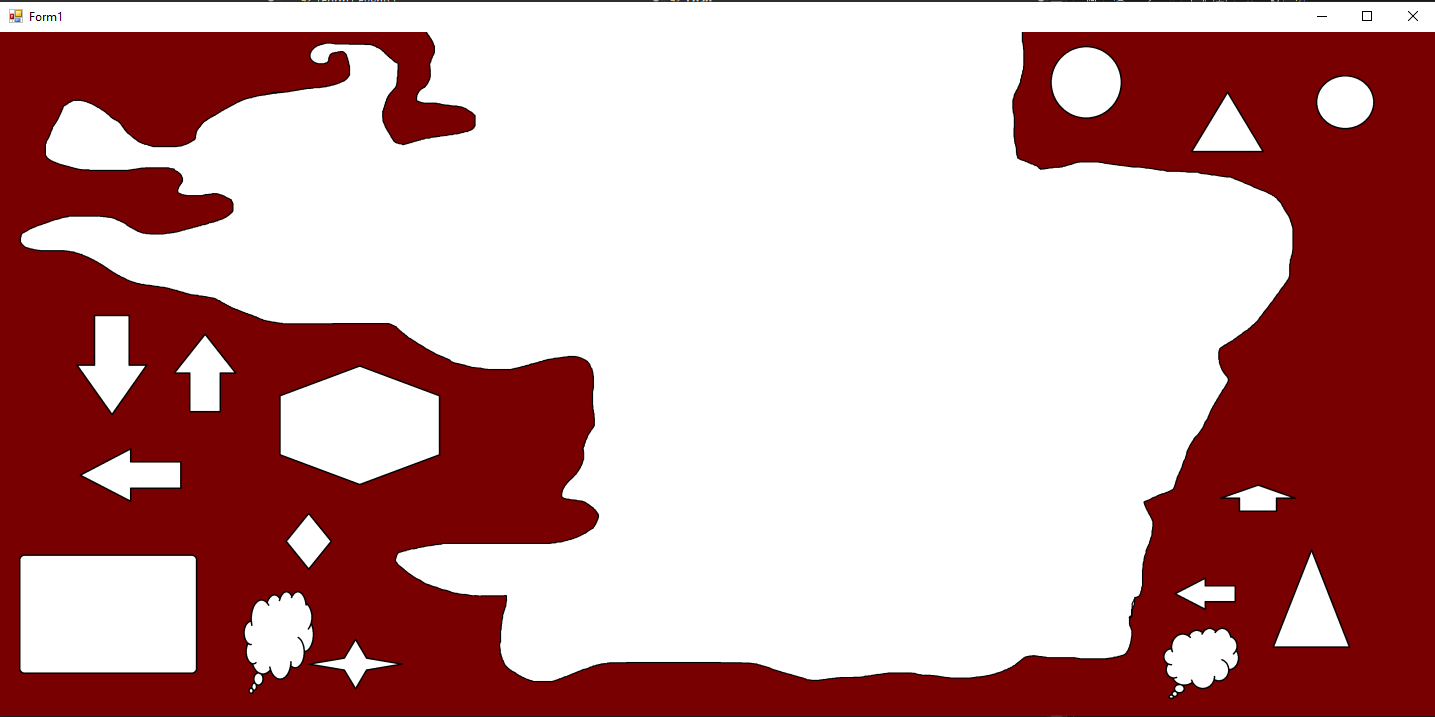
That one is 4840x2408 in size.
In my testing, it takes your original algorithm about 3 seconds too fill the image as you see there. My version does it in 182 milliseconds, which is approximately 1/5th of a second. Hopefully you should also see such gains were you to measure.
-
Feb 22nd, 2024, 04:01 PM
#35
Re: how convert VB6 to VB2010 code?
I will implement it, when I get round to having another look at my paint app. I know you?re right about the time savings. That was one of the issues that made me limit the size of images in my paint app, and ultimately put my paint app aside and move on to other projects. The eventual use of this graphics app. Is for designing address labels in my address book app?
- Coding Examples:
- Features:
- Online Games:
- Compiled Games:
-
Feb 22nd, 2024, 04:04 PM
#36
Re: how convert VB6 to VB2010 code?
This site is still buggy. Changing punctuation characters in my text input
Edit: Site problem reported to admin
Last edited by .paul.; Feb 22nd, 2024 at 04:20 PM.
- Coding Examples:
- Features:
- Online Games:
- Compiled Games:
-
Feb 22nd, 2024, 06:09 PM
#37
Re: how convert VB6 to VB2010 code?
Originally Posted by .paul.
I will implement it, when I get round to having another look at my paint app. I know you?re right about the time savings. That was one of the issues that made me limit the size of images in my paint app, and ultimately put my paint app aside and move on to other projects. The eventual use of this graphics app. Is for designing address labels in my address book app?
Well I hope it works well for you when you do get around to it eventually.
In the meantime, I think I will make this a CodeBank entry. It's very surprising how hard it is to find a decent flood fill implementation online, much less one in a .Net language. Everyone seems to be crazy over the 4 way recursive which is the one you used. It's very easy to understand and implement so I get it's appeal. However, it's basically the bubble sort of flood fill algorithms, good for teaching and demos but not good enough to be used seriously.
-
Feb 22nd, 2024, 06:23 PM
#38
Re: how convert VB6 to VB2010 code?
Originally Posted by Niya
Well I hope it works well for you when you do get around to it eventually.
In the meantime, I think I will make this a CodeBank entry. It's very surprising how hard it is to find a decent flood fill implementation online, much less one in a .Net language. Everyone seems to be crazy over the 4 way recursive which is the one you used. It's very easy to understand and implement so I get it's appeal. However, it's basically the bubble sort of flood fill algorithms, good for teaching and demos but not good enough to be used seriously.
Good idea with the codebank entry. I didn't, and still don't understand the 4 way recursive algorithm  Which is why i asked an expert when i saw the opportunity Which is why i asked an expert when i saw the opportunity
- Coding Examples:
- Features:
- Online Games:
- Compiled Games:
-
Feb 22nd, 2024, 06:43 PM
#39
Re: how convert VB6 to VB2010 code?
While I appreciate the compliment, I don't consider myself an expert.
I do have a lot of experience with image processing but I still don't possess anywhere near the talent of true gods of the art like Tanner Helland or Olaf.
Knowing Olaf he could probably write a flood fill that works in microseconds. 
-
Feb 22nd, 2024, 06:52 PM
#40
Re: how convert VB6 to VB2010 code?
Originally Posted by .paul.
I didn't, and still don't understand the 4 way recursive algorithm
The idea is actually quite simple. From the point where the fill begins, you observe the pixel to the top, left, bottom and right of it and if you find "unfilled" pixels, do the same thing with each of them which is to say you check the top, left, bottom and right of each one. All the while you're filling them with the new colour. The algorithm basically "radiates" the new colour from wherever you start.
Filled pixels in this context refers to both pixels filled by the algorithm itself or pixels that were already a different colour from the start.
 Posting Permissions
- You may not post new threads
- You may not post replies
- You may not post attachments
- You may not edit your posts
-
Forum Rules
|
Click Here to Expand Forum to Full Width
|



 Reply With Quote


