|

-
Jan 19th, 2024, 11:08 AM
#3681
Lively Member

Re: CommonControls (Replacement of the MS common controls)
Hi,
I just extract the files in my VBCCR folder and I can't compile the new version ComCtlsDemo.exe , I get an error in VTableHandle.CallByDispId function on ", pDispParams As OLEGuids.OLEDISPPARAMS"
What do I do wrong ?
-
Jan 19th, 2024, 11:16 AM
#3682
Lively Member
Re: CommonControls (Replacement of the MS common controls)
Sorry, my bad, I hadn't upgraded OLEGuids.tlb
-
Jan 19th, 2024, 11:16 AM
#3683
Re: CommonControls (Replacement of the MS common controls)
 Originally Posted by Crapahute

Hi,
I just extract the files in my VBCCR folder and I can't compile the new version ComCtlsDemo.exe , I get an error in VTableHandle.CallByDispId function on ", pDispParams As OLEGuids.OLEDISPPARAMS"
What do I do wrong ?
CallByDispId is a new function in VTableHandle.bas. (same syntax as in twinBASIC)
OLEGuids.tlb needs to be replaced on your machine (SysWow64) as it got re-compiled so that IDispatch::Invoke is usable without to resort on DispCallFunc.
Sorry for the inconvenience caused.
-
Jan 20th, 2024, 05:01 AM
#3684
Re: CommonControls (Replacement of the MS common controls)
Originally Posted by Krool
I don't know how..
The trick once wrote, quote:
However, calling IOleControlSite always return S_OK and does not case the frame top-level container IOleInPlaceFrame to raise the KeyDown event.
I can get the IOleInPlaceFrame object from within IOleInPlaceActiveObject::TranslateAccelerator and the hWndFrame (which is VB.Form or VB.UserControl)
However, how to know the KeyPreview state or invoke something ? I need some help here. I can cast IOleInPlaceFrame to IDispatch and get the KeyPreview property of a VB.Form, but that looks odd and hacky.
The IOleControlSite::TranslateAccelerator works per se. For non-arrow keys it will fire the KeyDown event when KeyPreview is True. However, for arrow keys it will just move focus, like the standard behavior.
So the problem is here how to override this standard behavior to "consume" it (like already done) but let the container fire it's KeyDown event when KeyPreview is True.
For example the following change works, there seems to be no difference. Because I assume that the OriginalIOleIPAO handler also does the IOleControlSite::TranslateAccelerator call ...
So again, how to enforce arrow keys do forward to the container. Other active x controls seem to be able to do it, like vsFlexGrid or so.
Code:
If Handled = False Then IOleIPAO_TranslateAccelerator = This.OriginalIOleIPAO.TranslateAccelerator(VarPtr(Msg))
If Handled = False Then IOleIPAO_TranslateAccelerator = PropOleControlSite.TranslateAccelerator(VarPtr(Msg), GetShiftStateFromMsg())
Last edited by Krool; Jan 20th, 2024 at 05:21 AM.
-
Jan 29th, 2024, 06:11 AM
#3685
Hyperactive Member
Re: CommonControls (Replacement of the MS common controls)
I'm running into something strange:
When the user clicks on the space above any button, the Toolbar_ButtonClick(ByVal Button As VBCCR17.TbrButton) event receives the last button on the toolbar as the parameter, but... only when that button is hidden.
Any idea what is causing this?
-
Feb 1st, 2024, 10:42 AM
#3686
-
Feb 2nd, 2024, 07:31 PM
#3687
Fanatic Member

Re: CommonControls (Replacement of the MS common controls)
VB6SP6, Win10x64
@Krool
i download the source code of your lastest release (1.7.100).
It is not possible to run the project anymore. At module VTableHandle -> CallByDispId i get an error for OLEGuids.OLEDISPPARAMS.
Any ideas why OLEDISPPARAMS not exist in OLEGuids.tlb?
Code:
#If (TWINBASIC = 0) Then
Public Function CallByDispId(ByVal This As Object, ByVal DispId As Long, ByVal CallType As VbCallType, ParamArray ArgList() As Variant) As Variant
Const DISPID_PROPERTYPUT As Long = -3
Dim PropDispatch As OLEGuids.IDispatch, IID_NULL As OLEGuids.OLECLSID, pDispParams As OLEGuids.OLEDISPPARAMS
-
Feb 2nd, 2024, 07:59 PM
#3688
Fanatic Member
-
Feb 3rd, 2024, 08:33 AM
#3689
Re: CommonControls (Replacement of the MS common controls)
Originally Posted by Mith
VB6SP6, Win10x64
@Krool
i download the source code of your lastest release (1.7.100).
It is not possible to run the project anymore. At module VTableHandle -> CallByDispId i get an error for OLEGuids.OLEDISPPARAMS.
Any ideas why OLEDISPPARAMS not exist in OLEGuids.tlb?
Code:
#If (TWINBASIC = 0) Then
Public Function CallByDispId(ByVal This As Object, ByVal DispId As Long, ByVal CallType As VbCallType, ParamArray ArgList() As Variant) As Variant
Const DISPID_PROPERTYPUT As Long = -3
Dim PropDispatch As OLEGuids.IDispatch, IID_NULL As OLEGuids.OLECLSID, pDispParams As OLEGuids.OLEDISPPARAMS
See post 3683
-
Feb 3rd, 2024, 09:41 AM
#3690
Fanatic Member
Re: CommonControls (Replacement of the MS common controls)
Originally Posted by Krool
See post 3683
Thanks! I replaced OLEGuids.tlb with the one from ComCtlsDemo.zip and it works again without error messages!
-
Feb 4th, 2024, 02:48 AM
#3691
Re: CommonControls (Replacement of the MS common controls)
Originally Posted by Erwin69
I'm running into something strange:
When the user clicks on the space above any button, the Toolbar_ButtonClick(ByVal Button As VBCCR17.TbrButton) event receives the last button on the toolbar as the parameter, but... only when that button is hidden.
Any idea what is causing this?
This occurs on comctl32.dll version 5.8x only. The error is in TBN_DROPDOWN and related to the ButtonDropDown event (when WholeDropDown) or WM_COMMAND/BN_CLICKED otherwise.
Need to investigate why/what is going on. For me this is a 5.8x bug.
-
Feb 4th, 2024, 10:06 AM
#3692
Re: CommonControls (Replacement of the MS common controls)
Originally Posted by AAraya
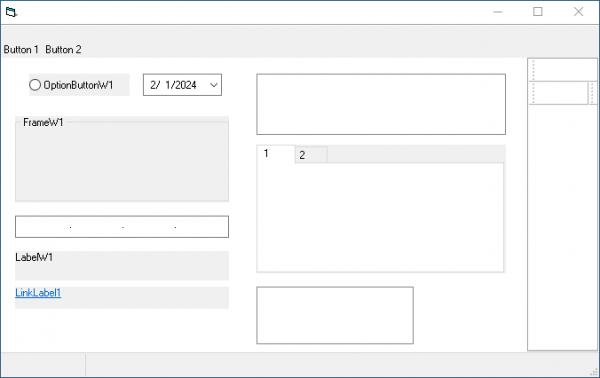
I'm having a problem with DPI handling on the Toolbar using the VBCCR17.OCX. All other controls properly and automatically adjust to the new DPIs but the toolbar does not. Is there something I need to do on my end to get this to work properly (other than specifying in the manifest that the app is dpiAware)? Again, it "just works" for the other VBCCR controls without any special handling from my end but not the toolbar.
Here are two screenshots of random VBCCR controls thrown onto a form to demo the issue. Note how they all auto-scale but not the toolbar (which appears to shrink).
Example 1: 100% DPI
Example 2: 250% DPI
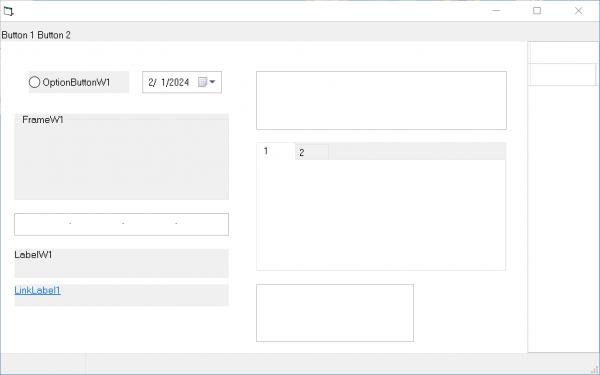
Yes, you may need to scale the button sizes manually. Try the following:
Code:
ToolBar1.ButtonWidth = ToolBar1.ButtonWidth * dpi_factor
ToolBar1.ButtonHeight = ToolBar1.ButtonHeight * dpi_factor
If your buttons show text, your best bet is to delete and reinsert all toolbar buttons, otherwise BTNS_AUTOSIZE doesn't work half of the time and you end up with cropped text.
-
Feb 4th, 2024, 05:55 PM
#3693
Fanatic Member
Re: CommonControls (Replacement of the MS common controls)
Originally Posted by Krool
Yes, you may need to scale the button sizes manually. Try the following:
Code:
ToolBar1.ButtonWidth = ToolBar1.ButtonWidth * dpi_factor
ToolBar1.ButtonHeight = ToolBar1.ButtonHeight * dpi_factor
If your buttons show text, your best bet is to delete and reinsert all toolbar buttons, otherwise BTNS_AUTOSIZE doesn't work half of the time and you end up with cropped text.
Thanks for your response.
I'm curious - is there a reason you chose to not implement this yourself on the Toolbar control like you did for the other controls?
Two questions:
1. dpi_factor is calculated how? Is it DPI/100? For example, if the user's scaling is set to 175%, the dpi_factor = 1.75?
2. If I resize the buttons as you show in the sample code, will the images be auto-scaled? Or do I need to have multiple image lists with different sized images which I load based on the DPI setting?
-
Feb 5th, 2024, 01:56 AM
#3694
Re: CommonControls (Replacement of the MS common controls)
Originally Posted by AAraya
Thanks for your response.
I'm curious - is there a reason you chose to not implement this yourself on the Toolbar control like you did for the other controls?
Two questions:
1. dpi_factor is calculated how? Is it DPI/100? For example, if the user's scaling is set to 175%, the dpi_factor = 1.75?
2. If I resize the buttons as you show in the sample code, will the images be auto-scaled? Or do I need to have multiple image lists with different sized images which I load based on the DPI setting?
Your manifest. Do you apply per-monitor dpi awareness or system (primary monitor) dpi awareness ?
Because the VBCCR controls are only system dpi aware. Means the app is responsible to adjust scalings for per-monitor dpi awareness.
-
Feb 5th, 2024, 11:50 AM
#3695
Fanatic Member
Re: CommonControls (Replacement of the MS common controls)
Originally Posted by Krool
Your manifest. Do you apply per-monitor dpi awareness or system (primary monitor) dpi awareness ?
Because the VBCCR controls are only system dpi aware. Means the app is responsible to adjust scalings for per-monitor dpi awareness.
I do not apply per-monitor dpi awareness. I use only one DPI related setting in my manifest: dpiAware = True. And I'm testing this on a one monitor system. Again, it works for all of your other controls, as the screenshot shows. Just not the Toolbar (and maybe the Status Bar too?)
-
Feb 5th, 2024, 03:18 PM
#3696
Re: CommonControls (Replacement of the MS common controls)
Originally Posted by AAraya
I do not apply per-monitor dpi awareness. I use only one DPI related setting in my manifest: dpiAware = True. And I'm testing this on a one monitor system. Again, it works for all of your other controls, as the screenshot shows. Just not the Toolbar (and maybe the Status Bar too?)
The ComCtlsDemo resource file now has the dpiAware = True in it.
The below test shows that it does scale. (100% vs 150%)
Of course the images are not scaled as that's the app responsibility.

-
Feb 5th, 2024, 04:18 PM
#3697
Fanatic Member
Re: CommonControls (Replacement of the MS common controls)
Originally Posted by Krool
The ComCtlsDemo resource file now has the dpiAware = True in it.
The below test shows that it does scale. (100% vs 150%)
Of course the images are not scaled as that's the app responsibility.
Interesting! Where can I download that demo? I'd like to examine the Toolbar and button settings as maybe I'm doing something wrong in there then.
-
Feb 5th, 2024, 05:28 PM
#3698
Re: CommonControls (Replacement of the MS common controls)
Originally Posted by AAraya
Interesting! Where can I download that demo? I'd like to examine the Toolbar and button settings as maybe I'm doing something wrong in there then.
1st post in this thread...
-
Feb 7th, 2024, 11:04 AM
#3699
Fanatic Member
Re: CommonControls (Replacement of the MS common controls)
Originally Posted by AAraya
dpi_factor is calculated how? Is it DPI/100? For example, if the user's scaling is set to 175%, the dpi_factor = 1.75?
Responding to my own question here in case someone else stumbles across my post.
The DPI factor is determined by comparing the current DPI setting of the system with the default DPI setting (typically 96 DPI). The formula to calculate the DPI factor is:
DPI factor=Current DPI/96
For example, if the current DPI setting is 120 DPI, the DPI factor would be:
DPI factor=120/96=1.25
To get the current DPI setting:
Code:
Private Declare Function GetDeviceCaps Lib "gdi32" (ByVal hdc As Long, ByVal nIndex As Long) As Long
Private Const LOGPIXELSX As Long = 88

Function GetDPI() As Long
    Dim hdc As Long
    hdc = GetDC(0)
    GetDPI = GetDeviceCaps(hdc, LOGPIXELSX)
    ReleaseDC 0, hdc
End Function
-
Feb 11th, 2024, 10:46 AM
#3700
New Member
Re: CommonControls (Replacement of the MS common controls)
Hello Mr. Krool,
I need your help.
I get the following error: ERROR VBCCR17 Run-time error '50003'; Unexpected error.
I have a form where I am using imagelist as an image container for a menu bar,
the icons are 16x16 pixels, generated from .svg files (with old traditional .ico no problem),
In Windows 10 I do not have any problem,
the problem occurs in some versions of windows 7 service pack 1,
I have tried it on a vm with windows 7 sp1 and it has not given me any problems.
What library do you use to load the images that may be outdated in these Windows.
-
Feb 11th, 2024, 11:36 AM
#3701
Re: CommonControls (Replacement of the MS common controls)
Originally Posted by vb6nostalgia
Hello Mr. Krool,
I need your help.
I get the following error: ERROR VBCCR17 Run-time error '50003'; Unexpected error.
I have a form where I am using imagelist as an image container for a menu bar,
the icons are 16x16 pixels, generated from .svg files (with old traditional .ico no problem),
In Windows 10 I do not have any problem,
the problem occurs in some versions of windows 7 service pack 1,
I have tried it on a vm with windows 7 sp1 and it has not given me any problems.
What library do you use to load the images that may be outdated in these Windows.
Are these 32bit icons?
-
Feb 11th, 2024, 12:38 PM
#3702
New Member
Re: CommonControls (Replacement of the MS common controls)
yes,
in the file properties, both are 16x16 96 dpi 32bits,
the first is an image that comes with vb6 (WRENCH.ICO) works on those computers with windows 7 sp1,
but the second also 32 bits (converted from a . svg with magick) is the one that generates the error on some computers with Windows 7 sp1.
I think that some shared library is outdated. But I don't know where to start, to be able to solve the error.
-
Feb 11th, 2024, 01:19 PM
#3703
Re: CommonControls (Replacement of the MS common controls)
Originally Posted by vb6nostalgia
yes,
in the file properties, both are 16x16 96 dpi 32bits,
the first is an image that comes with vb6 (WRENCH.ICO) works on those computers with windows 7 sp1,
but the second also 32 bits (converted from a . svg with magick) is the one that generates the error on some computers with Windows 7 sp1.
I think that some shared library is outdated. But I don't know where to start, to be able to solve the error.
I can remember that StdPicture with 32 bit icons had problems on older OS.
I can do nothing here. You can downgrad your icon to 24 bits if alpha channel is not needed to fix it.
-
Feb 11th, 2024, 06:31 PM
#3704
Fanatic Member
Re: CommonControls (Replacement of the MS common controls)
Originally Posted by Krool
I can remember that StdPicture with 32 bit icons had problems on older OS.
I can do nothing here. You can downgrad your icon to 24 bits if alpha channel is not needed to fix it.
Agree, i had this issue several times. Don't use any 32bit icons in your project if you support Win7!
-
Feb 13th, 2024, 12:54 PM
#3705
Hyperactive Member
Re: CommonControls (Replacement of the MS common controls)
Originally Posted by Nouyana
No, it means that FontCombo1.Style property is set to FtcStyleDropDownList.
I mean you should set it to FtcStyleDropDownCombo
-
Feb 13th, 2024, 01:58 PM
#3706
New Member
Re: CommonControls (Replacement of the MS common controls)
Originally Posted by Krool
I can remember that StdPicture with 32 bit icons had problems on older OS.
I can do nothing here. You can downgrad your icon to 24 bits if alpha channel is not needed to fix it.
I couldn't get the option to change the icons to 24bit to work, I imagine it failed when converting them. Because they always appeared as 32bits in the properties.
But installing windows 7 from scratch, it worked.
Thanks for your comments.
-
Feb 13th, 2024, 08:06 PM
#3707
Fanatic Member
TreeView Redraw not work correct
VB6SP6, Win10x64, VBCCR 1.7.100
@Krool
The redraw method of the TreeView does not work correct. The scrollbars are not included when setting redraw=false.
When adding many items to the tree the horizontal and vertical scrollbars are jumping around like crazy.
The only workaround for this is to use LockWindowUpdate(tvwTest.hWndUserControl) instead of the redraw method.
Can you fix this?
-
Feb 16th, 2024, 08:07 AM
#3708
Re: TreeView Redraw not work correct
Originally Posted by Mith
VB6SP6, Win10x64, VBCCR 1.7.100
@Krool
The redraw method of the TreeView does not work correct. The scrollbars are not included when setting redraw=false.
When adding many items to the tree the horizontal and vertical scrollbars are jumping around like crazy.
The only workaround for this is to use LockWindowUpdate(tvwTest.hWndUserControl) instead of the redraw method.
Can you fix this?
This seems to be a bug in the WM_SETREDRAW implementation in the TreeView control. I can't fix it.
Your workaround is fine. However, the Redraw property will continue to use WM_SETREDRAW.
You can do both actually. WM_SETREDRAW will for sure optimize internal code in TreeView while LockWindowUpdate ensures that "visually" the scrollbars don't mess up.
-
Feb 18th, 2024, 11:20 AM
#3709
Hyperactive Member
 Re: CommonControls (Replacement of the MS common controls) Re: CommonControls (Replacement of the MS common controls)
Got an error today in the old working code. VBCCR 1.7.0.102
Run-time error '5'
Invalid procedure call or argument.
Code:
Private Sub Form_QueryUnload(Cancel As Integer, UnloadMode As Integer)
   If Me.WindowState <> vbMinimized Then
      frmResize.SaveFinalPosition
   End If
   Select Case UnloadMode
   Case vbAppWindows, vbAppTaskManager
      Call EndOfProgram(False)
   Case Else
      Me.StatusBar1.Panels(2).Text = "Compacting database..." ' ERROR HERE
      Call EndOfProgram(True)
   End Select
   Set SysTray = Nothing
End Sub
-
Feb 20th, 2024, 10:24 PM
#3710
Member
Re: CommonControls (Replacement of the MS common controls)
Quick question, I tried searching the thread but couldnt find anything.
Is it possible to column sort the virtual listview?
-
Feb 22nd, 2024, 01:09 PM
#3711
Re: CommonControls (Replacement of the MS common controls)
Originally Posted by SMC1979
Quick question, I tried searching the thread but couldnt find anything.
Is it possible to column sort the virtual listview?
No, and it makes no sense..
Just sort the underlying source and .Refresh.
-
Feb 22nd, 2024, 01:09 PM
#3712
Re: CommonControls (Replacement of the MS common controls)
Originally Posted by Nouyana
Got an error today in the old working code. VBCCR 1.7.0.102
Run-time error '5'
Invalid procedure call or argument.
Code:
Private Sub Form_QueryUnload(Cancel As Integer, UnloadMode As Integer)
   If Me.WindowState <> vbMinimized Then
      frmResize.SaveFinalPosition
   End If
   Select Case UnloadMode
   Case vbAppWindows, vbAppTaskManager
      Call EndOfProgram(False)
   Case Else
      Me.StatusBar1.Panels(2).Text = "Compacting database..." ' ERROR HERE
      Call EndOfProgram(True)
   End Select
   Set SysTray = Nothing
End Sub
Can't repro.
-
Feb 22nd, 2024, 11:10 PM
#3713
Member
Re: CommonControls (Replacement of the MS common controls)
It does make sense for what I'm doing, doing a find files search and adding to the listview, virtual is so drastically faster, but unable to sort it.
Since the items are being added on the fly there isn't any way to sort. When I add them to a normal listview the sort is so very slow, 100,000+ items.
Trying to keep the speed up, maybe I can find another way to store the list to sort it and then put it back into the virtual. Just trying to find something that is faster than a normal listview.
Also, amazing work on these controls, best I've seen.
-
Feb 23rd, 2024, 01:01 PM
#3714
Fanatic Member
Re: CommonControls (Replacement of the MS common controls)
Originally Posted by Krool
If you use the easier Fixed OwnerDraw then you only need to handle the ItemDraw event. That event is a direct forward call of an WM_DRAWITEM message.
So if you google for other OwnerDraw example handling WM_DRAWITEM then you might have your starting point already. You certainly only need to adapt some few things to consider the event parameter namings etc.
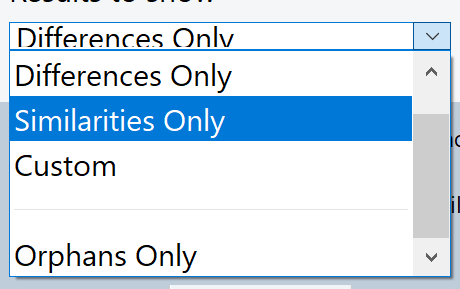
It's been a few years since I played with this Owner-drawn combo stuff. I need to revisit it now as I'm tweaking my code to handle DPI. In order to get the items in my owner drawn combo list to factor in DPI I had to adjust the size in the ComboBoxW ItemMeasure event. This is working well for the items in the list as shown by the screenshot below. However the combox box size itself is an issue. It's too small and any attempts to resize it to a DPI factor size simply reverts it back to a seemingly default size. What's the correct way for me to handle this so that the combo box is resized for higher DPI?
For all other VBCCR combos in this project, the DPI sizing "just works" without me having to do anything. But not for the owner-drawn version which leads me to believe that I have to handle the sizing of this as I'm doing for the items in the list. I don't mind doing that but as I said, when I change the ComboBoxW.height property it auto-reverts back to its initial setting.

Last edited by AAraya; Feb 23rd, 2024 at 01:31 PM.
-
Feb 23rd, 2024, 01:37 PM
#3715
Re: CommonControls (Replacement of the MS common controls)
Originally Posted by AAraya
It's been a few years since I played with this Owner-drawn combo stuff. I need to revisit it now as I'm tweaking my code to handle DPI. In order to get the items in my owner drawn combo list to factor in DPI I had to adjust the size in the ComboBoxW ItemMeasure event. This is working well for the items in the list as shown by the screenshot below. However the combox box size itself is an issue. It's too small and any attempts to resize it to a DPI factor size simply reverts it back to a seemingly default size. What's the correct way for me to handle this so that the combo box is resized for higher DPI?
For all other VBCCR combos in this project, the DPI sizing "just works" without me having to do anything. But not for the owner-drawn version which leads me to believe that I have to handle the sizing of this as I'm doing for the items in the list. I don't mind doing that but as I said, when I change the ComboBoxW.height property it auto-reverts back to its initial setting.
Use CB_SETITEMHEIGHT with wParam set to 1 for the selection field.
-
Feb 23rd, 2024, 02:27 PM
#3716
Fanatic Member
Re: CommonControls (Replacement of the MS common controls)
Edit...
Found the answer myself.
Thanks Krool!
Last edited by AAraya; Feb 23rd, 2024 at 03:22 PM.
-
Feb 24th, 2024, 10:41 AM
#3717
Re: CommonControls (Replacement of the MS common controls)
Bugfix for the ComboBoxW/FontCombo and VirtualCombo. (regression since 10-Dec-2023)
The improvement in the internal CheckDropDownHeight (SetWindowPos on list instead of MoveWindow on combo) is now only when CB_GETCOUNT is > 0. Otherwise the MoveWindow on combo is used. (as in UserControl_Resize)
Because the ComboBox list resize via SetWindowPos seems to work only when there are items in it. Otherwise it only resize when doing a MoveWindow on the ComboBox.
Practical exposure of this bug was that the .Clear method didn't resize the drop-down list ..
EDIT: ImageCombo excluded as it uses MoveWindow on combo always for different reasons.
-
Mar 2nd, 2024, 10:26 PM
#3718
Addicted Member
Re: CommonControls (Replacement of the MS common controls)
I decided to bite the bullet and investigate applying this facility to my long running project(21 years now).
I installed the ComCtlsDemo project and a strange thing happens. In the IDE, when I bring the RichTextboxForm control to the forefront, it loops! In the IDE, not when I run the project.
Process Explorer(Sysinternals) shows that VB6 is running at 100% cpu. I can minimize the RichTextboxForm and the looping stops.
What is happening here? I can't find anything similar when searching this thread.
My development system runs Windows 7.
Additional: note - I can run the project just fine.
Additionl#2: On the top line with the header info, ie, project name and Microsoft Visual Basic ,in [],s it says "design" or "running".
Pulling on the corners of the main form, at a certain point it changes from design to running. At first I thought it was maybe the calendar since in the IDE it is determining the current date, which could be looping. But I don't think so.
Pulling the corners down past a certain point triggers it into running mode. It does seem like it's the Coolbar causing it. I cut the Coolbar and running stops. Paste it in and running starts again.
I closed the project and re-opened it and it still causes running in the IDE.
It doesn't go into running mode until I 1st pull on the corners, then there is a certain point where it shifts between the two states.
I determined that when the outer project form right edge is pulled inside the main form edge so it covers the Coolbar, and then pulled up or down, that causes it to go into running state.
Or pulling the main form right edge to partially cover the Coolbar also causes the problem.
Last edited by VB-only; Mar 3rd, 2024 at 09:29 PM.
-
Mar 3rd, 2024, 02:47 AM
#3719
Hyperactive Member
Re: CommonControls (Replacement of the MS common controls)
Last edited by Nouyana; Mar 3rd, 2024 at 03:17 AM.
-
Mar 9th, 2024, 12:48 AM
#3720
Hyperactive Member
Re: CommonControls (Replacement of the MS common controls)
Originally Posted by VB-only
I decided to bite the bullet and investigate applying this facility to my long running project(21 years now).
I installed the ComCtlsDemo project and a strange thing happens. In the IDE, when I bring the RichTextboxForm control to the forefront, it loops! In the IDE, not when I run the project.
The old problem with DEMO-project. Krool didn't fixed it. The solution:
https://www.vbforums.com/showthread....=1#post5632609
 Posting Permissions
- You may not post new threads
- You may not post replies
- You may not post attachments
- You may not edit your posts
-
Forum Rules
|
Click Here to Expand Forum to Full Width
|



 Reply With Quote