|

-
Dec 13th, 2023, 01:48 PM
#1
Thread Starter
Hyperactive Member


How to threading a couple of SoundPlayers to play synchronously?
Hi all o7.
Consider a timer to perform
Code:
My.Computer.Audio.Play(My.Resources.Test, AudioPlayMode.Background)
A 500ms timer and 1000ms audio file will lead to cutting audio file and startover. I've tried threading but in a bad way, causing the UI freezing while it finishes the work.
Since twice of the duration is enough for audio length, Is it possible to toggle a boolean variable to perform each players/threads in a see-saw way?
Should I double the Media.SoundPlayer?
Code:
    Private Sub PlaySound1()
        Dim soundPlayer As New Media.SoundPlayer(My.Resources.test)
        soundPlayer.PlaySync()
    End Sub
    Private Sub PlaySound2()
        Dim soundPlayer As New Media.SoundPlayer(My.Resources.test)
        soundPlayer.PlaySync()
    End Sub
Or should I double the threads? Or should I do both???
Code:
    Private Sub Timer1_Tick(sender As Object, e As EventArgs) Handles Timer1.Tick
        If ToggleSound Then
            SoundThread1 = New Thread(AddressOf PlaySound1)
            SoundThread1.Start()
        Else
            SoundThread2 = New Thread(AddressOf PlaySound2)
            SoundThread2.Start()
        End If
        ToggleSound = Not ToggleSound
    End Sub
Does Media.SoundPlayer even able to perform a sort of buffered "layering" of waves? Also simple form of "SoundPlayer.Play()" acts like first example.
Current results with 250ms timer for test: They keep playing slowly to finish entire file ignorantly, closing the form will not stop them (Depends on how long you spend x250ms while form was open, then stop runtime).
-
Dec 25th, 2023, 01:38 PM
#2
Thread Starter
Hyperactive Member
Re: How to threading a couple of SoundPlayers to play synchronously?
As a tangible visual example,
Following image shows first way which in-app other sounds will replaced/play with the sound that is playing.

But following image shows what I'm looking for. "Alarm" sound keeps playing - its ending ringing can be heard - when you stop, mute, acknowledge it (whatever it called) last audio finishes its audio and no more replays will be take place. Exiting sound also can be heard freely next to others.
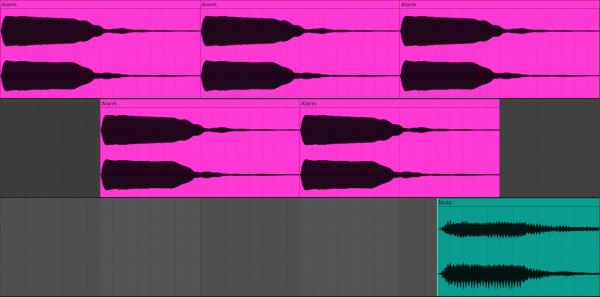
Does Media.SoundPlayer even able to perform a sort of buffered "layering" of waves?
This is a serious question, consider there is a way logically. Is it possible that hardware can perform it physically? What do others do when they write an app with an ambient background loop which environment command sounds wouldn't conflict?
-
Jan 14th, 2024, 10:00 AM
#3
Thread Starter
Hyperactive Member
Re: How to threading a couple of SoundPlayers to play synchronously?
First thing: "Simultaneously" would be a proper word for this matter. Or not even a threading (as we're familiar with it) related thread.
Secondly, since contribution rate on this thread was absolutely zero (lol it comes to mind a simple issue at first but it's not) I'd look it up and ChatGPT returned an interesting idea. Here's the full reply with a DirectX approach:
“
Here's an example of how you could use Microsoft DirectX to play multiple sounds simultaneously:
1. Add a reference to the Microsoft.DirectX.DirectSound namespace in your project.
2. Create a new instance of the DirectSound class to handle sound playback:
Code:
Dim ds As New Microsoft.DirectX.DirectSound.DirectSound()
ds.SetCooperativeLevel(Me.Handle, Microsoft.DirectX.DirectSound.CooperativeLevel.Normal)
3. Create a new instance of the SecondaryBuffer class for each sound you want to play:
Code:
Dim buffer1 As New Microsoft.DirectX.DirectSound.SecondaryBuffer("sound1.wav", ds)
Dim buffer2 As New Microsoft.DirectX.DirectSound.SecondaryBuffer("sound2.wav", ds)
4. Set the volume and other properties for each buffer as needed:
Code:
buffer1.Volume = -1000
buffer2.Volume = 0
5. Play the buffers simultaneously:
Code:
buffer1.Play(0, Microsoft.DirectX.DirectSound.BufferPlayFlags.Default)
buffer2.Play(0, Microsoft.DirectX.DirectSound.BufferPlayFlags.Default)
This will play both sounds simultaneously, with the ability to adjust their volume and other properties as needed.
Note that this is just a basic example, and there are many more options and features available in Microsoft DirectX and other sound libraries.
”
After installing DirectX SDK to reference it in VS from this link and resolving Visual C++ Redistribution problems, I encountered an instance declaration problem from the first line since DirectSound() is not a member of Microsoft.DirectX.DirectSound. It also cannot be left alone (a method or subroutine should be selected).
Therefore I checked a third party sound-based dll called "NAudio" which covered almost all recording and playback features a developer need with a verity of effects, mixer, modulators and format support/conversion. Here's the full ChatGPT reply:
“
you may want to consider using a library like NAudio or FMOD to achieve simultaneous sound playback with more control over the playback. These libraries allow for mixing and playing multiple sounds at the same time, with options for adjusting volume, panning, and adding effects.
Here's an example of how you could use NAudio to play multiple sounds simultaneously:
1. Add a reference to the NAudio library in your project.
2. Create a new instance of the WaveOutEvent class to handle sound playback:
Code:
Dim outputDevice As New NAudio.Wave.WaveOutEvent()
3. Create a new instance of the AudioFileReader class for each sound you want to play:
Code:
Dim sound1 As New NAudio.Wave.AudioFileReader("sound1.wav")
Dim sound2 As New NAudio.Wave.AudioFileReader("sound2.wav")
4. Create a new instance of the MixingSampleProvider class to mix the sounds together:
Code:
Dim mixer As New NAudio.Wave.MixingSampleProvider(New NAudio.Wave.WaveFormat())
mixer.AddInputStream(sound1)
mixer.AddInputStream(sound2)
5. Set the output device to play the mixed sounds:
Code:
outputDevice.Init(mixer)
outputDevice.Play()
This will play both sounds simultaneously, with the ability to adjust their volume and other properties as needed.
Note that this is just a basic example, and there are many more options and features available in NAudio and other sound libraries.
”
Is there any Microsoft.DirectX.DirecSound or NAudio experts here to help me out? Sources and examples are very rare for this goal. Thanks ♥
-
Jan 14th, 2024, 10:04 AM
#4
Thread Starter
Hyperactive Member
Re: How to threading a couple of SoundPlayers to play synchronously?
The latter has its own difficulties like feeding a My.Resources.AnyWaveFile to a NAudio.Wave.AudioFileReader(...) which should be a stream. Or instead of WaveMixerStream(), WaveMixerStream32() should be replaced. Now after couple of weeks I was messing around and now able to play 3 waves at one but only these 3. I cannot add one more, I cannot reduce 1, I cannot play only 1 of them on an event like Button_Click. A total disaster... Here's the code:
Code:
Imports NAudio.Wave

Public Class Form1
    Private waveFiles As List(Of WaveFileReader)
    Private mixerStream1 As WaveMixerStream32
    Private mixerStream2 As WaveMixerStream32
    Private outputDevice As IWavePlayer

    Private Sub Form1_Load(sender As Object, e As EventArgs) Handles MyBase.Load
        ' Load two wave files from resources
        Dim resourceStream1 As IO.Stream = My.Resources.Resource1
        Dim waveFile1 As New WaveFileReader(resourceStream1)
        Dim resourceStream2 As IO.Stream = My.Resources.Resource2
        Dim waveFile2 As New WaveFileReader(resourceStream2)

        ' Create two mixer streams and add the wave files to them
        waveFiles = New List(Of WaveFileReader)({waveFile1, waveFile2})
        mixerStream1 = New WaveMixerStream32()
        mixerStream2 = New WaveMixerStream32()
        For Each waveFile In waveFiles
            Dim inputStream1 As New WaveChannel32(waveFile)
            Dim inputStream2 As New WaveChannel32(waveFile)
            mixerStream1.AddInputStream(inputStream1)
            mixerStream2.AddInputStream(inputStream2)
        Next

        ' Initialize an output device and start playback
        outputDevice = New WaveOut()
        outputDevice.Init(mixerStream1)
    End Sub

    Private Sub Button1_Click(sender As Object, e As EventArgs) Handles Button1.Click
        ' Switch to mixer stream 1 and start playback
        outputDevice.Stop()
        outputDevice.Init(mixerStream1)
        outputDevice.Play()
    End Sub

    Private Sub Button2_Click(sender As Object, e As EventArgs) Handles Button2.Click
        ' Switch to mixer stream 2 and start playback
        outputDevice.Stop()
        outputDevice.Init(mixerStream2)
        outputDevice.Play()
    End Sub

    Private Sub Form1_FormClosing(sender As Object, e As FormClosingEventArgs) Handles MyBase.FormClosing
        ' Stop playback and dispose resources
        outputDevice.Stop()
        outputDevice.Dispose()
        mixerStream1.Dispose()
        mixerStream2.Dispose()
        For Each waveFile In waveFiles
            waveFile.Dispose()
        Next
    End Sub
End Class
Last edited by pourkascheff; Jan 14th, 2024 at 10:13 AM.
Tags for this Thread
 Posting Permissions
- You may not post new threads
- You may not post replies
- You may not post attachments
- You may not edit your posts
-
Forum Rules
|
Click Here to Expand Forum to Full Width
|



 Reply With Quote