|

-
Sep 14th, 2017, 12:50 PM
#41
Thread Starter
Lively Member

Re: Error 481 - Invalid picture in compiled exe (vb6 sp6) in Win7 II
And yet another test:
Omitted STDOLE2.tlb from manifest and dependencies
Bonnie West's code adds an image of the icon to the center of the form:
256x256 - 24, 48x48 - 24, 32x32 - 24, 16x16 - 24
48x48 - 8, 32x32 - 8, 16x16 - 8
32x32 - 4, 16x16 - 4
On my Development Host windows 7 (x64) PC, zThreeD.exe works:
Icon does appear on zThreeD.exe main form title bar and center of form.
Icon does appear on zThreeD.exe desktop shortcut (after screen Refresh).
Icon does appear in zThreeD.exe shortcut properties.
Icon does appear on zThreeD.exe.
Icon does appear in zThreeD.exe properties.
On my test windows 10 (x64) PC, zThreeD.exe works:
Icon does appear on zThreeD.exe main form title bar and center of form.
Old Icon does appear on zThreeD.exe desktop shortcut (Unaffected by Refresh or reboot?).
- - - (This behavior with the Desktop Shortcut icon seems to resolve itself or can be 'fixed' by uninstall > reboot > install)
Icon does appear in zThreeD.exe shortcut properties.
Icon does appear on zThreeD.exe.
Icon does appear in zThreeD.exe properties.
On my wife's windows 7 (x64) PC, zThreeD.exe installs but does not work: Error 481 - Invalid picture
* Icon does NOT appear on zThreeD.exe main form title bar: Error 481 - Invalid picture
Icon does appear on zThreeD.exe desktop shortcut.
Icon does appear in zThreeD.exe shortcut properties.
Icon does appear on zThreeD.exe.
Icon does appear in zThreeD.exe properties.
Last edited by anderci; Sep 15th, 2017 at 06:37 AM.
-
Sep 15th, 2017, 07:30 AM
#42
Thread Starter
Lively Member
Re: Error 481 - Invalid picture in compiled exe (vb6 sp6) in Win7 II
The test results, above, are the same with all of my tiny test apps (zNoOCX, zRichTx, zThreeD and zMSComct)
The zNoOCX installation package no longer contains stdole2.tlb any other dependency files.
I simply copied (from my PC via the USB memory stick) the zNoOCX.exe file to my wife's windows 7 (x64) PC into a D:\Program Files (x86)\Clark_Anderson\zNoOCX folder and ran it:
IT WORKS!
Doggonit, that was a fluke: every thing works in my wife's logon??
Even Administrator logon does not make everything work?? This work/not work in other logons includes the 'copied' zNoOCX.exe file. I may have to take this puzzle back to the NSIS forum or...?
Thank you, Spooman for the instructions...
Last edited by anderci; Sep 15th, 2017 at 09:27 AM.
-
Sep 15th, 2017, 08:13 AM
#43
Re: Error 481 - Invalid picture in compiled exe (vb6 sp6) in Win7 II
Anderci
Congrats.
Lord knows this has been quite the exercise .. 
May I make the following suggestion .. mark the thread as RESOLVED.
To do so
- Look just above your 1st post
- Click the Thread Tools button
- Click the Mark as Resolved option
Spoo
-
Sep 15th, 2017, 02:32 PM
#44
Thread Starter
Lively Member
Re: Error 481 - Invalid picture in compiled exe (vb6 sp6) in Win7 II
My guess, at this point, is the 'Error 481 - Invalid picture' was an unusual symptom response to security issues??
I certainly would like a better understanding of this. Does my NSIS installation script need adjusting for it?
Last edited by anderci; Sep 15th, 2017 at 05:23 PM.
-
Nov 23rd, 2023, 10:37 AM
#45
Re: [RESOLVED] Error 481 - Invalid picture in compiled exe (vb6 sp6) in Win7 II
very old thread, but maybe somebody still alive here...
@anderci, in post #42, I do not understand how do you able to solve the issue... so, all you did is just removed stdole2.tlb dependency?
I have this very rare error "Error 481 - Invalid picture" on Windows 11.
I don't have a constant access to that machine to do convenient tests.
Tried to include 24bit images in my ico file, which is loaded in "Icon" form's property. Without success.
Are there tools, allowing to re-order images in ico-file? (tried IcoFX, but it seems does not have such an option)
Last edited by Dragokas; Nov 23rd, 2023 at 10:43 AM.
-
Nov 23rd, 2023, 11:04 AM
#46
Re: [RESOLVED] Error 481 - Invalid picture in compiled exe (vb6 sp6) in Win7 II
GreenFish Icon Editor Pro works for me.
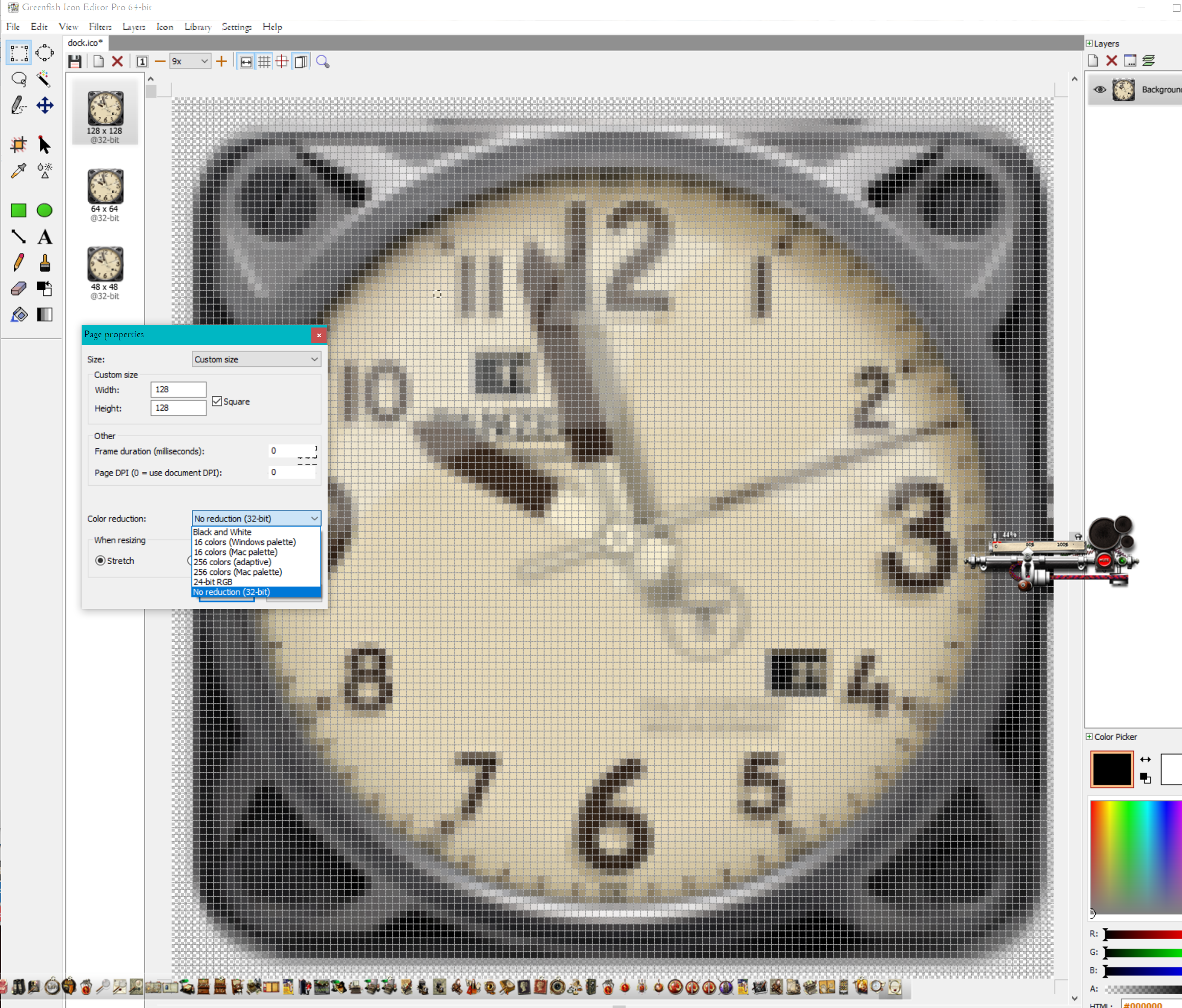
Typically, I save my form icons as 48x48x32 and all my apps work well from 32bit win7 to win11 64bit, I often have a hidden form that is assigned a larger 64x64x32 icon that gives the overall project its icon.

I do ensure that the icon images do not contain multiple icons.
https://github.com/yereverluvinunclebert
Skillset: VMS,DOS,Windows Sysadmin from 1985, fault-tolerance, VaxCluster, Alpha,Sparc. DCL,QB,VBDOS- VB6,.NET, PHP,NODE.JS, Graphic Design, Project Manager, CMS, Quad Electronics. classic cars & m'bikes. Artist in water & oils. Historian.
By the power invested in me, all the threads I start are battle free zones - no arguing about the benefits of VB6 over .NET here please. Happiness must reign.
-
Nov 23rd, 2023, 11:36 AM
#47
Re: [RESOLVED] Error 481 - Invalid picture in compiled exe (vb6 sp6) in Win7 II
yereverluvinuncleber, you can't be sure. The error is really very rare. Like 1 of 300 machines, maybe more.
Thanks for suggestion to use GreenFish. It support re-order by drag & drop. It was one of suggestions in this thread to re-order images such as 24-bit images to be on top, it doesn't hurt to try.
As about 256x256 support, I'm usually using IconChanger by anny05 to patch exe by inserting 256x. However, in above case with "Error 481" it isn't used.
-
Nov 23rd, 2023, 12:07 PM
#48
Re: [RESOLVED] Error 481 - Invalid picture in compiled exe (vb6 sp6) in Win7 II
When I previously used multiple icons I had to re-order them to ensure the correct one was used but I now try to avoid any complication so I just use single icons in one ico file with just one size. I get round the need for a bigger icon by assigning it to that hidden form. I think I have used a 128x 128 with some success but I generally use 64x64.
Previously, I had an issue with a previously working icon not operating on Win 10 ( 50003 Error) with the desktop DPI scaled to a figure such as 125% or 175%. Using the 48x 48 icon size seemed to fix that.
https://github.com/yereverluvinunclebert
Skillset: VMS,DOS,Windows Sysadmin from 1985, fault-tolerance, VaxCluster, Alpha,Sparc. DCL,QB,VBDOS- VB6,.NET, PHP,NODE.JS, Graphic Design, Project Manager, CMS, Quad Electronics. classic cars & m'bikes. Artist in water & oils. Historian.
By the power invested in me, all the threads I start are battle free zones - no arguing about the benefits of VB6 over .NET here please. Happiness must reign.
-
Nov 24th, 2023, 07:42 AM
#49
Re: [RESOLVED] Error 481 - Invalid picture in compiled exe (vb6 sp6) in Win7 II
Figured out the reason of a such error.
In my case looks like a bug in Windows.
In short: contents of the icon doesn't matter*. The problem is in modified %TEMP%
As you perhaps know(?), if you include your own icon file as a form's "Icon" property, VB runtime calls OleLoadPictureEx() which then firstly write icon on disk in the TEMP folder returned by GetTempPathW().
So, if system has no access to that folder (e.g. missing or permissions issue), or has incorrect %TEMP% environment variable or so, you'll receive "Invalid picture" on app start. Sometimes I saw altered record in the registry - instead of REG_EXPAND_SZ, "Temp" value have a type of REG_SZ preventing the data "%USERPROFILE%\AppData\Local\Temp" from normal expanding.
Well, why I called it a bug. In my case, the problem was deeper.
There is a weird behaviour in Windows where it can assign custom TEMP value overriding current variable by volatile environment variable when you connect to machine via RDP session. So, the final %TEMP% will look like this: %USERPROFILE%\AppData\Local\Temp\2
where the folder "Temp\2" does not exist and does not create automatically by Windows.
Behaviour may be disabled by GPO, as described here.
So, there is a solution: check does %TEMP% exist and accessible.
As automatic solution:
1. You may not use form's "Icon" property at all and load icon manually (by code).
Or
2. You may start app from Main() or load from hidden form having no icon, then check if %TEMP% folder exists (and accessible for write access), if no, create it or modify %TEMP% to point to the correct location. Then, you may safely load other forms having custom ico file in its "Icon" form's property.
*well, there is surely some rules about icon creation, like the presence of 24bit images (of some sizes - sorry, don't remember exactly) which is essential for some unpatched XP.
Here is a minimal set what always worked for me in all OS versions:
32x32 (24 bit)
16x16 (24 bit)
48x48 (32 bit)
32x32 (32 bit)
16x16 (32 bit)
+ 256x256 (32 bit), this one is inserted by patching the exe file (required for good look only).
-
Nov 24th, 2023, 08:22 AM
#50
Re: [RESOLVED] Error 481 - Invalid picture in compiled exe (vb6 sp6) in Win7 II
Another consequence of OleLoadPictureEx persisting to %TEMP% is that main form will fail loading when there is not enough disk space free.
Seen this in the wild w/ our apps so always starting from Sub Main and Load-ing main form inside error handler so cryptic errors can be translated to something human-readable so end users can take action on their own w/o support calls.
cheers,
</wqw>
-
Nov 24th, 2023, 07:02 PM
#51
Re: [RESOLVED] Error 481 - Invalid picture in compiled exe (vb6 sp6) in Win7 II
That's not good. Is your cause/resolution very different from the others in this thread? Hoping it does not get lost. Worth its own thread? Just a thought.
re: the icon files
32x32 (24 bit)
16x16 (24 bit)
48x48 (32 bit)
32x32 (32 bit)
16x16 (32 bit)
Is your typical icon file a multi icon file with the icons in this order?
https://github.com/yereverluvinunclebert
Skillset: VMS,DOS,Windows Sysadmin from 1985, fault-tolerance, VaxCluster, Alpha,Sparc. DCL,QB,VBDOS- VB6,.NET, PHP,NODE.JS, Graphic Design, Project Manager, CMS, Quad Electronics. classic cars & m'bikes. Artist in water & oils. Historian.
By the power invested in me, all the threads I start are battle free zones - no arguing about the benefits of VB6 over .NET here please. Happiness must reign.
-
Nov 24th, 2023, 07:05 PM
#52
Re: [RESOLVED] Error 481 - Invalid picture in compiled exe (vb6 sp6) in Win7 II
 Originally Posted by Dragokas

2. You may start app from Main() or load from hidden form having no icon, then check if %TEMP% folder exists (and accessible for write access), if no, create it or modify %TEMP% to point to the correct location. Then, you may safely load other forms having custom ico file in its "Icon" form's property.
When you have some sample code, please provide and I may steal it to use it!
https://github.com/yereverluvinunclebert
Skillset: VMS,DOS,Windows Sysadmin from 1985, fault-tolerance, VaxCluster, Alpha,Sparc. DCL,QB,VBDOS- VB6,.NET, PHP,NODE.JS, Graphic Design, Project Manager, CMS, Quad Electronics. classic cars & m'bikes. Artist in water & oils. Historian.
By the power invested in me, all the threads I start are battle free zones - no arguing about the benefits of VB6 over .NET here please. Happiness must reign.
-
Nov 26th, 2023, 06:39 PM
#53
Re: [RESOLVED] Error 481 - Invalid picture in compiled exe (vb6 sp6) in Win7 II
Originally Posted by yereverluvinuncleber
Is your typical icon file a multi icon file with the icons in this order?
I'm using for years this minimal sequence (no complaints as of now among various configs), resource hacker show it goes in such order:
Code:
32x32 (24 bit) - index 1
16x16 (24 bit) - index 2
256x256 (32 bit) - index 3
48x48 (32 bit) - index 4
32x32 (32 bit) - index 5
16x16 (32 bit) - index 6
My .ico loaded in form is the same, but without 256x256.
Then, I'm inserting 256x256 with modified Icon Exe Patcher by anny05, also I'm removing default icons with indices 30001-3000x.
However, for common simple usage, it's enough just to use .ico loaded in form without doing lot of above stuff.
Originally Posted by yereverluvinuncleber
When you have some sample code, please provide and I may steal it to use it!
Well, again that's not something I like to do in simple and trivial way.
For general usage, it's enough to just apply directory exist check => CreateDirectory + SetEnvironmentVariable if that's damaged.
However, I'm doing much more, with access check and unlock.
If you like to see, here is full code, executed on Main() before any form get loaded. If unresolved issues with %temp% found, app just display message explaining the cause to user.
-
Nov 27th, 2023, 04:28 AM
#54
Fanatic Member
Re: [RESOLVED] Error 481 - Invalid picture in compiled exe (vb6 sp6) in Win7 II
I know this sounds strange but I have had this error when running vb6 apps on modern versions of windows without ADMIN priv. I never got to the bottom of it as my main project runs on our boxes so admin priv is not an issue.
As a test can you run your app with admin priv?
-
Nov 27th, 2023, 10:12 AM
#55
Re: [RESOLVED] Error 481 - Invalid picture in compiled exe (vb6 sp6) in Win7 II
vbwins, that may indicate your app had not enough access permissions to the temp folder or its DACL is modified.
I have no problem in running VB6 apps with non-elevated context or through the user of 'users' group e.g. on Win11.
The simplest solution may be just redirect icon unpacking from temp to own app folder:
Code:
Private Declare Function SetEnvironmentVariable Lib "kernel32" Alias "SetEnvironmentVariableW" (ByVal lpName As Long, ByVal lpValue As Long) As Long

Public Sub Main()
    SetEnvironmentVariable StrPtr("TMP"), StrPtr(App.Path)
    Form1.Show vbModeless
End Sub
If you zip and provide here a minimum project with this issue which possible to be reproduced, we can look.
P.S. And yeah, in above explanations I did a mistake, OleLoadPictureEx => GetTempPathW => is looking for %TMP%, not %Temp%.
-
Nov 27th, 2023, 10:50 AM
#56
Re: [RESOLVED] Error 481 - Invalid picture in compiled exe (vb6 sp6) in Win7 II
Originally Posted by MSDN
The GetTempPath function checks for the existence of environment variables in the following order and uses the first path found:
- The path specified by the TMP environment variable.
- The path specified by the TEMP environment variable.
- The path specified by the USERPROFILE environment variable.
- The Windows directory.
The last bullet perhaps means C:\WINDOWS\Temp (if exists) most probably.
cheers,
</wqw>
-
Nov 27th, 2023, 11:55 AM
#57
Re: [RESOLVED] Error 481 - Invalid picture in compiled exe (vb6 sp6) in Win7 II
wqweto, nice to know, good addition!
I also remembered some users complained about user context %TMP% pointing to C:\WINDOWS\Temp (quick googled example).
Potentially, that may be vbwins' issue.
However, if we see the default permission (win11), technically non-admin users aren't restricted from write access: screen
Out of curiosity, I just replaced TMP/Temp with C:\WINDOWS\Temp and icon successfully unpacked there running as non-admin user app.
It does even remove ~icon file, regardless the "Delete" permission is not granted in DACL, hmm.
Although, permissions set on that folder may differ in various OS builds.
Tags for this Thread
 Posting Permissions
- You may not post new threads
- You may not post replies
- You may not post attachments
- You may not edit your posts
-
Forum Rules
|
Click Here to Expand Forum to Full Width
|



 Reply With Quote


