|

-
Sep 28th, 2023, 03:18 PM
#1
Thread Starter
Fanatic Member

 [RESOLVED] Query failure [RESOLVED] Query failure
The query, below runs but fails to yield results.
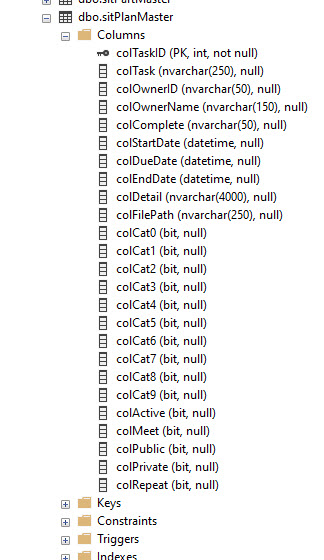
The table referenced is sitPlanMaster, which is part of the Access PlanMaster database. The field colTask is structured as a text field, colDueDate a date field, and colTaskID an integer field.
The table has 5 records. All records have the field colMeet set to True, all records have a colDueDate value, as well as a unique colTaskID value.
For connecting and manipulating the database, I use the connection methods shown below. For this application, the connection method is used for numerous other queries, to the same table and database. None have had any issues.
This code comes from a calendar application that I found and have used for several applications. Although much of the code for the calendar application is above my head, I generally understand how it works, and what it does. The original application was built to use with an Access database.
I have run this query method many times (both leading in and out) and followed it through without being able to find why no records are found. In every instance, the RecordCount = 0 and none of the 5 records that meet the criteria are found.
I use this query method with other applications and databases without issue. I copied this query method from another application, where the query runs and yields the expected results. The only difference between this application and the other is that the database used in the application I copied this from, is an SQL Express database. I don't believe that should be an issue, but it is a difference.
At this point, it seems to me that the only cause is that the query is wrong, but I just can't see where it is. When I run the query, I know that startDate and endDate both have the expected values and I get no errors, with regard to the query executing.
Code:
    Private Sub AddAppointmentToFlDay(ByVal startDayAtFlNumber As Integer)
        Dim startDate As DateTime = New Date(currentDate.Year, currentDate.Month, 1)
        Dim endDate As DateTime = startDate.AddMonths(1).AddDays(-1)


        PlanMaster.AddParam("@meet", 1)
        PlanMaster.PlanMasterQuery("SELECT colTask,colDueDate,colTaskID " &
                                   "FROM sitPlanMaster " &
                                   "WHERE colMeet=@meet AND colDueDate BETWEEN '" & startDate.ToShortDateString &
                                   "' AND '" & endDate.ToShortDateString & "'")
        For Each Row As DataRow In PlanMaster.ListTable.Rows
            Dim appDay As DateTime = DateTime.Parse(CStr(Row("colDueDate")))
            Dim link As New LinkLabel
            link.Tag = Row("colTaskID")
            link.Name = $"link{Row("colTaskID")}"
            link.Text = CStr(Row("colTask"))
            AddHandler link.Click, AddressOf ShowAppointmentDetail
            listFlDay((appDay.Day - 1) + (startDayAtFlNumber - 1)).Controls.Add(link)
        Next
    End Sub
Code:
#Region "Connection Parameters"
        Private PlanMasterConnection As New OleDbConnection("Provider=Microsoft.ACE.OLEDB.12.0;Data Source=PlanMaster.accdb;")
        Public ListCommand As OleDbCommand
        Public ListAdapter As OleDbDataAdapter
        Public ListDataSet As DataSet
        Public ListTable As DataTable
        Public Params As New List(Of OleDbParameter)
        Public Exception As String
#End Region
#Region "Data Connection"
        Public Sub AddParam(Name As String, Value As Object)
            Dim NewParam As New OleDbParameter(Name, Value)
            Params.Add(NewParam)
        End Sub
        Public Sub PlanMasterQuery(SelectQuery As String)
            RecordCount = 0
            Exception = ""
#Region "Connection"
            Try
                PlanMasterConnection.Open()
                ListCommand = New OleDbCommand(SelectQuery, PlanMasterConnection)
                Params.ForEach(Sub(p) ListCommand.Parameters.Add(p))
                Params.Clear()
                ListTable = New DataTable
                ListDataSet = New DataSet
                ListAdapter = New OleDbDataAdapter(ListCommand)
                RecordCount = ListAdapter.Fill(ListTable)
                ListDataSet.Tables.Add(ListTable)
            Catch ex As Exception
                Exception = ex.Message
                MsgBox(ex.Message + vbLf + vbCrLf + MyError)
            Finally
                MyError = ""
                If PlanMasterConnection.State = ConnectionState.Open Then PlanMasterConnection.Close()
            End Try
#End Region
        End Sub
-
Sep 28th, 2023, 03:30 PM
#2
Re: Query failure
Do you have the SQL Server Management tools installed so that you can connect directly to the database and issue SQL queries completely outside of all programming? If so, the first thing I would recommend is that you execute the exact query that the code is executing and see if you do get those 5 expected results.
If the results of that test are 0 results, then you have at least reproduced the issue outside of code, which would be revealing and hopefully put you on the track of where the problem lies.
-
Sep 28th, 2023, 03:53 PM
#3
Thread Starter
Fanatic Member
Re: Query failure
I have actually never ran a query from SQL SM. I can probably figure out how to do this. I have never attached an Access database to SQL Server, can I do that?
-
Sep 28th, 2023, 04:00 PM
#4
Re: Query failure
Sorry, I may have misread your original post. If the database for this application is an Access database, assuming you have Microsoft Access installed, I would recommend opening the database in Access and executing the query directly.
That being said, if memory serves, when querying for dates in an Access database using concatenation as you are, you should be surrounding the date values with # signs rather than single quotes, like so:
Code:
PlanMaster.PlanMasterQuery("SELECT colTask,colDueDate,colTaskID " &
    "FROM sitPlanMaster " &
    "WHERE colMeet=@meet AND colDueDate BETWEEN #" & startDate.ToShortDateString &
    "# AND #" & endDate.ToShortDateString & "#")
-
Sep 28th, 2023, 05:35 PM
#5
Thread Starter
Fanatic Member
Re: Query failure
Actually, I went back and looked at some of the other queries in this application and noted that the queries would not respond if 1 was used in the query instead of True. In keeping with that, I changed my query as below. When the code is run now, I get a "data type mismatch" error.
In the other queries that I have in the application, If I use 1 the queries will just ignore the value, while if I use True, I get the expected response.
Code:
    Private Sub AddAppointmentToFlDay(ByVal startDayAtFlNumber As Integer)
        Dim startDate As DateTime = New Date(currentDate.Year, currentDate.Month, 1)
        Dim endDate As DateTime = startDate.AddMonths(1).AddDays(-1)


        PlanMaster.AddParam("@meet", True)
        PlanMaster.PlanMasterQuery("SELECT colTask,colDueDate,colTaskID " &
                                   "FROM sitPlanMaster " &
                                   "WHERE colMeet=@meet AND colDueDate BETWEEN '" & startDate.ToShortDateString &
                                   "' AND '" & endDate.ToShortDateString & "'")
        For Each Row As DataRow In PlanMaster.ListTable.Rows
            Dim appDay As DateTime = DateTime.Parse(CStr(Row("colDueDate")))
            Dim link As New LinkLabel
            link.Tag = Row("colTaskID")
            link.Name = $"link{Row("colTaskID")}"
            link.Text = CStr(Row("colTask"))
            AddHandler link.Click, AddressOf ShowAppointmentDetail
            listFlDay((appDay.Day - 1) + (startDayAtFlNumber - 1)).Controls.Add(link)
        Next
    End Sub
Oh, I will give your suggestion a try.
-
Sep 28th, 2023, 06:01 PM
#6
Thread Starter
Fanatic Member
Re: Query failure
I ran the query in Access, and it correctly found all 5 records.
I saw the # character you mentioned in the queries I ran in access. I went back to the code and did it with the # characters and HOLY CRAP, it worked like a champ.
Thanks, I really, really appreciate this. I have been scratching my head for a couple of days over this.
-
Sep 30th, 2023, 05:29 AM
#7
Re: [RESOLVED] Query failure
You already use a parameter for colMeeat.
why don’t you use another two parameters for the DueDate BETWEEN?
Last edited by Zvoni; Tomorrow at 31:69 PM.
----------------------------------------------------------------------------------------
One System to rule them all, One Code to find them,
One IDE to bring them all, and to the Framework bind them,
in the Land of Redmond, where the Windows lie
---------------------------------------------------------------------------------
People call me crazy because i'm jumping out of perfectly fine airplanes.
---------------------------------------------------------------------------------
Code is like a joke: If you have to explain it, it's bad
Tags for this Thread
 Posting Permissions
- You may not post new threads
- You may not post replies
- You may not post attachments
- You may not edit your posts
-
Forum Rules
|
Click Here to Expand Forum to Full Width
|



 Reply With Quote

