|

-
Aug 15th, 2023, 08:21 AM
#1
Thread Starter
Lively Member

ImageList Locking Screen
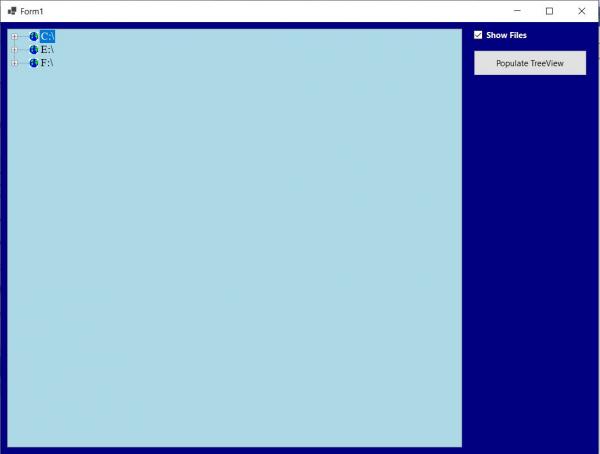
I just created an Application that will dynamically display all of the Directories, Sub-Directories, and optionally Files on my System. This is accomplished via the use of a TreeView Control and works flawlessly. The moment that I assign the ImageList (imgList) to the TreeView (TreeView1) Control's ImageList Property, either manually or programmatically, only the Root Directories are displayed with the Default Icon, the Screen Locks, and you cannot drill down any deeper past the Root. The Indexes in the ImageList are all in Range and I cannot fathom why this will not work. I have posted the offending Code Segment as well as an Image depicting what happens when an ImageList is assigned to the TreeView. Any and all help would greatly be appreciated - thanks in advance.
Code:
Private Sub Button1_Click(sender As Object, e As EventArgs) Handles Button1.Click
  With Me.TreeView1
    .Parent = Me
    .Anchor = AnchorStyles.Top Or AnchorStyles.Left Or AnchorStyles.Right Or AnchorStyles.Bottom
    .BackColor = Color.LightBlue
    .ForeColor = Color.Black
    .BorderStyle = BorderStyle.Fixed3D
    .FullRowSelect = True    'Not the Default
    .ShowLines = True        'Default
    .ShowPlusMinus = True    'Default
    .Scrollable = True       'Default
    .HideSelection = False   'The highlighting of the SelectedNode does not disappear when the Control does not have the Focus
    .HotTracking = True      'Node will appear as a HyperLink when Mouse passes over it

    '*********************************** THIS BLOCK OF CODE WILL LOCK THE SCREEN **********************************
      '.ImageList = imgList1   'Screen Locks, Icon displayed on Root Directory, cannot Drill Down Directories (+) *
      '.ImageIndex = 1                                                                                            *
      '.SelectedImageIndex = 2 '3rd Image in imgList1 displayed by the currently selected Node                    *
    '**************************************************************************************************************

    .Indent = 35             'In Pixels, Default is 19
    .Font = New Font(“Times New Roman”, 12.0F)
    '.ItemHeight = TreeView1.Font.Height * 2    'By Default, scales with the Controls Height Property in Pixels

    FillDirectoryTree()
  End With
End Sub
-
Aug 15th, 2023, 10:13 AM
#2
Re: ImageList Locking Screen
If you are recursively searching through a folder tree and then passing the entire contents to an imagelist then perhaps the system is trying to do what you want and you just have to wait?
https://github.com/yereverluvinunclebert
Skillset: VMS,DOS,Windows Sysadmin from 1985, fault-tolerance, VaxCluster, Alpha,Sparc. DCL,QB,VBDOS- VB6,.NET, PHP,NODE.JS, Graphic Design, Project Manager, CMS, Quad Electronics. classic cars & m'bikes. Artist in water & oils. Historian.
By the power invested in me, all the threads I start are battle free zones - no arguing about the benefits of VB6 over .NET here please. Happiness must reign.
-
Aug 15th, 2023, 11:19 AM
#3
Thread Starter
Lively Member
Re: ImageList Locking Screen
 Originally Posted by yereverluvinuncleber

If you are recursively searching through a folder tree and then passing the entire contents to an imagelist then perhaps the system is trying to do what you want and you just have to wait?
That is the first thing that I thought of, after waiting, waiting, and waiting, no results. Strangely enough, I have been clicking on the '+' Icon to Expand which doesn't work. If I dbl-click on either the Node Icon or the Underlined Node Text, all works as it should (indicated below). Very weird behavior, have you seen anything like this, namely: the "+" and "-" Expand/Collapse Icons only work when there is no associate ImageList Control?

-
Aug 17th, 2023, 11:33 AM
#4
Re: ImageList Locking Screen
Does it really lock, or somewhat lock? If ANY controls respond at all, then the screen isn't really locked. Real locking up happens for one of three reasons. The first is that you are doing something so long running that the application doesn't have time to respond to any of your actions. Waiting would solve that, but you said that you did wait, and perhaps long enough. One other reason would be a perpetual loop. That's really a subset of the first issue, because the program is too busy to respond to input, but only because it is looping forever. Waiting won't resolve that, because it will keep on looping until the heat death of the universe. The third option would be a deadlock on something.
If the screen is really locking (no controls are responding), then the first thing to do is to figure out which of those three scenarios applies. To do that, hit the break button. That will take you to some line of code. If you then press F11, either the code will step forwards or it will not. If execution does not step forwards after pressing F11, then you are deadlocked on the line where execution is currently at. That line would then be the key. If execution does step forwards, then one of the first two apply. By hitting F11 repeatedly, you will either find out that you have a perpetual loop (you will return forever to whence you came), or you will realize that something is taking FAR longer than you thought it would.
My usual boring signature: Nothing
 
-
Aug 17th, 2023, 12:32 PM
#5
Thread Starter
Lively Member
Re: ImageList Locking Screen
Originally Posted by Shaggy Hiker
Does it really lock, or somewhat lock? If ANY controls respond at all, then the screen isn't really locked. Real locking up happens for one of three reasons. The first is that you are doing something so long running that the application doesn't have time to respond to any of your actions. Waiting would solve that, but you said that you did wait, and perhaps long enough. One other reason would be a perpetual loop. That's really a subset of the first issue, because the program is too busy to respond to input, but only because it is looping forever. Waiting won't resolve that, because it will keep on looping until the heat death of the universe. The third option would be a deadlock on something.
If the screen is really locking (no controls are responding), then the first thing to do is to figure out which of those three scenarios applies. To do that, hit the break button. That will take you to some line of code. If you then press F11, either the code will step forwards or it will not. If execution does not step forwards after pressing F11, then you are deadlocked on the line where execution is currently at. That line would then be the key. If execution does step forwards, then one of the first two apply. By hitting F11 repeatedly, you will either find out that you have a perpetual loop (you will return forever to whence you came), or you will realize that something is taking FAR longer than you thought it would.
Does it really lock, or somewhat lock?
Not really sure (LOL). None of the Command Buttons on the Form will work, the Expand (+) icons will not work, but I can dbl-click individual Node Text or Node Icons to Expand/Contract the Node(s). I can also Stop the Program, going into Design Mode, by clicking the red square on the Menu Bar. I've worked with TreeViews before but never encountered this problem. For now I am simply eliminating the ImageList which really isn't critical to the operation.
-
Aug 17th, 2023, 01:51 PM
#6
Re: ImageList Locking Screen
Well, if you can stop it with the red square, then you can pause it with the break button. If so, then the stepping would still show whether you were deadlocked or not.
My usual boring signature: Nothing
-
Aug 18th, 2023, 07:43 AM
#7
Re: ImageList Locking Screen
I'd like to see what FillDirectoryTree looks like ... the key may be in there, since that's where it should be when it locks up... also, I wonder if maybe virtual mode would be advisable, and only load child nodes when the parent is expanded. On the other hand, it doesn't look like you're loading much into it.... so .....
-tg
-
Aug 18th, 2023, 11:34 AM
#8
Thread Starter
Lively Member
Re: ImageList Locking Screen
Originally Posted by techgnome
I'd like to see what FillDirectoryTree looks like ... the key may be in there, since that's where it should be when it locks up... also, I wonder if maybe virtual mode would be advisable, and only load child nodes when the parent is expanded. On the other hand, it doesn't look like you're loading much into it.... so .....
-tg
A couple of points worth mentioning/re-mentioning;
1) The Code works flawlessly as long as a Reference to an ImageList does not exist which would be referenced prior to calling FillDirectoryTree().
2) Traditional Recursion is not used, you would expect it to exist in GetSubDirectoryNodes(). Each successively deeper level of the Tree is determined prior to the Parent Node being expanded via the TreeView's BeforeExpand() Event which is depicted below. I suspect the the problem lies there but I am too inexperienced in VB.NET to make that call.
3) I have reduced the Code to it's simplest state and posted the relevant segments below. The Base Code was taken from 'Programming .NET Windows Applications' by Jesse Liberty & Dan Hurwitz.
4) Thanks again for all your help in this matter.
Code:
Private Sub FillDirectoryTree()    ‘Called after initializing the TreeView
  tvw.BeginUpdate()    ‘Suppress Redraw until TreeView completion
  tvw.Nodes.Clear()    ‘Clear all Nodes

  'Get the logical drives and put them into the root nodes. Fill an Array with all
  ‘Logical Drives on the machine
  Dim strDrives() As String = Environment.GetLogicalDrives()

‘Iterate through the drives, adding them to the tree.
Dim rootDirectoryName As String

For each rootDirectoryName in strDrives
  Try
    Directory.GetDirectories(rootDirectoryName)    ‘1st Level Directories

    'Create a node for each root directory

    Dim ndRoot As TreeNode = new TreeNode(rootDirectoryName)

    tvw.Nodes.Add(ndRoot)    ‘Add Node to Tree (C:\, D:\, E:\, F:\)

    ‘Add subdirectory nodes. If Show Files checkbox checked, then also get
    ‘the FileNames

    GetSubDirectoryNodes(ndRoot, cb.Checked)    ‘cb – CheckBox on Form

  Catch e As System.IO.IOException    ‘Drive not ready
    ‘Ignore

  Catch e As Exception
    'Catch any other errors.
    MessageBox.Show(e.Message)
  End Try
Next

tvw.EndUpdate()
End Sub
Code:
Private Sub GetSubDirectoryNodes(parentNode as TreeNode, getFileNames as Boolean)
  'Exit this method if the node is not a directory.
  Dim di As DirectoryInfo = new DirectoryInfo(parentNode.FullPath)

  If (di.Attributes and FileAttributes.Directory) = 0	then
    Return

  End If

  parentNode.Nodes.Clear()


  'Get an Array of Strings containing all the subdirectories in Parent Node
  Dim arSubs() As string = Directory.GetDirectories(parentNode.FullPath)

  'Add a Child Node for each SubDirectory.
  Dim subDir As string

  For Each subDir In arSubs
    Dim dirInfo As DirectoryInfo = new DirectoryInfo(subDir)

    'Do not show hidden folders
    If (dirInfo.Attributes and FileAttributes.Hidden) = 0 then

    Dim subNode As TreeNode = new TreeNode(dirInfo.Name)
    parentNode.Nodes.Add(subNode)
    End If
  Next

  If getFileNames Then    ‘Process FileNames?
    Dim files() As string = Directory.GetFiles(parentNode.FullPath)
    Dim str As string

    For each str in files
      Dim fi As FileInfo = New FileInfo(str)
      Dim fileNode As TreeNode = New TreeNode(fi.Name)

      parentNode.Nodes.Add(fileNode)

    Next
  End if
End sub
Code:
Private Sub tvw_BeforeExpand(ByVal sender as object, ByVal e as TreeViewCancelEventArgs)
  tvw.BeginUpdate()

  Dim tn As TreeNode

  For Each tn In e.Node.Nodes
    GetSubDirectoryNodes(tn, cb.Checked)
  Next

  tvw.EndUpdate()
End Sub
-
Aug 18th, 2023, 12:38 PM
#9
Re: ImageList Locking Screen
Try this ... build up the nodes first... then add it to the treeview...
Code:
Private Sub FillDirectoryTree()    ‘Called after initializing the TreeView
  tvw.BeginUpdate()    ‘Suppress Redraw until TreeView completion
  tvw.Nodes.Clear()    ‘Clear all Nodes

  'Get the logical drives and put them into the root nodes. Fill an Array with all
  ‘Logical Drives on the machine
  Dim strDrives() As String = Environment.GetLogicalDrives()

‘Iterate through the drives, adding them to the tree.
Dim rootDirectoryName As String

For each rootDirectoryName in strDrives
  Try
    Directory.GetDirectories(rootDirectoryName)    ‘1st Level Directories

    'Create a node for each root directory

    Dim ndRoot As TreeNode = new TreeNode(rootDirectoryName)

    ‘Add subdirectory nodes. If Show Files checkbox checked, then also get
    ‘the FileNames

    GetSubDirectoryNodes(ndRoot, cb.Checked)    ‘cb – CheckBox on Form

    tvw.Nodes.Add(ndRoot)    ‘Add Node to Tree (C:\, D:\, E:\, F:\) ''' <<---- move this to the end after adding hte child nodes to it...

  Catch e As System.IO.IOException    ‘Drive not ready
    ‘Ignore

  Catch e As Exception
    'Catch any other errors.
    MessageBox.Show(e.Message)
  End Try
Next

tvw.EndUpdate()
End Sub
To be honest, I'm surprised you're not getting NPEs...
Code:
Private Sub tvw_BeforeExpand(ByVal sender as object, ByVal e as TreeViewCancelEventArgs)
  tvw.BeginUpdate()

  Dim tn As TreeNode

  For Each tn In e.Node.Nodes
    GetSubDirectoryNodes(tn, cb.Checked)
  Next

  tvw.EndUpdate()
End Sub
What is "tn" in there? You never set it, but pass it to the GetSubDirectoryNodes method...
which then does this:
parentNode.Nodes.Clear()
but parentNode wasn't set... so it shouldn't work.
Does changing this
Dim tn As TreeNode
to this
Dim tn As TreeNode = DirectCast(tn, TreeNode) ' Might need to fully qualify TreeNode
Other than that, I don't see anything obvious. You've basically hit everything I could think of...
-tg
-
Aug 18th, 2023, 02:43 PM
#10
Re: ImageList Locking Screen
What do you get from stepping through it?
My usual boring signature: Nothing
-
Aug 19th, 2023, 10:34 AM
#11
Thread Starter
Lively Member
Re: ImageList Locking Screen
tn represents each Node within the Nodes Collection of the Node that is about to be Expanded (e.Nodes.Node). tn, along with a Boolean Value indicating the Status of a Check Box, is passed as Arguments to the GetSubDirectoryNodes() procedure whereas tn is then replaced by the parentNode Arugment.
-
Aug 19th, 2023, 10:52 AM
#12
Thread Starter
Lively Member
Re: ImageList Locking Screen
What do you get from stepping through it?
Prior to FillDirectoryTree() being called, I programmatically set certain properties of the TreeView. The offending Line of Code that caused the problem is commented in the below segment.
Code:
With TreeView1
  .Parent = me
  .Anchor = AnchorStyles.Top Or AnchorStyles.Left Or AnchorStyles.Right or AnchorStyles.Bottom
  .BackColor = Color.Moccasin
  .ForeColor = Color.DarkRed
  .BorderStyle = BorderStyle.Fixed3D
  .FullRowSelect = False
  .ShowLines = True
  .ShowPlusMinus = True
  .Scrollable = True
  .HideSelection = False
  .HotTracking = True
  .ImageList = imgList    ‘This Line causes the problem
  .ImageIndex = 1         'The ImageIndex assignment persists
  .SelectedImageIndex = 2     'The SelectedImageIndex assignment persists
  .Indent = 35
  .Font = new Font("Times New Roman", 20f)
End With

FillDirectoryTree()
NOTE: I am new to programming in VB.NET but experienced in VB/VBA. I am also relatively new to this Forum, so if my question is out of line, I do apologize. I will continue to play with this Code, but in the event that I cannot get it to work as it should, is it permissible in this Forum to ZIP the Project Files and upload them in the hope that the Experts such as you can have a look at the Code and hopefully resolve this issue?
-
Aug 19th, 2023, 11:00 AM
#13
Re: ImageList Locking Screen
That may work, but it also may not. Since it's a bunch of volunteers, and often very casual volunteers, they may not want to have a look at a whole project.
There are some things that might be worth trying, first. There's still a chance that this has to do with the size of things taking a VERY long time. You might be able to test that by making up a fake image list with nothing but VERY small images. Basically, if the imgList holds N images, create some little 16x16 image and populate the list with N copies of that tiny image. You could even go smaller, but it might be advisable not to, as icons might get wonky if too small.
My usual boring signature: Nothing
Tags for this Thread
 Posting Permissions
- You may not post new threads
- You may not post replies
- You may not post attachments
- You may not edit your posts
-
Forum Rules
|
Click Here to Expand Forum to Full Width
|



 Reply With Quote


