|

-
Aug 12th, 2023, 09:54 PM
#1
Thread Starter
PowerPoster

MDIParent not showing Child Form correctly?
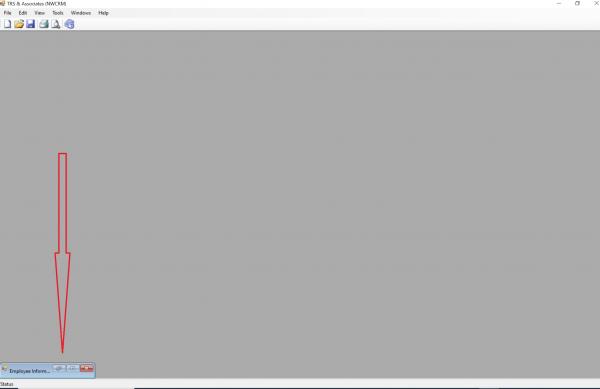
I have a MDIParent form that is showing a Child Form at the bottom left of the MDIParent. I've never seen this kind of behavior before. I never had any issues like this with VB.Net but I'm in the process of learning C#. Perhaps it's something that I'm not aware of related to C# but that would seem weird. It does this everytime. Anyway, please see the attached image. Below is the code that I click from a menustripitem.
Code:
        private void employeeToolStripMenuItem_Click_1(object sender, EventArgs e)
        {
            Form1 frm1 = new Form1();
            frm1.MdiParent = this;
            frm1.StartPosition = FormStartPosition.Manual;
            frm1.Location = new System.Drawing.Point(0, 0);
            frm1.Show();
        }
-
Aug 13th, 2023, 01:38 AM
#2
Re: MDIParent not showing Child Form correctly?
It looks like it's minimised, although I'm not sure why. Try setting the WindowState to Normal. If it's not minimised then it might be a sizing issue, so you could also try setting the Size. Again, not sure why that should be required, assuming that you have both those properties set appropriately in the designer for that form.
-
Aug 13th, 2023, 01:48 PM
#3
Thread Starter
PowerPoster
Re: MDIParent not showing Child Form correctly?
I figured it out. I put the code in the "MdiChildActivate" method.
 Posting Permissions
- You may not post new threads
- You may not post replies
- You may not post attachments
- You may not edit your posts
-
Forum Rules
|
Click Here to Expand Forum to Full Width
|



 Reply With Quote
