|

-
Jun 28th, 2023, 11:17 AM
#1001
Re: VBFlexGrid Control (Replacement of the MSFlexGrid control)
 Originally Posted by Nouyana

We have the incompatibility with MSFlexGrid here.
removed. N/A
Last edited by Krool; Jun 30th, 2023 at 03:00 PM.
-
Jun 28th, 2023, 11:19 AM
#1002
Hyperactive Member

 Re: VBFlexGrid Control (Replacement of the MSFlexGrid control) Re: VBFlexGrid Control (Replacement of the MSFlexGrid control)
Originally Posted by jpbro
I'm a big fan of Before* events with a Cancel parameter, e.g.:
Code:
Public Event BeforePaste(ByRef Text As String, ByRef Cancel As Boolean)
Setting Cancel = True will abort the paste operation.
Another advantage of a BeforePaste event is that you can "massage" the incoming data if necessary (for example, de-formatting currency strings, normalizing date string, etc...).
+1 vote.
And maybe we need a BeforeCopy too? With 2D Variant arrays in both of them?
-
Jun 28th, 2023, 11:24 AM
#1003
Hyperactive Member
Re: VBFlexGrid Control (Replacement of the MSFlexGrid control)
It would be great if we can copy/paste between Excel and VBFlexGrid with cell formats and maybe pictures...
-
Jun 28th, 2023, 12:03 PM
#1004
Re: VBFlexGrid Control (Replacement of the MSFlexGrid control)
Then you first need to examine the format of the data on clipboard.
And we have a lot of clients using products which use the vsFlexGrid and importing to do grid is hardly ever used.
If importing is needed then it’s just basic copy and paste of values.
Exporting is done using by creating an Excel file, never with Excel automation or by pasting formatted results
-
Jun 29th, 2023, 12:20 PM
#1005
Re: VBFlexGrid Control (Replacement of the MSFlexGrid control)
Memory leak fixed in the CellPicture property. This is related to 26-Jun-2023 update.
-
Jun 29th, 2023, 01:10 PM
#1006
Hyperactive Member
 Re: VBFlexGrid Control (Replacement of the MSFlexGrid control) Re: VBFlexGrid Control (Replacement of the MSFlexGrid control)
Originally Posted by Krool
New ColCheckBoxes property to have predefined checkboxes in a column.
All FlexNoCheckBox values are mapped as FlexUnchecked.
It works fine with IVBFlexDataSource2, but it doesn't always work independently.
Code:
Private Sub Form_Load()
   Dim i As Integer
   With VBFlexGrid1
      .Cols = 4
      .FixedRows = 1
      .Rows = 1
      For i = 1 To 50
         .AddItem i & vbTab & "Name " & i & vbTab & i * 100 & vbTab & "текст"
      Next i
      .TextArray(0) = "ID"
      .TextArray(1) = "NAME"
      .TextArray(2) = "SUM"
      .TextArray(3) = "DESCR"
      .Row = 1
      .Col = 1
      ' .ColCheckBoxes(2) = True    ' THIS CALL WORKS FINE
   End With
End Sub
Private Sub Command1_Click()
   With VBFlexGrid1
      .ColCheckBoxes(2) = True      ' THIS CALL DOESN'T WORK
   End With
End Sub
-
Jun 30th, 2023, 05:45 AM
#1007
Re: VBFlexGrid Control (Replacement of the MSFlexGrid control)
Originally Posted by Nouyana
1. Can we somehow recognise the Excel buffer and process it right way?
2. Can we change the default row separator to vbCrLf? We have the incompatibility with MSFlexGrid here.
The default row separator for MS(H)FlexGrid is always vbCr. There is no "automatic" change to vbCrLf when you paste something from Excel.
Instead some cells will contain an vbLf, but you don't see it because MSFlexGrid WordWrap is set to False. When you set it to True it's same behavior as in VBFlexGrid.
In VBFlexGrid there is an additional SingleLine property. However, MS(H)FlexGrid just combines in the WordWrap property DT_WORDBREAK and DT_SINGLELINE.
It was wanted to have that seperately in the VBFlexGrid. So that's indeed an "incompatibility" because VBFlexGrid displays multi-line text by default and on MS(H)FlexGrid the WordWrap must be set to True.
Originally Posted by Nouyana
It works fine with IVBFlexDataSource2, but it doesn't always work independently.
There is a missing invalidation on the .ColCheckBoxes property. Will fix it soon. In the meantime you can fix by just calling .Refresh.
EDIT: Fixed. Thanks
Last edited by Krool; Jun 30th, 2023 at 12:18 PM.
-
Jun 30th, 2023, 02:43 PM
#1008
Hyperactive Member
 Re: VBFlexGrid Control (Replacement of the MSFlexGrid control) Re: VBFlexGrid Control (Replacement of the MSFlexGrid control)
Originally Posted by Krool
The default row separator for MS(H)FlexGrid is always vbCr. There is no "automatic" change to vbCrLf when you paste something from Excel.
Instead some cells will contain an vbLf, but you don't see it because MSFlexGrid WordWrap is set to False. When you set it to True it's same behavior as in VBFlexGrid.
In VBFlexGrid there is an additional SingleLine property. However, MS(H)FlexGrid just combines in the WordWrap property DT_WORDBREAK and DT_SINGLELINE.
It was wanted to have that seperately in the VBFlexGrid. So that's indeed an "incompatibility" because VBFlexGrid displays multi-line text by default and on MS(H)FlexGrid the WordWrap must be set to True.
Ok. So do we have any safely way to use the FlexClipPasteModeAutoSelection? In the meantime, the user will corrupt data if he pastes something from Excel. At least we need an Undo method.
Last edited by Nouyana; Jul 1st, 2023 at 06:45 AM.
Reason: spell-check
-
Jul 2nd, 2023, 06:08 AM
#1009
Hyperactive Member
Re: VBFlexGrid Control (Replacement of the MSFlexGrid control)
Originally Posted by Krool
Code:
Dim NonClientWidth As Long, Picture As IPictureDisp
NonClientWidth = VBFlexGrid1.ComboButtonWidth - VBFlexGrid1.ComboButtonClientWidth
Set Picture = Picture1.Picture
Set VBFlexGrid1.ColComboButtonPicture(1) = Picture
VBFlexGrid1.ColComboButtonWidth(1) = NonClientWidth + Me.ScaleX(CHimetricToPixel_X(Picture.Width), vbPixels, vbTwips)
The question is a bit off-topic. Why do you use CHimetricToPixel_X instead of just Me.ScaleX(Picture.Width, vbHimetric, vbTwips)?
-
Jul 2nd, 2023, 04:10 PM
#1010
Hyperactive Member
Re: VBFlexGrid Control (Replacement of the MSFlexGrid control)
Originally Posted by Krool
It is possible to have ComboMode <> FlexComboModeNone and .ComboItems = "". This results then in a drop-down list with no items.
I don't know if it's a feature or a bug, but:
1. This code works fine:
Code:
With VBFlexGrid1
   .CellComboCue = FlexComboCueDropDown
   .ComboItems = "Arnold|Bob|Charlie|David|Elena|Felix|Greg"
   .ComboMode = FlexComboModeDropDown
   .Text = "Arnold"
   .ComboItems = ""  ' Works fine
End With
2. This code doesn't work:
Code:
With VBFlexGrid1
   .Cell(FlexCellComboCue, .FixedRows, .Col, .Rows - 1, .Col) = FlexComboCueDropDown
   .ColComboItems(.Col) = "Arnold|Bob|Charlie|David|Elena|Felix|Greg"
   .ColComboMode(.Col) = FlexComboModeDropDown
   .Cell(FlexCellText, .FixedRows, .Col, .Rows - 1, .Col) = "Arnold"
   .ComboItems = ""  ' Doesn't work
End With
-
Jul 4th, 2023, 12:58 AM
#1011
Re: VBFlexGrid Control (Replacement of the MSFlexGrid control)
Originally Posted by Nouyana
I don't know if it's a feature or a bug, but:
1. This code works fine:
Code:
With VBFlexGrid1
   .CellComboCue = FlexComboCueDropDown
   .ComboItems = "Arnold|Bob|Charlie|David|Elena|Felix|Greg"
   .ComboMode = FlexComboModeDropDown
   .Text = "Arnold"
   .ComboItems = ""  ' Works fine
End With
2. This code doesn't work:
Code:
With VBFlexGrid1
   .Cell(FlexCellComboCue, .FixedRows, .Col, .Rows - 1, .Col) = FlexComboCueDropDown
   .ColComboItems(.Col) = "Arnold|Bob|Charlie|David|Elena|Felix|Greg"
   .ColComboMode(.Col) = FlexComboModeDropDown
   .Cell(FlexCellText, .FixedRows, .Col, .Rows - 1, .Col) = "Arnold"
   .ComboItems = ""  ' Doesn't work
End With
That's intended to be like this. If .ComboMode is <> FlexComboModeNone then .ComboItems will be taken.
If else .ColComboMode is <> FlexComboModeNone then .ColComboItems will be taken.
-
Jul 4th, 2023, 01:31 AM
#1012
Re: VBFlexGrid Control (Replacement of the MSFlexGrid control)
Nouyana,
thanks however for bringing this up. It seems there is a bug.
If ComboItems is "" then a "blank" item is inserted.
So I will change the behavior in next release that if ComboItems is vbNullString (StrPtr() = 0) then really no item is inserted. However, if ComboItems is "" then a "blank" item shall still be inserted.
-
Jul 4th, 2023, 04:00 AM
#1013
Hyperactive Member
Re: VBFlexGrid Control (Replacement of the MSFlexGrid control)
Originally Posted by Krool
That's intended to be like this. If .ComboMode is <> FlexComboModeNone then .ComboItems will be taken.
If else .ColComboMode is <> FlexComboModeNone then .ColComboItems will be taken.
Can you change it? Let it be ColComboItems as a default list and ComboItems as a list for the specific cell. It seems to me that this logic is present in all other properties.
Let's imagine that you create a payroll table in wich there are two columns: a department and an employee, related by the one-to-many relationship. When you add a new record, all employees (or no one of employees) should be avaliable in the "employee" drop-down list untill a department is selected. So we need a default ColComboItems ("" or all of them) and a specific ComboItems related to the department field when it is selected.
Last edited by Nouyana; Jul 4th, 2023 at 04:05 AM.
-
Jul 4th, 2023, 05:28 AM
#1014
Re: VBFlexGrid Control (Replacement of the MSFlexGrid control)
Originally Posted by Nouyana
Can you change it? Let it be ColComboItems as a default list and ComboItems as a list for the specific cell. It seems to me that this logic is present in all other properties.
Let's imagine that you create a payroll table in wich there are two columns: a department and an employee, related by the one-to-many relationship. When you add a new record, all employees (or no one of employees) should be avaliable in the "employee" drop-down list untill a department is selected. So we need a default ColComboItems ("" or all of them) and a specific ComboItems related to the department field when it is selected.
That's not possible without breaking behavior compatibility. In such a case where you need it I would suggest keeping ColComboItems empty and dynamically fill in ComboItems and ComboMode on the BeforeEdit event. That's why it exists in the first place, for such scenarios.
-
Jul 5th, 2023, 07:15 AM
#1015
Hyperactive Member
Re: VBFlexGrid Control (Replacement of the MSFlexGrid control)
Originally Posted by Krool
- FlexComboModeButton -> Allows to modify by button only
Doesn't work for me. I can edit it by any way (F2/DblClick):
Code:
With VBFlexGrid1
   .CellComboCue = FlexComboCueButton
   .ComboMode = FlexComboModeButton
End With
-
Jul 5th, 2023, 10:34 AM
#1016
Re: VBFlexGrid Control (Replacement of the MSFlexGrid control)
Originally Posted by Nouyana
Doesn't work for me. I can edit it by any way (F2/DblClick):
Code:
With VBFlexGrid1
   .CellComboCue = FlexComboCueButton
   .ComboMode = FlexComboModeButton
End With
Yes the text can still be edited. If you want it locked you can send EM_SETREADONLY. Or you can disallow certain reasons in beforeEdit event.
Combo button can be a mix of text edit or button functionality. So there is as less restriction as possible.
-
Jul 5th, 2023, 10:44 AM
#1017
Hyperactive Member
Re: VBFlexGrid Control (Replacement of the MSFlexGrid control)
Originally Posted by Krool
- FlexComboButtonValuePressed -> Shows drop-down list or raises ComboButtonClick. (depending on ComboMode)
Doesn't work. Both drop-down list and ComboButtonClick.
Code:
Private Sub VBFlexGrid1_ComboButtonClick()
   Debug.Print "FlexGrid1_ComboButtonClick"
End Sub
Private Sub Command2_Click()
   With VBFlexGrid1
'      .CellComboCue = FlexComboCueButton
'      .ComboMode = FlexComboModeButton
      .CellComboCue = FlexComboCueDropDown
      .ComboMode = FlexComboModeDropDown
      .ComboItems = "Arnold|Bob|Charlie|David|Elena|Felix|Greg"
      .ComboButtonValue = FlexComboButtonValuePressed
   End With
End Sub
-
Jul 6th, 2023, 02:49 AM
#1018
Hyperactive Member
Re: VBFlexGrid Control (Replacement of the MSFlexGrid control)
Originally Posted by Krool
Included the ColDataCapacity property. (As Long)
Setting ADO DataSource will predefine the column numeric precision/scale and data capacity.
It's an information property only, but useful to better format text or restrict max length in a column. (ColFormat/EditMaxLength property)
What for do you have the "Property Let"?
Code:
Public Property Let ColDataCapacity(ByVal Index As Long, ByVal Value As Long)
   ' ...
End Property
And why
Code:
Description = "Returns/sets the data capacity for the specified column"
EDIT: Maybe we can use it with FlexDataSource...
Last edited by Nouyana; Jul 6th, 2023 at 03:16 AM.
-
Jul 6th, 2023, 06:28 AM
#1019
Hyperactive Member
Re: VBFlexGrid Control (Replacement of the MSFlexGrid control)
Originally Posted by Krool
- Included the ColNumericPrecision/ColNumericScale property. (As Byte)
Included the ColDataCapacity property. (As Long)
Setting ADO DataSource will predefine the column numeric precision/scale and data capacity.
Now I'm about the ColNumericPrecision property.
According to the MS Knowledge Base, the NumericPrecision is 255 if ProviderType is not a numeric data type.
But, in fact, ADO sometimes returns the Precision = 255 for a numeric fields. This is an example of such a recordset with Precision = 255 for all the fields. This recordset type is almost the same as DAO.dbOpenTable.
Code:
   With oConn
      .Provider = "Microsoft.Jet.OLEDB.4.0"
      .ConnectionString = "Data Source=" & sDBMain
      .Open
   End With
   Set t_RECORDS = New ADODB.Recordset
   With t_RECORDS
      .CursorLocation = adUseServer
      .CursorType = adOpenKeyset
      .LockType = adLockPessimistic
      .Source = "t_RECORDS"
      .ActiveConnection = oConn
      .Open , , , , CommandTypeEnum.adCmdTableDirect
   End With
I haven't tested any other kind of file-database connections, but it seems to me that the Precision only works properly with SQL Server databases.
Therefore, the ColNumericPrecision property is unreliable and cannot be used for formatting.
ColNumericPrecision property has the "Property Let" part, but it's not interact with a recordset (sometimes it's possible). So, in my opinion, it is better to interact with all these properties (ColNumericPrecision, ColNumericScale and ColDataCapacity) derictly through the Recordset object. In my opinion, it is better to remove them.
-
Jul 6th, 2023, 08:48 AM
#1020
Re: VBFlexGrid Control (Replacement of the MSFlexGrid control)
Originally Posted by Nouyana
Doesn't work. Both drop-down list and ComboButtonClick.
Code:
Private Sub VBFlexGrid1_ComboButtonClick()
   Debug.Print "FlexGrid1_ComboButtonClick"
End Sub
Private Sub Command2_Click()
   With VBFlexGrid1
'      .CellComboCue = FlexComboCueButton
'      .ComboMode = FlexComboModeButton
      .CellComboCue = FlexComboCueDropDown
      .ComboMode = FlexComboModeDropDown
      .ComboItems = "Arnold|Bob|Charlie|David|Elena|Felix|Greg"
      .ComboButtonValue = FlexComboButtonValuePressed
   End With
End Sub
That's intended as .ComboButtonValue works only when in edit mode. You miss a Below is amended code:
Code:
Private Sub VBFlexGrid1_ComboButtonClick()
   Debug.Print "FlexGrid1_ComboButtonClick"
End Sub
Private Sub Command2_Click()
   With VBFlexGrid1
'      .CellComboCue = FlexComboCueButton
'      .ComboMode = FlexComboModeButton
      .CellComboCue = FlexComboCueDropDown
      .ComboMode = FlexComboModeDropDown
      .ComboItems = "Arnold|Bob|Charlie|David|Elena|Felix|Greg"
      .StartEdit
      .ComboButtonValue = FlexComboButtonValuePressed
   End With
End Sub
-
Jul 6th, 2023, 12:05 PM
#1021
Hyperactive Member
Re: VBFlexGrid Control (Replacement of the MSFlexGrid control)
Originally Posted by Krool
That's intended as .ComboButtonValue works only when in edit mode. You miss a .StartEdit
Yes, this works. Thank you.
But this is not very convenient. From my point of view, the "ComboButtonValue = FlexComboButtonValuePressed" operator should automatically put the user into edit mode.
-
Jul 6th, 2023, 02:57 PM
#1022
Addicted Member
Re: VBFlexGrid Control (Replacement of the MSFlexGrid control)
Hi!
2 questions, just to see if i'm doing it wrong or fine xD
1.- Best way to know what column is sorted the grid?
Actually i'm doing:
Code:
    For I = 0 To vbGrid.Cols - 1
        If vbGrid.ColSortArrow(I) <> FlexSortArrowNone Then
            ColumnOrdered= I
            Exit For
        End If
    Next I
And using the columnordered variable for something.
It's ok? there is a better way ?
aaand
2.- the best way to control the columns?
i mean, for example in a combobox, i use .itemdata(x) to control the right index of the value.
in the Grid, actually i'm filling the columns statically: vbgrid.additem xx & vbtab & yy & vbtab & zz , etc...
Is there a way to tell the grid that column 1 is "date1", where date1 is a field of my recordset ?.
this will be perfect, because then i can insert a column in the middle of the grid, without changing all the additem.. and maybe i can use the grid without the textmatrix property ? something like : vbrid.colindex("date1"). row or something like that ?
Maybe what i'm looking for is the .colkey prop ?
Thanks in advance !
Last edited by Calcu; Jul 6th, 2023 at 03:03 PM.
-
Jul 7th, 2023, 12:33 AM
#1023
Re: VBFlexGrid Control (Replacement of the MSFlexGrid control)
Originally Posted by Calcu
Hi!
2 questions, just to see if i'm doing it wrong or fine xD
1.- Best way to know what column is sorted the grid?
Actually i'm doing:
Code:
    For I = 0 To vbGrid.Cols - 1
        If vbGrid.ColSortArrow(I) <> FlexSortArrowNone Then
            ColumnOrdered= I
            Exit For
        End If
    Next I
And using the columnordered variable for something.
It's ok? there is a better way ?
aaand
2.- the best way to control the columns?
i mean, for example in a combobox, i use .itemdata(x) to control the right index of the value.
in the Grid, actually i'm filling the columns statically: vbgrid.additem xx & vbtab & yy & vbtab & zz , etc...
Is there a way to tell the grid that column 1 is "date1", where date1 is a field of my recordset ?.
this will be perfect, because then i can insert a column in the middle of the grid, without changing all the additem.. and maybe i can use the grid without the textmatrix property ? something like : vbrid.colindex("date1"). row or something like that ?
Maybe what i'm looking for is the .colkey prop ?
Thanks in advance !
Yes, use ColKey and set each column to field.name. Later on you can access by field.name via ColIndex.
-
Jul 7th, 2023, 01:34 AM
#1024
Addicted Member
Re: VBFlexGrid Control (Replacement of the MSFlexGrid control)
-
Jul 7th, 2023, 04:24 AM
#1025
Hyperactive Member
Re: VBFlexGrid Control (Replacement of the MSFlexGrid control)
Krool,
why do you always check flags before changing them? These two program blocks are equal:
Code:
If (.Fields(iCol).Attributes And &H20) = &H20 Then ' adFldIsNullable
    If (VBFlexGridColsInfo(iCol + PropFixedCols).State And CLIS_NULLABLE) = 0 Then VBFlexGridColsInfo(iCol + PropFixedCols).State = VBFlexGridColsInfo(iCol + PropFixedCols).State Or CLIS_NULLABLE
Else
    If (VBFlexGridColsInfo(iCol + PropFixedCols).State And CLIS_NULLABLE) = CLIS_NULLABLE Then VBFlexGridColsInfo(iCol + PropFixedCols).State = VBFlexGridColsInfo(iCol + PropFixedCols).State And Not CLIS_NULLABLE
End If
Code:
If (.Fields(iCol).Attributes And &H20) = &H20 Then ' adFldIsNullable
    VBFlexGridColsInfo(iCol + PropFixedCols).State = VBFlexGridColsInfo(iCol + PropFixedCols).State Or CLIS_NULLABLE
Else
    VBFlexGridColsInfo(iCol + PropFixedCols).State = VBFlexGridColsInfo(iCol + PropFixedCols).State And Not CLIS_NULLABLE
End If
You do it everywhere.
Last edited by Nouyana; Jul 7th, 2023 at 10:59 AM.
-
Jul 7th, 2023, 12:08 PM
#1026
Hyperactive Member
Re: VBFlexGrid Control (Replacement of the MSFlexGrid control)
Wrong description for the ColFormat property: "Returns/sets the format used to display numeric values."
Why only numeric? This is an example of LCase formatting using the ColFormat property.
Code:
VBFlexGrid1.ColFormat(1) = "<"
-
Jul 7th, 2023, 01:47 PM
#1027
Hyperactive Member
Re: VBFlexGrid Control (Replacement of the MSFlexGrid control)
Originally Posted by Krool
30-Dec-2022
- Included the ColNumericPrecision/ColNumericScale property. (As Byte)
Included the ColDataCapacity property. (As Long)
Setting ADO DataSource will predefine the column numeric precision/scale and data capacity.
It's an information property only, but useful to better format text or restrict max length in a column. (ColFormat/EditMaxLength property)
It seems that EditMaxLength property doesn't work. WinXP SP3.
Code:
Private Sub Command1_Click()
   With VBFlexGrid1
      .Text = ""
      .EditMaxLength = 3
   End With
End Sub
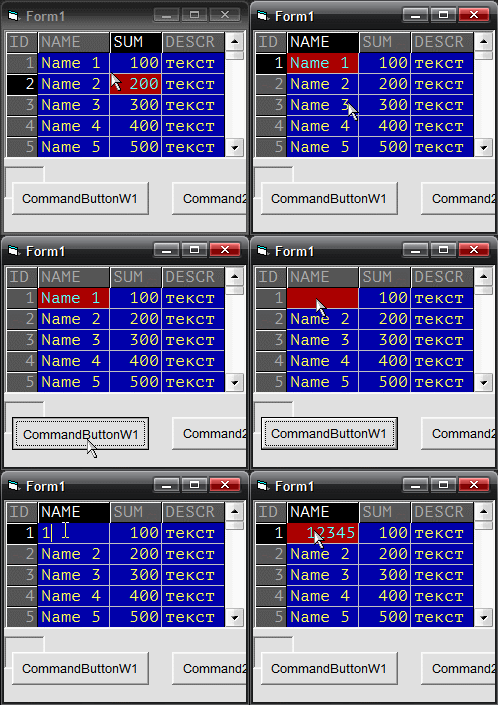
-
Jul 7th, 2023, 02:00 PM
#1028
Re: VBFlexGrid Control (Replacement of the MSFlexGrid control)
Originally Posted by Nouyana
It seems that EditMaxLength property doesn't work. WinXP SP3.
Code:
Private Sub Command1_Click()
   With VBFlexGrid1
      .Text = ""
      .EditMaxLength = 3
   End With
End Sub
It has no effect unless edit mode is active.
Maybe I should start throwing errors on those props when mis-used ;-D.
Like this or .ComboButtonValue
-
Jul 7th, 2023, 02:31 PM
#1029
Hyperactive Member
Re: VBFlexGrid Control (Replacement of the MSFlexGrid control)
Originally Posted by Krool
It has no effect unless edit mode is active.
Am I understand right that if I want to limit the text length in all cells of a column, I need to get into the edit mode for each of them? Doesn't sound obvious. Can you change it?
Originally Posted by Krool
Maybe I should start throwing errors on those props when mis-used ;-D.
Like this or .ComboButtonValue
From my poin of view, for the ComboButtonValue property it is better to StartEdit within the property sub.
For the EditMaxLength property (if you can't change it) the error message will be convenient.
I'm trying to create a full-fledget reference documentation for the VBFlexGrid. It will be ready in three month or so. I hope this will also solve some of the problems like that.
-
Jul 7th, 2023, 03:39 PM
#1030
Re: VBFlexGrid Control (Replacement of the MSFlexGrid control)
Originally Posted by Nouyana
Am I understand right that if I want to limit the text length in all cells of a column, I need to get into the edit mode for each of them? Doesn't sound obvious. Can you change it?
From my poin of view, for the ComboButtonValue property it is better to StartEdit within the property sub.
For the EditMaxLength property (if you can't change it) the error message will be convenient.
I'm trying to create a full-fledget reference documentation for the VBFlexGrid. It will be ready in three month or so. I hope this will also solve some of the problems like that.
I understand. Well EditMaxLength is really tied to the current edit window.
You could set the ColDataCapacity property and in the EditSetupWindow event let EditMaxLength from ColDataCapacity.
Documentation? Hah cool.
-
Jul 8th, 2023, 12:17 AM
#1031
Hyperactive Member
Re: VBFlexGrid Control (Replacement of the MSFlexGrid control)
Originally Posted by Krool
You could set the ColDataCapacity property and in the EditSetupWindow event let EditMaxLength from ColDataCapacity.
Maybe ColDataCapacity should do all the job?
-
Jul 8th, 2023, 12:31 AM
#1032
Re: VBFlexGrid Control (Replacement of the MSFlexGrid control)
Originally Posted by Nouyana
Maybe ColDataCapacity should do all the job?
No. It was promised to be an information property.
Also it could be 4 for int, 8 for big int etc.
-
Jul 8th, 2023, 02:00 AM
#1033
Hyperactive Member
Re: VBFlexGrid Control (Replacement of the MSFlexGrid control)
ColHidden. Readable edition.
Code:
Public Property Let ColHidden(ByVal Index As Long, ByVal NeedToHide As Boolean)
   If (Index > -1) And (Index < PropCols) Then
      With VBFlexGridColsInfo(Index)
         .State = IIf(NeedToHide, (.State Or CLIS_HIDDEN), (.State And Not CLIS_HIDDEN))
      End With
   ElseIf Index = -1 Then
      Dim i As Long
      For i = 0 To (PropCols - 1)
         With VBFlexGridColsInfo(i)
            .State = IIf(NeedToHide, (.State Or CLIS_HIDDEN), (.State And Not CLIS_HIDDEN))
         End With
      Next
   Else
      Err.Raise Number:=30010, Description:="Invalid Col value"
   End If

   If Not ((Index < VBFlexGridExtendLastCol) And (VBFlexGridExtendLastCol > -1)) Then
      VBFlexGridExtendLastCol = GetExtendLastCol()
   End If

   Dim RCP As TROWCOLPARAMS
   With RCP
      .Mask = RCPM_LEFTCOL
      .Flags = RCPF_CHECKLEFTCOL Or RCPF_SETSCROLLBARS Or RCPF_FORCEREDRAW
      .LeftCol = VBFlexGridLeftCol
      Call SetRowColParams(RCP)
   End With
End Property
-
Jul 8th, 2023, 02:08 AM
#1034
Hyperactive Member
Re: VBFlexGrid Control (Replacement of the MSFlexGrid control)
This means "hide all columns":
Code:
VBFlexGrid1.ColHidden(-1) = True
-
Jul 8th, 2023, 03:02 AM
#1035
Re: VBFlexGrid Control (Replacement of the MSFlexGrid control)
Nouyana,
I appreciate your comments and reports. But if you want to help please focus on real issues and not on cosmetic. Also I thank you for your documentation offer, but we do not need to pollute this thread now with tiny advises.
-
Jul 8th, 2023, 03:09 AM
#1036
Re: VBFlexGrid Control (Replacement of the MSFlexGrid control)
Originally Posted by Nouyana
Wrong description for the ColFormat property: "Returns/sets the format used to display numeric values."
Why only numeric? This is an example of LCase formatting using the ColFormat property.
Code:
VBFlexGrid1.ColFormat(1) = "<"
Thanks. Will change the description for ColFormat/FixedFormat property to "Returns/sets the format used to display numeric, string, or date/time values."
-
Jul 8th, 2023, 03:56 AM
#1037
Hyperactive Member
 Re: VBFlexGrid Control (Replacement of the MSFlexGrid control) Re: VBFlexGrid Control (Replacement of the MSFlexGrid control)
Originally Posted by Krool
Nouyana,
I appreciate your comments and reports. But if you want to help please focus on real issues and not on cosmetic. Also I thank you for your documentation offer, but we do not need to pollute this thread now with tiny advises.
The ability of using (-1) for Col* properties was not obvious for me and I'm assure, for many others . You had never mentioned about it (or I had never seen it) before. I noticed it completly by accident after I rewrote your code. But I heard you. I apologize for my disrespectful statement about "readable edition". I considered it as a sort of professional joke. Sorry for that. 
-
Jul 8th, 2023, 10:15 AM
#1038
Re: VBFlexGrid Control (Replacement of the MSFlexGrid control)
Update released.
Fixed args Text1 and Text2 in the CompareText event from As Long to As String. 
Thanks to NBechtloff who made it possible to modify the type lib in VBFLXGRD16.OCX so it could be re-compiled with "binary compatibility".
-
Jul 9th, 2023, 12:12 PM
#1039
Hyperactive Member
Re: VBFlexGrid Control (Replacement of the MSFlexGrid control)
These defaults should be equal, shouldn't they?
Code:
Private Sub Command2_Click()
   With VBFlexGrid1                   ' DEFAULTS:
      Debug.Print .ColIsVisible(.Col) ' FlexVisibilityPartialOK
      Debug.Print .ColsVisible()      ' FlexVisibilityCompleteOnly
   End With
End Sub

Private Sub Command1_Click()
   With VBFlexGrid1                   ' DEFAULTS:
      Debug.Print .RowIsVisible(.Row) ' FlexVisibilityPartialOK
      Debug.Print .RowsVisible()      ' FlexVisibilityCompleteOnly
   End With
End Sub
-
Jul 9th, 2023, 01:19 PM
#1040
Re: VBFlexGrid Control (Replacement of the MSFlexGrid control)
Originally Posted by Nouyana
These defaults should be equal, shouldn't they?
Code:
Private Sub Command2_Click()
   With VBFlexGrid1                   ' DEFAULTS:
      Debug.Print .ColIsVisible(.Col) ' FlexVisibilityPartialOK
      Debug.Print .ColsVisible()      ' FlexVisibilityCompleteOnly
   End With
End Sub

Private Sub Command1_Click()
   With VBFlexGrid1                   ' DEFAULTS:
      Debug.Print .RowIsVisible(.Row) ' FlexVisibilityPartialOK
      Debug.Print .RowsVisible()      ' FlexVisibilityCompleteOnly
   End With
End Sub
No they shouldn't. That had a reason ...
I added the optional visibility argument to control/change the behavior.
 Posting Permissions
- You may not post new threads
- You may not post replies
- You may not post attachments
- You may not edit your posts
-
Forum Rules
|
Click Here to Expand Forum to Full Width
|



 Reply With Quote