|

-
Jun 10th, 2023, 09:43 PM
#1
Optical Character Recognition (OCR) With Tesseract3
I needed to perform OCR on values selected out of a larger image by users one-at-a-time, and that led me to Tesseract 3 (there are more recent versions, but I found V3 first and it worked well enough for me, so I just stuck with it).
I wrote a small class that makes it easy to pass an image of some text to Tesseract and have it spit back a VB6 String (shared it at the bottom of this post).
Some Notes:
- The class works with CDECL build of Tesseract 3 - I'm using the last 3.x series compiled and published by the University of Mannheim Library (UB Mannheim) that is available here: https://digi.bib.uni-mannheim.de/tesseract/ - Get the "tesseract-ocr-setup-3.05.02-20180621.exe" release.
- To make CDECL calls & Image handling easier, I'm using RC6 - feel free to swap it out for your favourite image handling & CDECL calling code if you aren't an RC6 user. If you aren't going to use RC6, please check the comments anyway as I ran into a few "gotchas" - reading them might save you a few hours of headaches.
- This class implements a very small subset of the Tesseract Base API. I only wrote what I needed to get the job done. Feel free to extend it as needed, and post your changes back here if you are so inclined.
- It's a bit slow - I only get around 15 image->text conversions per second against short input, but since my primary use-case is to convert $ values extracted from a user drawn region (one $ value at a time captured from a larger document with many values), it is more than fast enough.
- Tesseract3 seems to do best with high resolution images, especially for detecting the difference between small things like commas and periods - so I recommend working with 200-300DPI image sources if possible.
Public Methods of CTesseract3
Initialize - This must be called before you call any other methods - pass the path to the folder where libtesseract-3.dll is located.
AcceptableCharacters - Pass a string of characters that Tesseract3 will consider "legal" - this can improve accuracy if (for example) you want to detect only numbers, you can pass "0123456789" and it won't mis-detect things like "I", "O", etc... This is completely optional though.
GetStringFromImage - Pass an image file path or byte array (JPG/PNG/BMP) and it will spit back a String of the OCR'd image.
GetCurrencyFromImage - Pass an image file path or byte array (JPG/PNG/BMP) and it will spit back a Currency datatype of the OCR'd image. Use this method when you know you want to recognize Currency value images.
Basic Example Code:
Code:
Public Sub Test
   Dim tess As New CTesseract3

   tess.Initialize "<path to folder where libtesseract-3.dll is>"

   MsgBox tess.GetTextFromImage("<path to JPG/BMP/PNG image>") ' OR MsgBox tess.GetTextFromImage(<image byte array>)
End Sub
I've included a few small sample images in the project, and you can try out the OCR by typing "Test" in the Immediate window and press return - you should see the following if everything is working OK:
Code:
test
STATUS: PASS  GetStringFromImage aginst Text Image Result: This is a test of the emergency broadcast system.    Expecting: This is a test of the emergency broadcast system.
STATUS: FAIL  GetStringFromImage against Positive Currency Image Result: 7.086.74   Expecting: 7,086.74
STATUS: PASS  GetCurrencyFromImage against Positive Currency Image Result: 7086.74  Expecting: 7086.74
STATUS: PASS  GetCurrencyFromImage against Negative Currency Image Result: -7086.74 Expecting: -7086.74
(Note that the second item FAILing is the expected result - it's to illustrate the importance of using GetCurrencyFromImage for numeric value processing)
Feel free to ask questions/report any bugs, and I hope someone out there finds this useful.
Source Code:
Tesseract3a.zip
Last edited by jpbro; Jun 12th, 2023 at 11:44 AM.
-
Jun 10th, 2023, 09:54 PM
#2
Re: Optical Character Recognition (OCR) With Tesseract3
One things I forgot to mention is that there is likely a small memory leak. Tesseract3 creates the result string like this:
Code:
char* result = new char[text.length() + 1];
And we're supposed to free memory with this:
But we don't have "delete []" in VB6 of course. Anybody know if there's a a way to do this?
-
Jun 10th, 2023, 09:56 PM
#3
Fanatic Member

Re: Optical Character Recognition (OCR) With Tesseract3
-
Jun 11th, 2023, 10:25 AM
#4
Re: Optical Character Recognition (OCR) With Tesseract3
 Originally Posted by xxdoc123

Thanks xxdoc123 - PaddleOCR-json is new to me.
-
Jun 11th, 2023, 11:17 AM
#5
Re: Optical Character Recognition (OCR) With Tesseract3
Cool. I did this a few years back, also with Tesseract. The idea for me, was to read information from invoices (which were stored as PDF's).
If you don't know where you're going, any road will take you there...
My VB6 love-children: Vee-Hive and Vee-Launcher
-
Jun 11th, 2023, 08:56 PM
#6
Fanatic Member
Re: Optical Character Recognition (OCR) With Tesseract3
Originally Posted by jpbro
Thanks xxdoc123 - PaddleOCR-json is new to me.
This is a good open source project, the author wrapped it as a console program so that we can call it through pipes, sockets. It is fairly easy for VB
-
Jun 11th, 2023, 09:25 PM
#7
Re: Optical Character Recognition (OCR) With Tesseract3
Originally Posted by xxdoc123
This is a good open source project, the author wrapped it as a console program so that we can call it through pipes, sockets. It is fairly easy for VB
Are you able to share your project? I always enjoy looking at alternatives.
-
Jun 11th, 2023, 09:46 PM
#8
Re: Optical Character Recognition (OCR) With Tesseract3
Originally Posted by ColinE66
Cool. I did this a few years back,
I'm often late to the party. I should probably be "embracing AI vision models" for this now instead.
Originally Posted by ColinE66
The idea for me, was to read information from invoices (which were stored as PDF's).
I'm also grabbing stuff from PDFs (converted to bitmaps first). I have a smorgasbord of PDFs to work with - there's such a wide range in quality (including scans of printouts), and I found it impossible to read information at the page level (or any level) and give users a chance to figure it all out. So instead, I ask users to pick a column/field of data they are trying to input (e.g. "$ Owed" for Record X) and then they drag the mouse over the number they are interested in. The software then converts the image->String->Currency and drops it into the appropriate field. The String->Currency bit was a bit tricky actually, but it seems to be working reasonably well now (albeit kinda fuzzy).
How did your approach work?
-
Jun 12th, 2023, 01:48 AM
#9
Fanatic Member
Re: Optical Character Recognition (OCR) With Tesseract3
Originally Posted by jpbro
Are you able to share your project? I always enjoy looking at alternatives.
https://www.vbforums.com/showthread....xe-like-python
used wqw mdJson.bas and cExec.CLS AND PaddleOCR-json.v1.2.1
Code:
Option Explicit

Private Declare Sub Sleep Lib "kernel32" (ByVal dwMilliseconds As Long)


Private oP As cExec

Private Sub Command1_Click()
    Dim ocrJson As String
    ocrJson = SendCommand("C:\Users\Lenovo\Desktop\test.jpg", "}", 2) ', "root", 2) '
    Debug.Print ocrJson
    Dim vJson As Variant
    Dim oJson As Object
    JsonParse ocrJson, vJson
    Debug.Print JsonDump(vJson)

    Set oJson = JsonParseObject(ocrJson)
    Debug.Print JsonValue(oJson, "code")

    Dim txtArray As Variant
    txtArray = JsonValue(oJson, "data/*/text")

    Debug.Print Join(txtArray, "")
    'Shell "TASKKILL /F /IM PaddleOCR_json.exe /T"
    'oP.KillProcess
    'oP.Detach
End Sub

Private Sub Command2_Click()
    Dim ocrJson As String
    ocrJson = Text1 ' SendCommand("C:\Users\Lenovo\Desktop\test.jpg", "}", 2) ', "root", 2) '
    Debug.Print ocrJson
    Dim vJson As Variant
    Dim oJson As Object
    JsonParse ocrJson, vJson
    Debug.Print JsonDump(vJson)

    Set oJson = JsonParseObject(ocrJson)
    Debug.Print JsonValue(oJson, "code")

    Dim txtArray As Variant
    txtArray = JsonValue(oJson, "data/*/text")
End Sub

Private Sub Form_Load()

    ChDrive App.Path

    ChDir App.Path
    Set oP = New cExec


    oP.Run Environ$("COMSPEC"), "/Q", StartHidden:=False, CurrentDir:="C:\Users\Lenovo\Desktop\PaddleOCR-json.v1.2.1"

    'oP.Run "cmd.exe", vbNullString  ', StartHidden:=True

    Debug.Print SendCommand("")   'initialize the engine
     Me.Caption = "hwnd: " & oP.FindConsoleHwnd(Me.hWnd)
    Command1.Enabled = False
End Sub

Private Sub Form_Click()
    Cls
    ' oP.ReadPendingOutput;
    '--- for terminator emulate command prompt with CurDir$ & ">"
    'Print SendCommand("dir", CurDir$ & ">")
    ' Print SendCommand("cd c:") ', "")
    Debug.Print SendCommand("C:\Users\Lenovo\Desktop\PaddleOCR-json.v1.2.1\PaddleOCR_json.EXE --use_debug=0", "OCR init completed", 5)

    '

    Command1.Enabled = True
    'Print SendCommand("exit", CurDir$ & ">", 2)
End Sub

Public Function SendCommand(sCommand As String, _
                            Optional sTerminator As String, _
                            Optional Timeout As Double = 2, _
                            Optional ByVal UseDoEvents As Boolean = True) As String
    Dim sRetVal  As String
    Dim dblTimer As Double

    dblTimer = Timer

    If Not oP.AtEndOfOutput And Len(sCommand) > 0 Then
        oP.WriteInput sCommand & vbCrLf
    End If

    If Not oP.AtEndOfOutput And sTerminator = "" Then
        sTerminator = CurDir$ & ">"

    End If

    Do While Not oP.AtEndOfOutput

        If UseDoEvents Then

            DoEvents
        Else
            Call Sleep(1)
        End If

        sRetVal = sRetVal & oP.ReadPendingOutput & oP.ReadPendingError

        If InStr(sRetVal, sTerminator) > 0 Then
            Exit Do
        End If

        If Timeout > 0 Then
            If Timer > dblTimer + Timeout Then
                Exit Do
            End If
        End If

    Loop

    SendCommand = sRetVal
End Function

Private Sub Form_Unload(Cancel As Integer)
    ' Debug.Print oP.AtEndOfOutput
    oP.KillProcess
    ' Debug.Print oP.AtEndOfOutput
End Sub
used dilettante shellpipe control can do the same thing so easy
Code:
Option Explicit
'
'Run system console command shell piping I/O from/to a VB form.
'

Private Sub LogInput(ByVal Text As String)
    With rtfOut
        .SelStart = Len(.Text)
        .SelColor = vbCyan
        .SelText = Text & vbNewLine
        .SelStart = Len(.Text)
    End With
End Sub

Private Sub LogMsg(ByVal Msg As String)
    With rtfOut
        .SelStart = Len(.Text)
        .SelColor = vbRed
        .SelText = Msg & vbNewLine
        .SelStart = Len(.Text)
    End With
End Sub

Private Sub LogOutput()

    With rtfOut
        .SelStart = Len(.Text)
        .SelColor = vbWhite
        .SelText = ShellPipe.GetData()

        .SelStart = Len(.Text)
    End With

    If InStr(rtfOut.Text, "OCR init completed") > 0 Then
        rtfOut.Text = " OCR init complete "
    End If

    If InStr(rtfOut.Text, "}]}") > 0 Then
        rtfOut.Text = Replace(rtfOut.Text, "}]}", "ok")
    End If

End Sub

Private Sub Form_Load()
    Show

    Select Case ShellPipe.Run("C:\Users\Lenovo\Desktop\PaddleOCR-json.v1.2.1\PaddleOCR_json.exe", "C:\Users\Lenovo\Desktop\PaddleOCR-json.v1.2.1")
        Case SP_SUCCESS
            lblStatus.Caption = "Command shell running. Type EXIT to finish."
            txtIn.Enabled = True
            txtIn.SetFocus

        Case SP_CREATEPIPEFAILED
            lblStatus.Caption = "Createpipe failed!"
            LogMsg vbNewLine & "Createpipe failed!"

        Case SP_CREATEPROCFAILED
            lblStatus.Caption = "Createprocess failed!"
            LogMsg vbNewLine & "Createprocess failed!"
    End Select
End Sub

Private Sub Form_QueryUnload(Cancel As Integer, UnloadMode As Integer)
    'If UnloadMode = vbFormControlMenu And ShellPipe.Active Then
       ' Cancel = True
        'MsgBox "Exit command shell first", , "Command shell still active"
    'End If
End Sub

Private Sub Form_Unload(Cancel As Integer)
    With ShellPipe
        If .Active Then
            .FinishChild
        End If
    End With
End Sub

Private Sub ShellPipe_ChildFinished()
    LogOutput
    ShellPipe.FinishChild
    lblStatus.Caption = "Done.  You can close this window now."
    txtIn.Enabled = False
End Sub

Private Sub ShellPipe_DataArrival(ByVal CharsTotal As Long)
    LogOutput
End Sub

Private Sub ShellPipe_Error(ByVal Number As Long, ByVal Source As String, CancelDisplay As Boolean)
    LogMsg "ShellPipe error " & Hex$(Number) & "in" & Source
    lblStatus.Caption = "Error"
    CancelDisplay = True
    ShellPipe.FinishChild
    txtIn.Enabled = False
End Sub

Private Sub txtIn_KeyPress(KeyAscii As Integer)
    If KeyAscii = Asc(vbCr) Then
        KeyAscii = 0
        With txtIn
            LogInput .Text
            ShellPipe.SendLine .Text
            .Text = ""
        End With
    End If
End Sub
Last edited by xxdoc123; Jun 13th, 2023 at 04:57 PM.
-
Jun 12th, 2023, 11:24 AM
#10
Re: Optical Character Recognition (OCR) With Tesseract3
Thanks xxdoc123, I'll give it a try!
-
Jun 12th, 2023, 11:27 AM
#11
Re: Optical Character Recognition (OCR) With Tesseract3
I just updated the first post with a new function: GetCurrencyFromImage
If you know you are trying to read Currency images, you should use this method instead of GetStringFromImage:
First, this method allows you to convert arbitrary locale values into VB6 Currency
Second, Tesseract3 sometimes messes up "," and ".", which can result in non-sensical currency values like "7.086.74" (value contains 2 decimal separator characters) where "7,086.74" is the desired result (value contains one decimal separator and one thousands separator). GetCurrencyFromImage will try to make sense of non-sensical results so they can be coerced to a Currency datatype.
-
Jun 12th, 2023, 11:45 AM
#12
Re: Optical Character Recognition (OCR) With Tesseract3
Forgot to mention - I renamed GetTextFromImage to GetStringFromImage to line up better with the new GetCurrencyFromImage method.
-
Jun 13th, 2023, 10:07 AM
#13
Re: Optical Character Recognition (OCR) With Tesseract3
Originally Posted by jpbro
How did your approach work?
The object of my exercise, was to identify non-PO expenditure relating to telecoms. Accordingly, I established, up-font, a number of 'terms' that might appear on such invoices (e.g. 'line rental', etc)
Then I let Tess 'read' whatever it could, and checked for the presence of those terms. It wasn't bullet-proof, by any means, but it reduced the volume to a quantity that could be manually checked.
It was a one-off exercise, so it served its purpose...
If you don't know where you're going, any road will take you there...
My VB6 love-children: Vee-Hive and Vee-Launcher
-
Aug 31st, 2023, 01:46 AM
#14
Fanatic Member
Re: Optical Character Recognition (OCR) With Tesseract3
i found this links
https://github.com/sml2h3/ddddocr
https://club.excelhome.net/thread-1666823-1-1.html
but is 64 dll can not refer by vb6
the code is vba ,work well
Code:
Option Explicit
Declare PtrSafe Sub Init Lib "DdddOcr.dll" ()
Declare PtrSafe Sub Shutdown Lib "DdddOcr.dll" Alias "Close" ()
Declare PtrSafe Function Classification Lib "DdddOcr.dll" (ByRef aa As Byte) As LongPtr
Private Declare PtrSafe Function lstrlenA Lib "kernel32.dll" (ByVal lpString As LongPtr) As Long
Private Declare PtrSafe Sub CopyMemory Lib "kernel32.dll" Alias "RtlMoveMemory" (ByVal Destination As LongPtr, ByVal Source As LongPtr, ByVal Length As Long)
Sub main()
    Dim path As String, i As Long, pathbase As String
    pathbase = ThisWorkbook.path
    For i = 1 To 8
        path = ThisWorkbook.path & "\pics\" & i & ".png"
        Debug.Print (GetStr(path))
    Next
End Sub
'
Function GetStr(path As String)
    Dim address, str As String, bytearr() As Byte
    str = Pic2Base64(path)
    bytearr = StrConv(str, vbFromUnicode)
    Init
        address = Classification(bytearr(0))
        GetStr = StringFromPointerA(address)
    Shutdown
End Function

'
Public Function Pic2Base64(strPicPath As String) As String
    Const adTypeBinary = 1 ' Binary file is encoded
    Dim objXML, objDocElem, objStream
    Set objStream = CreateObject("ADODB.Stream")
    objStream.Type = adTypeBinary
    objStream.Open
    objStream.LoadFromFile (strPicPath)
    Set objXML = CreateObject("MSXml2.DOMDocument")
    Set objDocElem = objXML.createElement("Base64Data")
    objDocElem.DataType = "bin.base64"
    objDocElem.nodeTypedValue = objStream.Read()
    Pic2Base64 = objDocElem.Text
    objStream.Close
    Set objXML = Nothing
    Set objDocElem = Nothing
    Set objStream = Nothing
End Function

'
Public Function StringFromPointerA(ByVal pointerToString As LongPtr) As String
    Dim tmpBuffer()    As Byte
    Dim byteCount      As Long
    Dim retVal         As String
    byteCount = lstrlenA(pointerToString)
    If byteCount > 0 Then
        ReDim tmpBuffer(0 To byteCount - 1) As Byte
        Call CopyMemory(VarPtr(tmpBuffer(0)), pointerToString, byteCount)
    End If
    retVal = StrConv(tmpBuffer, vbUnicode)
    StringFromPointerA = retVal
End Function
It seems that the recognition effect is good.
Last edited by xxdoc123; Aug 31st, 2023 at 01:52 AM.
-
Mar 4th, 2025, 11:14 AM
#15
New Member
Re: Optical Character Recognition (OCR) With Tesseract3
Hi all, I am getting below error (wrong number of arguments...) when I run test:
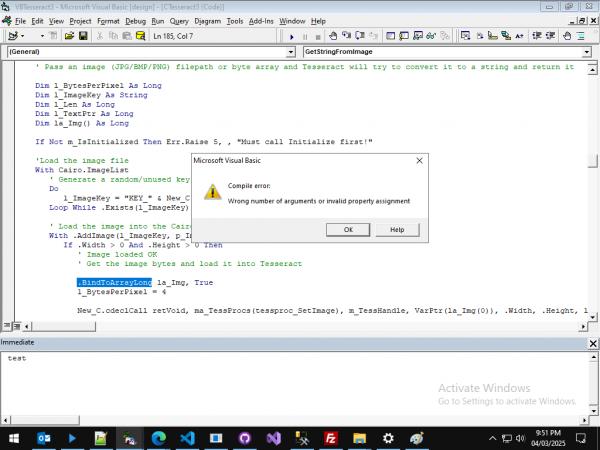
Looks like, BindToArrayLong method accepts single argument and we are passing 2 arguments. If I remove 2nd argument, I am getting another error "Subscript out of range" on la_Img:

Last edited by avinash7; Mar 4th, 2025 at 11:24 AM.
Reason: Wrong code blocks
-
Mar 4th, 2025, 12:29 PM
#16
Re: Optical Character Recognition (OCR) With Tesseract3
The images didn't work (you have to go to Advanced mode to add images) so I'm not sure what's wrong. I've tried downloading the source from the first post and running the Test() method, and it worked without errors.
BindToArrayLong does support 2 parameters:

Are you sure you have the most recent RC6 library installed?
-
Mar 4th, 2025, 12:30 PM
#17
Re: Optical Character Recognition (OCR) With Tesseract3
Just noticed you were able to fix the images - only thing I can think of is that maybe some older version of RC6 don't support the OneDimensional parameter of BindToArrayLong. First thing I'd try is to update to the latest version from https://www.vbrichlcient.com/
-
Mar 8th, 2025, 11:12 PM
#18
New Member
Re: Optical Character Recognition (OCR) With Tesseract3
Originally Posted by jpbro
Just noticed you were able to fix the images - only thing I can think of is that maybe some older version of RC6 don't support the OneDimensional parameter of BindToArrayLong. First thing I'd try is to update to the latest version from https://www.vbrichlcient.com/
This was it. I upgraded RC6 to latest version and it worked fine, Thanks.
Also, do you know if there is a requirement/limitation regarding image resolution, type, etc.? I have many similar images but this code is able to identify only a couple of them correctly. Please note that some images are in their original format, some are saved after taking screenshot, some are resized using some program.
 Posting Permissions
- You may not post new threads
- You may not post replies
- You may not post attachments
- You may not edit your posts
-
Forum Rules
|
Click Here to Expand Forum to Full Width
|



 Reply With Quote