|

-
May 12th, 2023, 05:23 AM
#1
Thread Starter
Member


H2: Zoom in/out of center of viewport of image control?
Hi all,
I have a form that pops up and displays pictures. I've some code that enables zooming in/out of the image. Code works fine:
Code:
Sub ImageCenter3()
        img.Left = (Me.ScaleWidth - img.Width) / 2
        img.Top = (Me.ScaleHeight - img.Height) / 2
End Sub
Private Sub Form_KeyUp(KeyCode As Integer, Shift As Integer)
Dim x As Double
        'me.KeyPreview = True' needs to be on for this event to fire on all presses.
        x = 300 'zoom increment
        If KeyCode = 107 Or KeyCode = 187 Then ' 43 "+" keys -> Zoom in
            img.Stretch = True
            img.Width = img.Width + x
            img.Height = img.Height + x
            Call ImageCenter3
        ElseIf KeyCode = 109 Or KeyCode = 189 Then ' 45 "-" keys -> Zoom out
            img.Stretch = True
            img.Width = img.Width - x
            img.Height = img.Height - x
            Call ImageCenter3
        ElseIf KeyCode = 48 Or KeyCode = 96 Then ' "0" key -> Fit to window
            Call Form_Resize
        ElseIf KeyCode = 49 Or KeyCode = 97 Then ' "1" key -> set to 100%
            img.Stretch = False
            Call ImageCenter3
        ElseIf KeyCode > 49 And KeyCode < 59 Then  ' 2,3,4,5,6,7,8,9 ,factor of *100% zoom
            img.Stretch = True
            x = KeyCode - 48
            img.Width = imgX * x
            img.Height = imgY * x
            Call ImageCenter3
        ElseIf KeyCode > 97 And KeyCode < 106 Then  ' ------- " -------
            img.Stretch = True
            x = KeyCode - 96
            img.Width = imgX * x
            img.Height = imgY * x
            Call ImageCenter3
        End If

End Sub
My challenge:
The code above will allways reset the position of the image and zoom in/out from the center of the image (because of the "/ 2" operation in ImageCenter3().
I also have code that enables panning the image.
Q: How can I enable zooming in/out based on the center of what is visible on the form (which might not be the center of the image, if I have panned...)?
-
May 12th, 2023, 12:20 PM
#2
Re: H2: Zoom in/out of center of viewport of image control?
Not sure, whether you already use the Cairo-VB-wrapper or not - but using it will give you:
- much better stretch-quality (compared to the VB.image-Ctl in Zoom-Mode)
- and much less "hazzle" regarding "Zoom- and Pan-math" (due to its built-in Transform-methods)
Here is a short example, which does combined Panning- and Zooming -
(the blue marked lines below are the ones, which to the "heavy lifting" regarding the math)
Code:
Option Explicit

Private CC As cCairoContext, Img As cCairoSurface
Private Zoom As Single, PanX As Single, PanY As Single

Private Sub Form_Load()
  Zoom = 1 'init the Zoomfactor to 1
  Set Img = Cairo.ImageList.AddIconFromResourceFile("", "shell32", 317) 'load a system-icon as the example-image
'  Set Img = Cairo.ImageList.AddImage("", "c:\temp\tulips.jpg") 'or alternatively, load an img from disk
End Sub

Private Sub Form_Resize() 'ensure a Form-covering backbuffer-surface-context in CC
  ScaleMode = vbPixels: Set CC = Cairo.CreateSurface(ScaleWidth, ScaleHeight).CreateContext
  Redraw
End Sub

Private Sub Redraw()
  CC.Paint 1, Cairo.CreateCheckerPattern 'clear the previous Background with a new Pattern

  CC.Save
    CC.TranslateDrawings CC.Surface.Width / 2, CC.Surface.Height / 2
    CC.ScaleDrawings Zoom, Zoom
    CC.TranslateDrawings PanX, PanY 'place the pan-related translation after the Scale-Transform in the line above

    CC.Paint 1, Img.CreateSurfacePattern(CAIRO_FILTER_GAUSSIAN, CAIRO_EXTEND_NONE, True)
  CC.Restore

  Set Picture = CC.Surface.Picture 'set our back-buffer as the new Form-Picture
End Sub

Private Sub Form_MouseMove(Button As Integer, Shift As Integer, X As Single, Y As Single)
  Static xPrev As Single, yPrev As Single
  If Button Then PanX = PanX + (X - xPrev) / Zoom: PanY = PanY + (Y - yPrev) / Zoom: Redraw
  xPrev = X: yPrev = Y
End Sub

Private Sub Form_KeyDown(KeyCode As Integer, Shift As Integer)
  Select Case KeyCode
    Case 49 To 57: Zoom = KeyCode - 48 'use Keys 1 to 9 to set the Zoomfactor directly
  End Select
  Redraw
End Sub
The above code will show the following (on a Win11-machine), after checking in the RC6-Project-Reference:
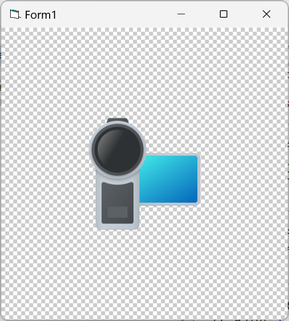
Olaf
-
May 23rd, 2023, 07:57 AM
#3
Thread Starter
Member
Re: H2: Zoom in/out of center of viewport of image control?
 Originally Posted by Schmidt

Not sure, whether you already use the Cairo-VB-wrapper or not...
Thanks Olaf. Now you're touching on another item I've come across many times. This also reveals how little I understand, but I'll ask anyways :- )
I found the Cairo-VB-wrapper over at "Github: VBCairo", but how do I utilize stuff I find at GitHub?
What do I download, how do I download, and so on...
Stupid questions, I know! :-)
-
May 23rd, 2023, 08:25 AM
#4
Re: H2: Zoom in/out of center of viewport of image control?
Originally Posted by JohnPotier
Thanks Olaf. Now you're touching on another item I've come across many times. This also reveals how little I understand, but I'll ask anyways :- )
I found the Cairo-VB-wrapper over at " Github: VBCairo", but how do I utilize stuff I find at GitHub?
What do I download, how do I download, and so on...
Stupid questions, I know! :-)
At a guess, these here: https://github.com/VBForumsCommunity...ree/master/bin
Last edited by Zvoni; Tomorrow at 31:69 PM.
----------------------------------------------------------------------------------------
One System to rule them all, One Code to find them,
One IDE to bring them all, and to the Framework bind them,
in the Land of Redmond, where the Windows lie
---------------------------------------------------------------------------------
People call me crazy because i'm jumping out of perfectly fine airplanes.
---------------------------------------------------------------------------------
Code is like a joke: If you have to explain it, it's bad
-
May 23rd, 2023, 08:40 AM
#5
Re: H2: Zoom in/out of center of viewport of image control?
Originally Posted by JohnPotier
Thanks Olaf. Now you're touching on another item I've come across many times. This also reveals how little I understand, but I'll ask anyways :- )
I found the Cairo-VB-wrapper over at " Github: VBCairo", but how do I utilize stuff I find at GitHub?
What do I download, how do I download, and so on...
Stupid questions, I know! :-)
That's the wrapper, based on code from "the trick" (exposing the cairo-flat-api - and unmaintained for a few years).
The bigger cairo-wrapper (based on VB-Classes) is downloadable on vbRichClient.com -
(you need to download the "RC6BaseDlls.zip", and register RC6.dll after unpacking - for my example to work)...
Olaf
Last edited by Schmidt; May 23rd, 2023 at 08:53 AM.
Tags for this Thread
 Posting Permissions
- You may not post new threads
- You may not post replies
- You may not post attachments
- You may not edit your posts
-
Forum Rules
|
Click Here to Expand Forum to Full Width
|



 Reply With Quote

