|

-
Apr 4th, 2023, 08:13 AM
#1
Thread Starter
Hyperactive Member


 [RESOLVED] KeyUp/KeyDown instant interaction [RESOLVED] KeyUp/KeyDown instant interaction
Suppose you want to toggle contents of ALL controls in a form (and its UserControls) with Alt KeyDown to its names or meanings. Then by releasing Alt (KeyUp) they return to their previous old (or even new updated) value.
A) For an instrumentation example, at the beginning labels would be like: (Alt. not pressed)
┌───────────┐
│0.5m
├───────────┤
│23°C
├───────────┤
│77KPa
├───────────┤
│10Kg
└───────────┘
B) And right after pressing Alt, lables will turn into their meanings
┌───────────┐
│Length
├───────────┤
│Temperature
├───────────┤
│Pressure
├───────────┤
│Weight
└───────────┘
C) By releasing Alt key, Paragraph "A" will be repeated.
-
Apr 4th, 2023, 10:04 AM
#2
Re: KeyUp/KeyDown instant interaction
the Alt key work in a strange way, are you sure you want to use it ? else you have to set the keypreview of the form to true and play with the keydown and Keyup events of the form :
for example, this works :
Code:
Private Sub Form1_KeyDown(sender As Object, e As KeyEventArgs) Handles Me.KeyDown
        If e.KeyCode = Keys.V Then
            Label1.Text = "texte1"
        End If


    End Sub


    Private Sub Form1_KeyUp(sender As Object, e As KeyEventArgs) Handles Me.KeyUp
        If e.KeyCode = Keys.V Then
            Label1.Text = "texte2"
        End If


    End Sub
and for this, it doesn't, it activate keydown for Alt and KeyUp for Alt+ something
Code:
 Private Sub Form1_KeyDown(sender As Object, e As KeyEventArgs) Handles Me.KeyDown
        If e.Modifiers = Keys.Alt Then
            Label1.Text = "texte1"
        End If


    End Sub


    Private Sub Form1_KeyUp(sender As Object, e As KeyEventArgs) Handles Me.KeyUp
        If e.Modifiers = Keys.Alt Then
            Label1.Text = "texte2"
        End If


    End Sub
In fact i am not sure you can handle the ALT key alone without an other key
edit : to test it you just need a form and a label
Last edited by Delaney; Apr 4th, 2023 at 10:29 AM.
The best friend of any programmer is a search engine 
"Don't wish it was easier, wish you were better. Don't wish for less problems, wish for more skills. Don't wish for less challenges, wish for more wisdom" (J. Rohn)
“They did not know it was impossible so they did it” (Mark Twain)
-
Apr 4th, 2023, 10:43 AM
#3
Re: KeyUp/KeyDown instant interaction
This is probably how I'd deal with this:
* Create a custom control that has a textbox and a label.
** Add a property that when set hides the textbox, and shows the label.
** Same property, when unset, unhides the textbox and hides the label
** Add additional properties so you can set the textbox and label contents as needed.
* Add them to the form as needed.
* set formKeyPreview
* add event handler for keyDown - set the flag
* add event handler for KeyUp - unset the flag
Or ....
Just add textboxesd and lables in the same spot... add each set to a List<Of TextBox> and List<Of Label> ... then it's a matter of looping through the lists and hiding and showing the controls as needed.
-tg
-
Apr 4th, 2023, 11:29 AM
#4
Thread Starter
Hyperactive Member
Re: KeyUp/KeyDown instant interaction
This matter is more tangible in games dispite we're not talking about games but consider this short silent video (on my google drive) to see how VAST it could benefits user interface and helps in disambiguation.
https://drive.google.com/file/d/1Wr_...t silent video
I pressed Alt. during screen record multiple times. For mentioning what changed there:
- Simplified minimap (Enemies in red, allies in green) instead of character color.
- Player name in minimap instead of character direction.
- Vision and attack range/radius around items.
- Player health and energy barographs under players avatars.
- Teleport cooldown in circular clock under players avatars.
- Current checkpoint or objective to do by upside down arrow on environment.
All these toggles/shows while Alt is pressed.
Last edited by pourkascheff; Apr 10th, 2023 at 12:09 AM.
-
Apr 4th, 2023, 12:43 PM
#5
Re: KeyUp/KeyDown instant interaction
But in a game you usually have a game loop that is constantly cycling and the game would likely be using the Windows API to check for key presses that have occurred in every cycle, so can easily see the Alt key go down or up and change what it draws that cycle.
You could do something similar in .Net if you designed your display updates to be done by an "update display" type routine.
I've done that in Simulation code where I have data coming in from a lot of different sources at arbitrary rates and the user can select what data they are interested in looking at.
In that case I have a "GUI Timer" that ticks at 10hz, and calls a routine to update all the controls based on the current user selections and the current state of the data, which is always changing at its own independent rate.
It would be easy to base alternating what gets displayed in a set of controls by setting a flag based on the state of the Alt key, but you may have to resort to using a Windows API call to test the state of the ALT key at the beginning of your cycle.
I haven't researched it though, or played around with monitoring the ALT key.
Last edited by passel; Apr 4th, 2023 at 12:47 PM.
"Anyone can do any amount of work, provided it isn't the work he is supposed to be doing at that moment" Robert Benchley, 1930
-
Apr 9th, 2023, 05:15 AM
#6
Thread Starter
Hyperactive Member
Re: KeyUp/KeyDown instant interaction
 Originally Posted by techgnome

Just add textboxesd and lables in the same spot...
Your "flowchart" or in-order-instructions is absolutely right. That's exactly what I was planning. But the latter will be totally a mess cause I used TableLayoutPanels and cells can only feed one control each. Lots of hides/shows (Or even maybe removes/adds or deletes/creates)
Originally Posted by Delaney
In fact i am not sure you can handle the ALT key alone without an other key
I'm following what you are saying frere. I wasn't even able to test a demo app. I'm new to this field of KeyDown/KeyUp events. Nothing special happened in my app. I'm doing it wrong. But if this IS the ultimate way, I can introduce another actual idea in famous german digital audio workstation, Abelton Live which you can toggle the TimeLine view to MixerDesk with "Tab" key.
a) It is a less used key but another problem will happen: What about tab-index-shifting action then? (in case of missing any mouse devices) Which language that software were written in then? (Wikipedia: C++)
Environment screenshot:
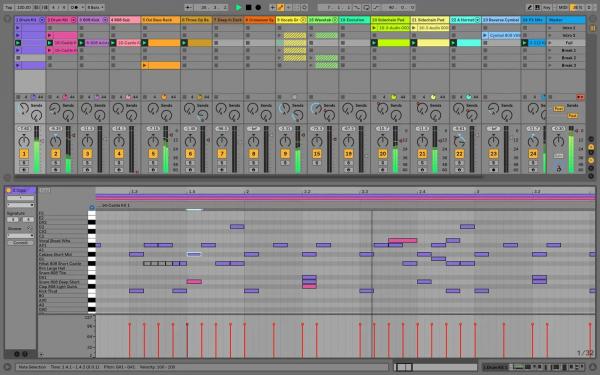
b) If someone enthusiast with creative mind do a simple testapp for me will be massively grateful.
Originally Posted by passel
a game loop that is constantly cycling and the game
Not a game-nerd but a microcontroller-pro. I'm familiar with "Infinite loop"s. Processor programming (Not low-level) you're always dealing with an
Code:
While(1)
{
/*Literally all things happen here in
a high rate, except interrupts.*/
}
Things are easier here. Don't you think? Is new value updated? Yes: Is that-specific key pressed? Yes: Don't mind it, show info. No: Show old value (stored to a random variable) or show new value. ¯\_(ツ)_/¯
Last edited by pourkascheff; Apr 9th, 2023 at 06:15 AM.
-
Apr 9th, 2023, 01:59 PM
#7
Re: KeyUp/KeyDown instant interaction
Yes. Along that line this is my simple example of updating the Gui at a set frequency and checking for the Alt key (either Alt key in this case, but you could check for LMenu and RMenu if you wanted different actions depending on which Alt key was pressed).
To keep it simple, I just put the module in the Form file rather than use a dedicated file for the Module, but normally you would use a separate file for modules and major classes.
Just start a new project, paste this code over the default code, run, and then press and Release the Alt key as desired.
Code:
Imports System.Runtime.InteropServices

Module Api
  <DllImport("user32.dll", SetLastError:=True, CharSet:=CharSet.Unicode)> _
  Public Function GetKeyState(ByVal nVirtKey As Keys) As Short
  End Function
End Module

Public Class Form1
  Private helpMe As Boolean
  Private WithEvents GuiTimer As New Timer
  Private Counter As Integer

  Private Sub Form1_Load(sender As System.Object, e As System.EventArgs) Handles MyBase.Load
    Me.Controls.Add(New Label)
    GuiTimer.Enabled = True
  End Sub

  Private Sub UpdateGui()
    If helpMe Then
      Label1.Text = "Simple Cycle Counter"
    Else
      Label1.Text = Counter.ToString
    End If
  End Sub

  Private Sub Timer_Tick(sender As System.Object, e As System.EventArgs) Handles GuiTimer.Tick
    Dim AltState As Short = GetKeyState(Keys.Menu)
    helpMe = AltState < 0
    Counter += 1
    UpdateGui()
  End Sub
End Class
"Anyone can do any amount of work, provided it isn't the work he is supposed to be doing at that moment" Robert Benchley, 1930
-
Apr 10th, 2023, 12:02 AM
#8
Thread Starter
Hyperactive Member
Re: KeyUp/KeyDown instant interaction
Originally Posted by passel
paste this code over the default code, run, and then press and Release the Alt key as desired.
That's incredible passel! Thanks a lot. It's even shorter than what I expected. :-)
Tags for this Thread
 Posting Permissions
- You may not post new threads
- You may not post replies
- You may not post attachments
- You may not edit your posts
-
Forum Rules
|
Click Here to Expand Forum to Full Width
|



 Reply With Quote


