|

-
Mar 6th, 2023, 06:48 AM
#1
Thread Starter
Lively Member

Messages
I am using Microsoft Visual Studio Community 2019 Version 16.9.4
I suddenly have 76 messages telling me things like:
Names must begin with Capitals
Must use compound assignements
I do not recollect ever seeing any of this before so how do I stop being nagged without turning off something useful?
Thank you
Bob
.
-
Mar 6th, 2023, 07:38 AM
#2
Re: Messages
Are you talking about messages in the Error List window, as opposed to errors and warnings? Can you provide actual examples of actual code and actual messages?
-
Mar 6th, 2023, 08:31 AM
#3
Thread Starter
Lively Member
Re: Messages
 Originally Posted by jmcilhinney

Are you talking about messages in the Error List window?
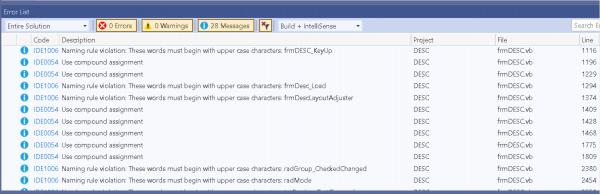
Yes as per here - the number of Messages seems to vary - a few minutes ago it was 76!!
-
Mar 6th, 2023, 08:35 AM
#4
Re: Messages
VS2019 and forth (I guess since I don't have the bug bag 2022 installed) pop such indications. They might can be disable but I haven't checked. Anyhow they are just info, not even warnings so just ignore them if you like.
ἄνδρα μοι ἔννεπε, μοῦσα, πολύτροπον, ὃς μάλα πολλὰ
πλάγχθη, ἐπεὶ Τροίης ἱερὸν πτολίεθρον ἔπερσεν·
-
Mar 6th, 2023, 08:41 AM
#5
Re: Messages
I usually ignore those unless it's a warning or error. Never thought about turning them off.
-
Mar 6th, 2023, 09:33 AM
#6
Re: Messages
I noticed that there is a naming rule violation. If you go to Tools > Options and then select Text Editor > Visual Basic > Code Style > Naming you will see the various naming convention rules and how they are treated.
Removing those will likely eliminate most (if not all) of your "suggestions".
-
Mar 6th, 2023, 10:01 AM
#7
Re: Messages
It looks like you ran the Code Analysis tool. The tool gives you a whole bunch of 'suggestions' based on a rule set, some of which DDay mentioned. I'm not sure that anybody uses ALL the code style rules that are applied, but most everybody uses at least some. You can turn off rules that you don't want...or you can turn off code analysis entirely, in which case you won't see any of them. Some of them are useful, though.
My usual boring signature: Nothing
 
-
Mar 6th, 2023, 10:32 AM
#8
Re: Messages
Originally Posted by dday9
I noticed that there is a naming rule violation. If you go to Tools > Options and then select Text Editor > Visual Basic > Code Style > Naming you will see the various naming convention rules and how they are treated.
Removing those will likely eliminate most (if not all) of your "suggestions".
I don't know why but at least in 2019 it's:
Text Editor > Basic > Code Style > Naming
ἄνδρα μοι ἔννεπε, μοῦσα, πολύτροπον, ὃς μάλα πολλὰ
πλάγχθη, ἐπεὶ Τροίης ἱερὸν πτολίεθρον ἔπερσεν·
-
Mar 6th, 2023, 12:58 PM
#9
Re: Messages
You can also override these settings by use of an .editorconfig file, https://editorconfig.org/ has more details. Recent versions of VS can generate these automatically for you from your VS configuration as well.
Tags for this Thread
 Posting Permissions
- You may not post new threads
- You may not post replies
- You may not post attachments
- You may not edit your posts
-
Forum Rules
|
Click Here to Expand Forum to Full Width
|



 Reply With Quote


