|

-
Feb 21st, 2023, 03:59 AM
#1
Thread Starter
Hyperactive Member


 [RESOLVED] VS IDE SolutionExplorer question [RESOLVED] VS IDE SolutionExplorer question
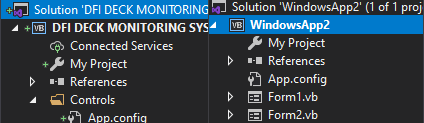
Hi, I'm not sure which button or probably combination of buttons I pressed but solution explorer items now have a green plus symbol in prior. (Left picture). How can I undo it to default (Which presented in a demo project (Right picture))?
-
Feb 21st, 2023, 04:10 AM
#2
Re: VS IDE SolutionExplorer question
That + symbol is what is displayed when you are using source control and you add a new item. It would appear that you have placed the solution on the right under source control. You absolutely should be using source control, so you shouldn't be trying to undo that. Learn how to use source control properly and use it. It is absolutely a good thing and will make your life better even if you can generally do without it.
-
Feb 21st, 2023, 12:40 PM
#3
Re: VS IDE SolutionExplorer question
You sure do get a lot of visual feedback in the modern Visual Studio. That's just one of many. I would like to be able to toggle the amount and type of visual feedback that is available, but that's often not possible. Still, this one is a good thing, as much of the visual feedback is.
My usual boring signature: Nothing
 
-
Feb 21st, 2023, 01:21 PM
#4
Thread Starter
Hyperactive Member
Re: VS IDE SolutionExplorer question
Hey Hiker. Agree with more visualized part. It is "Visual" studio after all... dozen of new icons are not a big deal for Microsoft's graphists.
If reading this is enough, It's a good thing but I'm not interested to put a released commercial solution under risk of something which I'm not sure what is it and is never going to be an online far-editable project. Don't you think the same? I really need to undo it jmcilhinney. If it is OK and not effecting anything and only icons are different (and there's no way to retrieve back the icons) then I don't care about icons.
Last edited by pourkascheff; Feb 21st, 2023 at 01:59 PM.
-
Feb 21st, 2023, 01:58 PM
#5
Re: VS IDE SolutionExplorer question
 Originally Posted by pourkascheff

Hey Hiker. Agree with more visualized part. It is "Visual" studio after all... dozen of new icons are not a big deal for Microsoft's graphists.
If reading this is enough, It's a good thing but I'm not interested to put a released commercial solution under risk of something which I'm not sure what is it and is never going to be an online far-editable project. Don't you think the same? I really need to undo it jmcilhinney. If it is OK and effecting anything and only icons are different (and there's no way to retrieve back the icons) then I don't care about icons.
Git (or any version control) isn't just about collaboration, it is a way of tracking changes to your code base. A version control system will give you an easy way to rollback changes, version changes, branch your code to work on more than one change at a time cleanly, plus generally be able to maintain a proper code history.
The effort to learn basic git (especially if you are using Visual Studio) is minimal and a good investment of your time. If you really want to get rid of the versioning then if you look in the folder containing your source code there should be a hidden folder called .git - just delete that folder.
Seriously though, you would be better of using git instead of removing it.
-
Feb 21st, 2023, 02:09 PM
#6
Thread Starter
Hyperactive Member
Re: VS IDE SolutionExplorer question
Well, It got more sense now... Thanks for enlighten me. I'm on it. I just thought small green plus symbol means I am in middle of something. Committing to finish or undo were my options. Your saying I'm all done by now? (Still reading about it)
Tags for this Thread
 Posting Permissions
- You may not post new threads
- You may not post replies
- You may not post attachments
- You may not edit your posts
-
Forum Rules
|
Click Here to Expand Forum to Full Width
|



 Reply With Quote


