|

-
Nov 6th, 2022, 01:25 PM
#1
Thread Starter
Fanatic Member


 [RESOLVED] application has failed to start because its side-by-side configuration is incorrect [RESOLVED] application has failed to start because its side-by-side configuration is incorrect
I don't have any problem when running the project in VB, but after I compile some projects, the following error is displayed when running the compiled file.
The application has failed to start because its side-by-side configuration is incorrect. Please see the application event log or use the command-line sxstrace.exe tool for more detail.
Note: its happened jst for some projects so this is not about all projects in vb.
Note: It is strange that the zipped files that contain the source and compiled files, the compiled file is executed correctly, but this problem is found when I open and compile the same project in vb The compiled file displays the error mentioned above
i read in internet about maybe problem is from vc ++ and etc,The latest version Microsoft Visual C All Package 2022-10-19 is also installed on my system and my Windows is Windows 8 64 bit,In addition, I also tested in run as administrator mode or compatibility too and the problem was not solved yet
-
Nov 6th, 2022, 06:03 PM
#2
Re: application has failed to start because its side-by-side configuration is incorre
Check the manifest, clearly something is wrong such as a syntax error. You might find a specific clue in the event log or by using the suggested trace tool.
I wouldn't jump in wild random directions like VC++ which seems very unlikely to be involved.
-
Nov 6th, 2022, 10:18 PM
#3
Thread Starter
Fanatic Member
 Re: application has failed to start because its side-by-side configuration is incorre Re: application has failed to start because its side-by-side configuration is incorre
i did show in this preview about when i extracted source from zip and run exe or project its work good and no any error about codes but after compile ,compiled file show that error :

links of preview image with good quality :
https://postimg.cc/67QhjWyV
https://i.postimg.cc/YS6ySj7P/1.gif
and this is result of SxsTrace tools :
Code:
Begin Activation Context Generation.
Input Parameter:
	Flags = 0
	ProcessorArchitecture = Wow32
	CultureFallBacks = en-US;en
	ManifestPath = F:\@00 vb 00@\-- Gird ba emkanate ziad(progress adodc va ...)\jgrid\JGrid-2.8\JGrid.exe
	AssemblyDirectory = F:\@00 vb 00@\-- Gird ba emkanate ziad(progress adodc va ...)\jgrid\
	Application Config File =
-----------------
INFO: Parsing Manifest File F:\@00 vb 00@\-- Gird ba emkanate ziad(progress adodc va ...)\jgrid\JGrid-2.8\JGrid.exe.
	INFO: Manifest Definition Identity is VB Name,processorArchitecture="X86",type="win32",version="7.1.0.631".
	INFO: Reference: Microsoft.Windows.Common-Controls,language="*",processorArchitecture="X86",publicKeyToken="6595b64144ccf1df",type="win32",version="6.0.0.0"
	ERROR: Line 37: XML Syntax error.
ERROR: Activation Context generation failed.
End Activation Context Generation.
i attached that orginal exe and new compiled in preview here too,i dont know yet how can fix it.
2 version.zip
-
Nov 7th, 2022, 12:44 PM
#4
Thread Starter
Fanatic Member
Re: application has failed to start because its side-by-side configuration is incorre
whats problem in this manifest ,i found this manifest in a res file :
Code:
<?xml version="1.0" encoding="UTF-8"?>
<assembly xmlns="urn:schemas-microsoft-com:asm.v1" manifestVersion="1.0">
 <assemblyIdentity version="7.1.0.631" processorArchitecture="X86" name="VB Name" type="win32" />
 <description>Jlauncher</description>
 <dependency>
  <dependentAssembly>
   <assemblyIdentity type="win32" name="Microsoft.Windows.Common-Controls" version="6.0.0.0" processorArchitecture="X86" publicKeyToken="6595b64144ccf1df" language="*"/>
  </dependentAssembly>
 </dependency>
    <compatibility xmlns="urn:schemas-microsoft-com:compatibility.v1">
       <application>
           <!-- Windows 10 -->
            <supportedOS Id="{8e0f7a12-bfb3-4fe8-b9a5-48fd50a15a9a}"/>
           <!-- Windows 8.1 -->
            <supportedOS Id="{1f676c76-80e1-4239-95bb-83d0f6d0da78}"/>
           <!-- Windows 8 -->
            <supportedOS Id="{4a2f28e3-53b9-4441-ba9c-d69d4a4a6e38}"/>
           <!-- Windows 7 -->
            <supportedOS Id="{35138b9a-5d96-4fbd-8e2d-a2440225f93a}"/>
           <!-- Windows Vista -->
            <supportedOS Id="{e2011457-1546-43c5-a5fe-008deee3d3f0}"/>
       </application>
    </compatibility>
 <!-- Identify the application security requirements: Vista and above -->
 <trustInfo xmlns="urn:schemas-microsoft-com:asm.v2">
   <security>
  <requestedPrivileges>
    <requestedExecutionLevel level="asInvoker" uiAccess="false" />
  </requestedPrivileges>
   </security>
 </trustInfo>
 <!-- Identify advanced options: Vista and above -->
 <asmv3:application xmlns:asmv3="urn:schemas-microsoft-com:asm.v3">
   <asmv3:windowsSettings xmlns="http://schemas.microsoft.com/SMI/2005/WindowsSettings">
  <dpiAware>true</dpiAware>
   </asmv3:windowsSettings>
 </asmv3:application>
</assembly>
-
Nov 7th, 2022, 01:04 PM
#5
Re: application has failed to start because its side-by-side configuration is incorre
Should the xmlns:asmv3 attribute be in the asmv3:application tag? I've only seen that attribute in the assembly tag here: https://learn.microsoft.com/en-us/wi...tion-manifests
Does this manifest work?
Code:
<?xml version="1.0" encoding="UTF-8"?>
<assembly xmlns="urn:schemas-microsoft-com:asm.v1" manifestVersion="1.0" xmlns:asmv3="urn:schemas-microsoft-com:asm.v3">
 <assemblyIdentity version="7.1.0.631" processorArchitecture="X86" name="VB Name" type="win32" />
 <description>Jlauncher</description>
 <dependency>
  <dependentAssembly>
   <assemblyIdentity type="win32" name="Microsoft.Windows.Common-Controls" version="6.0.0.0" processorArchitecture="X86" publicKeyToken="6595b64144ccf1df" language="*"/>
  </dependentAssembly>
 </dependency>
    <compatibility xmlns="urn:schemas-microsoft-com:compatibility.v1">
       <application>
           <!-- Windows 10 -->
            <supportedOS Id="{8e0f7a12-bfb3-4fe8-b9a5-48fd50a15a9a}"/>
           <!-- Windows 8.1 -->
            <supportedOS Id="{1f676c76-80e1-4239-95bb-83d0f6d0da78}"/>
           <!-- Windows 8 -->
            <supportedOS Id="{4a2f28e3-53b9-4441-ba9c-d69d4a4a6e38}"/>
           <!-- Windows 7 -->
            <supportedOS Id="{35138b9a-5d96-4fbd-8e2d-a2440225f93a}"/>
           <!-- Windows Vista -->
            <supportedOS Id="{e2011457-1546-43c5-a5fe-008deee3d3f0}"/>
       </application>
    </compatibility>
 <!-- Identify the application security requirements: Vista and above -->
 <trustInfo xmlns="urn:schemas-microsoft-com:asm.v2">
   <security>
  <requestedPrivileges>
    <requestedExecutionLevel level="asInvoker" uiAccess="false" />
  </requestedPrivileges>
   </security>
 </trustInfo>
 <!-- Identify advanced options: Vista and above -->
 <asmv3:application>
   <asmv3:windowsSettings xmlns="http://schemas.microsoft.com/SMI/2005/WindowsSettings">
  <dpiAware>true</dpiAware>
   </asmv3:windowsSettings>
 </asmv3:application>
</assembly>
-
Nov 7th, 2022, 02:00 PM
#6
Re: application has failed to start because its side-by-side configuration is incorre
You wrote name="VB Name" in your <assemblyIdentity> tag. I don't know if this would make a difference but you should put the name of your executable file there.
Also I am using "asm.v3" in the <trustInfo> tag and never had any problems:
Code:
<trustInfo xmlns="urn:schemas-microsoft-com:asm.v3">
  <security>
    <requestedPrivileges>
      <requestedExecutionLevel level="asInvoker" uiAccess="false"/>
    </requestedPrivileges>
  </security>
</trustInfo>
Make sure the manifest is compiled as a resource (with ID=24) inside your executable file.
-
Nov 7th, 2022, 02:22 PM
#7
Re: application has failed to start because its side-by-side configuration is incorre
 Originally Posted by VanGoghGaming

Also I am using "asm.v3" in the <trustInfo> tag and never had any problems:
OK, it was just a hunch since I've never seen the xmlns:asmv3 tag in an asmv3:application tag and the sxstrace log showed an error on line #37. Line 37 is simply the closing </asmv3:application> tag, and I didn't see how that could be a syntax error. I thought perhaps the parser reports the error after hitting the closing tag, and was therefore reporting the wrong line #.
-
Nov 7th, 2022, 03:28 PM
#8
Thread Starter
Fanatic Member
Re: application has failed to start because its side-by-side configuration is incorre
i replaced manifest in res file with this manifest and now its work but i am not sure its work on other windows version too or not like as under windows 8 or 32 or 64 bits yet but i guess it should be work too.
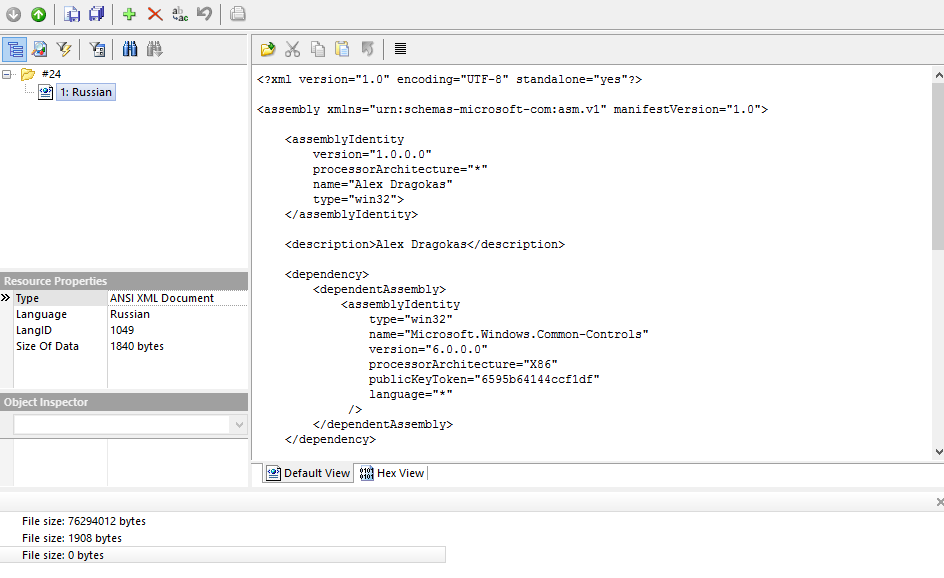
linke of image if not loaded full size : link
content of manifest file from a "russian manifest sample attached in res file" :
Code:
<?xml version="1.0" encoding="UTF-8" standalone="yes"?>

<assembly xmlns="urn:schemas-microsoft-com:asm.v1" manifestVersion="1.0">

    <assemblyIdentity
        version="1.0.0.0"
        processorArchitecture="*"
        name="Alex Dragokas"
        type="win32">
    </assemblyIdentity>

    <description>Alex Dragokas</description>

    <dependency>
        <dependentAssembly>
            <assemblyIdentity
                type="win32"
                name="Microsoft.Windows.Common-Controls"
                version="6.0.0.0"
                processorArchitecture="X86"
                publicKeyToken="6595b64144ccf1df"
                language="*"
             />
        </dependentAssembly>
    </dependency>

    <trustInfo xmlns="urn:schemas-microsoft-com:asm.v3">
        <security>
            <requestedPrivileges>
                <requestedExecutionLevel
                    level="asInvoker"
                    uiAccess="false">
                </requestedExecutionLevel>
            </requestedPrivileges>
        </security>
    </trustInfo>

    <compatibility xmlns="urn:schemas-microsoft-com:compatibility.v1">
        <application>
            <supportedOS Id="{e2011457-1546-43c5-a5fe-008deee3d3f0}"></supportedOS>
            <supportedOS Id="{35138b9a-5d96-4fbd-8e2d-a2440225f93a}"></supportedOS>
            <supportedOS Id="{4a2f28e3-53b9-4441-ba9c-d69d4a4a6e38}"></supportedOS>
            <supportedOS Id="{1f676c76-80e1-4239-95bb-83d0f6d0da78}"></supportedOS>
        </application>
    </compatibility>

    <application xmlns="urn:schemas-microsoft-com:asm.v3">
        <windowsSettings>
            <dpiAware xmlns="http://schemas.microsoft.com/SMI/2005/WindowsSettings">true</dpiAware>
        </windowsSettings>
    </application>

</assembly>
Last edited by Black_Storm; Nov 7th, 2022 at 03:33 PM.
Tags for this Thread
 Posting Permissions
- You may not post new threads
- You may not post replies
- You may not post attachments
- You may not edit your posts
-
Forum Rules
|
Click Here to Expand Forum to Full Width
|



 Reply With Quote


