|

-
Oct 31st, 2022, 02:27 PM
#1
Thread Starter
Fanatic Member


how load image,draw circle area crop ,then crop and save
hi,i am looking for any sample about load a image then draw a circle area with mouse for crop and then save that circle area as png or jpg,i know i can do that with cairo or wia but i found jst sample about crop or save any body can help about do that with cairo or wia,i dont know how can crop circle with wia (maybe need mask effecr idk) and save it or how can do that all of theme with cairo
for example i found these :
https://www.cairographics.org/samples/
https://www.vbforums.com/showthread....From-A-Picture
i need a simple sample
-
Nov 1st, 2022, 08:21 AM
#2
Re: how load image,draw circle area crop ,then crop and save
It's pretty straightforward to do with Cairo. This example requires:
- a reference to RC6.dll
- a menu called mnuFileSave
- an image called orig.jpg in the app.path folder
Code:
Option Explicit

' Cairo surface of an image and selected ellipse
Private mo_Srf As cCairoSurface

' Start point of user-defined rectangular area for our ellipse
Private m_X1 As Long
Private m_Y1 As Long
' Endpoint of user-defined rectangular area for our ellipse
Private m_X2 As Long
Private m_Y2 As Long

Private Sub Form_Load()
   Me.ScaleMode = vbPixels ' When dealing with images, it's easiest to work in pixels.

   ' Load an image into our image list for later drawing in the Redraw method
   Cairo.ImageList.AddImage "main", App.Path & "\orig.jpg"
End Sub

Private Sub Form_MouseDown(Button As Integer, Shift As Integer, X As Single, Y As Single)
   If Button = vbLeftButton Then
      ' Set start point of user-defined rectangular area/selection
      m_X1 = X
      m_Y1 = Y
   End If
End Sub

Private Sub Form_MouseMove(Button As Integer, Shift As Integer, X As Single, Y As Single)
   If Button = vbLeftButton Then
      ' Set end point of user-defined rectangular area/selection
      m_X2 = X
      m_Y2 = Y

      Redraw
   End If
End Sub

Private Sub Form_MouseUp(Button As Integer, Shift As Integer, X As Single, Y As Single)
   If Button = vbLeftButton Then
      ' Set end point of user-defined rectangular area/selection
      m_X2 = X
      m_Y2 = Y

      Redraw
   End If
End Sub

Private Sub Form_Resize()
   ' Resize our Cairo surface to match the size of the form
   Set mo_Srf = Cairo.CreateSurface(Me.ScaleWidth, Me.ScaleHeight)
   Redraw
End Sub

Sub Redraw()
   With mo_Srf.CreateContext
      .RenderSurfaceContent "main", 0, 0, Me.ScaleWidth, Me.ScaleHeight, , , True   ' Render the full original image first (maintaining aspect ratio with the final "True" parameter)

      If m_X2 > 0 And m_Y2 > 0 Then
         ' We have a selection rectangle, so we will draw an ellipse, "erasing" everything outside it. The "erase" operation will just be a white fill for this demo

         .Rectangle 0, 0, Me.ScaleWidth, Me.ScaleHeight  ' Create a rectangular path over the whole image - this will be our white fill/erase area

         .Ellipse m_X1 + (m_X2 - m_X1) / 2, _
                  m_Y1 + (m_Y2 - m_Y1) / 2, _
                  m_X2 - m_X1, _
                  m_Y2 - m_Y1 ' Draw an ellipse within the bounds of the user-drawn rectangular area.
                                      ' Note that the RC6 Ellipse method takes the center point of the ellipse for the first 2 parameters, then the width & height of the ellipse for the next 2 parameters.

         .FillRule = CAIRO_FILL_RULE_EVEN_ODD   ' Set the fill rule to EVEN/ODD so that we are filling between the ellipse and the rectangle
         .SetSourceColor vbWhite ' Change the fill colour to white
         .Fill ' And fill in our path with the selected colour
      End If
   End With

   Set Me.Picture = mo_Srf.Picture
End Sub

Private Sub mnuFileSave_Click()
   ' Crop the image to the user-defined rectangular area and save it (overwriting any existing file of the same name)
   mo_Srf.CropSurface(m_X1, m_Y1, m_X2 - m_X1, m_Y2 - m_Y1).WriteContentToJpgFile App.Path & "\crop.jpg"
End Sub
Note that the above example is very basic. For example, it doesn't handle things like automatically resizing the selection rectangle when you resize the form, but it should be OK for demonstrating the basic process.
Example Original Image:
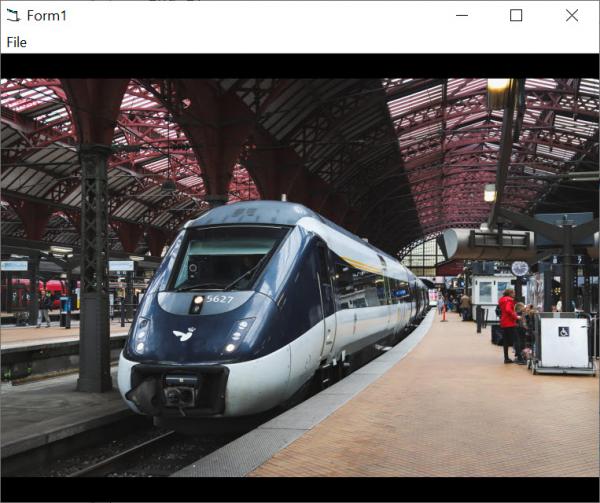
Example Selection:
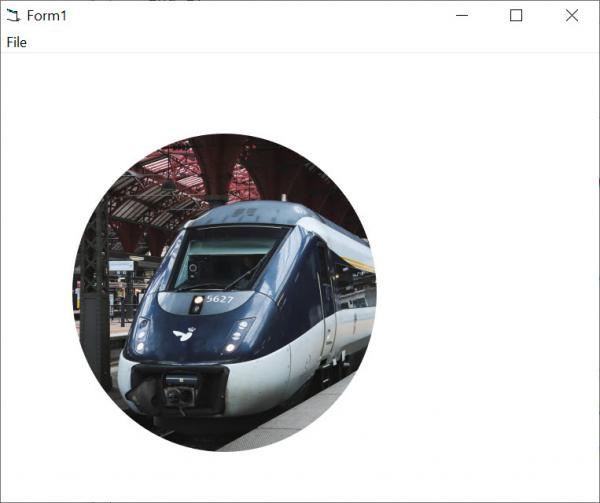
Example Exported/Cropped Image:
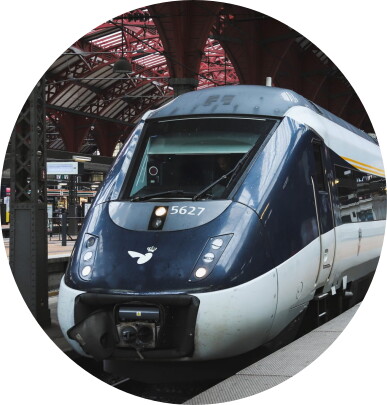
Last edited by jpbro; Nov 1st, 2022 at 08:40 AM.
-
Nov 1st, 2022, 12:34 PM
#3
Thread Starter
Fanatic Member
Re: how load image,draw circle area crop ,then crop and save
thanks but there is a small problem about crop process,i need crop with circle area without background white color like as png and save it.
my another problem is i wanna save that circle area with gray percent (for example between 0 to 100 percent about gray mode).
-
Nov 1st, 2022, 03:22 PM
#4
Thread Starter
Fanatic Member
Re: how load image,draw circle area crop ,then crop and save
i changed to this for crop with export png without background color and gray effect export :

better size :

Code:
Option Explicit
Private mo_Srf As cCairoSurface
Private m_X1 As Long
Private m_Y1 As Long
Private m_X2 As Long
Private m_Y2 As Long
Dim ExpSrf As cCairoSurface

Private Sub Form_Load()
    Me.ScaleMode = vbPixels
    Cairo.ImageList.AddImage "main", App.Path & "\1.png"
End Sub

Private Sub Form_MouseDown(Button As Integer, Shift As Integer, X As Single, Y As Single)
    If Button = vbLeftButton Then
        m_X1 = X
        m_Y1 = Y
    End If
End Sub

Private Sub Form_MouseMove(Button As Integer, Shift As Integer, X As Single, Y As Single)
    If Button = vbLeftButton Then
        m_X2 = X
        m_Y2 = Y

        Redraw
    End If
End Sub

Private Sub Form_MouseUp(Button As Integer, Shift As Integer, X As Single, Y As Single)
    If Button = vbLeftButton Then
        m_X2 = X
        m_Y2 = Y

        Redraw
    End If
End Sub

Private Sub Form_Resize()
    Set mo_Srf = Cairo.CreateSurface(Me.ScaleWidth, Me.ScaleHeight)
    Redraw
End Sub

Sub Redraw()


    With mo_Srf.CreateContext

        .RenderSurfaceContent "main", 0, 0, Me.ScaleWidth, Me.ScaleHeight, , , True

        If m_X2 > 0 And m_Y2 > 0 Then

            .Rectangle 0, 0, Me.ScaleWidth, Me.ScaleHeight

            .Ellipse m_X1 + (m_X2 - m_X1) / 2, _
            m_Y1 + (m_Y2 - m_Y1) / 2, _
            m_X2 - m_X1, _
            m_Y2 - m_Y1

            .FillRule = CAIRO_FILL_RULE_EVEN_ODD

            .SetSourceColor vbWhite, 0.6

            .Fill

        End If
    End With

    With Cairo.CreateSurface(Me.ScaleWidth, Me.ScaleHeight).CreateContext
        .Ellipse m_X1 + (m_X2 - m_X1) / 2, m_Y1 + (m_Y2 - m_Y1) / 2, m_X2 - m_X1, m_Y2 - m_Y1

        .Clip
        .RenderSurfaceContent "main", 0, 0, Me.ScaleWidth, Me.ScaleHeight

        .ResetClip
        Set ExpSrf = Cairo.CreateSurface(mo_Srf.Width, mo_Srf.Height)

        Dim cc As cCairoContext
        Set cc = ExpSrf.CreateContext

        cc.RenderSurfaceContent .Surface, 0, 0, , , , , True

       '****************************************************
        ' for convert to gray ( maybe better idea?)
        cc.Operator = CAIRO_OPERATOR_HSL_COLOR
        cc.Ellipse m_X1 + (m_X2 - m_X1) / 2, m_Y1 + (m_Y2 - m_Y1) / 2, m_X2 - m_X1, m_Y2 - m_Y1
        cc.Fill , Cairo.CreateSolidPatternLng(RGB(1, 1, 1), 1)
        '****************************************************
    End With

    Set Me.Picture = mo_Srf.Picture
End Sub

Private Sub Form_Terminate()
    If Forms.Count = 0 Then New_c.CleanupRichClientDll
End Sub

Private Sub mnuFileSave_Click()
    ExpSrf.CropSurface(m_X1, m_Y1, m_X2 - m_X1, m_Y2 - m_Y1).WriteContentToPngFile App.Path & "\Export.png"
End Sub
but maybe better idea for export with gray color percent idea?
here was been my idea :
Code:
       '****************************************************
        ' for convert to gray ( maybe better idea?)
        cc.Operator = CAIRO_OPERATOR_HSL_COLOR
        cc.Ellipse m_X1 + (m_X2 - m_X1) / 2, m_Y1 + (m_Y2 - m_Y1) / 2, m_X2 - m_X1, m_Y2 - m_Y1
        cc.Fill , Cairo.CreateSolidPatternLng(RGB(1, 1, 1), 1)
        '****************************************************
+ my another question , i tested these codes but jst png and jpg exported,svg and pdf not worked why?
Code:
    ExpSrf.CropSurface(m_X1, m_Y1, m_X2 - m_X1, m_Y2 - m_Y1).WriteContentToPngFile App.Path & "\Export.png"
    ExpSrf.CropSurface(m_X1, m_Y1, m_X2 - m_X1, m_Y2 - m_Y1).WriteContentToJpgFile App.Path & "\Export.jpg", 100
    ExpSrf.CropSurface(m_X1, m_Y1, m_X2 - m_X1, m_Y2 - m_Y1).WriteContentToSVGFile App.Path & "\Export.svg"
    ExpSrf.CropSurface(m_X1, m_Y1, m_X2 - m_X1, m_Y2 - m_Y1).WriteContentToPDFFile App.Path & "\Export.pdf"
Last edited by Black_Storm; Nov 1st, 2022 at 05:20 PM.
Tags for this Thread
 Posting Permissions
- You may not post new threads
- You may not post replies
- You may not post attachments
- You may not edit your posts
-
Forum Rules
|
Click Here to Expand Forum to Full Width
|



 Reply With Quote
