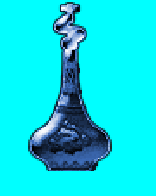
[RESOLVED] My Potions are too strong for you Traveller. Cairo Hue Shift?
Hi Cairo Squad,
I've been testing another autobuilder, but came to an abrupt halt.
Short version, handmade Photoshop sketch tests, thought they looked particularly cool, made a Cairo re-assembler to make many, however, colours were horribly skewed from the Photoshop ideals (bright areas dropped, colourization too hot etc). I've had to reassess the builder and am now starting from scratch.
I just noticed one thing, that would make everything easy peasy. Hue Shifting.
I was wondering if people know how to do this in Cairo?
This is what you do in Photoshop.
Saturation is easy as you only need to place a grey surface over the original image. But actual hue shifting? I tried various Photoshoppy addition layers, like adding a hue layer in a different colour, but it's all wrong. So I'm wondering if Cairo has a way of hue shifting? The reason I ask, is because if I add a hue layer to the original image it overwrites ALL hues, meaning a red potion with orange glow becomes soley green for example. It looks pretty foul to be honest. Basically the underlayer with multiple colours becomes a bland single colour.
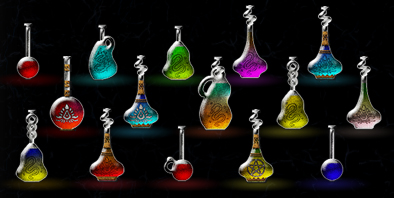
These are my handmade Premade-Proper-Photoshop-Pixel-Potions-Picked-A-Pepper-Or-Two I'm trying to replicate. Thanks for help!
Re: My Potions are too strong for you Traveller. Cairo Hue Shift?
If I understand correctly you want to be able to change the hue of an image without needing Photoshop. Perhaps you want your own code to do it through Cairo. Now I can't say whether Cairo can do it, I'll leave that to Olaf since he is the resident Cairo expert.
However, in the event that Cairo can't do what you want, I offer this: Changing the hue of an image, while I won't say it's easy, it's not exactly difficult either. We're all used to dealing with colours using the RGB colour space however, it is not the only colour space. There are many colour spaces and the ones you need to be dealing with are the HSL or HSB colour spaces. So what you do is you get all the pixel values of the image which will be in RGB format and from there you have to convert all of them to HSL or HSB from there you can change the hue values of each pixel by adding or subtracting to and from the hue value of each pixel.
It should be quite easy to find an algorithm to convert from RGB to HSL/HSB online if this Cairo thing doesn't work out and you have to do it yourself. Also, I wrote a small application for recolouring sprites which does this through the HSL colour space. You can check it out here if you want. It's written in VB.Net but perhaps you can look at it for ideas. It uses no 3rd party image libraries or anything like that for recolouring sprites so the code is all there showing how to do it.
C++ programmers will dismiss you as a cretinous simpleton for your inability to keep track of pointers chained 6 levels deep and Java programmers will pillory you for buying into the evils of Microsoft. Meanwhile C# programmers will get paid just a little bit more than you for writing exactly the same code and VB6 programmers will continue to whitter on about "footprints". - FunkyDexter
There's just no reason to use garbage like InputBox. - jmcilhinney
The threads I start are Niya and Olaf free zones. No arguing about the benefits of VB6 over .NET here please. Happiness must reign. - yereverluvinuncleber
Re: My Potions are too strong for you Traveller. Cairo Hue Shift?
Thanks Niya, though I can't read your files... I don't have .Net installed anymore. Can I open one in word pad perhaps, which file?
Thanks Arnoutdv I'll take a looksee.
Though I was looking at other code chunks to slide HSB around, but it was all Python, C, Sea-flea and god knows what else. I'm not proficient to understand the complexities of what they were doing this time. Normally one can guess the similar components but nothing was apparent. I'll keep looking until I submit to my,,,, *drum roll*
A Last Minute Trashy Workaround! Tadah!
Behold in all it's god awful glory. Ligthen layers of R(Normal), G and Beeeee. I think I can randomize all these to make various shifts, sort of. It kind of actually works much to my surprise. If nothing is apparent I'll just use this dodgy method.
Re: My Potions are too strong for you Traveller. Cairo Hue Shift?
Well just to be clear, you want the ability to recolour sprites by changing the hue, right? So you can create different colour bottles from a single base, is this right? I was guessing that is what you were looking for based on your OP but I wasn't 100% sure.
C++ programmers will dismiss you as a cretinous simpleton for your inability to keep track of pointers chained 6 levels deep and Java programmers will pillory you for buying into the evils of Microsoft. Meanwhile C# programmers will get paid just a little bit more than you for writing exactly the same code and VB6 programmers will continue to whitter on about "footprints". - FunkyDexter
There's just no reason to use garbage like InputBox. - jmcilhinney
The threads I start are Niya and Olaf free zones. No arguing about the benefits of VB6 over .NET here please. Happiness must reign. - yereverluvinuncleber
Re: My Potions are too strong for you Traveller. Cairo Hue Shift?
Originally Posted by Niya
Well just to be clear, you want the ability to recolour sprites by changing the hue, right? So you can create different colour bottles from a single base, is this right? I was guessing that is what you were looking for based on your OP but I wasn't 100% sure.
Yes.
The trashy workaround I 'just' thought up a moment ago does this, sort of... It's not precisely predictable or code worthy, but the light levels stay perfect as do the hue shift. <- I have not been able to do this via Cairo or Photoshop 'Flat Layering' yet.
In the workaround, if I randomize alpha on the RGB layers in Cairo, that will be enough to alter the bottles appearance. I tried mucking around and all the vibrant colours stayed perfect, complete with tonal shifts. It's like fixing a car with a sledgehammer though...
C++ programmers will dismiss you as a cretinous simpleton for your inability to keep track of pointers chained 6 levels deep and Java programmers will pillory you for buying into the evils of Microsoft. Meanwhile C# programmers will get paid just a little bit more than you for writing exactly the same code and VB6 programmers will continue to whitter on about "footprints". - FunkyDexter
There's just no reason to use garbage like InputBox. - jmcilhinney
The threads I start are Niya and Olaf free zones. No arguing about the benefits of VB6 over .NET here please. Happiness must reign. - yereverluvinuncleber
Re: My Potions are too strong for you Traveller. Cairo Hue Shift?
Yeah, just an entire 'image' or 'Cairo surface' hue shift. I don't need anything fancy.
Cairo is preferable, if it's available as a thing. Cairo seems to have a lot of built in art functions, but I haven't come across hue shift yet, only hue layer add.
Re: My Potions are too strong for you Traveller. Cairo Hue Shift?
Originally Posted by -Corso->
Yeah, just an entire 'image' or 'Cairo surface' hue shift. I don't need anything fancy.
Cairo is preferable, if it's available as a thing. Cairo seems to have a lot of built in art functions, but I haven't come across hue shift yet, only hue layer add.
Tell me, does Cairo allow you to access pixel data from it's surfaces? If that's the case, all you have to do is convert those pixel values from RGB to HSL or HSB. You can then set the hue of the pixels, convert them back to RGB and write them to the Cairo surface.
Also, how are you using Cairo? Are you using it through Olaf's RichClient library or are you using it through something else? The reason I ask is because if it's from RC5/6 then perhaps Olaf can help with this.
I could show you how to do it manually but it would take me forever write a working sample in VB6 since I'd have to rely on what I know which is GDI and that requires a lot of tedious boilerplate. I'm not looking forward to that at all Olaf could probably produce VB6 code for this far faster than I ever could.
C++ programmers will dismiss you as a cretinous simpleton for your inability to keep track of pointers chained 6 levels deep and Java programmers will pillory you for buying into the evils of Microsoft. Meanwhile C# programmers will get paid just a little bit more than you for writing exactly the same code and VB6 programmers will continue to whitter on about "footprints". - FunkyDexter
There's just no reason to use garbage like InputBox. - jmcilhinney
The threads I start are Niya and Olaf free zones. No arguing about the benefits of VB6 over .NET here please. Happiness must reign. - yereverluvinuncleber
Re: My Potions are too strong for you Traveller. Cairo Hue Shift?
Yes, RC6 does allow you to read and write pixel data. (BindToArray). I can do that to grab RGB and Alpha. Ah, so I just need to find the code to switch that to HSV. Nice!
Re: My Potions are too strong for you Traveller. Cairo Hue Shift?
Ok I made an extremely barebones sample that demonstrates how to change an image's hue. Here's a 40 second video demonstrating it so you see what it looks like:-
I wanted to do the demo in VB6 but unfortunately I was unable to quickly find information on how to load an image from disk and access it's pixel data using RC6's Cairo. I didn't want to spend all day trawling these boards looking for that information. GDI was also out of the question since it would require a tonne of boilerplate I'd have to spend up to an hour writing and testing or ripping from old VB6 projects I haven't touched in like a decade plus. Instead I just banged it out in about 30 minutes in VB.Net.
Fortunately though, the important parts are extremely easy to understand and translate to VB6. I'll leave it to you to figure out all the Cairo stuff in VB6.
Now the core of all this as I've said is converting from RGB to HSB or HSL and back. I chose HSB since it's a tad bit simpler than HSL. Here is the code for converting RGB to HSB and back:-
Code:
Public Structure HSB
    Public Sub New(hue As Integer, saturation As Double, brightness As Double)
        Me.Hue = hue
        Me.Saturation = saturation
        Me.Brightness = brightness
    End Sub
    Public Property Hue As Integer
    Public Property Saturation As Double
    Public Property Brightness As Double

    Public Overrides Function ToString() As String
        Return $"Hue = {Me.Hue.ToString}, Saturation = {Me.Saturation.ToString}, Brightness = {Me.Brightness.ToString}"
    End Function

End Structure


Public Class ColorConverter
    Public Shared Function ColorToHSB(ByVal c As Color) As HSB
        Return RGBToHSB(c.R, c.G, c.B)
    End Function

    Public Shared Function RGBToHSB(ByVal R As Byte, ByVal G As Byte, ByVal B As Byte) As HSB

        Dim d_r As Double = R / 255
        Dim d_g As Double = G / 255
        Dim d_b As Double = B / 255

        Dim max As Double = {d_r, d_g, d_b}.Max
        Dim min As Double = {d_r, d_g, d_b}.Min
        Dim diff As Double = max - min

        Dim h As Integer
        Dim s, v As Double

        If max = min Then
            h = 0

        ElseIf max = d_r Then
            h = (60 * ((d_g - d_b) / diff) + 360) Mod 360

        ElseIf max = d_g Then
            h = (60 * ((d_b - d_r) / diff) + 360) Mod 360

        ElseIf max = d_b Then
            h = (60 * ((d_r - d_g) / diff) + 360) Mod 360
        End If

        If max = 0 Then s = 0 Else s = diff / max

        v = max

        Return New HSB(h, s, v)
    End Function

    Public Shared Function HSBToRGB(ByVal hsb As HSB) As Color
        Return HSBToRGB(hsb.Hue, hsb.Saturation, hsb.Brightness)
    End Function

    Public Shared Function HSBToRGB(ByVal hue As Integer, ByVal saturation As Double, ByVal value As Double) As Color
        'JavaScript algorithm
        '===============================================
        '  Const HSBToRGB = (h, s, b) >= {
        '  s /= 100;
        '  b /= 100;
        '  Const k = (n) >= (n + h / 60) % 6;
        '  Const f = (n) >= b * (1 - s * Math.Max(0, Math.Min(k(n), 4 - k(n), 1)));
        '  Return [255 * f(5), 255 * f(3), 255 * f(1)];
        '};
        '===============================================

        Dim k = Function(n As Double) (n + hue / 60) Mod 6
        Dim f = Function(n As Double) value * (1 - saturation * Math.Max(0, {k(n), 4 - k(n), 1}.Min))

        Return Color.FromArgb(255, 255 * f(5), 255 * f(3), 255 * f(1))
    End Function
End Class
The above is VB.Net code I know but it's really nothing more than mathematical formulas really. It should be very trivial to convert this to VB6.
Apply it to an image is also very trivial. Here is the VB.Net code I used:-
Code:
    Public Sub SetImageHue(ByVal img As Bitmap, ByVal hue As Integer)

        'Lock the Bitmap object to access it's bits
        Dim bpData = img.LockBits(New Rectangle(0, 0, img.Width, img.Height), Imaging.ImageLockMode.ReadWrite, Imaging.PixelFormat.Format32bppArgb)

        Dim A, R, G, B As Byte

        For i As Integer = 0 To (bpData.Width * bpData.Height) - 1

            'Read the colour components of each pixel
            'from the Bitmap
            B = Marshal.ReadByte(IntPtr.Add(bpData.Scan0, i * 4))
            G = Marshal.ReadByte(IntPtr.Add(bpData.Scan0, i * 4), 1)
            R = Marshal.ReadByte(IntPtr.Add(bpData.Scan0, i * 4), 2)
            A = Marshal.ReadByte(IntPtr.Add(bpData.Scan0, i * 4), 3)

            'Convert the pixel from the RGB colour space to
            'the HSB colour space.
            Dim hsb = ColorConverter.RGBToHSB(R, G, B)

            'Set the hue of the pixel
            hsb.Hue = hue

            Dim c As Color = ColorConverter.HSBToRGB(hsb)

            'Write the pixel back to the image
            Marshal.WriteInt32(IntPtr.Add(bpData.Scan0, i * 4), c.ToArgb)

        Next

        'Unlock the bitmap
        img.UnlockBits(bpData)
    End Sub
The above is a function that sets the Hue of a Bitmap. It's very simple. You just enumerate all of the pixels in the image, convert the RGB components to HSB, set the hue you want, convert it back to RGB and write the new RGB values back to the image. Very easy stuff.
C++ programmers will dismiss you as a cretinous simpleton for your inability to keep track of pointers chained 6 levels deep and Java programmers will pillory you for buying into the evils of Microsoft. Meanwhile C# programmers will get paid just a little bit more than you for writing exactly the same code and VB6 programmers will continue to whitter on about "footprints". - FunkyDexter
There's just no reason to use garbage like InputBox. - jmcilhinney
The threads I start are Niya and Olaf free zones. No arguing about the benefits of VB6 over .NET here please. Happiness must reign. - yereverluvinuncleber
Re: My Potions are too strong for you Traveller. Cairo Hue Shift?
Thanks Niya. I'll examine this in detail. I'm actually dead tired and sore after a hospital visit, plus I have to go back in a few days. I'd like to write up the Cairo version using your formula as it's a good way for me to learn it for other colour adjustments in the future. Just going to rest for a few days before I post that though.
While there I coded up the lazybones version of mine too, for the, just in case scenario.
Thanks for posting.
Re: My Potions are too strong for you Traveller. Cairo Hue Shift?
Originally Posted by -Corso->
I'd like to write up the Cairo version using your formula...
Before you dive into your own Pixel-Loops, please check whether the function below -
(ApplyHueTo(...) is sufficient).
Code:
Option Explicit

Private CC As cCairoContext 'our global BackBuf-CC (derived from a Form-covering Surface)

Private Sub Form_Load()
  Dim Src As cCairoSurface
  Set Src = Cairo.ImageList.AddImage("Grey_Src", "c:\temp\potion_greyscale.png", 128, 128)

  Cairo.ImageList.AddSurface "Hue_Green", ApplyHueTo(Src, vbGreen)
  Cairo.ImageList.AddSurface "Hue_Yellow", ApplyHueTo(Src, vbYellow)
  Cairo.ImageList.AddSurface "Hue_Magenta", ApplyHueTo(Src, vbMagenta)
  Cairo.ImageList.AddSurface "Hue_Cyan", ApplyHueTo(Src, vbCyan)

  Me.Move Left, 0, Width, Screen.Height
End Sub

Private Sub Form_Resize()
  ScaleMode = vbPixels: AutoRedraw = True
  Set CC = Cairo.CreateSurface(ScaleWidth, ScaleHeight).CreateContext
  ReDraw
End Sub

Private Sub ReDraw()
  CC.Paint 1, Cairo.CreateCheckerPattern(8, &H333333)

    Dim i&
    CC.RenderSurfaceContent "Grey_Src", 0, i * 128: i = i + 1
    CC.RenderSurfaceContent "Hue_Green", 0, i * 128: i = i + 1
    CC.RenderSurfaceContent "Hue_Yellow", 0, i * 128: i = i + 1
    CC.RenderSurfaceContent "Hue_Magenta", 0, i * 128: i = i + 1
    CC.RenderSurfaceContent "Hue_Cyan", 0, i * 128: i = i + 1

  CC.Surface.DrawToDC hDC: Refresh
End Sub

Private Function ApplyHueTo(Src As cCairoSurface, ByVal Color As Long) As cCairoSurface
  Dim CC As cCairoContext, TmpSrf As cCairoSurface
  'we have to do this in two steps (because HSL-Operations do not support Alpha)
  Set CC = Cairo.CreateSurface(Src.Width, Src.Height).CreateContext
      CC.Paint 1, Cairo.CreateSolidPatternLng(vbBlack)
      CC.RenderSurfaceContent Src, 0, 0

      CC.Operator = CAIRO_OPERATOR_HSL_COLOR
      CC.Paint 1, Cairo.CreateSolidPatternLng(Color)
  Set TmpSrf = CC.Surface 'store the result of Step 1 in a Tmp-Surface

  'Ok, now step 2 (Masking of the TmpSrf with the original Src)
  Set CC = Cairo.CreateSurface(Src.Width, Src.Height).CreateContext
      CC.SetSourceColor Color
      CC.MaskSurface Src

      CC.SetSourceSurface TmpSrf
      CC.MaskSurface Src

  Set ApplyHueTo = CC.Surface
End Function
It produces these results (from a GreyScale-Alpha-Source):
Re: My Potions are too strong for you Traveller. Cairo Hue Shift?
Hi Olaf,
I was getting the similar results with a basic Operator = CAIRO_OPERATOR_HSL_SATURATION to my original picture. (Because it already has colour tones in it, which allows the hue shift.)
The reason for Hue 'Shift', and not 'Hue Overwrite' is to preserve the 'other' colours present in the original.
For example, if I add a yellow tint to your red potion bottle original, the tint vanishes to a single colour.
Seen here, the red/yellow bottles' lower incarnations are flat. Not the desired result.
It means brown beer bottles with golden highlights, or an orange potion with an inky purple seeping in become flat too. This is what was happening with the very first autobuilder, now scrapped.
I'll continue on the hue shift integration in a few days when I'm better rested.
Re: My Potions are too strong for you Traveller. Cairo Hue Shift?
Olaf's solution seems to require a greyscale base image, not one with colour. Is there some reason you can't start the "hue shifting" process with a greyscale image? Look at his code, it seems it is not so much changing the hue of the image as it is performing a blend operation of the grayscale image onto a coloured background. Such an approach would be a tad bit unpredictable if you start with a coloured image.
C++ programmers will dismiss you as a cretinous simpleton for your inability to keep track of pointers chained 6 levels deep and Java programmers will pillory you for buying into the evils of Microsoft. Meanwhile C# programmers will get paid just a little bit more than you for writing exactly the same code and VB6 programmers will continue to whitter on about "footprints". - FunkyDexter
There's just no reason to use garbage like InputBox. - jmcilhinney
The threads I start are Niya and Olaf free zones. No arguing about the benefits of VB6 over .NET here please. Happiness must reign. - yereverluvinuncleber
Re: My Potions are too strong for you Traveller. Cairo Hue Shift?
Shouldn't the bottle and cap or stopper be one image, and the "potion" contents another?
Then after tinting and adjusting saturation and brightness of the contents, first render the contents and then render the transparent bottle in front of it? A little crude and requires that the bottle be flat-on to the eye so its bottom renders as just a thick line... but at least the glass and stopper don't end up tinted or brightness distorted and you don't get any awkward tinted "glow."
If the ultimate goal is a transparent PNG the canvas should be all transparent pixels before rendering I suppose.
I think all of this can be done with plain old GDI32 calls (including loading the source PNG images as bitmaps)... except encoding the result in PNG format. Much of the heavy lifting could be done using SetColorAdjustment().
As a bonus this can all be done using DDBs and compatible DCs. That way GDI Scaling can be used to keep your UI from falling apart under High DPI (even multimonitor mixed DPI).
Re: My Potions are too strong for you Traveller. Cairo Hue Shift?
Here's a quick breakdown of the potion assembly. Note, you must NOT start with a greyscale image. That is forbidden!
Puh! Dirty Hobbitses and their greasyscales!
There are so many tonal colours in the solution that it's too much work to recreate in Cairo from a greyscale.
Basically, I make a huge bottle at 600px^2 and use Photoshop layering effects to get what I want(what I think looks coolest). Basically, that initial bottle body is just a white blob of pen strokes and fill, Photoshop does the illumination, gradients, tone, colour variance on the fly. (Again, thanks to it's Layering Effects and proficiency. *Smug Smug*) So if I want a new bottle, I only draw a white blob shape. Same with all the other components leather, neck, stopper, insignia.
Those layers are then re-assembled on Cairo, with many stoppers, leather, bodies, necks and so on. Unlimited Potion Works.
All randomly chosen, same as the Cairo Rock Builder.
But, I do want the bottle contents to have a full spectrum colour array. Normally one uses hue shifting as it doesn't interfere with the white glass reflect or outline, that's critically (artistically) important.
Hence why I'm tracking it down, but I'm on massive loads of painkillers today, so I'm just falling asleep at the keyboard instead.
Thankfully, I've got the code prepped and ready to input to use RGB separated layers which ultimately ends up in the same as what hue shifting does.
Before all of that, I run some specialised automations through Photoshop to produce the potion bottle components with further lighting etc, and that's a whole other potion bottle of fishsauce.
Fishsauce takes no time to draw, less than a moment.
So, greyscale starting image is BAD! Begone wicked thoughts of monotoness! Foul demoness!
Last edited by -Corso->; Jun 4th, 2022 at 05:21 AM.
Re: My Potions are too strong for you Traveller. Cairo Hue Shift?
I think exploring Tanner Helland's PhotoDemon is an excellent idea.
However, I just think of hue shifting as a RyGcBmRyGcBm... circle (red-yellow-green-cyan-blue-magenta-red...). If we imagine our three RGB pixel values (0 to 255), and think of a sum of them, it's just rotating those values in a way that keeps their sum the same, gradually shifting which is higher and which is lower, etc.
I suppose the differentials (between the RGB values) must also stay the same, or it just all goes to gray.
Any software I post in these forums written by me is provided "AS IS" without warranty of any kind, expressed or implied, and permission is hereby granted, free of charge and without restriction, to any person obtaining a copy. To all, peace and happiness.
Re: My Potions are too strong for you Traveller. Cairo Hue Shift?
Originally Posted by dilettante
Yeah, it sounds like tinting isn't the goal at all. Probably colorspace rotation shifting each pixel's hue by the same amount in a circular manner.
I strongly suspect this as well.
I'm currently examining the the code Olaf posted to try and figure out how to reproduce my VB.Net sample in VB6 using RC6's Cairo objects which does exactly as you said, rotates the hue of the image. This is the same strategy I used in the PixelPainter application I also mentioned in this thread. It's basically a stripped down version of GIMP's Colourize feature. It's typically used to recolour sprites and such for games. For example if you have sprites of a guard in red uniform, you can shift the hues to change the colour of the uniform to say, green or brown.
I'll post that when I'm done. I have to kind of feel my way around Cairo by trial and error because RC6's implementation of Cairo is not documented. A lot of guess work but I'm making progress.
C++ programmers will dismiss you as a cretinous simpleton for your inability to keep track of pointers chained 6 levels deep and Java programmers will pillory you for buying into the evils of Microsoft. Meanwhile C# programmers will get paid just a little bit more than you for writing exactly the same code and VB6 programmers will continue to whitter on about "footprints". - FunkyDexter
There's just no reason to use garbage like InputBox. - jmcilhinney
The threads I start are Niya and Olaf free zones. No arguing about the benefits of VB6 over .NET here please. Happiness must reign. - yereverluvinuncleber
Re: My Potions are too strong for you Traveller. Cairo Hue Shift?
Try this:-
I've finally been able to figure out a bit about using Cairo thanks to the code Olaf posted earlier.
The above demonstrates a VB6 version of the VB.Net version I posted earlier. This one uses Cairo and a translated version of the VB.Net code to perform hue shifting. See attachment for the application.
C++ programmers will dismiss you as a cretinous simpleton for your inability to keep track of pointers chained 6 levels deep and Java programmers will pillory you for buying into the evils of Microsoft. Meanwhile C# programmers will get paid just a little bit more than you for writing exactly the same code and VB6 programmers will continue to whitter on about "footprints". - FunkyDexter
There's just no reason to use garbage like InputBox. - jmcilhinney
The threads I start are Niya and Olaf free zones. No arguing about the benefits of VB6 over .NET here please. Happiness must reign. - yereverluvinuncleber
Re: My Potions are too strong for you Traveller. Cairo Hue Shift?
Niya, reading your code is like....
Not the hue shift I was looking for. *Finger motion*. Carry on.
Meanwhile, the Methstar is nearing completion.... R G B are now in separate folders. Photoshop automations are all complete. I just need to go sleep and deal with the nested multiple file loading crap again.
Re: My Potions are too strong for you Traveller. Cairo Hue Shift?
Originally Posted by -Corso->
Niya, reading your code is like....
Yea it was very painful doing that in VB6 to be honest. It took me like 20 to 30 minutes to do the VB.Net version and it took me nearly all a day to do that VB6 version. I kept getting side tracked by VB6's various limitations because I'm no longer used to them. Plus I had to do a lot of trial and error to try and guess my way through Cairo.
Originally Posted by -Corso->
Not the hue shift I was looking for. *Finger motion*. Carry on.
Based on that image, it works exactly as I expected. What's wrong with it?
C++ programmers will dismiss you as a cretinous simpleton for your inability to keep track of pointers chained 6 levels deep and Java programmers will pillory you for buying into the evils of Microsoft. Meanwhile C# programmers will get paid just a little bit more than you for writing exactly the same code and VB6 programmers will continue to whitter on about "footprints". - FunkyDexter
There's just no reason to use garbage like InputBox. - jmcilhinney
The threads I start are Niya and Olaf free zones. No arguing about the benefits of VB6 over .NET here please. Happiness must reign. - yereverluvinuncleber
Re: My Potions are too strong for you Traveller. Cairo Hue Shift?
Ok, to explain, that slider function has overwritten all tones in the image when activated. It's 'looks' like a hue shift functionally speaking, but it actually overwrites first, then your slider hue shifts. So the image was overpainted really. Which is what the first autobuilder and Olaf's version does.
The picture below, blue bottle is what true hue shifting is. Notice the darker blue liquid near the top? If I scroll the hue shift slider in Photoshop, it maintains the 'other' variant colours. And the others are there for showing it further. So, really speaking, no overpaint, actual 'shift'.
It's tricky, but I was hoping Cairo had some sort of inbuilt function for sliding colours, but doesn't look like it.
Re: My Potions are too strong for you Traveller. Cairo Hue Shift?
Ak ok. I think I know what you want. I might need to make some minor changes to how the hue is applied. I can't promise it would achieve the effect you want but I'm willing to give it a try.
Can you provide me with an image of original bottle by itself?
C++ programmers will dismiss you as a cretinous simpleton for your inability to keep track of pointers chained 6 levels deep and Java programmers will pillory you for buying into the evils of Microsoft. Meanwhile C# programmers will get paid just a little bit more than you for writing exactly the same code and VB6 programmers will continue to whitter on about "footprints". - FunkyDexter
There's just no reason to use garbage like InputBox. - jmcilhinney
The threads I start are Niya and Olaf free zones. No arguing about the benefits of VB6 over .NET here please. Happiness must reign. - yereverluvinuncleber
Re: My Potions are too strong for you Traveller. Cairo Hue Shift?
Very happy to encourage users back to VB6.
Attached are some rough PNG's. Normally I'd remove the leather but it doesn't matter in this instance. Techgnome's link has the RGB HSV conversion code. So I should really concentrate on that. But various painkillers are making my brain mush.
I think it's just a matter of going over each pixel, pulling it's R,B,G values, convert those to HSV via Techgnome's link, adjusting the H value by a set amount, then converting back to RGB, then writing over the original surface/image.
I'd have to dig up my BindToArray code once more....
Sub Hue_Shift_Me(My_Surface As cCairoContext, ByVal Hue_Shift_Amount As Single)
'-=-=-=-=-=-=-=-=-=-=-=-=-=-=-=-=-=-=-=-=-=-=-=-=-=-=-=-=-=-=-=-=-=-=-=-=-=-=-=-=-=-=-=-=-=-=-=-=-=-=-=-=-=-=-=-=-=-=-=-=-=-=-=-=-=-=-=-=-=
'   Hue Shift a Surface
'-=-=-=-=-=-=-=-=-=-=-=-=-=-=-=-=-=-=-=-=-=-=-=-=-=-=-=-=-=-=-=-=-=-=-=-=-=-=-=-=-=-=-=-=-=-=-=-=-=-=-=-=-=-=-=-=-=-=-=-=-=-=-=-=-=-=-=-=-=
'This sub hue shifts an surface by a set amount. Note Hue is 0 to 255 max.
Dim Pixel_Height As Long 'Height of the surface
Dim Pixel_Width As Long 'Width of the surface
Pixel_Height = My_Surface.Surface.Height 'Write down their sizes
Pixel_Width = My_Surface.Surface.Width
Dim My_Connection() As Byte 'This is the bound array connection to the surface so we can extract and write pixel data
Dim C As Integer 'Counter
Dim D As Integer 'Counter
Dim Hue As Byte
Dim Value As Byte
Dim Saturation As Byte
Dim Red As Byte: Dim Green As Byte: Dim Blue As Byte 'Our wanted pixel colours
Dim Trim_Amount As Integer
'[BIND SURFACE TO OPERATIONL ARRAY]
My_Surface.Surface.BindToArray My_Connection 'Conenct the surface for input and output
'Let's scan through all the pixels to extract R, G & B values
For D = 0 To (Pixel_Height - 1) 'To the full image height
    For C = 0 To (Pixel_Width - 1) * 4 Step 4 'To the full image width. In byte form, we need to skip over some data (alpha)
        Blue = My_Connection(C + 0, D)
        Green = My_Connection(C + 1, D)
        Red = My_Connection(C + 2, D)
        'Now that we have R,G,B, we can convert that to a hue
        'If it's all zero's neglect it
        If Blue <> 0 Or Red <> 0 Or Green <> 0 Then
            'Call Colour_Shift(Red, Green, Blue, Hue_Shift_Amount)
            Call RGBtoHSV(Red, Green, Blue, Hue, Saturation, Value)
            'Add the hue shift
            If (Hue + Hue_Shift_Amount) > 255 Then 'If over, use the excess as the new value
                Trim_Amount = Hue + Hue_Shift_Amount - 255
                Hue = Trim_Amount
            Else
                Hue = Hue + Hue_Shift_Amount 'Standard add which doesn't go over 255
            End If
            Call HSVtoRGB(Hue, Saturation, Value, Red, Green, Blue)
            'Over write the hue shift
            My_Connection(C + 0, D) = Blue
            My_Connection(C + 1, D) = Green
            My_Connection(C + 2, D) = Red
        End If
    Next C
Next D
My_Surface.Surface.ReleaseArray My_Connection 'Release the array
End Sub
And now the Methstar has been destroyed!
Ok, will update with pictures when I gets me arts done.
Re: [RESOLVED] My Potions are too strong for you Traveller. Cairo Hue Shift?
FWIW, here is my take at HSV-Routines (best placed in a *.bas Module):
Code:
Public Sub RGB2HSV(ByVal R As Byte, ByVal G As Byte, ByVal B As Byte, H As Long, S As Single, V As Single)
  If G > R Then H = G - R:     V = G Else H = R - G: V = R
  If B > V Then H = B - V + H: V = B Else If V - B > H Then H = V - B
  If V = 0 Then S = 0 Else S = H / V: V = V / 255

  Select Case CByte(V * 255) 'return H Between 0 and 360 (S and V between 0 and 1)
      Case R: If H Then H = 60 * ((0 + G - B) / H + 0): If H < 0 Then H = H + 360
      Case G: If H Then H = 60 * ((0 + B - R) / H + 2)
      Case B: If H Then H = 60 * ((0 + R - G) / H + 4)
  End Select
End Sub

Public Sub HSV2RGB(ByVal H As Long, ByVal S As Single, ByVal V As Single, R As Byte, G As Byte, B As Byte)
  Dim i As Long, X As Long
  For i = 1 To 5 Step 2
      X = (H + i * 60 + 360000) Mod 360: If X >= 180 Then X = 240 - X
      If X < 0 Then X = 0 Else If X > 60 Then X = 60

      If i = 5 Then R = V * (1 - S * X / 60) * 255
      If i = 3 Then G = V * (1 - S * X / 60) * 255
      If i = 1 Then B = V * (1 - S * X / 60) * 255
  Next
End Sub
The above pair operates (native-compiled) about factor 20 faster than what Niya has produced.
And here's a function, which does Hue-Rotation (also to be placed in a *.bas):
Code:
Public Function HueRotate(Src As cCairoSurface, ByVal HueAngle_PlusMinus360 As Long, _
                          Optional ByVal SatIntervalMin As Single, Optional ByVal SatIntervalMax As Single = 1, _
                          Optional ByVal LumIntervalMin As Single, Optional ByVal LumIntervalMax As Single = 1) As cCairoSurface

  Dim P() As Byte, X As Long, Y As Long, H As Long, S As Single, V As Single
  Set HueRotate = Src.CreateSimilar(, , , True) 'make a copy of the source

  Cairo.DeMultiplyAlpha HueRotate.DataPtr, HueRotate.Stride * HueRotate.Height
  HueRotate.BindToArray P
      For Y = 0 To UBound(P, 2): For X = 0 To UBound(P, 1) Step 4 '<- notice Step4 (Byte-Order in P is "BGRA")
          RGB2HSV P(X + 2, Y), P(X + 1, Y), P(X + 0, Y), H, S, V

          If S >= SatIntervalMin And S <= SatIntervalMax Then
             If V >= LumIntervalMin And V <= LumIntervalMax Then
                HSV2RGB H + HueAngle_PlusMinus360, S, V, P(X + 2, Y), P(X + 1, Y), P(X + 0, Y)
             End If
          End If
      Next X, Y
  HueRotate.ReleaseArray P
  Cairo.PreMultiplyAlpha HueRotate.DataPtr, HueRotate.Stride * HueRotate.Height
End Function
Please note the enclosing of the Pixel-Loop between "De- and Pre-Multiply-Alpha" calls (on the Result-Surface).
It's important to expand the RGB-Values to their "full-range" first (before doing HSL or HSV manipulations) -
...the final PreMultiply will ensure proper Alpha-Channel-corresponding RGB-Values before routine-exit.
Also note the Optional Filter-Params for Saturation and Luminance (if you leave them out, you will have a "Standard-Hue-Shift").
Ok, Form-Test-Code for all that:
Code:
Option Explicit

Private Src As cCairoSurface

Private Sub Form_Load()
    Caption = "Press a MouseButton, and Move the Mouse"
    Set Src = Cairo.ImageList.AddImage("", App.Path & "\potion_orig.png", 128, 128)
    Set Picture = Src.Picture
End Sub

Private Sub Form_MouseMove(Button As Integer, Shift As Integer, X As Single, Y As Single)
  If Button = 0 Then Exit Sub 'do nothing, until the User presses a MouseKey whilst moving
  Dim HueAngle As Long, Result As cCairoSurface
      HueAngle = (X + Y) / (ScaleWidth + ScaleHeight) * 360
      Caption = "Current HueAngle: " & HueAngle & "°"
      New_c.Timing True
         Set Result = HueRotate(Src, HueAngle, 0.75, 1) '<- the Saturation-FilterInterval is optional
      Caption = Caption & New_c.Timing
      Result.DrawToDC hDC
End Sub
Re: [RESOLVED] My Potions are too strong for you Traveller. Cairo Hue Shift?
Yea, go with Olaf's version. It's way better than what I posted.
However, I'd be curious to know if what he posted above works for you. The reason I ask is because based on what you posted about the results you expected, there is something else I wanted to try.
C++ programmers will dismiss you as a cretinous simpleton for your inability to keep track of pointers chained 6 levels deep and Java programmers will pillory you for buying into the evils of Microsoft. Meanwhile C# programmers will get paid just a little bit more than you for writing exactly the same code and VB6 programmers will continue to whitter on about "footprints". - FunkyDexter
There's just no reason to use garbage like InputBox. - jmcilhinney
The threads I start are Niya and Olaf free zones. No arguing about the benefits of VB6 over .NET here please. Happiness must reign. - yereverluvinuncleber
Re: [RESOLVED] My Potions are too strong for you Traveller. Cairo Hue Shift?
Here is a quick and dirty test that uses GDI32. No GDI+, no Cairo, no add-in libraries at all.
It seems to be close to what we're talking about here. The main limitation is that it doesn't have as "Save as PNG" option for tweaked images, which would require the use of some library (GDi+, etc.) since GDI32 has no PNG encoder I'm aware of. Another limitation is that it requires Windows Vista or later: it can't run on Altair Basic or Windows XP.
Bonus: It copes with High and even Per Monitor DPI on Windows 10 (version 1703 Creator's Update) or later. No coding hoops jumped through, it relies on the appcompat option "GDI Scaling."
Easy to test, unzip the archive. Then copy the two images above into the Project folder ("Bottle Yellow Green.png" and "Bottle Light.png"). Runs in the IDE, or better as a compiled EXE.
Probably a bit crude, I just wanted to see what I could get quickly.
Re: [RESOLVED] My Potions are too strong for you Traveller. Cairo Hue Shift?
Originally Posted by dilettante
Here is a quick and dirty test that uses GDI32. No GDI+, no Cairo, no add-in libraries at all.
It seems to be close to what we're talking about here. The main limitation is that it doesn't have as "Save as PNG" option for tweaked images, which would require the use of some library (GDi+, etc.) since GDI32 has no PNG encoder I'm aware of. Another limitation is that it requires Windows Vista or later: it can't run on Altair Basic or Windows XP.
Bonus: It copes with High and even Per Monitor DPI on Windows 10 (version 1703 Creator's Update) or later. No coding hoops jumped through, it relies on the appcompat option "GDI Scaling."
Easy to test, unzip the archive. Then copy the two images above into the Project folder ("Bottle Yellow Green.png" and "Bottle Light.png"). Runs in the IDE, or better as a compiled EXE.
Probably a bit crude, I just wanted to see what I could get quickly.
I can't get your sample to work on my PC:-
Code:
        Case vbString
            F = FreeFile(0)
            Open PngData For Binary Access Read As #F
            ReDim PngBytes(LOF(F) - 1)
            Get #F, , PngBytes
            Close #F
It crashes at the line in red with a "subscript out of range" error. I checked the value of LOF(F) and it returned 0 which suggested to me that it wasn't finding the file. I attempted a fix by prepending App.Path but for some reason it still doesn't work. LOF(F) still returns 0 which means it's still not finding the file. My VB6 is still rusty in many areas so I'm wondering if it has anything to do with the actual path of the image:-
C++ programmers will dismiss you as a cretinous simpleton for your inability to keep track of pointers chained 6 levels deep and Java programmers will pillory you for buying into the evils of Microsoft. Meanwhile C# programmers will get paid just a little bit more than you for writing exactly the same code and VB6 programmers will continue to whitter on about "footprints". - FunkyDexter
There's just no reason to use garbage like InputBox. - jmcilhinney
The threads I start are Niya and Olaf free zones. No arguing about the benefits of VB6 over .NET here please. Happiness must reign. - yereverluvinuncleber
Re: [RESOLVED] My Potions are too strong for you Traveller. Cairo Hue Shift?
Looking at Dilettante's program, I'm starting to think that HSL would have been a better colour space than HSB. My PixelPainter app also uses HSL and it produces similar results. The only difference is that Dilettante's code somehow avoids rotating the grays at the bottle cork, the logo on the bottle and the grey lighting to the left-bottom of the bottle. PixelPainter on the other hand would rotate everything. However, in my app, specific pixels could be selected and when I select only the contents of the bottle, avoiding the grey areas, it produces the same output as Dilettante's program. Long story short, HSL seems to produce better results than HSB.
@Dilettante.
I also notice in your code, you only allow hue rotations of 240 degrees. Why not the full 360?
Also, how does your code avoid rotating the greys? If I select all pixels in my pixel painter app, this is the result:-
As you can see, everything is shifted yet in your code I can't readily tell how the greys are being avoided without manual intervention. What's the insight?
C++ programmers will dismiss you as a cretinous simpleton for your inability to keep track of pointers chained 6 levels deep and Java programmers will pillory you for buying into the evils of Microsoft. Meanwhile C# programmers will get paid just a little bit more than you for writing exactly the same code and VB6 programmers will continue to whitter on about "footprints". - FunkyDexter
There's just no reason to use garbage like InputBox. - jmcilhinney
The threads I start are Niya and Olaf free zones. No arguing about the benefits of VB6 over .NET here please. Happiness must reign. - yereverluvinuncleber
Re: [RESOLVED] My Potions are too strong for you Traveller. Cairo Hue Shift?
Those ShLwAPI calls only use 0-240 for the 3 elements even though 16-bit WORD arguments are used. Weird, hmm?
I used a hack for those oddball colors. If the "adjusted" color is black but the original color was not black... I restored the original color of that pixel and moved on to premultiply.
It seems that the ShLwAPI calls "blackhole" any colors not within their colorspace, i.e. return 0 without any other error indication.



 [RESOLVED] My Potions are too strong for you Traveller. Cairo Hue Shift?

 Reply With Quote


 I don't have .Net installed anymore. Can I open one in word pad perhaps, which file?
  Originally Posted by Niya


 Olaf could probably produce VB6 code for this far faster than I ever could.


 Yea it was very painful doing that in VB6 to be honest. It took me like 20 to 30 minutes to do the VB.Net version and it took me nearly all a day to do that VB6 version. I kept getting side tracked by VB6's various limitations because I'm no longer used to them. Plus I had to do a lot of trial and error to try and guess my way through Cairo.