|

-
Mar 18th, 2022, 06:43 PM
#1
Thread Starter
Lively Member

 ComboBox last selected item at top of list ComboBox last selected item at top of list
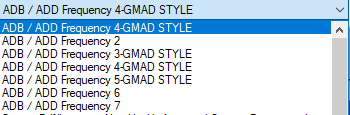
My combo box is filled from a dataset. It works but something weird is happening. After the user selects a item in the list it shows up at the top of the list covering the actual first item. If they select the top item that looks like the one they were just on it actually brings up the correct record.
So lets say the Dropdown contains these five items. The user selects the 4th item.
ADB / ADD Frequency 1
ADB / ADD Frequency 2
ADB / ADD Frequency 3
ADB / ADD Frequency 4
ADB / ADD Frequency 5
When they click the dropdown the next time. they see
ADB / ADD Frequency 4
ADB / ADD Frequency 2
ADB / ADD Frequency 3
ADB / ADD Frequency 4
ADB / ADD Frequency 5
If they click on the top item in the list, they go to the ADB / ADD Frequency 1 record not ADB / ADD Frequency 4.
-
Mar 18th, 2022, 06:44 PM
#2
Thread Starter
Lively Member
Re: ComboBox last selected item at top of list
-
Mar 18th, 2022, 06:58 PM
#3
Re: ComboBox last selected item at top of list
 Originally Posted by wjburke2

My combo box is filled from a dataset. It works but something weird is happening. After the user selects a item in the list it shows up at the top of the list covering the actual first item. If they select the top item that looks like the one they were just on it actually brings up the correct record.
So lets say the Dropdown contains these five items. The user selects the 4th item.
ADB / ADD Frequency 1
ADB / ADD Frequency 2
ADB / ADD Frequency 3
ADB / ADD Frequency 4
ADB / ADD Frequency 5
When they click the dropdown the next time. they see
ADB / ADD Frequency 4
ADB / ADD Frequency 2
ADB / ADD Frequency 3
ADB / ADD Frequency 4
ADB / ADD Frequency 5
If they click on the top item in the list, they go to the ADB / ADD Frequency 1 record not ADB / ADD Frequency 4.
You should post the code that is in any event handlers for that combobox. Not normal behavior for sure, so presumably some code you have is causing it.
-
Mar 18th, 2022, 08:47 PM
#4
Re: ComboBox last selected item at top of list
Originally Posted by wjburke2
The attachment is invalid. This site seems to have an issue with inline attachments so try again and DO NOT attach inline.
-
Mar 21st, 2022, 07:05 AM
#5
Thread Starter
Lively Member
Re: ComboBox last selected item at top of list
Actually, This is all generated code at this point. I haven't started customizing the control. Here is what I did to create it. I have a dataset the has
Category_ID Identy int
Category char 80
I have a second table
Campaign
Cam_Id int Idenity
Cat_FKey int
Campaign Char 80
I created a dataset with these two tables (there's actually more to it but keeping it simple). The dataset shows up as a datasource. Select ComboBox for the Category field. Drag it to the form. Then Select Datagrid view for Campaign Table. Then drag it onto the form. Now at this point the category combobox only shows the current Category. So I clicked on the properties tab on the Category control and select use bound items, Data Source Category, Display Member Category, Value member Cat_Id. Now the it shows all the Category's. When I select a Category the child campaigns are displayed. The generated code below looks correct. But When I select category I see what I described. So is it because of the way I used the properties tab to fill the combobox?
Code:
         'cmbCategory
        '
        Me.cmbCategory.DataBindings.Add(New System.Windows.Forms.Binding("Text", Me.CategoryBindingSource, "CAT_Category", True))
        Me.cmbCategory.DataSource = Me.CategoryBindingSource
        Me.cmbCategory.DisplayMember = "CAT_Category"
        Me.cmbCategory.DropDownStyle = System.Windows.Forms.ComboBoxStyle.DropDownList
        Me.cmbCategory.FormattingEnabled = True
        Me.cmbCategory.Location = New System.Drawing.Point(104, 12)
        Me.cmbCategory.Name = "cmbCategory"
        Me.cmbCategory.Size = New System.Drawing.Size(350, 21)
        Me.cmbCategory.TabIndex = 9
        Me.cmbCategory.ValueMember = "CAT_ID"

        'dgvCampaign
        '
        Me.dgvCampaign.AllowUserToAddRows = False
        Me.dgvCampaign.AllowUserToDeleteRows = False
        Me.dgvCampaign.AutoGenerateColumns = False
        Me.dgvCampaign.ColumnHeadersHeightSizeMode = System.Windows.Forms.DataGridViewColumnHeadersHeightSizeMode.AutoSize
        Me.dgvCampaign.Columns.AddRange(New System.Windows.Forms.DataGridViewColumn() {Me.DataGridViewTextBoxColumn1, Me.DataGridViewTextBoxColumn2, Me.DvgTestLit, Me.dvgTestFlag, Me.dgvCamName, Me.dgvCamType, Me.dgvJobNum, Me.dgvBDate, Me.dgvEdate, Me.DataGridViewTextBoxColumn9})
        Me.dgvCampaign.DataSource = Me.CampaignBindingSource
        Me.dgvCampaign.Location = New System.Drawing.Point(16, 92)
        Me.dgvCampaign.MultiSelect = False
        Me.dgvCampaign.Name = "dgvCampaign"
        Me.dgvCampaign.ReadOnly = True
        Me.dgvCampaign.RowHeadersVisible = False
        Me.dgvCampaign.SelectionMode = System.Windows.Forms.DataGridViewSelectionMode.FullRowSelect
        Me.dgvCampaign.Size = New System.Drawing.Size(708, 220)
        Me.dgvCampaign.TabIndex = 3
Last edited by wjburke2; Mar 21st, 2022 at 07:43 AM.
Reason: add image
-
Mar 21st, 2022, 08:48 AM
#6
Re: ComboBox last selected item at top of list
Get rid of the Binding on the Text property and set the DropDownStyle to DropDownList.
-
Mar 21st, 2022, 09:27 AM
#7
Thread Starter
Lively Member
Re: ComboBox last selected item at top of list
Thank you, That worked, As always I grateful for your help
Last edited by wjburke2; Mar 21st, 2022 at 09:33 AM.
Tags for this Thread
 Posting Permissions
- You may not post new threads
- You may not post replies
- You may not post attachments
- You may not edit your posts
-
Forum Rules
|
Click Here to Expand Forum to Full Width
|



 Reply With Quote

