[RESOLVED] Aes encryption worked on windows 7 and win 10 but notworkd on winxp!!! how fix that?
hi guys,
i have jst a simple module "mdAesEcb.bas" downloaded from vbforum with this content :
Code:
'--- mdAesEcb.bas
Option Explicit
DefObj A-Z

#Const ImplUseShared = False

'=========================================================================
' API
'=========================================================================

'--- for CNG
Private Const MS_PRIMITIVE_PROVIDER         As String = "Microsoft Primitive Provider"
Private Const BCRYPT_CHAIN_MODE_ECB         As String = "ChainingModeECB"
Private Const BCRYPT_ALG_HANDLE_HMAC_FLAG   As Long = 8

'--- for CryptStringToBinary
Private Const CRYPT_STRING_BASE64           As Long = 1
'--- for WideCharToMultiByte
Private Const CP_UTF8                       As Long = 65001
'--- for FormatMessage
Private Const FORMAT_MESSAGE_FROM_SYSTEM    As Long = &H1000
Private Const FORMAT_MESSAGE_IGNORE_INSERTS As Long = &H200

Private Declare Sub CopyMemory Lib "kernel32" Alias "RtlMoveMemory" (lpvDest As Any, lpvSource As Any, ByVal cbCopy As Long)
Private Declare Function BCryptOpenAlgorithmProvider Lib "bcrypt" (phAlgorithm As Long, ByVal pszAlgId As Long, ByVal pszImplementation As Long, ByVal dwFlags As Long) As Long
Private Declare Function BCryptCloseAlgorithmProvider Lib "bcrypt" (ByVal hAlgorithm As Long, ByVal dwFlags As Long) As Long
Private Declare Function BCryptGetProperty Lib "bcrypt" (ByVal hObject As Long, ByVal pszProperty As Long, pbOutput As Any, ByVal cbOutput As Long, cbResult As Long, ByVal dwFlags As Long) As Long
Private Declare Function BCryptSetProperty Lib "bcrypt" (ByVal hObject As Long, ByVal pszProperty As Long, ByVal pbInput As Long, ByVal cbInput As Long, ByVal dwFlags As Long) As Long
Private Declare Function BCryptGenerateSymmetricKey Lib "bcrypt" (ByVal hAlgorithm As Long, phKey As Long, pbKeyObject As Any, ByVal cbKeyObject As Long, pbSecret As Any, ByVal cbSecret As Long, ByVal dwFlags As Long) As Long
Private Declare Function BCryptDestroyKey Lib "bcrypt" (ByVal hKey As Long) As Long
Private Declare Function BCryptEncrypt Lib "bcrypt" (ByVal hKey As Long, pbInput As Any, ByVal cbInput As Long, ByVal pPaddingInfo As Long, ByVal pbIV As Long, ByVal cbIV As Long, pbOutput As Any, ByVal cbOutput As Long, pcbResult As Long, ByVal dwFlags As Long) As Long
Private Declare Function BCryptDeriveKeyPBKDF2 Lib "bcrypt" (ByVal pPrf As Long, pbPassword As Any, ByVal cbPassword As Long, pbSalt As Any, ByVal cbSalt As Long, ByVal cIterations As Long, ByVal dwDummy As Long, pbDerivedKey As Any, ByVal cbDerivedKey As Long, ByVal dwFlags As Long) As Long
Private Declare Function BCryptCreateHash Lib "bcrypt" (ByVal hAlgorithm As Long, phHash As Long, ByVal pbHashObject As Long, ByVal cbHashObject As Long, pbSecret As Any, ByVal cbSecret As Long, ByVal dwFlags As Long) As Long
Private Declare Function BCryptDestroyHash Lib "bcrypt" (ByVal hHash As Long) As Long
Private Declare Function BCryptHashData Lib "bcrypt" (ByVal hHash As Long, pbInput As Any, ByVal cbInput As Long, ByVal dwFlags As Long) As Long
Private Declare Function BCryptFinishHash Lib "bcrypt" (ByVal hHash As Long, pbOutput As Any, ByVal cbOutput As Long, ByVal dwFlags As Long) As Long
#If Not ImplUseShared Then
    Private Declare Function CryptStringToBinary Lib "crypt32" Alias "CryptStringToBinaryW" (ByVal pszString As Long, ByVal cchString As Long, ByVal dwFlags As Long, ByVal pbBinary As Long, ByRef pcbBinary As Long, ByRef pdwSkip As Long, ByRef pdwFlags As Long) As Long
    Private Declare Function CryptBinaryToString Lib "crypt32" Alias "CryptBinaryToStringW" (ByVal pbBinary As Long, ByVal cbBinary As Long, ByVal dwFlags As Long, ByVal pszString As Long, pcchString As Long) As Long
    Private Declare Function WideCharToMultiByte Lib "kernel32" (ByVal CodePage As Long, ByVal dwFlags As Long, ByVal lpWideCharStr As Long, ByVal cchWideChar As Long, lpMultiByteStr As Any, ByVal cchMultiByte As Long, ByVal lpDefaultChar As Long, ByVal lpUsedDefaultChar As Long) As Long
    Private Declare Function MultiByteToWideChar Lib "kernel32" (ByVal CodePage As Long, ByVal dwFlags As Long, lpMultiByteStr As Any, ByVal cchMultiByte As Long, ByVal lpWideCharStr As Long, ByVal cchWideChar As Long) As Long
    Private Declare Function FormatMessage Lib "kernel32" Alias "FormatMessageA" (ByVal dwFlags As Long, lpSource As Long, ByVal dwMessageId As Long, ByVal dwLanguageId As Long, ByVal lpBuffer As String, ByVal nSize As Long, Args As Any) As Long
#End If

'=========================================================================
' Constants and member variables
'=========================================================================

Private Const ERR_UNSUPPORTED_ENCR  As String = "Unsupported encryption"
Private Const AES_BLOCK_SIZE        As Long = 16
Private Const AES_KEYLEN            As Long = 32                    '-- 32 -> AES-256, 24 -> AES-196, 16 -> AES-128
Private Const AES_SALT              As String = "SaltVb6CryptoAes"  '-- at least 16 chars

Private Type UcsZipCryptoType
    hPbkdf2Alg          As Long
    hHmacAlg            As Long
    hHmacHash           As Long
    HmacHashLen         As Long
    hAesAlg             As Long
    hAesKey             As Long
    AesKeyObjData()     As Byte
    AesKeyObjLen        As Long
    Nonce(0 To 1)       As Long
    EncrData()          As Byte
    EncrPos             As Long
    LastError           As String
End Type

'=========================================================================
' Functions
'=========================================================================

Public Function AesEncryptString(sText As String, sPassword As String) As String
    Dim baData()        As Byte
    Dim sError          As String

    baData = ToUtf8Array(sText)
    If Not AesCryptArray(baData, ToUtf8Array(sPassword), Error:=sError) Then
        Err.Raise vbObjectError, , sError
    End If
    AesEncryptString = ToBase64Array(baData)
End Function

Public Function AesDecryptString(sEncr As String, sPassword As String) As String
    Dim baData()        As Byte
    Dim sError          As String

    baData = FromBase64Array(sEncr)
    If Not AesCryptArray(baData, ToUtf8Array(sPassword), Error:=sError) Then
        Err.Raise vbObjectError, , sError
    End If
    AesDecryptString = FromUtf8Array(baData)
End Function

Public Function AesCryptArray( _
            baData() As Byte, _
            baPass() As Byte, _
            Optional Salt As String, _
            Optional ByVal KeyLen As Long, _
            Optional Error As String, _
            Optional HmacSha1 As Variant) As Boolean
    Const VT_BYREF      As Long = &H4000
    Dim uCtx            As UcsZipCryptoType
    Dim vErr            As Variant
    Dim bHashBefore     As Boolean
    Dim bHashAfter      As Boolean
    Dim baTemp()        As Byte
    Dim lPtr            As Long

    On Error GoTo EH
    If Not IsMissing(HmacSha1) Then
        bHashBefore = (HmacSha1(0) <= 0)
        bHashAfter = (HmacSha1(0) > 0)
    End If
    If LenB(Salt) > 0 Then
        baTemp = ToUtf8Array(Salt)
    Else
        baTemp = ToUtf8Array(AES_SALT)
    End If
    If KeyLen <= 0 Then
        KeyLen = AES_KEYLEN
    End If
    If Not pvCryptoAesInit(uCtx, baPass, baTemp, KeyLen, 0) Then
        Error = uCtx.LastError
        GoTo QH
    End If
    If Not pvCryptoAesCrypt(uCtx, baData, Size:=UBound(baData) + 1, HashBefore:=bHashBefore, HashAfter:=bHashAfter) Then
        Error = uCtx.LastError
        GoTo QH
    End If
    If Not IsMissing(HmacSha1) Then
        baTemp = pvCryptoAesGetFinalHash(uCtx, UBound(HmacSha1) + 1)
        lPtr = Peek((VarPtr(HmacSha1) Xor &H80000000) + 8 Xor &H80000000)
        If (Peek(VarPtr(HmacSha1)) And VT_BYREF) <> 0 Then
            lPtr = Peek(lPtr)
        End If
        lPtr = Peek((lPtr Xor &H80000000) + 12 Xor &H80000000)
        Call CopyMemory(ByVal lPtr, baTemp(0), UBound(baTemp) + 1)
    End If
    '--- success
    AesCryptArray = True
QH:
    pvCryptoAesTerminate uCtx
    Exit Function
EH:
    vErr = Array(Err.Number, Err.Source, Err.Description)
    pvCryptoAesTerminate uCtx
    Err.Raise vErr(0), vErr(1), vErr(2)
End Function

'= private ===============================================================

Private Function pvCryptoAesInit(uCrypto As UcsZipCryptoType, baPass() As Byte, baSalt() As Byte, ByVal lKeyLen As Long, nPassVer As Integer) As Boolean
    Dim baDerivedKey()  As Byte
    Dim lDummy          As Long '--- discarded
    Dim hResult         As Long
    Dim sApiSource      As String

    '--- init member vars
    uCrypto.Nonce(0) = 0
    uCrypto.Nonce(1) = 0
    uCrypto.EncrData = vbNullString
    uCrypto.EncrPos = 0
    '--- generate RFC 2898 based derived key
    On Error GoTo EH_Unsupported '--- CNG API missing on XP
    hResult = BCryptOpenAlgorithmProvider(uCrypto.hPbkdf2Alg, StrPtr("SHA1"), StrPtr(MS_PRIMITIVE_PROVIDER), BCRYPT_ALG_HANDLE_HMAC_FLAG)
    If hResult <> 0 Then
        sApiSource = "BCryptOpenAlgorithmProvider(SHA1)"
        GoTo QH
    End If
    On Error GoTo 0
    ReDim baDerivedKey(0 To 2 * lKeyLen + 1) As Byte
    On Error GoTo EH_Unsupported '--- PBKDF2 API missing on Vista
    hResult = BCryptDeriveKeyPBKDF2(uCrypto.hPbkdf2Alg, baPass(0), UBound(baPass) + 1, baSalt(0), UBound(baSalt) + 1, 1000, 0, baDerivedKey(0), UBound(baDerivedKey) + 1, 0)
    If hResult <> 0 Then
        sApiSource = "BCryptDeriveKeyPBKDF2"
        GoTo QH
    End If
    On Error GoTo 0
    '--- extract Password Verification Value from last 2 bytes of derived key
    Call CopyMemory(nPassVer, baDerivedKey(2 * lKeyLen), 2)
    '--- init AES w/ ECB from first half of derived key
    hResult = BCryptOpenAlgorithmProvider(uCrypto.hAesAlg, StrPtr("AES"), StrPtr(MS_PRIMITIVE_PROVIDER), 0)
    If hResult <> 0 Then
        sApiSource = "BCryptOpenAlgorithmProvider(AES)"
        GoTo QH
    End If
    hResult = BCryptGetProperty(uCrypto.hAesAlg, StrPtr("ObjectLength"), uCrypto.AesKeyObjLen, 4, lDummy, 0)
    If hResult <> 0 Then
        sApiSource = "BCryptGetProperty(ObjectLength)"
        GoTo QH
    End If
    hResult = BCryptSetProperty(uCrypto.hAesAlg, StrPtr("ChainingMode"), StrPtr(BCRYPT_CHAIN_MODE_ECB), LenB(BCRYPT_CHAIN_MODE_ECB), 0)
    If hResult <> 0 Then
        sApiSource = "BCryptSetProperty(ChainingMode)"
        GoTo QH
    End If
    ReDim uCrypto.AesKeyObjData(0 To uCrypto.AesKeyObjLen - 1) As Byte
    hResult = BCryptGenerateSymmetricKey(uCrypto.hAesAlg, uCrypto.hAesKey, uCrypto.AesKeyObjData(0), uCrypto.AesKeyObjLen, baDerivedKey(0), lKeyLen, 0)
    If hResult <> 0 Then
        sApiSource = "BCryptGenerateSymmetricKey"
        GoTo QH
    End If
    '-- init HMAC from second half of derived key
    hResult = BCryptOpenAlgorithmProvider(uCrypto.hHmacAlg, StrPtr("SHA1"), StrPtr(MS_PRIMITIVE_PROVIDER), BCRYPT_ALG_HANDLE_HMAC_FLAG)
    If hResult <> 0 Then
        sApiSource = "BCryptOpenAlgorithmProvider(SHA1)"
        GoTo QH
    End If
    hResult = BCryptGetProperty(uCrypto.hHmacAlg, StrPtr("HashDigestLength"), uCrypto.HmacHashLen, 4, lDummy, 0)
    If hResult <> 0 Then
        sApiSource = "BCryptGetProperty(HashDigestLength)"
        GoTo QH
    End If
    hResult = BCryptCreateHash(uCrypto.hHmacAlg, uCrypto.hHmacHash, 0, 0, baDerivedKey(lKeyLen), lKeyLen, 0)
    If hResult <> 0 Then
        sApiSource = "BCryptCreateHash"
        GoTo QH
    End If
    '--- success
    pvCryptoAesInit = True
    Exit Function
QH:
    If Err.LastDllError <> 0 Then
        uCrypto.LastError = GetSystemMessage(Err.LastDllError)
    Else
        uCrypto.LastError = "[" & Hex(hResult) & "] Error in " & sApiSource
    End If
    Exit Function
EH_Unsupported:
    uCrypto.LastError = ERR_UNSUPPORTED_ENCR
End Function

Private Sub pvCryptoAesTerminate(uCrypto As UcsZipCryptoType)
    If uCrypto.hPbkdf2Alg <> 0 Then
        Call BCryptCloseAlgorithmProvider(uCrypto.hPbkdf2Alg, 0)
        uCrypto.hPbkdf2Alg = 0
    End If
    If uCrypto.hHmacHash <> 0 Then
        Call BCryptDestroyHash(uCrypto.hHmacHash)
        uCrypto.hHmacHash = 0
    End If
    If uCrypto.hHmacAlg <> 0 Then
        Call BCryptCloseAlgorithmProvider(uCrypto.hHmacAlg, 0)
        uCrypto.hHmacAlg = 0
    End If
    If uCrypto.hAesKey <> 0 Then
        Call BCryptDestroyKey(uCrypto.hAesKey)
        uCrypto.hAesKey = 0
    End If
    If uCrypto.hAesAlg <> 0 Then
        Call BCryptCloseAlgorithmProvider(uCrypto.hAesAlg, 0)
        uCrypto.hAesAlg = 0
    End If
End Sub

Private Function pvCryptoAesCrypt( _
            uCrypto As UcsZipCryptoType, _
            baData() As Byte, _
            Optional ByVal Offset As Long, _
            Optional ByVal Size As Long, _
            Optional ByVal HashBefore As Boolean, _
            Optional ByVal HashAfter As Boolean) As Boolean
    Dim lIdx            As Long
    Dim lJdx            As Long
    Dim lPadSize        As Long
    Dim hResult         As Long
    Dim sApiSource      As String

    If Size < 0 Then
        Size = UBound(baData) + 1 - Offset
    End If
    If HashBefore Then
        hResult = BCryptHashData(uCrypto.hHmacHash, baData(Offset), Size, 0)
        If hResult <> 0 Then
            sApiSource = "BCryptHashData"
            GoTo QH
        End If
    End If
    With uCrypto
        '--- reuse EncrData from prev call until next AES_BLOCK_SIZE boundary
        For lIdx = Offset To Offset + Size - 1
            If (.EncrPos And (AES_BLOCK_SIZE - 1)) = 0 Then
                Exit For
            End If
            baData(lIdx) = baData(lIdx) Xor .EncrData(.EncrPos)
            .EncrPos = .EncrPos + 1
        Next
        If lIdx < Offset + Size Then
            '--- pad remaining input size to AES_BLOCK_SIZE
            lPadSize = (Offset + Size - lIdx + AES_BLOCK_SIZE - 1) And -AES_BLOCK_SIZE
            If UBound(.EncrData) + 1 < lPadSize Then
                ReDim .EncrData(0 To lPadSize - 1) As Byte
            End If
            '--- encrypt incremental nonces in EncrData
            For lJdx = 0 To lPadSize - 1 Step 16
                If .Nonce(0) <> -1 Then
                    .Nonce(0) = (.Nonce(0) Xor &H80000000) + 1 Xor &H80000000
                Else
                    .Nonce(0) = 0
                    .Nonce(1) = (.Nonce(1) Xor &H80000000) + 1 Xor &H80000000
                End If
                Call CopyMemory(.EncrData(lJdx), .Nonce(0), 8)
            Next
            hResult = BCryptEncrypt(.hAesKey, .EncrData(0), lPadSize, 0, 0, 0, .EncrData(0), lPadSize, lJdx, 0)
            If hResult <> 0 Then
                sApiSource = "BCryptEncrypt"
                GoTo QH
            End If
            '--- xor remaining input and leave anything extra of EncrData for reuse
            For .EncrPos = 0 To Offset + Size - lIdx - 1
                baData(lIdx) = baData(lIdx) Xor .EncrData(.EncrPos)
                lIdx = lIdx + 1
            Next
        End If
    End With
    If HashAfter Then
        hResult = BCryptHashData(uCrypto.hHmacHash, baData(Offset), Size, 0)
        If hResult <> 0 Then
            sApiSource = "BCryptHashData"
            GoTo QH
        End If
    End If
    '--- success
    pvCryptoAesCrypt = True
    Exit Function
QH:
    If Err.LastDllError <> 0 Then
        uCrypto.LastError = GetSystemMessage(Err.LastDllError)
    Else
        uCrypto.LastError = "[" & Hex(hResult) & "] Error in " & sApiSource
    End If
End Function

Private Function pvCryptoAesGetFinalHash(uCrypto As UcsZipCryptoType, ByVal lSize As Long) As Byte()
    Dim baResult()      As Byte

    ReDim baResult(0 To uCrypto.HmacHashLen - 1) As Byte
    Call BCryptFinishHash(uCrypto.hHmacHash, baResult(0), uCrypto.HmacHashLen, 0)
    ReDim Preserve baResult(0 To lSize - 1) As Byte
    pvCryptoAesGetFinalHash = baResult
End Function

'= shared ================================================================

#If Not ImplUseShared Then
Public Function ToBase64Array(baData() As Byte) As String
    Dim lSize           As Long

    If UBound(baData) >= 0 Then
        ToBase64Array = String$(2 * UBound(baData) + 6, 0)
        lSize = Len(ToBase64Array) + 1
        Call CryptBinaryToString(VarPtr(baData(0)), UBound(baData) + 1, CRYPT_STRING_BASE64, StrPtr(ToBase64Array), lSize)
        ToBase64Array = Left$(ToBase64Array, lSize)
    End If
End Function

Public Function FromBase64Array(sText As String) As Byte()
    Dim lSize           As Long
    Dim baOutput()      As Byte

    lSize = Len(sText) + 1
    ReDim baOutput(0 To lSize - 1) As Byte
    Call CryptStringToBinary(StrPtr(sText), Len(sText), CRYPT_STRING_BASE64, VarPtr(baOutput(0)), lSize, 0, 0)
    If lSize > 0 Then
        ReDim Preserve baOutput(0 To lSize - 1) As Byte
        FromBase64Array = baOutput
    Else
        FromBase64Array = vbNullString
    End If
End Function

Public Function ToUtf8Array(sText As String) As Byte()
    Dim baRetVal()      As Byte
    Dim lSize           As Long

    lSize = WideCharToMultiByte(CP_UTF8, 0, StrPtr(sText), Len(sText), ByVal 0, 0, 0, 0)
    If lSize > 0 Then
        ReDim baRetVal(0 To lSize - 1) As Byte
        Call WideCharToMultiByte(CP_UTF8, 0, StrPtr(sText), Len(sText), baRetVal(0), lSize, 0, 0)
    Else
        baRetVal = vbNullString
    End If
    ToUtf8Array = baRetVal
End Function

Public Function FromUtf8Array(baText() As Byte) As String
    Dim lSize           As Long

    If UBound(baText) >= 0 Then
        FromUtf8Array = String$(2 * UBound(baText), 0)
        lSize = MultiByteToWideChar(CP_UTF8, 0, baText(0), UBound(baText) + 1, StrPtr(FromUtf8Array), Len(FromUtf8Array))
        FromUtf8Array = Left$(FromUtf8Array, lSize)
    End If
End Function

Public Function GetSystemMessage(ByVal lLastDllError As Long) As String
    Dim lSize            As Long

    GetSystemMessage = Space$(2000)
    lSize = FormatMessage(FORMAT_MESSAGE_FROM_SYSTEM Or FORMAT_MESSAGE_IGNORE_INSERTS, 0&, lLastDllError, 0&, GetSystemMessage, Len(GetSystemMessage), 0&)
    If lSize > 2 Then
        If Mid$(GetSystemMessage, lSize - 1, 2) = vbCrLf Then
            lSize = lSize - 2
        End If
    End If
    GetSystemMessage = "[" & lLastDllError & "] " & Left$(GetSystemMessage, lSize)
End Function

Private Function Peek(ByVal lPtr As Long) As Long
    Call CopyMemory(Peek, ByVal lPtr, 4)
End Function
#End If
and a form for use decrypt my data saved in a file name "data.info" content is "09Xc0jc=" so i want show descypted this data with password = "baRnamEha_123_net" so i used this code in form :
Code:
Private Sub Command1_Click()

    On Error Resume Next

    Dim tmpdata As String, tmpd As String

    Open App.Path & "\data.info" For Input As #1
    Input #1, tmpdata
    Close #1
    tmpd = ""
    tmpd = AesDecryptString(tmpdata, "baRnamEha_123_net")
    MsgBox tmpd

End Sub
its works on windows 7 and win 10(64bit) but not worked on windows xp,its will be show empty string in windows xp in that message box.its will be show "Trial" string after decrypted,how can fix that to work in windows xp,maybe problem is from dlls?!!! maybe not supported in windows xp?
i want use this Aes encrypt or decrypt in windows xp too.
any body can fix that or better way for encrypt decrypt like as aes to support all windows (xp,7, and 10)?
i attached this project for download too.
Last edited by Black_Storm; Feb 17th, 2022 at 08:32 PM.
Re: Aes encryption worked on windows 7 and win 10 but notworkd on winxp!!! how fix t
Originally Posted by Black_Storm
any body can fix that or better way for encrypt decrypt like as aes to support all windows (xp,7, and 10)?
Why don't you check out the original CodeBank thread instead?
This is a very old version of the submission so I want to ask you to remove the complete code from your post (I am the original author) and to delete it from your hard-disk too as it's flawed. This is *not* AES in ECB mode per se (and crypto is hard).
Just use mdAesCbc.bas from the original thread as this module uses Crypto API and has a VB6 version of PBKDF2 so does not depend on BCryptDeriveKeyPBKDF2 API function so it works on XP too.
Both AES in CTR and CBC modes in the original thread above are now openssl compatible (the code you posted above is not), i.e. can interoperate with PHP or other languages (can encrypt in VB6 and decrypt with openssl/PHP/.Net and vice versa).
Re: Aes encryption worked on windows 7 and win 10 but notworkd on winxp!!! how fix t
Originally Posted by wqweto
Why don't you check out the original CodeBank thread instead?.
because i found that code in search too !!!
Originally Posted by wqweto
This is a very old version of the submission so I want to ask you to remove the complete code from your post (I am the original author) and to delete it from your hard-disk too as it's flawed. This is *not* AES in ECB mode per se (and crypto is hard).
thanks and ok i will be replace this version with that version.
i am use Xceed Encryption activex but i want know what is best encryption or descryption for big size data for example i want encrypt or descrypt a video file or any format data with 200 mb or 400 mb size ore larger ,i want support xp 32bit till win 10 64 bit too but if i dont want use that activex and jst use a simple class or etc ...,can help me?
Last edited by Black_Storm; Feb 20th, 2022 at 06:38 PM.
Re: Aes encryption worked on windows 7 and win 10 but notworkd on winxp!!! how fix t
You can try the AesChunkedCryptArray function in mdAesCtr.bas with something like this
Code:
Private Sub TestEncrypt4()
    Dim baKey() As Byte
    Dim baInput() As Byte
    Dim baEncr1() As Byte
    Dim baEncr2() As Byte
    Dim baEncr3() As Byte
    Dim baDecr() As Byte

    baKey = StrConv("32-byte secret key and 16-byte IV", vbFromUnicode)
    Debug.Assert UBound(baKey) >= 31 And UBound(baKey) <= 47
    baInput = "this is a chunk this is a chunk this is a chunk"
    If Not AesChunkedInit(baKey) Then
        GoTo QH
    End If
    If Not AesChunkedCryptArray(baInput, baEncr1, Final:=False) Then
        GoTo QH
    End If
    Debug.Print DesignDumpArray(baEncr1)
    If Not AesChunkedCryptArray(baInput, baEncr2, Final:=False) Then
        GoTo QH
    End If
    Debug.Print DesignDumpArray(baEncr2)
    If Not AesChunkedCryptArray(baInput, baEncr3) Then
        GoTo QH
    End If
    Debug.Print DesignDumpArray(baEncr3)
    If Not AesChunkedInit(baKey) Then
        GoTo QH
    End If
    If Not AesChunkedCryptArray(baEncr1, baDecr, Final:=False) Then
        GoTo QH
    End If
    If Not AesChunkedCryptArray(baEncr2, baDecr, Final:=False) Then
        GoTo QH
    End If
    If Not AesChunkedCryptArray(baEncr3, baDecr) Then
        GoTo QH
    End If
    Debug.Print DesignDumpArray(baDecr)
    Exit Sub
QH:
    MsgBox AesChunkedGetLastError, vbCritical
End Sub
These couple of functions (AesChunkedXxx) allow reading and encrypting a file in chunks.
Note that this is AES in Counter mode (not CBC) and the implementation is not compatible with Windows XP.
Re: Aes encryption worked on windows 7 and win 10 but notworkd on winxp!!! how fix t
i cant use this for support windows xp too?
Do I have to use this module "mdAesCtr.bas" and there is no other method or module that is better,maybe another user control or class better than this?
i want to can use on windows xp till windows 10 as i said before,can send a simple project jst with input a huge file size to can encode it and decoded it?
Re: Aes encryption worked on windows 7 and win 10 but notworkd on winxp!!! how fix t
I just added AesChunkedInit, AesChunkedEncryptArray and AesChunkedDecryptArray subs to mdAesCbc.bas which can be used like this
Code:
    Dim baKey()     As Byte
    Dim baChunk()   As Byte
    Dim baEncr()    As Byte
    Dim baDecr()    As Byte
    Dim uEncr       As UcsBuffer
    Dim uDecr       As UcsBuffer

    On Error GoTo EH
    baKey = StrConv("32-byte secret key and 16-byte IV", vbFromUnicode)
    baChunk = "this is a chunk this is a chunk this is a chunk"
    '--- encrypt
    AesChunkedInit baKey
    AesChunkedEncryptArray baChunk, baEncr, Final:=False
    BufferWriteArray uEncr, baEncr
    AesChunkedEncryptArray baChunk, baEncr, Final:=False
    BufferWriteArray uEncr, baEncr
    AesChunkedEncryptArray baChunk, baEncr
    BufferWriteArray uEncr, baEncr
    Debug.Print DesignDumpArray(uEncr.Data, 0, uEncr.Size)
    '--- decrypt
    AesChunkedInit baKey
    Do While uEncr.Pos < uEncr.Size
        BufferReadArray uEncr, baChunk, Clamp(100, , uEncr.Size - uEncr.Pos)
        AesChunkedDecryptArray baChunk, baDecr, Final:=uEncr.Pos >= uEncr.Size
        BufferWriteArray uDecr, baDecr
    Loop
    Debug.Print DesignDumpArray(uDecr.Data, 0, uDecr.Size)
    Exit Sub
EH:
    MsgBox Err.Description, vbCritical
cheers,
</wqw>
Last edited by wqweto; Feb 19th, 2022 at 07:09 PM.
i need to this ecnryption work on xp too and please if u can attach project using that VB6-Huge class
i have two problems yet :
how use ur class inside that vb6-huge project and i hv problem with write encoded data with huge size and read encoded huge size and writed decoded hugesize using that VB6-Huge project
i used this code but this show error about your class:
Code:
Option Explicit

Private hbfFile As HugeBinaryFile
Private hbfFilew As HugeBinaryFile
Private bytBuf() As Byte
Private bytBufencoded() As Byte

Private lngBlocks As Long
Dim MAX_BLOCKS As Long
Dim lastbytes As Long
Dim needlast As Boolean


Private Sub Command2_Click()

    On Error Resume Next

    lngBlocks = 0
    lblRead.Caption = ""
    needlast = False
    Set hbfFile = New HugeBinaryFile
    Set hbfFilew = New HugeBinaryFile

    hbfFile.OpenFile "f:\1.mp4"
    Kill "f:\2.mp4"
    hbfFilew.OpenFile "f:\2.mp4"

    Caption = " Reading " _
       & Format$(hbfFile.FileLen, "##,###,###,###,##0") _
       & " bytes"

    MAX_BLOCKS = hbfFile.FileLen \ 1000000
    lastbytes = CCur(hbfFile.FileLen) - CCur((MAX_BLOCKS * 1000000))

    Timer2.Enabled = True
End Sub


Private Sub Timer2_Timer()

    If needlast = True Then
        ReDim bytBuf(1 To lastbytes)
        ReDim bytBufencoded(1 To lastbytes)

    Else

        ReDim bytBuf(1 To 1000000)
        ReDim bytBufencoded(1 To 1000000)

    End If

    hbfFile.ReadBytes bytBuf
    bytBufencoded = bytBuf

    AesCryptArray bytBufencoded, ToUtf8Array("pass"), , , , , 0

    If hbfFile.EOF Then

        Timer1.Enabled = False
        hbfFile.CloseFile
        Set hbfFile = Nothing
        hbfFilew.CloseFile
        Set hbfFilew = Nothing
    Else

        hbfFilew.WriteBytes bytBufencoded

        lngBlocks = lngBlocks + 1

        If lngBlocks + 1 > MAX_BLOCKS Then needlast = True

        If lngBlocks > MAX_BLOCKS Then
            lblRead.Caption = hbfFile.FileLen
        Else
            lblRead.Caption = CCur(lngBlocks) * CCur(UBound(bytBuf))
        End If


    End If

End Sub
this project work if dont want use AesCryptArray method but when i added that AesCryptArray program show error about subscibe out of range in about AesCryptArray function in class.i think problem is because of redim bytes i should be redim array because nessarry for me but i cant send to AesCryptArray function .
how can i fix this?
and my second problem is speed of read write huge files plus i want add encode decode ur class too.
Last edited by Black_Storm; Feb 20th, 2022 at 01:02 AM.
Re: Aes encryption worked on windows 7 and win 10 but notworkd on winxp!!! how fix t
Originally Posted by wqweto
These are way too many problems you can solve using internet forums and I’m not currently available for hire.
Good luck finding solutions!
sorry i dont have time for hire you,capacity is full!,You can stay home safe from the risk of Covid disease,its ok yes there are problem after add encode and that is why I asked here,here is available for others answers too plus here is one of that forums on internet,if i needed ok i will be search on other forums too thanks for your idea,here is enough now.
thanks for your help till now,goodluck and bye,It may be solvable here without the need for other forums or threads.
for others :
as i said before my code in #9 work fine if i comment theses lines :
i am useing xceed for ecode decode but it not free for encyption rn (like as chilkat for encr/decr) but if i dont want use theme so maybe available another good encryption,special working with huge file size.
maybe need change that huge binary class for compatible with this class or compatible wqweto class with that huge files.
Last edited by Black_Storm; Feb 20th, 2022 at 07:13 PM.
Reason: added result
Re: Aes encryption worked on windows 7 and win 10 but notworkd on winxp!!! how fix t
You don't really need a whole new encryption method to encrypt a larger file, you can just encrypt it in blocks. Read the first 2GB, encrypt/decrypt out to new file, read and encrypt/decrypt the next 2GB and append it, etc.
Re: Aes encryption worked on windows 7 and win 10 but notworkd on winxp!!! how fix t
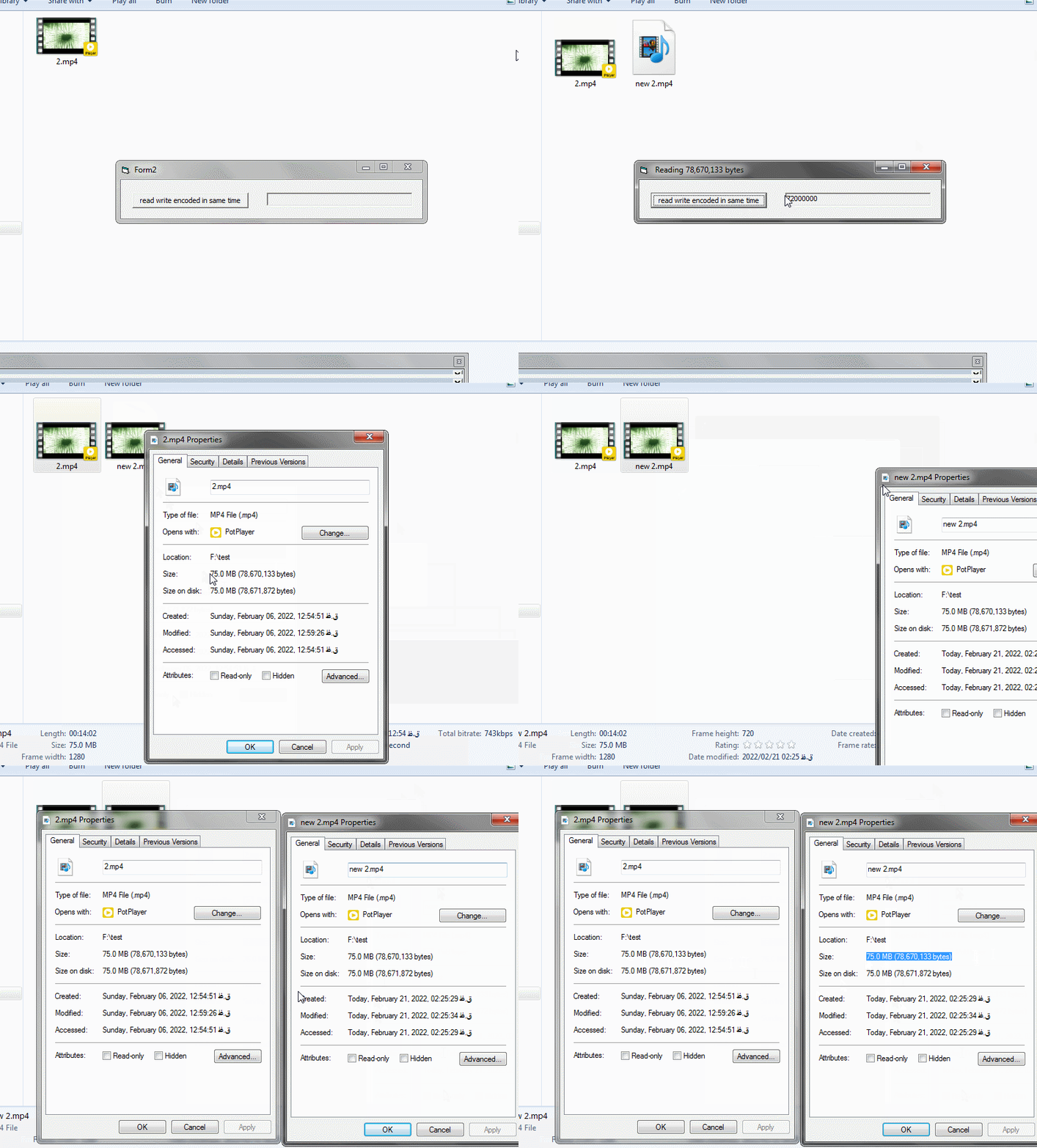
i solved problem and tested over 3 gigabyte ,i attached exe and some test video and images .
i used mdAesCtr.bas for encrypt and decrypt arrays and i used HugeBinaryFile.cls and fixed some bugs in HugeBinaryFile.cls for work with huge file size.
tested :
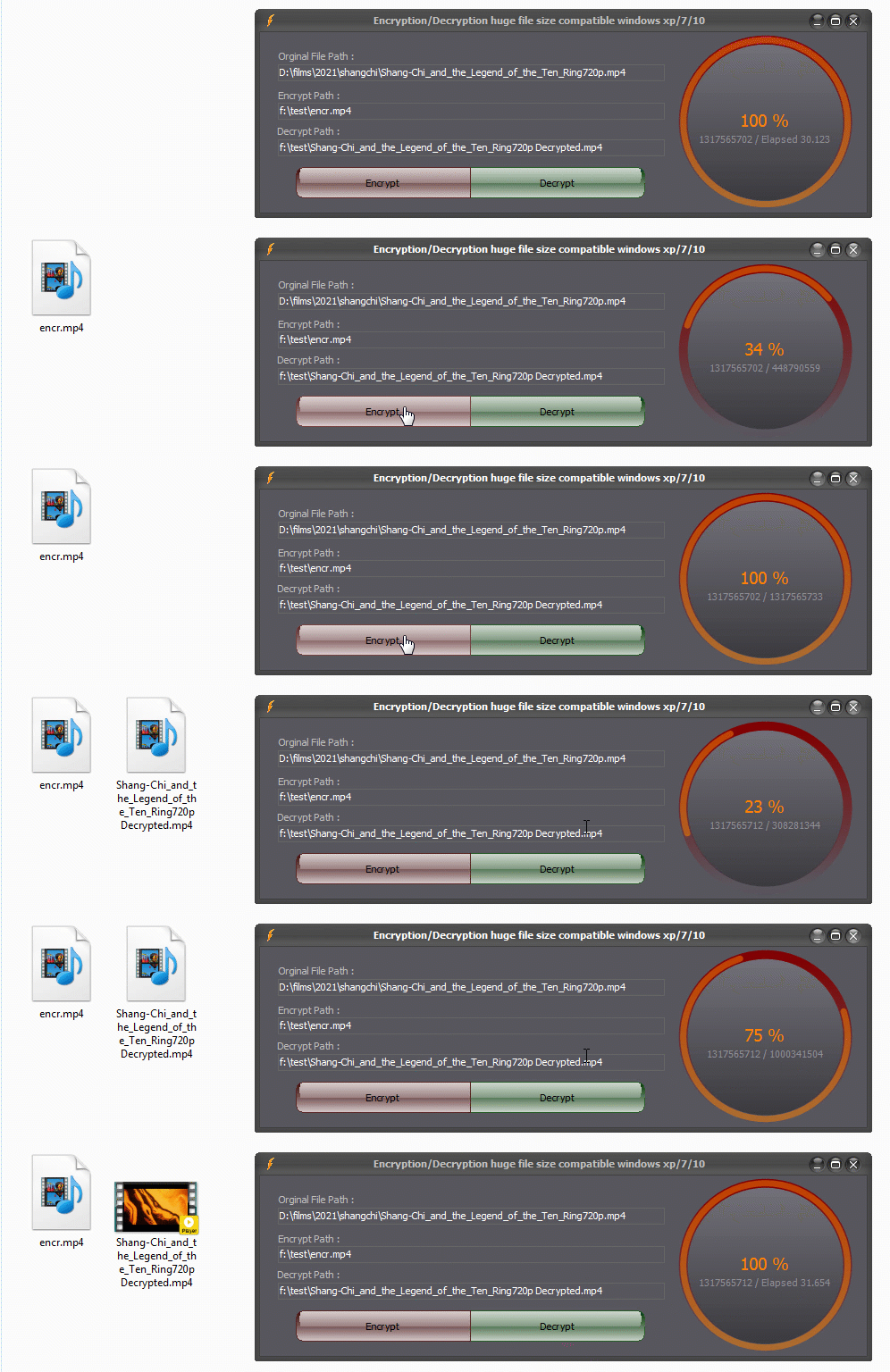
its jst a animated gif about process but full video tested attached in link.
Re: [RESOLVED] Aes encryption worked on windows 7 and win 10 but notworkd on winxp!!
Just cobbled together a mdStreamSupport.bas module which has pretty much the same functionality as HugeBinaryFile.cls above but wraps IStream interface as returned by SHCreateStreamOnFile API function (which btw supports long file names) and can be used to handle binary files of arbitrary size.
Here is how to use the IStream wrapper module with latest revision of mdAesCbc.bas for XP compatible AES-256 encryption in CBC mode.
Code:
Option Explicit

Private Const RDW_INVALIDATE                As Long = &H1
Private Const RDW_ERASE                     As Long = &H4
Private Const RDW_ALLCHILDREN               As Long = &H80
Private Const RDW_UPDATENOW                 As Long = &H100
Private Const RDW_FRAME                     As Long = &H400

Private Declare Function RedrawWindow Lib "user32" (ByVal hWnd As Long, ByVal lprcUpdate As Long, ByVal hrgnUpdate As Long, ByVal fuRedraw As Long) As Long

Private m_sOperName             As String
Private m_bOperCancel           As Boolean
Private m_dblOperTimer          As Double

Private Sub Form_Click()
    Dim baKey()         As Byte

    On Error GoTo EH
    If LenB(m_sOperName) <> 0 Then
        Exit Sub
    End If
    baKey = StrConv("32-byte secret key and 16-byte IV", vbFromUnicode)
    If Not EncryptFile("D:\TEMP\aaa.mkv", "D:\TEMP\bbb.mkv", baKey) Then
        Debug.Print "EncryptFile cancelled"
        Exit Sub
    End If
    If Not DecryptFile("D:\TEMP\bbb.mkv", "D:\TEMP\ccc.mkv", baKey) Then
        Debug.Print "DecryptFile cancelled"
        Exit Sub
    End If
    Exit Sub
EH:
    MsgBox Err.Description, vbCritical
End Sub

Private Sub Form_QueryUnload(Cancel As Integer, UnloadMode As Integer)
    If LenB(m_sOperName) <> 0 Then
        If MsgBox("Do you want to cancel " & m_sOperName & " operation?", vbQuestion Or vbYesNo) = vbYes Then
            m_bOperCancel = True
        End If
        Cancel = 1
    End If
End Sub

Private Sub pvStartOperation(sName As String)
    m_sOperName = sName
    m_bOperCancel = False
    m_dblOperTimer = Timer
End Sub

Private Function pvEndOperation() As Boolean
    Label1.Caption = Label1.Caption & " (" & Format$(Timer - m_dblOperTimer, "0.0") & " sec)"
    Call RedrawWindow(hWnd, 0, 0, RDW_INVALIDATE Or RDW_ALLCHILDREN Or RDW_ERASE Or RDW_FRAME Or RDW_UPDATENOW)
    m_sOperName = vbNullString
    pvEndOperation = Not m_bOperCancel
End Function

Private Function pvShowProgress(cCurrent As Currency, cTotal As Currency, Optional ByVal AllowCancel As Boolean) As Boolean
    If cTotal <> 0 Then
        Label1.Caption = m_sOperName & ": " & Format$(cCurrent * 100 / cTotal, "0.0") & "% complete"
    Else
        Label1.Caption = m_sOperName & ": N/A"
    End If
    Call RedrawWindow(hWnd, 0, 0, RDW_ALLCHILDREN Or RDW_FRAME Or RDW_UPDATENOW)  ' RDW_INVALIDATE Or RDW_ERASE
    If AllowCancel Then
        DoEvents
        pvShowProgress = Not m_bOperCancel
    Else
        pvShowProgress = True
    End If
End Function

Private Function EncryptFile(sSrcFile As String, sDestFile As String, baKey() As Byte) As Boolean
    Const CHUNK_SIZE    As Long = 1024& * 1024
    Dim pInput          As stdole.IUnknown
    Dim pOutput         As stdole.IUnknown
    Dim baChunk()       As Byte
    Dim cTotal          As Currency
    Dim cCurrent        As Currency

    pvStartOperation "Encrypt file"
    AesChunkedInit baKey
    Set pInput = StreamOpenFile(sSrcFile)
    Set pOutput = StreamOpenFile(sDestFile, AlwaysCreate:=True)
    cTotal = StreamGetSize(pInput)
    Do While pvShowProgress(cCurrent, cTotal, AllowCancel:=True)
        baChunk = StreamReadBytes(pInput, CHUNK_SIZE)
        If UBound(baChunk) < 0 Then
            Exit Do
        End If
        cCurrent = cCurrent + UBound(baChunk) + 1
        AesChunkedEncryptArray baChunk, baChunk, Final:=cCurrent >= cTotal
        StreamWriteBytes pOutput, baChunk
    Loop
    EncryptFile = pvEndOperation()
End Function

Private Function DecryptFile(sSrcFile As String, sDestFile As String, baKey() As Byte) As Boolean
    Const CHUNK_SIZE    As Long = 1024& * 1024
    Dim pInput          As stdole.IUnknown
    Dim pOutput         As stdole.IUnknown
    Dim baChunk()       As Byte
    Dim cTotal          As Currency
    Dim cCurrent        As Currency

    pvStartOperation "Decrypt file"
    AesChunkedInit baKey
    Set pInput = StreamOpenFile(sSrcFile)
    Set pOutput = StreamOpenFile(sDestFile, True)
    cTotal = StreamGetSize(pInput)
    Do While pvShowProgress(cCurrent, cTotal, AllowCancel:=False)
        baChunk = StreamReadBytes(pInput, CHUNK_SIZE)
        If UBound(baChunk) < 0 Then
            Exit Do
        End If
        cCurrent = cCurrent + UBound(baChunk) + 1
        AesChunkedDecryptArray baChunk, baChunk, Final:=StreamEOF(pInput)
        StreamWriteBytes pOutput, baChunk
    Loop
    DecryptFile = pvEndOperation()
End Function
cheers,
</wqw>
Last edited by wqweto; Feb 23rd, 2022 at 08:11 AM.
Re: [RESOLVED] Aes encryption worked on windows 7 and win 10 but notworkd on winxp!!
My problem was solved in number #13, but if I want to use your example on #14, I had 3 questions during the test, and the third question is the most important:
1- At the time of encryption or decryption, the program depends on the size of the file and does not allow any more work, and it seems that the memory is too busy and the system slows down during or after processing. In HugeBinaryFile class, it has options such as autoflush. Although in my example the program does not hang in number #13, but I did not use autoflush and I do not know is necessary or not and my english is weak, but what can I do if the program does not hang in your example, I also tested by adding "doevents" too and the problem remained.am i should be use sepeare timer replace with ur do loop or better way?
2. How to show the percentage of progress of encryption or decryption on ur example #14 (percnetage of bytes encrypt/decrypt or like as 0 to 100).
3- If I want to decrypt this large file inside the program without saving it on disk and play it, is there a way?
I have two problems here: 1- How to save a large file inside the program without using the classic VB resource for better protect resources and 2- How to decrypt and play it without saving it to disk. i created a seperate thread some days ago and i am doing find solutions for next steps in that,and here is realated to that.
(For example, I have an 800 MB or 1 GB or 500 MB mp4 or mkv file that I do not want to have on the disk, i want keep theme inside the program,maybe keep encryption and need decryption inside the program without save on disk,if not pissible to keep these huge files size ok for example if i have external encrypted file how can decrypt this huge file without save on disk and play it inside program)
Last edited by Black_Storm; Feb 21st, 2022 at 08:46 PM.
Re: [RESOLVED] Aes encryption worked on windows 7 and win 10 but notworkd on winxp!!
@Black_Storm,
1- If you're running from the IDE what wqweto posted the lag will be from the Debug.Print.
2- Add a counter to the loop, get the total file size, divide it by the chuck size, your progress % is the counter value / chunks.
3- Before you go any farther with this idea, how much video data do you need to be able to store? Because we can solve this problem right now if it's more than 4GB: Not possible.
Then even if you're not facing that hard limit, you need to be aware to do what you're asking, editing live running code, you're going to be running up against anti-virus and OS anti-malware security features that won't be big fans of your self-modifying exe. You can get around those, but it's even more added complexity, which is nothing compared to the final problem: Some of the code will be running from memory as Windows maps the exe file and loads what's needed, so you're going to have some horrific crashes as those get out of sync if things aren't handled perfectly.
I don't know if it's you or someone you're working for that's so dead set against having a 2nd file, but however difficult this may seem, convincing them or yourself a 2nd file isn't going to make the difference whether you get cracked or not will definitely be the easier route.
Re: [RESOLVED] Aes encryption worked on windows 7 and win 10 but notworkd on winxp!!
i tested this on windows xp/7/10 64bit and worked good with huge files.
i changed some part with this :
Code:
Private Sub EncryptFile(sSrcFile As String, sDestFile As String, baKey() As Byte)
    ' fixed error about main files size smaller than chunk difination

    Dim CHUNK_SIZE  As Long

    Dim pInput      As stdole.IUnknown

    Dim pOutput     As stdole.IUnknown

    Dim baChunk()   As Byte

    Dim dblTimer    As Double

    Dim lSize       As Currency

    Dim Chunkreaded As Currency

    dblTimer = Timer

    AesChunkedInit baKey
    Set pInput = StreamOpenFile(sSrcFile)
    Set pOutput = StreamOpenFile(sDestFile, AlwaysCreate:=True)

    lSize = StreamGetSize(pInput)
    ' if size of file smaller than chunksize

    If lSize < (1024@ * 1024 * 2) Then CHUNK_SIZE = lSize Else CHUNK_SIZE = 1024@ * 1024 * 2 ' x mb
    Chunkreaded = 31 ' extra  byte
    p.Value = 0
    p.Caption1 = p.Value & " %"
    p.Caption2 = ""

    Do
        DoEvents

        baChunk = StreamReadBytes(pInput, CHUNK_SIZE)

        If UBound(baChunk) < 0 Then

            Exit Do

        End If

        Chunkreaded = Chunkreaded + UBound(baChunk) + 1 ' +1  added because of UBound

        ' progress
        p.Caption2 = lSize & " / " & Chunkreaded


        If CHUNK_SIZE = lSize Then
            ' progress
            p.Value = 100
            p.Caption1 = p.Value & " %"
        Else
            ' progress
            p.Value = Fix(CCur((Chunkreaded * 100) / lSize))
            p.Caption1 = p.Value & " %"
        End If


        DoEvents

        AesChunkedEncryptArray baChunk, baChunk, Final:=StreamEOF(pInput)
        StreamWriteBytes pOutput, baChunk
    Loop
    ' progress
    p.Caption2 = lSize & " / Elapsed " & Format$(Timer - dblTimer, "0.000")
    p.Value = 100
    p.Caption1 = p.Value & " %"
End Sub

Private Sub DecryptFile(sSrcFile As String, sDestFile As String, baKey() As Byte)

    ' fixed error about main files size smaller than chunk difination

    Dim CHUNK_SIZE  As Long

    Dim pInput      As stdole.IUnknown

    Dim pOutput     As stdole.IUnknown

    Dim baChunk()   As Byte

    Dim dblTimer    As Double

    Dim lSize       As Currency

    Dim Chunkreaded As Currency

    dblTimer = Timer
    AesChunkedInit baKey
    Set pInput = StreamOpenFile(sSrcFile)
    Set pOutput = StreamOpenFile(sDestFile, True)

    lSize = StreamGetSize(pInput)

    ' if size of file smaller than chunksize

    If lSize < (1024@ * 1024 * 2) Then CHUNK_SIZE = lSize Else CHUNK_SIZE = 1024@ * 1024 * 2 ' x mb
    Chunkreaded = 0 ' extra  byte
    ' progress
    p.Value = 0
    p.Caption1 = p.Value & " %"

    Do

        baChunk = StreamReadBytes(pInput, CHUNK_SIZE)

        If UBound(baChunk) < 0 Then

            Exit Do

        End If

        Chunkreaded = Chunkreaded + UBound(baChunk) + 1 ' +1  added because of UBound

        ' progress
        p.Caption2 = lSize & " / " & Chunkreaded

        If CHUNK_SIZE = lSize Then
            ' progress
            p.Value = 100
            p.Caption1 = p.Value & " %"
        Else
            ' progress
            p.Value = Fix(CCur((Chunkreaded * 100) / lSize))
            p.Caption1 = p.Value & " %"
        End If

        DoEvents
        AesChunkedDecryptArray baChunk, baChunk, Final:=StreamEOF(pInput)
        StreamWriteBytes pOutput, baChunk
    Loop

    ' progress
    p.Caption2 = lSize & " / Elapsed " & Format$(Timer - dblTimer, "0.000")
    p.Value = 100
    p.Caption1 = p.Value & " %"

End Sub
@Black_Storm,
1- If you're running from the IDE what wqweto posted the lag will be from the Debug.Print.
2- Add a counter to the loop, get the total file size, divide it by the chuck size, your progress % is the counter value / chunks.
3- Before you go any farther with this idea, how much video data do you need to be able to store? Because we can solve this problem right now if it's more than 4GB: Not possible.
Then even if you're not facing that hard limit, you need to be aware to do what you're asking, editing live running code, you're going to be running up against anti-virus and OS anti-malware security features that won't be big fans of your self-modifying exe. You can get around those, but it's even more added complexity, which is nothing compared to the final problem: Some of the code will be running from memory as Windows maps the exe file and loads what's needed, so you're going to have some horrific crashes as those get out of sync if things aren't handled perfectly.
I don't know if it's you or someone you're working for that's so dead set against having a 2nd file, but however difficult this may seem, convincing them or yourself a 2nd file isn't going to make the difference whether you get cracked or not will definitely be the easier route.
1-Before asking the question in #15, I had converted all the debugs to caption=xxx or label.caption=xxx and then asked the question, but I solved the problem by setting the timer control, but still my question 1 remains in #15 and is about memory and slow occupation. The speed of the computer is working at high volumes. Can the memory be optimized here like the previous HugeBinaryFile class (autoflush method)?
2-I sent the code I added and changed above so solved that question.
3- The number of videos is not known, but the size of each file can be estimated up to 300 to 400 MB, and the number of files may reach 10. But if we consider the number of files less than 4 GB, what is the solution?
Yes, I know about editing running code, and I've talked enough about it before in the threads I created.
I do not work for a specific person and the company has many people, I have done this before with less features and work with separate files, but this time it is different, the files must be inside the executable file.
I'm still looking for question 3 on how to play this file without having to save it to disk.
For example, if I have an encrypted file with a size of 300 or 400 MB, but I want to decrypt it and play it without having to write it to disk, what should I do?
My two issues
1- How to decrypt without saving to disk
2- Play formats such as mp4 or mkv in the program.
Last edited by Black_Storm; Feb 22nd, 2022 at 10:18 PM.
Re: [RESOLVED] Aes encryption worked on windows 7 and win 10 but notworkd on winxp!!
Another option would be to provide a custom implementation of ISequentialStream (or IStream) which decrypts on the fly, this provided that the media player in use supports playback from streams (not only files on disk).
Re: [RESOLVED] Aes encryption worked on windows 7 and win 10 but notworkd on winxp!!
Originally Posted by wqweto
Just updated post #14 with pvStartOperation, pvShowProgress and pvEndOperation functions which
- implement percentage progress (proper call of RedrawWindow API function)
- optionally allow cancellation on form query unload with AllowCancel:=True (only on encrypt operation in sample)
- and prevent reentrancy of form click which is important if you call DoEvents for whatever reason
i choised a sample mp4 with with size over 1 gig and encr is work but in decr program will be hang and stoped desc after some seconds :
The problem is still slow. The speed of the computer or the memory occupied when working with huge size files is not solved, of course, if I want to use your module.
important for me now is decrypt without save on disk and play it,how can do that?
Last edited by Black_Storm; Feb 23rd, 2022 at 06:59 PM.
Re: [RESOLVED] Aes encryption worked on windows 7 and win 10 but notworkd on winxp!!
Originally Posted by Schmidt
1) ... start a mini-webserver-instance "InProcess", which "streams" the decrypted buffers
2) ... use a Browser-Control as the "player"
It does not seem logical to set up a web service, but for my web players many years ago I used players that were online like as jwplayer or etc ... and needed internet, but now I do not want to use any internet connection
If I want to mention just like you in general, yes, there is a lot of ideas, but now I need a sample code. If you have examples in this case, send it.
In another thread that was related to this issue, I already showed a few examples of work that used players such as vlc that can only play, but there are two issues
1- To use Activex like VLC, many files such as plugins had to be installed
2. Now the issue is a little different because we want to play a 700 MB or 300 MB file, for example, without giving the address of the physical file and of course after decrypt ,the player must be able to read the presentations (decrypts arrays) and be able to play.
Originally Posted by wqweto
Another option would be to provide a custom implementation of ISequentialStream (or IStream) which decrypts on the fly, this provided that the media player in use supports playback from streams (not only files on disk).
</wqw>
An algorithm that is obvious
1- Read some buffer and decrypt and play it
2- Read the next amount
I do not know if it is possible to load a whole file of 300 MB or 700 MB or ... in memory and the second issue is how to play it, so it must be possible to move between offset or positions in the presentation
any sample code or project?
Last edited by Black_Storm; Feb 23rd, 2022 at 07:11 PM.
Re: [RESOLVED] Aes encryption worked on windows 7 and win 10 but notworkd on winxp!!
Originally Posted by Black_Storm
but in decr program will be hang and stoped desc after some seconds :
Yes, this will need to either spin the message pump and discard mouse/keyboard messages or use DisableProcessWindowsGhosting API function to prevent OS from marking app window as "(not responding)" and ghosting it with white overlay which hides the progress indicator beneath.
Re: [RESOLVED] Aes encryption worked on windows 7 and win 10 but notworkd on winxp!!
Originally Posted by Black_Storm
any sample code or project?
You had enough free code in this thread. If you keep on demanding any more code you have to be prepared to hire a dedicated developer to whom to voice your "demands".
If you are not planning on hiring anyone then keep your tone down, get you sh*t together and start programming whatever wild ideas you have in mind instead.
Re: [RESOLVED] Aes encryption worked on windows 7 and win 10 but notworkd on winxp!!
Originally Posted by wqweto
Yes, this will need to either spin the message pump and discard mouse/keyboard messages or use DisableProcessWindowsGhosting API function to prevent OS from marking app window as "(not responding)" and ghosting it with white overlay which hides the progress indicator beneath.
your answer is like as BLAH,BLAH,BLAH ... !!! stop answers like as sh**t.we have no time for this and u can stay safe at ur home.you can go and work on your codes without need send again here :|.this thread resolved at #13.
for your answers :
It is true that you are explaining that minor items should be added, but it stops when the main program decryption loop hangs / stops, especially in the case of huge size.
So it is better to send the main decryption processes which is one of the main parts without any problem until it is necessary to come and explain that other codes must be added so that the program does not hang !!!
Originally Posted by wqweto
You had enough free code in this thread. If you keep on demanding any more code you have to be prepared to hire a dedicated developer to whom to voice your "demands".
If you are not planning on hiring anyone then keep your tone down, get you sh*t together and start programming whatever wild ideas you have in mind instead.
did u see that in #13, i dont think so:
i solved problem and tested over 3 gigabyte ,i attached exe and some test video and images .
i used mdAesCtr.bas for encrypt and decrypt arrays and i used HugeBinaryFile.cls and fixed some bugs in HugeBinaryFile.cls for work with huge file size.
As I mentioned before, the problem with this thread was already solved in issue 13 before more code samples.
You said goodluck in #10 and came back with newer codes in #14 when you see that the question is solved and the thread is resolved!!!
Originally Posted by wqweto
Good luck finding solutions!
So there is no need to refer to more free codes that you started sending it after the number 13 !!! Someone didn't force you to go back and send more codes with bugs and as i said before We were not waiting for you and your low-importance comments.
After your code at 14 I mentioned in the number 15 that
My problem was solved in number #13, but if I want to use your example on #14, I had 3 questions during the test, and the third question is the most important:
The 2 next question that was sent based on your re-edit problem codes in 14.
Before your answer was answered in 19 and you re-returned with troubled codes.
Isn't it better to stop this your stupid process and if you say "goodluck" do not come back again by codes with bugs and explain theme?!!!
I have already answered enough of your ridiculous questions and you first came up with the idea of hiring.
I already answered that I do not have time to hire someone like you, the capacity for people like you is full.you can think of hiring somewhere else.
So if I want to pay a cost to hire people like you, I can use the same non-free Active-x better than hiring like as you.
although I mentioned earlier that it is possible to solve some sections with the help of non-free activex, but you have to It seems you do not read.
i am use Xceed Encryption activex but i want know what is best encryption or descryption for big size data for example
again old answer : No one has forced you to respond here and waste other people's time with sample codes.
any sample code or project?
The question was added at the end of the text,But no wonder you can't see,you are not the only addressee of that question and I am not waiting for you to answers like as sh**t and, maybe your help is not needed.you can say good luck again if u know means of it !!! .sorry Your feedback does not matter and this thread resolved at #13.we are not available for u from this time.Good luck and bye.
Last edited by Black_Storm; Feb 24th, 2022 at 01:35 PM.
Reason: good luck is good luck
Re: [RESOLVED] Aes encryption worked on windows 7 and win 10 but notworkd on winxp!!
Originally Posted by Black_Storm
i tested this on windows xp/7/10 64bit and worked good with huge files.
i changed some part with this :
Code:
Private Sub EncryptFile(sSrcFile As String, sDestFile As String, baKey() As Byte)
    ' fixed error about main files size smaller than chunk difination

    Dim CHUNK_SIZE  As Long

    Dim pInput      As stdole.IUnknown

    Dim pOutput     As stdole.IUnknown

    Dim baChunk()   As Byte

    Dim dblTimer    As Double

    Dim lSize       As Currency

    Dim Chunkreaded As Currency

    dblTimer = Timer

    AesChunkedInit baKey
    Set pInput = StreamOpenFile(sSrcFile)
    Set pOutput = StreamOpenFile(sDestFile, AlwaysCreate:=True)

    lSize = StreamGetSize(pInput)
    ' if size of file smaller than chunksize

    If lSize < (1024@ * 1024 * 2) Then CHUNK_SIZE = lSize Else CHUNK_SIZE = 1024@ * 1024 * 2 ' x mb
    Chunkreaded = 31 ' extra  byte
    p.Value = 0
    p.Caption1 = p.Value & " %"
    p.Caption2 = ""

    Do
        DoEvents

        baChunk = StreamReadBytes(pInput, CHUNK_SIZE)

        If UBound(baChunk) < 0 Then

            Exit Do

        End If

        Chunkreaded = Chunkreaded + UBound(baChunk) + 1 ' +1  added because of UBound

        ' progress
        p.Caption2 = lSize & " / " & Chunkreaded


        If CHUNK_SIZE = lSize Then
            ' progress
            p.Value = 100
            p.Caption1 = p.Value & " %"
        Else
            ' progress
            p.Value = Fix(CCur((Chunkreaded * 100) / lSize))
            p.Caption1 = p.Value & " %"
        End If


        DoEvents

        AesChunkedEncryptArray baChunk, baChunk, Final:=StreamEOF(pInput)
        StreamWriteBytes pOutput, baChunk
    Loop
    ' progress
    p.Caption2 = lSize & " / Elapsed " & Format$(Timer - dblTimer, "0.000")
    p.Value = 100
    p.Caption1 = p.Value & " %"
End Sub

Private Sub DecryptFile(sSrcFile As String, sDestFile As String, baKey() As Byte)

    ' fixed error about main files size smaller than chunk difination

    Dim CHUNK_SIZE  As Long

    Dim pInput      As stdole.IUnknown

    Dim pOutput     As stdole.IUnknown

    Dim baChunk()   As Byte

    Dim dblTimer    As Double

    Dim lSize       As Currency

    Dim Chunkreaded As Currency

    dblTimer = Timer
    AesChunkedInit baKey
    Set pInput = StreamOpenFile(sSrcFile)
    Set pOutput = StreamOpenFile(sDestFile, True)

    lSize = StreamGetSize(pInput)

    ' if size of file smaller than chunksize

    If lSize < (1024@ * 1024 * 2) Then CHUNK_SIZE = lSize Else CHUNK_SIZE = 1024@ * 1024 * 2 ' x mb
    Chunkreaded = 0 ' extra  byte
    ' progress
    p.Value = 0
    p.Caption1 = p.Value & " %"

    Do

        baChunk = StreamReadBytes(pInput, CHUNK_SIZE)

        If UBound(baChunk) < 0 Then

            Exit Do

        End If

        Chunkreaded = Chunkreaded + UBound(baChunk) + 1 ' +1  added because of UBound

        ' progress
        p.Caption2 = lSize & " / " & Chunkreaded

        If CHUNK_SIZE = lSize Then
            ' progress
            p.Value = 100
            p.Caption1 = p.Value & " %"
        Else
            ' progress
            p.Value = Fix(CCur((Chunkreaded * 100) / lSize))
            p.Caption1 = p.Value & " %"
        End If

        DoEvents
        AesChunkedDecryptArray baChunk, baChunk, Final:=StreamEOF(pInput)
        StreamWriteBytes pOutput, baChunk
    Loop

    ' progress
    p.Caption2 = lSize & " / Elapsed " & Format$(Timer - dblTimer, "0.000")
    p.Value = 100
    p.Caption1 = p.Value & " %"

End Sub
1-Before asking the question in #15, I had converted all the debugs to caption=xxx or label.caption=xxx and then asked the question, but I solved the problem by setting the timer control, but still my question 1 remains in #15 and is about memory and slow occupation. The speed of the computer is working at high volumes. Can the memory be optimized here like the previous HugeBinaryFile class (autoflush method)?
2-I sent the code I added and changed above so solved that question.
3- The number of videos is not known, but the size of each file can be estimated up to 300 to 400 MB, and the number of files may reach 10. But if we consider the number of files less than 4 GB, what is the solution?
Yes, I know about editing running code, and I've talked enough about it before in the threads I created.
I do not work for a specific person and the company has many people, I have done this before with less features and work with separate files, but this time it is different, the files must be inside the executable file.
I'm still looking for question 3 on how to play this file without having to save it to disk.
For example, if I have an encrypted file with a size of 300 or 400 MB, but I want to decrypt it and play it without having to write it to disk, what should I do?
My two issues
1- How to decrypt without saving to disk
2- Play formats such as mp4 or mkv in the program.
Hi Black_Storm. thats a nice looking circle progress. is that a usercontrol. would you mind sharing it.?



 [RESOLVED] Aes encryption worked on windows 7 and win 10 but notworkd on winxp!!! how fix that?

 Reply With Quote

 Originally Posted by Black_Storm




 .sorry Your feedback does not matter and this thread resolved at #13.we are not available for u from this time.Good luck and bye.

