|

-
Mar 16th, 2021, 02:46 PM
#161
Re: [VB6] ucShellBrowse: A modern replacement for Drive/FileList w/ extensive feature
Sorry about that the next version I'm working on adds that argument. I've updated the download to remove it for now, or you can just delete the siItem argument and use the commented out way of changing the shell item (that's the only change):
Code:
Private Sub ucShellTree1_ItemSelect(sName As String, sFullPath As String, bFolder As Boolean, hItem As Long)
'If bStartup = False Then
    If bFolder Then
        'Previously we set by path, but this won't work with Win10 virtual devices like phones and cameras
        'ucShellTree had to be extensively modified to not navigate or set the selected ishellitem by just the path either
'        ucShellBrowse1.BrowserPath = sFullPath
         ucShellBrowse1.BrowserOpenItem ucShellTree1.SelectedShellItem
    End If
'End If
End Sub
-
Mar 18th, 2021, 09:26 PM
#162
Re: [VB6] ucShellBrowse: A modern replacement for Drive/FileList w/ extensive feature
Major Project Update: Version 9.5
Originally, this was just going to be a quick fix... the black boxes for shortcut overlays still appeared in Med/L/XL icon view (when switching to a new folder in high perf mode).
HOWEVER... I went on a crazy coding binge making yet another update so soon worth it, by tackling some long standing problems:
-In the Details Pane, the properties boxes would routinely be placed such that property names got cut off, or it overlapped the type name, or there was an excessive gap at the bottom. The layout has been completely re-done from scratch. All columns are now the appropriate width for the properties they contain, and the next column starts where the previous one let off. There's no more issues with the file names overlapping, no more huge gaps at high DPI, everything is perfect.
-You can now set the font for the ListView/ComboBox, and Details Pane, separate from the main font for the rest of the control, right from the Properties Window with a font dialog. If you don't set the LV/CB or DT font, it defaults to the main control font, and stays synced to that until you specifically set it to something else.
-All the buttons/frames/textboxes now inherit the main control font, with the exception of being limited to size 9 for layout constraints.
-There's lists for Files and Folders (selected and checked, plus full paths for each), but now there's a combined list that contains both. Items(), ItemsFullParsing(), ItemCount, ItemsSelected(), ItemsSelectedFull(),' ItemsSelectedCount, ItemsChecked(), ItemsCheckedFull(), and ItemsCheckedCount.
A couple other small features and minor fixes round out the release. I've tried to test things thoroughly, so assuming nothing major pops up I intend to keep this version up for a while.
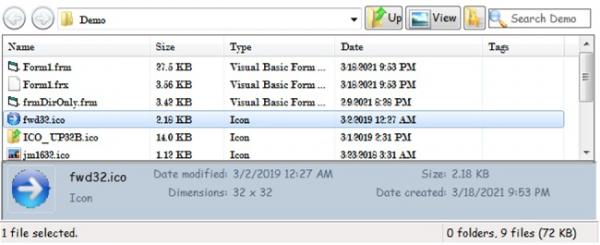


Separate fonts and vastly improved Details Pane layout. Long properties like 'Contributing artists' had been particularly problematic.
Code:
'New in v9.5 (Released 18 Mar 2021)
'
'-Completely redid the Detail Pane property placement from scratch. Properties are
' no longer overlapping regardless of length, and are spaced according to their
' actual length so a column with short properties doesn't take up way more space
' then needed. The UserOption cxMaxProp specifies the maximum length of an edit
' box for a property, cxMinProp specifies the minimum.
' The file name/type display in the Details Pane also expands based on whether
' there's enough room to show any properties.
'
'-Made fonts independent of eachother. There's now FontFileControls that sets the
' ListView and ComboBox font, and FontDetails that sets the font for the Details
' Pane. Everything else is controlled by the original Font property.
' FontDetails and FontFileControls will default to the main font until you set them
' to something different.
' So if you're upgrading an existing project, no fonts will change, it will simply
' inherit the existing ones, with the exception that there's no more defaulting to
' a system font, so if you had DetailsPaneUseControlFont = False, it would now be
' the main font until you changed it.
'
'-Added Items(), ItemsFullParsing(), ItemCount, ItemsSelected(), ItemsSelectedFull(),
' ItemsSelectedCount, ItemsChecked(), ItemsCheckedFull(), and ItemsCheckedCount
' functions to retrieve a list of these for both files and folders instead of one
' or the other.
'
'-Added FilesCheckedCount and FoldersCheckedCount since there were counts for the
' full list and selected list, but not the checked list.
'
'-All controls on the Column Select and Search popups now inherit the main control
' font. Due to layout constraints, the size is limited to 9 points for now, so if
' the main font is larger, it will be reduced *only for these controls* (and the
' buttons in the Control Box); for the rest the full size is still used.
'
'-Added ControlBarHeight property. If you're using ListViewOffsetX to open a blank
' space for e.g. a ShellTree, it's helpful to know the current height of the
' control bar, since a larger font size will make it taller. (Get only).
' The ShellOpenDemo project shows this in use.
'
'-Final sizing wasn't applied when the control was first loaded into the IDE form
' designer; it now runs the full resize routine so it should better match the
' runtime appearance. Always check that; some things can't/won't be reflected at
' design time. Most notably, if it's view is Thumbnail View, that won't be applied
' until runtime, so the designer will show it in the last normal mode it was in.
'
'-(Bug fix) Changing the font during runtime resulted in the font on the Command
'           Buttons being 'stuck'... it wouldn't fonts again until the app
'           restarted, or if in the IDE, until the entire IDE restarted.
'
'-(Bug fix) If you set the Details Pane to not inherit the main font, the spacing
'           and sizing were incorrect (and illegible). However, that option has
'           now been removed since it can be set separately.
'
'-(Bug fix) The black box overlay bug was not actually fixed for MD/L/XL icon view.
NEW! I'm also now distributing ucShellBrowse and ucShellTree together as a compiled OCX, complete with SxS resources to create registration-free distributions.
[VB6] Shell Controls OCX
Last edited by fafalone; Mar 19th, 2021 at 05:14 AM.
Reason: OCX now available
-
Mar 22nd, 2021, 10:17 PM
#163
Re: [VB6] ucShellBrowse: A modern replacement for Drive/FileList w/ extensive feature
Project Update: Version 9.5 R1
I have no idea how this was overlooked but for some reason tabbing had stopped working. Also before it stopped working, tabbing then shift-tabbing between a VB control and API control resulted in focus getting stuck.
Also a minor bug fix; after Tile View was selected, moving to a new folder added an extra line that duplicated the file name. Also added a DetailsPaneOffsetX property, to move that over the same way as the ListView, letting you have a ShellTree etc. go further down the side--- the DemoEx sample has been updated to use this, while DemoOpenDlg continues to only offset the ListView.

Code:
'New in v9.5 R1 (Released 22 Mar 2021)
'
'-Added DetailsOffsetX property, so that you can e.g. have a ShellTree that goes
' all the way down to the StatusBar without also having the Details Pane under it.
'
'-(Bug fix) Eliminated memory leaks from unfreed font handles.
'
'-(Bug fix) After Tiles View is set, moving to a new directory causes there to be
'           a 4th line that duplicates the file name.
'
'-(Bug fix) Tabbing had stopped working. Also, when they were working, focus would
'           get stuck if you tabbed backwards between a VB and API control.
Last edited by fafalone; Mar 22nd, 2021 at 11:20 PM.
-
Mar 25th, 2021, 03:10 AM
#164
Re: [VB6] ucShellBrowse: A modern replacement for Drive/FileList w/ extensive feature
Project Update: Version 9.5 Revision 2
Sorry for yet another significant bug guys... the complexity is really getting out of hand for what I have time for 
The new focus system for arrows and tabs changed the way focus worked, such that if you clicked a button in the control bar (Up, View, etc) then clicked the Search Box or Combo edit box (if present and editable), enter keypresses went to the button, instead of the box, which made it impossible to search (unless you clicked another API control first, then went to search). I was able to find a workaround that fixed this without breaking the tab/arrow keys functionality.
Also made a major performance improvement for High Perf mode; for InfoTips on folders it won't search that folder for its contents, which could take a while for large folders. and it won't lookup link targets for those properties either; also InfoTipMode wasn't being changed during runtime. Finally, added Copy Names/Full Paths to the shell context menu.
Code:
'New in v9.5 R2 (Released 25 Mar 2021)
'
'-Added Context Menu items 'Copy names' and 'Copy full paths' to copy the selected
' items to the clipboard.
'
'-Substantial delays could result from mousing over certain items like a folder
' containing thousands of items while the InfoTip was generated, since the code
' was set to go deep to generate the best tip. Using slow tips is now disabled in
' High Perf Mode, as is looking up link targets and using their info. This doesn't
' effect most items; pictures, mp3s, etc, will still show metadata... as far as I
' can tell this only effects showing Size/Files/Folders in Folder infotips.
' You can toggle this setting with the User Option bLimitInfoTipsInHighPerfMode.
'
'-(Bug fix) Changes to InfoTipMode were not being applied during runtime.
'
'-(Bug fix) The new tab/arrow key system set the focus in such in way that if you
'           clicked on a button (View/Up/etc) then click on the Search Box or the
'           Dropdown edit box (if present and editable), the enter key went to the
'           last button pressed. I found a workaround to resolve that without the
'           tab/arrow keys breaking again.
-
Apr 1st, 2021, 08:07 PM
#165
Hyperactive Member

Re: [VB6] ucShellBrowse: A modern replacement for Drive/FileList w/ extensive feature
ShellBrowseDemoEx compiles but will not run. It stops on line 533
Code:
ucShellTree1.OpenToItem siItem, False
in Form1 with Run-time error 10: "The array is fixed or temporarily locked".
-
Apr 2nd, 2021, 02:04 PM
#166
Re: [VB6] ucShellBrowse: A modern replacement for Drive/FileList w/ extensive feature
Uncomment the bChanging check/toggle in ucShellBrowse1_DirectoryChanged and Form_Load... looks like I accidentally included the demo that was updated for the next ShellTree version, which eliminates the need for that.
Or just update the OpenToItem sub to the future version;
Code:
If bLoadDone = False Then Exit Sub
Dim lpFull As Long, sFull As String
si.GetDisplayName SIGDN_DESKTOPABSOLUTEPARSING, lpFull
sFull = LPWSTRtoStr(lpFull)
If (sFull <> "") Then
    If sFull = sSelectedItem Then Exit Sub
End If
bNavigating = True
bFlagBlockClkExp = False
pSetRedrawMode False
Hourglass True
lLoopTrack = 0
DebugAppend "OpenToItem " & sFull
If IsUSBDevice(sFull) Then
    DebugAppend "OpenToItem->Detected USB device, ensuring add..."
    Dim hrua As Long
    hrua = USBDeviceEnsureAdded(sFull)
    DebugAppend "OpenToItem->EnsureAdd result=" & hrua
End If
DebugAppend bExpandTarget
TVNavigate si, bExpandTarget, bSelectTarget
Hourglass False
pSetRedrawMode True
bNavigating = False
Last edited by fafalone; Apr 2nd, 2021 at 04:28 PM.
-
Apr 2nd, 2021, 04:32 PM
#167
Hyperactive Member
Re: [VB6] ucShellBrowse: A modern replacement for Drive/FileList w/ extensive feature
Okay. Next problem with ShellBrowseDemoEx
OutputDirList (which is Command3). If I have one or more items selected in the UCShellBrowse1 control then a listing is output to the Immediate windows so that is okay. However, if there is nothing selected in the control, when I click on this button I get an error message "Subscript Out of range" and execution halts at line 316
Code:
Set pArSel = ucShellBrowse1.SelectedItems
My guess is that there needs to be a check to ensure that at least one item is selected in the control before that line of code executes. I tried to insert UCShellBrowse1.SelectedItems.GetCount but that didn't work.
-
Apr 2nd, 2021, 05:30 PM
#168
Re: [VB6] ucShellBrowse: A modern replacement for Drive/FileList w/ extensive feature
.The cost of developing controls is too high. It is best to give him a separate module. It is convenient for other people to be quoted. First, it is necessary. Well, super programming ability. Most It is difficult to get repaired when you encounter different bugs. The more difficult problems are more difficult.
If a control needs three or five modules. Each module is marked with detailed functions and how to call the method.
VB 6 has been abandoned by Microsoft more than 20 years, I do not know how the development in other countries, how many people use?
-
Apr 2nd, 2021, 09:00 PM
#169
Re: [VB6] ucShellBrowse: A modern replacement for Drive/FileList w/ extensive feature
 Originally Posted by MountainMan

Okay. Next problem with ShellBrowseDemoEx
OutputDirList (which is Command3). If I have one or more items selected in the UCShellBrowse1 control then a listing is output to the Immediate windows so that is okay. However, if there is nothing selected in the control, when I click on this button I get an error message "Subscript Out of range" and execution halts at line 316
Code:
Set pArSel = ucShellBrowse1.SelectedItems
My guess is that there needs to be a check to ensure that at least one item is selected in the control before that line of code executes. I tried to insert UCShellBrowse1.SelectedItems.GetCount but that didn't work.
Yeah it was just meant to display selected items.... ucShellBrowse.SetSelectedItemArray is the source of the error, and should have the following sanity check:
Code:
If cpidl Then
    Dim pdo As oleexp.IDataObject
    psfCur.GetUIObjectOf 0&, cpidl, apidl(0), IID_IDataObject, 0&, pdo
    If (pdo Is Nothing) = False Then
        oleexp.SHCreateShellItemArrayFromDataObject pdo, IID_IShellItemArray, siaSelected
    End If
End If
(it's encountering an undim'd apidl() )
I actually did add a counter, .ItemsSelectedCount, but that has a bug too, it doesn't differentiate between 0 and 1 because it's checking an array of paths and just reporting the UBound... it should be:
Code:
Public Function ItemsSelectedCount() As Long
If UBound(sSelectedFiles) = 0 Then
    If sSelectedFiles(0) = "" Then
        ItemsSelectedCount = 0
    Else
        ItemsSelectedCount = 1
    End If
Else
    ItemsSelectedCount = UBound(sSelectedFiles)
End If
End Function
The other counts all use a different method so are ok (you could e.g. check FilesSelectedCount+FolderSelectedCount which actually do do that check I missed here).
Apologies for more bugs, I'll have to update it tonight... I run through most common things in pre-release tests but it's just getting so complex that the few hours a week I have to work on it don't leave as much time to testing as needed.
@xiaoyao I'm not entirely sure what you're saying... this is just a personal fun project for me, I'm not spending any money developing this control. And there's pros/cons to splitting things up into different modules. It's great for a full project, but just for an individual control, I like having it as self-contained as possible.
Last edited by fafalone; Apr 2nd, 2021 at 09:06 PM.
-
Apr 2nd, 2021, 11:19 PM
#170
Hyperactive Member
Re: [VB6] ucShellBrowse: A modern replacement for Drive/FileList w/ extensive feature
No problem. All of us here appreciate the time and effort you put into this. We've all got day jobs (most anyway) so we understand limited time constraints. Thanks so much for developing these controls.
-
Apr 3rd, 2021, 01:54 AM
#171
Re: [VB6] ucShellBrowse: A modern replacement for Drive/FileList w/ extensive feature
Glad it's appreciated 
All those bugs and some others are now covered:
Project Update: Version 9.6
A number of small bug fixes make this release needed. Most critically, .SelectedFiles returned an error if nothing was selected. Also got in a couple small improvements; the focus issues are resolved even better now that the control box buttons are API created, custom shortcut overlays are loaded for Med/L/XL Icon and Thumbnail modes, and the View/Bookmark menus popup under the buttons (if that's where they're launched from) instead of whereever the mouse is.
Note on working with ucShellTree: That project has been updated such that there's no longer a need for a variable to track when a directory change is happening, so now all you need in the DirectoryChange event for ucShellBrowse is:
Code:
Private Sub ucShellBrowse1_DirectoryChanged(ByVal sFullPath As String, siItem As oleexp.IShellItem, pidlFQ As Long)
    ucShellTree1.OpenToItem siItem, False
End Sub
You'll want to grab the new version (2.6) of that before you run DemoEx or DemoOpenDlg in this download, as they've been updated to reflect this change and will error with an older version (and DemoEx accidentally had in the previous version, before 2.6 was released).
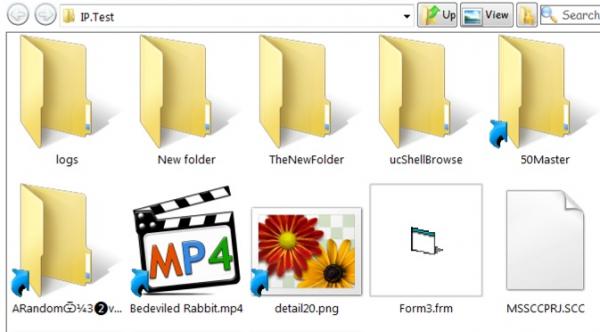
If you've set up custom shortcut overlays, they're now loaded. If not, no worries, it defaults to the system one if not set.
Code:
'New in Version 9.6 (Released 03 Apr 2021)
'
'-Replaced VB CommandButtons in Control Box with API-created ones, to avoid any
' remaining focus issues. Will do the Columns and Search popups at some point.
'
'-The View Menu and Bookmark Menu now pop up under their respective buttons,
' instead of wherever the mouse cursor is, which might be way off if it opened
' from a keyboard press rather than click. The right-click on the ListView back
' will still of course open at that point.
'
'-If the system shortcut overlay has been changed, used that instead. Only
' currently supported in Med/L/XL icon and Thumbnail Views. Can be disabled with
' the bUseCustomShortcutOverlay User Option.
'
'-(Bug fix) In certain modes, overlays wouldn't load.
'
'-(Bug fix) Fallback images for when ComCtl6 wasn't present, and the non-themed
'           back button image, had mysteriously vanished.
'
'-(Bug fix) If the Back/Fwd button were normal buttons, if they weren't enabled
'           the tab cycle would get stuck
'
'-(Bug fix) If you used a very large font for the file controls, but not for the
'           main UserControl font, and the Search Box was not visible, the bottom
'           of the Up/View/Bookmark buttons could be truncated.
'
'-(Bug fix) Memory leaks in thumbnail generation.
'
'-(Bug fix) .SelectedItems would cause an error if no items were selected when
'           it was called.
'
'-(Bug fix) .ItemsSelectedCount return 0 for both 0 and 1 items, then was off by
'           one for more.
'
'-(Bug fix) If you started in Files Only mode, and changed to Dir+Files or Dir
'           Only + Ctls during runtime, in some circumstances the control box
'           height would be too small and cut things off.
-
Apr 3rd, 2021, 06:58 AM
#172
Re: [VB6] ucShellBrowse: A modern replacement for Drive/FileList w/ extensive feature
Ignoring xiaoyaiao' gibbersiht completely. You are doing a good job faf.
-
Apr 21st, 2021, 02:59 PM
#173
Re: [VB6] ucShellBrowse: A modern replacement for Drive/FileList w/ extensive feature
Project Update: Version 9.6 Revision 2
Major issue: The ComboBox, when editing is enabled, would not display the full path when clicked, and in many circumstances could not be edited, and pressing enter would not open the path even if it could. This was related to focus issues from the IPAO update. Sorry this was not noticed for so long (how did no one notice this??).
Also fixed a couple minor issues; View Menu status bar tips stopped working again, and when the Search Box was grayed out while displaying results, the tab cycle got stuck on it, and graphics glitches with the Thicker control border style.
One new feature: The Security Zone is now displayed in the status bar like in Explorer, set with new ShowSecurityZone option (default=True). The icon and text are loaded from Windows.
I forgot to add a description for the new ShowSecurityZone option, but there's already a bunch of DLs so I'm not going to re-update. It will read:
"Displays the icon and description of the Security Zone of the loaded folder in the Status Bar, e.g. 'Computer', 'Local intranet', etc."

Code:
'New in v9.6 R2 (Released 21 Apr 2021)
'
'-The StatusBar will now show the Security Zone of the current location, if
' enabled with the ShowSecurityZone option, complete with the icon. The text
' (and icon) are loaded from Windows, so don't need manual localization.
'
'-The StatusBar shows a size grip if the Control Border Style is SBCB_Thicker,
' which makes it resizable.
'
'-(Bug fix) If the Search Box was grayed out, it couldn't receive focus and the
'           tab sequence got stuck.
'
'-(Bug fix) The status bar menu tips for the View Menu managed to stop working
'           again.
'
'-(Bug fix) If the Control Border was Thicker, which enables resizing, the
'           control would visually glitch.
'
'-(Bug fix) The ComboBox would not display the full path when clicked, and often
'           couldn't be edited, among other problems with it.
Last edited by fafalone; Apr 21st, 2021 at 09:05 PM.
-
Apr 22nd, 2021, 03:18 AM
#174
Re: [VB6] ucShellBrowse: A modern replacement for Drive/FileList w/ extensive feature
Project Update: Version 9.6 Revision 3
Re-released with additional fixes and features as Version 9.7.
Spent a bunch of time testing R2... all good... release... and of course the next day I can't so much as glance at the control without finding another bug.  Sorry guys. Pretty sure it's good now. Sorry guys. Pretty sure it's good now.
Last edited by fafalone; Apr 22nd, 2021 at 10:06 PM.
-
Apr 22nd, 2021, 10:05 PM
#175
Re: [VB6] ucShellBrowse: A modern replacement for Drive/FileList w/ extensive feature
Project Update: Version 9.7
(This version was pulled shortly after release for a major audit)
Last edited by fafalone; Apr 23rd, 2021 at 08:49 PM.
-
Apr 23rd, 2021, 08:55 PM
#176
Re: [VB6] ucShellBrowse: A modern replacement for Drive/FileList w/ extensive feature
Major Project Update: Version 10.0 This version update has been adapted and finalized from 9.6 R3/9.7 with several more features/fixes.
Every time I went to save 9.6R3/9.7, a new bug popped up. After it happened a bunch of times, I pulled the project entirely. Then, I conducted a thorough review of every single Property and Public method in the control, fixing numerous additional bugs in the process.
With that and a few more features, it's time for a Major Version bump. 10.0 is the most tested version of ucShellBrowse ever.
See the log below for a full list of new features and the extensive bug fix list.
Code:
'New in v10.0 (Released 24 Apr 2021) - Also partially released as 9.6 R3/9.7.
'   Numerous features have been added throughout the day, and after I point I just
'   pulled the project entire.
'   After that, I took my time and conducted an extensive review of every Property
'   and public method, and resolved numerous additional bugs.
'   With that and some additional features, it's time for a Major Version change.
'
'
'-Changing the Combo Type to DropdownList then back had ComboCanEdit set to false
' which could be confusing if it had been true before. Added checks to obviate the
' need for doing that.
'
'-For the ComboType DropdownList, added arrow key functionality. Down arrow opens
' the dropdown, then arrow keys move up/down and enter navigates to the currently
' highlighted folder. For the standard Dropdown type, the control automatically
' opens the folder above/below with the arrow keys; there's no way to drop down
' the list like the other mode.
'
'-Changed the default SearchBoxWidth from 115 to 140.
'
'-Now loads a larger icon for the Security Zone icon when m_ScaleX > 1. Previously,
' the icon was always 16x16 and therefore *extremely* tiny.
'
'-Spaced out the columns in the Details Pane a bit and added the yDetailSpacer
' User Option to easily customization this column spacing factor. Minimum=18.
'
'-Autocomplete by default shows a popup results list now.
'
'-FilesOnly and FoldersOnly now refresh the view to apply the change.
'
'-The InfoTipsLimitForHPF property replaces the bLimitInfoTipsInHighPerfMode
' User Option. Don't use QITIPF_USESLOWTIP or QITIPF_LINKUSETARGET in HighPerf
' mode. Mainly affects showing Size/Files/Folders on folder tips.
'
'-(Bug fix) Unfortunately there were still outstanding issues with the ComboBox.
'           The tab loop didn't work at all in DropdownList mode. The tab cycle
'           would get stuck in the ListView.
'
'-(Bug fix) Changing ShowSecurityZone during runtime resulted in multiple bad
'           status panels being added.
'
'-(Bug fix) If the startup view was Md/L/XL Icon or Thumbnails, Custom Shortcut
'           Overlay will not load, and the system default is used.
'
'-(Bug fix) The Security Zone panel didn't autoresize; some zones may have been
'           truncated.
'
'-(Bug fix) The Search Box was having sizing issues. It's not tenable to have its
'           font be the main font and not the FileControls Font (like the Combo);
'           it would be cut off at high DPI even though it was explicitly set to
'           the correct text height. So it's now set to that font.
'
'-(Bug fix) VB .TextWidth/.TextHeight calls do not support Unicode, so some control
'           characters common to PropertyStore strings, which are hidden/are not
'           graphical characters, would be replaced by ?, and formatted strings
'           could have 4+ of these, throwing off the width calculation by including
'           4 characters that are never rendered.
'           This affected the spacing in the Details Pane, primarily because 4 of
'           them are included in strings formatted as a Date.
'
'-(Bug fix) The Bookmark, View, and History menus could not be displayed in
'           DirOnlyWithControls mode, due to the ListView being the parent. The
'           UserControl hWnd is used instead *only if the ListView is not present*
'           avoiding losing the status tips yet again...
'
'-(Bug fix) The 'Thicker' border on the ListView causes too many problems if it's
'           allowed to just resize the ListView, so resizing is blocked. On the
'           whole control, the 'Thicker' border allowed resizing the control to
'           smaller than cxMinUC/cyMinUC, including down to 0 which would then go
'           on to crash/freeze the control and app.
'
'-(Bug fix) While the font applied to controls was limited, some fonts are slightly
'           larger at the same size and this could cause the Column Filter checkbox,
'           Column OK/Cancel buttons to not be wide enough and cut text off.
'
'-(Bug fix) This same issue applied to the Search Options popup. Items were resized
'           to accomdate a larger font that's still within the control font size max.
'
'-(Bug fix) When some items have properties written, Windows does this ridiculous
'           thing with a long sequence of creating several temp files and a bunch of
'           renames. The Notify handler can't make sense of them, and tmp files wound
'           up being added, and the original file with the wrong icon and sometimes
'           type, even when absolutely everything to set those seemed correct.
'           It's now flagged to ignore everything until it gets the last message in
'           the sequence, or an update that indicates only UPDATEITEM fired.
'
'-(Bug fix) SpecialFoldersInBookmarks was not being applied to the Bookmarks menu
'           when it's part of the View Menu from a ListView background click.
'
'-(Bug fix) In HighPerformanceMode, attributes weren't stored with the item, breaking
'           among other things, dimming hidden file icons.
'
'-(Bug fix) Even when AllowRename was True, a label edit could not be initiated to
'           rename a file. In versions before that became the behavior, you could
'           start a label edit, but clicking on the edit box ended the labeledit,
'           and arrows did not work. There were a bunch of extra SetFocusAPI calls
'           causing this from before IPAO.
'
'-(Bug fix) When navigating back to the Custom Folder after adding it earlier, it
'           would not load the associated custom column set, instead loading it
'           just used the current column set.
'
'-(Bug fix) ShowAltDataStreams was not listing the size and was listing the type as
'           File folder instead of "(Alternate data stream)"
'
'-(Bug fix) The description for GroupCollapseGroups was the opposite of what was
'           actually done.
'
'-(Bug fix) The GroupStartCollapsed option, when group based on Name, only had the
'           first group collapsed instead of all of them.
'
'-(Bug fix) SetFocusOnFiles had stopped working at some point.
'
'-(Bug fix) The Properties window has a GroupMode entry visible, but the control
'           was not grouping by in on startup.
'           Note: Only SBGB_Name, SBGB_Size, SBGB_Type, and SBGB_DateModified are
'                 supported on startup.
'
'-(Bug fix) When using ItemFilterFolder, shortcuts to folders would always be added
'           in regular load mode regardless of whether they were a match or not.
'
'-(Bug fix) The New Folder menu item and InvokeNewFolder sub would both create a
'           new folder, but would either never initiate or immediately cancel the
'           label edit to start the rename operation. Further, InvokeNewFolder
'           would add it to the bottom of the list without scrolling to it.
See Also: The OCX version has been updated to use 10.0 as well.
[VB6] Shell Controls OCX
The OCX has its own demo:

Just for fun I duplicated that demo using the .ctl version of ucShellBrowse and ucShellTree instead-- it's the attachment of this post, not included in the main download. It works like DemoEx and DemoOpenDlg in referencing ..\ucShellBrowse.ctl and ..\..\ucShellTree\ucShellTree.ctl.
(Edit: New demo is now in the main zip)
Last edited by fafalone; Apr 28th, 2021 at 01:35 AM.
-
Apr 28th, 2021, 01:22 AM
#177
Re: [VB6] ucShellBrowse: A modern replacement for Drive/FileList w/ extensive feature
Project Update: Version 10.0 R2
A bug managed to slip through by only occuring in a highly specific situation 
If your startup mode is FilesOnly, but have enabled the SearchBox option, then during runtime switch to a mode with the Control Box visible, the Search Box does not show up along with the rest, even if you toggle it off and on.
Since this involves a completely broken main feature, had to release an update.
Added the DemoFileProc from above to the zip.
Code:
'New in v10.0 R2 (Released 28 Apr 2021)
'
'-(Bug fix) If the Search Box was enabled, but the mode set to FilesOnly, then you
'           changed to Dir+Files or other mode with the top bar, the Search Box
'           did not become visible along with everything else.
-
Apr 28th, 2021, 02:35 AM
#178
Re: [VB6] ucShellBrowse: A modern replacement for Drive/FileList w/ extensive feature
ERRON ON:Optional dwACL As AUTOCOMPLETELISTOPTIONS = ACLO_FILESYSDIRS
PROJECT emoVBDir
-
Apr 28th, 2021, 02:40 AM
#179
Re: [VB6] ucShellBrowse: A modern replacement for Drive/FileList w/ extensive feature
Reference=*\G{F9015E81-CAAC-45C0-94E8-42B7DA5D7557}#4.6#0#..\..\Windows\SysWow64\oleexp.tlb#OLEEXP - olelib With Modern Interfaces v4.6
Reference=*\G{F9015E81-CAAC-45C0-94E8-42B7DA5D7558}#4.7#0#C:\Windows\SysWow64\oleexp4.7.tlb#OLEEXP - Modern Shell Interfaces for VB6, v4.7
42B7DA5D7557
42B7DA5D7558
The V4.7 guid is different, which makes it completely useless. Every project has to be changed manually. Can I change it back to the previous GUID?
-
Apr 28th, 2021, 03:54 AM
#180
Re: [VB6] ucShellBrowse: A modern replacement for Drive/FileList w/ extensive feature
I don't know why it's not just automatically referencing the new one but just uncheck the reference, close the references dialog, open it again, then browse to oleexp.tlb 4.7.
For the autocomplete error, the only reason you'd get that is if you were trying to use an older version of oleexp.tlb, you need to be using at least 4.61
In fact, ACLO_FILESYSDIRS was added in oleexp v3.5. If you're using a version that old, that would also explain why it's not automatically switching GUIDs either. (And since 3.x was oleexp3.tlb, are you using 2.x or 1.x??)
You're going to need to download the newest version of oleexp.tlb (4.7). There should only be *one* copy of oleexp.tlb on your system, in a common directory like Windows\SysWOW64. Once you've copied it there, open a project that references oleexp.tlb, goto 'references', uncheck any oleexp reference, click ok, open the dialog again, then click 'browse' and select the new version you installed.
Yes, you're going to need to do this for each project that references the tlb. Upgrading versions after 4.0 don't require this so you won't need to do it again in the future, but you're using 3.4 or earlier so it's too out of date to update automatically.
Last edited by fafalone; Apr 28th, 2021 at 04:38 AM.
-
Apr 29th, 2021, 01:40 AM
#181
Re: [VB6] ucShellBrowse: A modern replacement for Drive/FileList w/ extensive feature
Project Update: Version 10.0 Revision 3
The minimum control height for FilesOnly/Dir+Files was applied at runtime for other modes, creating a big empty space below the control, potentially on top of other objects on your form.
I swear I could bug test for a month straight 24/7, then still find something I missed a day later 
Code:
'New in v10.0 R3 (Released 29 Apr 2021)
'
'-(Bug fix) The minimum height for the control was being enforced, but was not
'           appropriate for DirOnly/DriveOnly/DirOnlyCtl, which left a big chunk
'           of blank space under the control that might cover up other objects on
'           your form.
-
Apr 29th, 2021, 10:15 AM
#182
Fanatic Member
Re: [VB6] ucShellBrowse: A modern replacement for Drive/FileList w/ extensive feature
very good work as always
I have problems with Demoex projects, demothumbview
Oleexp 4.8 and in the codebank this 4.7
a greeting
-
Apr 29th, 2021, 12:54 PM
#183
Re: [VB6] ucShellBrowse: A modern replacement for Drive/FileList w/ extensive feature
What's the exact problem? It really shouldn't matter which version the string describes, the GUID is the same. Worst case just remove and re-add the reference.
-
Apr 29th, 2021, 03:31 PM
#184
Fanatic Member
Re: [VB6] ucShellBrowse: A modern replacement for Drive/FileList w/ extensive feature
I'm sorry forget to put the error.
This array is fixed or temporarily locked
in ucShellTree CreateCurrentMap()
in ReDim TVVisMap(0)
I do not have time to investigate more
a greeting
-
Apr 29th, 2021, 04:32 PM
#185
Re: [VB6] ucShellBrowse: A modern replacement for Drive/FileList w/ extensive feature
Are you sure you have the latest version of ucShellTree (2.6)? And in the stock demo, or how did you modify it?
I recall fixing a bug like that in one of the recent releases.
-
Apr 29th, 2021, 04:39 PM
#186
Fanatic Member
Re: [VB6] ucShellBrowse: A modern replacement for Drive/FileList w/ extensive feature
Sorry, my mistake I did not see the update
-
Apr 29th, 2021, 05:00 PM
#187
Re: [VB6] ucShellBrowse: A modern replacement for Drive/FileList w/ extensive feature
Hey no problem with the frequency I update these things even I can't keep up
-
Apr 29th, 2021, 08:17 PM
#188
Re: [VB6] ucShellBrowse: A modern replacement for Drive/FileList w/ extensive feature
Project Update: Version 10.0 Revision 4
The fix introduced to stop crashing with a Thicker border was incorrectly applied to the ListView as well, and this caused graphical glitches when resizing the control too short as the ListView locked and the Details Pane and/or StatusBar were drawn on top of it.
If I find one more significant bug this whole project is getting yanked for a solid month of testing lol... again sorry for the oversight, I hadn't tested resizing StatusBar/DtPane that small.
Code:
'New in v10.0 R4 (Released 29 Apr 2021)
'
'-Updated GetPropertyDisplayString snd GetPropertyKeyDisplayString to handle arrays
' in the manual fallback handler for properties without an IPropertyDescription.
'
'-(Bug fix) When the StatusBar and/or DetailsPane was enabled, resizing the control
'           below a certain point caused the ListView to stop resizing, forcing the
'           bar and pane onto it, causing graphical glitches. This was related to
'           the fix put in place to stop crashes from resizing a thicker border too
'           low; that code fired when it shouldn't.
-
May 23rd, 2021, 03:23 PM
#189
Member
Re: [VB6] ucShellBrowse: A modern replacement for Drive/FileList w/ extensive feature
I'm really sorry but I think I've found some bugs......
Have finally found some time to have a serious look at ucShellBrowse and ShellTree. They look really good.
Initially I want to use these as a replacement/upgrade for similar controls that were sold (for significant money)
by SkySoftware/NPLogic.
I want to use ShellTree with ShellBrowse, with ShellBrowse just showing the FileList, no buttons or dropdown combo etc etc.
I've got a few bugs, issues and missing functionality, so here goes.....
1 ShellBrowse makes the IDE somewhat crashy but I assume this is the usual subclassing issue.
2 I have had your ShellBrowseDemo crash when compiled to an EXE. I will update you if I can make this repeatable.
3 ShellBrowse gives an error in the IDE when changing the viewmode "Error in ucShellBrowse_SubClass Invalid Window Handle"
but it still works. OK when compiled to EXE
4 Please can we have ShowHidden properties in ShellTree similar to those in ShellBrowse, otherwise the folder displays are
incompatible.
5 The cursor in ShellBrowse is light blue, the cursor in ShellTree a darker blue, can it be the same blue as ShellBrowse please?
Is this a user option?
6 ShellBrowse and ShellTree do not have GotFocus events, I need a way to know which control has focus.
7 BUG? ShellBrowse and ShellTree do not reliable get the focus. If I click on either control then use keyboard up/down arrow keys
then the control does not always respond to these keystrokes. This can be demonstrated in your "ucShellTree with ucShellBrowse Demo"
8 BUG? ShellBrowse usually does a double update when changing folders, this can give obvious screen flicker. It looks like the first update
has files/folders in alphabetical order whilst the second puts the folders first, hence a very obvious flicker. I note that
ShellBrowse_DirectoryChanged is executed twice.
9 If ShellTree does get the focus then I can use the arrow keys to rapidly navigate the folder tree. Sometimes ShellBrowse can not keep
up and the refreshes all get stacked up, is it possible to prevent this? I appreciate that I am pushing your control hard here
and reporting a relatively trivial issue, but lets go for perfection???
10 What you have done is really clever and impressive. If you get any spare time how about putting some more comments in your code,
at least a little overview of what each routine is doing? It would great to learn a bit more about how this "low level Windows Interface" stuff works.
I will do as much testing as I can over the next week or two.
-
May 23rd, 2021, 08:35 PM
#190
Re: [VB6] ucShellBrowse: A modern replacement for Drive/FileList w/ extensive feature
For #3, is this with or without a Common Controls 6.0 manifest? Changing view modes during runtime is currently unsupported without it, and a couple view modes are incompatible. (As mentioned above I'm probably going to drop even trying to maintain support; if they're not enabled it probably explains a lot of your other crashes too)
4 - Absolutely, I'll add that ASAP could've sworn I had already
5 - Does your app have a custom cursor in it? The only time the cursor is usually set is a standard hourglass function in ucShellTree:
Code:
Private Sub Hourglass(fOn As Boolean)
If fOn Then
    Call SetCursor(LoadCursor(0, ByVal IDC_WAIT))
Else
    Call SetCursor(LoadCursor(0, ByVal IDC_ARROW))
End If
End Sub
If it's causing problems I'll just drop it though. ucShellBrowse does something similar when a file is dropped but not in folder load like the tree.
6 - ucShellBrowse raises the EnterFocus event on UserControl_EnterFocus; I can add that for the tree too, but do you mean focus on the ListView/TreeView controls?
7 - For ucShellBrowse, If lack of ComCtl6 is behind the earlier bugs, I'm inclined to think it's related to this too, since the past few versions I spent a **ton** of time working on keyboard focus for arrows and tabbing, and checked on both win7 and win10 before releases, but didn't check without comctl6.
For ucShellTree, since it's just the single control I hadn't really encountered any problems needing the fancy IPAO solution employed for the browser, but I'll definitely take another look.
8 - Through what dirchange method(s) and what settings for HighPerformanceMode, only with a shelltree, any other possibly relevant details? Can't see this on my end so need a little help replicating. Are both controls and the demo projects up to date because how they change dirs changed recently.
9 - Can you describe what you're doing in a little more detail?
10 - If you have any suggestions for what functionality you're most interested in, I can try to comment those functions... but commenting everything... We're talking 2000 methods between the two projects and you've already given me a ton to work on this week 
-
May 25th, 2021, 04:55 AM
#191
Member
Re: [VB6] ucShellBrowse: A modern replacement for Drive/FileList w/ extensive feature
Thank you, I am busy for a couple of days but will then put more time into this.
I'll do a couple of posts now so they don't get to big.
Background.
I have produced software used for recording noise and vibration data (for engineering, not music) and some users
will use it in a very hostile environment where just working the PC can be a bit difficult, plus the VB file browser
controls are poor.
I have done my own little file explorer, and more importantly a file dialog that uses a Shell Tree and a ShellBrowse type component (I don't use the tree combo).These give some additional functionality that the standard windows file dialog does not have.
1 The user can easily enable/disable all dragdrop and right click menus. This will likely be enabled working in the office/lab, but disabled for field work so that clumsy fingers do not accidentally drag files to an unintended place etc etc.
2 I have done a software version that runs full screen/touch screen usually on a Surface Go. Its not so easy to navigate the
ShellTree/ShellBrowse on a touch screen, especially when getting shaken about. I provide an optional toolbar with big buttons to
Navigate the controls. This is why I need to know the focus (most recently clicked control).
I also need functionality to navigate the tree and shellbrowse, expand and collapse nodes, and select files. I can do much of this with PostMessage but think I will need a method in ShellTree to expand/collapse nodes.
I can try to do a screen shot if that helps.
I am trying to be semi retired, the software is quite old so I am not actively selling it anymore, just supporting existing users (mostly free of charge) by keeping everything working and up to date plus doing small user requested enhancements. However if Wayne really manages to get TwinBasic working then I might be very tempted to start a new software project.
-
May 25th, 2021, 05:10 AM
#192
Member
Re: [VB6] ucShellBrowse: A modern replacement for Drive/FileList w/ extensive feature
Some thoughts on CommonControls6
I am sure I have got the latest versions of your controls and tests/demos so will be including your res files and hence
will be using commoncontrols6. I have just confirmed this with resource hacker. I was randomly pressing the command buttons
on your demo when it crashed. I will try again to replicate this but so far it has not crashed again. I had not rebooted Windows for several days which might be a factor.
I have mixed feelings about the commoncontrols6 requirement. Manifests are a bit tricky and I consider them to be a thing
for "VB power users". I would be good if your Browser, at least the OCX version, could work with "standard VB".
However I think we have to accept that Windows has moved on and manifests and side by side installations are the way to go.
Maybe because VB is now old the casual users have all gone and its only used by more experienced programmers who are happy with API calls, manifests, and side by side etc????
I will put manifest generation as a feature request on the TwinBasic site
Concerning additional functionality, I note that the old controls from LogicNP are still available for download (I expect with watermarks and nagscreens).
Maybe you could have a look to see what functionality they provided if you are interested.
These were good controls but are no longer supported and some Windows10 updates have made them unreliable.
http://www.ssware.com/megapack/builds_ocx.htm
-
May 28th, 2021, 05:08 AM
#193
Re: [VB6] ucShellBrowse: A modern replacement for Drive/FileList w/ extensive feature
1) Both right click menus can already be disabled, with EnableViewMenu for the background view menu, and EnableShellMenu for the context menu when clicking on files. I'll add an option to disable the context menu in shell tree.
If it's for drag and drop, in shelltree that can be disabled with the DisableDragDrop option, in shellbrowse via the FileDragDropMode selection.
2) For the dropdown in ShellBrowse this might be a bit of a problem, but I'll review keyboard functionality to see if I can add any more, should be able to make the right arrow expand in the treeview easy enough.
-
For ComCtl6, it's going to be preinstalled. All you need to do is add the .res containing it in your project. You don't need to worry about anything else; Windows Vista and newer all have it preinstalled, and if you're needing to support XP unfortunately this project won't work at all (I specifically designed it to show off newer shell features).
You don't need to distribute comctl6, you don't need to distribute a .manifest file, you just need it inside the .res that's in your project when you compile it. That's it, no other files to worry about besides your .exe (and any requirements unrelated to the control).
Sorry I haven't had a chance to get into this more, I should be able to when I get home tonight.
-
May 31st, 2021, 04:59 PM
#194
Member
Re: [VB6] ucShellBrowse: A modern replacement for Drive/FileList w/ extensive feature
I have now had a really good look at these controls and continue to be very impressed.
Having access to the source code is great, and having them written in VB is even better.
I have made my own little test program to evaluate these, it crashes quite often in the IDE but the compiled EXE is file.
Here is a slightly expanded list of bugs, issues, and requests for additional functionality.
ucBrowse
1 Double update sometimes giving noticable flicker
2 Not consistently getting focus (click the listview, then pressing up/down arrow on keyboard
does not always send these keystrokes to the control.)
ucTree has similar issue.
smaller issues
3 Selecting a file with .SelectedFile = name is case sensitive
Probably better if it is not, or could this be an option????
4 When selecting a file then if it is not visible it does not become visible
(user needs to scroll to find the file)
Automatic scrolling to make the file visible would be good, an "EnsureVisible" method even better.
>>>>>>>>>>>>>>>>>>>> Extra Functionality.
ucTree
5 An EnterFocus event.
6 a SetFocus method equivalent to SetFocusonFiles in ucBrowse
7 "Show Hidden" functionality similar to ucBrowse
8 a property to disable the right click menu.
ucBrowse
9 a method to select an item by location, in paticular to select the first item.
(maybe I can already do this?.....am working on it)
ucBrowse and ucTree
10 Control of cursor/highlight colours
...when I say cursor I mean the highlight bar showing the selected component, not the mousepointer
Its a different shade of blue in ucBrowse and ucTree.
Can they be the same? even better can this be a user property please?
(you give user control of the background colour so it would make sense to have
user control of this too?)
and what would be really good....
when the ucTree/ucBrowse does not have the focus the highlight bar becomes a very light
grey colour (at least on my PC), could we have a property to control this colour too?
11 Rapid Update/refresh problem.
When navigating the ucTree rapidly with keyboard up/down keys the ucBrowse can sometimes not
update quickly enough and the updates stack up.
I have had a look at my current LogicNP controls to see how they behave....
If clicking a folder in the Tree then the list/browse updates imediately.
If navigating with the keyboard a short delay is built in (I estimate about 700msec) and the list update
only occurs if no other navigation has taken place in this time.
12 Possible issue with "My Computer" display, more details later
-
Dec 7th, 2021, 12:28 PM
#195
Hyperactive Member
Re: [VB6] ucShellBrowse: A modern replacement for Drive/FileList w/ extensive feature
Fafalone,
I am incorporating ucShellBrowse and ucShellTree into a new file manager and I need a bit of help on drag'n'drop. Catching a drop onto either control with file paths is okay but I haven't yet figured out how to tell where within the control the drop occurs. I get that the mouse position is given when the drop occurs but to get the item it was dropped on I think I need to be able to get location parameters for each of the items in the control. I am sure it is in here somewhere but I don't see it. What am I missing? Thanks.
-
Jan 6th, 2022, 05:46 PM
#196
Re: [VB6] ucShellBrowse: A modern replacement for Drive/FileList w/ extensive feature
To tell where the drop occured you'd look at the parent path given in the event that's raised... if it's the same as the current path, it was dropped on the background, if not, it's been dropped on the file.
Public Event DropFiles(sFiles() As String, siaFiles As oleexp.IShellItemArray, doDropped As oleexp.IDataObject, sDropParent As String, siDropParent As oleexp.IShellItem, iEffect As oleexp.DROPEFFECTS, dwKeyState As Long, ptX As Long, ptY As Long)
sDropParent will contain the path it was dropped in, which could be either the current path (.BrowserPath) or the full path of a subfolder or file within that, if ActiveDragDrop is enabled, depending on exactly where you dropped it. siDropParent is an IShellItem for sDropParent.
Also, I'm back around Got home a couple weeks ago like I mentioned in email but my old computer's motherboard completely crapped out. Just finished a new system build upon which I was infuriated to find that despite careful hardware selection I couldn't get it to run Windows 7 (installed but wouldn't boot), and spent a week fighting with Windows 10 because MS now believes it's *their* computer and doesn't allow you to turn off Windows Defender even in the LTSC edition where you can lock down telemetry. Had to use recovery mode to be allowed to edit my own registry, can you believe that? Anyway, I'll be slowly getting back into the swing of things here. Probably forgot a lot of the details of exactly what I was doing last.
-
Jan 6th, 2022, 06:28 PM
#197
Re: [VB6] ucShellBrowse: A modern replacement for Drive/FileList w/ extensive feature
Originally Posted by dmrvb
I have now had a really good look at these controls and continue to be very impressed.
Having access to the source code is great, and having them written in VB is even better.
I have made my own little test program to evaluate these, it crashes quite often in the IDE but the compiled EXE is file.
Here is a slightly expanded list of bugs, issues, and requests for additional functionality.
ucBrowse
1 Double update sometimes giving noticable flicker
2 Not consistently getting focus (click the listview, then pressing up/down arrow on keyboard
does not always send these keystrokes to the control.)
ucTree has similar issue.
smaller issues
3 Selecting a file with .SelectedFile = name is case sensitive
Probably better if it is not, or could this be an option????
4 When selecting a file then if it is not visible it does not become visible
(user needs to scroll to find the file)
Automatic scrolling to make the file visible would be good, an "EnsureVisible" method even better.
>>>>>>>>>>>>>>>>>>>> Extra Functionality.
ucTree
5 An EnterFocus event.
6 a SetFocus method equivalent to SetFocusonFiles in ucBrowse
7 "Show Hidden" functionality similar to ucBrowse
8 a property to disable the right click menu.
ucBrowse
9 a method to select an item by location, in paticular to select the first item.
(maybe I can already do this?.....am working on it)
ucBrowse and ucTree
10 Control of cursor/highlight colours
...when I say cursor I mean the highlight bar showing the selected component, not the mousepointer
Its a different shade of blue in ucBrowse and ucTree.
Can they be the same? even better can this be a user property please?
(you give user control of the background colour so it would make sense to have
user control of this too?)
and what would be really good....
when the ucTree/ucBrowse does not have the focus the highlight bar becomes a very light
grey colour (at least on my PC), could we have a property to control this colour too?
11 Rapid Update/refresh problem.
When navigating the ucTree rapidly with keyboard up/down keys the ucBrowse can sometimes not
update quickly enough and the updates stack up.
I have had a look at my current LogicNP controls to see how they behave....
If clicking a folder in the Tree then the list/browse updates imediately.
If navigating with the keyboard a short delay is built in (I estimate about 700msec) and the list update
only occurs if no other navigation has taken place in this time.
12 Possible issue with "My Computer" display, more details later
1- Can you describe in more detail? There might be a little flicker but it only updates the redraw every once in a while so hasn't been too bad in a while; is this with the default settings or with other options for high performance mode and preloading?
2- Ugh.. you can't imagine how many hours I spent trying to get focus to work. I don't know that it can possibly get better than the extremely complicated focusing system it's got now due to inherent limitations of VB6 apps on modern Windows, but if you can be more specific on how I could replicate the exact issue (and on what OS) I'll give it a shot.
3- Could definitely make it an option. I honestly don't recall right now (I've been on hiatus from all things programming for 8 months or so-- btw, sorry for the long delayed reply due to that) whether there's an problems adding an Optional to a PropertyLet, but since there are none in the control...
If you wanted to update yours until I work that out, you could make it case insensitive as follows:
-Go to Public Property Let SelectedFile(sName As String)
-Change If LVEntries(lp).sName = sName Then to If LCase$(LVEntries(lp).sName) = LCase$(sName) Then
Edit: Here's the new function I'm going to be adding to the next version, since it's impossible to add Optional arguments to the previous one. This one is much better, it allows wildcards... so if Multiselect is enabled you could e.g. select *.exe:
Code:
'First, this new enum will be added up in the control defs:
Public Enum SB_ITEMSEL_MODE
    SBIM_FilesAndFolders = 0&
    SBIM_FilesOnly = 1&
    SBIM_FoldersOnly = 2&
End Enum

'Then this function is added:
Public Function SetSelectedItemsEx(sName As String, Optional bDeselectPrev As Boolean = True, Optional nMaxMatches As Long = 0&, Optional iSelectType As SB_ITEMSEL_MODE = SBIM_FilesOnly, Optional bEnsureVisible = True, Optional bCaseSensitive As Boolean = False) As Long
'bDeselectPrev - Clears any existing selection.
'nMaxMatches - If sName contains wildcards, specifies maximum matches. 0 = unlimited. Does not override Multiselect; so if Multiselect is False, any value larger than 1 is invalid.
'iSelectType - Match sName against Files only, Folders only, or both.
'bEnsureVisible - Scrolls the selected item into view. If multiple selections made, applied to the first match.
'bCaseSensitive - Applies both with and without wildcards.
'Returns files selected.
'Note: First match receives focus.
Dim i As Long
Dim lp As Long
Dim lCnt As Long
Dim sCp1 As String, sCp2 As String
Dim nMt As Long
Dim nEV As Long

lCnt = SendMessage(hLVS, LVM_GETITEMCOUNT, 0&, ByVal 0&)

If bDeselectPrev Then
    ListView_SetItemState hLVS, -1, 0&, LVIS_FOCUSED Or LVIS_SELECTED
End If

For i = 0 To (lCnt - 1)
    lp = GetLVItemlParam(hLVS, i)
    If (iSelectType = SBIM_FilesOnly) And (LVEntries(lp).bFolder = True) Then GoTo nxt
    If (iSelectType = SBIM_FoldersOnly) And (LVEntries(lp).bFolder = False) Then GoTo nxt
    sCp1 = LVEntries(lp).sName: sCp2 = sName
    If bCaseSensitive = False Then
        sCp1 = LCase$(sCp1): sCp2 = LCase$(sCp2)
    End If
    If PathMatchSpecW(StrPtr(sCp1), StrPtr(sCp2)) Then
        nMt = nMt + 1
        If nMt = 1 Then
            ListView_SetItemState hLVS, i, LVIS_FOCUSED Or LVIS_SELECTED, LVIS_FOCUSED Or LVIS_SELECTED
            nEV = i
        Else
            ListView_SetItemState hLVS, i, LVIS_SELECTED, LVIS_SELECTED
        End If
        If ((nMaxMatches > 0&) And (nMt = nMaxMatches)) Or (m_MultiSelect = False) Then Exit For
    End If
nxt:
Next i
LVSetSelection
If nMt Then SendMessage hLVS, LVM_ENSUREVISIBLE, nEV, ByVal 1&
SetSelectedItemsEx = nMt
End Function
4- An exposed EnsureVisible method is a great idea, will definitely add in next update. In the mean time of course you could add SendMessage hLVS, LVM_ENSUREVISIBLE, i, ByVal 1& at the end.
5-8- You're right probably should have had those already.
9- There's not a 1-and-done method for that, but you could certainly navigate to a path, set a module-level flag, then when receiving a DirectoryChanged event, which fires after the new one has been loaded, if your flag is True use .SelectFile to select a specific file, or call SetFocusOnFiles True[,True] to select the first file-- the first True is the option to select the first file if none if already selected (which will be the case with a newly loaded folder), and the 2nd True, if used, is to ensure you select the first *file*, as in ignore the folders.
10- Definitely haven't seen them in different colors before, and I test the demos where they're both loaded in both Win7 and Win10... I'm not sure how that's possible unless the ExplorerStyle option is set to a different value in one control than the other, they both default to enabling it. It's controlled by windows; the control would have to be 100% owner draw to change that.
When the control selection color goes to gray when out of focus or not is controlled by the ShowSelAlways option, which is available in both controls.
11- I'll take a look at this behavior. There are some timing codes in there that prevent bugs, could be causing that.
12- Let me know; I've tested the items my system has to display in Windows 7 and an older Windows 10 version, it's possible other items or newer Windows versions have issues. There are some known issues with the display in Windows 10. Certain items report properties they shouldn't have, resulting in e.g. drawing percent full bars for special folders that aren't drives... these need to be flagged manually.
Edit: I might know what you mean. I hadn't noticed it on the Windows 10 version on my laptop, but on my new system... it's grouping the Special Folders with the drives. This is due to an error where it's failing to get the relative pidl of the folders in the initial loop where the Categories are detected (something only applicable in this very special case). It seems the folders get suitable relative pidls elsewhere, so I fixed this by making, in LVLoadFolder, this bolded line conditional (adding the If statement):
Code:
                If LVEntries(nCur).pidlRel = 0& Then
                    psfCur.ParseDisplayName hLVS, 0&, StrPtr(LVEntries(nCur).sNameFull), 0&, LVEntries(nCur).pidlRel, 0&
                End If
Last edited by fafalone; Jan 8th, 2022 at 07:05 AM.
-
Jan 9th, 2022, 03:56 AM
#198
Hyperactive Member
Re: [VB6] ucShellBrowse: A modern replacement for Drive/FileList w/ extensive feature
Fafalone,
I have a request for your next update.
You use FILETIME fairly often in ucShellBrowse.ctl and usually you reference oleexp.tlb in the type or variable declaration by calling it "As oleexp.FILETIME" but there were 4 references where you did not do that and this caused a conflict with some of my code. I added "oleexp." in front of FILETIME on lines 2684, 2685, 2686 and 2687.
Also, the same is true with your use of RECT. I put "oleexp." in front of RECT on lines 29701, 37190 and 37191.
By doing this I was able to make the naming conflicts go away.
I checked ShellControl.ocx and there is no conflict, it's just with the .ctl file. this is good but I was thinking about expanding the utility I wrote for Krool's CCR controls to include yours so that a developer can use the OCX file for development (faster & more stable) but then compile with the .ctl file so the distribution package doesn't need the ocx. if I did this then the .ctl compile would fail with things as-is. Personally I am okay since I edited your .ctl file but it would be nice to avoid the hassle for others and so I don't have to edit your .ctl file for future updates.
As a nit-pick, I think your definition of FILETIME in oleexp.tlb is backwards from what it actually is. You have it defined as the high Long and then the low Long but Windows defines it the other way. In your code (and mine), this structure is passed as-is to the Windows call FileTime ToLocalFileTime which then is passed as-is to FileTimeToSystemTime which is then passed as-is to your function SystemTimeToDate which pops out a VBA-type Date value. So even with it defined backwards the Longs are not used separately so there is no problem. But if someone wanted to use the Longs as defined there would obviously be problems.
Thanks.
-
Jan 9th, 2022, 03:20 PM
#199
Member
Re: [VB6] ucShellBrowse: A modern replacement for Drive/FileList w/ extensive feature
Hello Fafalone
It can be good to have a break from software. I have not done much with these controls while you have been away, it will take a couple of days to get back into them.
To make a start,
The screen flicker is because the uclist (shellbrowse) control does a double update, first with the files first, then with the folders first, hence the flicker. This only occurs (or is only visible) on folders containing a lot of files and subfolders.
I select a folder in ucTree, this execute "ucList.BrowserOpenItem ucTree.SelectedShellItem" and this gives the double update. This is confirmed by putting a debug.print in "ucList_DirectoryChanged".
I think this is intrinsic behaviour rather than a "race condition" between ucTree and ucShellBrowse.
Interesting observation problem does not occur if I set uctree.MonitorDirChanges = false
.....more in a day or so
-
Jan 9th, 2022, 09:23 PM
#200
Re: [VB6] ucShellBrowse: A modern replacement for Drive/FileList w/ extensive feature
@MountainMan, thanks, I missed changing those in some newer features.
As for the prder, I believe you're looking at the display order in the VB6 IDE, which sorts them alphabetically, in the oleexp source, it's defined properly, see types.inc line 15:
Code:
typedef struct FILETIME {
	LONG dwLowDateTime;
	LONG dwHighDateTime;
} FILETIME;
@dmrvb, Ok, will take a look.
Tags for this Thread
 Posting Permissions
- You may not post new threads
- You may not post replies
- You may not post attachments
- You may not edit your posts
-
Forum Rules
|
Click Here to Expand Forum to Full Width
|



 Reply With Quote
