|

-
Dec 14th, 2021, 05:27 AM
#1
Thread Starter
Addicted Member

Calculate angle between points
I've an array with values, I need to calculate the angle between them, like in picture, assuming the increment of x is always 1
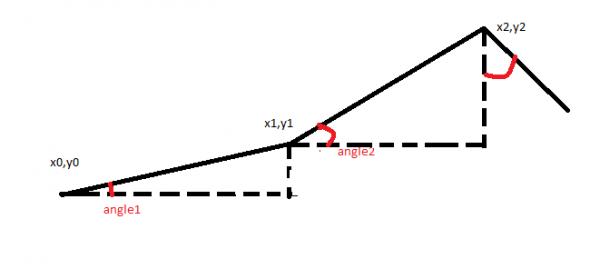
So i tryed:
Code:
 Const Rad2Deg As Double = 180.0 / Math.PI
   Const Deg2Rad As Double = Math.PI / 180.0
   Dim newlist As New List(Of UShort)

        For i = 0 To MySourceArray.Length - 1 Step 1
          Dim first As UShort = MySourceArray(i)
          Dim second As UShort = MySourceArray(i + 1)
            Dim angle = Math.Atan2(first - second, 1) * Rad2Deg
            newlist.Add(angle)
        Next
Some data for the arrays:
Code:
&H2020,&H 4544,&H4331,&H372E,&H434F,&H4D20,&H2020,&H2020
but I get overflow exception at the line where Atan2 is calculated. But if I try to do the the calc manually the result seem ok.
What am I missing?
Last edited by hannibal smith; Dec 14th, 2021 at 05:41 AM.
-
Dec 14th, 2021, 05:34 AM
#2
Re: Calculate angle between points
Code:
Dim first As UShort = (MySourceArray, i)
Dim second As UShort = (MySourceArray, i + 1)
Maybe that is some alternative syntax that I'm not aware of, but I would write it like this:
Code:
Dim first As UShort = MySourceArray(i)
Dim second As UShort = MySourceArray(i + 1)
Never heard of Math.Atan2 but again, I might just not know of it.
-
Dec 14th, 2021, 05:40 AM
#3
Re: Calculate angle between points
What are these values?
A single range of numbers only have distance between each.
An angle can only be calculated if you X,Y pairs
-
Dec 14th, 2021, 05:49 AM
#4
Thread Starter
Addicted Member
Re: Calculate angle between points
 Originally Posted by paulg4ije

Code:
Dim first As UShort = (MySourceArray, i)
Dim second As UShort = (MySourceArray, i + 1)
Maybe that is some alternative syntax that I'm not aware of, but I would write it like this:
Code:
Dim first As UShort = MySourceArray(i)
Dim second As UShort = MySourceArray(i + 1)
Never heard of Math.Atan2 but again, I might just not know of it.
Yep, it's my mistake in copy and past the code form visualstudio.
Originally Posted by Arnoutdv
What are these values?
A single range of numbers only have distance between each.
An angle can only be calculated if you X,Y pairs
They are value from a log that take a measure every second. As I write in first post the X should be always 1, because the horizontal dotted sements have always the same lenght=1 (1 sec). I need that angle because I want to known the pendence of the chart variations because it needed for other calcs.
-
Dec 14th, 2021, 05:55 AM
#5
Re: Calculate angle between points
But the scale of the X-axis must be of volume as the scale of the Y-axis.
Because the scale of the X-axis is part of the angle.
If your Y values are large with a lot of variation and the step of X is fixed 1 then the angles will be very steep.
If you increase the step of X-axis scale the angles will be less steep.
Just draw it on paper, the draw the same graph again with more distance between the point on the X-axis.
Code:
Smal step on the virtual X-Axis
o         o

  o     o
     o


Larger step on the virtual X-Axis

o                  o

    o         o
         o
-
Dec 14th, 2021, 06:35 AM
#6
Thread Starter
Addicted Member
Re: Calculate angle between points
I understand that, but the measurement are taken every 1 sec so I would take the step as 1. I undestand that it may result in very steep angles, but I'm looking for that "spikes" because they are "problems" that need to be highlighted.
Aside that, my isusse is the overflow exception that I still getting, and I did not understand way.
-
Dec 14th, 2021, 06:53 AM
#7
Thread Starter
Addicted Member
Re: Calculate angle between points
Here an example of data from array and angles that I'am expecting:
Data:
&H4800,&H01C3,&H0000,&H0000,&H4800,&H0306,&H0000,&H0000
angles in degrees : 89,89,0,167,89,89,0 (without decimals that are not needed).
-
Dec 14th, 2021, 07:19 AM
#8
Re: Calculate angle between points
But you can also get the spikes from the original values, no need to calculate the angle
It's just the difference between the values.
-
Dec 14th, 2021, 09:39 AM
#9
Re: Calculate angle between points
As I see it, the overflow is happening because some of your consecutive values in the array are the same, resulting in a call of something like:
math.atan2(0, 1)
Which overflows because the parameters passed are (dx, dy), and so it attempts to calculate the arctan of (1 / 0).
What you likely need is a simple if statement that checks if (first - second) = 0, and if so, then angle = 90 degrees, and if not, then do your math.atan2 to calculate angle.
Good luck.
-
Dec 14th, 2021, 11:04 AM
#10
Re: Calculate angle between points
I agree with the point that Arnoutdv mentioned in #8. In fact, this is especially true because of the fixed distance between the points on the X axis. The magnitude of the delta Y is directly related to the angle. In fact, with one exception, it barely matters what you do to the delta Y. Anything you do is simply transforming the value. That could exaggerate or dampen differences, but it won't change them.
The one exception is that last angle you showed. In all other cases, you are looking at the angle relative to the horizontal, whereas in the last example you are looking at the angle relative to the vertical. That can only mislead. After all, it's 90-the angle relative to the horizontal (in degrees), so you might as well be consistent and always measure relative to the horizontal. In that case, perhaps the point is that the line has trended downwards, but you can determine that by noting that the delta Y is negative.
My usual boring signature: Nothing
 
Tags for this Thread
 Posting Permissions
- You may not post new threads
- You may not post replies
- You may not post attachments
- You may not edit your posts
-
Forum Rules
|
Click Here to Expand Forum to Full Width
|



 Reply With Quote


