|

-
Nov 10th, 2021, 06:03 AM
#1
Thread Starter
Addicted Member

Full screen cover taskbar - win 10
I use this code to make form cover entire screen in Win10-64 and set always on top.
Code:
Private Declare Function SetWindowPos Lib "user32" (ByVal hwnd As Long, ByVal hWndInsertAfter As Long, ByVal x As Long, ByVal y As Long, ByVal cx As Long, ByVal cy As Long, ByVal wFlags As Long) As Long
Private Declare Function GetDeviceCaps Lib "gdi32" (ByVal hdc As Long, ByVal nIndex As Long) As Long
Private Const HORZRES = 8
Private Const VERTRES = 10

Public Sub SetAlwaysOnTop(ByVal hwnd As Long, Optional ByVal AlwaysOnTop As Boolean = True)
    Const SWP_NOSIZE = &H1
    Const SWP_NOMOVE = &H2
    Const SWP_SHOWWINDOW = &H40
    Const HWND_NOTOPMOST = -2
    Const HWND_TOPMOST = -1

    If AlwaysOnTop Then
        SetWindowPos hwnd, HWND_TOPMOST, 0&, 0&, 0&, 0&, SWP_NOMOVE Or SWP_NOSIZE Or SWP_SHOWWINDOW
    Else
        SetWindowPos hwnd, HWND_NOTOPMOST, 0&, 0&, 0&, 0&, SWP_NOMOVE Or SWP_NOSIZE Or SWP_SHOWWINDOW
    End If
End Sub

Private Sub Form_Load()
    Me.Move 0, 0, GetDeviceCaps(Me.hdc, HORZRES) * Screen.TwipsPerPixelX, GetDeviceCaps(Me.hdc, VERTRES) * Screen.TwipsPerPixelY
    SetAlwaysOnTop Me.hwnd
End Sub
...but on left side, right and bottom screen is not cover completely.
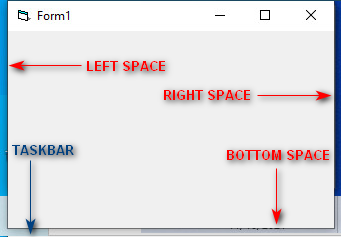
Can someone tell me how to do this?
-
Nov 10th, 2021, 06:26 AM
#2
Re: Full screen cover taskbar - win 10
when I change to fullscreen
I use:
SetForegroundWindow Me.Hwnd
MoveWindow Me.Hwnd, 0 , 0 , Width, Height, True
thats it.
I also use a KeyboardHook to avoid the user using any alt+tab etc while in fullscreen.
-
Nov 10th, 2021, 06:46 AM
#3
Thread Starter
Addicted Member
Re: Full screen cover taskbar - win 10
 Originally Posted by baka

SetForegroundWindow Me.Hwnd
MoveWindow Me.Hwnd, 0 , 0 , Width, Height, True
Thank you.
I try but left side space not disappear only bottom and right space.
-
Nov 10th, 2021, 07:27 AM
#4
Re: Full screen cover taskbar - win 10
this should work. at least for me.
try:
SetForegroundWindow Me.Hwnd
MoveWindow Me.Hwnd, 0 , 0 , Width, Height, True
SetForegroundWindow Me.Hwnd
-
Nov 10th, 2021, 07:45 AM
#5
Thread Starter
Addicted Member
Re: Full screen cover taskbar - win 10
Originally Posted by baka
SetForegroundWindow Me.Hwnd
MoveWindow Me.Hwnd, 0 , 0 , Width, Height, True
SetForegroundWindow Me.Hwnd
 No, same result left side space remain... No, same result left side space remain...
-
Nov 10th, 2021, 07:52 AM
#6
Re: Full screen cover taskbar - win 10
not sure, what do u have in the left side? and what kind of form are u using?
when calling movewindows hwnd,0 ,0 it will place the form at position 0,0
so u mean the form is not at 0,0 but like 100,0?
did u do anything with your desktop settings? or form properties? so the form has some kind of "invisible" edges. so its actually on 0,0 but there edge-border is 100 thick?
try making the form with borderstyle = 0 (yes, the controlbox will not be there anymore, so add a commandbutton so u can "quit" your program, while testing)
and see if the form will be placed in 0,0 or 100,0
(it could be that u need to make your form borderstyle=0, while in fullscreen, it is possible to do so, changing the borderstyle dynamically)
Last edited by baka; Nov 10th, 2021 at 07:56 AM.
-
Nov 10th, 2021, 08:56 AM
#7
Thread Starter
Addicted Member
Re: Full screen cover taskbar - win 10
Originally Posted by baka
not sure, what do u have in the left side? and what kind of form are u using?
Nothing in left side. Ordinary sizable form
Originally Posted by baka
so u mean the form is not at 0,0 but like 100,0?
No form is 0,0 if I want to cover left space I need to do
Code:
MoveWindow Me.hwnd, -10, 0
Originally Posted by baka
did u do anything with your desktop settings? or form properties? so the form has some kind of "invisible" edges. so its actually on 0,0 but there edge-border is 100 thick?
No
Originally Posted by baka
try making the form with borderstyle = 0 (yes, the controlbox will not be there anymore, so add a commandbutton so u can "quit" your program, while testing)
and see if the form will be placed in 0,0 or 100,0
Yes with work ... but i want titlebar.
If I use MaxButton form also maximize correct, but windows taskbar is visible and I need to cover.
Last edited by cliv; Nov 10th, 2021 at 09:04 AM.
-
Nov 10th, 2021, 09:04 AM
#8
Re: Full screen cover taskbar - win 10
ok so thats the problem. in windows 10 we have invisible edges that "counts" as part of the form. so using 0,0 will not place it correctly.
the only way to do it, is to find some API where u can get all the numbers of how thick that edge is, otherwise u will need to use -10.
Im not expert on that, as I dont use the title-bar, (I use custom-made titlebars)
but theres other member here that maybe can help you.
so what u need is to get the border width, check:
https://www.vbforums.com/showthread....th-form-Window
https://www.vbforums.com/showthread....g-Aero-Borders
https://www.vbforums.com/showthread....-Win10-vs-Win7
-
Nov 10th, 2021, 09:07 AM
#9
Thread Starter
Addicted Member
Re: Full screen cover taskbar - win 10
Originally Posted by baka
ok so thats the problem. in windows 10 we have invisible edges that "counts" as part of the form. so using 0,0 will not place it correctly.
the only way to do it, is to find some API where u can get all the numbers of how thick that edge is, otherwise u will need to use -10.
Thank you anyway
-
Nov 10th, 2021, 03:56 PM
#10
Re: Full screen cover taskbar - win 10
What is the BorderStyle property setting?
I suggest Fixed Single.
 Posting Permissions
- You may not post new threads
- You may not post replies
- You may not post attachments
- You may not edit your posts
-
Forum Rules
|
Click Here to Expand Forum to Full Width
|



 Reply With Quote