|

-
May 18th, 2021, 01:34 AM
#1
Thread Starter
Hyperactive Member


Hand cursor (VB) doesn't follow Link cursor (System)
Hey all.
I used my custom cursor package for Windows.
"Hand" cursor is set for all buttons in a VB.NET form application project. But they refuse to follow system cursor pack. Despite of other cursors (Text beam, No, resize, etc.) which work properly.
I just noticed that "Hand" cursor in VS could be not the same as "Link" cursor in System control panel.
How can I rectify it?
-
May 18th, 2021, 02:04 AM
#2
Re: Hand cursor (VB) doesn't follow Link cursor (System)
Perhaps you could provide a series of steps that we could follow to reproduce the issue.
-
May 18th, 2021, 05:37 AM
#3
Re: Hand cursor (VB) doesn't follow Link cursor (System)
Is this a vb.net question? It looks more general Windows related.
-
May 18th, 2021, 06:12 AM
#4
Re: Hand cursor (VB) doesn't follow Link cursor (System)
 Originally Posted by Peter Swinkels

Is this a vb.net question? It looks more general Windows related.
I interpreted it as saying that a change had been made in Windows that was expected to be respected in VB code but wasn't.
-
May 19th, 2021, 06:41 AM
#5
Thread Starter
Hyperactive Member
-
May 19th, 2021, 07:38 AM
#6
Re: Hand cursor (VB) doesn't follow Link cursor (System)
Ah... bottom line, VB isn't respecting the Schema cursors.
What happens if you use the "No" cursor for the CheckBox?
Does it then use the right cursor?
-tg
-
May 19th, 2021, 12:00 PM
#7
Thread Starter
Hyperactive Member
Re: Hand cursor (VB) doesn't follow Link cursor (System)
Originally Posted by techgnome
Does it then use the right cursor?
Yes sir, it does.
Actually I tested here:
Originally Posted by pourkascheff
Even some particular cursor (which were commanded to follow) are actually working.
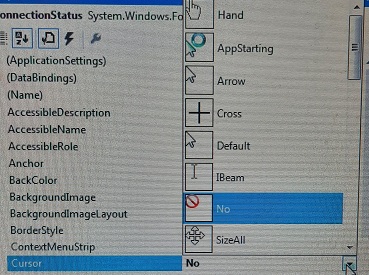 -> -> 
I think a hidden header code to make equal the Cursor.Hand and Cursor.Link would rectify the matter which I am not aware of.
-
May 19th, 2021, 02:21 PM
#8
Thread Starter
Hyperactive Member
Re: Hand cursor (VB) doesn't follow Link cursor (System)
Originally Posted by jmcilhinney
Perhaps you could provide a series of steps that we could follow to reproduce the issue.
No codes were applied. Only control properties (visually) has been changed.
Originally Posted by jmcilhinney
I interpreted it as saying that a change had been made in Windows that was expected to be respected in VB code but wasn't.
Exactly what it is.
-
May 19th, 2021, 03:55 PM
#9
Re: Hand cursor (VB) doesn't follow Link cursor (System)
(looking at the Cursors Class source code) it appears the hand cursor and half a dozen other cursors are not mapped to the system cursors. They are hard coded as resources in the System.Windows.Forms.dll assembly.
If you can find the .cur file for the hand cursor you want to use, you could copy it to your project and access it as:
Code:
ConnectionStatus.Cursor = New Cursor("Your Path\To\yourhand.cur")
-
May 19th, 2021, 07:37 PM
#10
Re: Hand cursor (VB) doesn't follow Link cursor (System)
Originally Posted by pourkascheff
No codes were applied. Only control properties (visually) has been changed.
Stop trying to provide as little information as possible and starting making the effort to help us help you. It would appear that you also made some changes in Windows so how about you do as I asked and provide a series of steps that we can follow to reproduce the issue? Frankly, I don't care any more. If you're going to make us drag every bit of information out of you then why should we bother?
-
May 20th, 2021, 02:37 AM
#11
Re: Hand cursor (VB) doesn't follow Link cursor (System)
@jmcilhinney: At least he isn't dumping a lot of irrelevant info - I know some people may never had to chance to learn proper english but it's even more trouble to figure out what people want when they write in broken english.
@pourkascheff:
And, there is no need to take pictures with your phone: https://www.screentogif.com/. If that's too much trouble: https://www.businessinsider.nl/how-t...onal=true&r=US.
Tags for this Thread
 Posting Permissions
- You may not post new threads
- You may not post replies
- You may not post attachments
- You may not edit your posts
-
Forum Rules
|
Click Here to Expand Forum to Full Width
|



 Reply With Quote


